
PSPICE- IntroductionPSPICE- Introduction
PRESENTED BY:
Akshay DholeAkshay Dhole
Mechatronics (SMBS)Mechatronics (SMBS)
13mmt101313mmt1013
Course faculty
Dr. M. K. ChakravarthiDr. M. K. Chakravarthi
IndexIndex
1. Introduction
2. Types of analysis
3. Circuit components
4. File structures
5. Libraries
6. Parts
7. Design structure
8. Design example
9. Results
10. Conclusion
IntroductionIntroduction
• SPICE (Simulation Program for Integrated Circuits
Emphasis) is a general purpose analog circuit
simulator that is used to verify circuit designs and to
predict the circuit behavior.
• PSpice is a PC version of SPICE and HSpice is a
version that runs on workstations and larger
computers.
• PSpice has analog and digital libraries of
standard components (such as NAND, NOR,
flip-flops, and other digital gates, op amps, etc)
which makes it a useful tool for a wide range of
analog and digital applications.
Types of AnalysisTypes of Analysis
• Non-linear DC analysis
• Non-linear transient analysis
• Linear AC Analysis
• Noise analysis
• Sensitivity analysis
• Distortion analysis
• Fourier analysis
• Monte Carlo Analysis
Circuit ComponentsCircuit Components
• Independent and dependent voltage and current sources
• Resistors
• Capacitors
• Inductors
• Mutual inductors
• Transmission lines
• Operational amplifiers
• Switches
• Diodes
• Bipolar transistors
• MOS transistors
• JFET
• MESFET
• Digital gates
TerminologiesTerminologies
• Subcircuit: A subcircuit allows you to define a
collection of elements as a subcircuit (e.g. an
operational amplifier) and to insert this description
into the overall circuit.
• EDIF: Electronic Design Interchange Format, a
standard published by EIA. Usually used for netlists.
File structure PSPICEFile structure PSPICE
(Capture)(Capture)
• Input file for PSpice that has the file type “.CIR”
• When a circuit is simulated “.OUT” is generated
• “*.DAT” file is by default a binary file to see the
data
• “*.LIB” files where the details of complex parts
are saved
• Additional files
o *.SCH (the schematic data, itself)
o *.ALS (alias files)
o *.NET (network connection files)
LibrariesLibraries
• These are files that contain reusable part data.
• They can be custom or default ones
• Some of the libraries available in the Evaluation
version of PSPICE are:
o abm.slb for special functions like square root and multipliers
o analog.slb for analog components like resistors and
capacitors
o breakout.slb for pots
o connect.slb, .plb for connectors
o eval.slb, .plb for semiconductor, digital devices, switches
o port.slb for grounds, high/low digital ports
o special.slb for ammeters, viewpoints
o source.slb for various analog and digital sources
PartsParts
• Part is a basic building block which may represent
o One or more physical element
o Function
o Simulation model
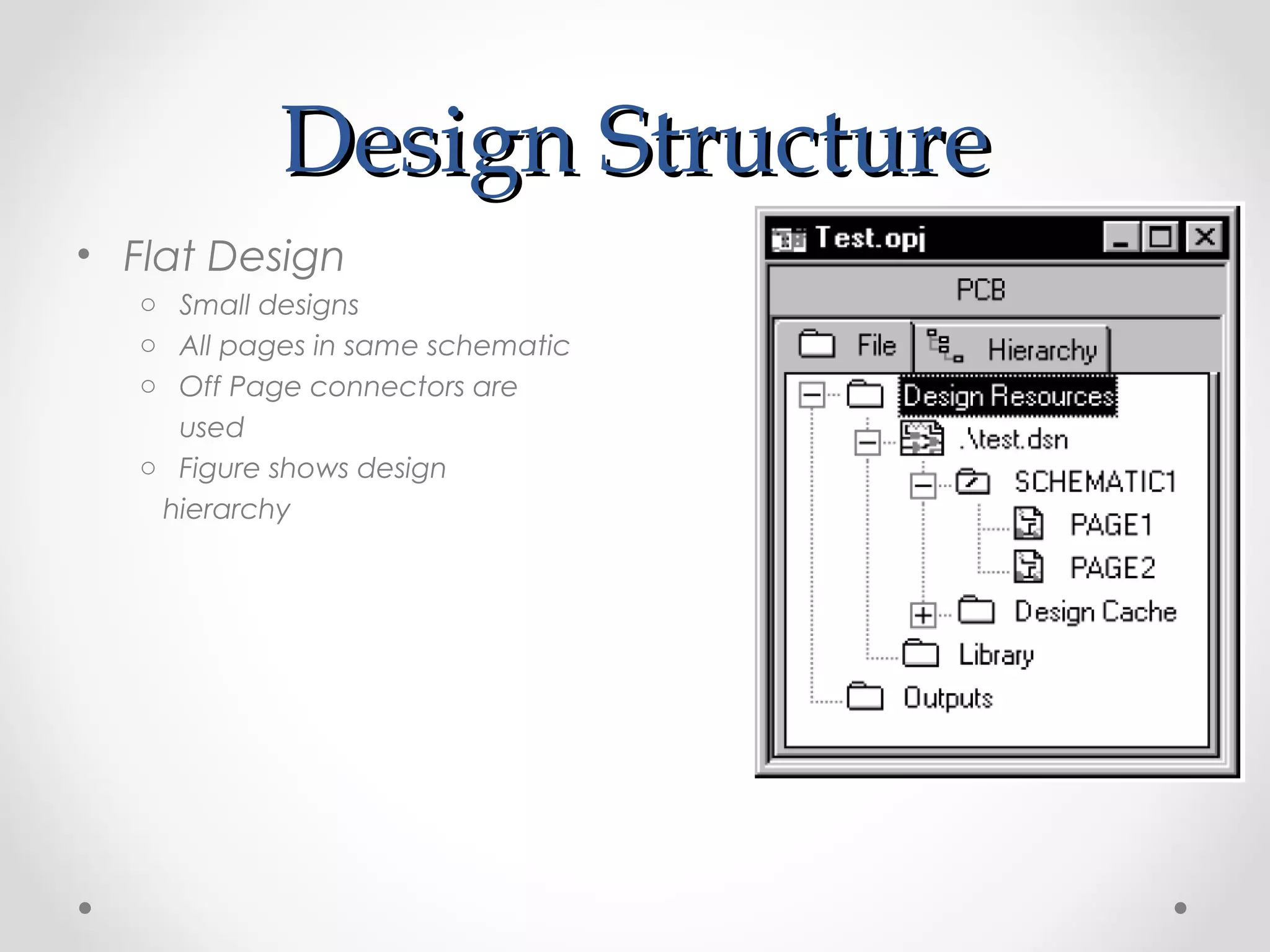
o When a part is placed for first time its entry is done in “Design Cache”
What is “Design Cache”????... Go and Find Out Yourself 
Design StructureDesign Structure
• Flat Design
o Small designs
o All pages in same schematic
o Off Page connectors are
used
o Figure shows design
hierarchy
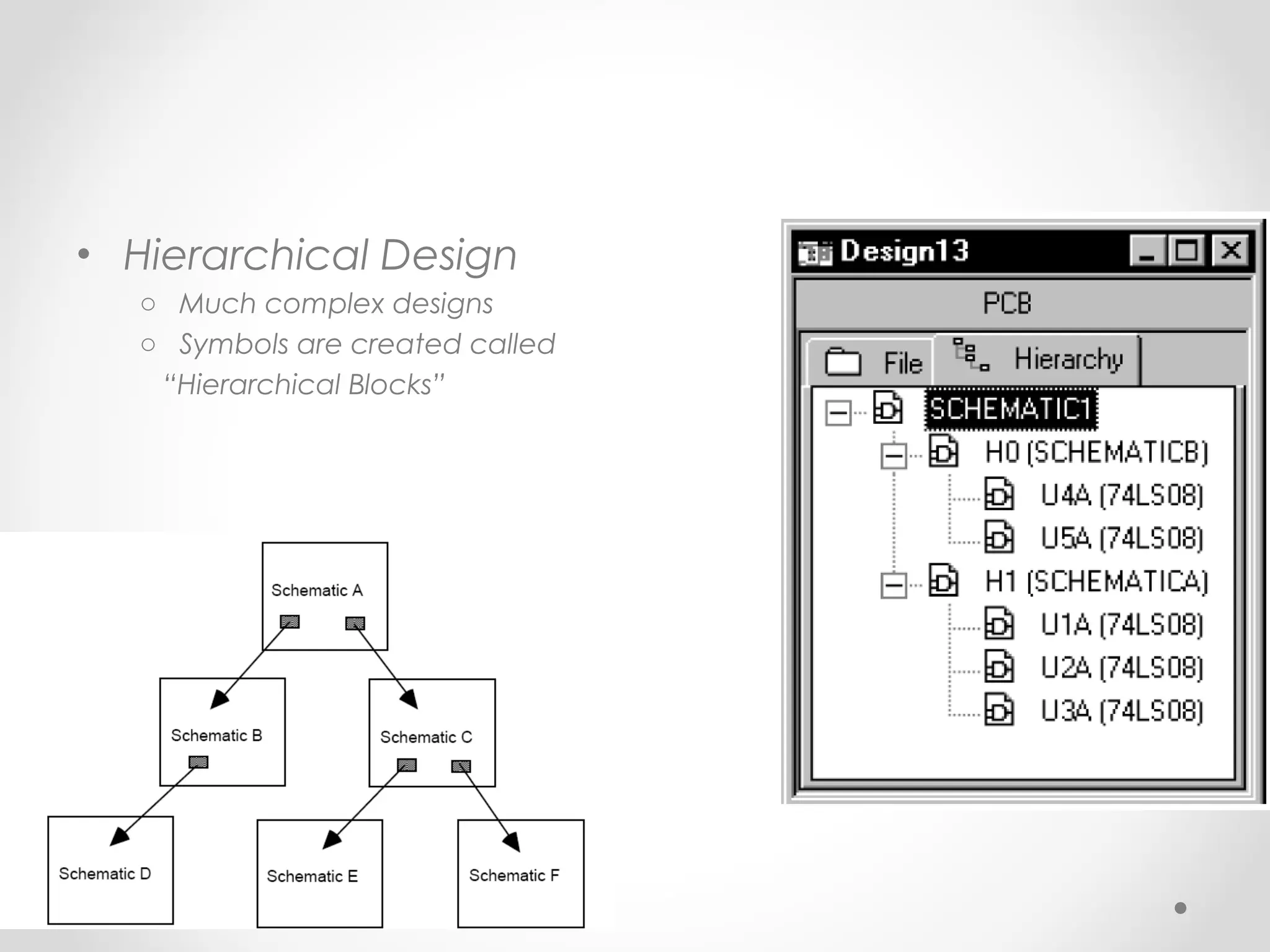
• Hierarchical Design
o Much complex designs
o Symbols are created called
“Hierarchical Blocks”
Things to remember beforeThings to remember before
startingstarting
• PSpice is not case sensitive
• All element names must be unique
• There must be a node designated "0" (Zero). This is
the reference node against which all voltages are
calculated.
• If any change is made in circuit make sure you
create netlist again before simulating it.
Getting StartedGetting Started
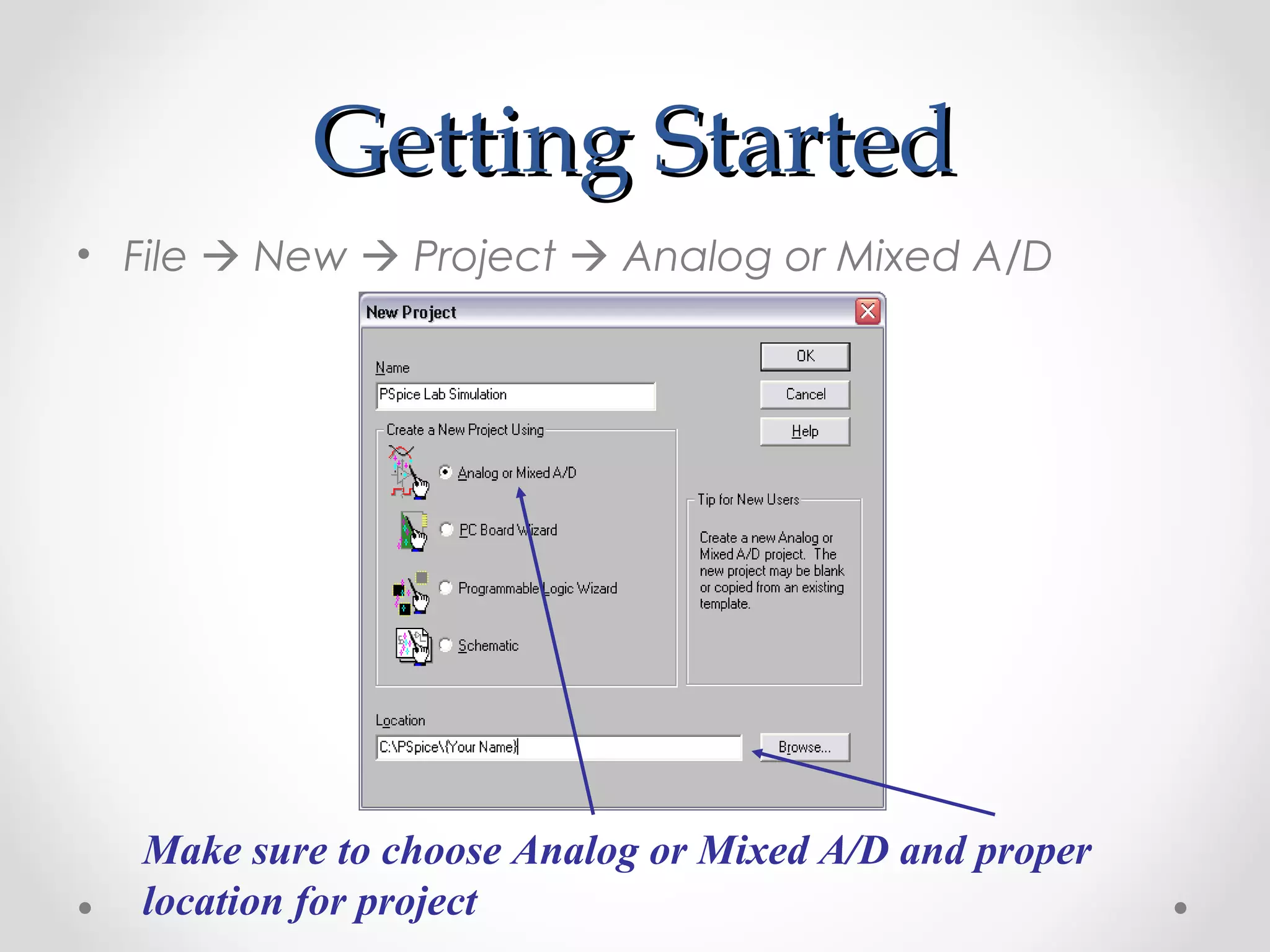
• File  New  Project  Analog or Mixed A/D
Make sure to choose Analog or Mixed A/D and proper
location for project
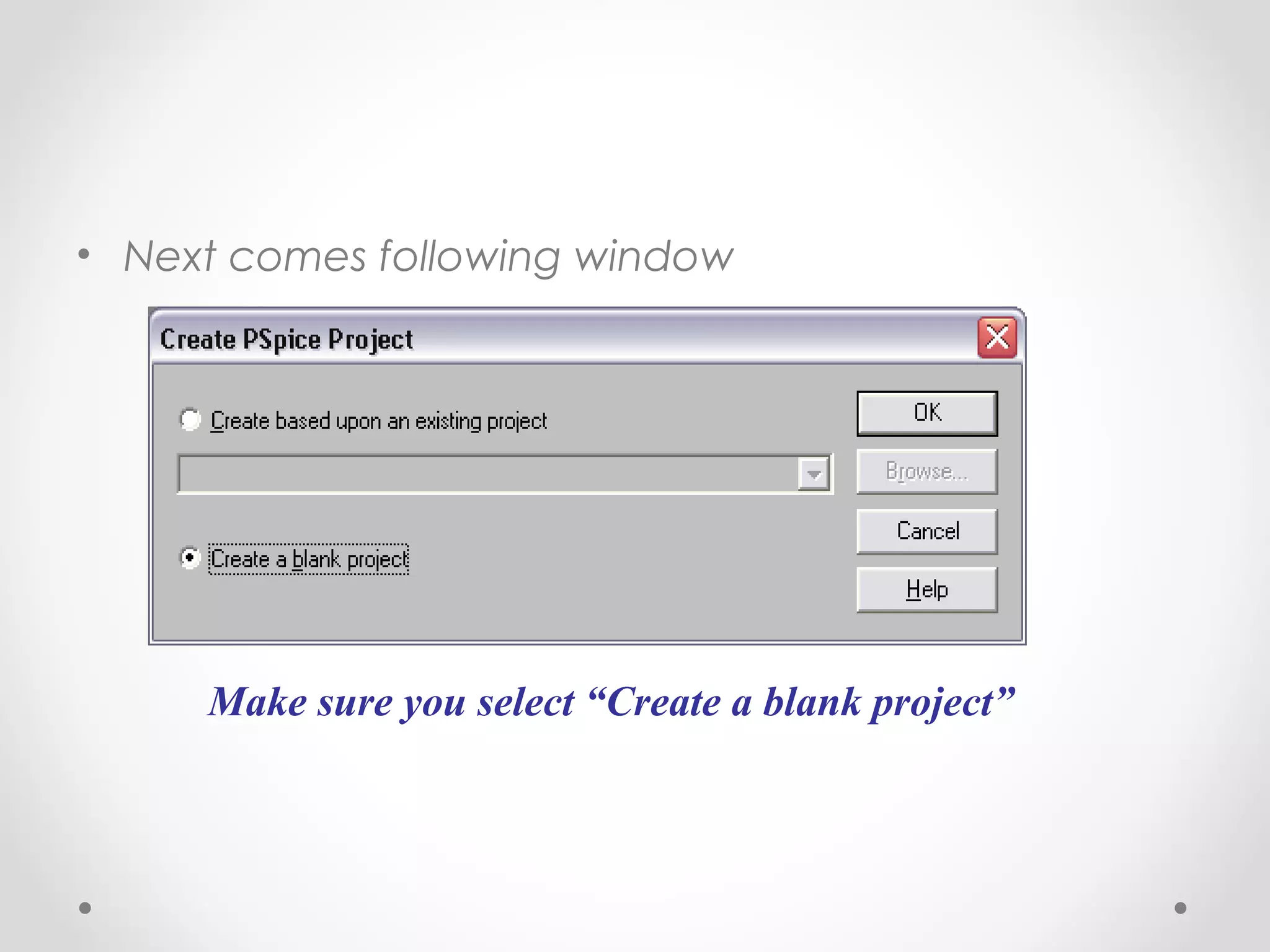
• Next comes following window
Make sure you select “Create a blank project”
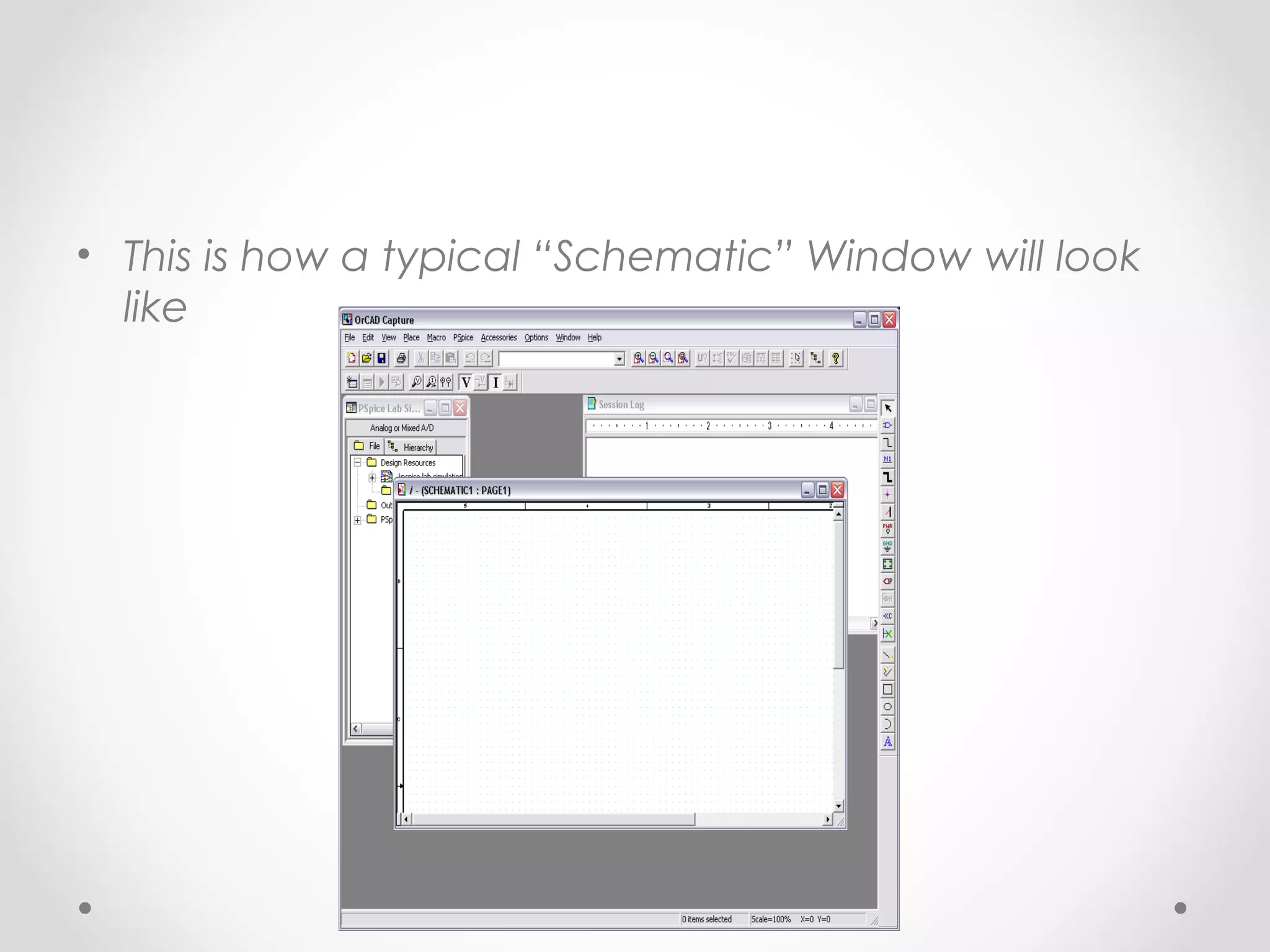
• This is how a typical “Schematic” Window will look
like
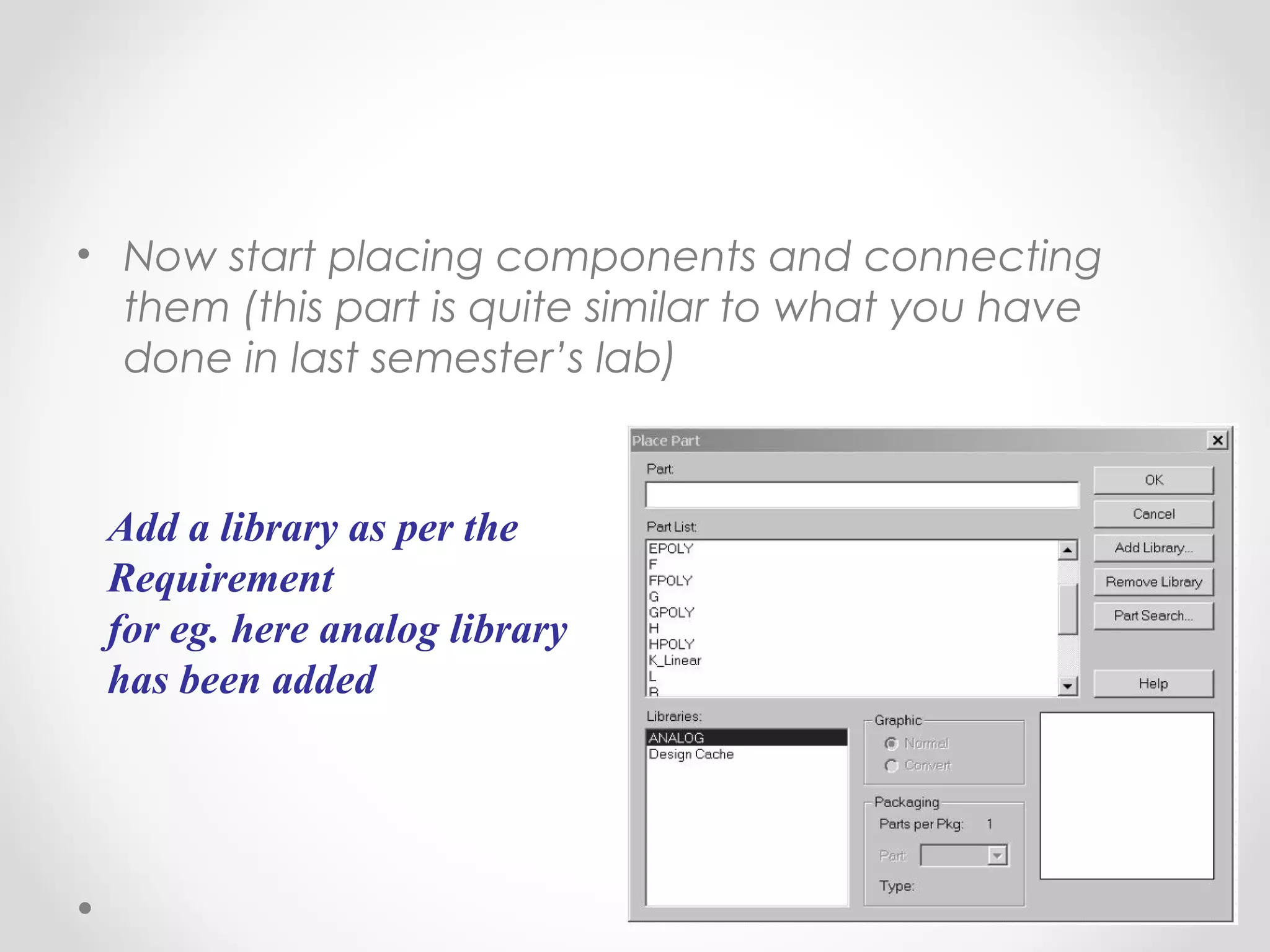
• Now start placing components and connecting
them (this part is quite similar to what you have
done in last semester’s lab)
Add a library as per the
Requirement
for eg. here analog library
has been added
• After completing the circuit save it and run it.
• Plot appropriate waveform by probing on circuit.
Design ExampleDesign Example
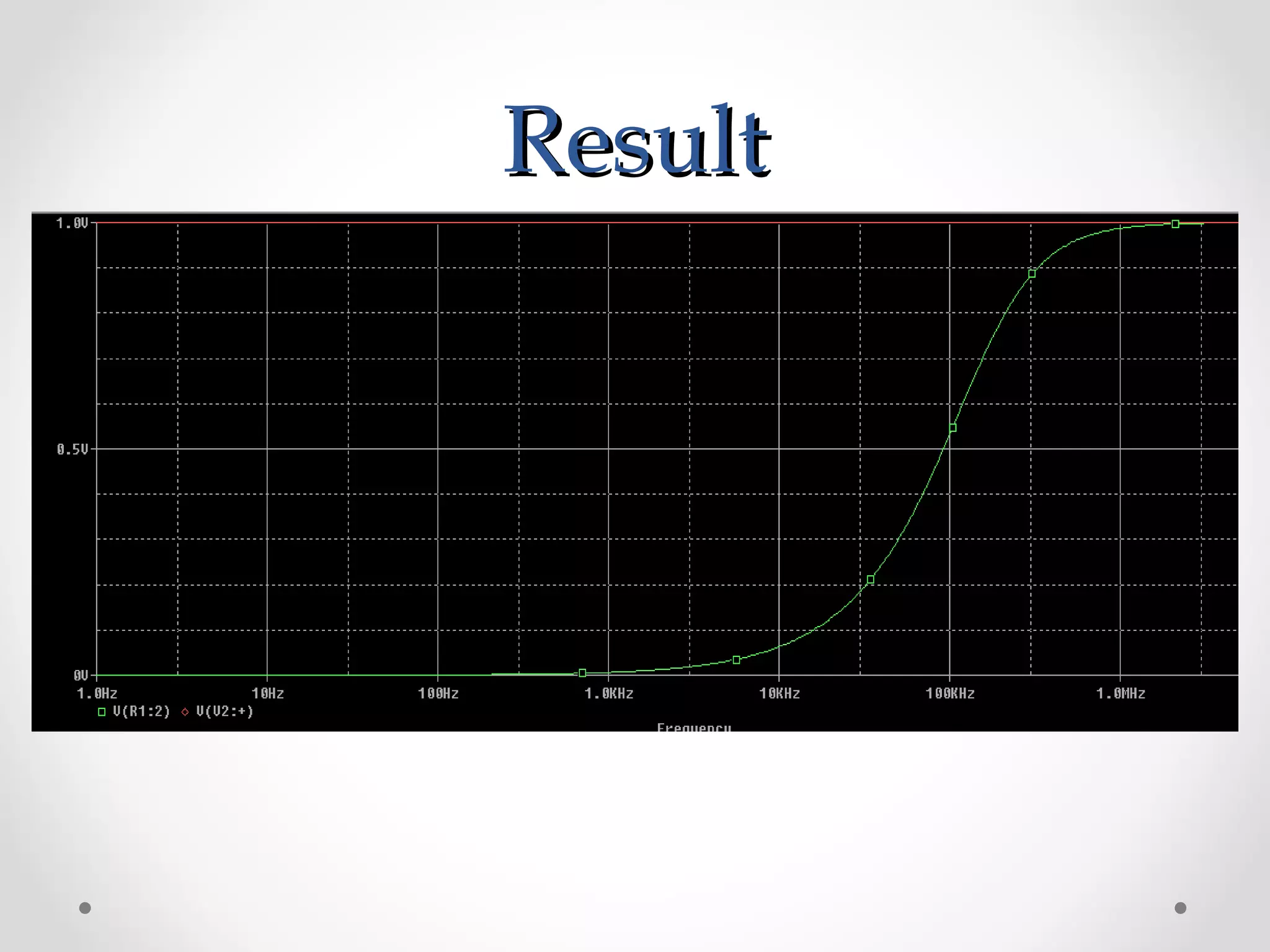
• Take example of a high pass filter (RC)
• First we will follow initial steps of creating a new
project
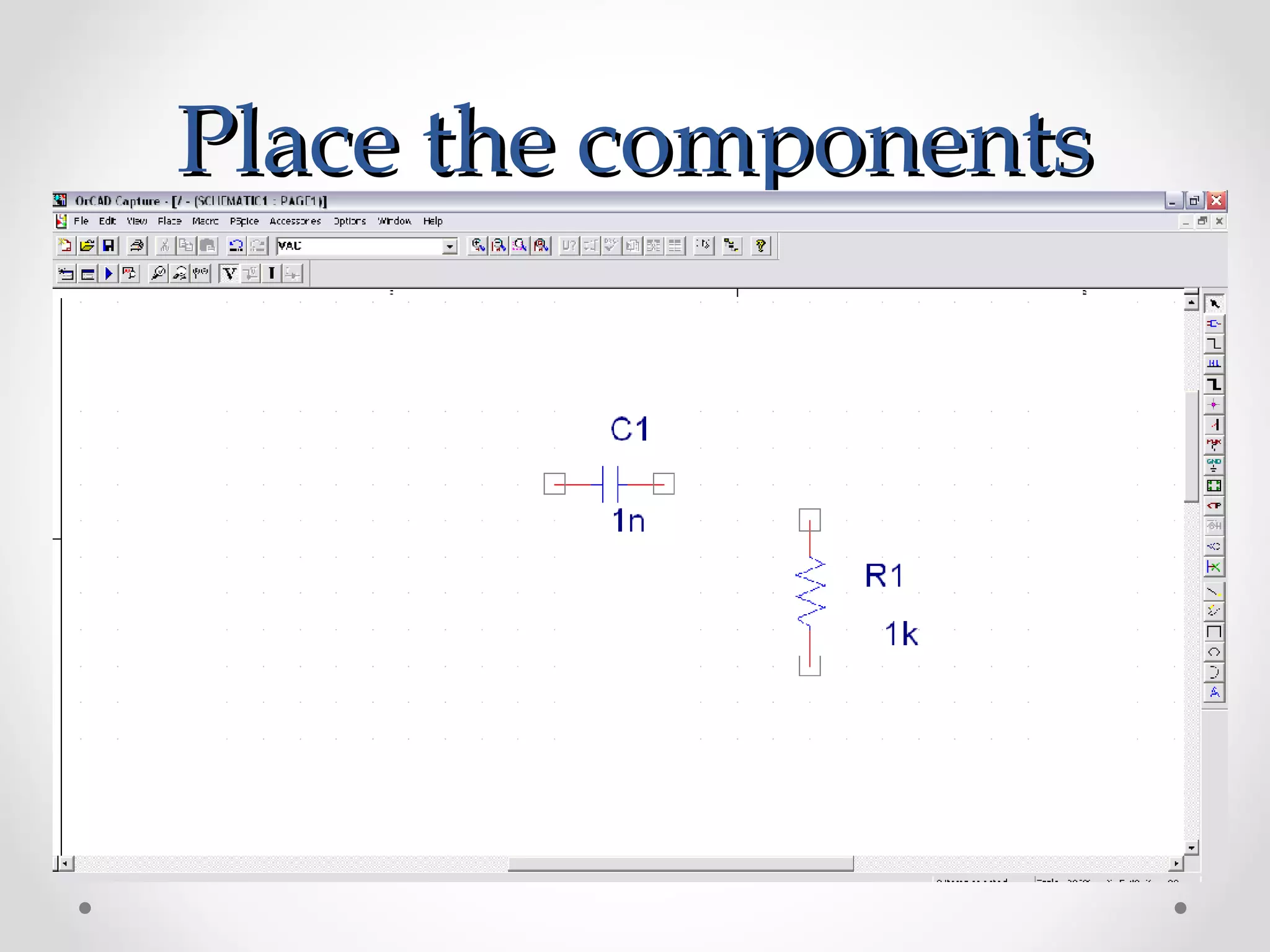
• Now placing the components.
Place the componentsPlace the components
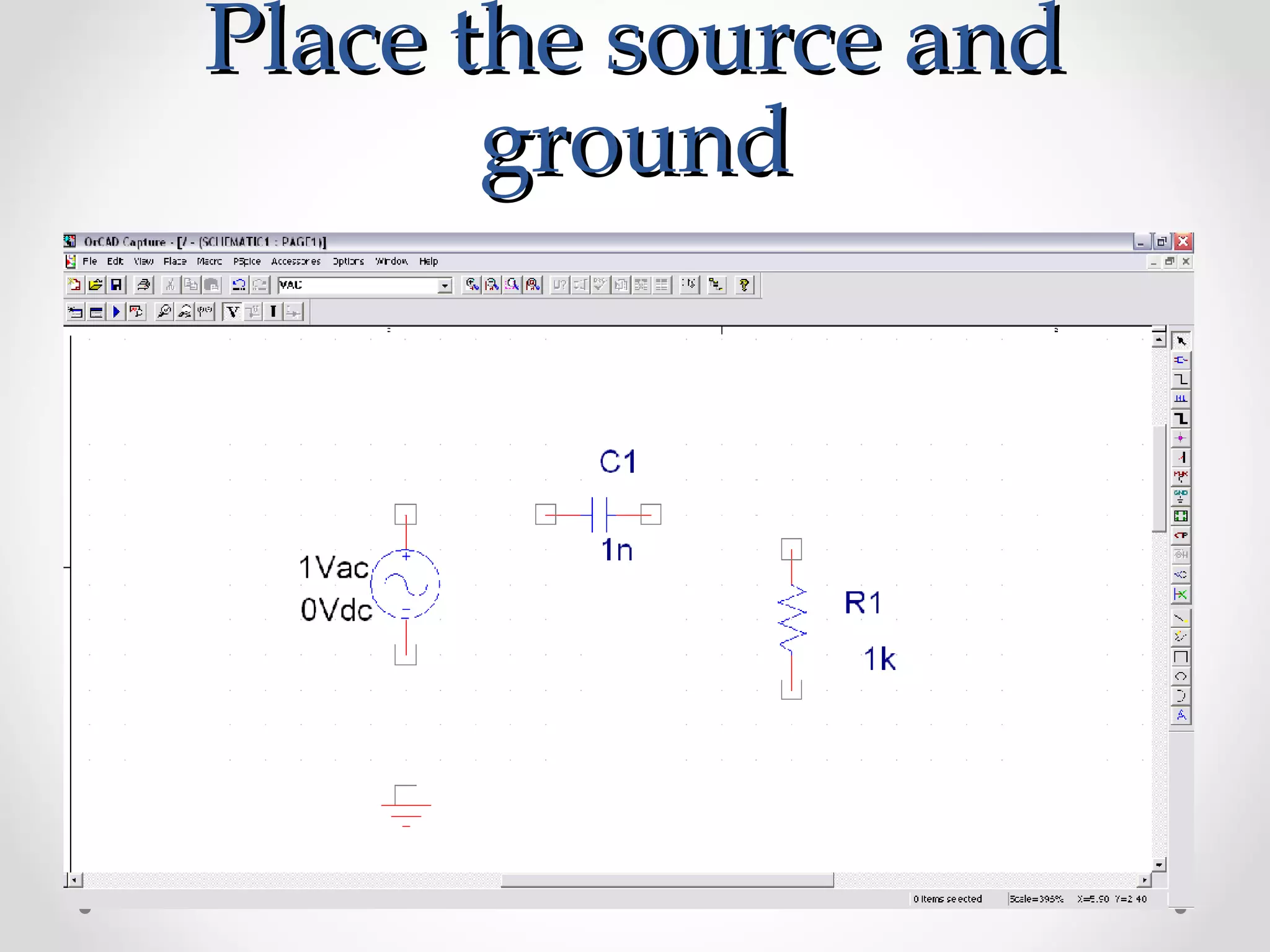
Place the source andPlace the source and
groundground
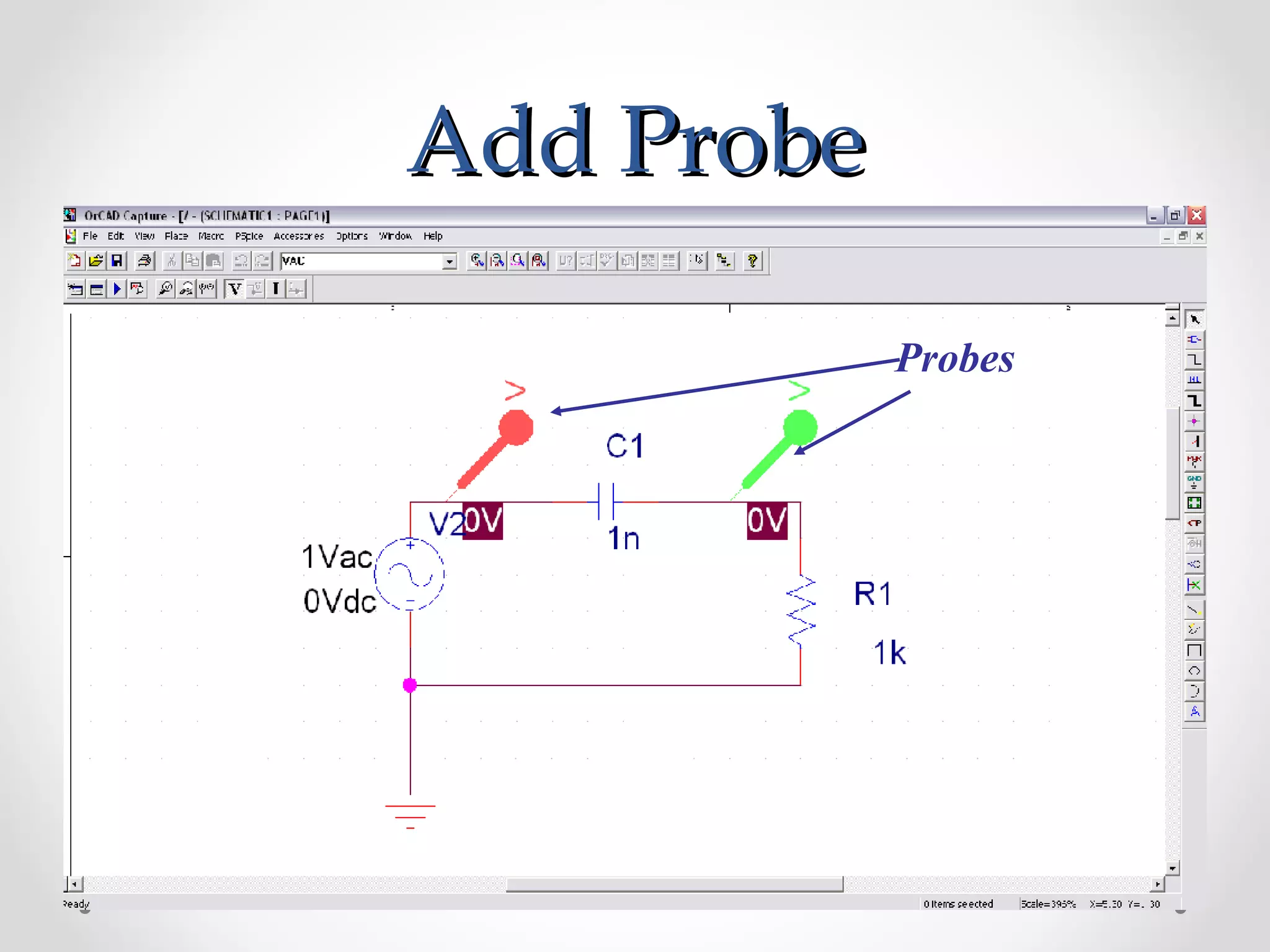
Add ProbeAdd Probe
Probes
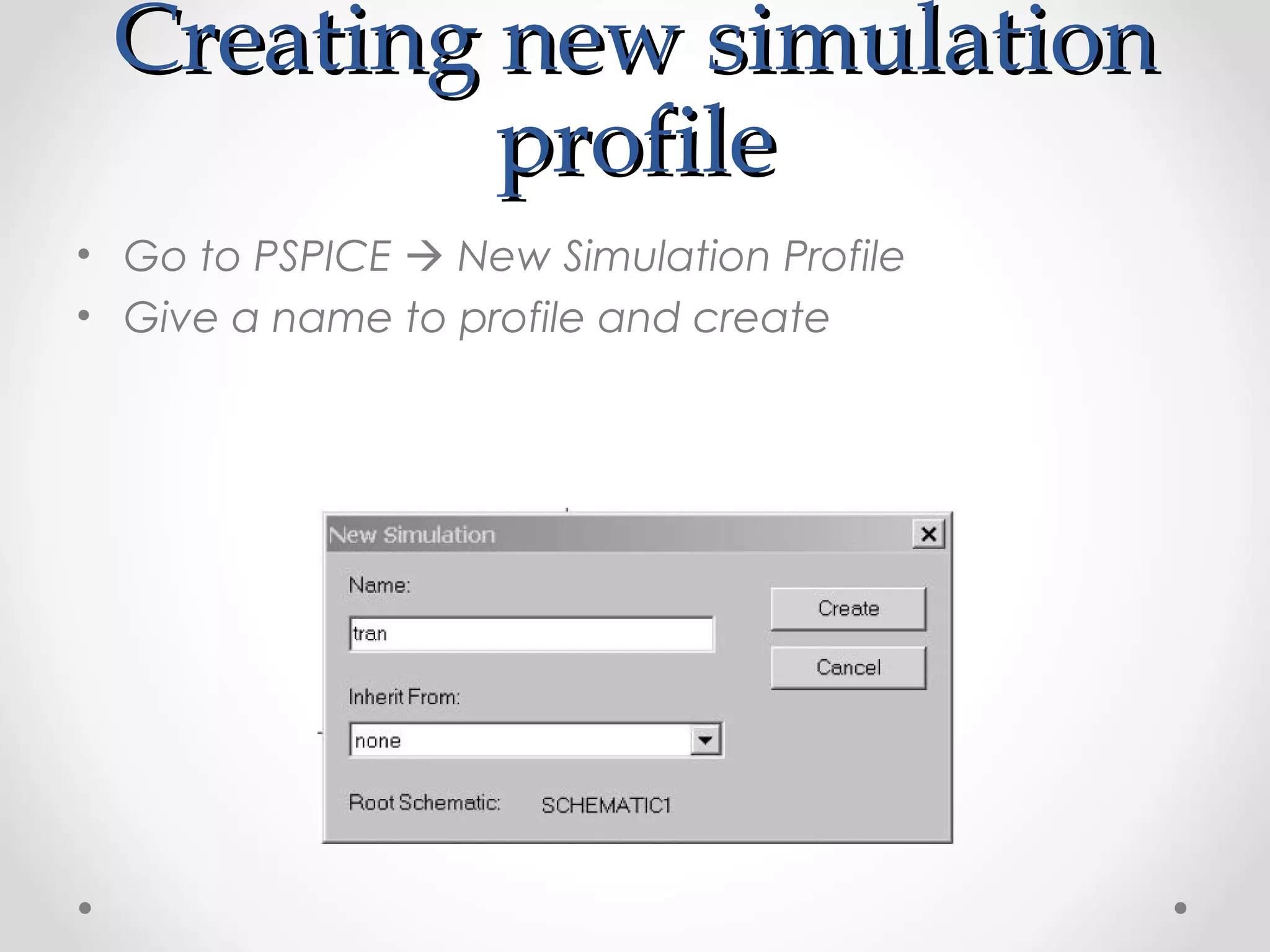
Creating new simulationCreating new simulation
profileprofile
• Go to PSPICE  New Simulation Profile
• Give a name to profile and create
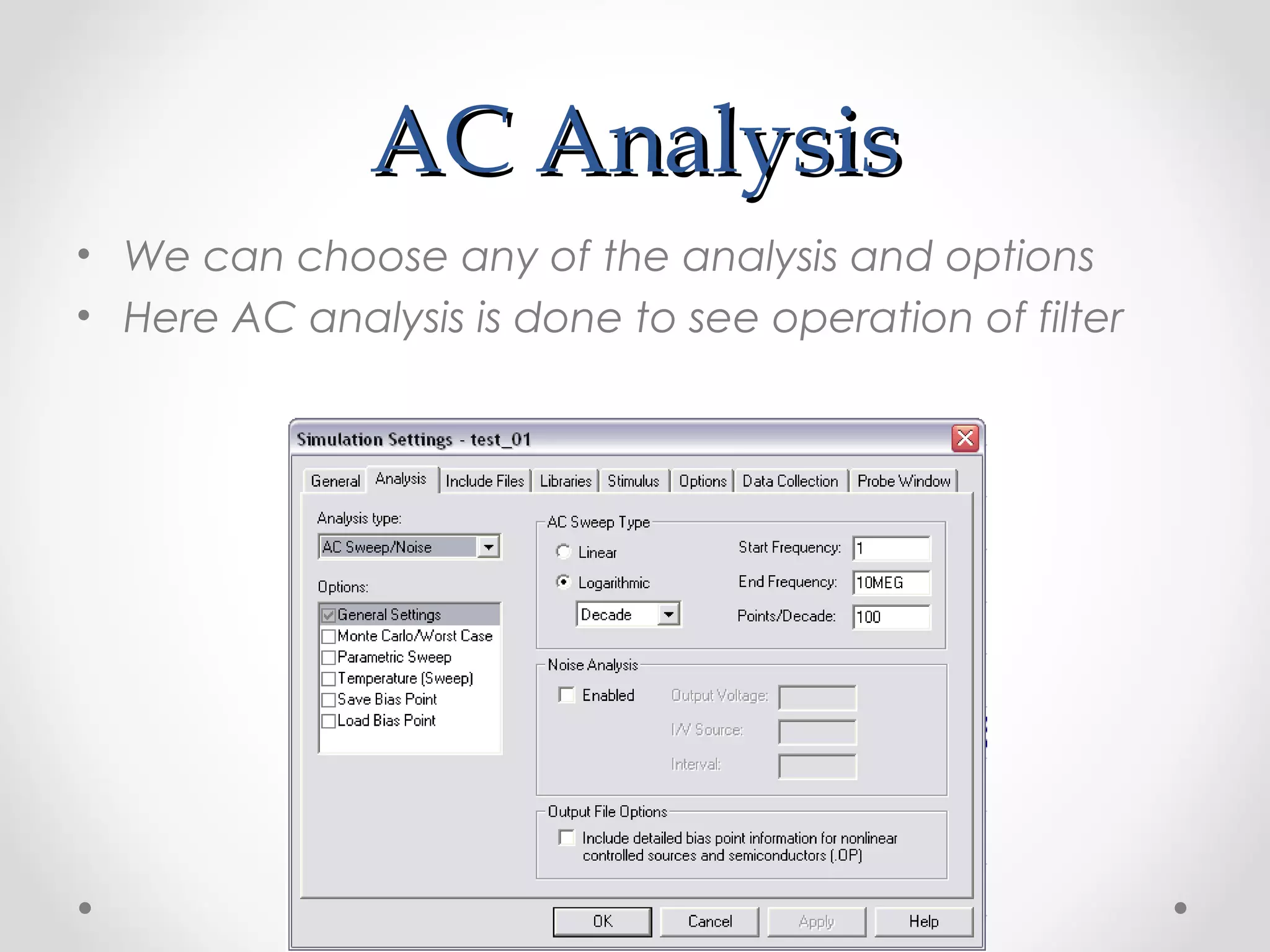
AC AnalysisAC Analysis
• We can choose any of the analysis and options
• Here AC analysis is done to see operation of filter
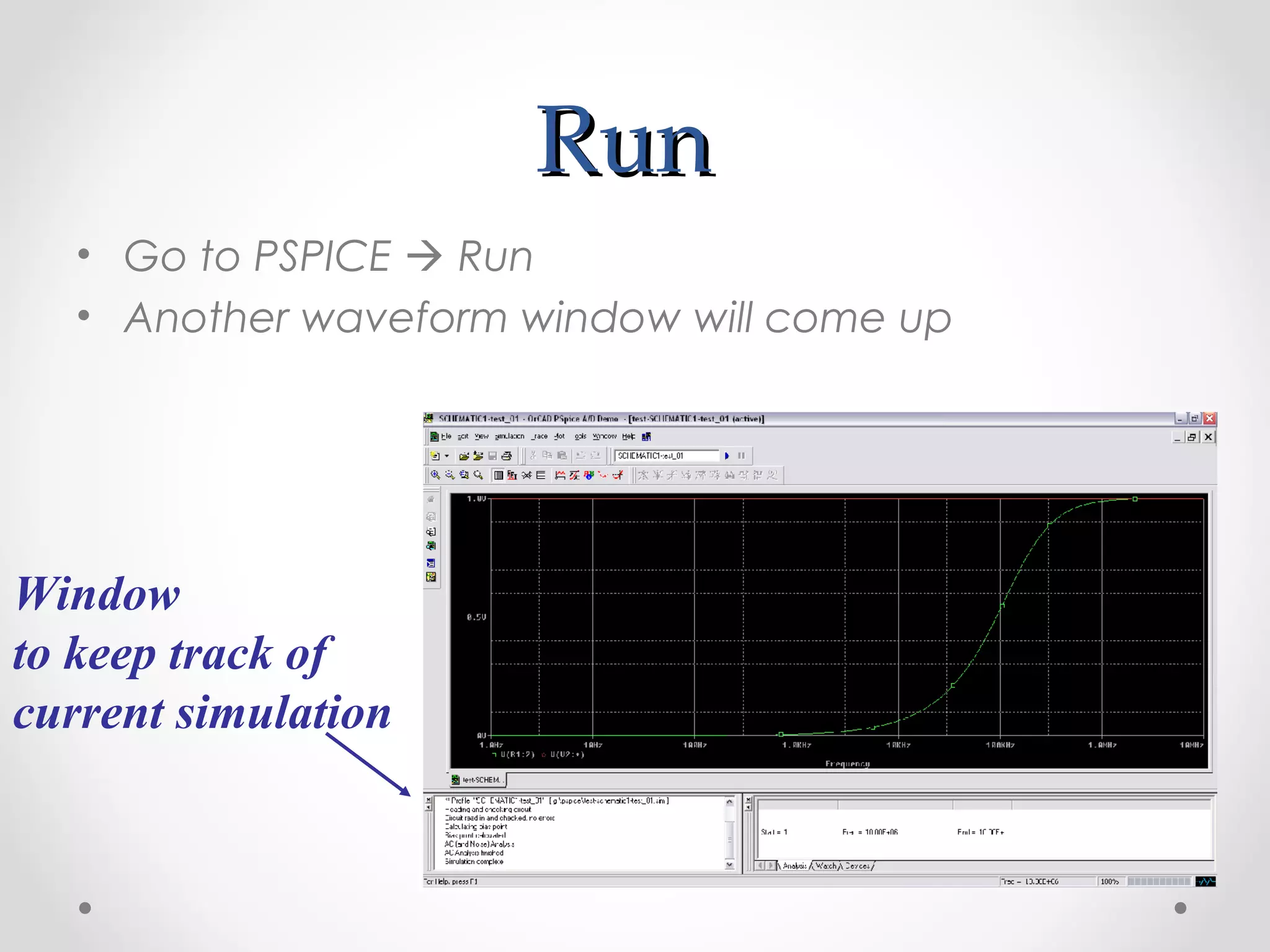
RunRun
• Go to PSPICE  Run
• Another waveform window will come up
Window
to keep track of
current simulation
ResultResult
ConclusionConclusion
• Thus we have learn the basics of P-Spice software
and it’s functioning theoretically.
• Its easy and simple software for simulations and
analysis of the circuits.
Thank you

Pspice Introduction

  • 1.
    PSPICE- IntroductionPSPICE- Introduction PRESENTEDBY: Akshay DholeAkshay Dhole Mechatronics (SMBS)Mechatronics (SMBS) 13mmt101313mmt1013 Course faculty Dr. M. K. ChakravarthiDr. M. K. Chakravarthi
  • 2.
    IndexIndex 1. Introduction 2. Typesof analysis 3. Circuit components 4. File structures 5. Libraries 6. Parts 7. Design structure 8. Design example 9. Results 10. Conclusion
  • 3.
    IntroductionIntroduction • SPICE (SimulationProgram for Integrated Circuits Emphasis) is a general purpose analog circuit simulator that is used to verify circuit designs and to predict the circuit behavior. • PSpice is a PC version of SPICE and HSpice is a version that runs on workstations and larger computers. • PSpice has analog and digital libraries of standard components (such as NAND, NOR, flip-flops, and other digital gates, op amps, etc) which makes it a useful tool for a wide range of analog and digital applications.
  • 4.
    Types of AnalysisTypesof Analysis • Non-linear DC analysis • Non-linear transient analysis • Linear AC Analysis • Noise analysis • Sensitivity analysis • Distortion analysis • Fourier analysis • Monte Carlo Analysis
  • 5.
    Circuit ComponentsCircuit Components •Independent and dependent voltage and current sources • Resistors • Capacitors • Inductors • Mutual inductors • Transmission lines • Operational amplifiers • Switches • Diodes • Bipolar transistors • MOS transistors • JFET • MESFET • Digital gates
  • 6.
    TerminologiesTerminologies • Subcircuit: Asubcircuit allows you to define a collection of elements as a subcircuit (e.g. an operational amplifier) and to insert this description into the overall circuit. • EDIF: Electronic Design Interchange Format, a standard published by EIA. Usually used for netlists.
  • 7.
    File structure PSPICEFilestructure PSPICE (Capture)(Capture) • Input file for PSpice that has the file type “.CIR” • When a circuit is simulated “.OUT” is generated • “*.DAT” file is by default a binary file to see the data • “*.LIB” files where the details of complex parts are saved • Additional files o *.SCH (the schematic data, itself) o *.ALS (alias files) o *.NET (network connection files)
  • 8.
    LibrariesLibraries • These arefiles that contain reusable part data. • They can be custom or default ones • Some of the libraries available in the Evaluation version of PSPICE are: o abm.slb for special functions like square root and multipliers o analog.slb for analog components like resistors and capacitors o breakout.slb for pots o connect.slb, .plb for connectors o eval.slb, .plb for semiconductor, digital devices, switches o port.slb for grounds, high/low digital ports o special.slb for ammeters, viewpoints o source.slb for various analog and digital sources
  • 9.
    PartsParts • Part isa basic building block which may represent o One or more physical element o Function o Simulation model o When a part is placed for first time its entry is done in “Design Cache” What is “Design Cache”????... Go and Find Out Yourself 
  • 10.
    Design StructureDesign Structure •Flat Design o Small designs o All pages in same schematic o Off Page connectors are used o Figure shows design hierarchy
  • 11.
    • Hierarchical Design oMuch complex designs o Symbols are created called “Hierarchical Blocks”
  • 12.
    Things to rememberbeforeThings to remember before startingstarting • PSpice is not case sensitive • All element names must be unique • There must be a node designated "0" (Zero). This is the reference node against which all voltages are calculated. • If any change is made in circuit make sure you create netlist again before simulating it.
  • 13.
    Getting StartedGetting Started •File  New  Project  Analog or Mixed A/D Make sure to choose Analog or Mixed A/D and proper location for project
  • 14.
    • Next comesfollowing window Make sure you select “Create a blank project”
  • 15.
    • This ishow a typical “Schematic” Window will look like
  • 16.
    • Now startplacing components and connecting them (this part is quite similar to what you have done in last semester’s lab) Add a library as per the Requirement for eg. here analog library has been added
  • 17.
    • After completingthe circuit save it and run it. • Plot appropriate waveform by probing on circuit.
  • 18.
    Design ExampleDesign Example •Take example of a high pass filter (RC) • First we will follow initial steps of creating a new project • Now placing the components.
  • 19.
  • 20.
    Place the sourceandPlace the source and groundground
  • 21.
  • 22.
    Creating new simulationCreatingnew simulation profileprofile • Go to PSPICE  New Simulation Profile • Give a name to profile and create
  • 23.
    AC AnalysisAC Analysis •We can choose any of the analysis and options • Here AC analysis is done to see operation of filter
  • 24.
    RunRun • Go toPSPICE  Run • Another waveform window will come up Window to keep track of current simulation
  • 25.
  • 26.
    ConclusionConclusion • Thus wehave learn the basics of P-Spice software and it’s functioning theoretically. • Its easy and simple software for simulations and analysis of the circuits.
  • 27.