
A Topology of the network defines the manner in which
the network devices are arranged and connected to each
other in a network.
 There are five common types of network
Topologies.
 BusTopology
 RingTopology
 StarTopology
 TreeTopology
 MeshTopology
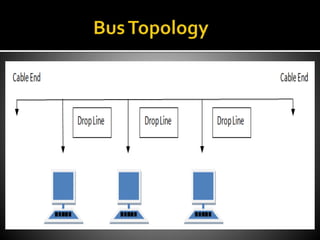
 Bus topology is a network type in where
every computer and network device is
connected to single cable.
 It transmits data only in one direction.
 Every device is connected to a single cable
 It is cost effective.
 Cable required is least compared to other
network topology.
 Used in small networks.
 It is easy to understand.
 Easy to expand joining two cables together.
 Cables fails then whole network fails.
 If network traffic is heavy or nodes are more
the performance of the network decreases.
 Cable has a limited length.
 It is slower than the ring topology.
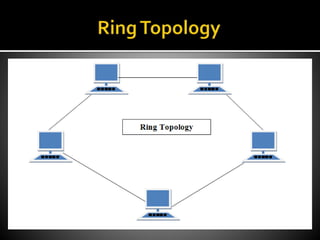
 It forms a ring as each computer is connected to
another computer, with the last one connected to
the first. Exactly two neighbours for each device.
That’s why it is called ring topology.
 A number of repeaters are used and the
transmission is unidirectional.
 Data is transferred in a sequential manner
that is bit by bit.
 Transmitting network is not affected by high
traffic or by adding more nodes, as only the
nodes having tokens can transmit data.
 Cheap to install and expand
 Troubleshooting is difficult in ring topology.
 Adding or deleting the computers disturbs
the network activity.
 Failure of one computer disturbs the whole
network.
• In this type of topology all the computers are
connected to a single hub through a cable. This hub
is the central node and all others nodes are
connected to the central node.
 Every node has its own dedicated connection
to the hub.
 Acts as a repeater for data flow.
 Can be used with twisted pair, Optical Fibre
or coaxial cable.
 Fast performance with few nodes and low
network traffic.
 Hub can be upgraded easily.
 Easy to troubleshoot.
 Easy to setup and modify.
 Only that node is affected which has failed rest
of the nodes can work smoothly.
 Cost of installation is high.
 Expensive to use.
 If the hub is affected then the whole network
is stopped because all the nodes depend on
the hub.
 Performance is based on the hub that is it
depends on its capacity
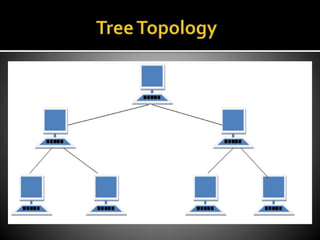
 It has a root node and all other nodes are connected
to it forming a hierarchy. It is also called hierarchical
topology. It should at least have three levels to the
hierarchy.
 Ideal if workstations are located in groups.
 Used inWide Area Network.
 Extension of bus and star topologies.
 Expansion of nodes is possible and easy.
 Easily managed and maintained.
 Error detection is easily done.
 Heavily cabled.
 Costly.
 If more nodes are added maintenance is
difficult.
 Central hub fails, network fails.
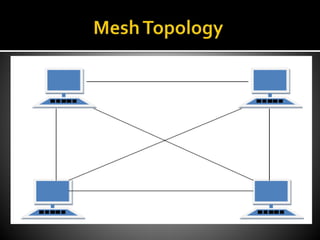
 It is a point-to-point connection to other nodes or
devices. Traffic is carried only between two devices
or nodes to which it is connected. Mesh has n (n-2)/2
physical channels to link hn devices.
 Partial Mesh Topology : In this topology
some of the systems are connected in the
same fashion as mesh topology but some
devices are only connected to two or three
devices.
 Full Mesh Topology : Each and every nodes
or devices are connected to each other.
 Fully connected.
 Robust.
 Not flexible.
 Each connection can carry its own data load.
 It is robust.
 Fault is diagnosed easily.
 Provides security and privacy.
 Installation and configuration is difficult.
 Cabling cost is more.
 Bulk wiring is required.
HAMZA
RASHEED
ROSHAAN
ZAHID
SALEEM
ULLAH
BURHAN
AHMED
UBAIR
ABID

Topology

  • 2.
    A Topology ofthe network defines the manner in which the network devices are arranged and connected to each other in a network.
  • 3.
     There arefive common types of network Topologies.  BusTopology  RingTopology  StarTopology  TreeTopology  MeshTopology
  • 4.
     Bus topologyis a network type in where every computer and network device is connected to single cable.
  • 6.
     It transmitsdata only in one direction.  Every device is connected to a single cable
  • 7.
     It iscost effective.  Cable required is least compared to other network topology.  Used in small networks.  It is easy to understand.  Easy to expand joining two cables together.
  • 8.
     Cables failsthen whole network fails.  If network traffic is heavy or nodes are more the performance of the network decreases.  Cable has a limited length.  It is slower than the ring topology.
  • 9.
     It formsa ring as each computer is connected to another computer, with the last one connected to the first. Exactly two neighbours for each device. That’s why it is called ring topology.
  • 11.
     A numberof repeaters are used and the transmission is unidirectional.  Data is transferred in a sequential manner that is bit by bit.
  • 12.
     Transmitting networkis not affected by high traffic or by adding more nodes, as only the nodes having tokens can transmit data.  Cheap to install and expand
  • 13.
     Troubleshooting isdifficult in ring topology.  Adding or deleting the computers disturbs the network activity.  Failure of one computer disturbs the whole network.
  • 14.
    • In thistype of topology all the computers are connected to a single hub through a cable. This hub is the central node and all others nodes are connected to the central node.
  • 16.
     Every nodehas its own dedicated connection to the hub.  Acts as a repeater for data flow.  Can be used with twisted pair, Optical Fibre or coaxial cable.
  • 17.
     Fast performancewith few nodes and low network traffic.  Hub can be upgraded easily.  Easy to troubleshoot.  Easy to setup and modify.  Only that node is affected which has failed rest of the nodes can work smoothly.
  • 18.
     Cost ofinstallation is high.  Expensive to use.  If the hub is affected then the whole network is stopped because all the nodes depend on the hub.  Performance is based on the hub that is it depends on its capacity
  • 19.
     It hasa root node and all other nodes are connected to it forming a hierarchy. It is also called hierarchical topology. It should at least have three levels to the hierarchy.
  • 21.
     Ideal ifworkstations are located in groups.  Used inWide Area Network.
  • 22.
     Extension ofbus and star topologies.  Expansion of nodes is possible and easy.  Easily managed and maintained.  Error detection is easily done.
  • 23.
     Heavily cabled. Costly.  If more nodes are added maintenance is difficult.  Central hub fails, network fails.
  • 24.
     It isa point-to-point connection to other nodes or devices. Traffic is carried only between two devices or nodes to which it is connected. Mesh has n (n-2)/2 physical channels to link hn devices.
  • 26.
     Partial MeshTopology : In this topology some of the systems are connected in the same fashion as mesh topology but some devices are only connected to two or three devices.  Full Mesh Topology : Each and every nodes or devices are connected to each other.
  • 27.
     Fully connected. Robust.  Not flexible.
  • 28.
     Each connectioncan carry its own data load.  It is robust.  Fault is diagnosed easily.  Provides security and privacy.
  • 29.
     Installation andconfiguration is difficult.  Cabling cost is more.  Bulk wiring is required.
  • 30.