
Introduction to Data
Communications
Chapter 1
What is data communication?
 Not to be confused with telecommunication—
– Any process that permits the passage from a
sender to one or more receivers of information of
any nature, delivered in any easy to use form by
any electromagnetic system.
 Data communication-
– Defined as a subset of telecommunication
involving the transmission of data to and from
computers and components of computer systems.
• More specifically data communication is transmitted via
mediums such as wires, coaxial cables, fiber optics, or
radiated electromagnetic waves such as broadcast radio,
infrared light, microwaves, and satellites.
History of Telecommunications
 Invention of telegraph Samuel Morse –
1837
 Invention of telephone- Alexander
Graham Bell – 1876
 Development of wireless By ??? – 1896
 Concept of universal access and growth
of AT&T
 Divestiture of AT&T—what year??
History of Telecommunications
Continued….
 Telecommunications Act of 1996
 Three main developments that led to the
growth of data communications systems:
– Large-scale integration of circuits reduced the cost
and size of terminals and comm equipment
– Developments of software systems made
establishment of communication networks easy
– Competition among providers of transmission
facilities reduced the cost of data circuits
History of Data Communication
 Transistor developed by Bell Labs (which is
now ???) 1947
 Hush-a-Phone Case
 Carterphone case
 MCI and Long Distance
 Creation of networks (LAN’s and WAN’s)
 Data Link Protocols
 Microcomputers
History of the Internet
 See web page link–
http://carl.sandiego.edu/itmg360/internet_history.htm
Framework for Global Electronic Commerce
 A Framework for Global Electronic
Commerce was released in 1997
 It’s release underscores the importance
of Internet-based commerce in the
global economy
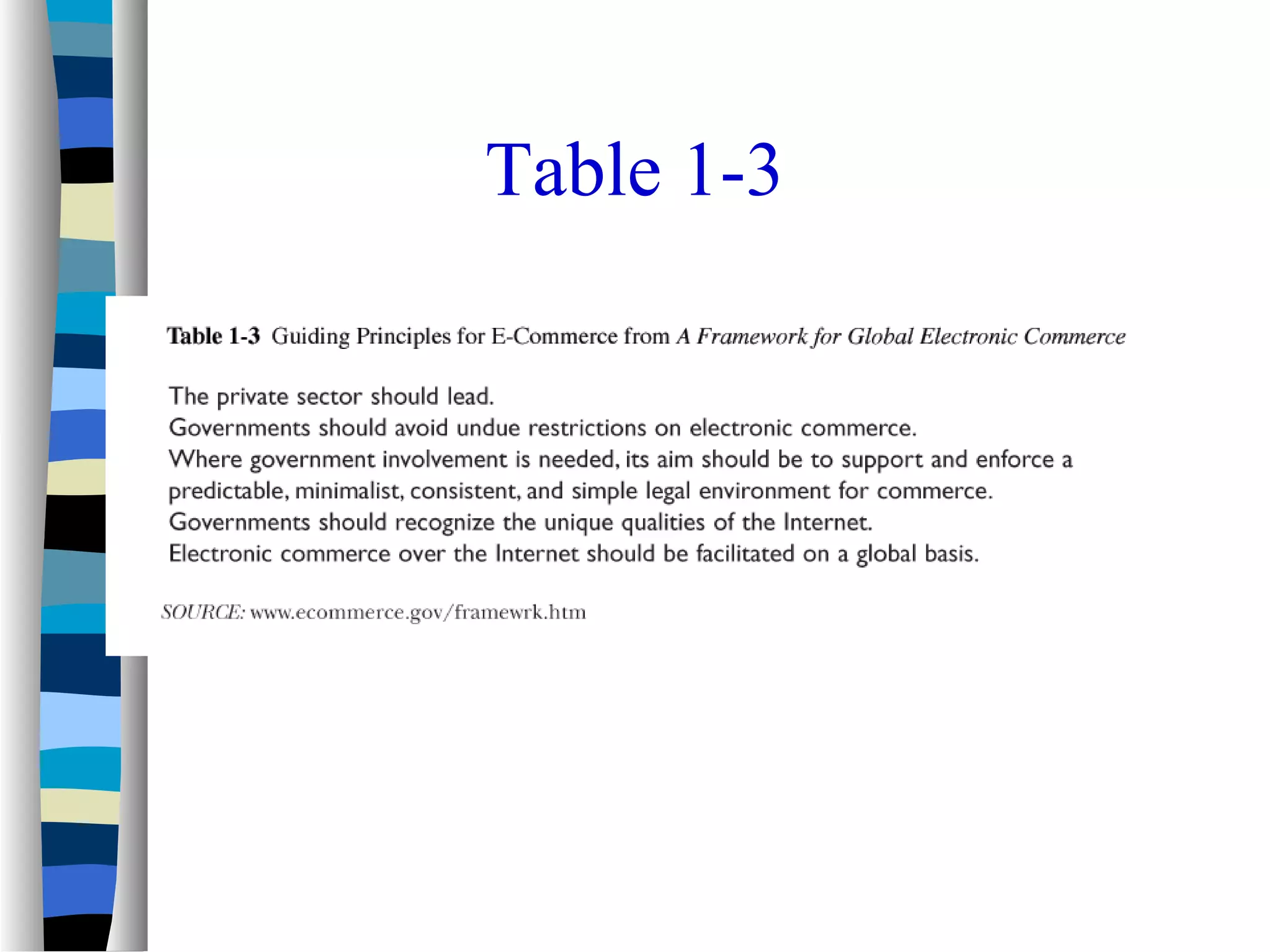
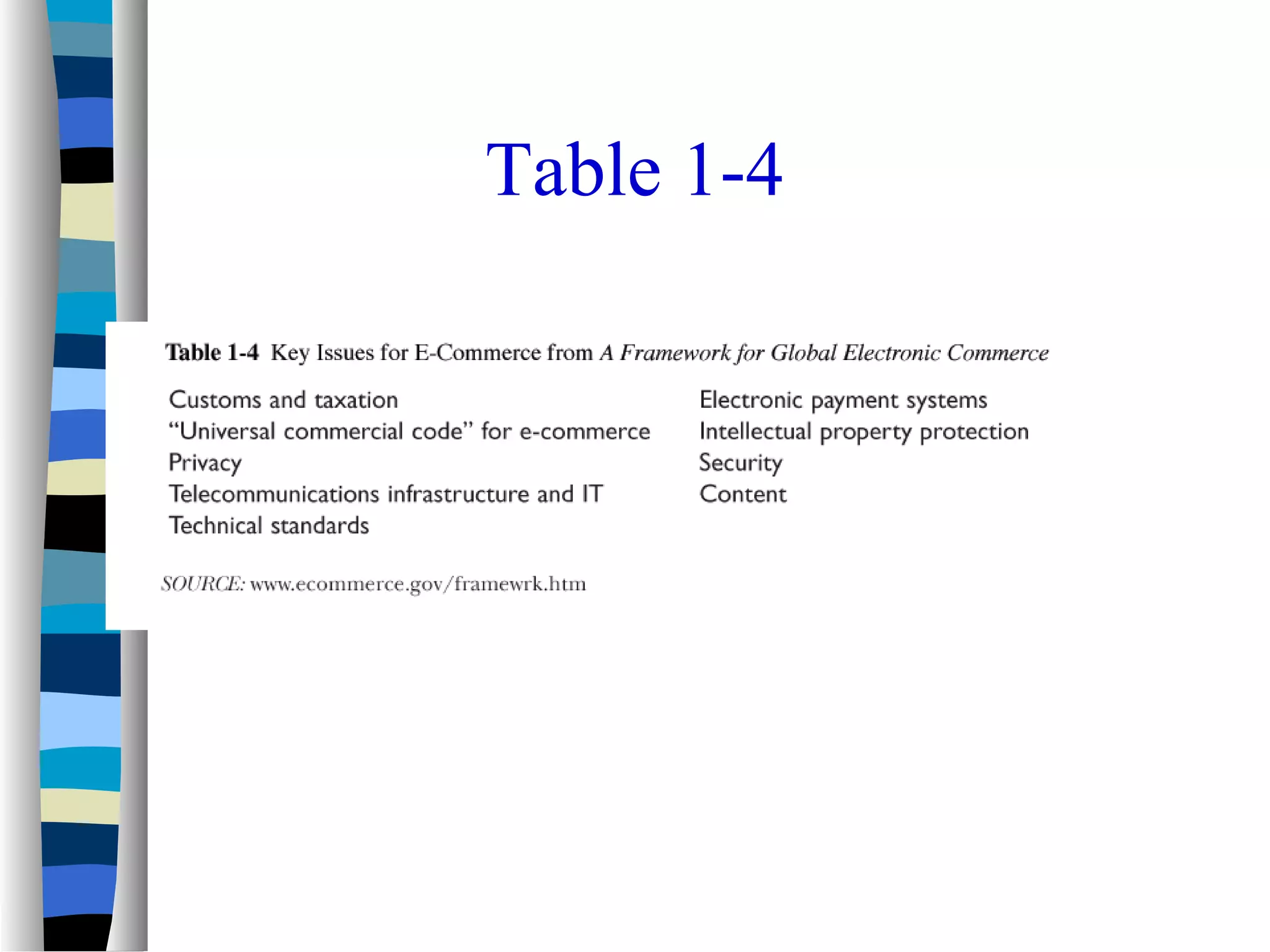
 It outlines several guiding principles for
e-commerce planners and strategists
Table 1-3
Table 1-4
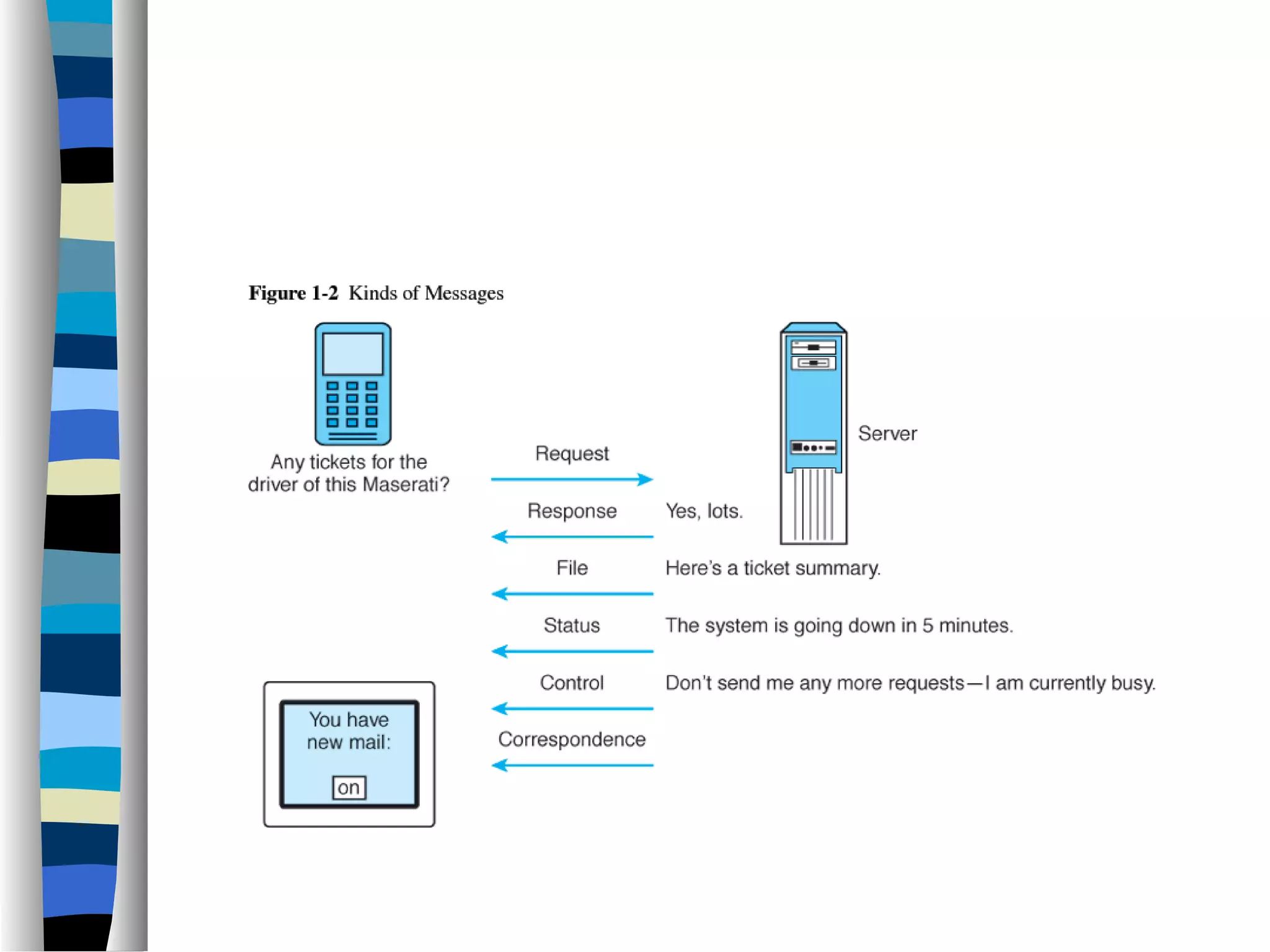
Features of Communication
 Four things required
– Sender, receiver, medium, and message
 Types of messages
– File
– Request
– Response
– Status
– Control
– Correspondence
 Understandability
 Error Detection
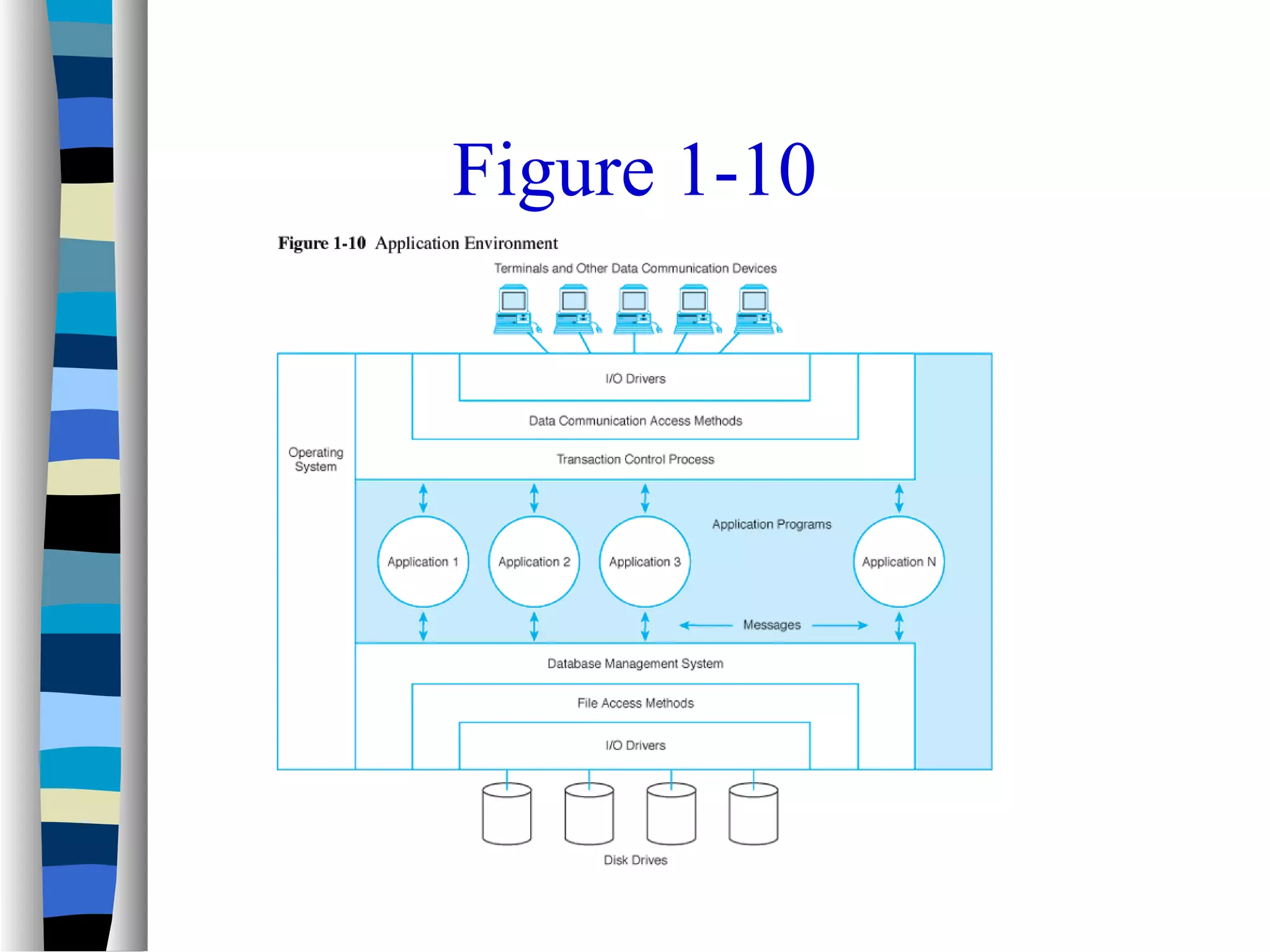
Network Applications
 The network applications environment
consists of several important
components:
– Application programs
– Operating systems
– Data communication systems
– Database management systems
 The application environment is
illustrated in Figure 1-10
Figure 1-10
Online System Requirements
 Response Time
 Throughput
 Consistency
 Flexibility
Online Systems Requirements
Continued
 Availability
 Reliability
– Mean time between failure (MTBF)
– Mean time to repair (MTTR)
– Fault Tolerance
 Recovery
 Security
Business Data Communication
Applications
 Major data communication applications
include:
– E-mail
– Groupware
– Knowledge management systems
– E-commerce and e-business applications
– Wireless applications
Groupware Applications
 Group calendar
systems
 Electronic filing
cabinets
 Project
management
software
 Group support
systems
 Electronic meeting
and
videoconferencing
systems
 Document
management
systems (image
processing systems)
Other Data Communication
Applications
 Batch applications
 Data entry
applications
 Distributed
applications
 Inquiry/response
applications
 Interactive
applications
 Sensor-based
applications
 Combined
applications
Application Service Providers
 Many businesses have turned to third-party
services for some or all of their business and
data communications applications
 Application service providers (ASPs) are
third-party organizations that manage and
distribute software and services to other
companies over the Web
 Many ASPs specialize in integrated e-
commerce and e-business applications
Business Data Communications
Issues
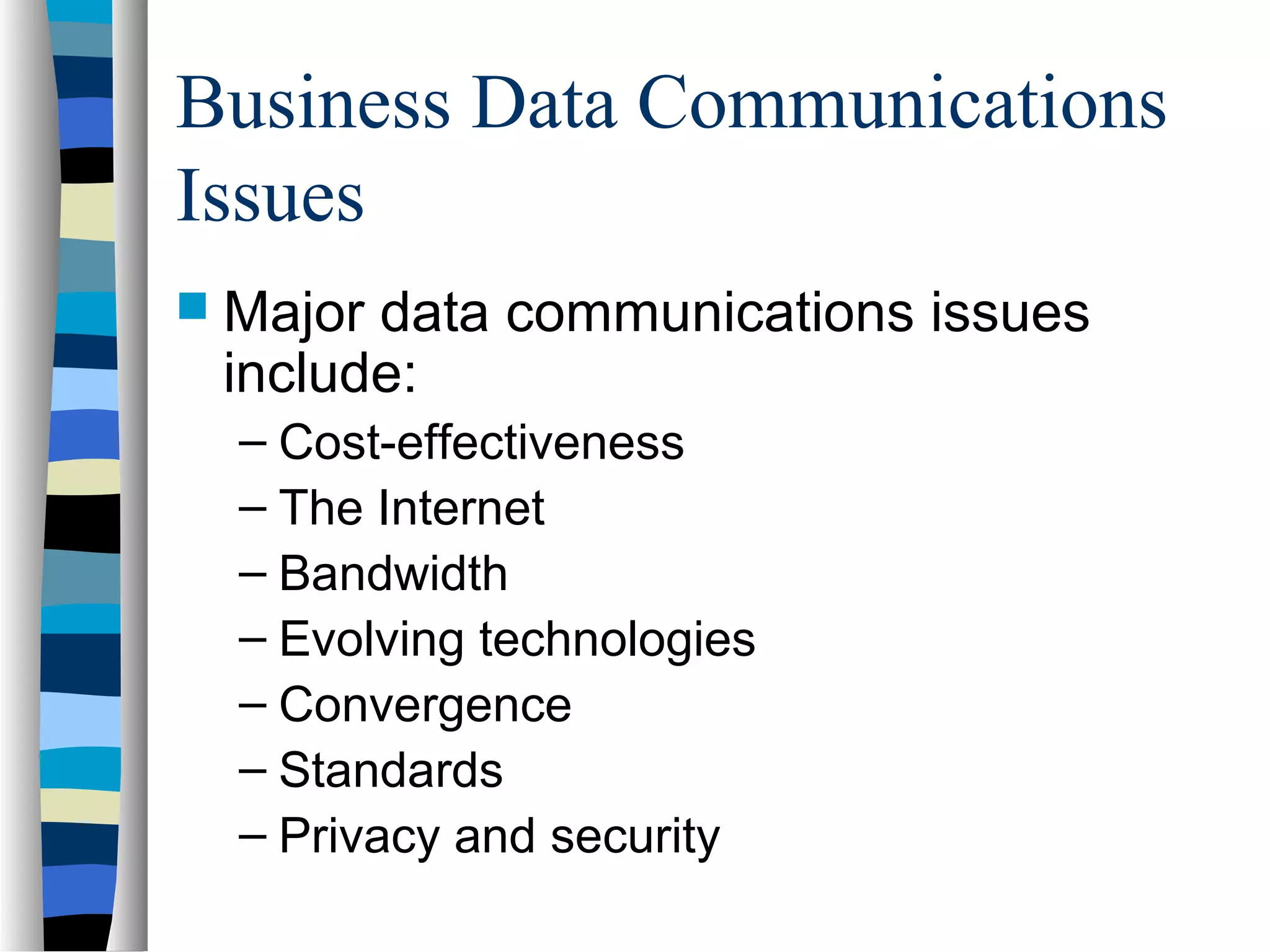
 Major data communications issues
include:
– Cost-effectiveness
– The Internet
– Bandwidth
– Evolving technologies
– Convergence
– Standards
– Privacy and security
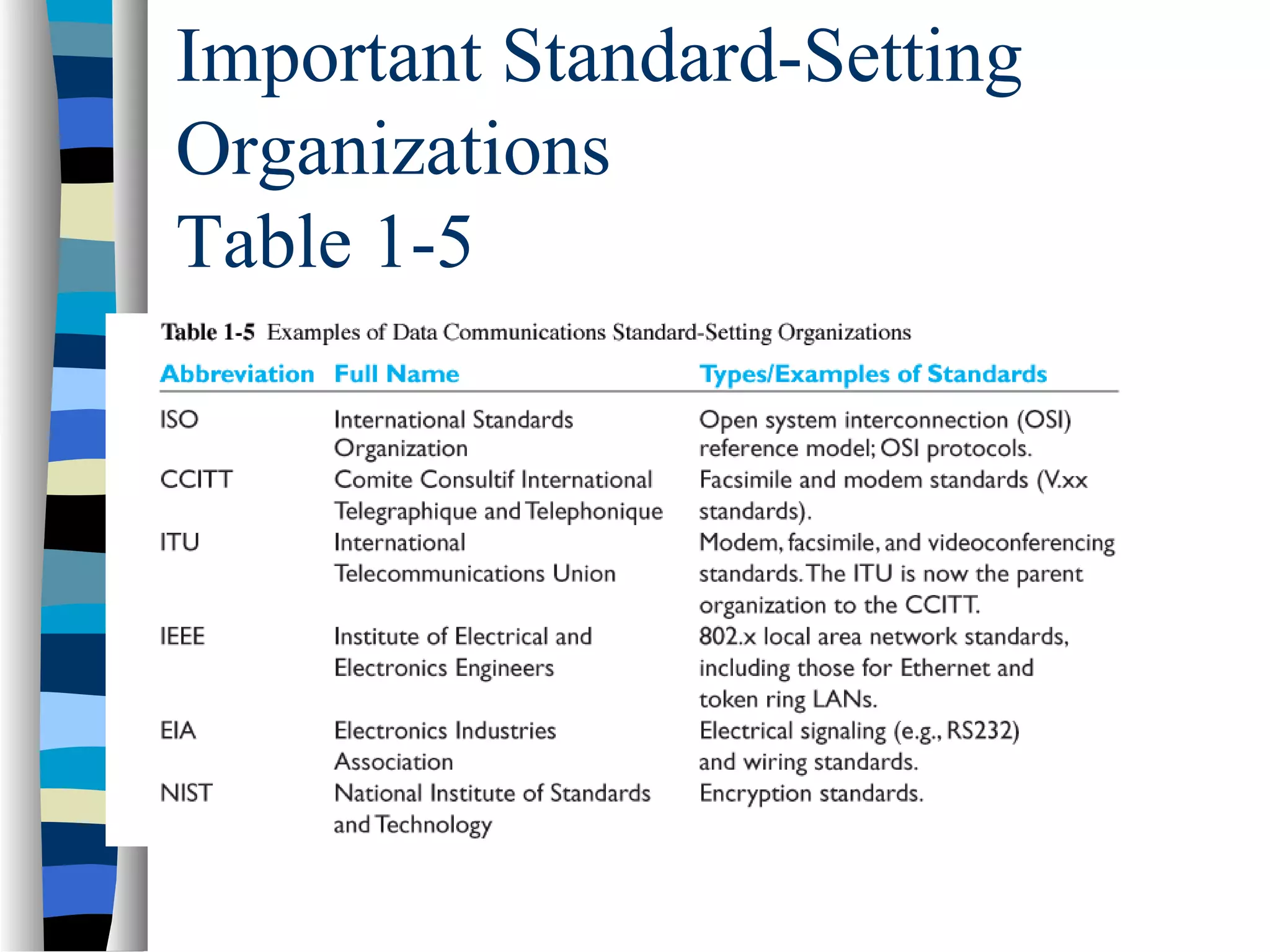
Important Standard-Setting
Organizations
Table 1-5
Business Data Communication
Careers
 There are numerous job opportunities
and career paths for individuals
interested in data communications and
networking
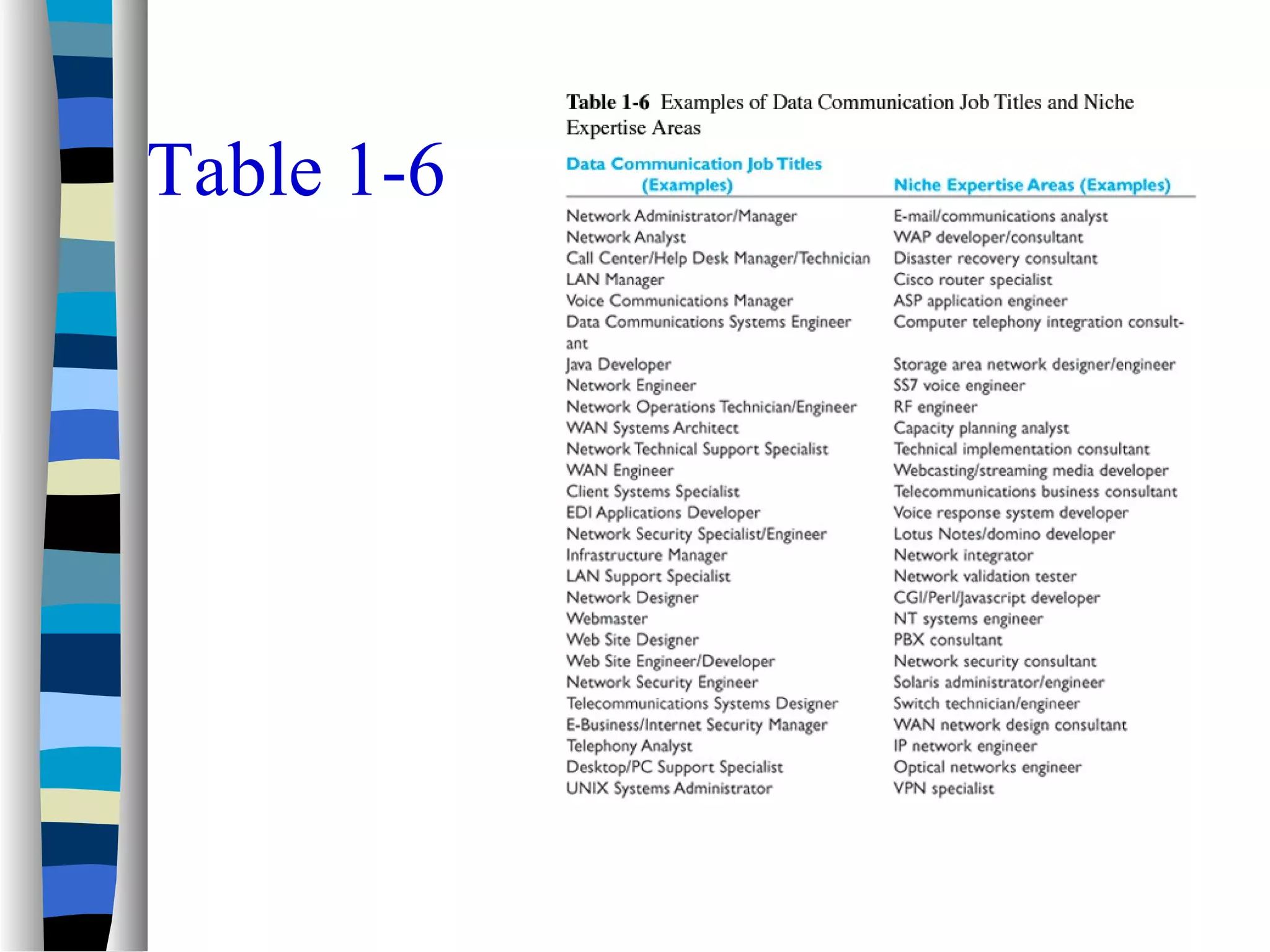
 Table 1-6 includes examples of data
communication job titles
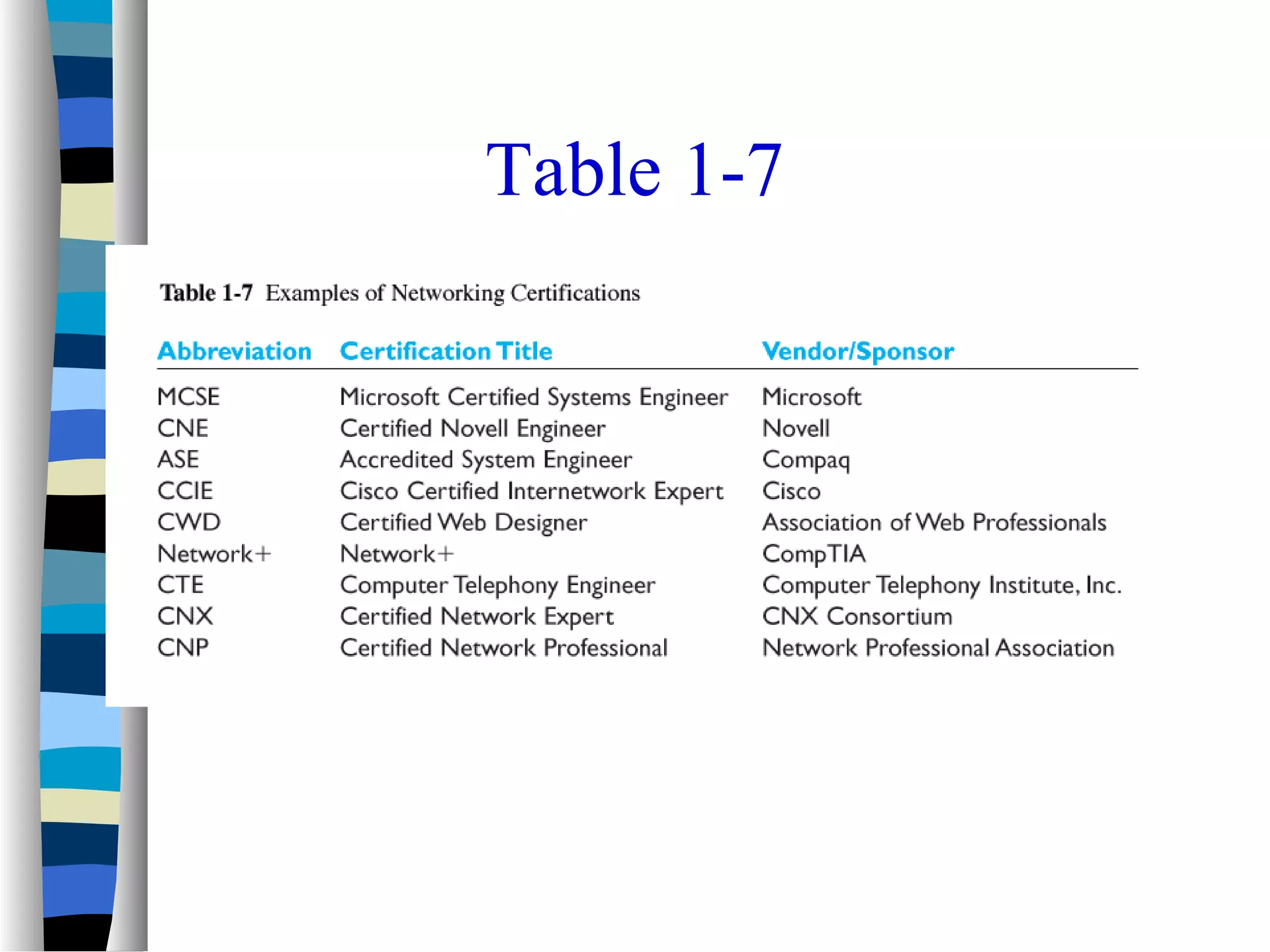
 Table 1-7 summarizes some of the
major professional certifications for
networking and data communications
specialists
Table 1-6
Table 1-7
Introduction to Networks
 Can be defined as a single computer ,
called a host, together with
communication circuits, communication
equipment, and terminals.
 There are many different types of
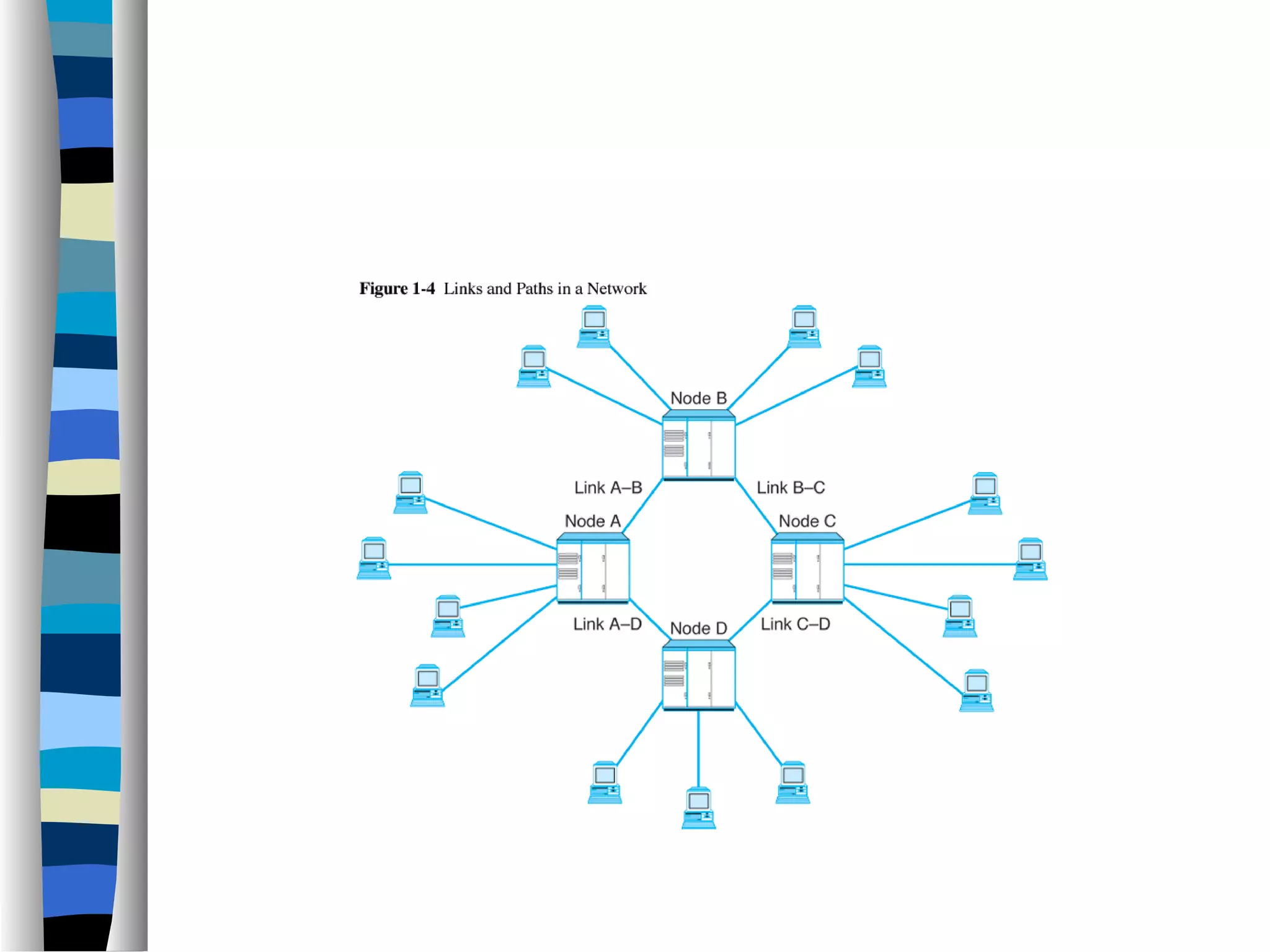
network configurations (see figures1-4
to 1-8)
Key Data Communication Concepts
 Session: communication dialog between network users or
applications
 Network: interconnected group of computers and
communication devices
 Node: a network-attached computer
 Link: connects adjacent nodes (see Figure 1-4)
 Path: end-to-end route within a network
 Circuit: the conduit over which data travels
 Packetizing: dividing messages into fixed-length packets prior
to transmission over a network’s communication media
 Routing: determining a message’s path from sending to
receiving nodes.
Store-and-Forward Systems
 Messages may be stored at intermediate
nodes along the transmission path between
sender and receiver in store-and-forward
systems
– This helps ensure message delivery without
obligating the sender to wait until a message is
delivered before transmitting other messages
– It also helps ensure message delivery in the case
of link or destination failure while the message is
in transit
– Store-and forward algorithms are valuable in time-
staged delivery systems and in networks that
assign priorities to different messages
Network Topology, Architecture,
and Complexity
 Network topology refers to the physical layout
of a network, the way that nodes attach to the
communication medium
 Network architecture refers to the way in
which media, hardware, and software are
integrated to form a network
 Network complexity is concerned with extent
to which network architectures are simple or
diverse in their make
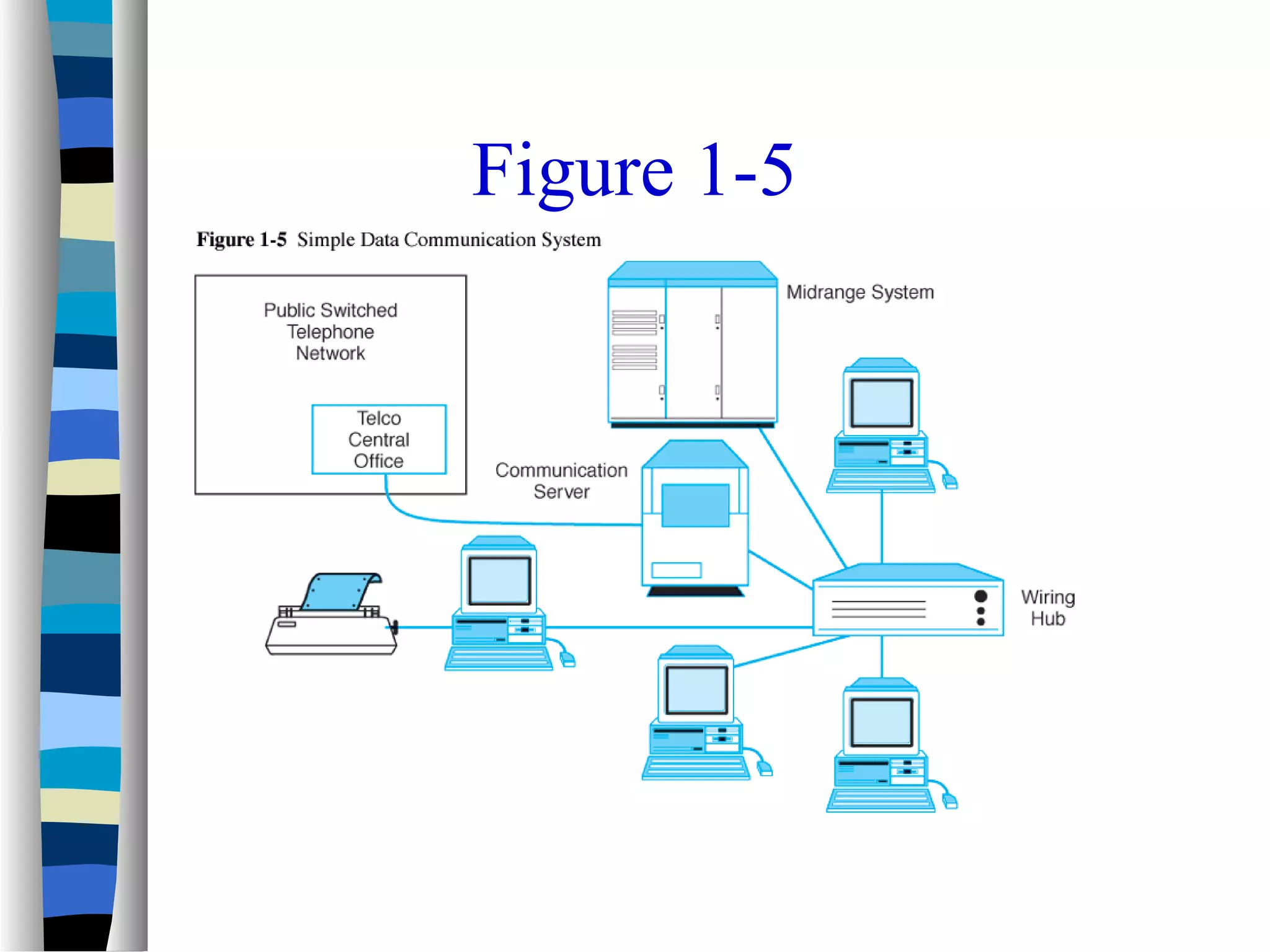
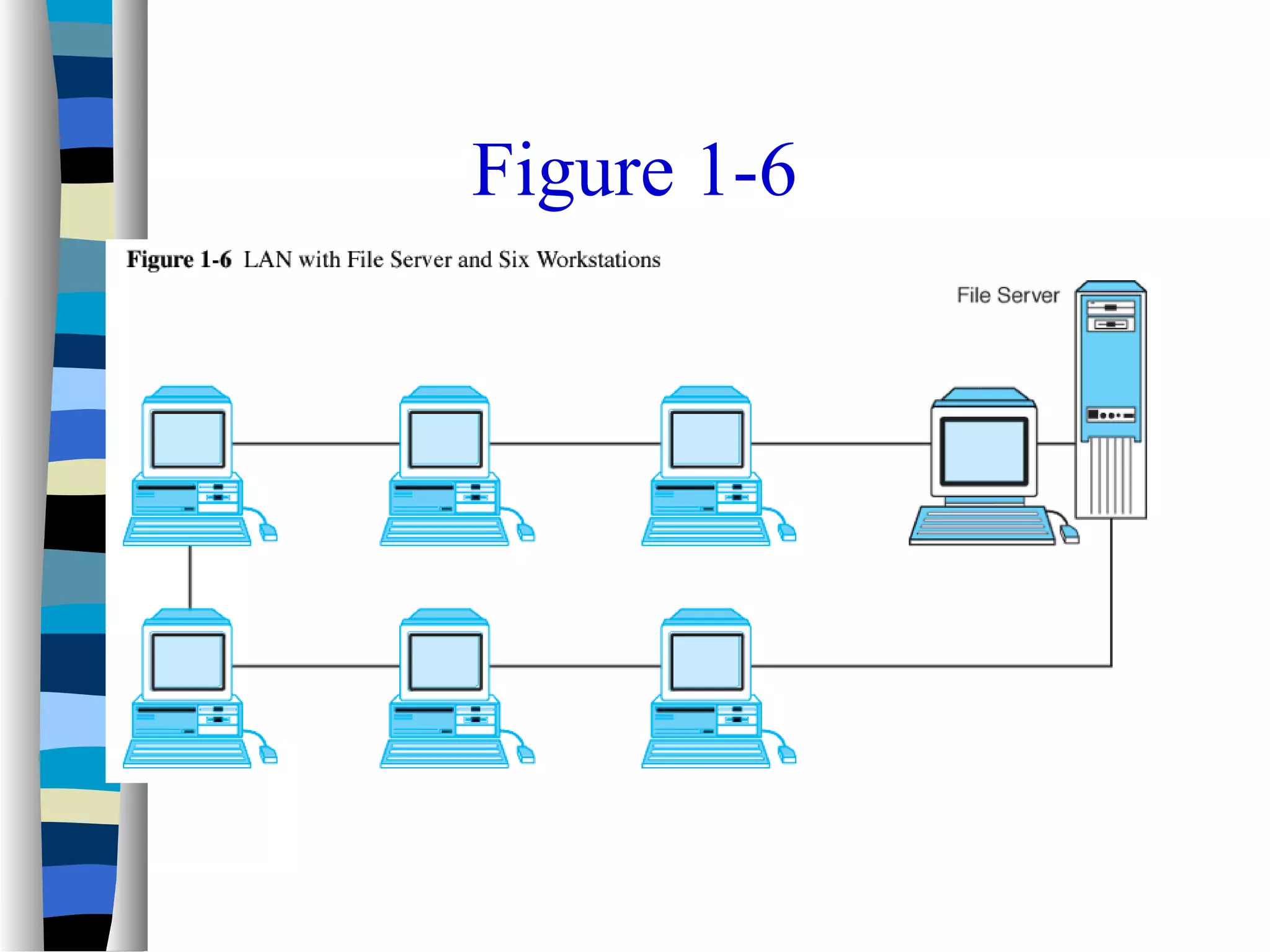
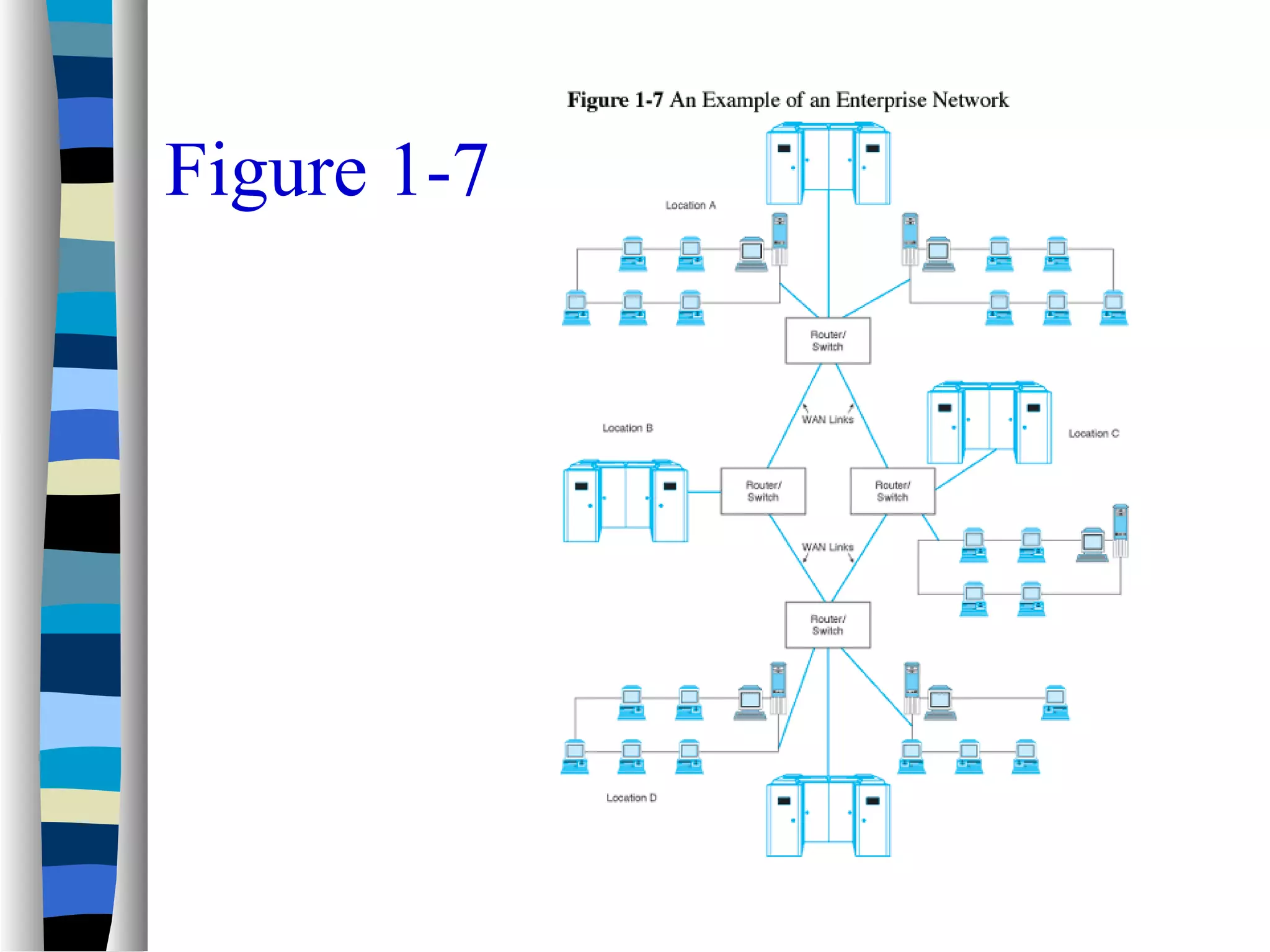
– Figures 1-5, 1-6, and 1-7 illustrate various levels of
complexity
Figure 1-5
Figure 1-6
Figure 1-7
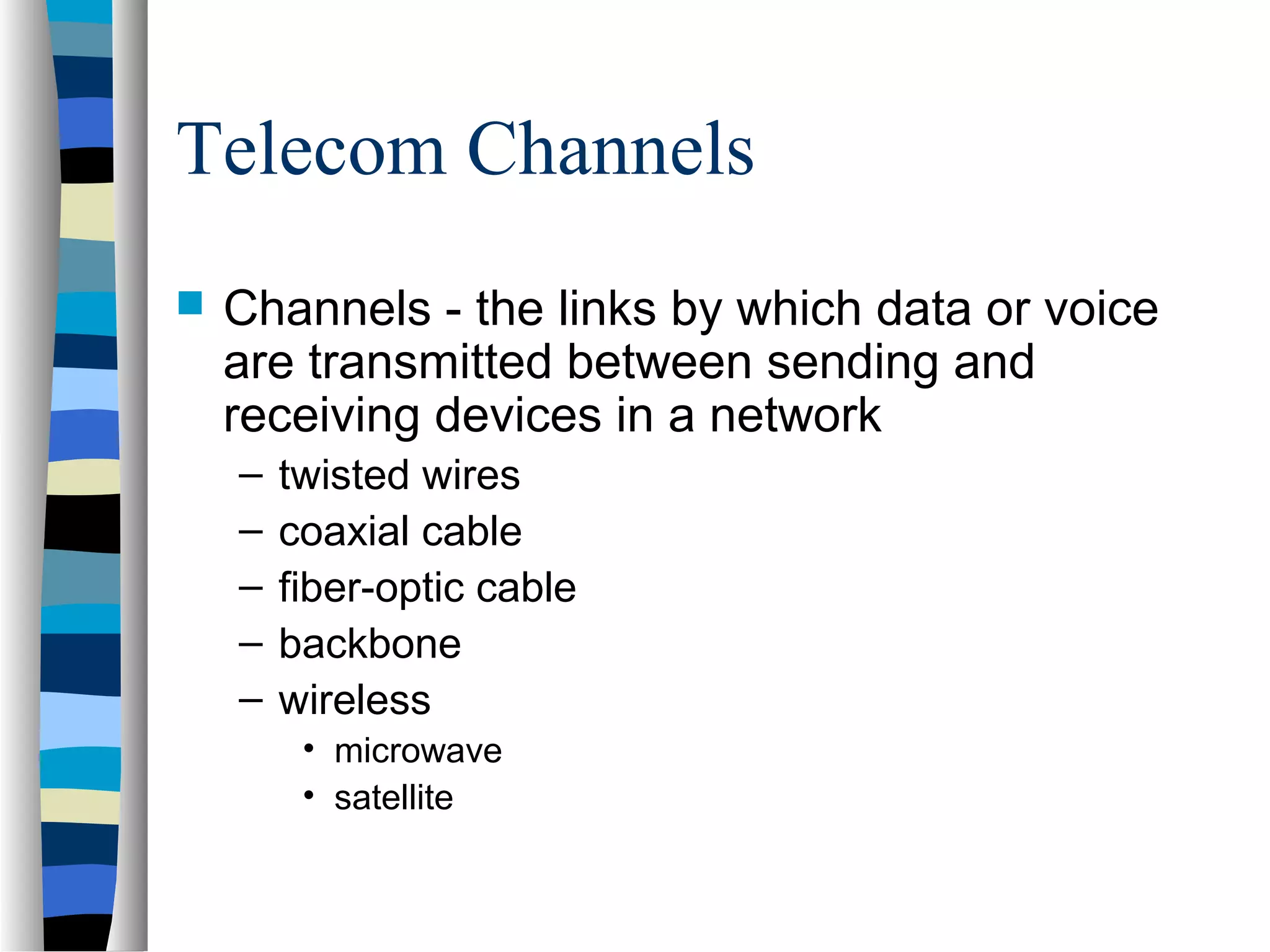
Telecom Channels
 Channels - the links by which data or voice
are transmitted between sending and
receiving devices in a network
– twisted wires
– coaxial cable
– fiber-optic cable
– backbone
– wireless
• microwave
• satellite
Telecom Channels – continued-
other Wireless
 Cellular
 Mobile data networks (2-way)
 PCS (personal communication
systems)- to the end user acts like
cellular, but different
 Personal data assistants
 smart phones
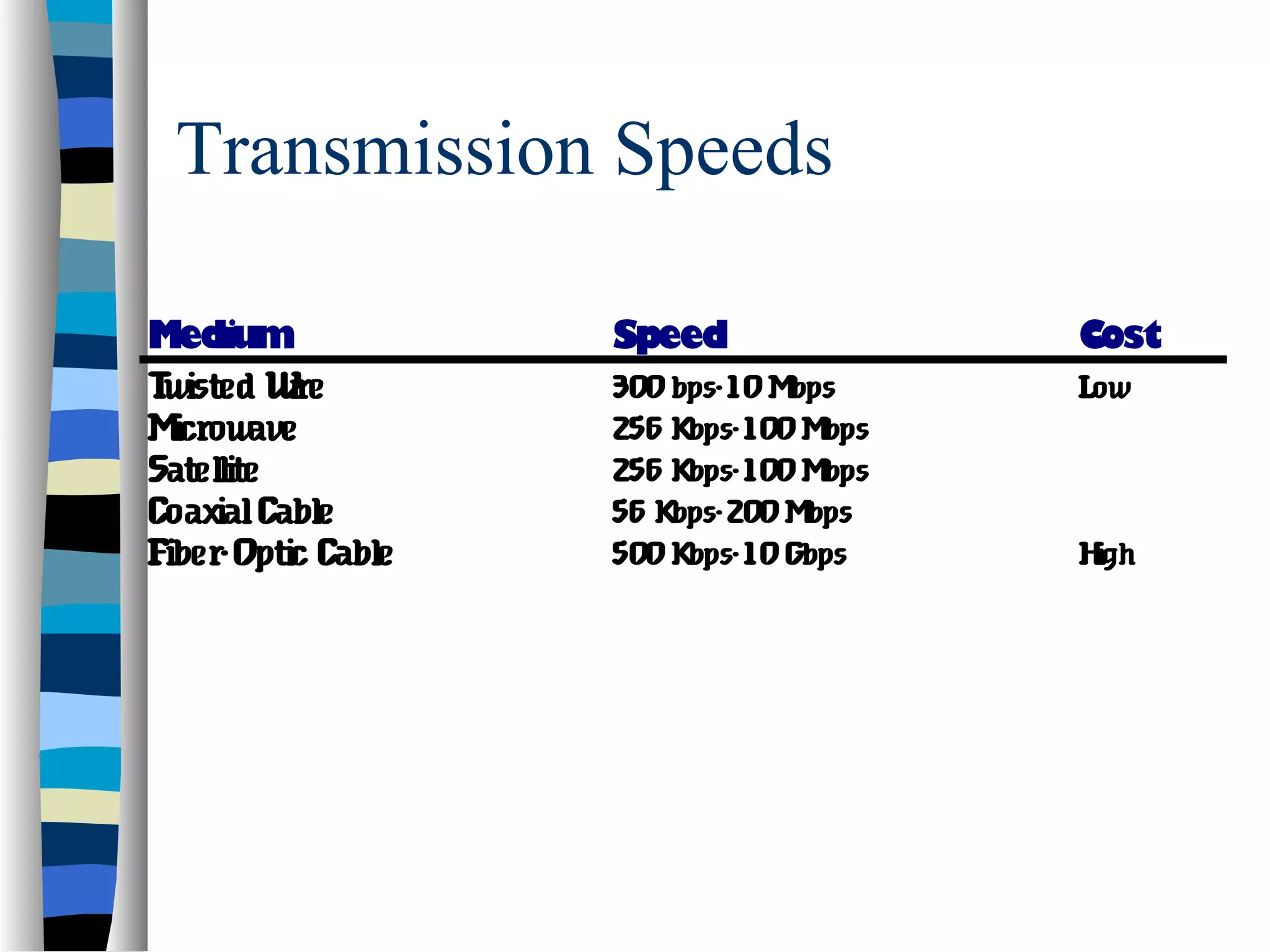
Transmission Speeds
Medium Speed Cost
Twisted Wire 300bps-10Mbps Low
Microwave 256 Kbps-100Mbps
Satellite 256 Kbps-100Mbps
CoaxialCable 56 Kbps-200Mbps
Fiber-Optic Cable 500Kbps-10Gbps High
Data Communication
Frameworks
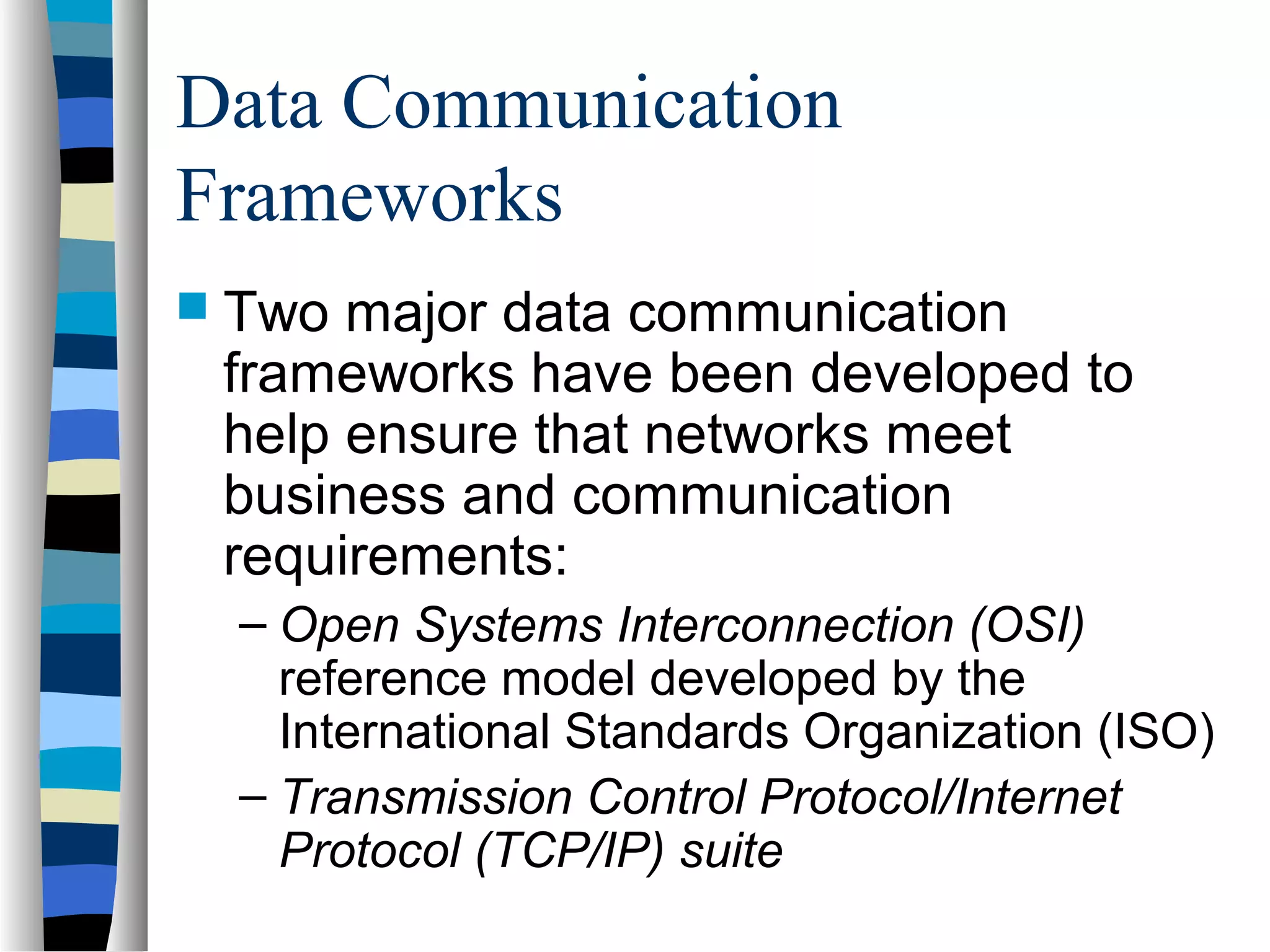
 Two major data communication
frameworks have been developed to
help ensure that networks meet
business and communication
requirements:
– Open Systems Interconnection (OSI)
reference model developed by the
International Standards Organization (ISO)
– Transmission Control Protocol/Internet
Protocol (TCP/IP) suite
History of the OSI Model
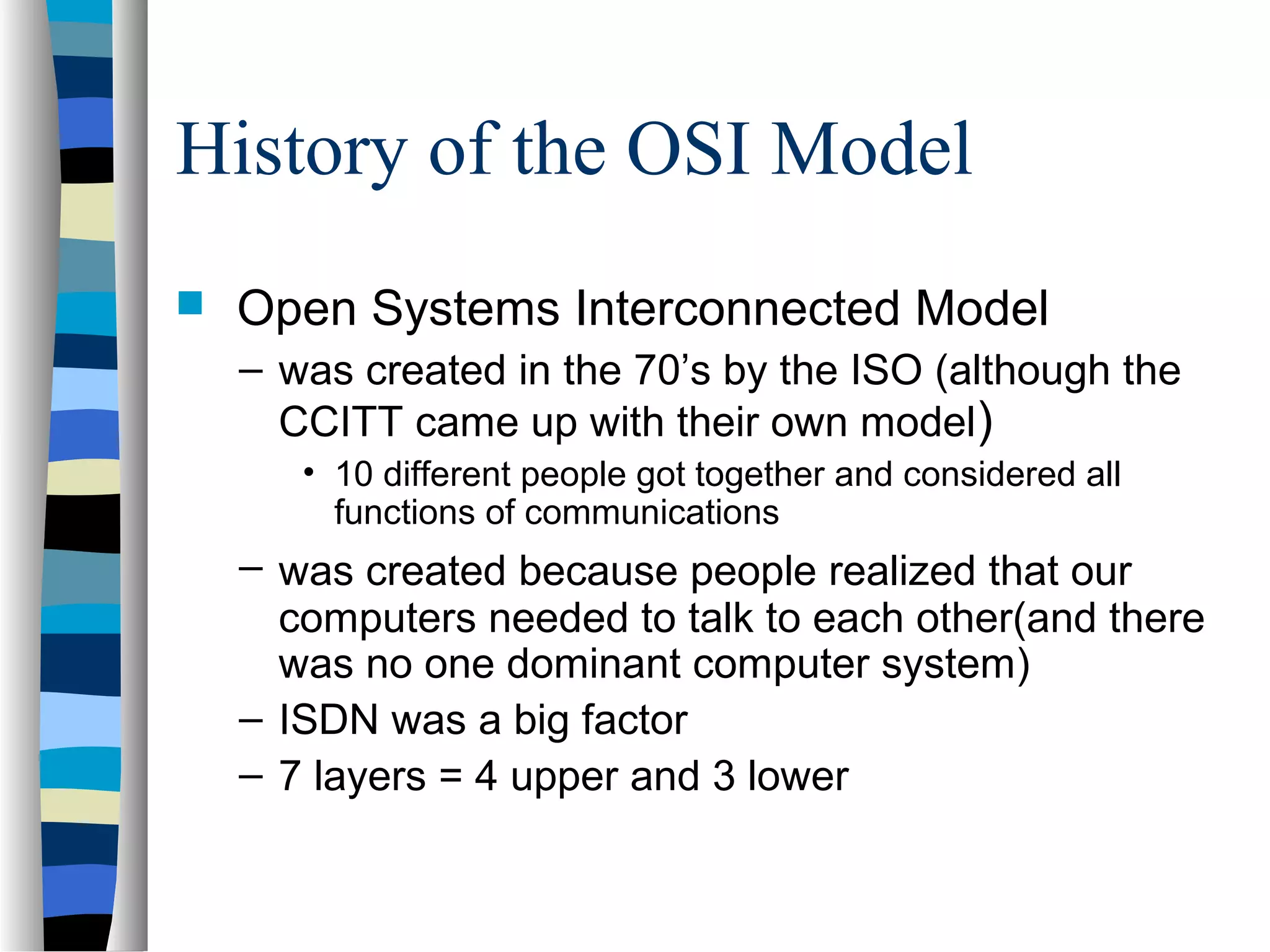
 Open Systems Interconnected Model
– was created in the 70’s by the ISO (although the
CCITT came up with their own model)
• 10 different people got together and considered all
functions of communications
– was created because people realized that our
computers needed to talk to each other(and there
was no one dominant computer system)
– ISDN was a big factor
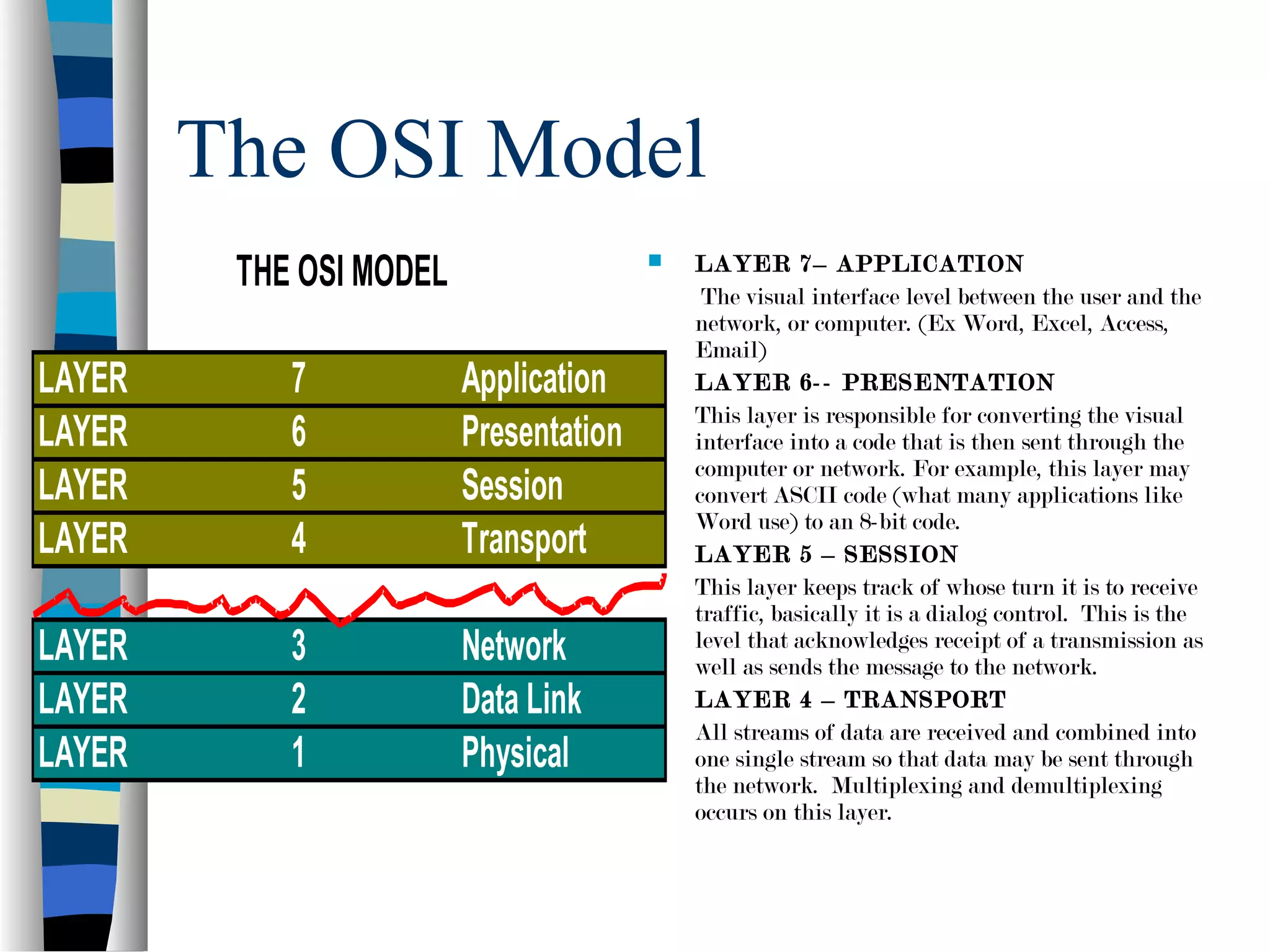
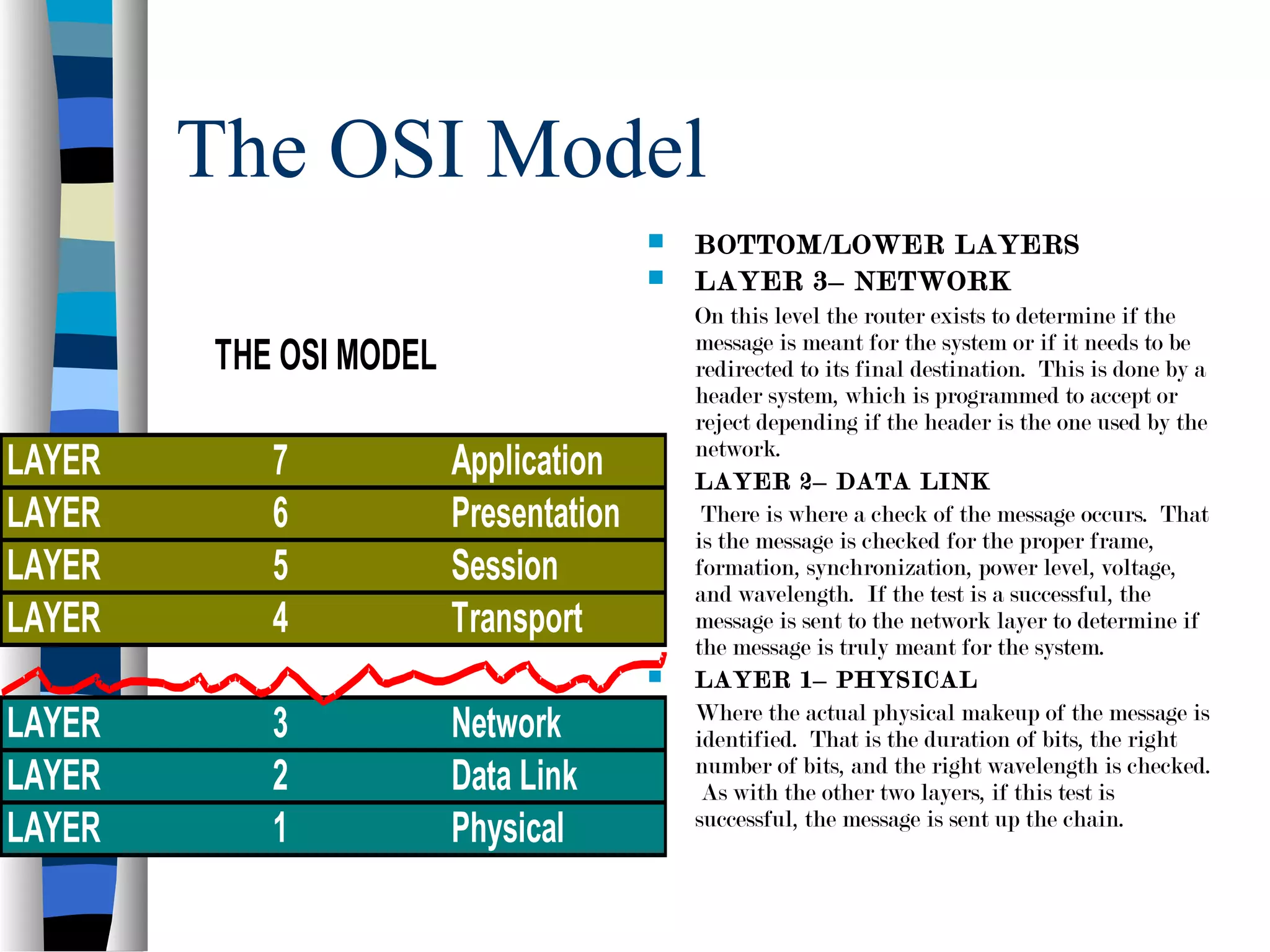
– 7 layers = 4 upper and 3 lower
OSI Reference Model in Practice
 The OSI reference model is used in many
ways:
– To provide assistance when troubleshooting
network problems
– To provide a common terminology and framework
for networking technology developers
– To facilitate the development of connectivity
standards needed for flexible open architectures
– To enable the development of protocol stacks that
allow network nodes to communicate with one
another
The OSI Model
 LAYER 7– APPLICATION
The visual interface level between the user and the
network, or computer. (Ex Word, Excel, Access,
Email)
 LAYER 6-- PRESENTATION
This layer is responsible for converting the visual
interface into a code that is then sent through the
computer or network. For example, this layer may
convert ASCII code (what many applications like
Word use) to an 8-bit code.
 LAYER 5 – SESSION
This layer keeps track of whose turn it is to receive
traffic, basically it is a dialog control. This is the
level that acknowledges receipt of a transmission as
well as sends the message to the network.
 LAYER 4 – TRANSPORT
All streams of data are received and combined into
one single stream so that data may be sent through
the network. Multiplexing and demultiplexing
occurs on this layer.
THE OSI MODEL
LAYER 7 Application
LAYER 6 Presentation
LAYER 5 Session
LAYER 4 Transport
LAYER 3 Network
LAYER 2 Data Link
LAYER 1 Physical
The OSI Model
 BOTTOM/LOWER LAYERS
 LAYER 3– NETWORK
On this level the router exists to determine if the
message is meant for the system or if it needs to be
redirected to its final destination. This is done by a
header system, which is programmed to accept or
reject depending if the header is the one used by the
network.
 LAYER 2– DATA LINK
There is where a check of the message occurs. That
is the message is checked for the proper frame,
formation, synchronization, power level, voltage,
and wavelength. If the test is a successful, the
message is sent to the network layer to determine if
the message is truly meant for the system.
 LAYER 1– PHYSICAL
Where the actual physical makeup of the message is
identified. That is the duration of bits, the right
number of bits, and the right wavelength is checked.
As with the other two layers, if this test is
successful, the message is sent up the chain.
THE OSI MODEL
LAYER 7 Application
LAYER 6 Presentation
LAYER 5 Session
LAYER 4 Transport
LAYER 3 Network
LAYER 2 Data Link
LAYER 1 Physical
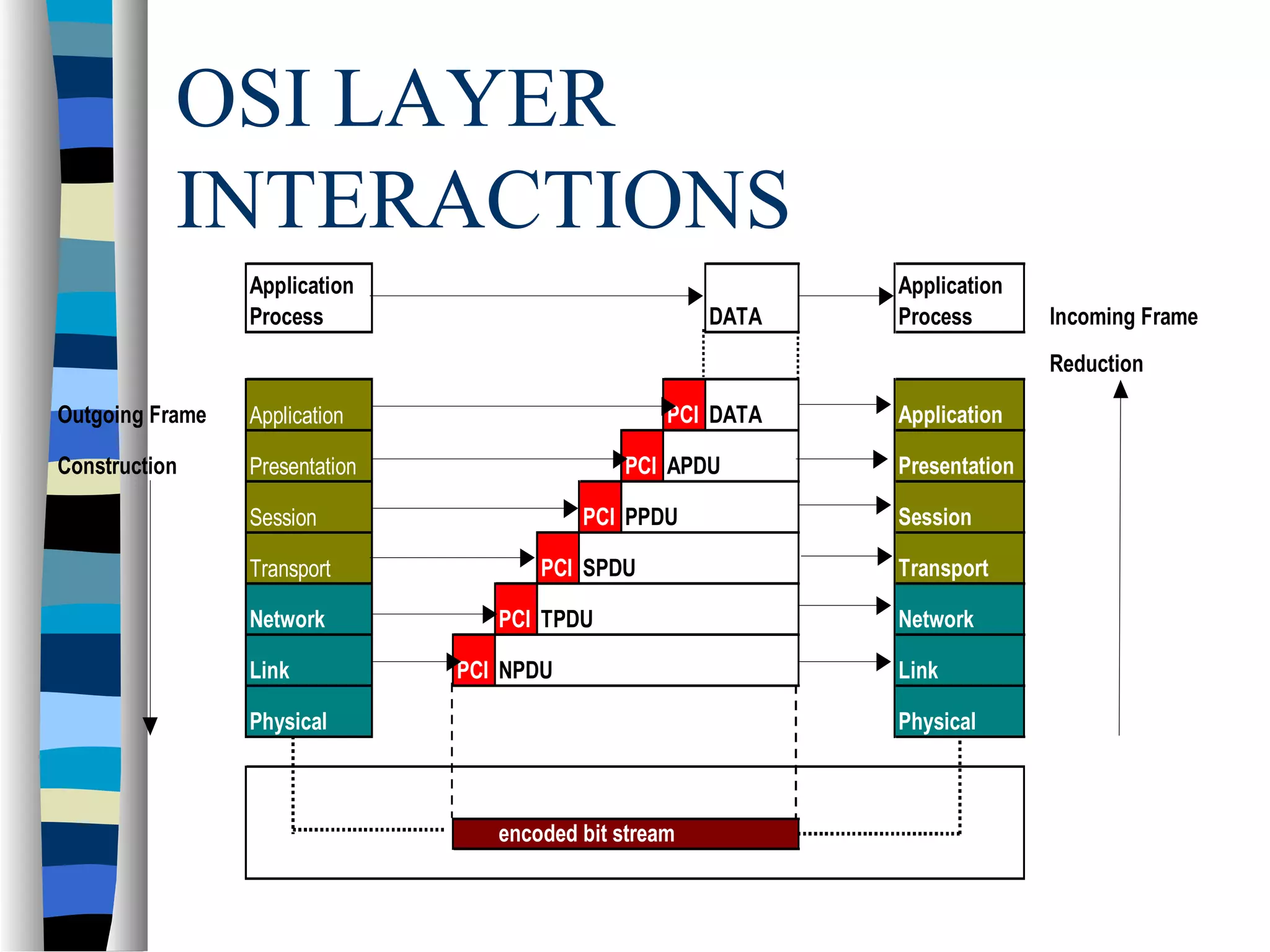
OSI LAYER
INTERACTIONS
Application
Process DATA
Application
Process Incoming Frame
Reduction
Outgoing Frame Application PCI DATA Application
Construction Presentation PCI APDU Presentation
Session PCI PPDU Session
Transport PCI SPDU Transport
Network PCI TPDU Network
Link PCI NPDU Link
Physical Physical
encoded bit stream
TCP/IP Protocol Suite
 The TCP/IP suite provides insights into the
inner workings of the Internet
 Like the OSI model, the TCP/IP suite is
layered
– Because the protocols found at each layer are
independent of those at the other layers, a given
protocol can be modified without affecting those
found at other layers
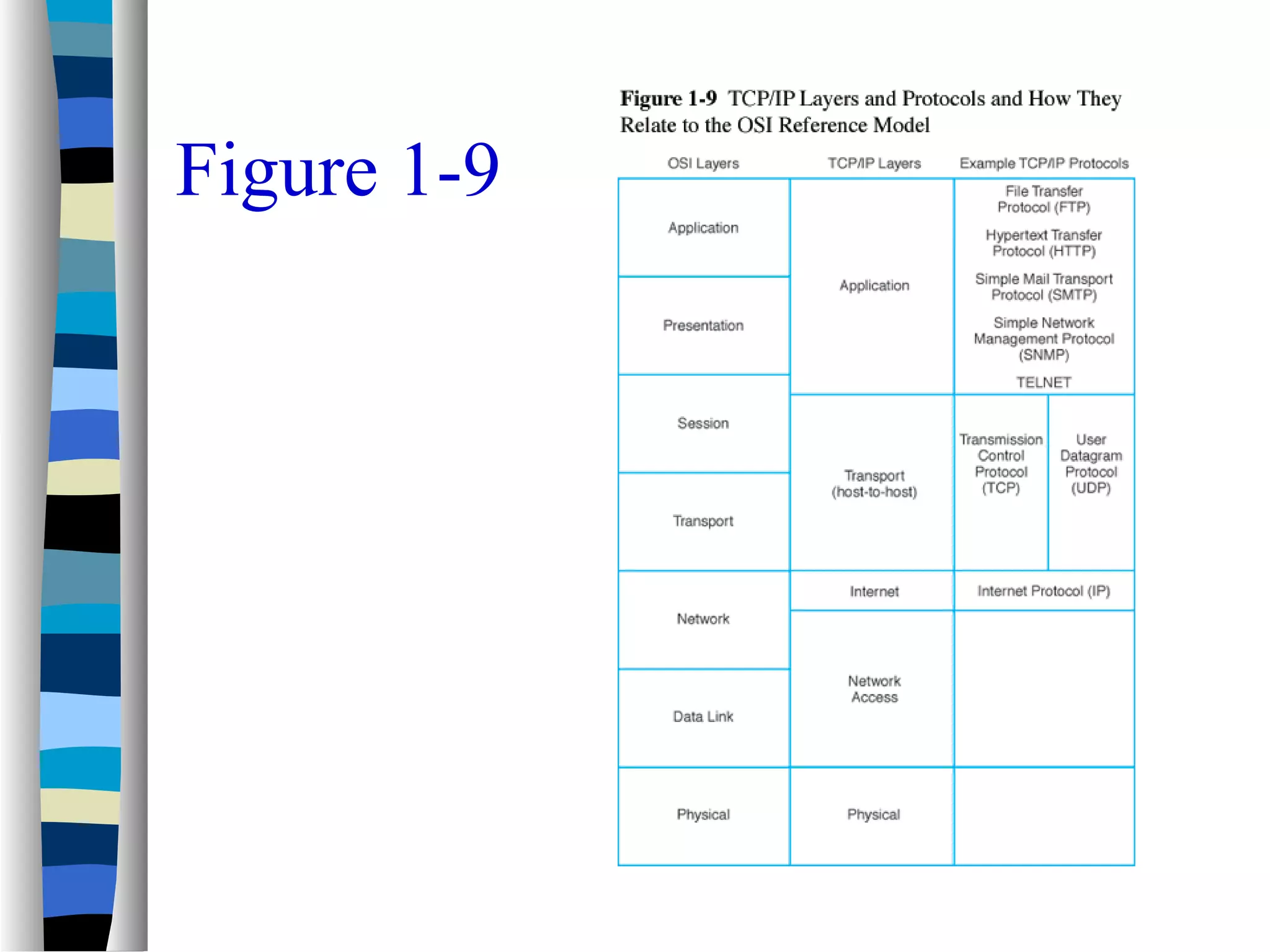
– TCP/IP layers and layer-specific protocols are
illustrated in Figure 1-9
Figure 1-9
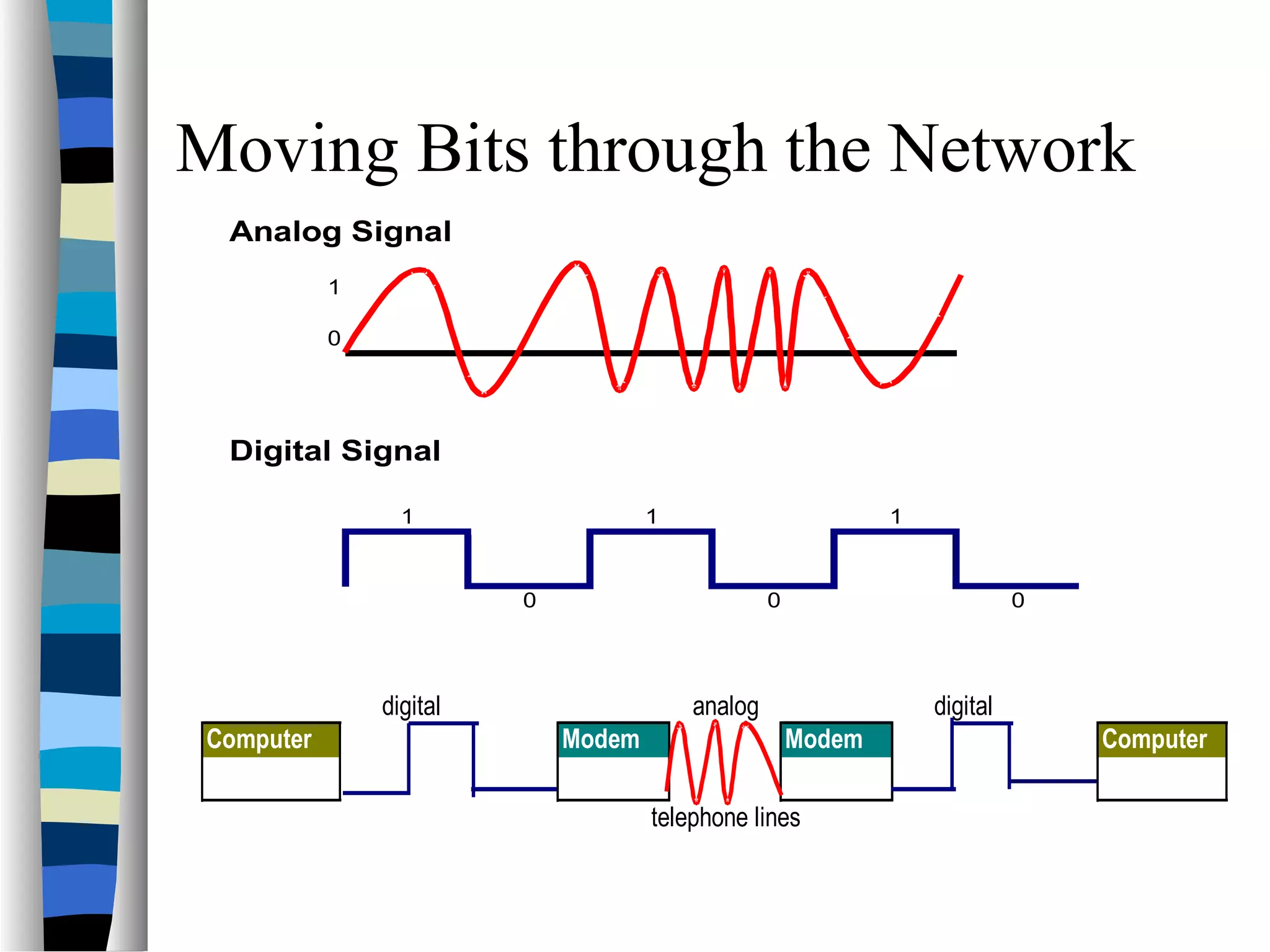
Moving Bits through the Network
Analog Signal
1
0
Digital Signal
1 1 1
0 0 0
digital analog digital
Computer Modem Modem Computer
telephone lines
Putting It all Together
 Data Communications Supports Applications
 The Operating System manages the
resources of the computer.
 There must however, be a system that
provides a bridge between applications and
the devices so they can communicate—this is
called a Transaction Control Process (TCP)
Topics Addressed in Chapter 1
 Data communication definitions
 Elements of communication systems
 Elements of data communication systems
 Data communications frameworks
 Data communications history
 Network applications
 Major data communications issues
 Careers in data communications

introduction to data comunication

  • 1.
  • 2.
    What is datacommunication?  Not to be confused with telecommunication— – Any process that permits the passage from a sender to one or more receivers of information of any nature, delivered in any easy to use form by any electromagnetic system.  Data communication- – Defined as a subset of telecommunication involving the transmission of data to and from computers and components of computer systems. • More specifically data communication is transmitted via mediums such as wires, coaxial cables, fiber optics, or radiated electromagnetic waves such as broadcast radio, infrared light, microwaves, and satellites.
  • 3.
    History of Telecommunications Invention of telegraph Samuel Morse – 1837  Invention of telephone- Alexander Graham Bell – 1876  Development of wireless By ??? – 1896  Concept of universal access and growth of AT&T  Divestiture of AT&T—what year??
  • 4.
    History of Telecommunications Continued…. Telecommunications Act of 1996  Three main developments that led to the growth of data communications systems: – Large-scale integration of circuits reduced the cost and size of terminals and comm equipment – Developments of software systems made establishment of communication networks easy – Competition among providers of transmission facilities reduced the cost of data circuits
  • 5.
    History of DataCommunication  Transistor developed by Bell Labs (which is now ???) 1947  Hush-a-Phone Case  Carterphone case  MCI and Long Distance  Creation of networks (LAN’s and WAN’s)  Data Link Protocols  Microcomputers
  • 6.
    History of theInternet  See web page link– http://carl.sandiego.edu/itmg360/internet_history.htm
  • 7.
    Framework for GlobalElectronic Commerce  A Framework for Global Electronic Commerce was released in 1997  It’s release underscores the importance of Internet-based commerce in the global economy  It outlines several guiding principles for e-commerce planners and strategists
  • 8.
  • 9.
  • 10.
    Features of Communication Four things required – Sender, receiver, medium, and message  Types of messages – File – Request – Response – Status – Control – Correspondence  Understandability  Error Detection
  • 12.
    Network Applications  Thenetwork applications environment consists of several important components: – Application programs – Operating systems – Data communication systems – Database management systems  The application environment is illustrated in Figure 1-10
  • 13.
  • 14.
    Online System Requirements Response Time  Throughput  Consistency  Flexibility
  • 15.
    Online Systems Requirements Continued Availability  Reliability – Mean time between failure (MTBF) – Mean time to repair (MTTR) – Fault Tolerance  Recovery  Security
  • 16.
    Business Data Communication Applications Major data communication applications include: – E-mail – Groupware – Knowledge management systems – E-commerce and e-business applications – Wireless applications
  • 17.
    Groupware Applications  Groupcalendar systems  Electronic filing cabinets  Project management software  Group support systems  Electronic meeting and videoconferencing systems  Document management systems (image processing systems)
  • 18.
    Other Data Communication Applications Batch applications  Data entry applications  Distributed applications  Inquiry/response applications  Interactive applications  Sensor-based applications  Combined applications
  • 19.
    Application Service Providers Many businesses have turned to third-party services for some or all of their business and data communications applications  Application service providers (ASPs) are third-party organizations that manage and distribute software and services to other companies over the Web  Many ASPs specialize in integrated e- commerce and e-business applications
  • 20.
    Business Data Communications Issues Major data communications issues include: – Cost-effectiveness – The Internet – Bandwidth – Evolving technologies – Convergence – Standards – Privacy and security
  • 21.
  • 22.
    Business Data Communication Careers There are numerous job opportunities and career paths for individuals interested in data communications and networking  Table 1-6 includes examples of data communication job titles  Table 1-7 summarizes some of the major professional certifications for networking and data communications specialists
  • 23.
  • 24.
  • 25.
    Introduction to Networks Can be defined as a single computer , called a host, together with communication circuits, communication equipment, and terminals.  There are many different types of network configurations (see figures1-4 to 1-8)
  • 26.
    Key Data CommunicationConcepts  Session: communication dialog between network users or applications  Network: interconnected group of computers and communication devices  Node: a network-attached computer  Link: connects adjacent nodes (see Figure 1-4)  Path: end-to-end route within a network  Circuit: the conduit over which data travels  Packetizing: dividing messages into fixed-length packets prior to transmission over a network’s communication media  Routing: determining a message’s path from sending to receiving nodes.
  • 28.
    Store-and-Forward Systems  Messagesmay be stored at intermediate nodes along the transmission path between sender and receiver in store-and-forward systems – This helps ensure message delivery without obligating the sender to wait until a message is delivered before transmitting other messages – It also helps ensure message delivery in the case of link or destination failure while the message is in transit – Store-and forward algorithms are valuable in time- staged delivery systems and in networks that assign priorities to different messages
  • 29.
    Network Topology, Architecture, andComplexity  Network topology refers to the physical layout of a network, the way that nodes attach to the communication medium  Network architecture refers to the way in which media, hardware, and software are integrated to form a network  Network complexity is concerned with extent to which network architectures are simple or diverse in their make – Figures 1-5, 1-6, and 1-7 illustrate various levels of complexity
  • 30.
  • 31.
  • 32.
  • 33.
    Telecom Channels  Channels- the links by which data or voice are transmitted between sending and receiving devices in a network – twisted wires – coaxial cable – fiber-optic cable – backbone – wireless • microwave • satellite
  • 34.
    Telecom Channels –continued- other Wireless  Cellular  Mobile data networks (2-way)  PCS (personal communication systems)- to the end user acts like cellular, but different  Personal data assistants  smart phones
  • 35.
    Transmission Speeds Medium SpeedCost Twisted Wire 300bps-10Mbps Low Microwave 256 Kbps-100Mbps Satellite 256 Kbps-100Mbps CoaxialCable 56 Kbps-200Mbps Fiber-Optic Cable 500Kbps-10Gbps High
  • 36.
    Data Communication Frameworks  Twomajor data communication frameworks have been developed to help ensure that networks meet business and communication requirements: – Open Systems Interconnection (OSI) reference model developed by the International Standards Organization (ISO) – Transmission Control Protocol/Internet Protocol (TCP/IP) suite
  • 37.
    History of theOSI Model  Open Systems Interconnected Model – was created in the 70’s by the ISO (although the CCITT came up with their own model) • 10 different people got together and considered all functions of communications – was created because people realized that our computers needed to talk to each other(and there was no one dominant computer system) – ISDN was a big factor – 7 layers = 4 upper and 3 lower
  • 38.
    OSI Reference Modelin Practice  The OSI reference model is used in many ways: – To provide assistance when troubleshooting network problems – To provide a common terminology and framework for networking technology developers – To facilitate the development of connectivity standards needed for flexible open architectures – To enable the development of protocol stacks that allow network nodes to communicate with one another
  • 39.
    The OSI Model LAYER 7– APPLICATION The visual interface level between the user and the network, or computer. (Ex Word, Excel, Access, Email)  LAYER 6-- PRESENTATION This layer is responsible for converting the visual interface into a code that is then sent through the computer or network. For example, this layer may convert ASCII code (what many applications like Word use) to an 8-bit code.  LAYER 5 – SESSION This layer keeps track of whose turn it is to receive traffic, basically it is a dialog control. This is the level that acknowledges receipt of a transmission as well as sends the message to the network.  LAYER 4 – TRANSPORT All streams of data are received and combined into one single stream so that data may be sent through the network. Multiplexing and demultiplexing occurs on this layer. THE OSI MODEL LAYER 7 Application LAYER 6 Presentation LAYER 5 Session LAYER 4 Transport LAYER 3 Network LAYER 2 Data Link LAYER 1 Physical
  • 40.
    The OSI Model BOTTOM/LOWER LAYERS  LAYER 3– NETWORK On this level the router exists to determine if the message is meant for the system or if it needs to be redirected to its final destination. This is done by a header system, which is programmed to accept or reject depending if the header is the one used by the network.  LAYER 2– DATA LINK There is where a check of the message occurs. That is the message is checked for the proper frame, formation, synchronization, power level, voltage, and wavelength. If the test is a successful, the message is sent to the network layer to determine if the message is truly meant for the system.  LAYER 1– PHYSICAL Where the actual physical makeup of the message is identified. That is the duration of bits, the right number of bits, and the right wavelength is checked. As with the other two layers, if this test is successful, the message is sent up the chain. THE OSI MODEL LAYER 7 Application LAYER 6 Presentation LAYER 5 Session LAYER 4 Transport LAYER 3 Network LAYER 2 Data Link LAYER 1 Physical
  • 41.
    OSI LAYER INTERACTIONS Application Process DATA Application ProcessIncoming Frame Reduction Outgoing Frame Application PCI DATA Application Construction Presentation PCI APDU Presentation Session PCI PPDU Session Transport PCI SPDU Transport Network PCI TPDU Network Link PCI NPDU Link Physical Physical encoded bit stream
  • 42.
    TCP/IP Protocol Suite The TCP/IP suite provides insights into the inner workings of the Internet  Like the OSI model, the TCP/IP suite is layered – Because the protocols found at each layer are independent of those at the other layers, a given protocol can be modified without affecting those found at other layers – TCP/IP layers and layer-specific protocols are illustrated in Figure 1-9
  • 43.
  • 44.
    Moving Bits throughthe Network Analog Signal 1 0 Digital Signal 1 1 1 0 0 0 digital analog digital Computer Modem Modem Computer telephone lines
  • 45.
    Putting It allTogether  Data Communications Supports Applications  The Operating System manages the resources of the computer.  There must however, be a system that provides a bridge between applications and the devices so they can communicate—this is called a Transaction Control Process (TCP)
  • 46.
    Topics Addressed inChapter 1  Data communication definitions  Elements of communication systems  Elements of data communication systems  Data communications frameworks  Data communications history  Network applications  Major data communications issues  Careers in data communications