A computer network, often simply referred to
as a network, is a collection of computers and
devices interconnected by communications
channels that facilitate communications among
users and allows users to share resources.
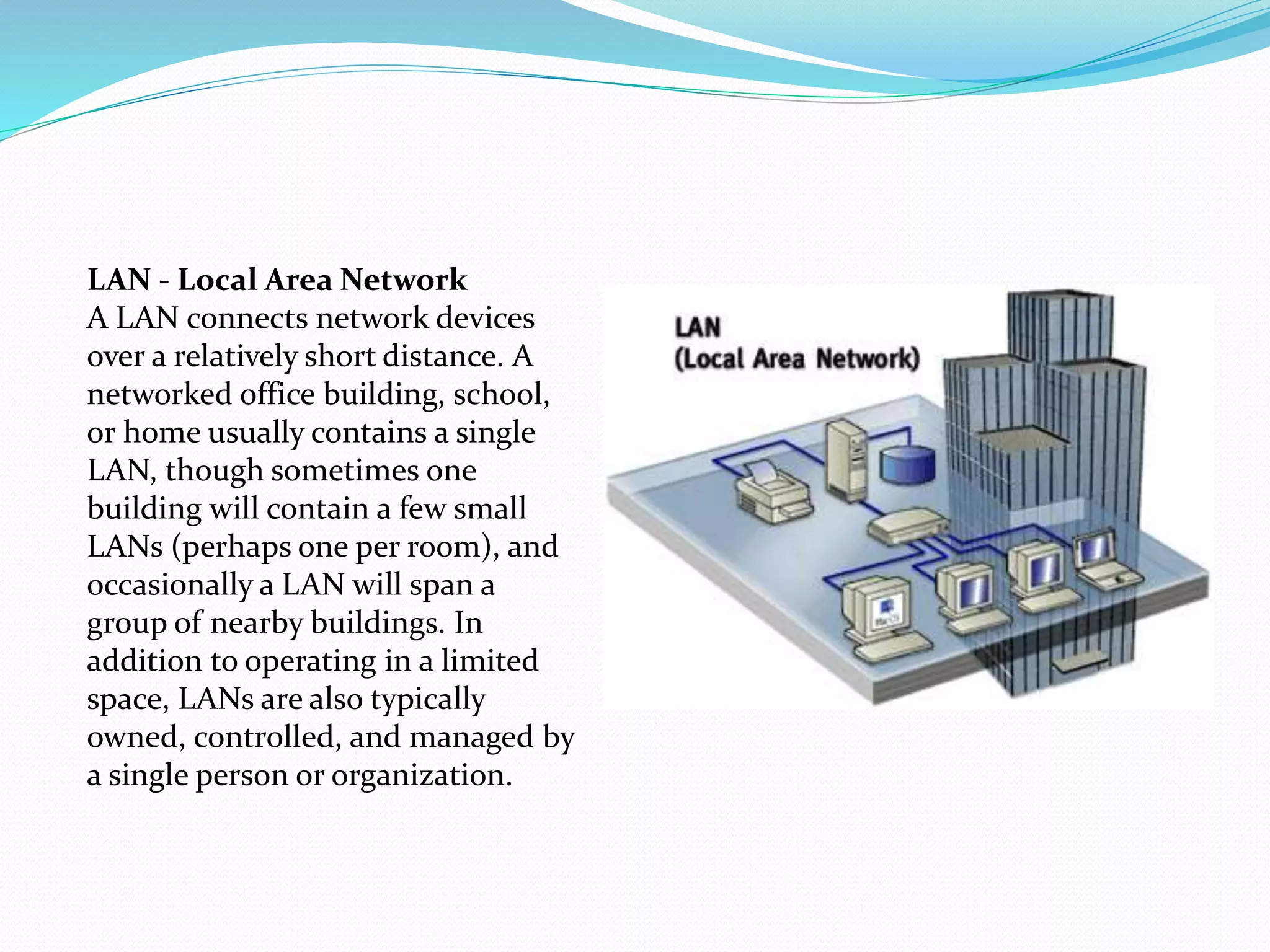
LAN - Local Area Network
A LAN connects network devices
over a relatively short distance. A
networked office building, school,
or home usually contains a single
LAN, though sometimes one
building will contain a few small
LANs (perhaps one per room), and
occasionally a LAN will span a
group of nearby buildings. In
addition to operating in a limited
space, LANs are also typically
owned, controlled, and managed by
a single person or organization.
A metropolitan area
network (MAN) is a large
computer network that
usually spans a city or a
large campus. A MAN
usually interconnects a
number of local area
networks (LANs) using a
high-capacity backbone
technology, such as fiber-
optical links, and provides
up-link services to wide area
networks (or WAN) and the
Internet.
WAN - Wide Area Network
As the term implies, a WAN spans a large physical distance. The
Internet is the largest WAN, spanning the Earth. A WAN is a
geographically-dispersed collection of LANs. A network device
called a router connects LANs to a WAN. In IP networking, the
router maintains both a LAN address and a WAN address.
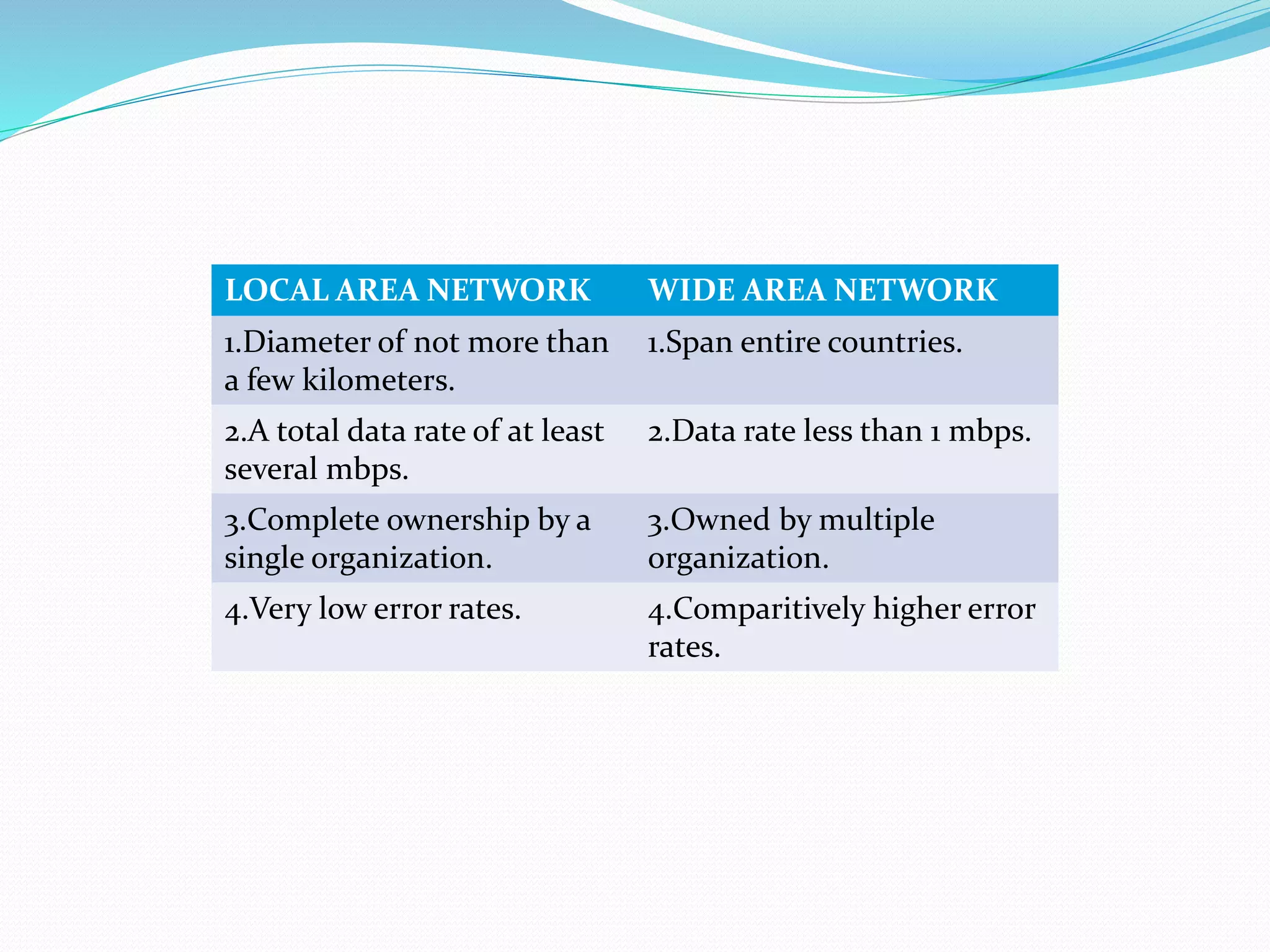
LOCAL AREA NETWORK WIDE AREA NETWORK
1.Diameter of not more than
a few kilometers.
1.Span entire countries.
2.A total data rate of at least
several mbps.
2.Data rate less than 1 mbps.
3.Complete ownership by a
single organization.
3.Owned by multiple
organization.
4.Very low error rates. 4.Comparitively higher error
rates.
Network topology is the layout pattern of
interconnections of the various elements (links, nodes,
etc.) of a computer network. Network topologies may be
physical or logical. Physical topology means the physical
design of a network including the devices, location and
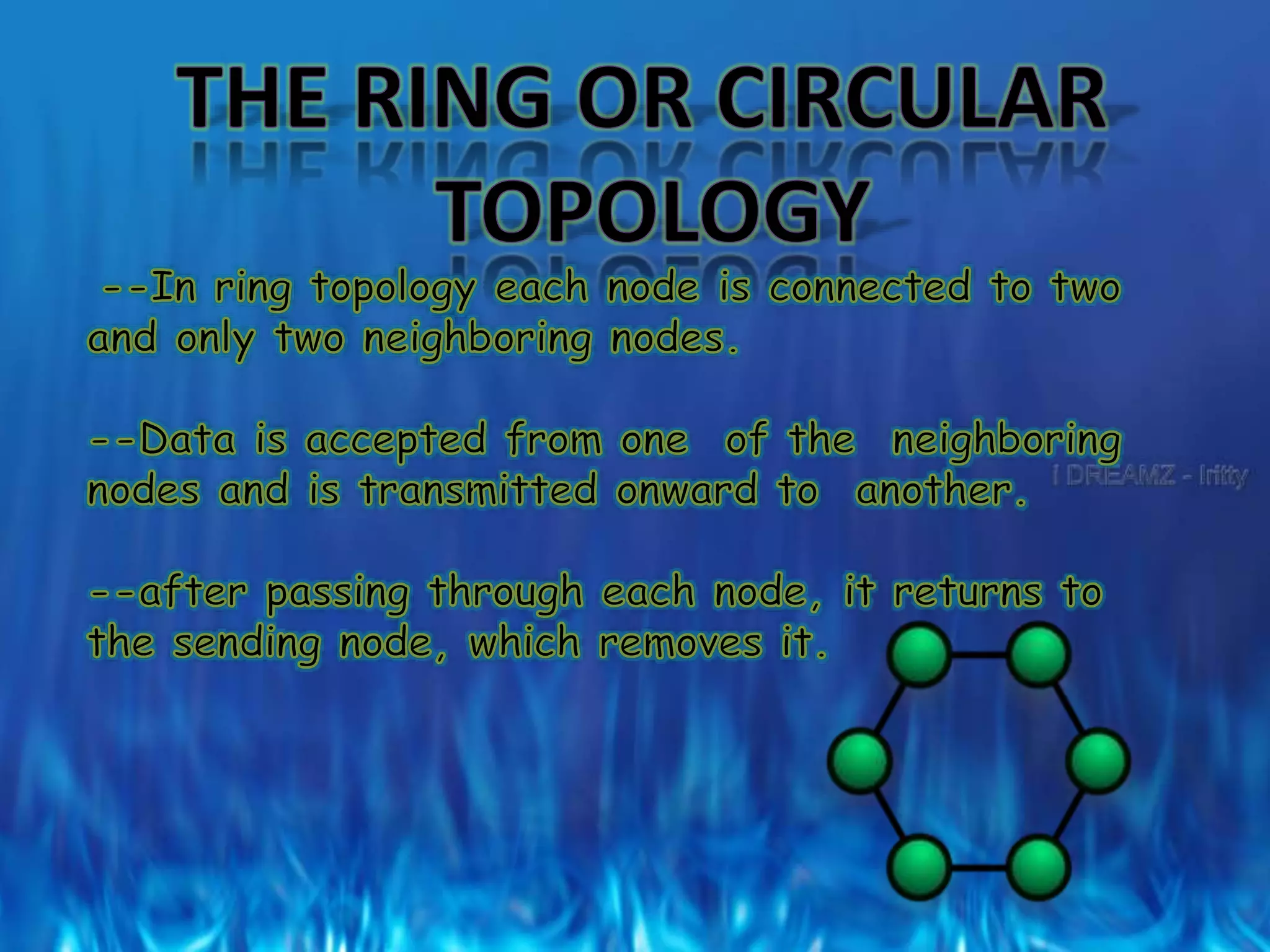
cable installation. Logical topology refers to how data is
actually transferred in a network as opposed to its
physical design.
Many topologies have been developed, but the major ones
are:
 the Star topology
 the Bus topology
 the Ring or circular
 the Tree
 the Graph
 the Mesh
STAR TOPOLOGY
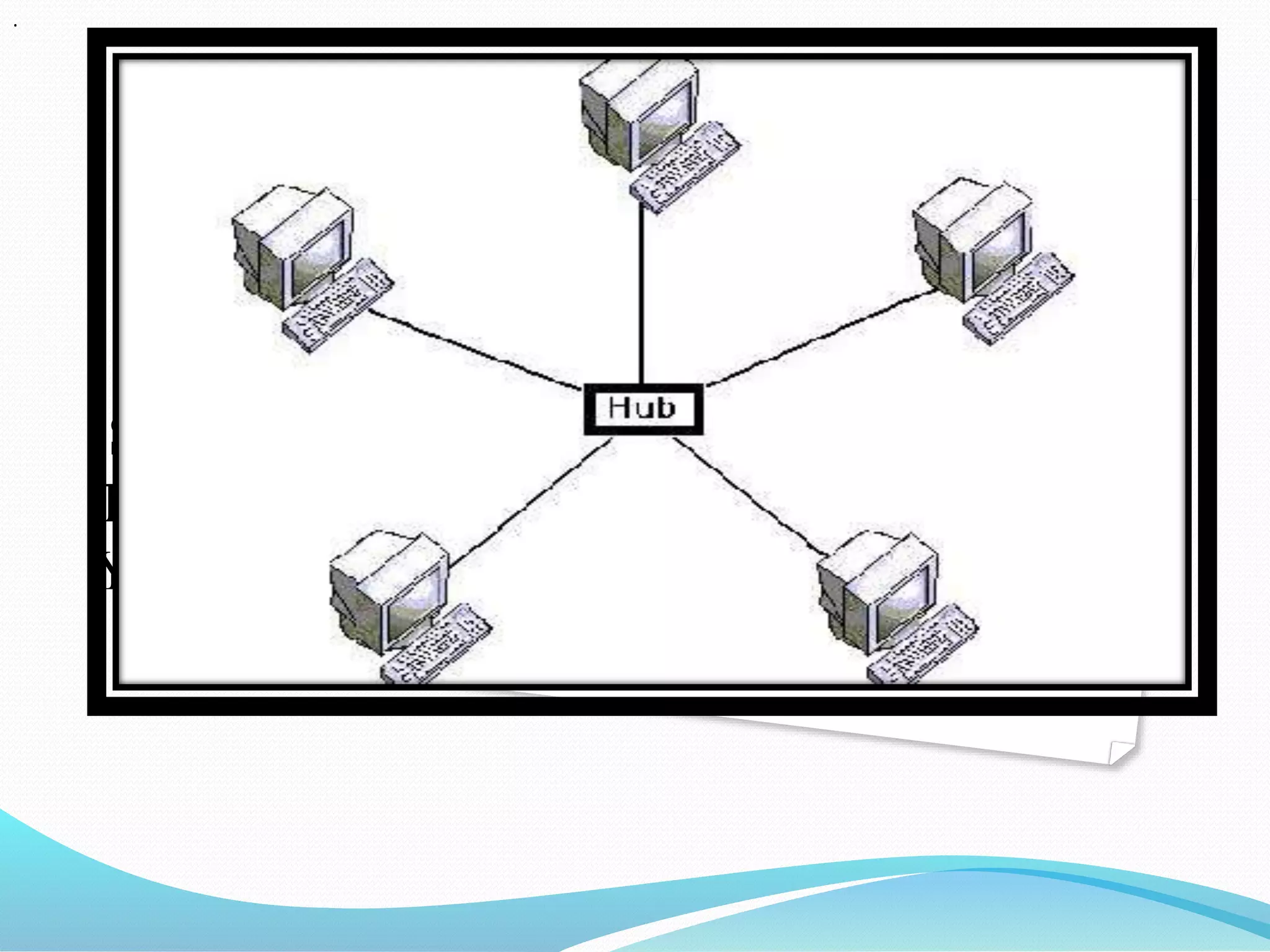
 Star networks are one of the most common computer
network topologies. In its simplest form, a star network
consists of one central switch, hub or computer, which
acts as a conduit to transmit messages. Thus, the hub and
leaf nodes, and the transmission lines between them, form
a graph with the topology of a star.
STAR
TOPOLOG
Y
.
The star topology reduces the chance of network failure by
connecting all of the systems to a central node. This central hub
rebroadcasts all transmissions received from any peripheral
node to all peripheral nodes on the network, sometimes
including the originating node. All peripheral nodes may thus
communicate with all others by transmitting to, and receiving
from, the central node only. The failure of a transmission line
linking any peripheral node to the central node will result in the
isolation of that peripheral node from all others, but the rest of
the systems will be unaffected.
ADVANTAGES OF STAR
TOPOLOGY Better performance: star topology prevents the passing of data
packets through an excessive number of nodes. At most, 3 devices and
2 links are involved in any communication between any two devices.
Although this topology places a huge overhead on the central hub,
with adequate capacity, the hub can handle very high utilization by one
device without affecting others.
 Simplicity: This topology is easy to understand, establish, and
navigate. Its simplicity obviates the need for complex routing or
message passing protocols. Also, as noted earlier, the isolation and
centralization it allows simplify fault detection, as each link or device
can be probed individually.
 Isolation of devices: Each device is inherently isolated by
the link that connects it to the hub. This makes the
isolation of individual devices straightforward and
amounts to disconnecting each device from the others.
This isolation also prevents any non-centralized failure
from affecting the network.
 Easy to install and wire.
 Easy to detect faults and to remove parts.
 No disruptions to the network when connecting or
removing devices
 Benefits from centralization: As the central hub is
the bottleneck, increasing its capacity, or connecting
additional devices to it, increases the size of the
network very easily. Centralization also allows the
inspection of traffic through the network. This
facilitates analysis of the traffic and detection of
suspicious behavior.
DISADVANTGES OF STAR
TOPOLOGY
 High dependence of the system on the functioning of the
central hub
 Failure of the central hub renders the network inoperable
 The performance and scalability of the network depends
on the capabilities of the hub
 Wiring up of the system can be very complex and
expensive
Network size is limited by the number of
connections that can be made to the hub
Other nodes may see a performance drop if
traffic to another node occupies a significant
portion of the central node's processing
capability or throughput.
Bus topology
 A bus network topology is a network architecture in
which a set of clients are connected via a shared
communications line, called a bus. There are several
common instances of the bus architecture, including one
in the motherboard of most computers, and those in some
versions of Ethernet networks.
Bus topology
 Bus networks are the simplest way to connect multiple
clients, but may have problems when two clients want to
transmit at the same time on the same bus. Thus systems
which use bus network architectures normally have some
scheme of collision handling or collision avoidance for
communication on the bus, quite often using Carrier Sense
Multiple Access or the presence of a bus master which
controls access to the shared bus resource.
 A true bus network is passive – the computers on the
bus simply listen for a signal; they are not responsible for
moving the signal along.
 However, many active architectures can also be described
as a "bus", as they provide the same logical functions as a
passive bus; for example, switched Ethernet can still be
regarded as a logical network, if not a physical one.
Indeed, the hardware may be abstracted away completely
in the case of a software bus.
 However, almost all current wireless networks can be
viewed as examples of passive bus networks, with radio
propagation serving as the shared passive medium.
 Bus network topology uses a broadcast channel which
means that all attached stations can hear every
transmission and all stations have equal priority in using
the network to transmit data.
 The Ethernet bus topology works like a big telephone
party line — before any device can send a packet, devices
on the bus must first determine that no other device is
sending a packet on the cable.
Advantages of linear topology
 Easy to implement and extend.
 Easy to install.
 Well-suited for temporary or small networks not
requiring high speeds (quick setup), resulting in faster
networks.
 Cheaper than other topologies (But in Recent years has became
less Important due Devices like a Switch)
 Cost effective; only a single cable is used.
 Easy identification of cable faults.
 Reduced weight due to fewer wires.
Disadvantages of linear topology
 Limited cable length and number of stations.
 If there is a problem with the cable, the entire network
breaks down.
 Maintenance costs may be higher in the long run.
 Performance degrades as additional computers are added
or on heavy traffic (shared bandwidth).
 Proper termination is required (loop must be in closed
path).
 Significant Capacitive Load (each bus transaction must be
able to stretch to most distant link).
 It works best with limited number of nodes.
 Commonly has a slower data transfer rate than other
topologies.
 Only one packet can remain on the bus during one clock
pulse.
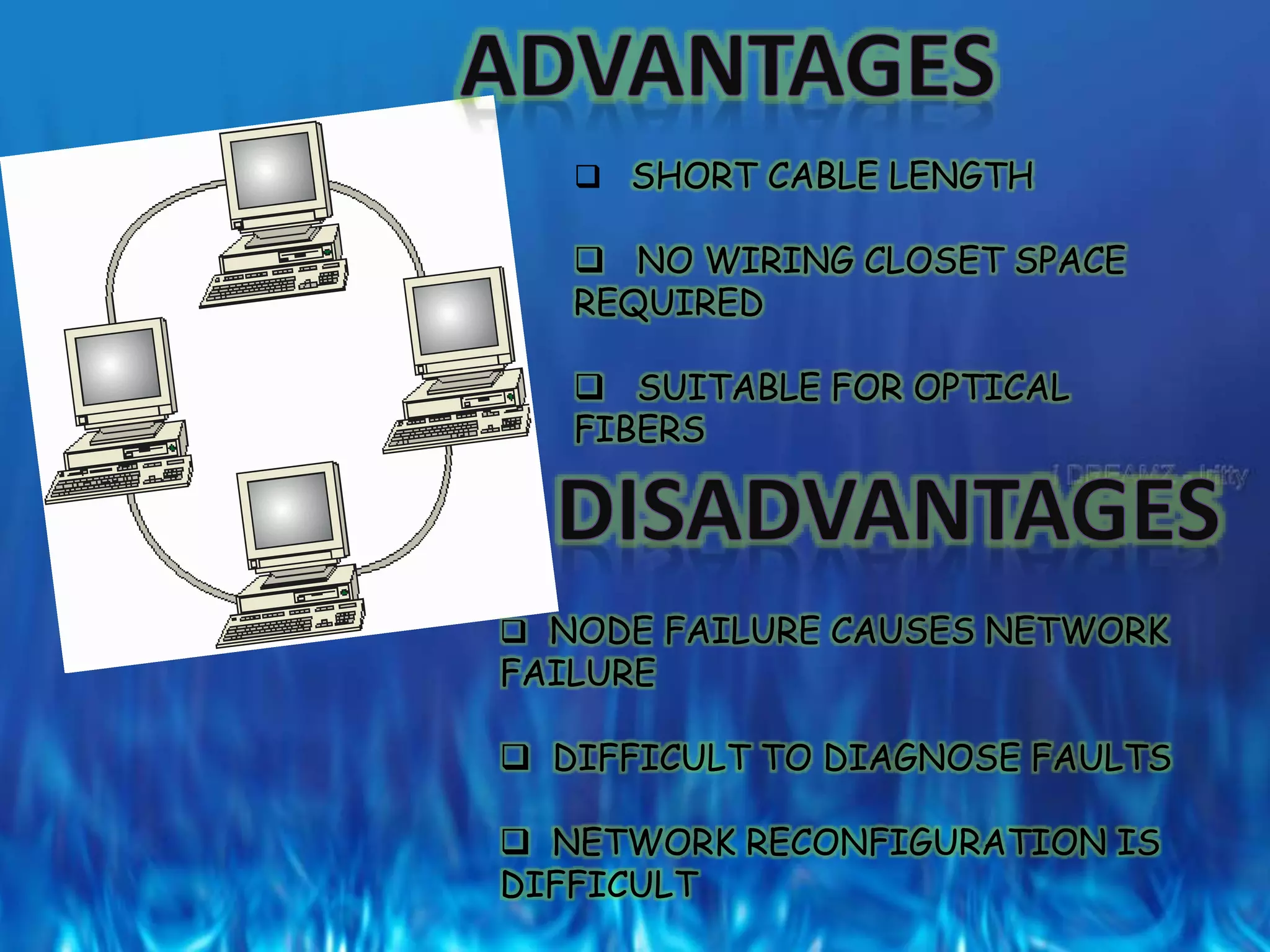
 SHORT CABLE LENGTH
 NO WIRING CLOSET SPACE
REQUIRED
 SUITABLE FOR OPTICAL
FIBERS
 NODE FAILURE CAUSES NETWORK
FAILURE
 DIFFICULT TO DIAGNOSE FAULTS
 NETWORK RECONFIGURATION IS
DIFFICULT
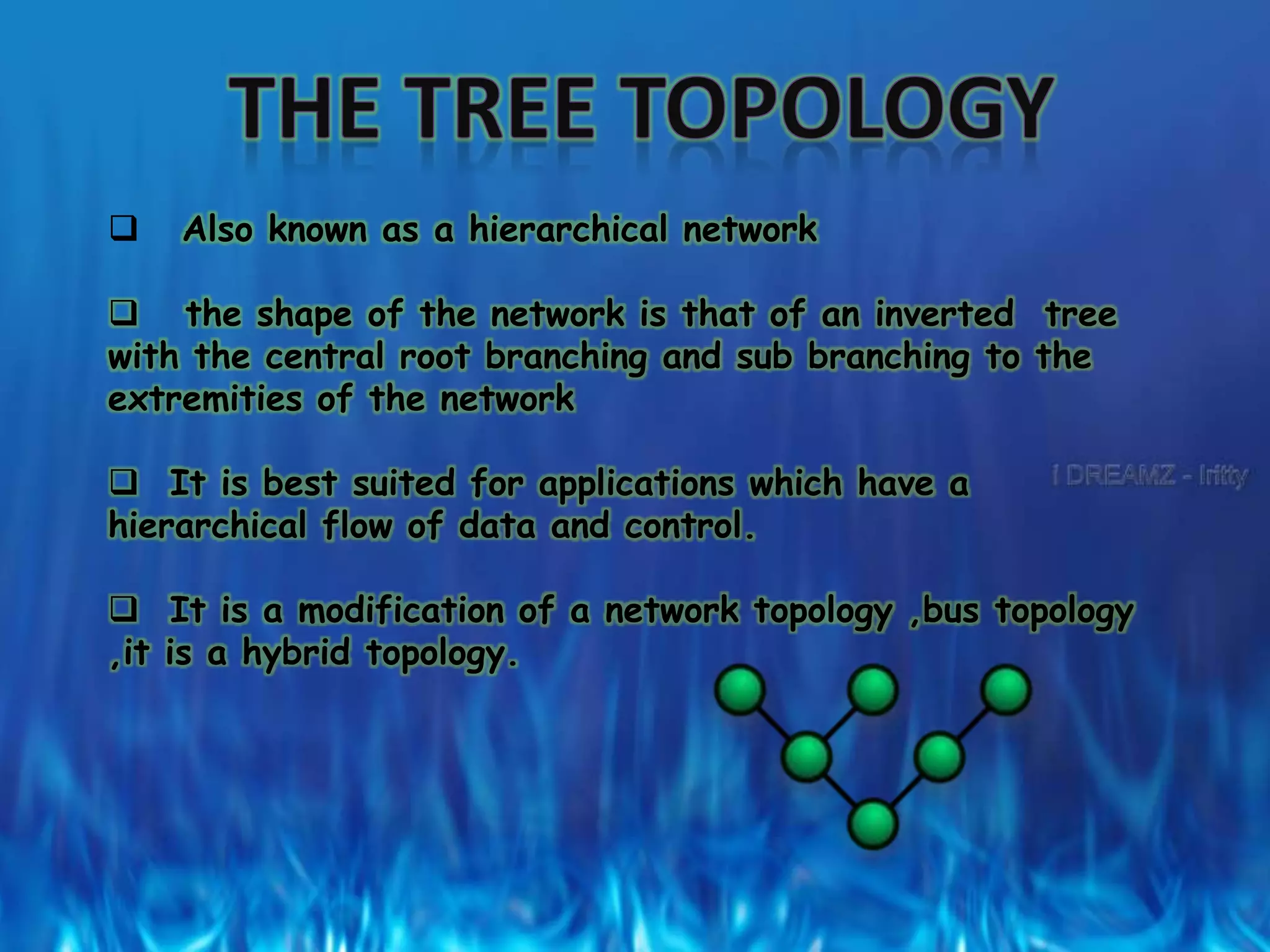
 Also known as a hierarchical network
 the shape of the network is that of an inverted tree
with the central root branching and sub branching to the
extremities of the network
 It is best suited for applications which have a
hierarchical flow of data and control.
 It is a modification of a network topology ,bus topology
,it is a hybrid topology.
In this nodes are connected together in an arbitrary
fashion.
A link may or may not connected two or more nodes.
If the path is established in two-node via one or more links
, it is called a connected graph
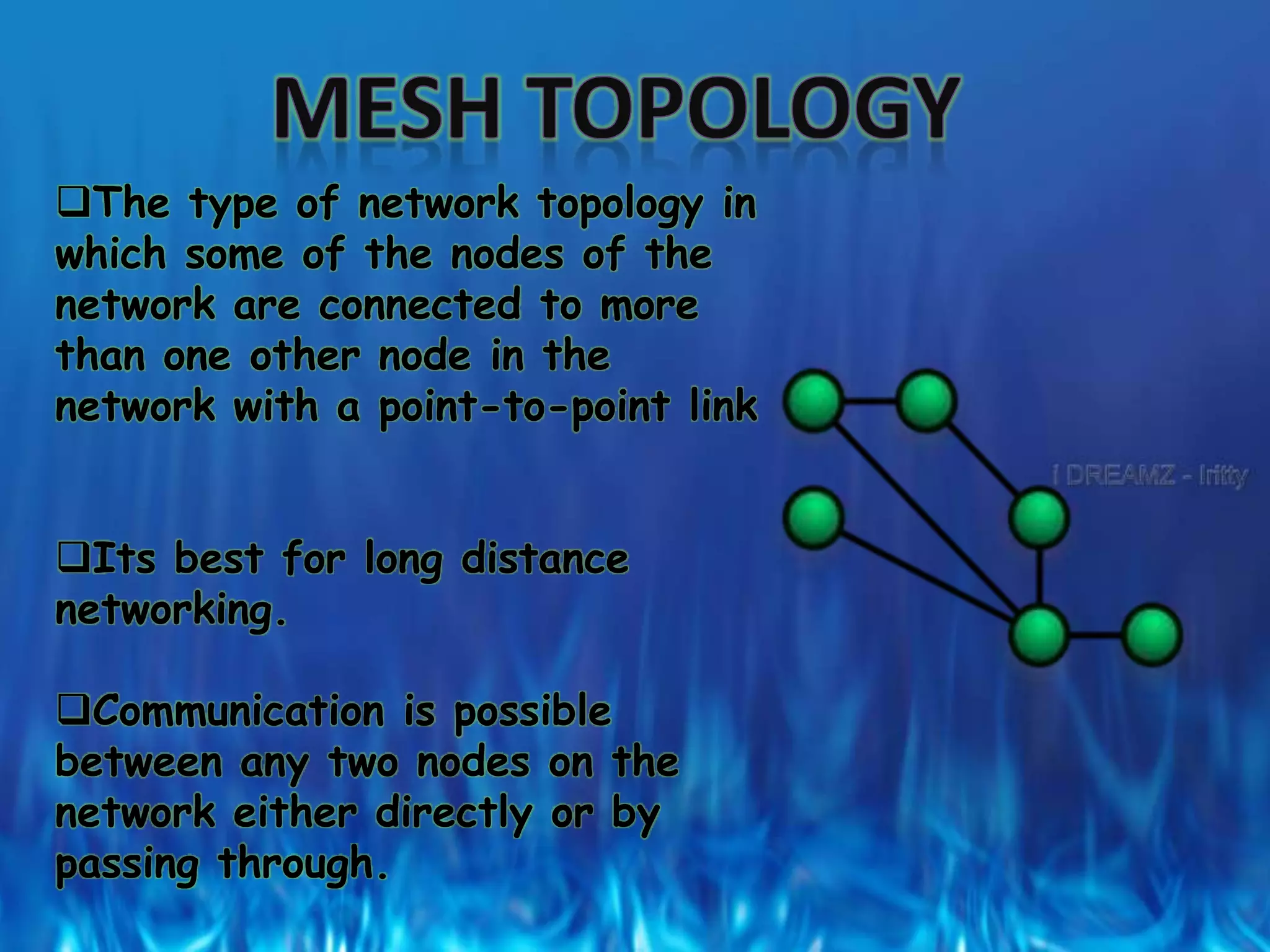
The type of network topology in
which some of the nodes of the
network are connected to more
than one other node in the
network with a point-to-point link
Its best for long distance
networking.
Communication is possible
between any two nodes on the
network either directly or by
passing through.
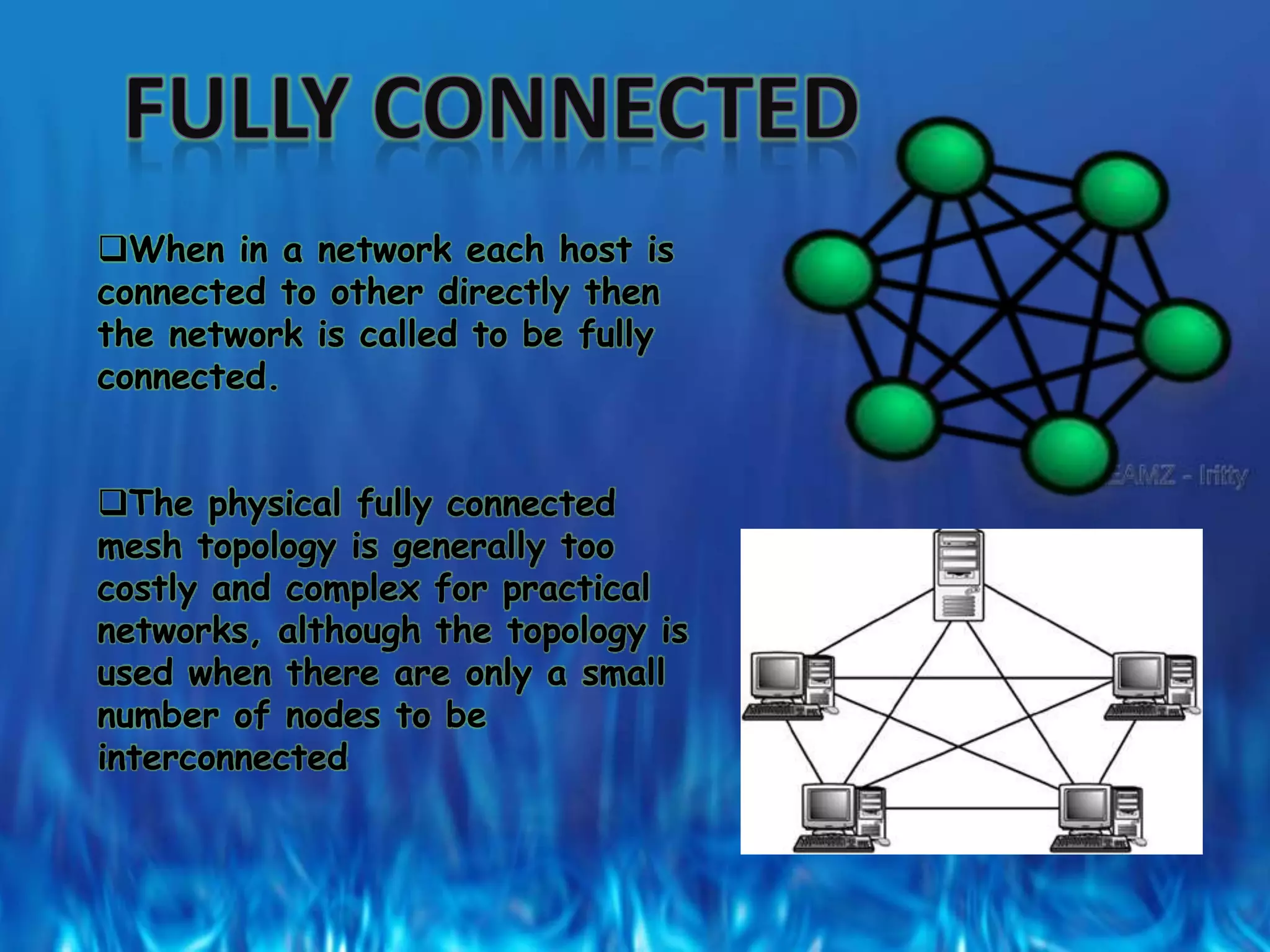
When in a network each host is
connected to other directly then
the network is called to be fully
connected.
The physical fully connected
mesh topology is generally too
costly and complex for practical
networks, although the topology is
used when there are only a small
number of nodes to be
interconnected
PROJECT BY-
• MAMTHA
• MADHURIMA
• BHARATH
• BINAY DAS

Types Of Networks

  • 2.
    A computer network,often simply referred to as a network, is a collection of computers and devices interconnected by communications channels that facilitate communications among users and allows users to share resources.
  • 3.
    LAN - LocalArea Network A LAN connects network devices over a relatively short distance. A networked office building, school, or home usually contains a single LAN, though sometimes one building will contain a few small LANs (perhaps one per room), and occasionally a LAN will span a group of nearby buildings. In addition to operating in a limited space, LANs are also typically owned, controlled, and managed by a single person or organization.
  • 4.
    A metropolitan area network(MAN) is a large computer network that usually spans a city or a large campus. A MAN usually interconnects a number of local area networks (LANs) using a high-capacity backbone technology, such as fiber- optical links, and provides up-link services to wide area networks (or WAN) and the Internet.
  • 5.
    WAN - WideArea Network As the term implies, a WAN spans a large physical distance. The Internet is the largest WAN, spanning the Earth. A WAN is a geographically-dispersed collection of LANs. A network device called a router connects LANs to a WAN. In IP networking, the router maintains both a LAN address and a WAN address.
  • 6.
    LOCAL AREA NETWORKWIDE AREA NETWORK 1.Diameter of not more than a few kilometers. 1.Span entire countries. 2.A total data rate of at least several mbps. 2.Data rate less than 1 mbps. 3.Complete ownership by a single organization. 3.Owned by multiple organization. 4.Very low error rates. 4.Comparitively higher error rates.
  • 7.
    Network topology isthe layout pattern of interconnections of the various elements (links, nodes, etc.) of a computer network. Network topologies may be physical or logical. Physical topology means the physical design of a network including the devices, location and cable installation. Logical topology refers to how data is actually transferred in a network as opposed to its physical design.
  • 8.
    Many topologies havebeen developed, but the major ones are:  the Star topology  the Bus topology  the Ring or circular  the Tree  the Graph  the Mesh
  • 9.
    STAR TOPOLOGY  Starnetworks are one of the most common computer network topologies. In its simplest form, a star network consists of one central switch, hub or computer, which acts as a conduit to transmit messages. Thus, the hub and leaf nodes, and the transmission lines between them, form a graph with the topology of a star.
  • 10.
  • 11.
    The star topologyreduces the chance of network failure by connecting all of the systems to a central node. This central hub rebroadcasts all transmissions received from any peripheral node to all peripheral nodes on the network, sometimes including the originating node. All peripheral nodes may thus communicate with all others by transmitting to, and receiving from, the central node only. The failure of a transmission line linking any peripheral node to the central node will result in the isolation of that peripheral node from all others, but the rest of the systems will be unaffected.
  • 12.
    ADVANTAGES OF STAR TOPOLOGYBetter performance: star topology prevents the passing of data packets through an excessive number of nodes. At most, 3 devices and 2 links are involved in any communication between any two devices. Although this topology places a huge overhead on the central hub, with adequate capacity, the hub can handle very high utilization by one device without affecting others.  Simplicity: This topology is easy to understand, establish, and navigate. Its simplicity obviates the need for complex routing or message passing protocols. Also, as noted earlier, the isolation and centralization it allows simplify fault detection, as each link or device can be probed individually.
  • 13.
     Isolation ofdevices: Each device is inherently isolated by the link that connects it to the hub. This makes the isolation of individual devices straightforward and amounts to disconnecting each device from the others. This isolation also prevents any non-centralized failure from affecting the network.  Easy to install and wire.  Easy to detect faults and to remove parts.  No disruptions to the network when connecting or removing devices
  • 14.
     Benefits fromcentralization: As the central hub is the bottleneck, increasing its capacity, or connecting additional devices to it, increases the size of the network very easily. Centralization also allows the inspection of traffic through the network. This facilitates analysis of the traffic and detection of suspicious behavior.
  • 15.
    DISADVANTGES OF STAR TOPOLOGY High dependence of the system on the functioning of the central hub  Failure of the central hub renders the network inoperable  The performance and scalability of the network depends on the capabilities of the hub  Wiring up of the system can be very complex and expensive
  • 16.
    Network size islimited by the number of connections that can be made to the hub Other nodes may see a performance drop if traffic to another node occupies a significant portion of the central node's processing capability or throughput.
  • 17.
    Bus topology  Abus network topology is a network architecture in which a set of clients are connected via a shared communications line, called a bus. There are several common instances of the bus architecture, including one in the motherboard of most computers, and those in some versions of Ethernet networks.
  • 18.
  • 19.
     Bus networksare the simplest way to connect multiple clients, but may have problems when two clients want to transmit at the same time on the same bus. Thus systems which use bus network architectures normally have some scheme of collision handling or collision avoidance for communication on the bus, quite often using Carrier Sense Multiple Access or the presence of a bus master which controls access to the shared bus resource.  A true bus network is passive – the computers on the bus simply listen for a signal; they are not responsible for moving the signal along.
  • 20.
     However, manyactive architectures can also be described as a "bus", as they provide the same logical functions as a passive bus; for example, switched Ethernet can still be regarded as a logical network, if not a physical one. Indeed, the hardware may be abstracted away completely in the case of a software bus.  However, almost all current wireless networks can be viewed as examples of passive bus networks, with radio propagation serving as the shared passive medium.
  • 21.
     Bus networktopology uses a broadcast channel which means that all attached stations can hear every transmission and all stations have equal priority in using the network to transmit data.  The Ethernet bus topology works like a big telephone party line — before any device can send a packet, devices on the bus must first determine that no other device is sending a packet on the cable.
  • 22.
    Advantages of lineartopology  Easy to implement and extend.  Easy to install.  Well-suited for temporary or small networks not requiring high speeds (quick setup), resulting in faster networks.  Cheaper than other topologies (But in Recent years has became less Important due Devices like a Switch)  Cost effective; only a single cable is used.  Easy identification of cable faults.  Reduced weight due to fewer wires.
  • 23.
    Disadvantages of lineartopology  Limited cable length and number of stations.  If there is a problem with the cable, the entire network breaks down.  Maintenance costs may be higher in the long run.  Performance degrades as additional computers are added or on heavy traffic (shared bandwidth).  Proper termination is required (loop must be in closed path).
  • 24.
     Significant CapacitiveLoad (each bus transaction must be able to stretch to most distant link).  It works best with limited number of nodes.  Commonly has a slower data transfer rate than other topologies.  Only one packet can remain on the bus during one clock pulse.
  • 26.
     SHORT CABLELENGTH  NO WIRING CLOSET SPACE REQUIRED  SUITABLE FOR OPTICAL FIBERS  NODE FAILURE CAUSES NETWORK FAILURE  DIFFICULT TO DIAGNOSE FAULTS  NETWORK RECONFIGURATION IS DIFFICULT
  • 27.
     Also knownas a hierarchical network  the shape of the network is that of an inverted tree with the central root branching and sub branching to the extremities of the network  It is best suited for applications which have a hierarchical flow of data and control.  It is a modification of a network topology ,bus topology ,it is a hybrid topology.
  • 28.
    In this nodesare connected together in an arbitrary fashion. A link may or may not connected two or more nodes. If the path is established in two-node via one or more links , it is called a connected graph
  • 29.
    The type ofnetwork topology in which some of the nodes of the network are connected to more than one other node in the network with a point-to-point link Its best for long distance networking. Communication is possible between any two nodes on the network either directly or by passing through.
  • 30.
    When in anetwork each host is connected to other directly then the network is called to be fully connected. The physical fully connected mesh topology is generally too costly and complex for practical networks, although the topology is used when there are only a small number of nodes to be interconnected
  • 31.
    PROJECT BY- • MAMTHA •MADHURIMA • BHARATH • BINAY DAS