Technology In Action Chapter 3 Using the Internet:  Making the Most of the Web’s Resources
Communications
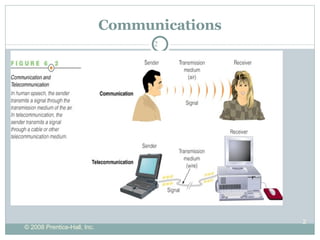
Communications Communication is the transmission of a signal from a sender to a receiver by way of a medium. The signal contains a   message composed of data and information.  For communication to be effective, both sender and receiver must understand the signals and agree on the way they are to be interpreted.
An Overview of Telecommunications Telecommunications:  the electronic transmission of signals for communications Telecommunications medium:  anything that carries an electronic signal and interfaces between a sending device and a receiving device
Telecommunications
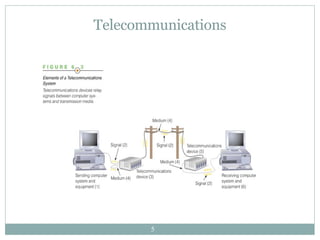
Telecommunications It starts with a sending unit (1), such as a person, a computer system, a terminal, or another device, that originates the message. The sending unit transmits a signal (2) to a telecommunications device (3).  The telecommunications device performs a number of functions, which can include converting the signal into a different form or from one type to another.  The telecommunications device then sends the signal through a medium(4).
Telecommunications A telecommunications medium is anything that carries an electronic signal and interfaces between a sending device and a receiving device.  The signal is received by another telecommunications device (5) that is connected to the receiving computer (6).  The process can then be reversed and another message can go back from the receiving unit (6) to the original sending unit (1).
Telecommunications Data Communication – A specialized subset of telecommunications that refers to the electronic collection, processing, and distribution of data – typically between computer system hardware devices.
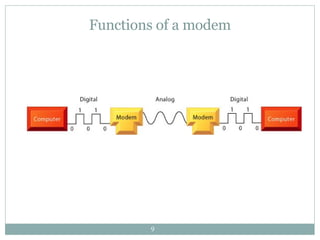
Functions of a modem
Channel Bandwidth Telecommunications professionals consider the capacity of the communications path or channel when they recommend transmission media for a business Channel bandwidth:  the rate at which data is exchanged over a communication channel Usually measured in bits per second (bps) Narrowband channels provide rates up to 64K BPS (twisted pair) Broadband begins with 1.5 MBS
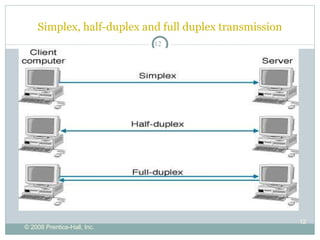
Basic Communications Channel Characteristics Simplex channel A communication channel that can transmit data in only one direction Half-duplex channel A communication channel that can transmit data in either direction, but not simultaneously. Full-duplex channel A communication channel that permits data transmission in both directions at the same time.
Simplex, half-duplex and full duplex transmission
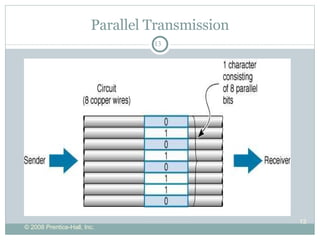
Parallel Transmission
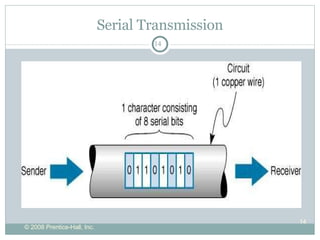
Serial Transmission
The Internet: The Basics Origin of the Internet The Internet vs. the Web Clients and servers Connecting to the Internet
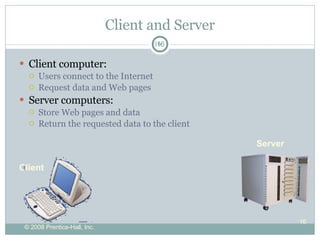
Client and Server Client computer: Users connect to the Internet Request data and Web pages Server computers: Store Web pages and data Return the requested data to the client Server Client
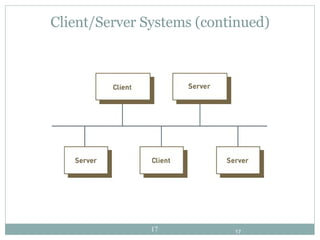
Client/Server Systems (continued)
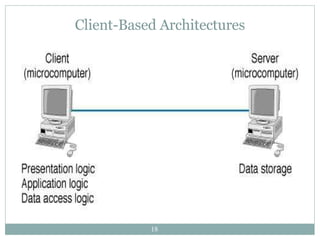
Client-Based Architectures
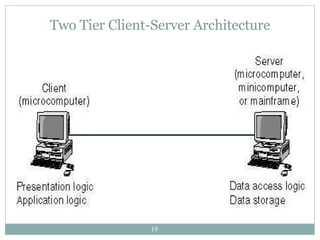
Two Tier Client-Server Architecture
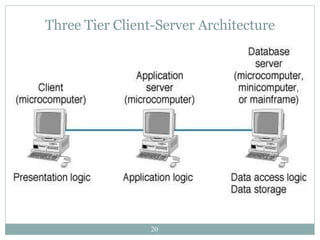
Three Tier Client-Server Architecture
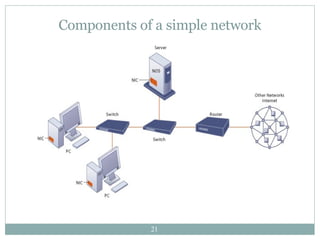
Components of a simple network
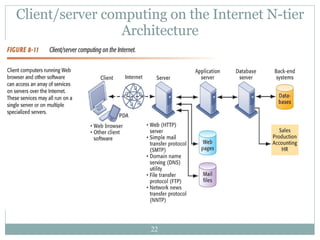
Client/server computing on the Internet N-tier Architecture
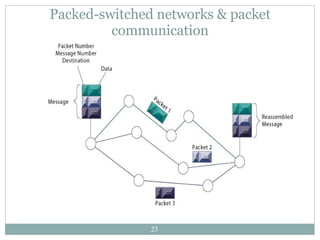
Packed-switched networks & packet communication
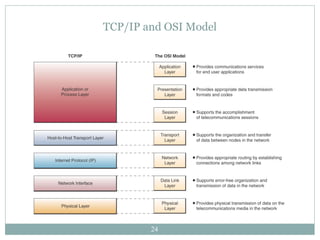
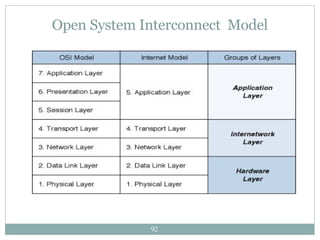
TCP/IP and OSI Model
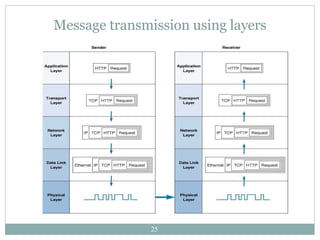
Message transmission using layers
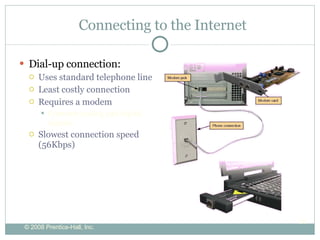
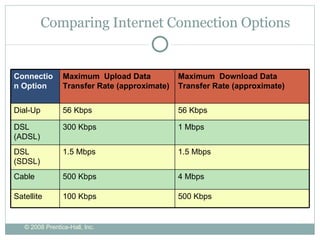
Connecting to the Internet Dial-up connection: Uses standard telephone line Least costly connection Requires a modem Converts analog and digital signals Slowest connection speed (56Kbps)
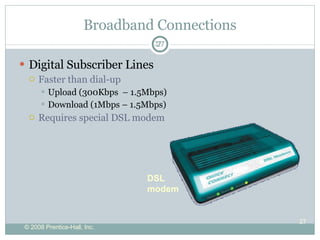
Broadband Connections Digital Subscriber Lines Faster than dial-up  Upload (300Kbps  – 1.5Mbps) Download (1Mbps – 1.5Mbps) Requires special DSL modem DSL modem
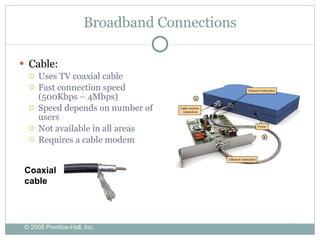
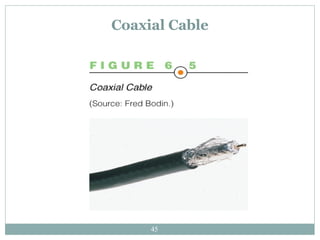
Broadband Connections Cable: Uses TV coaxial cable Fast connection speed (500Kbps – 4Mbps) Speed depends on number of users Not available in all areas Requires a cable modem Coaxial cable
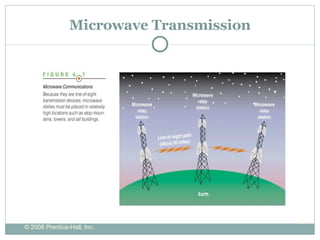
Microwave Transmission
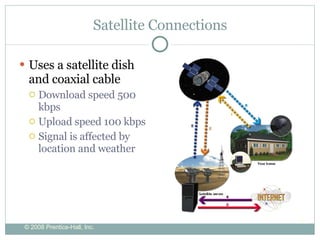
Satellite Connections Uses a satellite dish and coaxial cable Download speed 500 kbps Upload speed 100 kbps Signal is affected by location and weather
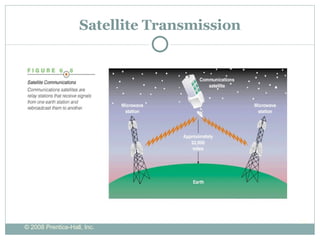
Satellite Transmission
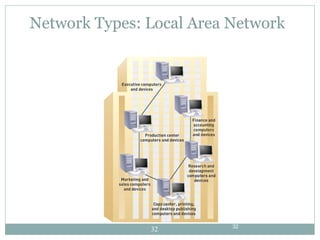
Network Types: Local Area Network
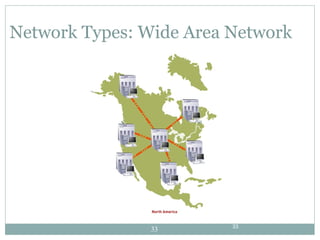
Network Types: Wide Area Network
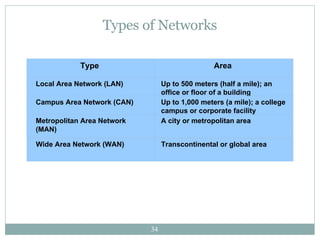
Types of Networks Type   Area  Local Area Network (LAN)  Up to 500 meters (half a mile); an office or floor of a building  Campus Area Network (CAN)  Up to 1,000 meters (a mile); a college campus or corporate facility  Metropolitan Area Network (MAN)  A city or metropolitan area  Wide Area Network (WAN)  Transcontinental or global area
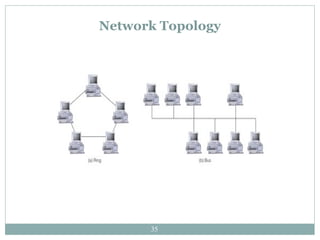
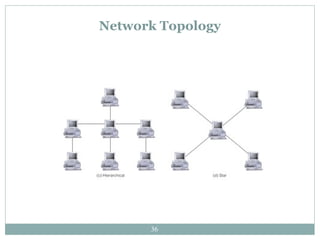
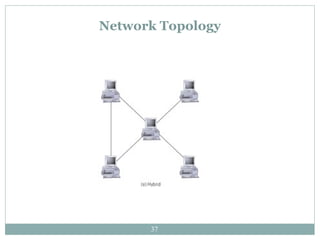
Network Topology
Network Topology
Network Topology
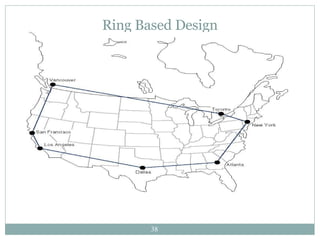
Ring Based Design
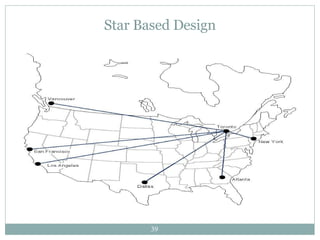
Star Based Design
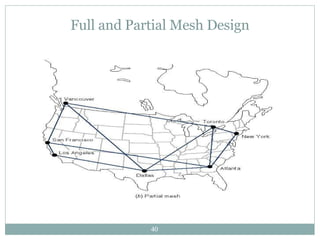
Full and Partial Mesh Design
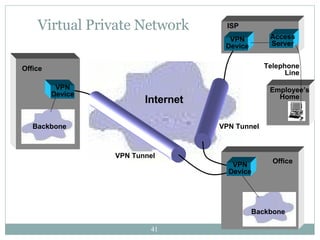
Virtual Private Network Internet VPN Tunnel VPN Tunnel VPN Device Backbone Backbone Office Office VPN Device VPN Device Telephone Line ISP Employee’s Home Access Server
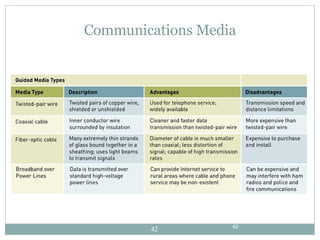
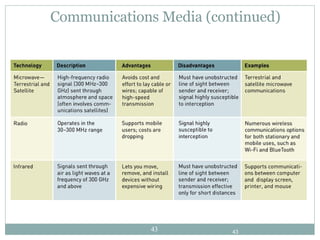
Communications Media
Communications Media (continued)
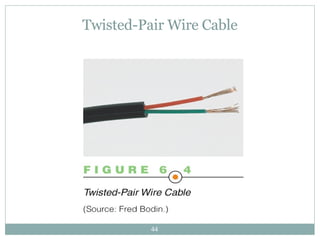
Twisted-Pair Wire Cable
Coaxial Cable
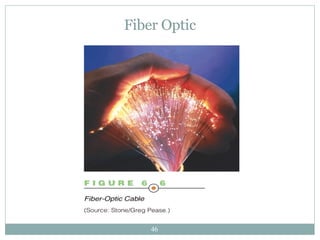
Fiber Optic
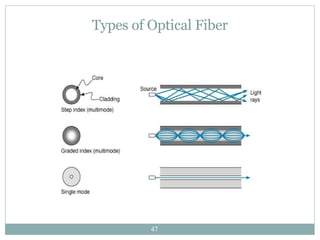
Types of Optical Fiber
Communications Software and Protocols Communications protocol:  a set of rules that govern the exchange of information over a communications channel Protocols govern several levels of a telecommunications network, such as: Hardware device level Application program level
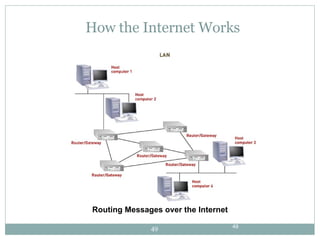
How the Internet Works Routing Messages over the Internet
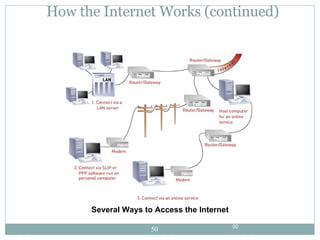
How the Internet Works (continued) Several Ways to Access the Internet
Comparing Internet Connection Options Connection Option Maximum  Upload Data Transfer Rate (approximate) Maximum  Download Data Transfer Rate (approximate) Dial-Up 56 Kbps 56 Kbps DSL (ADSL) 300 Kbps 1 Mbps DSL (SDSL) 1.5 Mbps 1.5 Mbps Cable 500 Kbps 4 Mbps Satellite 100 Kbps 500 Kbps
Choosing an ISP Factors to consider: Customer service Local access numbers E-mail options  Cost Trial period
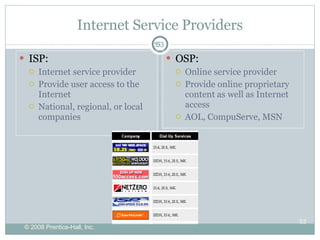
Internet Service Providers ISP: Internet service provider Provide user access to the Internet National, regional, or local companies OSP: Online service provider Provide online proprietary content as well as Internet access AOL, CompuServe, MSN
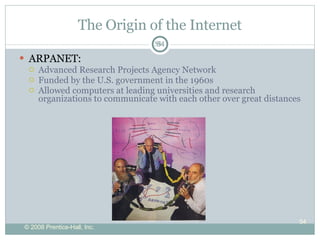
The Origin of the Internet ARPANET: Advanced Research Projects Agency Network Funded by the U.S. government in the 1960s Allowed computers at leading universities and research organizations to communicate with each other over great distances
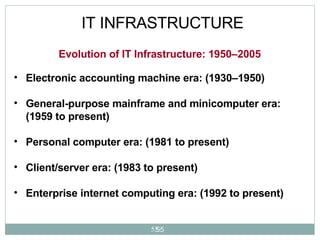
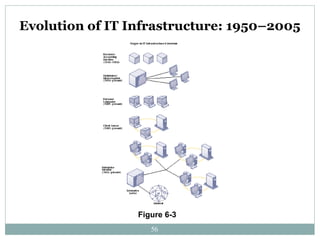
IT INFRASTRUCTURE Electronic accounting machine era: (1930–1950) General-purpose mainframe and minicomputer era: (1959 to present) Personal computer era: (1981 to present) Client/server era: (1983 to present) Enterprise internet computing era: (1992 to present)   Evolution of IT Infrastructure: 1950–2005
Evolution of IT Infrastructure: 1950–2005 Figure 6-3
The Web The Web is a part of the Internet distinguished by: common communication protocols TCP/IP and HTML special links (called  hyperlinks )  Web invented in 1989 by Tim Berners-Lee 1993, National Center for Supercomputing Applications releases the Mosaic browser  Developers of Mosaic release Netscape (1994) Netscape is beginning of Web’s major growth
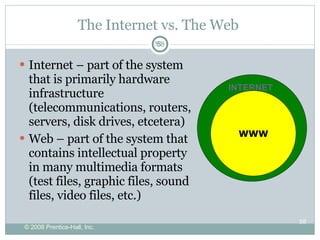
The Internet vs. The Web  Internet – part of the system that is primarily hardware infrastructure (telecommunications, routers, servers, disk drives, etcetera) Web – part of the system that contains intellectual property in many multimedia formats (test files, graphic files, sound files, video files, etc.) INTERNET WWW
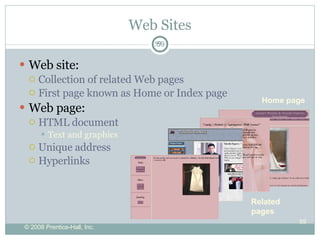
Web Sites Web site: Collection of related Web pages First page known as Home or Index page Web page: HTML document Text and graphics Unique address Hyperlinks  Home page Related  pages
The World Wide Web (continued) Hypertext Markup Language (HTML):  the standard page description language for Web pages HTML tags:  codes that let the Web browser know how to format text - as a heading, as a list, or as body text - and whether images, sound, and other elements should be inserted
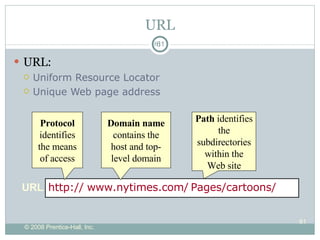
URL URL: Uniform Resource Locator Unique Web page address URL http:// Protocol  identifies the means of access www.nytimes.com/ Domain name  contains the host and top-level domain Pages/cartoons/ Path  identifies the subdirectories within the Web site
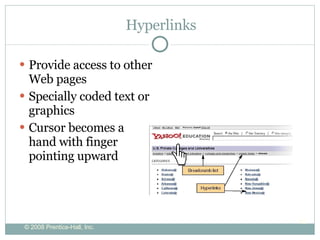
Hyperlinks  Provide access to other Web pages Specially coded text or graphics Cursor becomes a hand with finger pointing upward
Internet Communications Instant Messaging Voice over Internet (VoIP) Weblogs Podcasts Webcasts and Wikis Chat Rooms Newsgroups E-mail
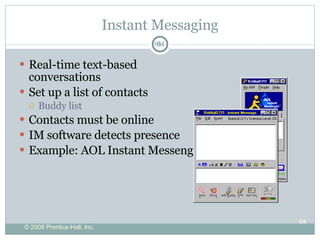
Instant Messaging Real-time text-based conversations Set up a list of contacts Buddy list Contacts must be online IM software detects presence  Example: AOL Instant Messenger
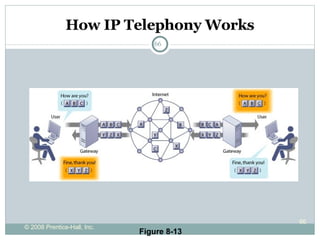
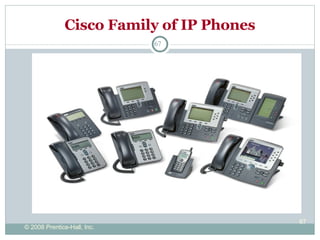
Voice over Internet Protocol VoIP  - The Internet as a means to place phone calls Uses technology similar to  e-mail to send  voice data digitally  Requires a microphone an Internet connection A  VoIP provider Services differ Free services require an account on both ends Paid services connect phone to computer Cable and DSL providers offer phone through broadband WiFi IP phones  call through Internet hotspots and wireless networks
How IP Telephony Works Figure 8-13
Cisco Family of IP Phones
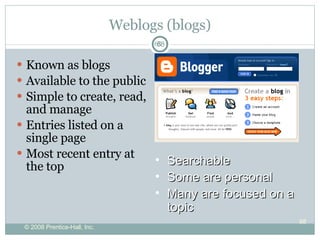
Weblogs (blogs) Known as blogs Available to the public Simple to create, read, and manage Entries listed on a single page Most recent entry at the top Searchable Some are personal Many are focused on a topic
Podcasts Video blog (vlog) – entries are video clips Podcasts – compressed audio/video files distributed on the Internet RSS (Really Simple Syndication) technology allows constant updates for subscribers Podcasts are all over the Web  Requires “aggregator” software to gather podcasts Requires media player software to play them Simple to create and attach RSS files
Webcasts and Wikis Webcasts  broadcast audio/visual files but are not updated use  streaming  media A  wiki  is a Web site that allows anyone to change its content  Wikis  provide an excellent source for collaborative writing  Unlike blogs,  wikis  can be edited for a  “common” opinion
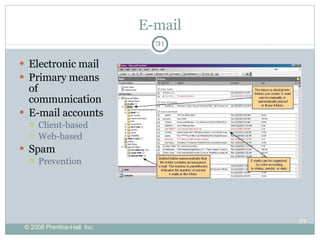
E-mail Electronic mail Primary means of communication E-mail accounts Client-based Web-based Spam  Prevention
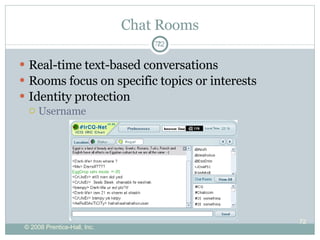
Chat Rooms Real-time text-based conversations Rooms focus on specific topics or interests Identity protection Username
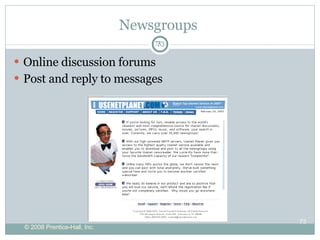
Newsgroups  Online discussion forums Post and reply to messages
Social Networking Social networking   sites like  MySpace.com Members share common interests Members communicate by voice, chat, instant message, video, and blogs  Members create personalized profiles  Growth has been explosive  Risks must be recognized and reduced
Web Entertainment Multimedia: Involves forms of media and text Graphics Audio Video Streaming audio and video Plug-in
Online Annoyances Spam – electronic junk mail Pop-ups – intrusive advertising Cookies – tracking user’s browsing habits Spyware – programs that collect data from a user’s computer Malware -  software that has a malicious intent  Phishing and Hoaxes – Ruses to fool and maybe steal from users
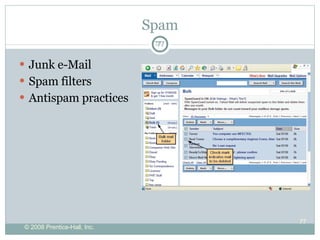
Spam Junk e-Mail Spam filters Antispam practices
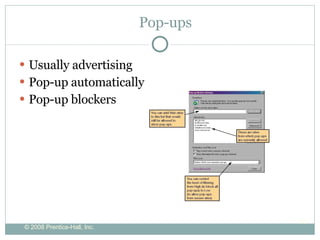
Pop-ups Usually advertising Pop-up automatically Pop-up blockers
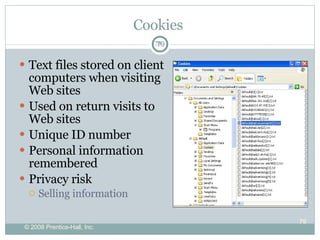
Cookies  Text files stored on client computers when visiting Web sites Used on return visits to Web sites Unique ID number Personal information remembered Privacy risk Selling information
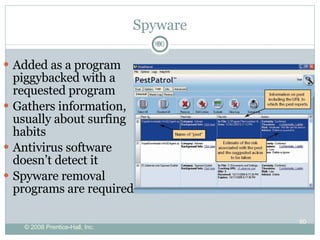
Spyware Added as a program piggybacked with a requested program Gathers information, usually about surfing habits Antivirus software doesn’t detect it Spyware removal programs are required
Malware Software that has a malicious intent  Spyware is a form of malware Other forms are viruses, worms, and Trojan horses Designed to render a computer useless or penetrate it completely
Phishing and Hoaxes Phishing is a phony communication Attempts to scam someone into sending vital information Hoaxes are attempts to scam people into sending money, or join a chain letter
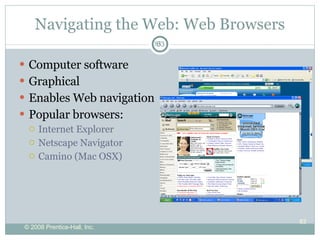
Navigating the Web: Web Browsers Computer software Graphical Enables Web navigation Popular browsers: Internet Explorer Netscape Navigator Camino (Mac OSX)
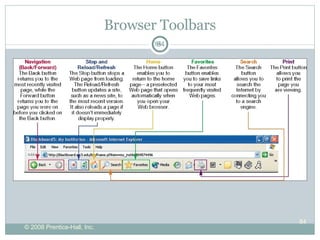
Browser Toolbars
Getting Around the Web Web sites URLs Hyperlinks Favorites and Bookmarks
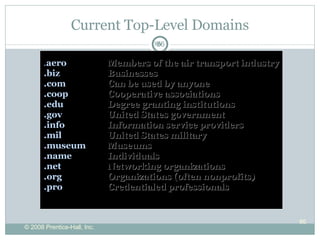
Current Top-Level Domains . aero   Members of the air transport industry .biz   Businesses .com   Can be used by anyone .coop   Cooperative associations .edu   Degree granting institutions .gov United States government .info   Information service providers .mil   United States military . museum  Museums . name  Individuals .net   Networking organizations .org   Organizations (often nonprofits) .pro  Credentialed professionals
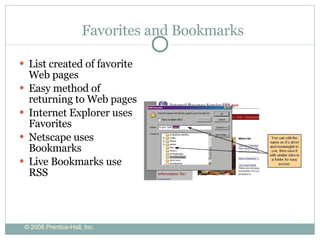
Favorites and Bookmarks List created of favorite Web pages Easy method of returning to Web pages Internet Explorer uses Favorites Netscape uses Bookmarks Live Bookmarks use RSS
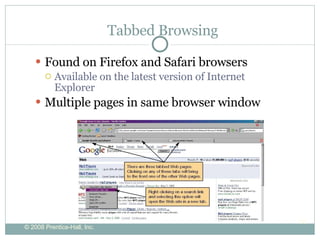
Tabbed Browsing Found on Firefox and Safari browsers  Available on the latest version of Internet Explorer  Multiple pages in same browser window
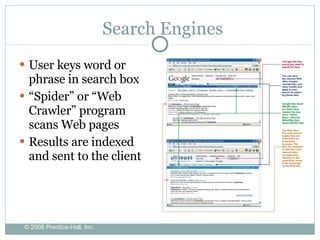
Search Engines User keys word or phrase in search box “ Spider” or “Web Crawler” program scans Web pages Results are indexed and sent to the client
What do YOU use the web for? ???
Information technology infrastructure:   The Internet  provides a universal and easy-to-use set of technologies and technology standards that can be adopted by all organizations. Direct communication between trading partners:  Disintermediation removes intermediate layers and streamlines processes.   ELECTRONIC BUSINESS, ELECTRONIC COMMERCE, AND THE EMERGING DIGITAL FIRM
Open System Interconnect  Model
ELECTRONIC BUSINESS, ELECTRONIC COMMERCE, AND THE EMERGING DIGITAL FIRM   Round the clock service:  Web sites available to consumers 24 hours Extended distribution channels:  Outlets created for attracting customers who otherwise would not patronize a firm  Reduced transaction costs:  Costs of searching for buyers declines
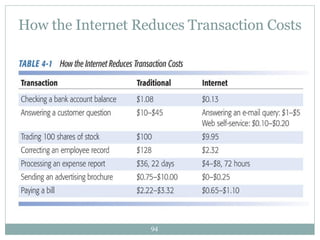
How the Internet Reduces Transaction Costs
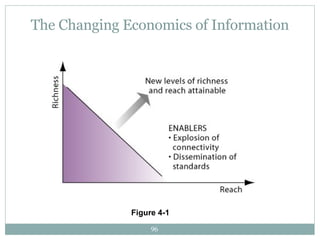
Information asymmetry:  One party in a transaction has more information than the other. The Internet decreases information asymmetry. Increases richness:  The Internet increases the depth, detail, and scope of information. Increases reach:  The Internet increases the number of people who can be contacted efficiently.  ELECTRONIC BUSINESS, ELECTRONIC COMMERCE, AND THE EMERGING DIGITAL FIRM
The Changing Economics of Information Figure 4-1
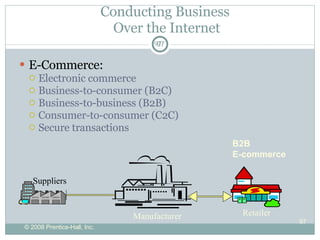
Conducting Business  Over the Internet E-Commerce: Electronic commerce Business-to-consumer (B2C) Business-to-business (B2B) Consumer-to-consumer (C2C) Secure transactions B2B E-commerce Manufacturer Suppliers Retailer
Business-To-Consumer   Advantages of E-commerce: Customer-centered retailing:  Closer and more personalized relationship with customers is possible  Web sites:  Provide a corporate-centered portal for the consumer to quickly find information on products, services, prices, orders
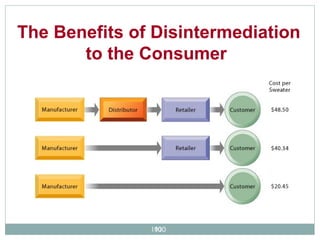
Disintermediation:  The elimination  of organizations or business process layers responsible for certain intermediary steps in a value chain, reducing costs to the consumer  Reintermediation:  The shifting of the intermediary role in a value chain to a new source, adding additional value to the consumer  Business-To-Consumer
The Benefits of Disintermediation to the Consumer
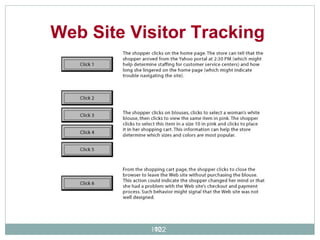
Clickstream tracking tools:   Collect data on customer activities at Web sites and store them in a log  Interactive Marketing and Personalization
Web Site Visitor Tracking
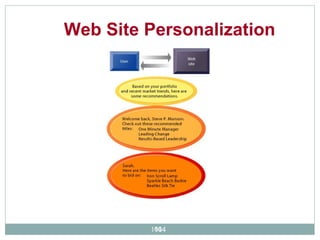
Create unique personalized Web pages for each customer Increased closeness to customer increases value to the customer, while reducing costs of interacting with the customer  Web Personalization
Web Site Personalization
Compares information gathered about a specific user’s behavior at a Web site to data about other customers with similar interests to predict what the user would like to see next. The software then makes recommendations to users based on their assumed interests . Collaborative filtering:
The use of Web sites to provide customers with access to information and answers to questions Replacing human call center operators and clerks UPS.com: Customer tracking of packages Orbitz.com: Customer self-help for organizing and managing a trip Dell.com: “My Order Status” facility  Customer self-service:
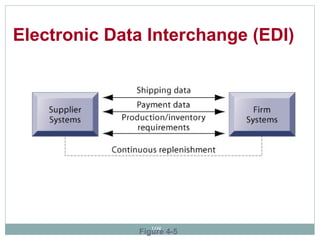
Electronic Data Interchange (EDI):  Enables the computer-to-computer exchange between two organizations of standard transactions.  Currently 80% of B2B e-commerce uses this system.  EDI is being replaced by more powerful Web-based alternatives.  Business-to-Business Electronic Commerce
  Electronic Data Interchange (EDI)  Figure 4-5
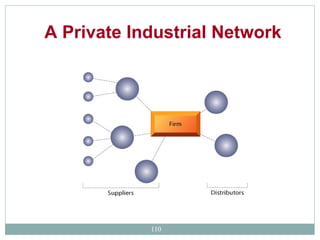
The largest Web-based form of B2B commerce  Private B2B extranets that focus on continuous business process coordination between a small group of companies for collaboration and supply chain management.  Wal-Mart uses its own private network to coordinate more than 15,000 suppliers to its stores. A Private Industrial Network
A Private Industrial Network
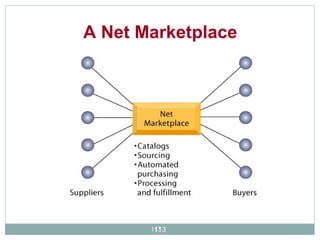
Distributors:  B2B online catalogs provide buyers with access to thousands of parts and other goods  (Grainger.com)  Procurement platforms:  Platforms for purchasing goods and materials and also sourcing, negotiating with suppliers,  paying for goods, and making delivery arrangements (Ariba.com)   Four different types of Net Marketplaces:   Net Marketplaces
Independent exchanges:  Third-party Net marketplace that is primarily transaction-oriented and that connects many buyers and suppliers for spot purchasing (Freemarkets.com, GEPolymerland.com) Industry consortia:  Industry-owned Net marketplaces used primarily for long-term sourcing of direct inputs to production (ChemConnect.com) Net Marketplaces Four different types of Net Marketplaces: (Continued)
A Net Marketplace
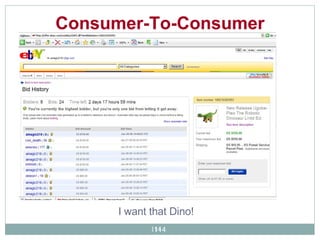
Consumer-To-Consumer   I want that Dino!
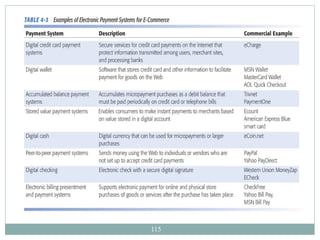
Electronic Commerce Payment Systems
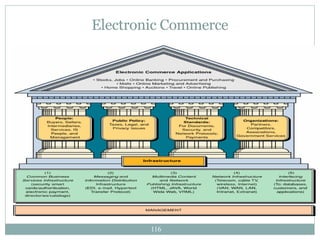
Electronic Commerce
Now that I know hardware, software and network, I want to build something!  Personal Video Recorder – record TV shows and watch it at anytime, skip commercials Slingbox  http://www.slingmedia.com/ Build your own PVR A used computer, a wireless network card, TV tuner/capture card, home wireless network, ubuntu operating system, MythTV video recording software  ( http://www.byopvr.com/Sections+index-req-viewarticle-artid-10-page-1.html ) How does it look?  http://www.youtube.com/watch?v=-jH_E3NmX8U

Using The Internet7

  • 1.
    Technology In ActionChapter 3 Using the Internet: Making the Most of the Web’s Resources
  • 2.
  • 3.
    Communications Communication isthe transmission of a signal from a sender to a receiver by way of a medium. The signal contains a message composed of data and information. For communication to be effective, both sender and receiver must understand the signals and agree on the way they are to be interpreted.
  • 4.
    An Overview ofTelecommunications Telecommunications: the electronic transmission of signals for communications Telecommunications medium: anything that carries an electronic signal and interfaces between a sending device and a receiving device
  • 5.
  • 6.
    Telecommunications It startswith a sending unit (1), such as a person, a computer system, a terminal, or another device, that originates the message. The sending unit transmits a signal (2) to a telecommunications device (3). The telecommunications device performs a number of functions, which can include converting the signal into a different form or from one type to another. The telecommunications device then sends the signal through a medium(4).
  • 7.
    Telecommunications A telecommunicationsmedium is anything that carries an electronic signal and interfaces between a sending device and a receiving device. The signal is received by another telecommunications device (5) that is connected to the receiving computer (6). The process can then be reversed and another message can go back from the receiving unit (6) to the original sending unit (1).
  • 8.
    Telecommunications Data Communication– A specialized subset of telecommunications that refers to the electronic collection, processing, and distribution of data – typically between computer system hardware devices.
  • 9.
  • 10.
    Channel Bandwidth Telecommunicationsprofessionals consider the capacity of the communications path or channel when they recommend transmission media for a business Channel bandwidth: the rate at which data is exchanged over a communication channel Usually measured in bits per second (bps) Narrowband channels provide rates up to 64K BPS (twisted pair) Broadband begins with 1.5 MBS
  • 11.
    Basic Communications ChannelCharacteristics Simplex channel A communication channel that can transmit data in only one direction Half-duplex channel A communication channel that can transmit data in either direction, but not simultaneously. Full-duplex channel A communication channel that permits data transmission in both directions at the same time.
  • 12.
    Simplex, half-duplex andfull duplex transmission
  • 13.
  • 14.
  • 15.
    The Internet: TheBasics Origin of the Internet The Internet vs. the Web Clients and servers Connecting to the Internet
  • 16.
    Client and ServerClient computer: Users connect to the Internet Request data and Web pages Server computers: Store Web pages and data Return the requested data to the client Server Client
  • 17.
  • 18.
  • 19.
  • 20.
  • 21.
    Components of asimple network
  • 22.
    Client/server computing onthe Internet N-tier Architecture
  • 23.
    Packed-switched networks &packet communication
  • 24.
  • 25.
  • 26.
    Connecting to theInternet Dial-up connection: Uses standard telephone line Least costly connection Requires a modem Converts analog and digital signals Slowest connection speed (56Kbps)
  • 27.
    Broadband Connections DigitalSubscriber Lines Faster than dial-up Upload (300Kbps – 1.5Mbps) Download (1Mbps – 1.5Mbps) Requires special DSL modem DSL modem
  • 28.
    Broadband Connections Cable:Uses TV coaxial cable Fast connection speed (500Kbps – 4Mbps) Speed depends on number of users Not available in all areas Requires a cable modem Coaxial cable
  • 29.
  • 30.
    Satellite Connections Usesa satellite dish and coaxial cable Download speed 500 kbps Upload speed 100 kbps Signal is affected by location and weather
  • 31.
  • 32.
  • 33.
    Network Types: WideArea Network
  • 34.
    Types of NetworksType Area Local Area Network (LAN) Up to 500 meters (half a mile); an office or floor of a building Campus Area Network (CAN) Up to 1,000 meters (a mile); a college campus or corporate facility Metropolitan Area Network (MAN) A city or metropolitan area Wide Area Network (WAN) Transcontinental or global area
  • 35.
  • 36.
  • 37.
  • 38.
  • 39.
  • 40.
    Full and PartialMesh Design
  • 41.
    Virtual Private NetworkInternet VPN Tunnel VPN Tunnel VPN Device Backbone Backbone Office Office VPN Device VPN Device Telephone Line ISP Employee’s Home Access Server
  • 42.
  • 43.
  • 44.
  • 45.
  • 46.
  • 47.
  • 48.
    Communications Software andProtocols Communications protocol: a set of rules that govern the exchange of information over a communications channel Protocols govern several levels of a telecommunications network, such as: Hardware device level Application program level
  • 49.
    How the InternetWorks Routing Messages over the Internet
  • 50.
    How the InternetWorks (continued) Several Ways to Access the Internet
  • 51.
    Comparing Internet ConnectionOptions Connection Option Maximum Upload Data Transfer Rate (approximate) Maximum Download Data Transfer Rate (approximate) Dial-Up 56 Kbps 56 Kbps DSL (ADSL) 300 Kbps 1 Mbps DSL (SDSL) 1.5 Mbps 1.5 Mbps Cable 500 Kbps 4 Mbps Satellite 100 Kbps 500 Kbps
  • 52.
    Choosing an ISPFactors to consider: Customer service Local access numbers E-mail options Cost Trial period
  • 53.
    Internet Service ProvidersISP: Internet service provider Provide user access to the Internet National, regional, or local companies OSP: Online service provider Provide online proprietary content as well as Internet access AOL, CompuServe, MSN
  • 54.
    The Origin ofthe Internet ARPANET: Advanced Research Projects Agency Network Funded by the U.S. government in the 1960s Allowed computers at leading universities and research organizations to communicate with each other over great distances
  • 55.
    IT INFRASTRUCTURE Electronicaccounting machine era: (1930–1950) General-purpose mainframe and minicomputer era: (1959 to present) Personal computer era: (1981 to present) Client/server era: (1983 to present) Enterprise internet computing era: (1992 to present) Evolution of IT Infrastructure: 1950–2005
  • 56.
    Evolution of ITInfrastructure: 1950–2005 Figure 6-3
  • 57.
    The Web TheWeb is a part of the Internet distinguished by: common communication protocols TCP/IP and HTML special links (called hyperlinks ) Web invented in 1989 by Tim Berners-Lee 1993, National Center for Supercomputing Applications releases the Mosaic browser Developers of Mosaic release Netscape (1994) Netscape is beginning of Web’s major growth
  • 58.
    The Internet vs.The Web Internet – part of the system that is primarily hardware infrastructure (telecommunications, routers, servers, disk drives, etcetera) Web – part of the system that contains intellectual property in many multimedia formats (test files, graphic files, sound files, video files, etc.) INTERNET WWW
  • 59.
    Web Sites Website: Collection of related Web pages First page known as Home or Index page Web page: HTML document Text and graphics Unique address Hyperlinks Home page Related pages
  • 60.
    The World WideWeb (continued) Hypertext Markup Language (HTML): the standard page description language for Web pages HTML tags: codes that let the Web browser know how to format text - as a heading, as a list, or as body text - and whether images, sound, and other elements should be inserted
  • 61.
    URL URL: UniformResource Locator Unique Web page address URL http:// Protocol identifies the means of access www.nytimes.com/ Domain name contains the host and top-level domain Pages/cartoons/ Path identifies the subdirectories within the Web site
  • 62.
    Hyperlinks Provideaccess to other Web pages Specially coded text or graphics Cursor becomes a hand with finger pointing upward
  • 63.
    Internet Communications InstantMessaging Voice over Internet (VoIP) Weblogs Podcasts Webcasts and Wikis Chat Rooms Newsgroups E-mail
  • 64.
    Instant Messaging Real-timetext-based conversations Set up a list of contacts Buddy list Contacts must be online IM software detects presence Example: AOL Instant Messenger
  • 65.
    Voice over InternetProtocol VoIP - The Internet as a means to place phone calls Uses technology similar to e-mail to send voice data digitally Requires a microphone an Internet connection A VoIP provider Services differ Free services require an account on both ends Paid services connect phone to computer Cable and DSL providers offer phone through broadband WiFi IP phones call through Internet hotspots and wireless networks
  • 66.
    How IP TelephonyWorks Figure 8-13
  • 67.
    Cisco Family ofIP Phones
  • 68.
    Weblogs (blogs) Knownas blogs Available to the public Simple to create, read, and manage Entries listed on a single page Most recent entry at the top Searchable Some are personal Many are focused on a topic
  • 69.
    Podcasts Video blog(vlog) – entries are video clips Podcasts – compressed audio/video files distributed on the Internet RSS (Really Simple Syndication) technology allows constant updates for subscribers Podcasts are all over the Web Requires “aggregator” software to gather podcasts Requires media player software to play them Simple to create and attach RSS files
  • 70.
    Webcasts and WikisWebcasts broadcast audio/visual files but are not updated use streaming media A wiki is a Web site that allows anyone to change its content Wikis provide an excellent source for collaborative writing Unlike blogs, wikis can be edited for a “common” opinion
  • 71.
    E-mail Electronic mailPrimary means of communication E-mail accounts Client-based Web-based Spam Prevention
  • 72.
    Chat Rooms Real-timetext-based conversations Rooms focus on specific topics or interests Identity protection Username
  • 73.
    Newsgroups Onlinediscussion forums Post and reply to messages
  • 74.
    Social Networking Socialnetworking sites like MySpace.com Members share common interests Members communicate by voice, chat, instant message, video, and blogs Members create personalized profiles Growth has been explosive Risks must be recognized and reduced
  • 75.
    Web Entertainment Multimedia:Involves forms of media and text Graphics Audio Video Streaming audio and video Plug-in
  • 76.
    Online Annoyances Spam– electronic junk mail Pop-ups – intrusive advertising Cookies – tracking user’s browsing habits Spyware – programs that collect data from a user’s computer Malware - software that has a malicious intent Phishing and Hoaxes – Ruses to fool and maybe steal from users
  • 77.
    Spam Junk e-MailSpam filters Antispam practices
  • 78.
    Pop-ups Usually advertisingPop-up automatically Pop-up blockers
  • 79.
    Cookies Textfiles stored on client computers when visiting Web sites Used on return visits to Web sites Unique ID number Personal information remembered Privacy risk Selling information
  • 80.
    Spyware Added asa program piggybacked with a requested program Gathers information, usually about surfing habits Antivirus software doesn’t detect it Spyware removal programs are required
  • 81.
    Malware Software thathas a malicious intent Spyware is a form of malware Other forms are viruses, worms, and Trojan horses Designed to render a computer useless or penetrate it completely
  • 82.
    Phishing and HoaxesPhishing is a phony communication Attempts to scam someone into sending vital information Hoaxes are attempts to scam people into sending money, or join a chain letter
  • 83.
    Navigating the Web:Web Browsers Computer software Graphical Enables Web navigation Popular browsers: Internet Explorer Netscape Navigator Camino (Mac OSX)
  • 84.
  • 85.
    Getting Around theWeb Web sites URLs Hyperlinks Favorites and Bookmarks
  • 86.
    Current Top-Level Domains. aero Members of the air transport industry .biz Businesses .com Can be used by anyone .coop Cooperative associations .edu Degree granting institutions .gov United States government .info Information service providers .mil United States military . museum Museums . name Individuals .net Networking organizations .org Organizations (often nonprofits) .pro Credentialed professionals
  • 87.
    Favorites and BookmarksList created of favorite Web pages Easy method of returning to Web pages Internet Explorer uses Favorites Netscape uses Bookmarks Live Bookmarks use RSS
  • 88.
    Tabbed Browsing Foundon Firefox and Safari browsers Available on the latest version of Internet Explorer Multiple pages in same browser window
  • 89.
    Search Engines Userkeys word or phrase in search box “ Spider” or “Web Crawler” program scans Web pages Results are indexed and sent to the client
  • 90.
    What do YOUuse the web for? ???
  • 91.
    Information technology infrastructure: The Internet provides a universal and easy-to-use set of technologies and technology standards that can be adopted by all organizations. Direct communication between trading partners: Disintermediation removes intermediate layers and streamlines processes. ELECTRONIC BUSINESS, ELECTRONIC COMMERCE, AND THE EMERGING DIGITAL FIRM
  • 92.
  • 93.
    ELECTRONIC BUSINESS, ELECTRONICCOMMERCE, AND THE EMERGING DIGITAL FIRM Round the clock service: Web sites available to consumers 24 hours Extended distribution channels: Outlets created for attracting customers who otherwise would not patronize a firm Reduced transaction costs: Costs of searching for buyers declines
  • 94.
    How the InternetReduces Transaction Costs
  • 95.
    Information asymmetry: One party in a transaction has more information than the other. The Internet decreases information asymmetry. Increases richness: The Internet increases the depth, detail, and scope of information. Increases reach: The Internet increases the number of people who can be contacted efficiently. ELECTRONIC BUSINESS, ELECTRONIC COMMERCE, AND THE EMERGING DIGITAL FIRM
  • 96.
    The Changing Economicsof Information Figure 4-1
  • 97.
    Conducting Business Over the Internet E-Commerce: Electronic commerce Business-to-consumer (B2C) Business-to-business (B2B) Consumer-to-consumer (C2C) Secure transactions B2B E-commerce Manufacturer Suppliers Retailer
  • 98.
    Business-To-Consumer Advantages of E-commerce: Customer-centered retailing: Closer and more personalized relationship with customers is possible Web sites: Provide a corporate-centered portal for the consumer to quickly find information on products, services, prices, orders
  • 99.
    Disintermediation: Theelimination of organizations or business process layers responsible for certain intermediary steps in a value chain, reducing costs to the consumer Reintermediation: The shifting of the intermediary role in a value chain to a new source, adding additional value to the consumer Business-To-Consumer
  • 100.
    The Benefits ofDisintermediation to the Consumer
  • 101.
    Clickstream tracking tools: Collect data on customer activities at Web sites and store them in a log Interactive Marketing and Personalization
  • 102.
  • 103.
    Create unique personalizedWeb pages for each customer Increased closeness to customer increases value to the customer, while reducing costs of interacting with the customer Web Personalization
  • 104.
  • 105.
    Compares information gatheredabout a specific user’s behavior at a Web site to data about other customers with similar interests to predict what the user would like to see next. The software then makes recommendations to users based on their assumed interests . Collaborative filtering:
  • 106.
    The use ofWeb sites to provide customers with access to information and answers to questions Replacing human call center operators and clerks UPS.com: Customer tracking of packages Orbitz.com: Customer self-help for organizing and managing a trip Dell.com: “My Order Status” facility Customer self-service:
  • 107.
    Electronic Data Interchange(EDI): Enables the computer-to-computer exchange between two organizations of standard transactions. Currently 80% of B2B e-commerce uses this system. EDI is being replaced by more powerful Web-based alternatives. Business-to-Business Electronic Commerce
  • 108.
    ElectronicData Interchange (EDI) Figure 4-5
  • 109.
    The largest Web-basedform of B2B commerce Private B2B extranets that focus on continuous business process coordination between a small group of companies for collaboration and supply chain management. Wal-Mart uses its own private network to coordinate more than 15,000 suppliers to its stores. A Private Industrial Network
  • 110.
  • 111.
    Distributors: B2Bonline catalogs provide buyers with access to thousands of parts and other goods (Grainger.com) Procurement platforms: Platforms for purchasing goods and materials and also sourcing, negotiating with suppliers, paying for goods, and making delivery arrangements (Ariba.com) Four different types of Net Marketplaces: Net Marketplaces
  • 112.
    Independent exchanges: Third-party Net marketplace that is primarily transaction-oriented and that connects many buyers and suppliers for spot purchasing (Freemarkets.com, GEPolymerland.com) Industry consortia: Industry-owned Net marketplaces used primarily for long-term sourcing of direct inputs to production (ChemConnect.com) Net Marketplaces Four different types of Net Marketplaces: (Continued)
  • 113.
  • 114.
    Consumer-To-Consumer I want that Dino!
  • 115.
  • 116.
  • 117.
    Now that Iknow hardware, software and network, I want to build something! Personal Video Recorder – record TV shows and watch it at anytime, skip commercials Slingbox http://www.slingmedia.com/ Build your own PVR A used computer, a wireless network card, TV tuner/capture card, home wireless network, ubuntu operating system, MythTV video recording software ( http://www.byopvr.com/Sections+index-req-viewarticle-artid-10-page-1.html ) How does it look? http://www.youtube.com/watch?v=-jH_E3NmX8U

Editor's Notes

  • #2 The Internet has changed our world. Communications and commerce move instantaneously across borders and around the world. Anyone can publish their wares, their ideas and their desires. Chapter 3 will present a brief introduction into where the Internet came from, how it is structured and describe ways in which the Internet is used.