THIN CLIENT


Presented by..
Nishikanth Podduturi
IT Operations Supervisor
ALPS Software Technologies Limited
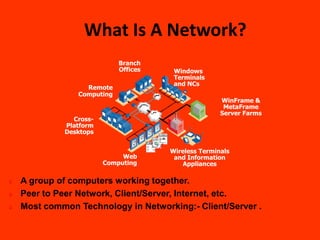
What Is A Network?
                            Branch
                            Offices    Windows
                                       Terminals
                                       and NCs
                  Remote
                Computing
                                                     WinFrame &
                                                      MetaFrame
                                                     Server Farms
               Cross-
             Platform
             Desktops


                                      Wireless Terminals
                             Web       and Information
                        Computing        Appliances

   A group of computers working together.
   Peer to Peer Network, Client/Server, Internet, etc.
   Most common Technology in Networking:- Client/Server .
What are Different Types Of
                           Clients.

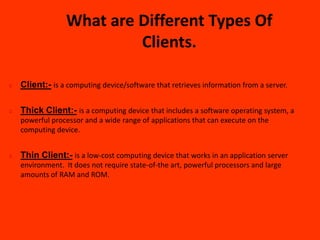
   Client:- is a computing device/software that retrieves information from a server.

   Thick Client:- is a computing device that includes a software operating system, a
    powerful processor and a wide range of applications that can execute on the
    computing device.


   Thin Client:- is a low-cost computing device that works in an application server
    environment. It does not require state-of-the art, powerful processors and large
    amounts of RAM and ROM.
What Is A Thin Client?
NO…
   An emaciated Library Patron.
   A Program To Purge Expired Patron.
   An Anorexic Library Budget.
So Then What Exactly Is A Thin Client?


   A Hardware/Software that runs application on a server, not on
    desktop.
   Key strokes and mouse click are sent over network to the server to
    process and give back the result…… (screen).
   Clients can be a low powered PC or a Thin client device.
   They Don’t Have HDD, FDD, CDROMS, Cooling Fans, Very Low
    Processing Power.
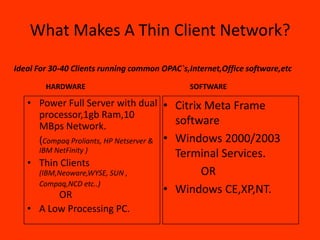
What Makes A Thin Client Network?

Ideal For 30-40 Clients running common OPAC`s,Internet,Office software,etc

        HARDWARE                              SOFTWARE

   • Power Full Server with dual • Citrix Meta Frame
     processor,1gb Ram,10
     MBps Network.                       software
     (Compaq Proliants, HP Netserver & • Windows 2000/2003
      IBM NetFinity )
                                         Terminal Services.
   • Thin Clients
      (IBM,Neoware,WYSE, SUN ,               OR
      Compaq,NCD etc..)
         OR                            • Windows CE,XP,NT.
   • A Low Processing PC.
How Does A Thin Client Work?
   About 1/3 Size Of PC.
   Works In A Same Way And At Same Speed As Desktop PC.
   Supports GUI And Windows Environment.
   Can Be Configured On As Low As 16Mb Of RAM.
   Same Feel As Working On Any Windows Based OS.
   Remote Computation….Server Takes Care Of All The Processing.
   Works On either Citrix`s ICA Or Microsoft's RDP Protocols (Both
    Require Only 20Kbps Speed Over Network To Work).
   User Logs On TO The Server Via Web Portal And A Familiar
    Windows Base Environment is Replicated On TO Users Screens
    With Access To Application, Internet, Mail, Drives, Printers, Etc.
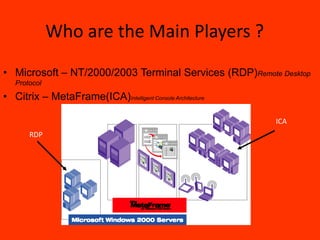
Who are the Main Players ?
• Microsoft – NT/2000/2003 Terminal Services (RDP)Remote Desktop
   Protocol

• Citrix – MetaFrame(ICA)Intelligent Console Architecture

                                                            ICA
       RDP
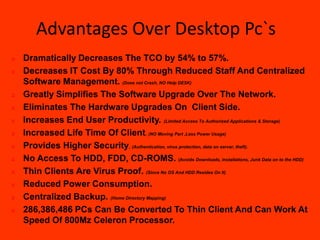
Advantages Over Desktop Pc`s
   Dramatically Decreases The TCO by 54% to 57%.
   Decreases IT Cost By 80% Through Reduced Staff And Centralized
    Software Management. (Does not Crash, NO Help DESK)
   Greatly Simplifies The Software Upgrade Over The Network.
   Eliminates The Hardware Upgrades On Client Side.
   Increases End User Productivity. (Limited Access To Authorized Applications & Storage)
   Increased Life Time Of Client. (NO Moving Part ,Less Power Usage)
   Provides Higher Security. (Authentication, virus protection, data on server, theft).
   No Access To HDD, FDD, CD-ROMS. (Avoids Downloads, installations, Junk Data on to the HDD)
   Thin Clients Are Virus Proof. (Since No OS And HDD Resides On It)
   Reduced Power Consumption.
   Centralized Backup. (Home Directory Mapping)
   286,386,486 PCs Can Be Converted To Thin Client And Can Work At
    Speed Of 800Mz Celeron Processor.
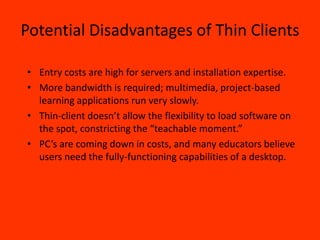
Potential Disadvantages of Thin Clients

• Entry costs are high for servers and installation expertise.
• More bandwidth is required; multimedia, project-based
  learning applications run very slowly.
• Thin-client doesn’t allow the flexibility to load software on
  the spot, constricting the “teachable moment.”
• PC’s are coming down in costs, and many educators believe
  users need the fully-functioning capabilities of a desktop.
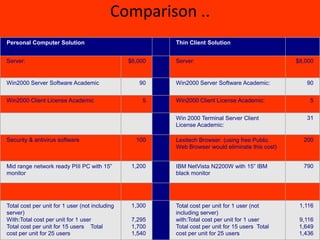
Comparison ..
Personal Computer Solution                               Thin Client Solution


Server:                                         $6,000   Server:                                  $8,000


Win2000 Server Software Academic                   90    Win2000 Server Software Academic:           90


Win2000 Client License Academic                     5    Win2000 Client License Academic:             5


                                                         Win 2000 Terminal Server Client             31
                                                         License Academic:

Security & antivirus software                     100    Lexitech Browser: (using free Public       200
                                                         Web Browser would eliminate this cost)


Mid range network ready PIII PC with 15”         1,200   IBM NetVista N2200W with 15” IBM           790
monitor                                                  black monitor


Total cost per unit for 1 user (not including    1,300   Total cost per unit for 1 user (not       1,116
server)                                                  including server)
With:Total cost per unit for 1 user              7,295   with:Total cost per unit for 1 user       9,116
Total cost per unit for 15 users Total           1,700   Total cost per unit for 15 users Total    1,649
cost per unit for 25 users                       1,540   cost per unit for 25 users                1,436
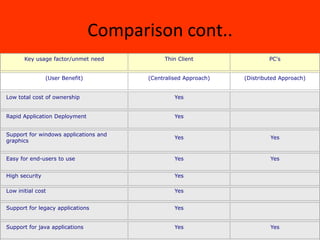
Comparison cont..
       Key usage factor/unmet need           Thin Client                 PC's


                (User Benefit)          (Centralised Approach)   (Distributed Approach)


Low total cost of ownership                      Yes


Rapid Application Deployment                     Yes


Support for windows applications and
                                                 Yes                      Yes
graphics


Easy for end-users to use                        Yes                      Yes


High security                                    Yes

Low initial cost                                 Yes


Support for legacy applications                  Yes


Support for java applications                    Yes                      Yes
What Services Can We Deliver Through
            Thin Clients.
   •   Access To Internet Through Common Browsers Like IE.
   •   Access To Subscription Database.
   •   OPAC Browsing.
   •   Microsoft Office.
   •   Audio.
   •   Several Application Software.
   •   Printing.
What Services Are Not Suitable For
           Thin Client
 • Streaming Video.
 • Video Games.
 • DVD Movies.
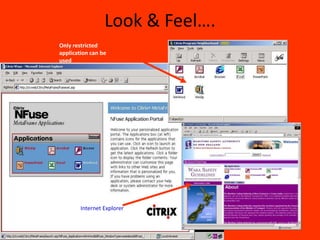
Look & Feel….
Only restricted
application can be
used


        Internet Explorer
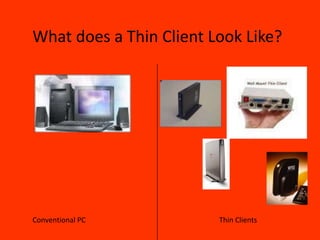
What does a Thin Client Look Like?


Conventional PC          Thin Clients
What kind of expertise is needed to set up a thin client
                         implementation like this?


•A librarian with good technical skills will be able to maintain the system, as long as
there is support from a Microsoft Certified Professional if problems arise.

•A Microsoft Network Administrator is needed to build a Thin client network.

•Once the network is developed it take only one person to take care of
(installation,hardware upgrade,Software upgrade,helpdesk) 100`s of PC.Common PC
skill would be enough to manages the whole network
Major Developers of Thin Client
              Technology

• Citrix and Microsoft   •   Sun Microsystems
  partnership            •   Wyse Technology
       WinFrame and      •   Acer
       MetaFrame         •   Compaq
• National               •   Dell
  Semiconductor          •   IBM
                         •   Gateway
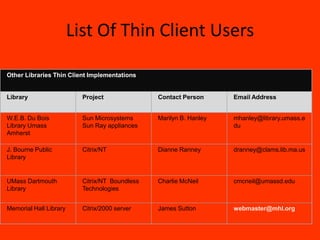
List Of Thin Client Users

Other Libraries Thin Client Implementations


Library                   Project               Contact Person      Email Address


W.E.B. Du Bois            Sun Microsystems      Marilyn B. Hanley   mhanley@library.umass.e
Library Umass             Sun Ray appliances                        du
Amherst

J. Bourne Public          Citrix/NT             Dianne Ranney       dranney@clams.lib.ma.us
Library


UMass Dartmouth           Citrix/NT Boundless   Charlie McNeil      cmcneil@umassd.edu
Library                   Technologies


Memorial Hall Library     Citrix/2000 server    James Sutton        webmaster@mhl.org
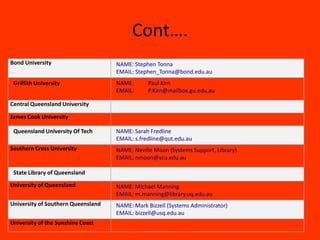
Cont….
Bond University                     NAME: Stephen Tonna
                                    EMAIL: Stephen_Tonna@bond.edu.au
 Griffith University                NAME:       Paul Kirn
                                    EMAIL:      P.Kirn@mailbox.gu.edu.au

Central Queensland University

James Cook University

 Queensland University Of Tech      NAME: Sarah Fredline
                                    EMAIL: s.fredline@qut.edu.au
Southern Cross University           NAME: Neville Moon (Systems Support, Library)
                                    EMAIL: nmoon@scu.edu.au

 State Library of Queensland
University of Queensland            NAME: Michael Manning
                                    EMAIL: m.manning@library.uq.edu.au
University of Southern Queensland   NAME: Mark Bizzell (Systems Administrator)
                                    EMAIL: bizzell@usq.edu.au
University of the Sunshine Coast
Growth OF Thin Client Popularity

•Growth Of Last Years Market by 18% where else Desktop Pc`s remain flat round the
world.
•Standard Growth Of 3% Of Over All PC in market,expected to reach to 5% by next year.
•If Technology is so good why do people don’t use it?
•A Lot more people know about its existence.
Summary
• May extend Life of Current PC’s by 2-3years
• Large upfront costs – Infrastructure and Network
  Costs (possibly Licensing)
• Management, Support, Application Deployment,
  Security, etc. far easier
• Will reduce Base Line Support costs over 3 to 5
  years
Supporting Information References
-   http://www.citrix.com/solutions/
-   http://www.tweakcitrix.com/
-   http://www.thethin.net/
-   The Skinny on Thin-client Technology
    http://208.201.97.5/pubs/fcw/1999/0315/fcw-techbrief-3-15-99.html
-   Thin Client Computing Defined
    http://www.thin-world.com/thindefined.htm
-   Thin Clients
    http://www.gcn.com/vol19_no29/guide/3040-1.html
Thank You!!…

ThinClient

  • 1.
    THIN CLIENT Presented by.. NishikanthPodduturi IT Operations Supervisor ALPS Software Technologies Limited
  • 2.
    What Is ANetwork? Branch Offices Windows Terminals and NCs Remote Computing WinFrame & MetaFrame Server Farms Cross- Platform Desktops Wireless Terminals Web and Information Computing Appliances  A group of computers working together.  Peer to Peer Network, Client/Server, Internet, etc.  Most common Technology in Networking:- Client/Server .
  • 3.
    What are DifferentTypes Of Clients.  Client:- is a computing device/software that retrieves information from a server.  Thick Client:- is a computing device that includes a software operating system, a powerful processor and a wide range of applications that can execute on the computing device.  Thin Client:- is a low-cost computing device that works in an application server environment. It does not require state-of-the art, powerful processors and large amounts of RAM and ROM.
  • 4.
    What Is AThin Client? NO…  An emaciated Library Patron.  A Program To Purge Expired Patron.  An Anorexic Library Budget. So Then What Exactly Is A Thin Client?  A Hardware/Software that runs application on a server, not on desktop.  Key strokes and mouse click are sent over network to the server to process and give back the result…… (screen).  Clients can be a low powered PC or a Thin client device.  They Don’t Have HDD, FDD, CDROMS, Cooling Fans, Very Low Processing Power.
  • 5.
    What Makes AThin Client Network? Ideal For 30-40 Clients running common OPAC`s,Internet,Office software,etc HARDWARE SOFTWARE • Power Full Server with dual • Citrix Meta Frame processor,1gb Ram,10 MBps Network. software (Compaq Proliants, HP Netserver & • Windows 2000/2003 IBM NetFinity ) Terminal Services. • Thin Clients (IBM,Neoware,WYSE, SUN , OR Compaq,NCD etc..) OR • Windows CE,XP,NT. • A Low Processing PC.
  • 6.
    How Does AThin Client Work?  About 1/3 Size Of PC.  Works In A Same Way And At Same Speed As Desktop PC.  Supports GUI And Windows Environment.  Can Be Configured On As Low As 16Mb Of RAM.  Same Feel As Working On Any Windows Based OS.  Remote Computation….Server Takes Care Of All The Processing.  Works On either Citrix`s ICA Or Microsoft's RDP Protocols (Both Require Only 20Kbps Speed Over Network To Work).  User Logs On TO The Server Via Web Portal And A Familiar Windows Base Environment is Replicated On TO Users Screens With Access To Application, Internet, Mail, Drives, Printers, Etc.
  • 7.
    Who are theMain Players ? • Microsoft – NT/2000/2003 Terminal Services (RDP)Remote Desktop Protocol • Citrix – MetaFrame(ICA)Intelligent Console Architecture ICA RDP
  • 8.
    Advantages Over DesktopPc`s  Dramatically Decreases The TCO by 54% to 57%.  Decreases IT Cost By 80% Through Reduced Staff And Centralized Software Management. (Does not Crash, NO Help DESK)  Greatly Simplifies The Software Upgrade Over The Network.  Eliminates The Hardware Upgrades On Client Side.  Increases End User Productivity. (Limited Access To Authorized Applications & Storage)  Increased Life Time Of Client. (NO Moving Part ,Less Power Usage)  Provides Higher Security. (Authentication, virus protection, data on server, theft).  No Access To HDD, FDD, CD-ROMS. (Avoids Downloads, installations, Junk Data on to the HDD)  Thin Clients Are Virus Proof. (Since No OS And HDD Resides On It)  Reduced Power Consumption.  Centralized Backup. (Home Directory Mapping)  286,386,486 PCs Can Be Converted To Thin Client And Can Work At Speed Of 800Mz Celeron Processor.
  • 9.
    Potential Disadvantages ofThin Clients • Entry costs are high for servers and installation expertise. • More bandwidth is required; multimedia, project-based learning applications run very slowly. • Thin-client doesn’t allow the flexibility to load software on the spot, constricting the “teachable moment.” • PC’s are coming down in costs, and many educators believe users need the fully-functioning capabilities of a desktop.
  • 10.
    Comparison .. Personal ComputerSolution Thin Client Solution Server: $6,000 Server: $8,000 Win2000 Server Software Academic 90 Win2000 Server Software Academic: 90 Win2000 Client License Academic 5 Win2000 Client License Academic: 5 Win 2000 Terminal Server Client 31 License Academic: Security & antivirus software 100 Lexitech Browser: (using free Public 200 Web Browser would eliminate this cost) Mid range network ready PIII PC with 15” 1,200 IBM NetVista N2200W with 15” IBM 790 monitor black monitor Total cost per unit for 1 user (not including 1,300 Total cost per unit for 1 user (not 1,116 server) including server) With:Total cost per unit for 1 user 7,295 with:Total cost per unit for 1 user 9,116 Total cost per unit for 15 users Total 1,700 Total cost per unit for 15 users Total 1,649 cost per unit for 25 users 1,540 cost per unit for 25 users 1,436
  • 11.
    Comparison cont.. Key usage factor/unmet need Thin Client PC's (User Benefit) (Centralised Approach) (Distributed Approach) Low total cost of ownership Yes Rapid Application Deployment Yes Support for windows applications and Yes Yes graphics Easy for end-users to use Yes Yes High security Yes Low initial cost Yes Support for legacy applications Yes Support for java applications Yes Yes
  • 12.
    What Services CanWe Deliver Through Thin Clients. • Access To Internet Through Common Browsers Like IE. • Access To Subscription Database. • OPAC Browsing. • Microsoft Office. • Audio. • Several Application Software. • Printing.
  • 13.
    What Services AreNot Suitable For Thin Client • Streaming Video. • Video Games. • DVD Movies.
  • 14.
    Look & Feel…. Onlyrestricted application can be used Internet Explorer
  • 15.
    What does aThin Client Look Like? Conventional PC Thin Clients
  • 16.
    What kind ofexpertise is needed to set up a thin client implementation like this? •A librarian with good technical skills will be able to maintain the system, as long as there is support from a Microsoft Certified Professional if problems arise. •A Microsoft Network Administrator is needed to build a Thin client network. •Once the network is developed it take only one person to take care of (installation,hardware upgrade,Software upgrade,helpdesk) 100`s of PC.Common PC skill would be enough to manages the whole network
  • 17.
    Major Developers ofThin Client Technology • Citrix and Microsoft • Sun Microsystems partnership • Wyse Technology WinFrame and • Acer MetaFrame • Compaq • National • Dell Semiconductor • IBM • Gateway
  • 18.
    List Of ThinClient Users Other Libraries Thin Client Implementations Library Project Contact Person Email Address W.E.B. Du Bois Sun Microsystems Marilyn B. Hanley mhanley@library.umass.e Library Umass Sun Ray appliances du Amherst J. Bourne Public Citrix/NT Dianne Ranney dranney@clams.lib.ma.us Library UMass Dartmouth Citrix/NT Boundless Charlie McNeil cmcneil@umassd.edu Library Technologies Memorial Hall Library Citrix/2000 server James Sutton webmaster@mhl.org
  • 19.
    Cont…. Bond University NAME: Stephen Tonna EMAIL: Stephen_Tonna@bond.edu.au Griffith University NAME: Paul Kirn EMAIL: P.Kirn@mailbox.gu.edu.au Central Queensland University James Cook University Queensland University Of Tech NAME: Sarah Fredline EMAIL: s.fredline@qut.edu.au Southern Cross University NAME: Neville Moon (Systems Support, Library) EMAIL: nmoon@scu.edu.au State Library of Queensland University of Queensland NAME: Michael Manning EMAIL: m.manning@library.uq.edu.au University of Southern Queensland NAME: Mark Bizzell (Systems Administrator) EMAIL: bizzell@usq.edu.au University of the Sunshine Coast
  • 20.
    Growth OF ThinClient Popularity •Growth Of Last Years Market by 18% where else Desktop Pc`s remain flat round the world. •Standard Growth Of 3% Of Over All PC in market,expected to reach to 5% by next year. •If Technology is so good why do people don’t use it? •A Lot more people know about its existence.
  • 21.
    Summary • May extendLife of Current PC’s by 2-3years • Large upfront costs – Infrastructure and Network Costs (possibly Licensing) • Management, Support, Application Deployment, Security, etc. far easier • Will reduce Base Line Support costs over 3 to 5 years
  • 22.
    Supporting Information References - http://www.citrix.com/solutions/ - http://www.tweakcitrix.com/ - http://www.thethin.net/ - The Skinny on Thin-client Technology http://208.201.97.5/pubs/fcw/1999/0315/fcw-techbrief-3-15-99.html - Thin Client Computing Defined http://www.thin-world.com/thindefined.htm - Thin Clients http://www.gcn.com/vol19_no29/guide/3040-1.html
  • 23.