Thin Clients
A viable replacement for
Desktop PCs?
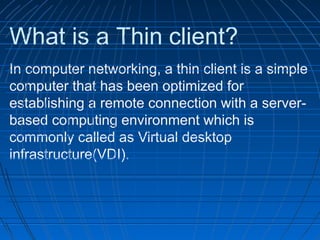
What is a Thin client?
In computer networking, a thin client is a simple
computer that has been optimized for
establishing a remote connection with a server-
based computing environment which is
commonly called as Virtual desktop
infrastructure(VDI).
Internal Use - Confidential
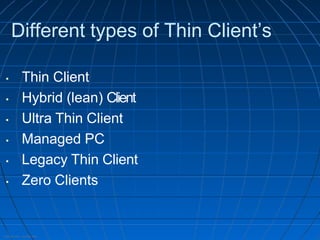
Different types of Thin Client’s
• Thin Client
• Hybrid (lean) Client
• Ultra Thin Client
• Managed PC
• Legacy Thin Client
• Zero Clients
Internal Use - Confidential
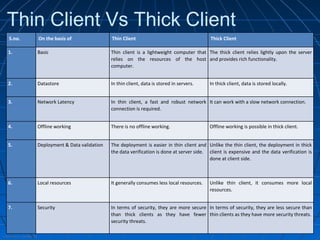
Thin Client Vs Thick Client
S.no. On the basis of Thin Client Thick Client
1. Basic Thin client is a lightweight computer that
relies on the resources of the host
computer.
The thick client relies lightly upon the server
and provides rich functionality.
2. Datastore In thin client, data is stored in servers. In thick client, data is stored locally.
3. Network Latency In thin client, a fast and robust network
connection is required.
It can work with a slow network connection.
4. Offline working There is no offline working. Offline working is possible in thick client.
5. Deployment & Data validation The deployment is easier in thin client and
the data verification is done at server side.
Unlike the thin client, the deployment in thick
client is expensive and the data verification is
done at client side.
6. Local resources It generally consumes less local resources. Unlike thin client, it consumes more local
resources.
7. Security In terms of security, they are more secure
than thick clients as they have fewer
security threats.
In terms of security, they are less secure than
thin clients as they have more security threats.
Internal Use - Confidential
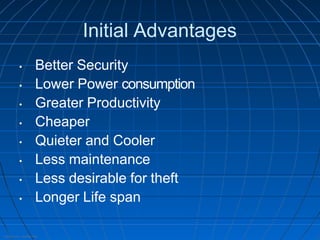
Initial Advantages
• Better Security
• Lower Power consumption
• Greater Productivity
• Cheaper
• Quieter and Cooler
• Less maintenance
• Less desirable for theft
• Longer Life span
Internal Use - Confidential
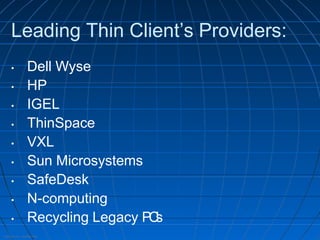
Leading Thin Client’s Providers:
• Dell Wyse
• HP
• IGEL
• ThinSpace
• VXL
• Sun Microsystems
• SafeDesk
• N-computing
• Recycling Legacy PC
’
s
Internal Use - Confidential
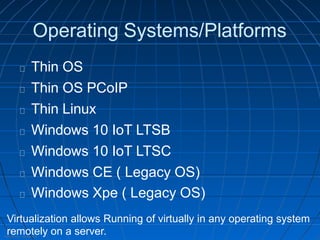
Operating Systems/Platforms
Thin OS
Thin OS PCoIP
Thin Linux
Windows 10 IoT LTSB
Windows 10 IoT LTSC
Windows CE ( Legacy OS)
Windows Xpe ( Legacy OS)
Virtualization allows Running of virtually in any operating system
remotely on a server.
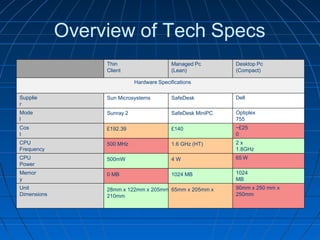
Overview of Tech Specs
Thin
Client
Managed Pc
(Lean)
Desktop Pc
(Compact)
Supplie
r
Dell
Mode
l
Optiplex
755
Cos
t
~£25
0
CPU
Frequency
2 x
1.8GHz
CPU
Power
65 W
Memor
y
1024
MB
Unit
Dimensions
Hardware Specifications
Sun Microsystems SafeDesk
Sunray 2 SafeDesk MiniPC
£192.39 £140
500 MHz 1.6 GHz (HT)
500mW 4 W
0 MB 1024 MB
28mm x 122mm x 205mm 65mm x 205mm x
210mm
90mm x 250 mm x
250mm
Internal Use - Confidential
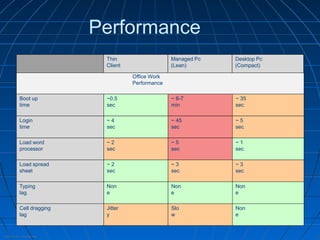
Performance
Office Work
Performance
Boot up
time
~0.5
sec
~ 6-7
min
~ 35
sec
Login
time
~ 4
sec
~ 45
sec
~ 5
sec
Load word
processor
~ 2
sec
~ 5
sec
~ 1
sec
Load spread
sheet
~ 2
sec
~ 3
sec
~ 3
sec
Typing
lag
Non
e
Non
e
Non
e
Cell dragging
lag
Jitter
y
Slo
w
Non
e
Thin
Client
Managed Pc
(Lean)
Desktop Pc
(Compact)
Internal Use - Confidential
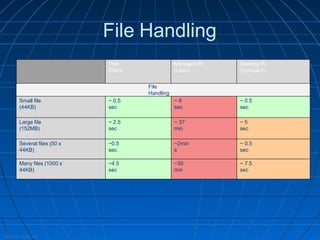
File Handling
File
Handling
Small file
(44KB)
~ 0.5
sec
~ 6
sec
~ 0.5
sec
Large file
(152MB)
~ 2.5
sec
~ 37
min
~ 5
sec
Several files (50 x
44KB)
~0.5
sec
~2min
s
~ 0.5
sec
Many files (1000 x
44KB)
~4.5
sec
~35
min
~ 7.5
sec
Thin
Client
Managed Pc
(Lean)
Desktop Pc
(Compact)
Internal Use - Confidential
Backed by all major software brokers
To add even more versatility, each thin client OS is fully
validated with the leading virtual desktop brokers: Microsoft,
Citrix, VMware and AWS.
Internal Use - Confidential
Conclusion
• PC's are still best for home users
• It could become viable forinexperienced users
• Thin Client’s are acceptable for business use
• Thin Client’s could potentially be used in
education sector, healthcare and in
enterprise industries.
For further information:
https://www.dell.com/en-
in/dt/wyse/index.htm

Module 1 - Thin Clients and its overview.pptx

  • 1.
    Thin Clients A viablereplacement for Desktop PCs?
  • 2.
    What is aThin client? In computer networking, a thin client is a simple computer that has been optimized for establishing a remote connection with a server- based computing environment which is commonly called as Virtual desktop infrastructure(VDI).
  • 3.
    Internal Use -Confidential Different types of Thin Client’s • Thin Client • Hybrid (lean) Client • Ultra Thin Client • Managed PC • Legacy Thin Client • Zero Clients
  • 4.
    Internal Use -Confidential Thin Client Vs Thick Client S.no. On the basis of Thin Client Thick Client 1. Basic Thin client is a lightweight computer that relies on the resources of the host computer. The thick client relies lightly upon the server and provides rich functionality. 2. Datastore In thin client, data is stored in servers. In thick client, data is stored locally. 3. Network Latency In thin client, a fast and robust network connection is required. It can work with a slow network connection. 4. Offline working There is no offline working. Offline working is possible in thick client. 5. Deployment & Data validation The deployment is easier in thin client and the data verification is done at server side. Unlike the thin client, the deployment in thick client is expensive and the data verification is done at client side. 6. Local resources It generally consumes less local resources. Unlike thin client, it consumes more local resources. 7. Security In terms of security, they are more secure than thick clients as they have fewer security threats. In terms of security, they are less secure than thin clients as they have more security threats.
  • 5.
    Internal Use -Confidential Initial Advantages • Better Security • Lower Power consumption • Greater Productivity • Cheaper • Quieter and Cooler • Less maintenance • Less desirable for theft • Longer Life span
  • 6.
    Internal Use -Confidential Leading Thin Client’s Providers: • Dell Wyse • HP • IGEL • ThinSpace • VXL • Sun Microsystems • SafeDesk • N-computing • Recycling Legacy PC ’ s
  • 7.
    Internal Use -Confidential Operating Systems/Platforms Thin OS Thin OS PCoIP Thin Linux Windows 10 IoT LTSB Windows 10 IoT LTSC Windows CE ( Legacy OS) Windows Xpe ( Legacy OS) Virtualization allows Running of virtually in any operating system remotely on a server.
  • 8.
    Overview of TechSpecs Thin Client Managed Pc (Lean) Desktop Pc (Compact) Supplie r Dell Mode l Optiplex 755 Cos t ~£25 0 CPU Frequency 2 x 1.8GHz CPU Power 65 W Memor y 1024 MB Unit Dimensions Hardware Specifications Sun Microsystems SafeDesk Sunray 2 SafeDesk MiniPC £192.39 £140 500 MHz 1.6 GHz (HT) 500mW 4 W 0 MB 1024 MB 28mm x 122mm x 205mm 65mm x 205mm x 210mm 90mm x 250 mm x 250mm
  • 9.
    Internal Use -Confidential Performance Office Work Performance Boot up time ~0.5 sec ~ 6-7 min ~ 35 sec Login time ~ 4 sec ~ 45 sec ~ 5 sec Load word processor ~ 2 sec ~ 5 sec ~ 1 sec Load spread sheet ~ 2 sec ~ 3 sec ~ 3 sec Typing lag Non e Non e Non e Cell dragging lag Jitter y Slo w Non e Thin Client Managed Pc (Lean) Desktop Pc (Compact)
  • 10.
    Internal Use -Confidential File Handling File Handling Small file (44KB) ~ 0.5 sec ~ 6 sec ~ 0.5 sec Large file (152MB) ~ 2.5 sec ~ 37 min ~ 5 sec Several files (50 x 44KB) ~0.5 sec ~2min s ~ 0.5 sec Many files (1000 x 44KB) ~4.5 sec ~35 min ~ 7.5 sec Thin Client Managed Pc (Lean) Desktop Pc (Compact)
  • 11.
    Internal Use -Confidential Backed by all major software brokers To add even more versatility, each thin client OS is fully validated with the leading virtual desktop brokers: Microsoft, Citrix, VMware and AWS.
  • 12.
    Internal Use -Confidential Conclusion • PC's are still best for home users • It could become viable forinexperienced users • Thin Client’s are acceptable for business use • Thin Client’s could potentially be used in education sector, healthcare and in enterprise industries. For further information: https://www.dell.com/en- in/dt/wyse/index.htm