System Models 
Ajayakumar.M.V 
IT Department
System models 
Purpose 
• illustrate/describe common properties and 
design choices for distributed system in a 
single descriptive model.
System Models 
Two types of models 
1. Architectural Models 
2. Fundamental Models
1. Architectural Models 
• It consider , 
1. the placement of the components across a 
network of computers. 
2. the inter-relationships between the 
components. 
3. Determine the distribution of data and 
computational tasks among the physical 
nodes of the system. 
4. Evaluating the performance , reliability, 
scalability and other properties of distributed 
systems.
Architectural Model- including 
1. Software layers 
2. System Architectures 
3. Variations on the client-server model 
4. Interfaces and objects. 
5. Design requirements for distributed 
Architectures.
1. Software layers
Software Layers 
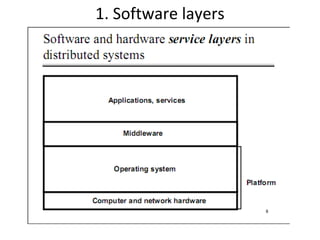
• In the layered view of a system each layer offers its services 
to the level above and builds its own service on the services 
of the layer below. 
Applications 
Middleware 
Operating system Platform 
Computer and network hardware 
Dr.Almetwally Mostyafa Summer 2009 
8
• Lowest level layers that provide services to 
other higher layers.
Middleware 
• Its purpose is to mask heterogeneity and 
provide a convenient programming model. 
• Eg CORBA, 
• Java RMI, 
• DCOM
2. System Architectures
System Architectures 
1. Client- server model 
2. Services provided by multiple servers. 
3. Proxy servers and caches. 
4. Peer processes
1. Client- server model 
• The system is structured as a set of processes, 
called servers, that offer services to the 
users , called clients. 
• The client-server model is usually based on a 
simple request/reply protocol, implemented 
with send/receive primitives or RPC or RMI. 
• The client sends a request message to the 
server asking for some service. 
• The server does the work and return a result 
or error code if the work could not be 
performed.
• A server can itself request services from other 
servers, thus the server itself acts like a client.
2. Services provided by multiple 
servers 
• Services may be implemented as several 
server processes in separate host computers 
interacting as necessary to provide a service 
to client processes.
3. Proxy Servers and Caches 
Proxy Servers 
• proxy servers are used to increase availability 
and performance of the services by reducing 
the load on the network and web-server. 
• Proxy server provides copies(replications) of 
resources which are managed by other server.
Cache 
• A store of recently used data objects that is 
closer to the client process than those remote 
objects. 
• When an object is needed by a client process 
the caching service checks the cache and 
supplies the objects from there in case of an 
up-to-date copy is available. 
• Purpose : is to increase performance and 
availability by avoiding frequent accesses to 
remote servers.
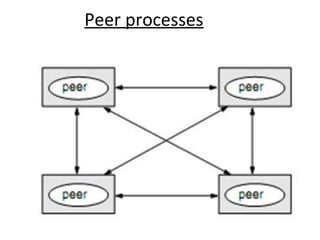
4. Peer processes 
• All processes(objects) play similar roles 
without distinction between client or servers. 
• A large number of data objects are shared; 
any individual computers hold only a small 
part of the application database. 
• It distributes shared resources widely. 
• It share computing and communication loads.
Peer processes
3. Variations on the client-server model 
• Several variations on the client-server model. 
The following are reasons of variation. 
1.The use of mobile code and mobile agents. 
2.Users need for low-cost computers with 
limited hardware resources. 
3.The requirement to add and remove mobile 
devices in a convenient manner.
Variations on the client-server model 
Including :- 
1. Mobile code 
2. Mobile agents 
3. Network computers 
4. Thin clients 
5. Mobile devices and spontaneous networking
1. Mobile code 
• It is used to refer to code that can be sent 
from one computer to another and run at the 
destination. 
• Example : java applets
Step : 1 
• The user running a browser selects a link to an 
applets whose code is stored on a web server. 
• The code is downloaded to the browser and 
runs there.
Step : 2 
• Client interacts with the applet.
Advantages & Disadvantages 
Advantages: 
1.Remote invocations are replaced by local 
ones. 
2.Good interactive response. 
3.Does not suffer from the delays. 
Disadvantages: 
• Security threat to the local resources in the 
destination computer.
2. Mobile Agents 
• Mobile agent is a running program that travels 
from one computer to another carrying out a 
task to someone’s behalf, such as collecting 
information, eventually returning with the 
results. 
• Mobile agent is a complete program(including 
both code & data) that can work 
independently. 
• Mobile agent can invoke local 
resources/data.
Mobile Agents
Advantages & Disadvantages 
Advantages: 
• Reduce communication cost and time by 
replacing remote invocation with local ones. 
Disadvantages: 
1.Limited applicability 
2.Security threat of the visited sites resources
3. Network Computers 
• Network computers do not store locally operating 
system or application code. 
• Downloads its operating system and any applications 
needed by the user from a remote file server. 
• Applications run locally but files are managed by a 
remote file server. 
• Users can migrate from one network computer to 
another. 
• Its processor and memory capacities can be 
restricted to reduce its cost.
Advantages 
• The network computers can be simpler, with 
limited capacity, it does not need even a local 
hard disk. 
• User can login from any computers. 
• No user effort for software management or 
administration.
4. Thin Clients 
• Thin clients do not download code (operating 
system or application) from the server to run 
it locally. 
• All code is run on the server, in parallel for 
several clients. 
• The thin client only runs the user interface.
• It is same as network computer scheme but 
instead of downloading the application code 
into the user’s computer, it runs them on a 
server machine, compute server. 
Disadvantages: 
High latencies:- increasing of the delays in 
highly interactive graphical applications.
Thin Client
5. Mobile Devices and 
Spontaneous Networking 
• Mobile Devices : Mobile devices are hardware 
computing components that move between 
physical locations. 
• Spontaneous Network: integrate mobile 
devices and other devices into a given 
network.
Advantages & Disadvantages 
Advantages: 
1.Easy connection to a local network. 
2.Easy integration with local services. 
Disadvantages: 
1.Limited connectivity 
2.Less Security and privacy
4. Interfaces and Objects 
• Interface definitions: 
a set of functions are available 
• In object oriented language : 
many objects can be encapsulated in processes. 
Eg: CORBA, RMI
5. Design Requirements for 
Distributed Architectures 
Including 
1.Performance issues 
2.Quality of services 
3.Use of caching & replication 
4.Dependability issues
1. Performance issues 
Following are the performance issues 
1.Responsiveness 
2.Throughput 
3.Balancing computational loads
1. Responsiveness 
• The load and performance of the server and 
network.
2. Throughput 
• The rate at which computational work is done. 
• It is affected by processing speeds and by 
data transfer rates.
3. Balancing computational loads 
• Several computers for a service.
2. Quality of service 
• Reliability 
• Security 
• Performance and adaptability
3. Use of Caching and Replication 
• Performance issues are bars to successful 
deploy distributed system. 
• Purpose : is to increase performance and 
availability by avoiding frequent accesses to 
remote servers.
4. Dependability Issues 
Including 
1.Correctness 
2.Fault tolerance : by redundancy 
3.Security
Thank You

4. system models

  • 1.
  • 2.
    System models Purpose • illustrate/describe common properties and design choices for distributed system in a single descriptive model.
  • 3.
    System Models Twotypes of models 1. Architectural Models 2. Fundamental Models
  • 4.
    1. Architectural Models • It consider , 1. the placement of the components across a network of computers. 2. the inter-relationships between the components. 3. Determine the distribution of data and computational tasks among the physical nodes of the system. 4. Evaluating the performance , reliability, scalability and other properties of distributed systems.
  • 5.
    Architectural Model- including 1. Software layers 2. System Architectures 3. Variations on the client-server model 4. Interfaces and objects. 5. Design requirements for distributed Architectures.
  • 6.
  • 8.
    Software Layers •In the layered view of a system each layer offers its services to the level above and builds its own service on the services of the layer below. Applications Middleware Operating system Platform Computer and network hardware Dr.Almetwally Mostyafa Summer 2009 8
  • 9.
    • Lowest levellayers that provide services to other higher layers.
  • 10.
    Middleware • Itspurpose is to mask heterogeneity and provide a convenient programming model. • Eg CORBA, • Java RMI, • DCOM
  • 11.
  • 12.
    System Architectures 1.Client- server model 2. Services provided by multiple servers. 3. Proxy servers and caches. 4. Peer processes
  • 13.
    1. Client- servermodel • The system is structured as a set of processes, called servers, that offer services to the users , called clients. • The client-server model is usually based on a simple request/reply protocol, implemented with send/receive primitives or RPC or RMI. • The client sends a request message to the server asking for some service. • The server does the work and return a result or error code if the work could not be performed.
  • 14.
    • A servercan itself request services from other servers, thus the server itself acts like a client.
  • 15.
    2. Services providedby multiple servers • Services may be implemented as several server processes in separate host computers interacting as necessary to provide a service to client processes.
  • 17.
    3. Proxy Serversand Caches Proxy Servers • proxy servers are used to increase availability and performance of the services by reducing the load on the network and web-server. • Proxy server provides copies(replications) of resources which are managed by other server.
  • 19.
    Cache • Astore of recently used data objects that is closer to the client process than those remote objects. • When an object is needed by a client process the caching service checks the cache and supplies the objects from there in case of an up-to-date copy is available. • Purpose : is to increase performance and availability by avoiding frequent accesses to remote servers.
  • 20.
    4. Peer processes • All processes(objects) play similar roles without distinction between client or servers. • A large number of data objects are shared; any individual computers hold only a small part of the application database. • It distributes shared resources widely. • It share computing and communication loads.
  • 21.
  • 22.
    3. Variations onthe client-server model • Several variations on the client-server model. The following are reasons of variation. 1.The use of mobile code and mobile agents. 2.Users need for low-cost computers with limited hardware resources. 3.The requirement to add and remove mobile devices in a convenient manner.
  • 23.
    Variations on theclient-server model Including :- 1. Mobile code 2. Mobile agents 3. Network computers 4. Thin clients 5. Mobile devices and spontaneous networking
  • 24.
    1. Mobile code • It is used to refer to code that can be sent from one computer to another and run at the destination. • Example : java applets
  • 25.
    Step : 1 • The user running a browser selects a link to an applets whose code is stored on a web server. • The code is downloaded to the browser and runs there.
  • 26.
    Step : 2 • Client interacts with the applet.
  • 27.
    Advantages & Disadvantages Advantages: 1.Remote invocations are replaced by local ones. 2.Good interactive response. 3.Does not suffer from the delays. Disadvantages: • Security threat to the local resources in the destination computer.
  • 28.
    2. Mobile Agents • Mobile agent is a running program that travels from one computer to another carrying out a task to someone’s behalf, such as collecting information, eventually returning with the results. • Mobile agent is a complete program(including both code & data) that can work independently. • Mobile agent can invoke local resources/data.
  • 29.
  • 30.
    Advantages & Disadvantages Advantages: • Reduce communication cost and time by replacing remote invocation with local ones. Disadvantages: 1.Limited applicability 2.Security threat of the visited sites resources
  • 31.
    3. Network Computers • Network computers do not store locally operating system or application code. • Downloads its operating system and any applications needed by the user from a remote file server. • Applications run locally but files are managed by a remote file server. • Users can migrate from one network computer to another. • Its processor and memory capacities can be restricted to reduce its cost.
  • 33.
    Advantages • Thenetwork computers can be simpler, with limited capacity, it does not need even a local hard disk. • User can login from any computers. • No user effort for software management or administration.
  • 34.
    4. Thin Clients • Thin clients do not download code (operating system or application) from the server to run it locally. • All code is run on the server, in parallel for several clients. • The thin client only runs the user interface.
  • 35.
    • It issame as network computer scheme but instead of downloading the application code into the user’s computer, it runs them on a server machine, compute server. Disadvantages: High latencies:- increasing of the delays in highly interactive graphical applications.
  • 36.
  • 37.
    5. Mobile Devicesand Spontaneous Networking • Mobile Devices : Mobile devices are hardware computing components that move between physical locations. • Spontaneous Network: integrate mobile devices and other devices into a given network.
  • 38.
    Advantages & Disadvantages Advantages: 1.Easy connection to a local network. 2.Easy integration with local services. Disadvantages: 1.Limited connectivity 2.Less Security and privacy
  • 40.
    4. Interfaces andObjects • Interface definitions: a set of functions are available • In object oriented language : many objects can be encapsulated in processes. Eg: CORBA, RMI
  • 41.
    5. Design Requirementsfor Distributed Architectures Including 1.Performance issues 2.Quality of services 3.Use of caching & replication 4.Dependability issues
  • 42.
    1. Performance issues Following are the performance issues 1.Responsiveness 2.Throughput 3.Balancing computational loads
  • 43.
    1. Responsiveness •The load and performance of the server and network.
  • 44.
    2. Throughput •The rate at which computational work is done. • It is affected by processing speeds and by data transfer rates.
  • 45.
    3. Balancing computationalloads • Several computers for a service.
  • 46.
    2. Quality ofservice • Reliability • Security • Performance and adaptability
  • 47.
    3. Use ofCaching and Replication • Performance issues are bars to successful deploy distributed system. • Purpose : is to increase performance and availability by avoiding frequent accesses to remote servers.
  • 48.
    4. Dependability Issues Including 1.Correctness 2.Fault tolerance : by redundancy 3.Security
  • 49.