Windows Server 2022
David J. Rosenthal
VP, Digital Business
July 27, 2021
©Microsoft Corporation
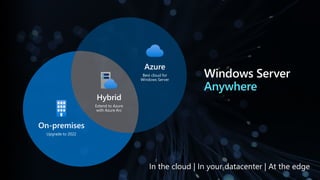
Azure
Windows Server
Anywhere
Hybrid
Extend to Azure
with Azure Arc
Azure
Best cloud for
Windows Server
On-premises
Upgrade to 2022
In the cloud | In your datacenter | At the edge
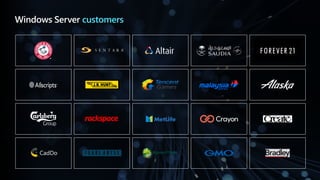
Windows Server customers
CadDo
©Microsoft Corporation
Azure
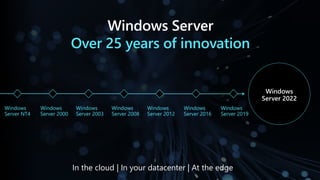
Windows Server
Over 25 years of innovation
Windows
Server NT4
Windows
Server 2000
Windows
Server 2008
Windows
Server 2012
Windows
Server 2016
Windows
Server 2019
Windows
Server 2022
In the cloud | In your datacenter | At the edge
Windows
Server 2003
©Microsoft Corporation
Azure
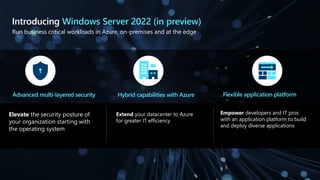
Elevate the security posture of
your organization starting with
the operating system
Extend your datacenter to Azure
for greater IT efficiency
Empower developers and IT pros
with an application platform to build
and deploy diverse applications
Run business critical workloads in Azure, on-premises and at the edge
Introducing Windows Server 2022 (in preview)
Advanced multi-layered security Hybrid capabilities with Azure Flexible application platform
©Microsoft Corporation
Azure
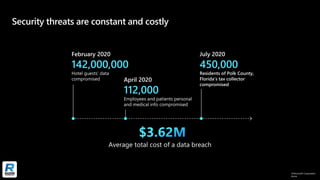
Security threats are constant and costly
©Microsoft Corporation
Azure
We need better security solutions
“How do we stay
ahead of emerging
security exploits?”
“How do I
keep virtualized
workloads safe?”
Average amount paid
in USD for each lost
or stolen record
containing sensitive or
confidential information
$141*
IT
Average total cost
of a data breach
$3.62
million*
*Cost of data breach study: Global analysis, 2017, Ponemon Institute
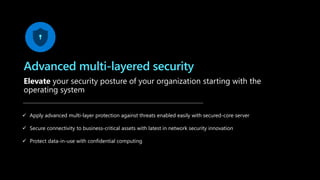
Advanced multi-layered security
Elevate your security posture of your organization starting with the
operating system
✓ Apply advanced multi-layer protection against threats enabled easily with secured-core server
✓ Secure connectivity to business-critical assets with latest in network security innovation
✓ Protect data-in-use with confidential computing
©Microsoft Corporation
Azure
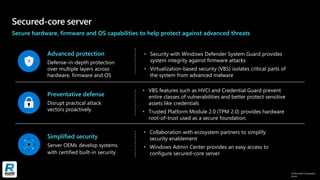
Secured-core server
Secure hardware, firmware and OS capabilities to help protect against advanced threats
• Collaboration with ecosystem partners to simplify
security enablement
• Windows Admin Center provides an easy access to
configure secured-core server
• Security with Windows Defender System Guard provides
system integrity against firmware attacks
• Virtualization-based security (VBS) isolates critical parts of
the system from advanced malware
• VBS features such as HVCI and Credential Guard prevent
entire classes of vulnerabilities and better protect sensitive
assets like credentials
• Trusted Platform Module 2.0 (TPM 2.0) provides hardware
root-of-trust used as a secure foundation.
Simplified security
Server OEMs develop systems
with certified built-in security
Advanced protection
Defense-in-depth protection
over multiple layers across
hardware, firmware and OS
Preventative defense
Disrupt practical attack
vectors proactively
©Microsoft Corporation
Azure
Secure connectivity
Latest in network security innovation for Windows Server
Transport
• Faster and more secure encrypted HTTPS connections
• TLS 1.3 enabled by default on Windows Server 2022
SMB
• SMB AES-256 encryption for the most security conscious
• East-West SMB encryption controls for internal
cluster communications
• Get industry standard encryption without compromising
performance using SMB encryption with RDMA
• Encrypted DNS name resolution requests with DoH
Secure DNS
©Microsoft Corporation
Azure
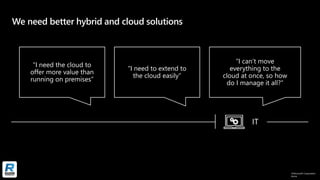
We need better hybrid and cloud solutions
“I need the cloud to
offer more value than
running on premises”
“I need to extend to
the cloud easily”
“I can’t move
everything to the
cloud at once, so how
do I manage it all?”
IT
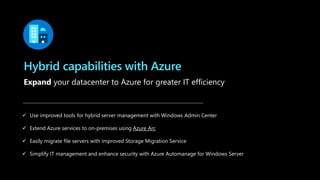
Hybrid capabilities with Azure
Expand your datacenter to Azure for greater IT efficiency
✓ Use improved tools for hybrid server management with Windows Admin Center
✓ Extend Azure services to on-premises using Azure Arc
✓ Easily migrate file servers with improved Storage Migration Service
✓ Simplify IT management and enhance security with Azure Automanage for Windows Server
Azure Arc enabled Windows Servers
Bring on-premises and multi-cloud Windows Servers to Azure with Azure Arc
Reach
Virtual machine
Management
At-scale searchable inventory
Unified management experience
Consistent VM Extensions
Governance &
security
©Microsoft Corporation
Azure
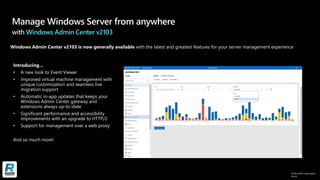
Manage Windows Server from anywhere
with Windows Admin Center v2103
©Microsoft Corporation
Azure
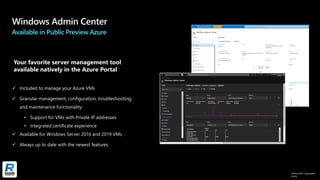
Available in Public Preview Azure
✓ Included to manage your Azure VMs​
✓ Granular management, configuration, troubleshooting,
and maintenance functionality​
• Support for VMs with Private IP addresses
• Integrated certificate experience
✓ Available for Windows Server 2016 and 2019 VMs​
✓ Always up to date with the newest features​
Your favorite server management tool
available natively in the Azure Portal
©Microsoft Corporation
Azure
Storage Migration Service
with Windows Server 2022
file
sync
HQ cluster
WS 2022
Branch
WS 2003 or
WS 2008/R2
Branch
Samba clusters
Azure
Storage Migration Service
file
sync
file
sync
• Migrate emulated file servers from
NetApp FAS to Windows Server clusters
• Enable Azure File Sync during migrations
and SMS can migrate your data onto a
modern Windows Server Virtual Machine
on Azure
©Microsoft Corporation
Azure
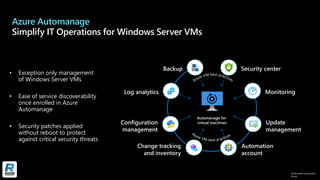
Azure Automanage
Simplify IT Operations for Windows Server VMs
Automation
account
Change tracking
and inventory
Security center
Monitoring
Update
management
Configuration
management
Log analytics
Backup
Automanage for
virtual machines
• Exception only management
of Windows Server VMs
• Ease of service discoverability
once enrolled in Azure
Automanage
• Security patches applied
without reboot to protect
against critical security threats
©Microsoft Corporation
Azure
Azure Automanage for Windows Server
©Microsoft Corporation
Azure
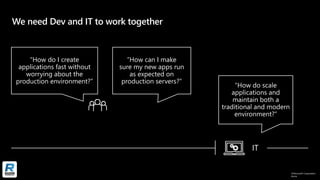
We need Dev and IT to work together
“How do scale
applications and
maintain both a
traditional and modern
environment?”
“How do I create
applications fast without
worrying about the
production environment?”
“How can I make
sure my new apps run
as expected on
production servers?”
IT
©Microsoft Corporation
Azure
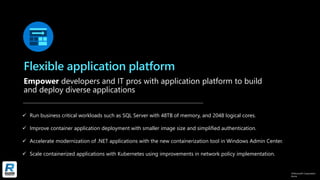
Flexible application platform
Empower developers and IT pros with application platform to build
and deploy diverse applications
✓ Run business critical workloads such as SQL Server with 48TB of memory, and 2048 logical cores.
✓ Improve container application deployment with smaller image size and simplified authentication.
✓ Accelerate modernization of .NET applications with the new containerization tool in Windows Admin Center.
✓ Scale containerized applications with Kubernetes using improvements in network policy implementation.
©Microsoft Corporation
Azure
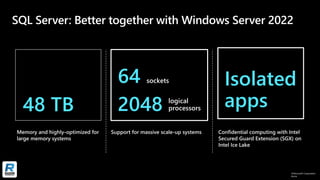
SQL Server: Better together with Windows Server 2022
48 TB
64 sockets
2048 logical
processors
Isolated
apps
©Microsoft Corporation
Azure
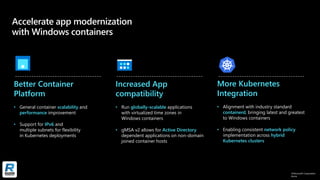
Accelerate app modernization
with Windows containers
Better Container
Platform
• General container scalability and
performance improvement
• Support for IPv6 and
multiple subnets for flexibility
in Kubernetes deployments
Increased App
compatibility
• Run globally-scalable applications
with virtualized time zones in
Windows containers
• gMSA v2 allows for Active Directory
dependent applications on non-domain
joined container hosts
More Kubernetes
Integration
• Alignment with industry standard
containerd, bringing latest and greatest
to Windows containers
• Enabling consistent network policy
implementation across hybrid
Kubernetes clusters
©Microsoft Corporation
Azure
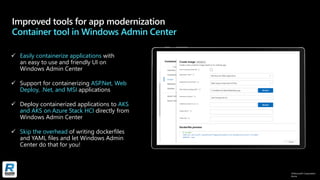
Improved tools for app modernization
Container tool in Windows Admin Center
✓ Easily containerize applications with
an easy to use and friendly UI on
Windows Admin Center
✓ Support for containerizing ASP.Net, Web
Deploy, .Net, and MSI applications
✓ Deploy containerized applications to AKS
and AKS on Azure Stack HCI directly from
Windows Admin Center
✓ Skip the overhead of writing dockerfiles
and YAML files and let Windows Admin
Center do that for you!
Get started
Software Assurance customers have New Version Rights and can get
Windows Server 2022 at no additional cost: Learn more
Download Windows Server 2022 LTSC preview
aka.ms/WS2022Preview
Try Windows Server 2022 LTSC preview on Azure
aka.ms/WS2022AzurePreview
Download Windows Admin Center
aka.ms/WindowsAdminCenter
866.797.3282 | Razor-tech.com
David Rosenthal
VP & General Manager
Digital Business
@DavidJRosenthal
SlideShare

Microsoft Windows Server 2022 Overview

  • 1.
    Windows Server 2022 DavidJ. Rosenthal VP, Digital Business July 27, 2021
  • 2.
    ©Microsoft Corporation Azure Windows Server Anywhere Hybrid Extendto Azure with Azure Arc Azure Best cloud for Windows Server On-premises Upgrade to 2022 In the cloud | In your datacenter | At the edge
  • 3.
  • 4.
    ©Microsoft Corporation Azure Windows Server Over25 years of innovation Windows Server NT4 Windows Server 2000 Windows Server 2008 Windows Server 2012 Windows Server 2016 Windows Server 2019 Windows Server 2022 In the cloud | In your datacenter | At the edge Windows Server 2003
  • 5.
    ©Microsoft Corporation Azure Elevate thesecurity posture of your organization starting with the operating system Extend your datacenter to Azure for greater IT efficiency Empower developers and IT pros with an application platform to build and deploy diverse applications Run business critical workloads in Azure, on-premises and at the edge Introducing Windows Server 2022 (in preview) Advanced multi-layered security Hybrid capabilities with Azure Flexible application platform
  • 6.
  • 7.
    ©Microsoft Corporation Azure We needbetter security solutions “How do we stay ahead of emerging security exploits?” “How do I keep virtualized workloads safe?” Average amount paid in USD for each lost or stolen record containing sensitive or confidential information $141* IT Average total cost of a data breach $3.62 million* *Cost of data breach study: Global analysis, 2017, Ponemon Institute
  • 8.
    Advanced multi-layered security Elevateyour security posture of your organization starting with the operating system ✓ Apply advanced multi-layer protection against threats enabled easily with secured-core server ✓ Secure connectivity to business-critical assets with latest in network security innovation ✓ Protect data-in-use with confidential computing
  • 9.
    ©Microsoft Corporation Azure Secured-core server Securehardware, firmware and OS capabilities to help protect against advanced threats • Collaboration with ecosystem partners to simplify security enablement • Windows Admin Center provides an easy access to configure secured-core server • Security with Windows Defender System Guard provides system integrity against firmware attacks • Virtualization-based security (VBS) isolates critical parts of the system from advanced malware • VBS features such as HVCI and Credential Guard prevent entire classes of vulnerabilities and better protect sensitive assets like credentials • Trusted Platform Module 2.0 (TPM 2.0) provides hardware root-of-trust used as a secure foundation. Simplified security Server OEMs develop systems with certified built-in security Advanced protection Defense-in-depth protection over multiple layers across hardware, firmware and OS Preventative defense Disrupt practical attack vectors proactively
  • 10.
    ©Microsoft Corporation Azure Secure connectivity Latestin network security innovation for Windows Server Transport • Faster and more secure encrypted HTTPS connections • TLS 1.3 enabled by default on Windows Server 2022 SMB • SMB AES-256 encryption for the most security conscious • East-West SMB encryption controls for internal cluster communications • Get industry standard encryption without compromising performance using SMB encryption with RDMA • Encrypted DNS name resolution requests with DoH Secure DNS
  • 11.
    ©Microsoft Corporation Azure We needbetter hybrid and cloud solutions “I need the cloud to offer more value than running on premises” “I need to extend to the cloud easily” “I can’t move everything to the cloud at once, so how do I manage it all?” IT
  • 12.
    Hybrid capabilities withAzure Expand your datacenter to Azure for greater IT efficiency ✓ Use improved tools for hybrid server management with Windows Admin Center ✓ Extend Azure services to on-premises using Azure Arc ✓ Easily migrate file servers with improved Storage Migration Service ✓ Simplify IT management and enhance security with Azure Automanage for Windows Server
  • 13.
    Azure Arc enabledWindows Servers Bring on-premises and multi-cloud Windows Servers to Azure with Azure Arc Reach Virtual machine Management At-scale searchable inventory Unified management experience Consistent VM Extensions Governance & security
  • 14.
    ©Microsoft Corporation Azure Manage WindowsServer from anywhere with Windows Admin Center v2103
  • 15.
    ©Microsoft Corporation Azure Available inPublic Preview Azure ✓ Included to manage your Azure VMs​ ✓ Granular management, configuration, troubleshooting, and maintenance functionality​ • Support for VMs with Private IP addresses • Integrated certificate experience ✓ Available for Windows Server 2016 and 2019 VMs​ ✓ Always up to date with the newest features​ Your favorite server management tool available natively in the Azure Portal
  • 16.
    ©Microsoft Corporation Azure Storage MigrationService with Windows Server 2022 file sync HQ cluster WS 2022 Branch WS 2003 or WS 2008/R2 Branch Samba clusters Azure Storage Migration Service file sync file sync • Migrate emulated file servers from NetApp FAS to Windows Server clusters • Enable Azure File Sync during migrations and SMS can migrate your data onto a modern Windows Server Virtual Machine on Azure
  • 17.
    ©Microsoft Corporation Azure Azure Automanage SimplifyIT Operations for Windows Server VMs Automation account Change tracking and inventory Security center Monitoring Update management Configuration management Log analytics Backup Automanage for virtual machines • Exception only management of Windows Server VMs • Ease of service discoverability once enrolled in Azure Automanage • Security patches applied without reboot to protect against critical security threats
  • 18.
  • 19.
    ©Microsoft Corporation Azure We needDev and IT to work together “How do scale applications and maintain both a traditional and modern environment?” “How do I create applications fast without worrying about the production environment?” “How can I make sure my new apps run as expected on production servers?” IT
  • 20.
    ©Microsoft Corporation Azure Flexible applicationplatform Empower developers and IT pros with application platform to build and deploy diverse applications ✓ Run business critical workloads such as SQL Server with 48TB of memory, and 2048 logical cores. ✓ Improve container application deployment with smaller image size and simplified authentication. ✓ Accelerate modernization of .NET applications with the new containerization tool in Windows Admin Center. ✓ Scale containerized applications with Kubernetes using improvements in network policy implementation.
  • 21.
    ©Microsoft Corporation Azure SQL Server:Better together with Windows Server 2022 48 TB 64 sockets 2048 logical processors Isolated apps
  • 22.
    ©Microsoft Corporation Azure Accelerate appmodernization with Windows containers Better Container Platform • General container scalability and performance improvement • Support for IPv6 and multiple subnets for flexibility in Kubernetes deployments Increased App compatibility • Run globally-scalable applications with virtualized time zones in Windows containers • gMSA v2 allows for Active Directory dependent applications on non-domain joined container hosts More Kubernetes Integration • Alignment with industry standard containerd, bringing latest and greatest to Windows containers • Enabling consistent network policy implementation across hybrid Kubernetes clusters
  • 23.
    ©Microsoft Corporation Azure Improved toolsfor app modernization Container tool in Windows Admin Center ✓ Easily containerize applications with an easy to use and friendly UI on Windows Admin Center ✓ Support for containerizing ASP.Net, Web Deploy, .Net, and MSI applications ✓ Deploy containerized applications to AKS and AKS on Azure Stack HCI directly from Windows Admin Center ✓ Skip the overhead of writing dockerfiles and YAML files and let Windows Admin Center do that for you!
  • 24.
    Get started Software Assurancecustomers have New Version Rights and can get Windows Server 2022 at no additional cost: Learn more Download Windows Server 2022 LTSC preview aka.ms/WS2022Preview Try Windows Server 2022 LTSC preview on Azure aka.ms/WS2022AzurePreview Download Windows Admin Center aka.ms/WindowsAdminCenter
  • 25.
    866.797.3282 | Razor-tech.com DavidRosenthal VP & General Manager Digital Business @DavidJRosenthal SlideShare