Presentation On
Cloud Computing
Presented To: Sir Fazal Rahman
Presented By: Waseem Ahmed
Section: BS(CS)-1B
Outline:
 Cloud Computing
 History of Cloud
 Components Of Cloud Computing
 Common characteristics of Cloud Computing
 Cloud Service models
 Types Of Cloud
 Cloud Architecture
 Properties of Cloud Computing
 Cloud Security
 Cloud Operating Systems
 Cloud Application
 Advantage & Disadvantage
 Conclusions
What is Cloud Computing?
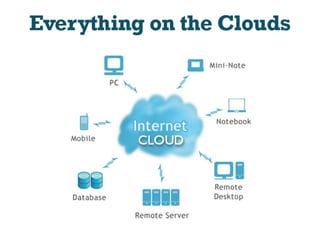
 An environment created in a user’s machine from an on-line
application stored on the cloud and run through a web browser.
 In simple Cloud computing is using the internet to access
someone else's software running on someone else's hardware
in someone else's data center.
 It involves deploying groups of remote servers and software
networks that allow centralized data storage and online access
to computer services or resources.
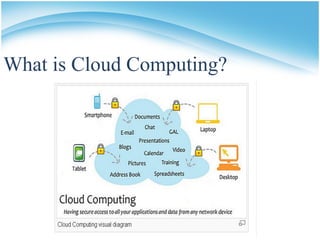
What is Cloud Computing?
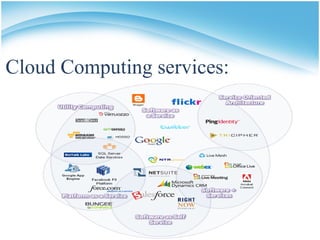
Cloud Computing services:
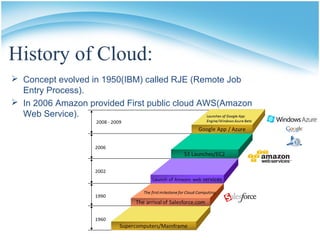
History of Cloud:
 Concept evolved in 1950(IBM) called RJE (Remote Job
Entry Process).
 In 2006 Amazon provided First public cloud AWS(Amazon
Web Service).
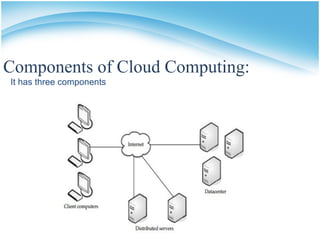
Components of Cloud Computing:
It has three components
 Client computers:
Clients are the device that the end user interact with cloud.
They are three types of clients:
1) Mobile.
2) Thick.
3) Thin (Most Popular)
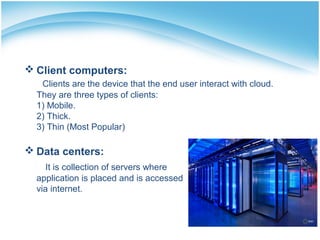
 Data centers:
It is collection of servers where
application is placed and is accessed
via internet.
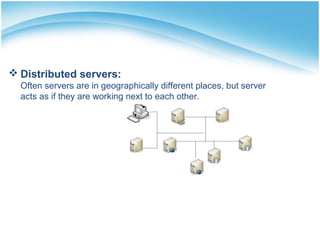
 Distributed servers:
Often servers are in geographically different places, but server
acts as if they are working next to each other.
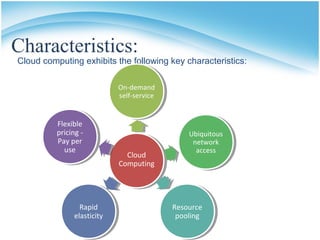
Characteristics:
Cloud computing exhibits the following key characteristics:
On-demand
self-service
Ubiquitous
network
access
Cloud
Computing
Resource
pooling
Flexible
pricing -
Pay per
use
Rapid
elasticity
Common characteristics of Cloud
Computing
 On-demand self-service
• Ubiquitous network access
• Resource pooling (advanced virtualization)
• Rapid elasticity
• Flexible pricing - Pay per use
• On-demand self-service
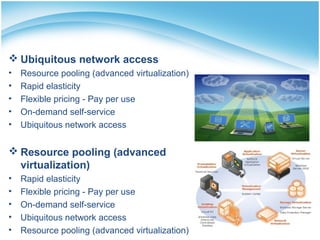
 Ubiquitous network access
• Resource pooling (advanced virtualization)
• Rapid elasticity
• Flexible pricing - Pay per use
• On-demand self-service
• Ubiquitous network access
 Resource pooling (advanced
virtualization)
• Rapid elasticity
• Flexible pricing - Pay per use
• On-demand self-service
• Ubiquitous network access
• Resource pooling (advanced virtualization)
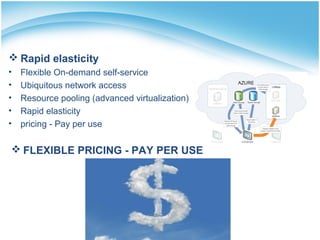
 FLEXIBLE PRICING - PAY PER USE
 Rapid elasticity
• Flexible On-demand self-service
• Ubiquitous network access
• Resource pooling (advanced virtualization)
• Rapid elasticity
• pricing - Pay per use
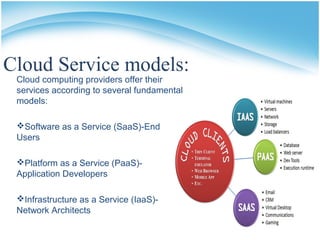
Cloud Service models:
Cloud computing providers offer their
services according to several fundamental
models:
Software as a Service (SaaS)-End
Users
Platform as a Service (PaaS)-
Application Developers
Infrastructure as a Service (IaaS)-
Network Architects
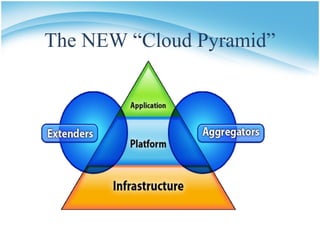
The NEW “Cloud Pyramid”
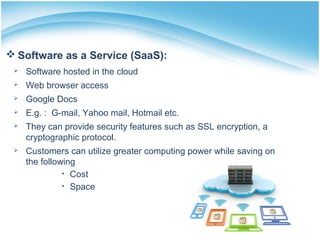
 Software as a Service (SaaS):
 Software hosted in the cloud
 Web browser access
 Google Docs
 E.g. : G-mail, Yahoo mail, Hotmail etc.
 They can provide security features such as SSL encryption, a
cryptographic protocol.
 Customers can utilize greater computing power while saving on
the following
• Cost
• Space
 Platform as a Service (PaaS):
 Host provides software development platform
 Customer creates software
 Host provides hardware
• Networks
• Servers
• storage
 E.g.: Salesforce.com, Windows Azure etc.
 Infrastructure as a Service (IaaS) :
 It also known as hardware as a service.
 It is a computing power that you can rent for a limited period of
time.
 It allows existing applications to be run on a cloud suppliers
hardware.
 Host provides:
• Servers
• Clients
• Networks
 Infrastructure providers can dynamically allocate resources.
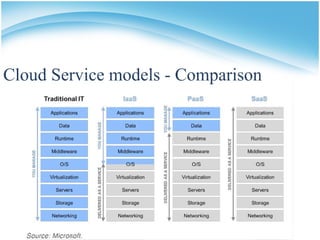
Cloud Service models - Comparison
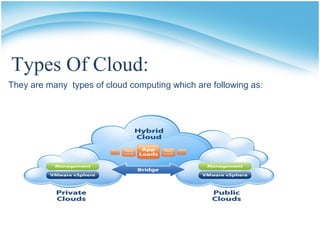
Types Of Cloud:
They are many types of cloud computing which are following as:
 Community cloud:
Shared by several organizations and supports a specific
community that has shared concerns.
 Private cloud:
Operated solely for an organization or company.
E.g. : HP data center, IBM, Sun, Oracle, 3tera.
 Public cloud:
Available to the general public or large industry group and its
owned by an organization selling cloud services.
E.g. : Amazon, Google, Microsoft, Sales force.
 Hybrid cloud:
Combination of two of the above, they remain unique entities
but are bound together by standardized technologies.
Cloud Architecture:
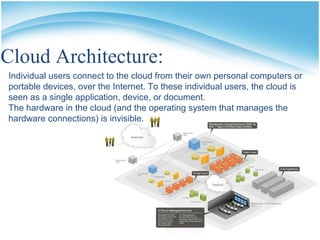
Individual users connect to the cloud from their own personal computers or
portable devices, over the Internet. To these individual users, the cloud is
seen as a single application, device, or document.
The hardware in the cloud (and the operating system that manages the
hardware connections) is invisible.
Properties of cloud computing:
 It is User Centric (P2P).
 It is Task Centric.
 It is Powerful (NASA).
 It is Intelligent.
 It is Accessible.
 It is Programmable (Data loader and Replication).
 Distributed and Collaborative Computing.
Cloud Security:
 SECURITY AND PRIVACY:
• Identify management
• Physical and personal
• security
• Availability
• Application security
• Privacy
• Legal issues
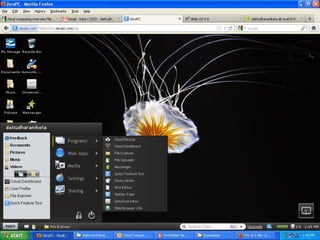
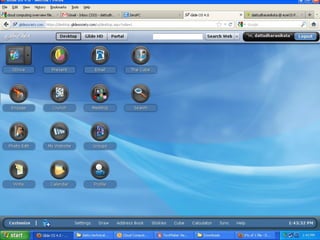
Cloud Operating Systems:
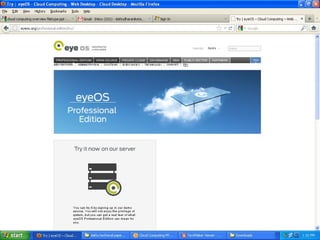
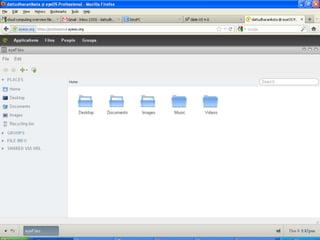
 Eye OS.
 Amoeba OS.
 Glide OS.
 Start force.
 myGoya.
 Corneli OS.
 Lucid Desktop.
 Cloudo, Ghost, Zimdesk, Start force etc.,
Why cloud service is popular?
 Reduce the complexity of networks.
 Do not have to buy software licenses.
 Customization.
 Cloud providers that have specialized in a particular area (such
as e-mail) can bring advanced services that a single company
might not be able to afford or develop.
 scalability, reliability, and efficiency.
 Info. at cloud are not easily lost
Cloud Application:
 Social Networking sites.
 E-mail sites.
 Search Engines.
 Many more services OVER THE INTERNET.
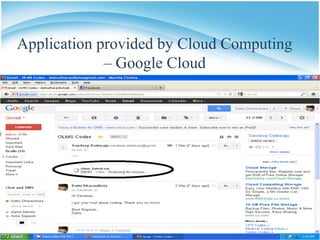
Application provided by Cloud Computing
– Google Cloud
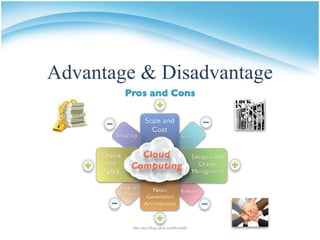
Advantage & Disadvantage
Difference
ADVANTAGES:
 Software as a Subscription.
 Reduced Software Maintenance.
 Increased Reliability.
 Environmentally Friendly.
 Cost Reduction.
 Latest version availability.
 Improved Performance.
 Reduced Software Cost.
 Instant Software Updates.
 Unlimited Storage Capacity.
 Device Independence and the “always on!, anywhere and any place”
 Free From Maintenance and the “no-need-to-know”
DISADVANTAGES:
 Requires a constant Internet
connection.
 Features might be limited.
 App performance could suffer.
 Stored data can be lost.
 Stored data might not be secure.
 Cloud computing is impossible if you
cannot connect to the Internet.
 When you are offline, cloud
computing simply does not work.
Future of CLOUD COMPUTING
 The 55% of respondents believe that cloud computing has a lower
total cost of ownership (TCO).
 74 percent of respondents indicated that cloud computing would
either lead to an increase in hiring or have no impact, while rest of
respondents expected any decrease in hiring based on cloud
adoption.
 39 percent indicating that the cloud would make for less or more
complex environments.
Cloud computing

Cloud computing

  • 2.
    Presentation On Cloud Computing PresentedTo: Sir Fazal Rahman Presented By: Waseem Ahmed Section: BS(CS)-1B
  • 3.
    Outline:  Cloud Computing History of Cloud  Components Of Cloud Computing  Common characteristics of Cloud Computing  Cloud Service models  Types Of Cloud  Cloud Architecture  Properties of Cloud Computing  Cloud Security  Cloud Operating Systems  Cloud Application  Advantage & Disadvantage  Conclusions
  • 4.
    What is CloudComputing?  An environment created in a user’s machine from an on-line application stored on the cloud and run through a web browser.  In simple Cloud computing is using the internet to access someone else's software running on someone else's hardware in someone else's data center.  It involves deploying groups of remote servers and software networks that allow centralized data storage and online access to computer services or resources.
  • 6.
    What is CloudComputing?
  • 7.
  • 8.
    History of Cloud: Concept evolved in 1950(IBM) called RJE (Remote Job Entry Process).  In 2006 Amazon provided First public cloud AWS(Amazon Web Service).
  • 9.
    Components of CloudComputing: It has three components
  • 10.
     Client computers: Clientsare the device that the end user interact with cloud. They are three types of clients: 1) Mobile. 2) Thick. 3) Thin (Most Popular)  Data centers: It is collection of servers where application is placed and is accessed via internet.
  • 11.
     Distributed servers: Oftenservers are in geographically different places, but server acts as if they are working next to each other.
  • 12.
    Characteristics: Cloud computing exhibitsthe following key characteristics: On-demand self-service Ubiquitous network access Cloud Computing Resource pooling Flexible pricing - Pay per use Rapid elasticity
  • 13.
    Common characteristics ofCloud Computing  On-demand self-service • Ubiquitous network access • Resource pooling (advanced virtualization) • Rapid elasticity • Flexible pricing - Pay per use • On-demand self-service
  • 14.
     Ubiquitous networkaccess • Resource pooling (advanced virtualization) • Rapid elasticity • Flexible pricing - Pay per use • On-demand self-service • Ubiquitous network access  Resource pooling (advanced virtualization) • Rapid elasticity • Flexible pricing - Pay per use • On-demand self-service • Ubiquitous network access • Resource pooling (advanced virtualization)
  • 15.
     FLEXIBLE PRICING- PAY PER USE  Rapid elasticity • Flexible On-demand self-service • Ubiquitous network access • Resource pooling (advanced virtualization) • Rapid elasticity • pricing - Pay per use
  • 16.
    Cloud Service models: Cloudcomputing providers offer their services according to several fundamental models: Software as a Service (SaaS)-End Users Platform as a Service (PaaS)- Application Developers Infrastructure as a Service (IaaS)- Network Architects
  • 17.
    The NEW “CloudPyramid”
  • 18.
     Software asa Service (SaaS):  Software hosted in the cloud  Web browser access  Google Docs  E.g. : G-mail, Yahoo mail, Hotmail etc.  They can provide security features such as SSL encryption, a cryptographic protocol.  Customers can utilize greater computing power while saving on the following • Cost • Space
  • 19.
     Platform asa Service (PaaS):  Host provides software development platform  Customer creates software  Host provides hardware • Networks • Servers • storage  E.g.: Salesforce.com, Windows Azure etc.
  • 20.
     Infrastructure asa Service (IaaS) :  It also known as hardware as a service.  It is a computing power that you can rent for a limited period of time.  It allows existing applications to be run on a cloud suppliers hardware.  Host provides: • Servers • Clients • Networks  Infrastructure providers can dynamically allocate resources.
  • 21.
  • 22.
    Types Of Cloud: Theyare many types of cloud computing which are following as:
  • 23.
     Community cloud: Sharedby several organizations and supports a specific community that has shared concerns.  Private cloud: Operated solely for an organization or company. E.g. : HP data center, IBM, Sun, Oracle, 3tera.  Public cloud: Available to the general public or large industry group and its owned by an organization selling cloud services. E.g. : Amazon, Google, Microsoft, Sales force.  Hybrid cloud: Combination of two of the above, they remain unique entities but are bound together by standardized technologies.
  • 24.
    Cloud Architecture: Individual usersconnect to the cloud from their own personal computers or portable devices, over the Internet. To these individual users, the cloud is seen as a single application, device, or document. The hardware in the cloud (and the operating system that manages the hardware connections) is invisible.
  • 25.
    Properties of cloudcomputing:  It is User Centric (P2P).  It is Task Centric.  It is Powerful (NASA).  It is Intelligent.  It is Accessible.  It is Programmable (Data loader and Replication).  Distributed and Collaborative Computing.
  • 26.
    Cloud Security:  SECURITYAND PRIVACY: • Identify management • Physical and personal • security • Availability • Application security • Privacy • Legal issues
  • 27.
    Cloud Operating Systems: Eye OS.  Amoeba OS.  Glide OS.  Start force.  myGoya.  Corneli OS.  Lucid Desktop.  Cloudo, Ghost, Zimdesk, Start force etc.,
  • 34.
    Why cloud serviceis popular?  Reduce the complexity of networks.  Do not have to buy software licenses.  Customization.  Cloud providers that have specialized in a particular area (such as e-mail) can bring advanced services that a single company might not be able to afford or develop.  scalability, reliability, and efficiency.  Info. at cloud are not easily lost
  • 35.
    Cloud Application:  SocialNetworking sites.  E-mail sites.  Search Engines.  Many more services OVER THE INTERNET.
  • 36.
    Application provided byCloud Computing – Google Cloud
  • 37.
  • 38.
    Difference ADVANTAGES:  Software asa Subscription.  Reduced Software Maintenance.  Increased Reliability.  Environmentally Friendly.  Cost Reduction.  Latest version availability.  Improved Performance.  Reduced Software Cost.  Instant Software Updates.  Unlimited Storage Capacity.  Device Independence and the “always on!, anywhere and any place”  Free From Maintenance and the “no-need-to-know” DISADVANTAGES:  Requires a constant Internet connection.  Features might be limited.  App performance could suffer.  Stored data can be lost.  Stored data might not be secure.  Cloud computing is impossible if you cannot connect to the Internet.  When you are offline, cloud computing simply does not work.
  • 39.
    Future of CLOUDCOMPUTING  The 55% of respondents believe that cloud computing has a lower total cost of ownership (TCO).  74 percent of respondents indicated that cloud computing would either lead to an increase in hiring or have no impact, while rest of respondents expected any decrease in hiring based on cloud adoption.  39 percent indicating that the cloud would make for less or more complex environments.