Thin Clients
A viable replacement for
     Desktop PCs?
What is a thin client
   True Thin Client
   Hybrid (lean) Client
   Ultra Thin Client
   Managed PC
   Legacy Thin Client
   Zero Clients
Initial Advantages
   Better Security
   Lower Power consumption
   Greater Productivity
   Cheaper
   Quieter and Cooler
   Less maintenance
   Less desirable for theft
   Longer Life span
Suppliers
   Wyse
   HP
   IGEL
   ThinSpace
   VXL
   Sun Microsystems
   SafeDesk
   N-computing
   Recycling Legacy PCs
Operating Systems/Platforms
   Windows CE
   Windows XPe
   Linux
   ThinOS

Virtualisation allows Running of
  virtually any operating system
  remotely on a server.
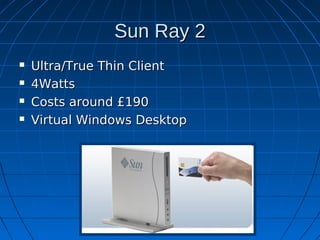
Sun Ray 2
   Ultra/True Thin Client
   4Watts
   Costs around £190
   Virtual Windows Desktop
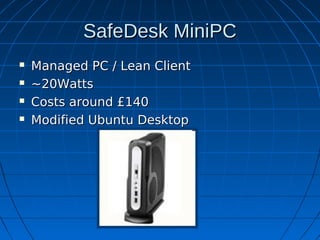
SafeDesk MiniPC
   Managed PC / Lean Client
   ~20Watts
   Costs around £140
   Modified Ubuntu Desktop
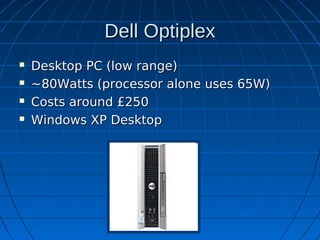
Dell Optiplex
   Desktop PC (low range)
   ~80Watts (processor alone uses 65W)
   Costs around £250
   Windows XP Desktop
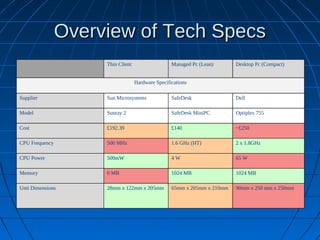
Overview of Tech Specs
                     Thin Client                   Managed Pc (Lean)      Desktop Pc (Compact)


                                   Hardware Specifications

Supplier             Sun Microsystems              SafeDesk               Dell

Model                Sunray 2                      SafeDesk MiniPC        Optiplex 755

Cost                 £192.39                       £140                   ~£250

CPU Frequency        500 MHz                       1.6 GHz (HT)           2 x 1.8GHz

CPU Power            500mW                         4W                     65 W

Memory               0 MB                          1024 MB                1024 MB

Unit Dimensions      28mm x 122mm x 205mm          65mm x 205mm x 210mm   90mm x 250 mm x 250mm
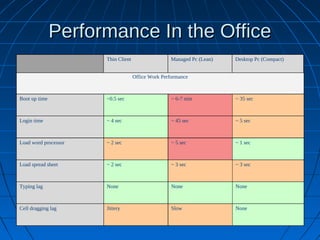
Performance In the Office
                      Thin Client                  Managed Pc (Lean)   Desktop Pc (Compact)


                                    Office Work Performance


Boot up time          ~0.5 sec                      ~ 6-7 min          ~ 35 sec


Login time            ~ 4 sec                       ~ 45 sec           ~ 5 sec


Load word processor   ~ 2 sec                       ~ 5 sec            ~ 1 sec


Load spread sheet     ~ 2 sec                       ~ 3 sec            ~ 3 sec


Typing lag            None                          None               None


Cell dragging lag     Jittery                       Slow               None
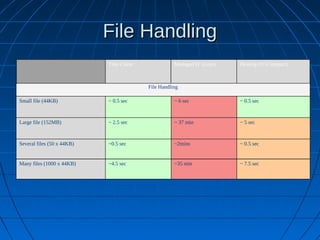
File Handling
                            Thin Client              Managed Pc (Lean)   Desktop Pc (Compact)


                                          File Handling

Small file (44KB)           ~ 0.5 sec                ~ 6 sec             ~ 0.5 sec


Large file (152MB)          ~ 2.5 sec                ~ 37 min            ~ 5 sec


Several files (50 x 44KB)   ~0.5 sec                 ~2mins              ~ 0.5 sec


Many files (1000 x 44KB)    ~4.5 sec                 ~35 min             ~ 7.5 sec
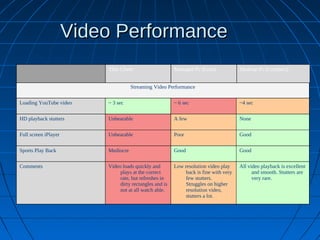
Video Performance
                          Thin Client                    Managed Pc (Lean)             Desktop Pc (Compact)


                                     Streaming Video Performance

Loading YouTube video     ~ 3 sec                        ~ 6 sec                       ~4 sec

HD playback stutters      Unbearable                     A few                         None

Full screen iPlayer       Unbearable                     Poor                          Good

Sports Play Back          Mediocre                       Good                          Good

Comments                  Video loads quickly and        Low resolution video play     All video playback is excellent
                               plays at the correct           back is fine with very         and smooth. Stutters are
                               rate, but refreshes in         few stutters.                  very rare.
                               dirty rectangles and is        Struggles on higher
                               not at all watch able.         resolution video,
                                                              stutters a lot.
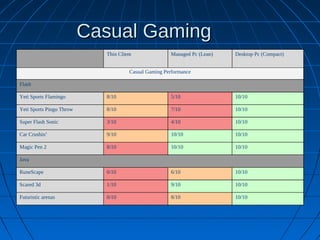
Casual Gaming
                            Thin Client               Managed Pc (Lean)   Desktop Pc (Compact)


                                      Casual Gaming Performance

Flash

Yeti Sports Flamingo        8/10                      5/10                10/10

Yeti Sports Pingu Throw     8/10                      7/10                10/10

Super Flash Sonic           3/10                      4/10                10/10

Car Crushin’                9/10                      10/10               10/10

Magic Pen 2                 8/10                      10/10               10/10

Java

RuneScape                   0/10                      6/10                10/10

Scared 3d                   1/10                      9/10                10/10

Futuristic arenas           0/10                      8/10                10/10
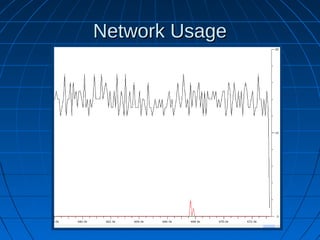
Network Usage
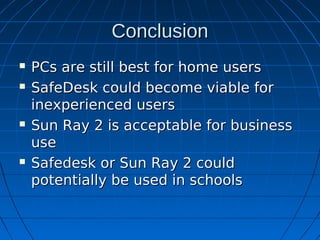
Conclusion
   PCs are still best for home users
   SafeDesk could become viable for
    inexperienced users
   Sun Ray 2 is acceptable for business
    use
   Safedesk or Sun Ray 2 could
    potentially be used in schools

Thin Client

  • 1.
    Thin Clients A viablereplacement for Desktop PCs?
  • 2.
    What is athin client  True Thin Client  Hybrid (lean) Client  Ultra Thin Client  Managed PC  Legacy Thin Client  Zero Clients
  • 3.
    Initial Advantages  Better Security  Lower Power consumption  Greater Productivity  Cheaper  Quieter and Cooler  Less maintenance  Less desirable for theft  Longer Life span
  • 4.
    Suppliers  Wyse  HP  IGEL  ThinSpace  VXL  Sun Microsystems  SafeDesk  N-computing  Recycling Legacy PCs
  • 5.
    Operating Systems/Platforms  Windows CE  Windows XPe  Linux  ThinOS Virtualisation allows Running of virtually any operating system remotely on a server.
  • 6.
    Sun Ray 2  Ultra/True Thin Client  4Watts  Costs around £190  Virtual Windows Desktop
  • 7.
    SafeDesk MiniPC  Managed PC / Lean Client  ~20Watts  Costs around £140  Modified Ubuntu Desktop
  • 8.
    Dell Optiplex  Desktop PC (low range)  ~80Watts (processor alone uses 65W)  Costs around £250  Windows XP Desktop
  • 9.
    Overview of TechSpecs Thin Client Managed Pc (Lean) Desktop Pc (Compact) Hardware Specifications Supplier Sun Microsystems SafeDesk Dell Model Sunray 2 SafeDesk MiniPC Optiplex 755 Cost £192.39 £140 ~£250 CPU Frequency 500 MHz 1.6 GHz (HT) 2 x 1.8GHz CPU Power 500mW 4W 65 W Memory 0 MB 1024 MB 1024 MB Unit Dimensions 28mm x 122mm x 205mm 65mm x 205mm x 210mm 90mm x 250 mm x 250mm
  • 10.
    Performance In theOffice Thin Client Managed Pc (Lean) Desktop Pc (Compact) Office Work Performance Boot up time ~0.5 sec ~ 6-7 min ~ 35 sec Login time ~ 4 sec ~ 45 sec ~ 5 sec Load word processor ~ 2 sec ~ 5 sec ~ 1 sec Load spread sheet ~ 2 sec ~ 3 sec ~ 3 sec Typing lag None None None Cell dragging lag Jittery Slow None
  • 11.
    File Handling Thin Client Managed Pc (Lean) Desktop Pc (Compact) File Handling Small file (44KB) ~ 0.5 sec ~ 6 sec ~ 0.5 sec Large file (152MB) ~ 2.5 sec ~ 37 min ~ 5 sec Several files (50 x 44KB) ~0.5 sec ~2mins ~ 0.5 sec Many files (1000 x 44KB) ~4.5 sec ~35 min ~ 7.5 sec
  • 12.
    Video Performance Thin Client Managed Pc (Lean) Desktop Pc (Compact) Streaming Video Performance Loading YouTube video ~ 3 sec ~ 6 sec ~4 sec HD playback stutters Unbearable A few None Full screen iPlayer Unbearable Poor Good Sports Play Back Mediocre Good Good Comments Video loads quickly and Low resolution video play All video playback is excellent plays at the correct back is fine with very and smooth. Stutters are rate, but refreshes in few stutters. very rare. dirty rectangles and is Struggles on higher not at all watch able. resolution video, stutters a lot.
  • 13.
    Casual Gaming Thin Client Managed Pc (Lean) Desktop Pc (Compact) Casual Gaming Performance Flash Yeti Sports Flamingo 8/10 5/10 10/10 Yeti Sports Pingu Throw 8/10 7/10 10/10 Super Flash Sonic 3/10 4/10 10/10 Car Crushin’ 9/10 10/10 10/10 Magic Pen 2 8/10 10/10 10/10 Java RuneScape 0/10 6/10 10/10 Scared 3d 1/10 9/10 10/10 Futuristic arenas 0/10 8/10 10/10
  • 14.
  • 15.
    Conclusion  PCs are still best for home users  SafeDesk could become viable for inexperienced users  Sun Ray 2 is acceptable for business use  Safedesk or Sun Ray 2 could potentially be used in schools