Presented By: Zuhaib Mirani (G. L)
Aamir Ali, Furqan Ali & SaQi Hussain
1
Govt: Boys Degree college Larkano (Sindh)
1. Intro to Bluetooth Tech.
2. History Of Bluetooth
3. Logo creation
4. How Bluetooth works
5. How data travel
6. Advantages & Disadvantages
7. Bluetooth Devices
2
 Simply the Bluetooth is a wireless technology
that communicates with wide variety of
electronic devices.
 The Bluetooth is a wireless technology
standard for exchanging data over short
distance (10 meters) using short Radio-waves
frequency of 2.4 GHz.
3
 Bluetooth is a wireless communication technology,
creates wireless personal area network (WPAN) for
short-range transmission of digital audio and data.
Wireless Network Tecnologies
4
 A piconet is a network of devices connected
using Bluetooth technology.
 When a network is established, one device
takes the role of the master while all the
other devices act as slaves.
Point to Point
Point to Multi Point
Master Device
Slave Device
5
 Collection of Piconets is called Scatternet. A
master or slave in one piconet can become
slave in another piconet.
6
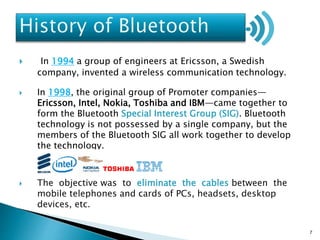
 In 1994 a group of engineers at Ericsson, a Swedish
company, invented a wireless communication technology.
 In 1998, the original group of Promoter companies—
Ericsson, Intel, Nokia, Toshiba and IBM—came together to
form the Bluetooth Special Interest Group (SIG). Bluetooth
technology is not possessed by a single company, but the
members of the Bluetooth SIG all work together to develop
the technology.
 The objective was to eliminate the cables between the
mobile telephones and cards of PCs, headsets, desktop
devices, etc.
7
Picture 01
Present Past
8
Picture 02
 The name Bluetooth taken from the 10th
century, The Harald Blatand was a king of
Denmark and Norway. He was
called by his nick name Bluetooth.
 The name was adopted because Bluetooth wireless
technology is expected to unify the
telecommunications and computing industries
King Harald Blatand
9
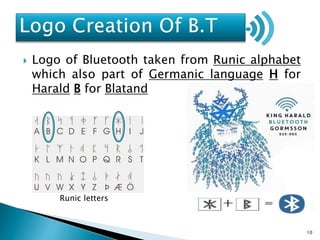
Runic letters
 Logo of Bluetooth taken from Runic alphabet
which also part of Germanic language H for
Harald B for Blatand
10
 Bluetooth technology is a combination of
hardware and software. On the hardware side,
chip containing the Bluetooth radio.That
sends and receives signals at a specific ISM
radio frequency 2.4 GHz
 The software interprets incoming Bluetooth
signals and sends them out in ways other
devices can read and understand.
11
 Frequancy Hopping Spread Spectrum (FHSS)
Frequency hopping spread spectrum (FHSS) is a method of
transmitting radio signals by rapidly switching a carries
among many frequency channels. Transmitted data are
divided into packets, and each packet is transmitted on one
of the 79 Bluetooth channels.
 Frequency hopping spread spectrum is defined in the 2.4 GHz
band and operates in around 79 frequencies ranging from
2.402 GHz to 2.480 GHz. Every frequency is modulated with
channel width of 1MHz and rates defined as 1 Mbps
NOTE
It’s also define
bluetooth data
transmiting
security
12
 Wireless communication
No need of wire to communicate
devices to each other WPAN.
 Low Energy Consumption
It use tiny ammount of power then
mobile tourch.
 Automatic
It’s completely autometic to device
detect within range.
 Security
B.T shares data only authorized device
using (FHSS).
 B.T Inexpensive
It’s not costly technology
 Free Usage
It’s accessible anywhere, it doesn’t
need permission from any country.
 No setup needed
 Industry Wide Support
 Data Transfer Rate
B.T data transmites 1Mbps while the
inferad rate is 4Mbps.
 Data sharing
Bluetooth share data at a time only
and only one device.
 Short range
B.T works in the range of 10 meters
(30feet).
 Devices Connectivity
maximum 8 devices can be connected
through Bluetooth.
13
 Bluetooth headsets are the most iconic Bluetooth peripherals,
has a tiny computer chip inside that contains the Bluetooth
radio, and software that makes connectivity between devices
possible.
 Pair your headset with your phone and you can use it to receive
calls wirelessly. Because the Bluetooth specification allows for
more than just simply receiving audio, buttons on the headset
can be used to answer and hang up calls, as well.
14
 Keyboards can also connect over Bluetooth, which is particularly
useful for tablets. Even if you could use a USB cable to connect a
single mouse or keyboard to a tablet, you would want Bluetooth
so you could connect both the keyboard and mouse at once —
you wouldn’t be limited to one input device by the single USB
port.
15
 An amplifier and loudspeaker with Bluetooth wireless
connectivity that is paired with one or more smart phones,
tablets or computers. the Bluetooth speaker receives digital
audio streams from the host device, which are typically
compressed then decompresses, decodes and amplifies the
audio through the built-in speakers.
16
 If you wish to communicate over the 100m range, you will
need a class 1 Bluetooth device at both ends.
 If you wish to communicate over the 10m range, you can
have a class 1 or class 2 device at both ends.
Class Maximum Power Operating Range
Class 1 100mW 100 meters
Class 2 2.5mW 10 meters
Class 3 1mW 1 meter
17
Version Capabilities
Bluetooth 1.x Basic rate 1 Mbps data rate
Bluetooth 2.x Basic rate + EDR 3 Mbps data rate
Bluetooth 3.x Basic rate + EDR + HS
Bluetooth 4.x Basic rate + EDR + HS + LE
18
19

The Bluetooth technology

  • 1.
    Presented By: ZuhaibMirani (G. L) Aamir Ali, Furqan Ali & SaQi Hussain 1 Govt: Boys Degree college Larkano (Sindh)
  • 2.
    1. Intro toBluetooth Tech. 2. History Of Bluetooth 3. Logo creation 4. How Bluetooth works 5. How data travel 6. Advantages & Disadvantages 7. Bluetooth Devices 2
  • 3.
     Simply theBluetooth is a wireless technology that communicates with wide variety of electronic devices.  The Bluetooth is a wireless technology standard for exchanging data over short distance (10 meters) using short Radio-waves frequency of 2.4 GHz. 3
  • 4.
     Bluetooth isa wireless communication technology, creates wireless personal area network (WPAN) for short-range transmission of digital audio and data. Wireless Network Tecnologies 4
  • 5.
     A piconetis a network of devices connected using Bluetooth technology.  When a network is established, one device takes the role of the master while all the other devices act as slaves. Point to Point Point to Multi Point Master Device Slave Device 5
  • 6.
     Collection ofPiconets is called Scatternet. A master or slave in one piconet can become slave in another piconet. 6
  • 7.
     In 1994a group of engineers at Ericsson, a Swedish company, invented a wireless communication technology.  In 1998, the original group of Promoter companies— Ericsson, Intel, Nokia, Toshiba and IBM—came together to form the Bluetooth Special Interest Group (SIG). Bluetooth technology is not possessed by a single company, but the members of the Bluetooth SIG all work together to develop the technology.  The objective was to eliminate the cables between the mobile telephones and cards of PCs, headsets, desktop devices, etc. 7
  • 8.
  • 9.
     The nameBluetooth taken from the 10th century, The Harald Blatand was a king of Denmark and Norway. He was called by his nick name Bluetooth.  The name was adopted because Bluetooth wireless technology is expected to unify the telecommunications and computing industries King Harald Blatand 9
  • 10.
    Runic letters  Logoof Bluetooth taken from Runic alphabet which also part of Germanic language H for Harald B for Blatand 10
  • 11.
     Bluetooth technologyis a combination of hardware and software. On the hardware side, chip containing the Bluetooth radio.That sends and receives signals at a specific ISM radio frequency 2.4 GHz  The software interprets incoming Bluetooth signals and sends them out in ways other devices can read and understand. 11
  • 12.
     Frequancy HoppingSpread Spectrum (FHSS) Frequency hopping spread spectrum (FHSS) is a method of transmitting radio signals by rapidly switching a carries among many frequency channels. Transmitted data are divided into packets, and each packet is transmitted on one of the 79 Bluetooth channels.  Frequency hopping spread spectrum is defined in the 2.4 GHz band and operates in around 79 frequencies ranging from 2.402 GHz to 2.480 GHz. Every frequency is modulated with channel width of 1MHz and rates defined as 1 Mbps NOTE It’s also define bluetooth data transmiting security 12
  • 13.
     Wireless communication Noneed of wire to communicate devices to each other WPAN.  Low Energy Consumption It use tiny ammount of power then mobile tourch.  Automatic It’s completely autometic to device detect within range.  Security B.T shares data only authorized device using (FHSS).  B.T Inexpensive It’s not costly technology  Free Usage It’s accessible anywhere, it doesn’t need permission from any country.  No setup needed  Industry Wide Support  Data Transfer Rate B.T data transmites 1Mbps while the inferad rate is 4Mbps.  Data sharing Bluetooth share data at a time only and only one device.  Short range B.T works in the range of 10 meters (30feet).  Devices Connectivity maximum 8 devices can be connected through Bluetooth. 13
  • 14.
     Bluetooth headsetsare the most iconic Bluetooth peripherals, has a tiny computer chip inside that contains the Bluetooth radio, and software that makes connectivity between devices possible.  Pair your headset with your phone and you can use it to receive calls wirelessly. Because the Bluetooth specification allows for more than just simply receiving audio, buttons on the headset can be used to answer and hang up calls, as well. 14
  • 15.
     Keyboards canalso connect over Bluetooth, which is particularly useful for tablets. Even if you could use a USB cable to connect a single mouse or keyboard to a tablet, you would want Bluetooth so you could connect both the keyboard and mouse at once — you wouldn’t be limited to one input device by the single USB port. 15
  • 16.
     An amplifierand loudspeaker with Bluetooth wireless connectivity that is paired with one or more smart phones, tablets or computers. the Bluetooth speaker receives digital audio streams from the host device, which are typically compressed then decompresses, decodes and amplifies the audio through the built-in speakers. 16
  • 17.
     If youwish to communicate over the 100m range, you will need a class 1 Bluetooth device at both ends.  If you wish to communicate over the 10m range, you can have a class 1 or class 2 device at both ends. Class Maximum Power Operating Range Class 1 100mW 100 meters Class 2 2.5mW 10 meters Class 3 1mW 1 meter 17
  • 18.
    Version Capabilities Bluetooth 1.xBasic rate 1 Mbps data rate Bluetooth 2.x Basic rate + EDR 3 Mbps data rate Bluetooth 3.x Basic rate + EDR + HS Bluetooth 4.x Basic rate + EDR + HS + LE 18
  • 19.

Editor's Notes

  • #5 An ad hoc network is a temporary connection between computers and devices used for a specific purpose, such as sharing documents during a meeting or playing multiplayer computer games
  • #13 It communicates on a frequency of 2.45 gigahertz (actually between 2.402 GHz and 2.480 GHz, to be exact). This frequency band has been set aside by international agreement for the use of industrial, scientific and medical devices (ISM).