
A
SEMINAR REPORT
ON
“BLUETOOTH TECHNOLOGY”
Seminar Guide Submitted By:
Mr. Mahendra Singh Sagar Afsar Ali
Assistant Professor Roll No.: TCA1406018
Master of Computer Application
4th
Sem. (LT)
COLLEGE OF COMPUTING SCIENCE AND
INFORMATION TECHNOLOGY
(Teerthanker Mahaveer University, Delhi Road, Moradabad – 244001)
2
What is Bluetooth?
• “Bluetooth wireless technology is an open specification for a
low-cost, low-power, short-range radio technology for ad-hoc
wireless communication of voice and data anywhere in the
world.” Bluetooth is a radio frequency specification for short
range, point to point and point to multi point voice and data
transfer. Bluetooth technology facilitates the replacement of
cables normally used to connect one device to another by a
short range radio link. With the help of blue tooth we can
operate our keyboard and mouse without direct connection
of CPU. Printers, fax machines, headphone, mouse,
keyboard or any other digital devices can be part of
Bluetooth system.
d to connect one device to another by a short range radio link. With the help of blue tooth we can operate our keyboard and mouse witho
nnected devices away from fixed network infrastructures.
10 December 2009 3
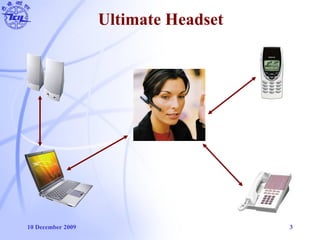
Ultimate Headset
10 December 2009 4
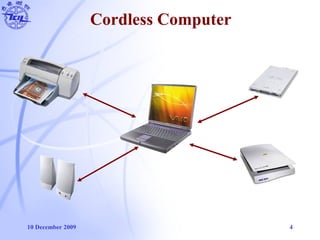
Cordless Computer
10 December 2009 5
Bluetooth Goals & Vision
• Originally conceived as a cable replacement technology
• Short-Range Wireless Solutions
• Open Specification
• Voice and Data Capability
• Worldwide Usability
• Other usage models began to develop:
— Personal Area Network (PAN)
— Ad-hoc networks
— Data/voice access points
— Wireless telematics
10 December 2009 6
Overview of Bluetooth History
• What is Bluetooth?
— Bluetooth is a short-range wireless communications technology.
• Why this name?
— It was taken from the 10th century Danish King Harald Blatand who
unified Denmark and Norway.
• When does it appear?
— 1994 – Ericsson study on a wireless technology to link mobile phones &
accessories.
— 5 companies joined to form the Bluetooth Special Interest Group (SIG)
in 1998.
— First specification released in July 1999.
10 December 2009 7
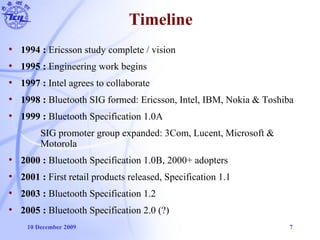
Timeline
• 1994 : Ericsson study complete / vision
• 1995 : Engineering work begins
• 1997 : Intel agrees to collaborate
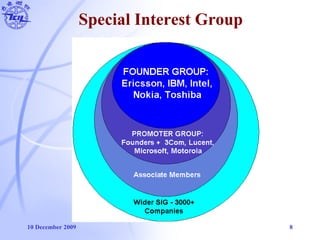
• 1998 : Bluetooth SIG formed: Ericsson, Intel, IBM, Nokia & Toshiba
• 1999 : Bluetooth Specification 1.0A
SIG promoter group expanded: 3Com, Lucent, Microsoft &
Motorola
• 2000 : Bluetooth Specification 1.0B, 2000+ adopters
• 2001 : First retail products released, Specification 1.1
• 2003 : Bluetooth Specification 1.2
• 2005 : Bluetooth Specification 2.0 (?)
10 December 2009 8
Special Interest Group
10 December 2009 9
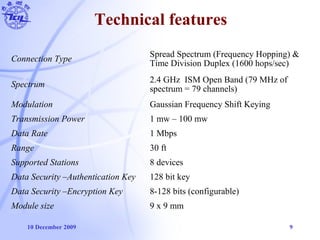
Technical features
Connection Type
Spread Spectrum (Frequency Hopping) &
Time Division Duplex (1600 hops/sec)
Spectrum
2.4 GHz ISM Open Band (79 MHz of
spectrum = 79 channels)
Modulation Gaussian Frequency Shift Keying
Transmission Power 1 mw – 100 mw
Data Rate 1 Mbps
Range 30 ft
Supported Stations 8 devices
Data Security –Authentication Key 128 bit key
Data Security –Encryption Key 8-128 bits (configurable)
Module size 9 x 9 mm
10 December 2009 10
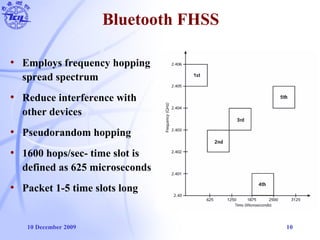
Bluetooth FHSS
• Employs frequency hopping
spread spectrum
• Reduce interference with
other devices
• Pseudorandom hopping
• 1600 hops/sec- time slot is
defined as 625 microseconds
• Packet 1-5 time slots long
10 December 2009 11
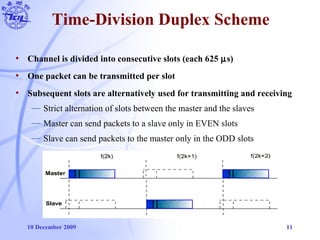
Time-Division Duplex Scheme
• Channel is divided into consecutive slots (each 625 µs)
• One packet can be transmitted per slot
• Subsequent slots are alternatively used for transmitting and receiving
— Strict alternation of slots between the master and the slaves
— Master can send packets to a slave only in EVEN slots
— Slave can send packets to the master only in the ODD slots
10 December 2009 12
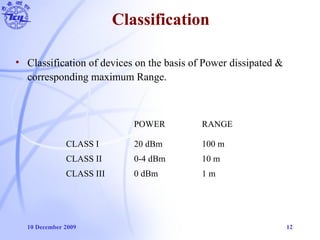
Classification
POWER RANGE
CLASS I 20 dBm 100 m
CLASS II 0-4 dBm 10 m
CLASS III 0 dBm 1 m
• Classification of devices on the basis of Power dissipated &
corresponding maximum Range.
10 December 2009 13
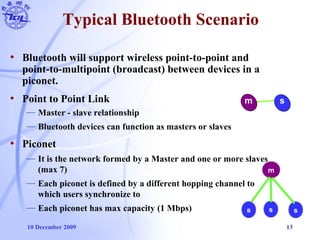
Typical Bluetooth Scenario
• Bluetooth will support wireless point-to-point and
point-to-multipoint (broadcast) between devices in a
piconet.
• Point to Point Link
— Master - slave relationship
— Bluetooth devices can function as masters or slaves
• Piconet
— It is the network formed by a Master and one or more slaves
(max 7)
— Each piconet is defined by a different hopping channel to
which users synchronize to
— Each piconet has max capacity (1 Mbps)
m s
s s s
m
10 December 2009 14
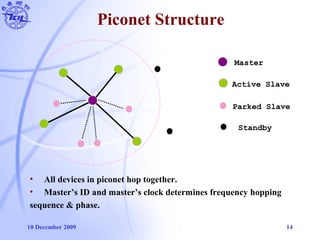
Piconet Structure
Master
Active Slave
Parked Slave
Standby
• All devices in piconet hop together.
• Master’s ID and master’s clock determines frequency hopping
sequence & phase.
10 December 2009 15
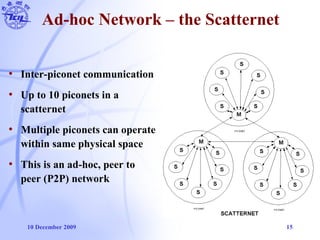
Ad-hoc Network – the Scatternet
• Inter-piconet communication
• Up to 10 piconets in a
scatternet
• Multiple piconets can operate
within same physical space
• This is an ad-hoc, peer to
peer (P2P) network
10 December 2009 16
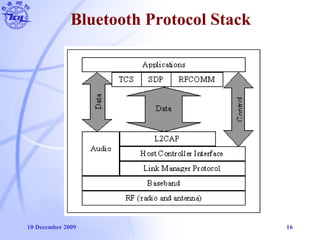
Bluetooth Protocol Stack
10 December 2009 17
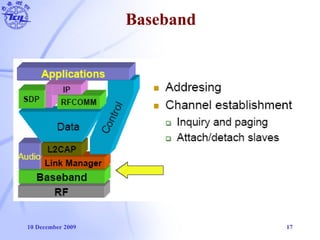
Baseband
10 December 2009 18
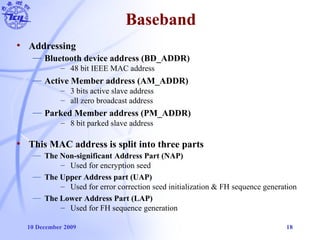
Baseband
• Addressing
— Bluetooth device address (BD_ADDR)
– 48 bit IEEE MAC address
— Active Member address (AM_ADDR)
– 3 bits active slave address
– all zero broadcast address
— Parked Member address (PM_ADDR)
– 8 bit parked slave address
• This MAC address is split into three parts
— The Non-significant Address Part (NAP)
– Used for encryption seed
— The Upper Address part (UAP)
– Used for error correction seed initialization & FH sequence generation
— The Lower Address Part (LAP)
– Used for FH sequence generation
10 December 2009 19
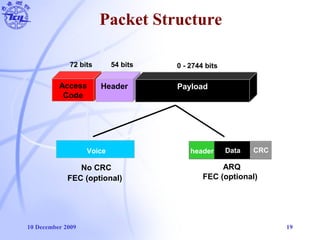
Packet Structure
Voice
No CRC
Data CRCheader
ARQ
FEC (optional) FEC (optional)
72 bits 54 bits 0 - 2744 bits
Access
Code
Header Payload
10 December 2009 20
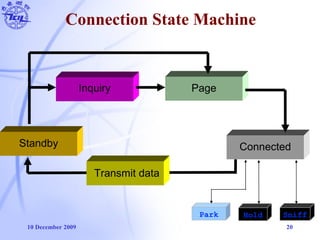
Connection State Machine
Standby
Inquiry Page
Connected
Transmit data
Park Hold Sniff
10 December 2009 21
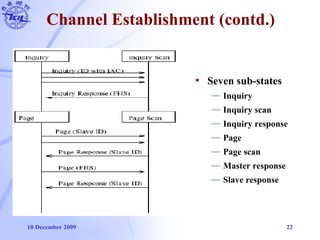
Channel Establishment
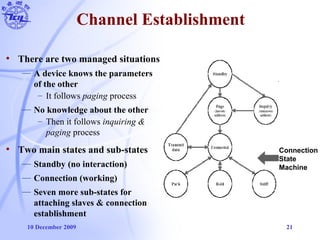
• There are two managed situations
— A device knows the parameters
of the other
– It follows paging process
— No knowledge about the other
– Then it follows inquiring &
paging process
• Two main states and sub-states
— Standby (no interaction)
— Connection (working)
— Seven more sub-states for
attaching slaves & connection
establishment
Connection
State
Machine
10 December 2009 22
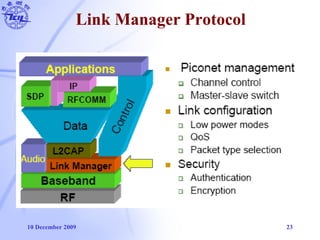
Channel Establishment (contd.)
• Seven sub-states
— Inquiry
— Inquiry scan
— Inquiry response
— Page
— Page scan
— Master response
— Slave response
10 December 2009 23
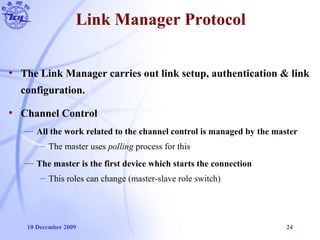
Link Manager Protocol
10 December 2009 24
Link Manager Protocol
• The Link Manager carries out link setup, authentication & link
configuration.
• Channel Control
— All the work related to the channel control is managed by the master
– The master uses polling process for this
— The master is the first device which starts the connection
– This roles can change (master-slave role switch)
10 December 2009 25
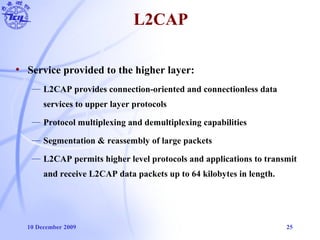
• Service provided to the higher layer:
— L2CAP provides connection-oriented and connectionless data
services to upper layer protocols
— Protocol multiplexing and demultiplexing capabilities
— Segmentation & reassembly of large packets
— L2CAP permits higher level protocols and applications to transmit
and receive L2CAP data packets up to 64 kilobytes in length.
L2CAP
10 December 2009 26
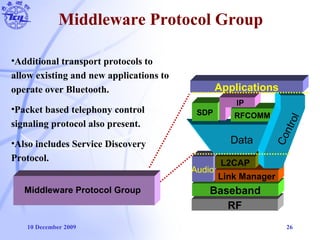
Middleware Protocol Group
RF
Baseband
Audio
Link Manager
L2CAP
Data
SDP RFCOMM
IP
Control
Applications
Middleware Protocol Group
•Additional transport protocols to
allow existing and new applications to
operate over Bluetooth.
•Packet based telephony control
signaling protocol also present.
•Also includes Service Discovery
Protocol.
10 December 2009 27
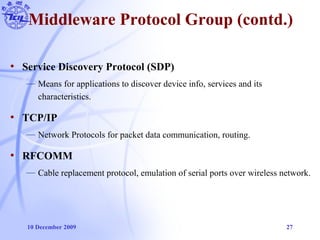
Middleware Protocol Group (contd.)
• Service Discovery Protocol (SDP)
— Means for applications to discover device info, services and its
characteristics.
• TCP/IP
— Network Protocols for packet data communication, routing.
• RFCOMM
— Cable replacement protocol, emulation of serial ports over wireless network.
10 December 2009 28
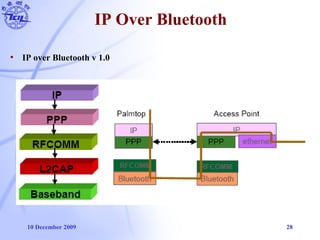
IP Over Bluetooth
• IP over Bluetooth v 1.0
10 December 2009 29
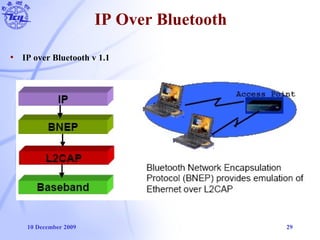
IP Over Bluetooth
• IP over Bluetooth v 1.1
10 December 2009 30
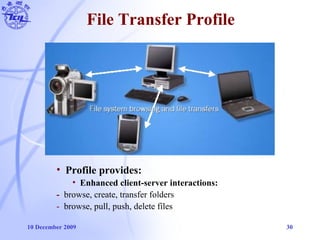
File Transfer Profile
• Profile provides:
• Enhanced client-server interactions:
- browse, create, transfer folders
- browse, pull, push, delete files
10 December 2009 31
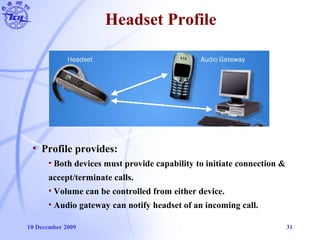
Headset Profile
• Profile provides:
• Both devices must provide capability to initiate connection &
accept/terminate calls.
• Volume can be controlled from either device.
• Audio gateway can notify headset of an incoming call.
10 December 2009 32
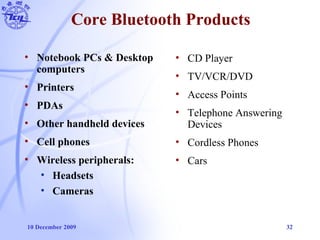
Core Bluetooth Products
• Notebook PCs & Desktop
computers
• Printers
• PDAs
• Other handheld devices
• Cell phones
• Wireless peripherals:
• Headsets
• Cameras
• CD Player
• TV/VCR/DVD
• Access Points
• Telephone Answering
Devices
• Cordless Phones
• Cars
10 December 2009 33
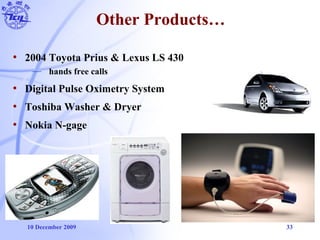
Other Products…
• 2004 Toyota Prius & Lexus LS 430
— hands free calls
• Digital Pulse Oximetry System
• Toshiba Washer & Dryer
• Nokia N-gage
10 December 2009 34
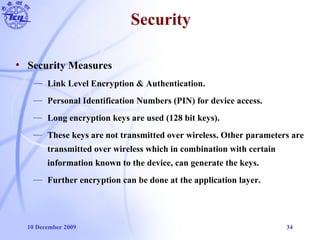
Security
• Security Measures
— Link Level Encryption & Authentication.
— Personal Identification Numbers (PIN) for device access.
— Long encryption keys are used (128 bit keys).
— These keys are not transmitted over wireless. Other parameters are
transmitted over wireless which in combination with certain
information known to the device, can generate the keys.
— Further encryption can be done at the application layer.
10 December 2009 35
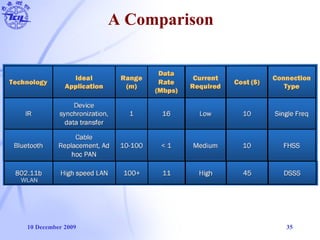
A Comparison
WLAN
10 December 2009 36
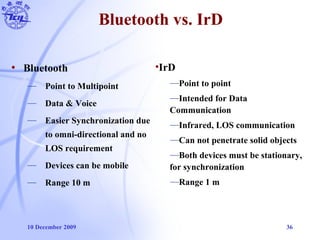
Bluetooth vs. IrD
• Bluetooth
— Point to Multipoint
— Data & Voice
— Easier Synchronization due
to omni-directional and no
LOS requirement
— Devices can be mobile
— Range 10 m
•IrD
—Point to point
—Intended for Data
Communication
—Infrared, LOS communication
—Can not penetrate solid objects
—Both devices must be stationary,
for synchronization
—Range 1 m
10 December 2009 37
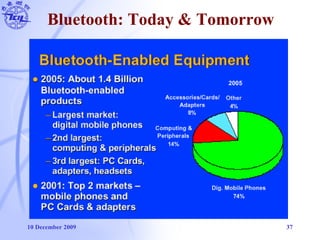
Bluetooth: Today & Tomorrow
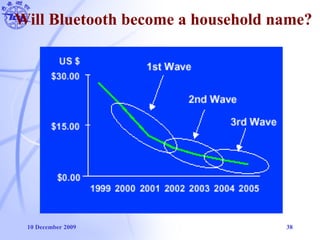
10 December 2009 38
Will Bluetooth become a household name?
10 December 2009 39
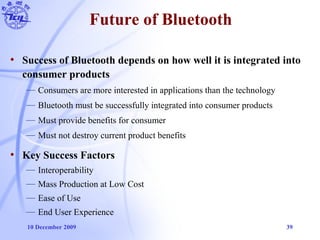
Future of Bluetooth
• Success of Bluetooth depends on how well it is integrated into
consumer products
— Consumers are more interested in applications than the technology
— Bluetooth must be successfully integrated into consumer products
— Must provide benefits for consumer
— Must not destroy current product benefits
• Key Success Factors
— Interoperability
— Mass Production at Low Cost
— Ease of Use
— End User Experience
10 December 2009 40
Summary
• A new global standard for data and voice
• Eliminate Cables
• Low Power, Low range, Low Cost network devices
• Future Improvements
— Master-Slave relationship can be adjusted dynamically for optimal
resource allocation and utilization.
— Adaptive, closed loop transmit power control can be implemented
to further reduce unnecessary power usage.
10 December 2009 41
“Things that think…
don’t make sense unless they
link.”
- Nicholas Negroponte, MIT Media Laboratory
10 December 2009 42
Thank You

bluetooth technology

  • 1.
    A SEMINAR REPORT ON “BLUETOOTH TECHNOLOGY” SeminarGuide Submitted By: Mr. Mahendra Singh Sagar Afsar Ali Assistant Professor Roll No.: TCA1406018 Master of Computer Application 4th Sem. (LT) COLLEGE OF COMPUTING SCIENCE AND INFORMATION TECHNOLOGY (Teerthanker Mahaveer University, Delhi Road, Moradabad – 244001)
  • 2.
    2 What is Bluetooth? •“Bluetooth wireless technology is an open specification for a low-cost, low-power, short-range radio technology for ad-hoc wireless communication of voice and data anywhere in the world.” Bluetooth is a radio frequency specification for short range, point to point and point to multi point voice and data transfer. Bluetooth technology facilitates the replacement of cables normally used to connect one device to another by a short range radio link. With the help of blue tooth we can operate our keyboard and mouse without direct connection of CPU. Printers, fax machines, headphone, mouse, keyboard or any other digital devices can be part of Bluetooth system. d to connect one device to another by a short range radio link. With the help of blue tooth we can operate our keyboard and mouse witho nnected devices away from fixed network infrastructures.
  • 3.
    10 December 20093 Ultimate Headset
  • 4.
    10 December 20094 Cordless Computer
  • 5.
    10 December 20095 Bluetooth Goals & Vision • Originally conceived as a cable replacement technology • Short-Range Wireless Solutions • Open Specification • Voice and Data Capability • Worldwide Usability • Other usage models began to develop: — Personal Area Network (PAN) — Ad-hoc networks — Data/voice access points — Wireless telematics
  • 6.
    10 December 20096 Overview of Bluetooth History • What is Bluetooth? — Bluetooth is a short-range wireless communications technology. • Why this name? — It was taken from the 10th century Danish King Harald Blatand who unified Denmark and Norway. • When does it appear? — 1994 – Ericsson study on a wireless technology to link mobile phones & accessories. — 5 companies joined to form the Bluetooth Special Interest Group (SIG) in 1998. — First specification released in July 1999.
  • 7.
    10 December 20097 Timeline • 1994 : Ericsson study complete / vision • 1995 : Engineering work begins • 1997 : Intel agrees to collaborate • 1998 : Bluetooth SIG formed: Ericsson, Intel, IBM, Nokia & Toshiba • 1999 : Bluetooth Specification 1.0A SIG promoter group expanded: 3Com, Lucent, Microsoft & Motorola • 2000 : Bluetooth Specification 1.0B, 2000+ adopters • 2001 : First retail products released, Specification 1.1 • 2003 : Bluetooth Specification 1.2 • 2005 : Bluetooth Specification 2.0 (?)
  • 8.
    10 December 20098 Special Interest Group
  • 9.
    10 December 20099 Technical features Connection Type Spread Spectrum (Frequency Hopping) & Time Division Duplex (1600 hops/sec) Spectrum 2.4 GHz ISM Open Band (79 MHz of spectrum = 79 channels) Modulation Gaussian Frequency Shift Keying Transmission Power 1 mw – 100 mw Data Rate 1 Mbps Range 30 ft Supported Stations 8 devices Data Security –Authentication Key 128 bit key Data Security –Encryption Key 8-128 bits (configurable) Module size 9 x 9 mm
  • 10.
    10 December 200910 Bluetooth FHSS • Employs frequency hopping spread spectrum • Reduce interference with other devices • Pseudorandom hopping • 1600 hops/sec- time slot is defined as 625 microseconds • Packet 1-5 time slots long
  • 11.
    10 December 200911 Time-Division Duplex Scheme • Channel is divided into consecutive slots (each 625 µs) • One packet can be transmitted per slot • Subsequent slots are alternatively used for transmitting and receiving — Strict alternation of slots between the master and the slaves — Master can send packets to a slave only in EVEN slots — Slave can send packets to the master only in the ODD slots
  • 12.
    10 December 200912 Classification POWER RANGE CLASS I 20 dBm 100 m CLASS II 0-4 dBm 10 m CLASS III 0 dBm 1 m • Classification of devices on the basis of Power dissipated & corresponding maximum Range.
  • 13.
    10 December 200913 Typical Bluetooth Scenario • Bluetooth will support wireless point-to-point and point-to-multipoint (broadcast) between devices in a piconet. • Point to Point Link — Master - slave relationship — Bluetooth devices can function as masters or slaves • Piconet — It is the network formed by a Master and one or more slaves (max 7) — Each piconet is defined by a different hopping channel to which users synchronize to — Each piconet has max capacity (1 Mbps) m s s s s m
  • 14.
    10 December 200914 Piconet Structure Master Active Slave Parked Slave Standby • All devices in piconet hop together. • Master’s ID and master’s clock determines frequency hopping sequence & phase.
  • 15.
    10 December 200915 Ad-hoc Network – the Scatternet • Inter-piconet communication • Up to 10 piconets in a scatternet • Multiple piconets can operate within same physical space • This is an ad-hoc, peer to peer (P2P) network
  • 16.
    10 December 200916 Bluetooth Protocol Stack
  • 17.
    10 December 200917 Baseband
  • 18.
    10 December 200918 Baseband • Addressing — Bluetooth device address (BD_ADDR) – 48 bit IEEE MAC address — Active Member address (AM_ADDR) – 3 bits active slave address – all zero broadcast address — Parked Member address (PM_ADDR) – 8 bit parked slave address • This MAC address is split into three parts — The Non-significant Address Part (NAP) – Used for encryption seed — The Upper Address part (UAP) – Used for error correction seed initialization & FH sequence generation — The Lower Address Part (LAP) – Used for FH sequence generation
  • 19.
    10 December 200919 Packet Structure Voice No CRC Data CRCheader ARQ FEC (optional) FEC (optional) 72 bits 54 bits 0 - 2744 bits Access Code Header Payload
  • 20.
    10 December 200920 Connection State Machine Standby Inquiry Page Connected Transmit data Park Hold Sniff
  • 21.
    10 December 200921 Channel Establishment • There are two managed situations — A device knows the parameters of the other – It follows paging process — No knowledge about the other – Then it follows inquiring & paging process • Two main states and sub-states — Standby (no interaction) — Connection (working) — Seven more sub-states for attaching slaves & connection establishment Connection State Machine
  • 22.
    10 December 200922 Channel Establishment (contd.) • Seven sub-states — Inquiry — Inquiry scan — Inquiry response — Page — Page scan — Master response — Slave response
  • 23.
    10 December 200923 Link Manager Protocol
  • 24.
    10 December 200924 Link Manager Protocol • The Link Manager carries out link setup, authentication & link configuration. • Channel Control — All the work related to the channel control is managed by the master – The master uses polling process for this — The master is the first device which starts the connection – This roles can change (master-slave role switch)
  • 25.
    10 December 200925 • Service provided to the higher layer: — L2CAP provides connection-oriented and connectionless data services to upper layer protocols — Protocol multiplexing and demultiplexing capabilities — Segmentation & reassembly of large packets — L2CAP permits higher level protocols and applications to transmit and receive L2CAP data packets up to 64 kilobytes in length. L2CAP
  • 26.
    10 December 200926 Middleware Protocol Group RF Baseband Audio Link Manager L2CAP Data SDP RFCOMM IP Control Applications Middleware Protocol Group •Additional transport protocols to allow existing and new applications to operate over Bluetooth. •Packet based telephony control signaling protocol also present. •Also includes Service Discovery Protocol.
  • 27.
    10 December 200927 Middleware Protocol Group (contd.) • Service Discovery Protocol (SDP) — Means for applications to discover device info, services and its characteristics. • TCP/IP — Network Protocols for packet data communication, routing. • RFCOMM — Cable replacement protocol, emulation of serial ports over wireless network.
  • 28.
    10 December 200928 IP Over Bluetooth • IP over Bluetooth v 1.0
  • 29.
    10 December 200929 IP Over Bluetooth • IP over Bluetooth v 1.1
  • 30.
    10 December 200930 File Transfer Profile • Profile provides: • Enhanced client-server interactions: - browse, create, transfer folders - browse, pull, push, delete files
  • 31.
    10 December 200931 Headset Profile • Profile provides: • Both devices must provide capability to initiate connection & accept/terminate calls. • Volume can be controlled from either device. • Audio gateway can notify headset of an incoming call.
  • 32.
    10 December 200932 Core Bluetooth Products • Notebook PCs & Desktop computers • Printers • PDAs • Other handheld devices • Cell phones • Wireless peripherals: • Headsets • Cameras • CD Player • TV/VCR/DVD • Access Points • Telephone Answering Devices • Cordless Phones • Cars
  • 33.
    10 December 200933 Other Products… • 2004 Toyota Prius & Lexus LS 430 — hands free calls • Digital Pulse Oximetry System • Toshiba Washer & Dryer • Nokia N-gage
  • 34.
    10 December 200934 Security • Security Measures — Link Level Encryption & Authentication. — Personal Identification Numbers (PIN) for device access. — Long encryption keys are used (128 bit keys). — These keys are not transmitted over wireless. Other parameters are transmitted over wireless which in combination with certain information known to the device, can generate the keys. — Further encryption can be done at the application layer.
  • 35.
    10 December 200935 A Comparison WLAN
  • 36.
    10 December 200936 Bluetooth vs. IrD • Bluetooth — Point to Multipoint — Data & Voice — Easier Synchronization due to omni-directional and no LOS requirement — Devices can be mobile — Range 10 m •IrD —Point to point —Intended for Data Communication —Infrared, LOS communication —Can not penetrate solid objects —Both devices must be stationary, for synchronization —Range 1 m
  • 37.
    10 December 200937 Bluetooth: Today & Tomorrow
  • 38.
    10 December 200938 Will Bluetooth become a household name?
  • 39.
    10 December 200939 Future of Bluetooth • Success of Bluetooth depends on how well it is integrated into consumer products — Consumers are more interested in applications than the technology — Bluetooth must be successfully integrated into consumer products — Must provide benefits for consumer — Must not destroy current product benefits • Key Success Factors — Interoperability — Mass Production at Low Cost — Ease of Use — End User Experience
  • 40.
    10 December 200940 Summary • A new global standard for data and voice • Eliminate Cables • Low Power, Low range, Low Cost network devices • Future Improvements — Master-Slave relationship can be adjusted dynamically for optimal resource allocation and utilization. — Adaptive, closed loop transmit power control can be implemented to further reduce unnecessary power usage.
  • 41.
    10 December 200941 “Things that think… don’t make sense unless they link.” - Nicholas Negroponte, MIT Media Laboratory
  • 42.
    10 December 200942 Thank You