BLUETOOTH TECHNOLOGY
Group B
Maj Marek Sipko
Capt Billy Hortman
Capt Michael McFerron
LT Mark Bjerke
LTjg David Jackson
Bluetooth
A specification adopted by the world's most powerful and
influential communications and computer manufacturers.
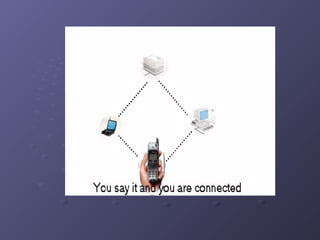
It will enable devices from mobile phones and PCs to
camcorders and cookers to talk to one another.
A little bit of history:
In early 1994, a team of researchers led by Sven
Mattisson and Jaap Haartsen in a vibrant college
town called Lund, Sweden, were investigating
the possibility of developing a wireless
connection between an ear-piece and phone. As
development proceeded, with it came the
realization that the potential of such a
technology far exceeded that of a mere cordless
headset. Ericsson decided to further research
the technology and thus, almost by accident the
Bluetooth concept was born.
The Bluetooth SIG set the following
goals:
Global usage
Voice and data handling
The ability to establish ad-hoc connections
The ability to withstand interference from other sources
in the open band
Very small size, in order to accommodate integration into
a variety of devices
Negligible power consumption in comparison to other
devices for similar use
An open interface standard
Competitively low cost of all units, as compared to their
non-Bluetooth contemporaries.
So how does Bluetooth work?
Basically, Bluetooth works by finding out what other
Bluetooth devices are nearby and then talking to them as
necessary. It does this by establishing a piconet, where
one device controls communications with up to seven
others. Many piconets can be linked to form a
scatternet .
Some ideas on how Bluetooth will
ingratiate itself into our lives:
Data synchronization need never again be a problem as your Bluetooth
enabled PDA, PC or laptop all talk to each other and update their
respective files to the most recent ones.
Traveling in a plane, a person may write but not send e-mail. When the
plane touches down the Bluetooth enabled laptop will communicate with
the user's phone and will automatically send them.
Mice and keyboards will identify themselves to the computer without
intervention, or could also be used to command TVs, videos or hi-fis at
the touch.
Use e-mail while your laptop is still in the briefcase! When your laptop
receives e-mail, you'll get an alert on your mobile phone. You can also
browse all incoming e-mails and read those you select in the mobile
phone's display.
A traveling businessperson could ask his laptop computer to locate a
suitable printer as soon as he enters a hotel lobby, and send a printout
to that printer when it has been found.
The Reality Check
In truth, Bluetooth is merely complementary to the other
technologies that permeate our lives. A universal
communicator, in itself it is of little benefit, but combined
with our mobile phones, PDAs and other devices, it
becomes a potent technology.
The Killer App for Bluetooth
The eradication of wire clutter
SECURITY ISSUES
Bluetooth’s abilities, for the moment at least, will be
limited to domestic use. As unresolved security issues
continue to loom, it is only a brave or stupid end-user
that would adopt Bluetooth on anything but a trivial scale.
Domestic arena offers Bluetooth a
bright future
People have a natural and healthy dislike for cables
littering their floors, and a technology that eliminates
such an eyesore and tedium for not only computers but
other electronic equipment like stereo’s, TV sets, home
kitchen and others.
Data Synchronization
The bane of those who work on the same projects and
files on different devices should be made almost
ridiculously easy by Bluetooth. Merely having the
different devices - PC, laptop, PDA, whatever - within
about 10 meters of each other should suffice as they all
automatically update their copy to the most recent one.
The Radiation Issues
It is a matter of concern to some that the carrier waves
used by Bluetooth inhabit the same band as that of
microwave ovens.
Fortunately, the transmitting power is far too weak to
result in perceptible effects in humans. Moreover, the
radiation is not concentrated in a single beam; rather, it
is randomly dispersed in all directions.
Security Issues and Bluetooth
The three principal security features employed by
Bluetooth are:
Frequency hopping, thus making eavesdropping almost
impossible.
Authentication, allowing a user to control connectivity to
specified devices only.
Encryption, utilizing a 0-bit, 40-bit or 64-bit key.
Despite considerable investment in this area, significant
security holes still exist in the 1.1 implementation of
Bluetooth.
The Real Security Threat
A more real concern lies in the method needed to
establish piconets. The necessity of PIN code entry in
the initialization process of two Bluetooth devices is
sloppy at best. The problem is augmented if each device
in a scatternet or larger-sized piconet has to be
independently initialized. It also poses significant
problems for a network administrator - it is unlikely that a
unique PIN would be assigned to each device, but not
doing so would seriously compromise network integrity.
It is worth noting that the SIG maintain that hackers
would have to take "extreme measures" to perform this
kind of hacking.
Security Bottom Line
Bluetooth in its current form is unsuitable for the transfer
of sensitive data. The Bluetooth SIG is actively seeking
to implement more sophisticated security protocols.
Tech Specs
Frequency Range
Physical Layer
Noise Immunity
Error Control
Data Transmission
Power
Frequency Range
Bluetooth devices utilize the 2.4Ghz Industrial, Scientific,
and Medical (ISM) frequency range. Throughout most of
the world this band is free and unregulated.
Encouraged by the Bluetooth SIG, governments worldwide are now beginning to regulate the 2.4Ghz band,
thus ensuring that it will remain available for unhindered
use by Bluetooth appliances.
Physical Layer
The Bluetooth hardware is comprised of a single 9*9mm
chip. Inserted into any device it can communicate with
any other Bluetooth device within a 10m radius, or up to
100m if an amplifier is used. The maximum data rate
achievable by 1st generation technology is 1Mbps.
Bluetooth appliances use Gaussian Frequency Shift
Keying (GSSK) for radio frequency modulation. Judicious
use of these modulation techniques should allow future
generations to achieve a transfer rate of between 2 and
12Mbps.
Noise Immunity
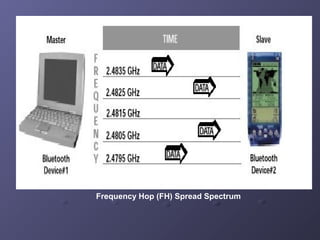
Frequency Hop (FH) spread spectrum is a method which
effectively divides the frequency band into a number of
hop channels. A technology that quickly hops channels
minimizes potential interference. Bluetooth takes
advantage of this technique by incorporating a fast
frequency hopping technology with a nominal hopping
rate of 1600 hops/second among 79 channels. After
transmitting a packet each device hops to another
frequency as determined by the master. The hopping
sequence is unique to each piconet and determined by
the Bluetooth Device Address (BDA) of the piconet
master.
Frequency Hop (FH) Spread Spectrum
Error Control
Another method by which Bluetooth increases its noise
immunity is that of Forward Error Correction (FEC). FEC
is a method that enables a receiver to not only detect but
also correct errors in a transmission. This technique is
especially valuable in limiting the impact of noise on long
distance links. Three error correction techniques have
been so far defined in the Bluetooth specification:
1/3 Rate FEC
2/3 Rate FEC
Automatic Repeat Request (ARQ)
Data Transmission
Bluetooth allows for data to be transmitted either
synchronously or asynchronously. The Synchronous
Connection Oriented (SCO) method is used primarily for
voice while the Asynchronous Connectionless (ACL)
method is used for data. Since SCO packets need
smooth transmission, they are transmitted via reserved
intervals, i.e. packets sent in groups with no interrupts.
Power
Bluetooth is truly admirable for its sparing use of power.
The technology limits the transmitter's power output to
exactly that needed - the signal strength is dynamically
modified to suit the required range. Power saving modes
examined in the Bluetooth protocol provide further
benefits.
Bluetooth Connection Protocol
The Bluetooth connection protocol describes the set of
rules by which all Bluetooth devices must abide in order
to establish a link and communicate with one another.
The essence of Bluetooth is based upon dynamically
configured units. Hopping very quickly between
frequencies, the protocol specifically caters for many
different modes to allow for minimal power consumption.
Standby
Devices not connected in a piconet are in standby mode.
In this mode, they listen for messages every 1.28
seconds - over 32 hop frequencies (fewer in Japan,
Spain, and France due to local bandwidth regulation).
Page/Inquiry
If a device wishes to make a connection with another
device, it sends out a page message if the address is
known, or an inquiry followed by a page message if it is
unknown. The master unit sends out 16 identical page
messages on 16 hop frequencies to the slave unit. If
there is no response, the master retransmits on the other
16 hop frequencies. The inquiry method requires an
extra response from the slave unit, since the MAC
address is unknown to the master unit.
Active
Simply, data transmission occurs.
Hold
When either the master or slave wishes, a hold mode
can be established, during which no data is transmitted.
The purpose of this is to conserve power. Otherwise,
there is a constant data exchange. A typical reason for
going into hold mode is the connection of several
piconets .
Sniff
The sniff mode, applicable only to slave units, is for
power conservation, though not at as reduced a level as
hold. During this mode, the slave does not take an active
role in the piconet, but listens at a reduced level. This is
usually a programmable setting.
Park
Park mode is a more reduced level of activity than the
hold mode. During it, the slave is synchronized to the
piconet, thus not requiring full reactivation, but is not part
of the traffic. In this state, they relinquish their MAC
addresses , but only listen enough to keep their
synchronization with the master and check for broadcast
messages.
FUTURE OF BLUETOOTH
Bluetooth was never designed to be a system competing
with LAN. It rather complements LAN, but taken as it is,
Bluetooth is a competent technology offering
unparalleled convenience. Ending, it will provide means
to get rid of connecting wire, and this is a truly a killer
app for it.

Introduction to Bluetooth technology

  • 1.
    BLUETOOTH TECHNOLOGY Group B MajMarek Sipko Capt Billy Hortman Capt Michael McFerron LT Mark Bjerke LTjg David Jackson
  • 2.
    Bluetooth A specification adoptedby the world's most powerful and influential communications and computer manufacturers. It will enable devices from mobile phones and PCs to camcorders and cookers to talk to one another.
  • 4.
    A little bitof history: In early 1994, a team of researchers led by Sven Mattisson and Jaap Haartsen in a vibrant college town called Lund, Sweden, were investigating the possibility of developing a wireless connection between an ear-piece and phone. As development proceeded, with it came the realization that the potential of such a technology far exceeded that of a mere cordless headset. Ericsson decided to further research the technology and thus, almost by accident the Bluetooth concept was born.
  • 5.
    The Bluetooth SIGset the following goals: Global usage Voice and data handling The ability to establish ad-hoc connections The ability to withstand interference from other sources in the open band Very small size, in order to accommodate integration into a variety of devices Negligible power consumption in comparison to other devices for similar use An open interface standard Competitively low cost of all units, as compared to their non-Bluetooth contemporaries.
  • 6.
    So how doesBluetooth work? Basically, Bluetooth works by finding out what other Bluetooth devices are nearby and then talking to them as necessary. It does this by establishing a piconet, where one device controls communications with up to seven others. Many piconets can be linked to form a scatternet .
  • 7.
    Some ideas onhow Bluetooth will ingratiate itself into our lives: Data synchronization need never again be a problem as your Bluetooth enabled PDA, PC or laptop all talk to each other and update their respective files to the most recent ones. Traveling in a plane, a person may write but not send e-mail. When the plane touches down the Bluetooth enabled laptop will communicate with the user's phone and will automatically send them. Mice and keyboards will identify themselves to the computer without intervention, or could also be used to command TVs, videos or hi-fis at the touch. Use e-mail while your laptop is still in the briefcase! When your laptop receives e-mail, you'll get an alert on your mobile phone. You can also browse all incoming e-mails and read those you select in the mobile phone's display. A traveling businessperson could ask his laptop computer to locate a suitable printer as soon as he enters a hotel lobby, and send a printout to that printer when it has been found.
  • 8.
    The Reality Check Intruth, Bluetooth is merely complementary to the other technologies that permeate our lives. A universal communicator, in itself it is of little benefit, but combined with our mobile phones, PDAs and other devices, it becomes a potent technology.
  • 9.
    The Killer Appfor Bluetooth The eradication of wire clutter
  • 10.
    SECURITY ISSUES Bluetooth’s abilities,for the moment at least, will be limited to domestic use. As unresolved security issues continue to loom, it is only a brave or stupid end-user that would adopt Bluetooth on anything but a trivial scale.
  • 11.
    Domestic arena offersBluetooth a bright future People have a natural and healthy dislike for cables littering their floors, and a technology that eliminates such an eyesore and tedium for not only computers but other electronic equipment like stereo’s, TV sets, home kitchen and others.
  • 12.
    Data Synchronization The baneof those who work on the same projects and files on different devices should be made almost ridiculously easy by Bluetooth. Merely having the different devices - PC, laptop, PDA, whatever - within about 10 meters of each other should suffice as they all automatically update their copy to the most recent one.
  • 13.
    The Radiation Issues Itis a matter of concern to some that the carrier waves used by Bluetooth inhabit the same band as that of microwave ovens. Fortunately, the transmitting power is far too weak to result in perceptible effects in humans. Moreover, the radiation is not concentrated in a single beam; rather, it is randomly dispersed in all directions.
  • 14.
    Security Issues andBluetooth The three principal security features employed by Bluetooth are: Frequency hopping, thus making eavesdropping almost impossible. Authentication, allowing a user to control connectivity to specified devices only. Encryption, utilizing a 0-bit, 40-bit or 64-bit key. Despite considerable investment in this area, significant security holes still exist in the 1.1 implementation of Bluetooth.
  • 15.
    The Real SecurityThreat A more real concern lies in the method needed to establish piconets. The necessity of PIN code entry in the initialization process of two Bluetooth devices is sloppy at best. The problem is augmented if each device in a scatternet or larger-sized piconet has to be independently initialized. It also poses significant problems for a network administrator - it is unlikely that a unique PIN would be assigned to each device, but not doing so would seriously compromise network integrity. It is worth noting that the SIG maintain that hackers would have to take "extreme measures" to perform this kind of hacking.
  • 16.
    Security Bottom Line Bluetoothin its current form is unsuitable for the transfer of sensitive data. The Bluetooth SIG is actively seeking to implement more sophisticated security protocols.
  • 17.
    Tech Specs Frequency Range PhysicalLayer Noise Immunity Error Control Data Transmission Power
  • 18.
    Frequency Range Bluetooth devicesutilize the 2.4Ghz Industrial, Scientific, and Medical (ISM) frequency range. Throughout most of the world this band is free and unregulated. Encouraged by the Bluetooth SIG, governments worldwide are now beginning to regulate the 2.4Ghz band, thus ensuring that it will remain available for unhindered use by Bluetooth appliances.
  • 19.
    Physical Layer The Bluetoothhardware is comprised of a single 9*9mm chip. Inserted into any device it can communicate with any other Bluetooth device within a 10m radius, or up to 100m if an amplifier is used. The maximum data rate achievable by 1st generation technology is 1Mbps. Bluetooth appliances use Gaussian Frequency Shift Keying (GSSK) for radio frequency modulation. Judicious use of these modulation techniques should allow future generations to achieve a transfer rate of between 2 and 12Mbps.
  • 20.
    Noise Immunity Frequency Hop(FH) spread spectrum is a method which effectively divides the frequency band into a number of hop channels. A technology that quickly hops channels minimizes potential interference. Bluetooth takes advantage of this technique by incorporating a fast frequency hopping technology with a nominal hopping rate of 1600 hops/second among 79 channels. After transmitting a packet each device hops to another frequency as determined by the master. The hopping sequence is unique to each piconet and determined by the Bluetooth Device Address (BDA) of the piconet master.
  • 21.
    Frequency Hop (FH)Spread Spectrum
  • 22.
    Error Control Another methodby which Bluetooth increases its noise immunity is that of Forward Error Correction (FEC). FEC is a method that enables a receiver to not only detect but also correct errors in a transmission. This technique is especially valuable in limiting the impact of noise on long distance links. Three error correction techniques have been so far defined in the Bluetooth specification: 1/3 Rate FEC 2/3 Rate FEC Automatic Repeat Request (ARQ)
  • 23.
    Data Transmission Bluetooth allowsfor data to be transmitted either synchronously or asynchronously. The Synchronous Connection Oriented (SCO) method is used primarily for voice while the Asynchronous Connectionless (ACL) method is used for data. Since SCO packets need smooth transmission, they are transmitted via reserved intervals, i.e. packets sent in groups with no interrupts.
  • 24.
    Power Bluetooth is trulyadmirable for its sparing use of power. The technology limits the transmitter's power output to exactly that needed - the signal strength is dynamically modified to suit the required range. Power saving modes examined in the Bluetooth protocol provide further benefits.
  • 25.
    Bluetooth Connection Protocol TheBluetooth connection protocol describes the set of rules by which all Bluetooth devices must abide in order to establish a link and communicate with one another. The essence of Bluetooth is based upon dynamically configured units. Hopping very quickly between frequencies, the protocol specifically caters for many different modes to allow for minimal power consumption.
  • 26.
    Standby Devices not connectedin a piconet are in standby mode. In this mode, they listen for messages every 1.28 seconds - over 32 hop frequencies (fewer in Japan, Spain, and France due to local bandwidth regulation).
  • 27.
    Page/Inquiry If a devicewishes to make a connection with another device, it sends out a page message if the address is known, or an inquiry followed by a page message if it is unknown. The master unit sends out 16 identical page messages on 16 hop frequencies to the slave unit. If there is no response, the master retransmits on the other 16 hop frequencies. The inquiry method requires an extra response from the slave unit, since the MAC address is unknown to the master unit.
  • 28.
  • 29.
    Hold When either themaster or slave wishes, a hold mode can be established, during which no data is transmitted. The purpose of this is to conserve power. Otherwise, there is a constant data exchange. A typical reason for going into hold mode is the connection of several piconets .
  • 30.
    Sniff The sniff mode,applicable only to slave units, is for power conservation, though not at as reduced a level as hold. During this mode, the slave does not take an active role in the piconet, but listens at a reduced level. This is usually a programmable setting.
  • 31.
    Park Park mode isa more reduced level of activity than the hold mode. During it, the slave is synchronized to the piconet, thus not requiring full reactivation, but is not part of the traffic. In this state, they relinquish their MAC addresses , but only listen enough to keep their synchronization with the master and check for broadcast messages.
  • 32.
    FUTURE OF BLUETOOTH Bluetoothwas never designed to be a system competing with LAN. It rather complements LAN, but taken as it is, Bluetooth is a competent technology offering unparalleled convenience. Ending, it will provide means to get rid of connecting wire, and this is a truly a killer app for it.