OpenGL Basics
KOLIBER
What is OpenGL ? ( Open Graphics Library )
• Cross-language, Cross-Platform API for rendering 2D, 3D vector
graphics.
• The API is typically used to interact with a graphics processing unit
(GPU), to achieve hardware-accelerated rendering.
• Drivers: the people who make GPUs, are responsible for writing
implementations of the OpenGL rendering system. Their
implementations, commonly called "drivers“ , translate OpenGL API
commands into GPU commands
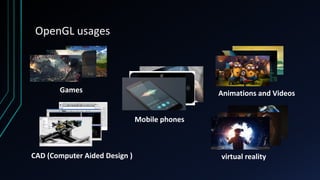
OpenGL usages
Games Animations and Videos
virtual realityCAD (Computer Aided Design )
Mobile phones
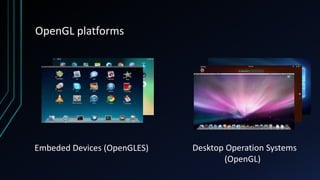
OpenGL platforms
Desktop Operation Systems
(OpenGL)
Embeded Devices (OpenGLES)
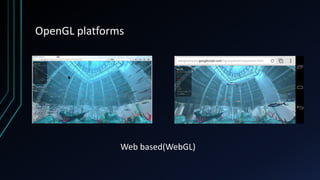
OpenGL platforms
Web based(WebGL)
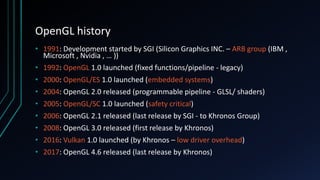
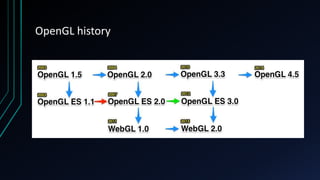
OpenGL history
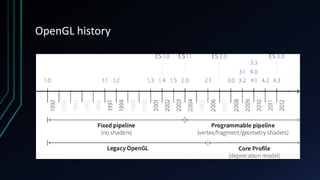
• 1991: Development started by SGI (Silicon Graphics INC. – ARB group (IBM ,
Microsoft , Nvidia , … ))
• 1992: OpenGL 1.0 launched (fixed functions/pipeline - legacy)
• 2000: OpenGL/ES 1.0 launched (embedded systems)
• 2004: OpenGL 2.0 released (programmable pipeline - GLSL/ shaders)
• 2005: OpenGL/SC 1.0 launched (safety critical)
• 2006: OpenGL 2.1 released (last release by SGI - to Khronos Group)
• 2008: OpenGL 3.0 released (first release by Khronos)
• 2016: Vulkan 1.0 launched (by Khronos – low driver overhead)
• 2017: OpenGL 4.6 released (last release by Khronos)
OpenGL history
OpenGL history
Deep into base !
OpenGL rendering pipeline
• At the first level OpenGL gets vertex array of our
model and our texture coordinates or ( color and
coordinates )
• At the second level OpenGL will translate , rotate ,
scale our vertices based on the transformation and
perspective matrices ( position calculator )
• At the third level OpenGL assembles our vertices
into triangles based on primitive type
• At the fourth level OpenGL rasterizes our triangles
into pixel format based on view port matrices and
• At the fifth level OpenGL will colorize and texturize
our pixels ( called fragment shader or pixel shader ) (
color chooser )
• At the sixth level OpenGL will test our pixels and do
some blending operations and at the end will write
pixels into framebuffer for showing in display
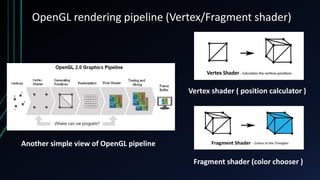
OpenGL rendering pipeline (Vertex/Fragment shader)
Vertex shader ( position calculator )
Fragment shader (color chooser )
Another simple view of OpenGL pipeline
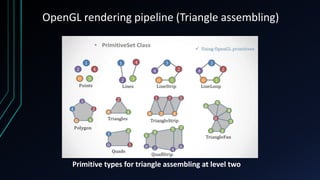
OpenGL rendering pipeline (Triangle assembling)
Primitive types for triangle assembling at level two
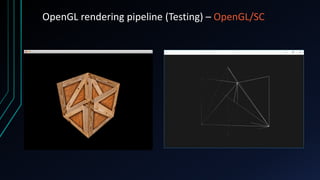
OpenGL rendering pipeline (Testing) – OpenGL/SC
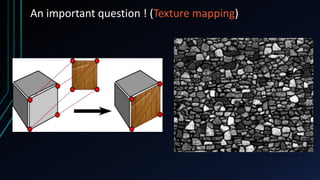
An important question ! (Texture mapping)
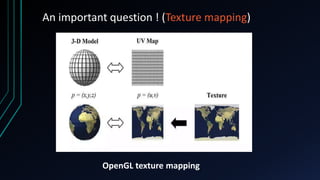
OpenGL texture mapping
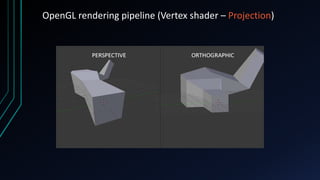
OpenGL rendering pipeline (Vertex shader – Projection)
Deep into Vertex Shader!
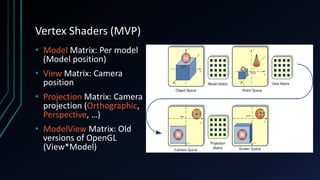
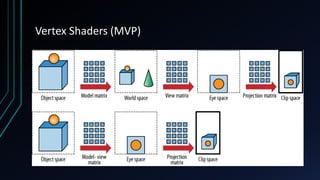
Vertex Shaders (MVP)
• Model Matrix: Per model
(Model position)
• View Matrix: Camera
position
• Projection Matrix: Camera
projection (Orthographic,
Perspective, …)
• ModelView Matrix: Old
versions of OpenGL
(View*Model)
Vertex Shaders (MVP)
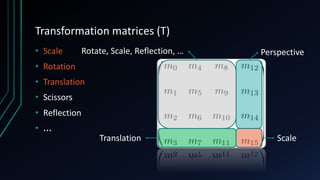
Transformation matrices (T)
• Scale
• Rotation
• Translation
• Scissors
• Reflection
• ...
PerspectiveRotate, Scale, Reflection, …
ScaleTranslation
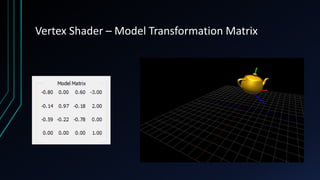
Vertex Shader – Model Transformation Matrix
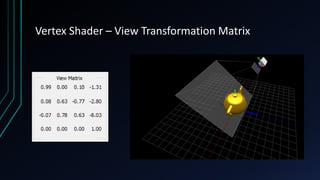
Vertex Shader – View Transformation Matrix
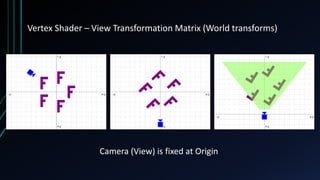
Vertex Shader – View Transformation Matrix (World transforms)
Camera (View) is fixed at Origin
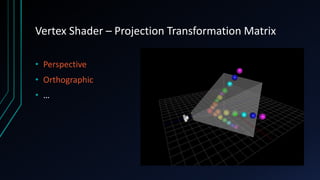
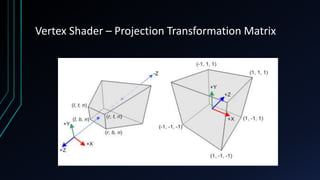
Vertex Shader – Projection Transformation Matrix
• Perspective
• Orthographic
• …
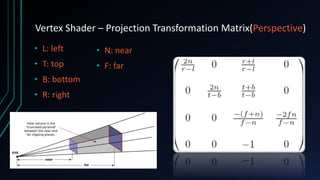
Vertex Shader – Projection Transformation Matrix(Perspective)
• N: near
• F: far
• L: left
• T: top
• B: bottom
• R: right
Vertex Shader – Projection Transformation Matrix
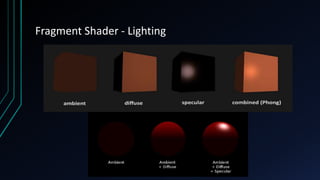
Fragment Shader - Lighting
Let’s Code!
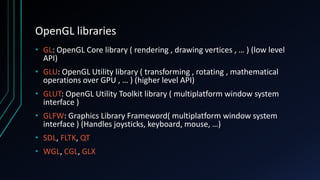
OpenGL libraries
• GL: OpenGL Core library ( rendering , drawing vertices , … ) (low level
API)
• GLU: OpenGL Utility library ( transforming , rotating , mathematical
operations over GPU , … ) (higher level API)
• GLUT: OpenGL Utility Toolkit library ( multiplatform window system
interface )
• GLFW: Graphics Library Frameword( multiplatform window system
interface ) (Handles joysticks, keyboard, mouse, …)
• SDL, FLTK, QT
• WGL, CGL, GLX
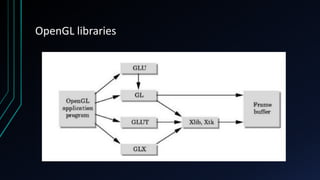
OpenGL libraries
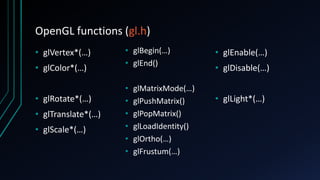
OpenGL functions (gl.h)
• glVertex*(…)
• glColor*(…)
• glRotate*(…)
• glTranslate*(…)
• glScale*(…)
• glBegin(…)
• glEnd()
• glMatrixMode(…)
• glPushMatrix()
• glPopMatrix()
• glLoadIdentity()
• glOrtho(…)
• glFrustum(…)
• glEnable(…)
• glDisable(…)
• glLight*(…)
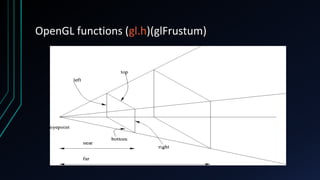
OpenGL functions (gl.h)(glFrustum)
Any question ?
Resources
• https://www.khronos.org/
• https://www.wikipedia.org/
• https://www.mesa3d.org/
• https://code.tutsplus.com/
• https://learnopengl.com
• https://open.gl/context
• http://www.songho.ca/opengl/gl_transform.html#example1
• http://in2gpu.com/2015/05/13/the-model-matrix/
• http://www.lighthouse3d.com/tutorials/glut-tutorial/keyboard-example-moving-
around-the-world/
• https://webglfundamentals.org/webgl/lessons/webgl-3d-camera.html

OpenGL basics

  • 1.
  • 2.
    What is OpenGL? ( Open Graphics Library ) • Cross-language, Cross-Platform API for rendering 2D, 3D vector graphics. • The API is typically used to interact with a graphics processing unit (GPU), to achieve hardware-accelerated rendering. • Drivers: the people who make GPUs, are responsible for writing implementations of the OpenGL rendering system. Their implementations, commonly called "drivers“ , translate OpenGL API commands into GPU commands
  • 3.
    OpenGL usages Games Animationsand Videos virtual realityCAD (Computer Aided Design ) Mobile phones
  • 4.
    OpenGL platforms Desktop OperationSystems (OpenGL) Embeded Devices (OpenGLES)
  • 5.
  • 6.
    OpenGL history • 1991:Development started by SGI (Silicon Graphics INC. – ARB group (IBM , Microsoft , Nvidia , … )) • 1992: OpenGL 1.0 launched (fixed functions/pipeline - legacy) • 2000: OpenGL/ES 1.0 launched (embedded systems) • 2004: OpenGL 2.0 released (programmable pipeline - GLSL/ shaders) • 2005: OpenGL/SC 1.0 launched (safety critical) • 2006: OpenGL 2.1 released (last release by SGI - to Khronos Group) • 2008: OpenGL 3.0 released (first release by Khronos) • 2016: Vulkan 1.0 launched (by Khronos – low driver overhead) • 2017: OpenGL 4.6 released (last release by Khronos)
  • 7.
  • 8.
  • 9.
  • 10.
    OpenGL rendering pipeline •At the first level OpenGL gets vertex array of our model and our texture coordinates or ( color and coordinates ) • At the second level OpenGL will translate , rotate , scale our vertices based on the transformation and perspective matrices ( position calculator ) • At the third level OpenGL assembles our vertices into triangles based on primitive type • At the fourth level OpenGL rasterizes our triangles into pixel format based on view port matrices and • At the fifth level OpenGL will colorize and texturize our pixels ( called fragment shader or pixel shader ) ( color chooser ) • At the sixth level OpenGL will test our pixels and do some blending operations and at the end will write pixels into framebuffer for showing in display
  • 11.
    OpenGL rendering pipeline(Vertex/Fragment shader) Vertex shader ( position calculator ) Fragment shader (color chooser ) Another simple view of OpenGL pipeline
  • 12.
    OpenGL rendering pipeline(Triangle assembling) Primitive types for triangle assembling at level two
  • 13.
    OpenGL rendering pipeline(Testing) – OpenGL/SC
  • 14.
    An important question! (Texture mapping)
  • 15.
    An important question! (Texture mapping) OpenGL texture mapping
  • 16.
    OpenGL rendering pipeline(Vertex shader – Projection)
  • 17.
  • 18.
    Vertex Shaders (MVP) •Model Matrix: Per model (Model position) • View Matrix: Camera position • Projection Matrix: Camera projection (Orthographic, Perspective, …) • ModelView Matrix: Old versions of OpenGL (View*Model)
  • 19.
  • 20.
    Transformation matrices (T) •Scale • Rotation • Translation • Scissors • Reflection • ... PerspectiveRotate, Scale, Reflection, … ScaleTranslation
  • 21.
    Vertex Shader –Model Transformation Matrix
  • 22.
    Vertex Shader –View Transformation Matrix
  • 23.
    Vertex Shader –View Transformation Matrix (World transforms) Camera (View) is fixed at Origin
  • 24.
    Vertex Shader –Projection Transformation Matrix • Perspective • Orthographic • …
  • 25.
    Vertex Shader –Projection Transformation Matrix(Perspective) • N: near • F: far • L: left • T: top • B: bottom • R: right
  • 26.
    Vertex Shader –Projection Transformation Matrix
  • 27.
  • 28.
  • 29.
    OpenGL libraries • GL:OpenGL Core library ( rendering , drawing vertices , … ) (low level API) • GLU: OpenGL Utility library ( transforming , rotating , mathematical operations over GPU , … ) (higher level API) • GLUT: OpenGL Utility Toolkit library ( multiplatform window system interface ) • GLFW: Graphics Library Frameword( multiplatform window system interface ) (Handles joysticks, keyboard, mouse, …) • SDL, FLTK, QT • WGL, CGL, GLX
  • 30.
  • 31.
    OpenGL functions (gl.h) •glVertex*(…) • glColor*(…) • glRotate*(…) • glTranslate*(…) • glScale*(…) • glBegin(…) • glEnd() • glMatrixMode(…) • glPushMatrix() • glPopMatrix() • glLoadIdentity() • glOrtho(…) • glFrustum(…) • glEnable(…) • glDisable(…) • glLight*(…)
  • 32.
  • 33.
  • 34.
    Resources • https://www.khronos.org/ • https://www.wikipedia.org/ •https://www.mesa3d.org/ • https://code.tutsplus.com/ • https://learnopengl.com • https://open.gl/context • http://www.songho.ca/opengl/gl_transform.html#example1 • http://in2gpu.com/2015/05/13/the-model-matrix/ • http://www.lighthouse3d.com/tutorials/glut-tutorial/keyboard-example-moving- around-the-world/ • https://webglfundamentals.org/webgl/lessons/webgl-3d-camera.html