OpenGL 4 for 2010 Mark Kilgard Barthold Lichtenbelt SIGGRAPH Sponsored Session  July 28, 2010
Also: Listen to this Talk Online Listen to Barthold and Mark 57:16 minutes Use the link below FYI:  This slides are corrected & extended http://nvidia.fullviewmedia.com/siggraph2010/02-dev-barthold-lichtenbelt-mark-kilgard.html
Barthold Lichtenbelt  Senior Manager of NVIDIA OpenGL core driver team Chair of Khronos OpenGL Working Group Co-author of  Introduction to Volume Rendering
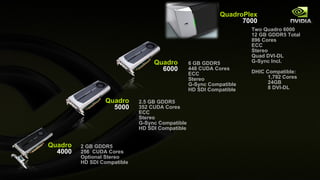
Quadro 5000 Quadro 4000 Quadro 6000 6 GB GDDR5 448 CUDA Cores ECC  Stereo G-Sync Compatible HD SDI Compatible 2.5 GB GDDR5 352 CUDA Cores ECC  Stereo G-Sync Compatible HD SDI Compatible 2   GB  GDDR5 256  CUDA  Cores Optional Stereo HD SDI Compatible QuadroPlex 7000 Two Quadro 6000 12 GB GDDR5 Total 896 Cores ECC  Stereo Quad DVI-DL G-Sync Incl. DHIC Compatible: 1,792 Cores  24GB 8 DVI-DL
Quadro 5000M: World’s Fastest Mobile Workstation Available in Dell and HP 17” Mobile Workstations!
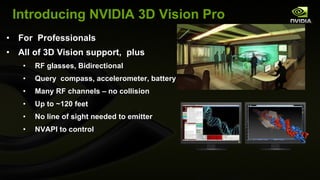
Introducing NVIDIA 3D Vision Pro For  Professionals All of 3D Vision support,  plus RF glasses, Bidirectional  Query  compass, accelerometer, battery Many RF channels – no collision Up to ~120 feet No line of sight needed to emitter NVAPI to control
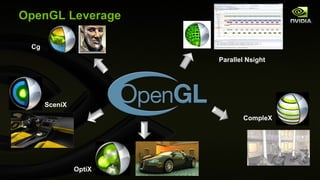
OpenGL Leverage Parallel Nsight Cg SceniX CompleX OptiX
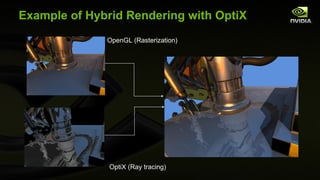
Example of Hybrid Rendering with OptiX OptiX (Ray tracing) OpenGL (Rasterization)
OpenGL In Every NVIDIA Business
NVIDIA OpenGL Initiatives API improvements Direct State Access (DSA) Bindless Graphics Framebuffer Memory info Texture Barrier First class Direct3D-isms WebGL OpenGL ES Quadro Quadro SDI Capture  Quadro SDI Output Quad Buffered Stereo Many more! Data interoperability and control DirectX interop CUDA interop OpenCL interop VDPAU interop Multi-GPU OpenGL interop GPU Affinity
OpenGL on Quadro World class OpenGL 4 drivers 17 years of uninterrupted API compatibility Workstation application certifications Workstation application profiles Display list optimizations Fast antialiased lines GPU affinity Enhanced interop with CUDA and multi-GPU OpenGL Advanced multi-GPU rendering Overlays Genlock UBB for less framebuffer memory usage Cross-platform Windows XP, Vista, Win7, Linux, Mac, FreeBSD, Solaris SLI Mosaic Advanced multi-monitor support First class, in house, Linux support
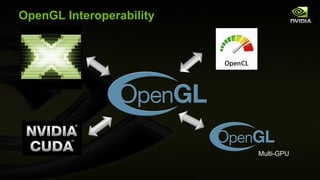
OpenGL Interoperability Multi-GPU
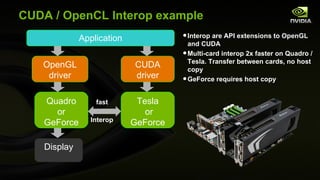
CUDA / OpenCL Interop example Application OpenGL driver CUDA driver Quadro or GeForce Display Tesla or GeForce Interop fast Interop are API extensions to OpenGL and CUDA Multi-card interop 2x faster on Quadro / Tesla. Transfer between cards, no host copy GeForce requires host copy
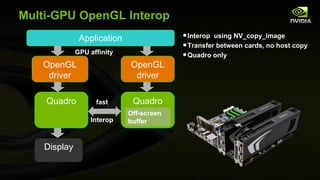
Multi-GPU OpenGL Interop Application OpenGL driver OpenGL driver Quadro Display Quadro Interop fast Interop  using NV_copy_image Transfer between cards, no host copy Quadro only GPU affinity Off-screen buffer
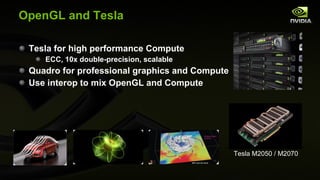
OpenGL and Tesla Tesla for high performance Compute ECC, 10x double-precision, scalable Quadro for professional graphics and Compute Use interop to mix OpenGL and Compute Tesla M2050 / M2070
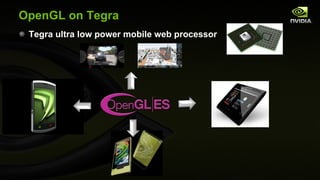
OpenGL on Tegra Tegra ultra low power mobile web processor
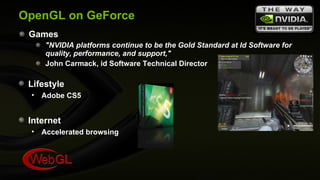
OpenGL on GeForce Games "NVIDIA platforms continue to be the Gold Standard at Id Software for quality, performance, and support,"   John Carmack, id Software Technical Director Lifestyle Adobe CS5 Internet Accelerated browsing
Initiating speaker transition sequence...
OpenGL 4 in 2010 What’s new in the API? Mark J. Kilgard
Mark J. Kilgard Principal System Software Engineer OpenGL driver Cg (“C for graphics”) shading language OpenGL Utility Toolkit (GLUT) implementer Author of  OpenGL for the X Window System Co-author of  Cg Tutorial
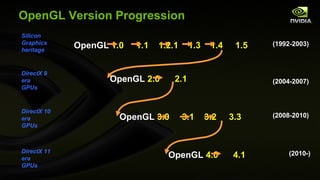
OpenGL Version Progression OpenGL  2.0   2.1  OpenGL  3.0  3.1  3.2  3.3  OpenGL  4.0  4.1   OpenGL  1.0  1.1  1.2.1  1.3  1.4  1.5  Silicon Graphics heritage DirectX 9 era GPUs DirectX 10 era GPUs DirectX 11 era GPUs (2008-2010) (1992-2003) (2004-2007) (2010-)
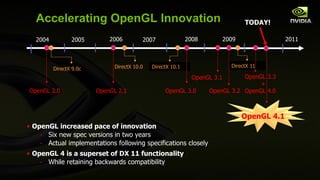
What a year for OpenGL  ! Two core updates in a single year! OpenGL 4.0 Released March 2010 OpenGL 4.1 Released July 2010 Cross-vendor supports for modern GPU features More functional than DirectX 11
OpenGL 3.3 + 4.0 Additions are Focus of This Talk Easy to get carried excited about new 4.1 goodies And miss out on OpenGL 4.0’s goodness Honestly, 4.0 is the bigger upgrade Still NVIDIA is providing OpenGL 4.1 now A few of the “big ticket” items in 4.0 Texture cube map arrays Double-precision values within shaders Programmable tessellation
Classic OpenGL State Machine From 1991-2007 * vertex & fragment processing became programmable [source: GL 1.0 specification]
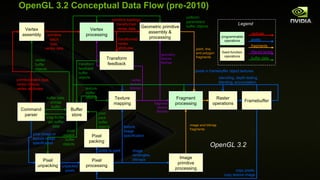
OpenGL 3.2 Conceptual Data Flow (pre-2010) Vertex processing Pixel processing Texture mapping Geometric primitive assembly & processing Image primitive processing Transform feedback Pixel unpacking Pixel packing Vertex assembly pixels in framebuffer object textures texture buffer objects texture image specification image rectangles, bitmaps primitive topology, transformed vertex data vertex texture fetches pixel pack buffer objects pixel unpack buffer objects vertex buffer objects transform feedback buffer objects buffer data, unmap buffer geometry texture fetches primitive batch type, vertex indices, vertex attributes primitive batch type, vertex data fragment texture fetches pixel image or texture image specification map buffer, get buffer data transformed vertex attributes image and bitmap fragments point, line, and polygon fragments pixels to pack unpacked pixels pixels fragments filtered texels buffer data vertices Legend programmable operations fixed-function operations copy pixels, copy texture image Buffer store uniform/ parameters buffer objects Fragment processing stenciling, depth testing, blending, accumulation OpenGL 3.2 Raster operations Framebuffer Command parser
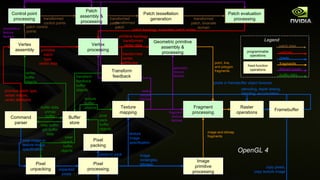
Vertex processing Pixel processing Texture mapping Geometric primitive assembly & processing Image primitive processing Transform feedback Pixel unpacking Pixel packing Vertex assembly pixels in framebuffer object textures texture buffer objects texture image specification image rectangles, bitmaps primitive topology, transformed vertex data vertex texture fetches pixel pack buffer objects pixel unpack buffer objects vertex buffer objects transform feedback buffer objects buffer data, unmap buffer geometry texture fetches primitive batch type, vertex indices, vertex attributes primitive batch type, vertex data fragment texture fetches pixel image or texture image specification map buffer, get buffer data transformed vertex attributes image and bitmap fragments point, line, and polygon fragments pixels to pack unpacked pixels pixels fragments filtered texels buffer data vertices Legend programmable operations fixed-function operations copy pixels, copy texture image Buffer store Fragment processing stenciling, depth testing, blending, accumulation Control point processing Patch assembly & processing Patch tessellation generation Patch evaluation processing patch control points transformed control points transformed patch transformed patch, bivariate domain transformed patch tessellation texture fetches patch topology, evaluated patch vertex patch data OpenGL 4 Raster operations Framebuffer Command parser
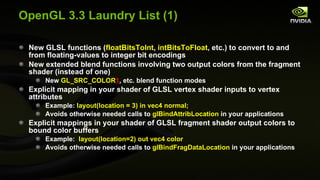
OpenGL 3.3 Laundry List (1) New GLSL functions ( floatBitsToInt ,  intBitsToFloat , etc.) to convert to and from floating-values to integer bit encodings New extended blend functions involving two output colors from the fragment shader (instead of one) New  GL_SRC_COLOR 1 , etc. blend function modes Explicit mapping in your shader of GLSL vertex shader inputs to vertex attributes  Example:  layout(location = 3) in vec4 normal; Avoids otherwise needed calls to  glBindAttribLocation  in your applications Explicit mappings in your shader of GLSL fragment shader output colors to bound color buffers Example:  layout(location=2) out vec4 color Avoids otherwise needed calls to  glBindFragDataLocation  in your applications
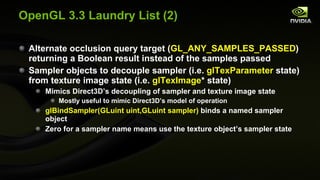
OpenGL 3.3 Laundry List (2) Alternate occlusion query target ( GL_ANY_SAMPLES_PASSED ) returning a Boolean result instead of the samples passed Sampler objects to decouple sampler (i.e.  glTexParameter  state) from texture image state (i.e.  glTexImage * state) Mimics Direct3D’s decoupling of sampler and texture image state Mostly useful to mimic Direct3D’s model of operation glBindSampler(GLuint uint,GLuint sampler)  binds a named sampler object Zero for a sampler name means use the texture object’s sampler state
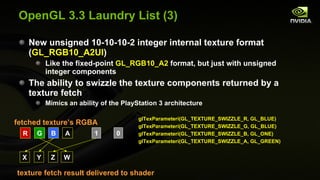
OpenGL 3.3 Laundry List (3) New unsigned 10-10-10-2 integer internal texture format ( GL_RGB10_A2UI ) Like the fixed-point  GL_RGB10_A2  format, but just with unsigned integer components The ability to swizzle the texture components returned by a texture fetch Mimics an ability of the PlayStation 3 architecture R G B A 1 0 X Y Z W texture fetch result delivered to shader  fetched texture’s RGBA  glTexParameteri(GL_TEXTURE_SWIZZLE_R, GL_BLUE) glTexParameteri(GL_TEXTURE_SWIZZLE_G, GL_BLUE) glTexParameteri(GL_TEXTURE_SWIZZLE_B, GL_ONE) glTexParameteri(GL_TEXTURE_SWIZZLE_A, GL_GREEN)
OpenGL 3.3 Laundry List (4) Timer query objects Allows timing of OpenGL command sequences without timing the idle time Allows accurate instrumentation of GPU bottlenecks Instanced arrays Mimics the behavior of Direct3D’s geometry instancing OpenGL’s support for immediate mode and inexpensive primitive batches makes geometry instancing needless Primary use would be emulating Direct3D’s model New command  glVertexAttribDivisor New 10-10-10-2 vertex array format types Signed and unsigned versions ( GL_INT_2_10_10_10_REV  and  GL_UNSIGNED_INT_2_10_10_10_REV  ) Good for packed vertex normals
OpenGL 3.3 Support & Older GPUs Pre-Fermi (DirectX 10 era) GPUs support OpenGL 3.3 Such pre-Fermi GPUs will never natively support OpenGL 4 (FYI:  NVIDIA drivers do provide slooow emulation support for newer architectures; useful for experiments, but that’s about all) Only NVIDIA’s Fermi (and on) support OpenGL 4 However many ARB extensions introduced by OpenGL 4 are supported by older DirectX 10 (and sometimes 9) GPUs Examples:  OpenGL 4.1’s  ARB_viewport_array  is exposed on DirectX 10 era NVIDIA GPUs NVIDIA’s policy is to expose as much of OpenGL functionality as a given GPU generation can possibly expose
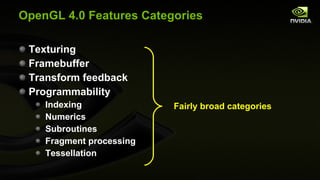
OpenGL 4.0 Features Categories Texturing Framebuffer Transform feedback Programmability Indexing Numerics Subroutines Fragment processing Tessellation Fairly broad categories
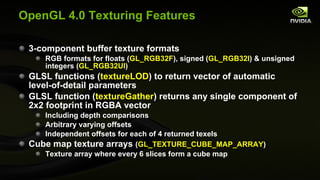
OpenGL 4.0 Texturing Features 3-component buffer texture formats RGB formats for floats ( GL_RGB32F ), signed ( GL_RGB32I ) & unsigned integers ( GL_RGB32UI ) GLSL functions ( textureLOD ) to return vector of automatic level-of-detail parameters GLSL function ( textureGather ) returns any single component of 2x2 footprint in RGBA vector  Including depth comparisons Arbitrary varying offsets Independent offsets for each of 4 returned texels Cube map texture arrays  ( GL_TEXTURE_CUBE_MAP_ARRAY ) Texture array where every 6 slices form a cube map
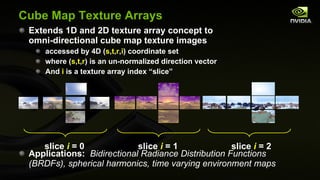
Cube Map Texture Arrays Extends 1D and 2D texture array concept to omni-directional cube map texture images accessed by 4D ( s , t , r , i ) coordinate set where ( s , t , r ) is an un-normalized direction vector And  i  is a texture array index “slice” Applications:  Bidirectional Radiance Distribution Functions (BRDFs), spherical harmonics, time varying environment maps slice  i  = 0  slice  i  = 1  slice  i  = 2
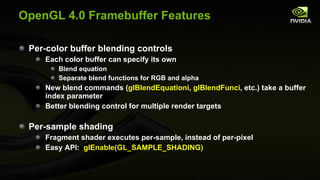
OpenGL 4.0 Framebuffer Features Per-color buffer blending controls Each color buffer can specify its own Blend equation Separate blend functions for RGB and alpha New blend commands ( glBlendEquationi ,  glBlendFunci , etc.) take a buffer index parameter Better blending control for multiple render targets Per-sample shading Fragment shader executes per-sample, instead of per-pixel Easy API:  glEnable(GL_SAMPLE_SHADING)
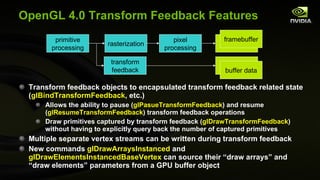
OpenGL 4.0 Transform Feedback Features Transform feedback objects to encapsulated transform feedback related state ( glBindTransformFeedback , etc.) Allows the ability to pause ( glPasueTransformFeedback ) and resume ( glResumeTransformFeedback ) transform feedback operations Draw primitives captured by transform feedback ( glDrawTransformFeedback ) without having to explicitly query back the number of captured primitives Multiple separate vertex streams can be written during transform feedback New commands  glDrawArraysInstanced  and  glDrawElementsInstancedBaseVertex  can source their “draw arrays” and “draw elements” parameters from a GPU buffer object primitive processing rasterization pixel processing framebuffer transform feedback buffer data framebuffer buffer data
OpenGL Shading Language Update OpenGL Shading Language (GLSL) version now synchronized with OpenGL version number So GLSL  4.00  corresponds to OpenGL  4.0 And GLSL  3.30  corresponds to OpenGL  3.3 Previously, confusingly, GLSL version number didn’t match OpenGL core version number Example:  OpenGL  3.2  depended on GLSL  1.50 Remember to request the version of GLSL you require Example:  #version 400 compatibility Best to always request  compatibility  or risk forced shader re-writes due to backward compatibility and deprecation issues
OpenGL 4.0 Programmable Features: Indexing Indexing into arrays of samplers with varying indices So  sampler2D sampler_array[3]  allowed now But index  must  be uniform for all uses Similarly, now allows indexing into arrays of uniform blocks
OpenGL 4.0 Programmable Features: Numeric Data Type Control Implicit signed and unsigned integer conversions “ precise ” type qualifier to avoid optimization-induced invariance Fused floating-point multiply-add (MAD) operation ( fma ) Splitting a floating-point value into significand and exponent ( frexp ) Constructing a floating-point value from a significand and exponent ( ldexp ) Integer bit-field manipulation ( bitfieldExtract ,  findLSB , etc.) Packing and unpacking small fixed-point values into larger scalar values ( packUnorm2x16 ,  unpackUnorm4x8 , etc.) NOTE: Recall 3.3 added raw cast of IEEE floating-point values to and from integers ( floatBitsToInt ,  intBitsToFloat , etc.)
Double-precision data types Scalar  double Vector  dvec4 , etc Matrix  dmat3  (3x3),  dmat4x2 , etc. Doubles can reside in buffer objects Double-precision operations Multiply, add, multiply-add (MAD) Relational operators, including vector comparisons Absolute value Minimum, maximum, clamping, etc. Packing and unpacking No support for double-precision angle, trigonometric, or logarithmic functions OpenGL 4.0 Programmable Features: Double-Precision Numeric
OpenGL 4.0 Programmable Features: Subroutines GLSL shaders support  subroutine  functions Typed subroutines variables can be bound to subroutine functions Allows for “indirect” subroutine calls Query  glGetSubroutineIndex  obtains index names for subroutine function names Command  glUniformRountinesiv  updates a program’s subroutine uniform variables with subroutine index names Use of subroutines can avoid/minimize shader recompilation costs by dynamically switching subroutines
OpenGL 4.0 Programmable Features: Fragment Shaders Mask of covered samples ( gl_SampleMask[ ]  ) of a fragment is read-able Fragment shader can “know” which samples within its pixel footprint are covered Fragment attribute interpolation control By offset relative to the pixel center ( interpolateAtOffset ) By a varying sample index ( interpolateAtSample ) Or at the centroid of the covered samples ( interpolateAtCentroid ) pixel center  relative offset  dx  dy  sample index  0  1  2  3  centroid centroid position of 3 covered samples pixel footprints interpolation modes
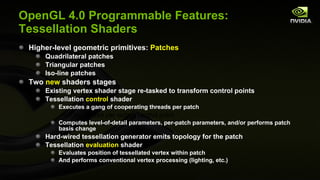
OpenGL 4.0 Programmable Features: Tessellation Shaders Higher-level geometric primitives:  Patches Quadrilateral patches Triangular patches Iso-line patches Two  new  shaders stages Existing vertex shader stage re-tasked to transform control points Tessellation  control  shader Executes a gang of cooperating threads per patch One thread per output control point Computes level-of-detail parameters, per-patch parameters, and/or performs patch basis change Hard-wired tessellation generator emits topology for the patch Tessellation  evaluation  shader Evaluates position of tessellated vertex within patch And performs conventional vertex processing (lighting, etc.)
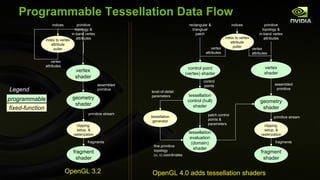
Programmable Tessellation Data Flow vertex shader clipping, setup, & rasterization fragment shader assembled primitive fragments index to vertex attribute puller indices primitive topology & in-band vertex attributes vertex attributes vertex shader geometry shader clipping, setup, & rasterization fragment shader OpenGL 4.0 adds tessellation shaders assembled primitive fragments index to vertex attribute puller indices primitive topology & in-band vertex attributes vertex attributes tessellation control (hull) shader tessellation evaluation (domain) shader tessellation generator level-of-detail parameters patch control points & parameters fine primitive topology  (u, v) coordinates primitive stream control points control point (vertex) shader vertex attributes rectangular & triangluar patch OpenGL 3.2 programmable fixed-function Legend geometry shader primitive stream
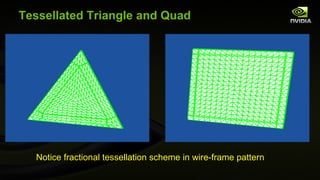
Tessellated Triangle and Quad Notice fractional tessellation scheme in wire-frame pattern
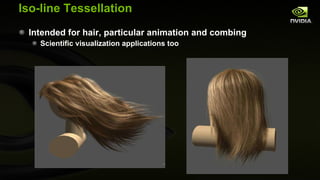
Iso-line Tessellation Intended for hair, particular animation and combing Scientific visualization applications too
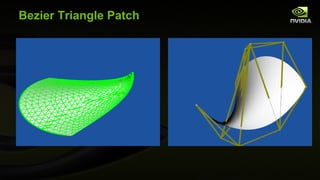
Bezier Triangle Patch
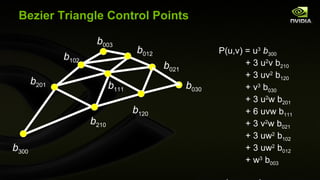
Bezier Triangle Control Points b 300 b 210 b 120 b 030 b 021 b 012 b 003 b 102 b 201 b 111 P(u,v) = u 3   b 300 + 3 u 2 v b 210 + 3 uv 2  b 120 + v 3  b 030 + 3 u 2 w b 201 + 6 uvw b 111 + 3 v 2 w b 021 + 3 uw 2  b 102 + 3 uw 2  b 012 + w 3  b 003 where  w=1-u-v
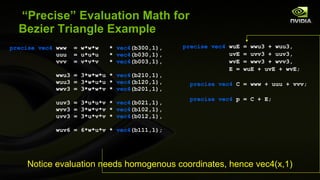
“Precise” Evaluation Math for Bezier Triangle Example precise   vec4  www  = w*w*w  *  vec4 (b300,1), uuu  = u*u*u  *  vec4 (b030,1), vvv  = v*v*v  *  vec4 (b003,1), wwu3 = 3*w*w*u *  vec4 (b210,1), wuu3 = 3*w*u*u *  vec4 (b120,1), wwv3 = 3*w*w*v *  vec4 (b201,1), uuv3 = 3*u*u*v *  vec4 (b021,1), wvv3 = 3*w*v*v *  vec4 (b102,1), uvv3 = 3*u*v*v *  vec4 (b012,1), wuv6 = 6*w*u*v *  vec4 (b111,1); precise vec4  wuE = wwu3 + wuu3, uvE = uvv3 + uuv3, wvE = wwv3 + wvv3, E = wuE + uvE + wvE; precise vec4  C = www + uuu + vvv; precise vec4  p = C + E; Notice evaluation needs homogenous coordinates, hence vec4(x,1)
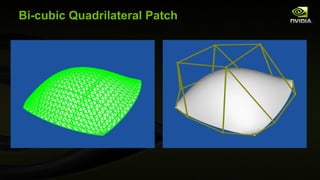
Bi-cubic Quadrilateral Patch
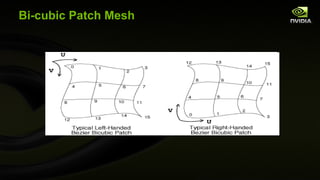
Bi-cubic Patch Mesh
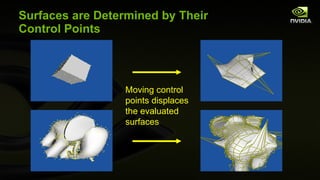
Surfaces are Determined by Their Control Points Moving control points displaces the evaluated surfaces
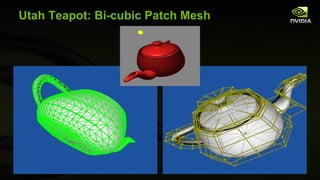
Utah Teapot: Bi-cubic Patch Mesh
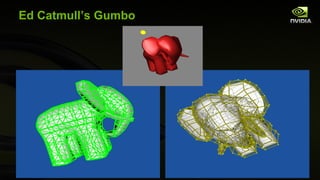
Ed Catmull’s Gumbo
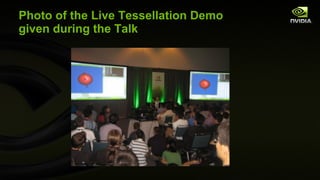
Photo of the Live Tessellation Demo given during the Talk
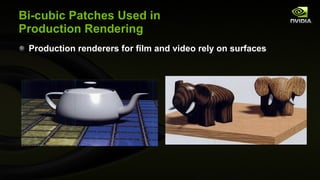
Bi-cubic Patches Used in Production Rendering Production renderers for film and video rely on surfaces
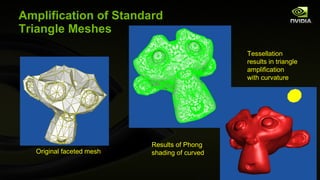
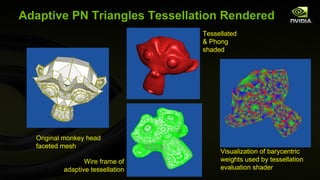
Amplification of Standard Triangle Meshes Original faceted mesh   Tessellation results in triangle amplification with curvature Results of Phong shading of curved
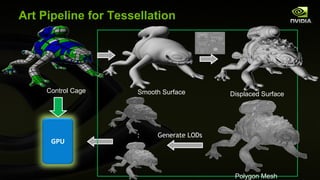
Art Pipeline for Tessellation … Generate LODs GPU Control Cage Smooth Surface Displaced Surface Polygon Mesh
 
 
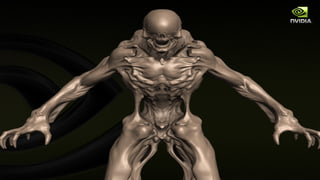
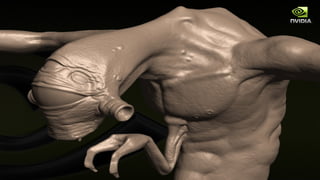
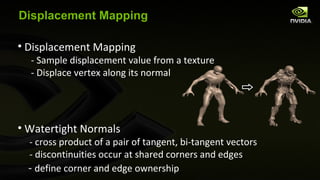
Displacement Mapping Displacement Mapping - Sample displacement value from a texture - Displace vertex along its normal Watertight Normals - cross product of a pair of tangent, bi-tangent vectors  - discontinuities occur at shared corners and edges -  define corner and edge ownership
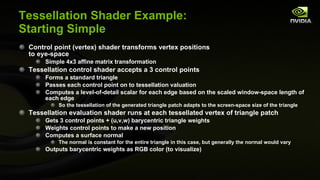
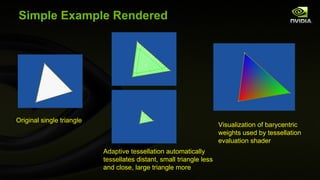
Tessellation Shader Example: Starting Simple Control point (vertex) shader transforms vertex positions to eye-space Simple 4x3 affine matrix transformation Tessellation control shader accepts a 3 control points Forms a standard triangle Passes each control point on to tessellation valuation Computes a level-of-detail scalar for each edge based on the scaled window-space length of each edge So the tessellation of the generated triangle patch adapts to the screen-space size of the triangle Tessellation evaluation shader runs at each tessellated vertex of triangle patch Gets 3 control points + (u,v,w) barycentric triangle weights Weights control points to make a new position Computes a surface normal The normal is constant for the entire triangle in this case, but generally the normal would vary Outputs barycentric weights as RGB color (to visualize)
GLSL Control Point (Vertex) Shader #version 400 compatibility // Multiply XYZ vertex by 4x3 modelview matrix //  (assumed non-projective) vec3  transform(precise vec3 v) { vec3  r; // Remember: GLSL is oddly column-major so [col][row] for ( int  i=0; i<3; i++) { r[i] = v[0] *  gl_ModelViewMatrix [0][i] + v[1] *  gl_ModelViewMatrix [1][i] + v[2] *  gl_ModelViewMatrix [2][i] + gl_ModelViewMatrix [3][i]; } return  r; } uniform vec2  wh;  // scaled width and height of screen out vec3  eye_space_pos; out vec2  scaled_window_space_pos; out vec3  eye_normal; void  main( void ) { eye_space_pos = transform(gl_Vertex.xyz); vec4  ndc_pos =  gl_ModelViewProjectionMatrix  *  vec4 ( gl_Vertex .xyz,1); scaled_window_space_pos = wh*(ndc_pos.xy / ndc_pos.w); // Pass along two sets of texture coordinates... gl_TexCoord [0] =  gl_MultiTexCoord0 ; gl_TexCoord [1] =  gl_MultiTexCoord1 ; mat3  nm =  gl_NormalMatrix ; vec3  n =  gl_Normal ; eye_normal =  normalize (nm * n); }
GLSL Tessellation  Control  Shader #version 400 compatibility layout (vertices=3) out; #define TID gl_InvocationID  // thread ID out float  sharable_len[]; in vec3  eye_space_pos[]; in vec2  scaled_window_space_pos[]; out vec3  eye_space_pos2[]; void  main( void ) { sharable_len[TID] = distance (scaled_window_space_pos[TID], scaled_window_space_pos[(TID+1)%3]); barrier (); float  len0 = sharable_len[0], len1 = sharable_len[1], len2 = sharable_len[2]; eye_space_pos2[TID] = eye_space_pos[TID]; // Limit level-of-detail output to thread zero.  if (TID == 0) { // Outer LOD gl_TessLevelOuter [0] = len1;  // V1-to-V2 edge gl_TessLevelOuter [1] = len2;  // V2-to-V0 edge gl_TessLevelOuter [2] = len0;  // V0-to-V1 edge // Inner LOD gl_TessLevelInner[0] = max (len0,  max (len1, len2)); } }
GLSL Tessellation  Evaluation  Shader #version 400 compatibility layout ( triangles )  in ; layout ( ccw )  in ; layout ( fractional_odd_spacing )  in ; in float  sharable_len[]; in vec3  eye_space_pos2[]; vec3  lerp3( in vec3  attrs[3],  vec3  uvw) { return  attrs[0] * uvw[0] + attrs[1] * uvw[1] + attrs[2] * uvw[2]; } vec4  applyPerspective( mat4  affine_matrix,  vec3  v) { vec4  r; r[0] = affine_matrix[0][0] * v[0]; r[1] = affine_matrix[1][1] * v[1]; r[2] = affine_matrix[2][2] * v[2] + affine_matrix[3][2]; r[3] = -v[2]; return  r; } void  main( void ) { vec3  barycentric_weights =  gl_TessCoord ; vec3  v[3]; for ( int  i = 0; i < 3; i++) { v[i] = eye_space_pos2[i]; } vec3  p = lerp3(v, barycentric_weights); gl_Position  = applyPerspective( gl_ProjectionMatrix , p); vec3  dpdv = eye_space_pos2[1] - eye_space_pos2[0]; vec3  dpdw = eye_space_pos2[2] - eye_space_pos2[0]; vec3  normal =  cross (dpdv, dpdw); // Visualize barycentric weights as color. vec4  color =  vec4 (barycentric_weights, 1.0);  gl_FrontColor  = color; gl_TexCoord [0] =  vec4 ( normalize (normal), length ( normalize (normal))); gl_TexCoord [1] =  vec4 (p, 1);  }
Simple Example Rendered Original single triangle   Adaptive tessellation automatically tessellates distant, small triangle less and close, large triangle more Visualization of barycentric weights used by tessellation evaluation shader
More Complicated Example: Adaptive PN Triangles Idea:  Send a triangle mesh with positions & normals Have the tessellation unit tessellated a curved triangle that matches the per-triangle positions & normals Nice because existing triangle meshes can get extra triangle detail Details Same control point (vertex) shader as before Tessellation control shader Input: 3 control points + normals Output: 10 control points for a Bezier triangle patch Output: 6 controls points for quadratic normal interpolation Output: adaptive level-of-detail (LOD) based on  edge lengths in scaled window space Tessellation evaluation shader Does cubic interpolation of Bezier triangle to compute position Does quadratic interpolation to compute surface normal
Adaptive PN Triangle Tessellation  Control  Shader #version 400 compatibility layout ( vertices =3) out;  // interior control points are per-patch #define TID gl_InvocationID  // thread ID #define P eye_space_pos  #define P2 eye_space_pos2 #define N eye_normal  in vec3  eye_space_pos[]; in vec2  scaled_window_space_pos[]; in vec3  eye_normal[]; out vec3  eye_space_pos2[]; out vec3  eye_space_normal[]; out vec3  ccw_cp[]; out vec3  cw_cp[]; out vec3  mid_normal[]; patch out  vec3 b111; void  main(void) { // TIDp1 = counter-clockwise (plus 1) control point index from TID int  TIDp1 = TID<2 ? TID+1 : 0;  // Means TIDp1 = (TID+1)%3; // TIDm1 = clockwise (minus 1) control point index from TID int  TIDm1 = TID>0 ? TID-1 : 2;  // Means TIDp1 = (TID+2)%3; // Compute triangle LOD parameters. // Each of 3 threads computes each of 3 edge lengths . gl_TessLevelOuter [TID] =  distance (scaled_window_space_pos[TIDm1], scaled_window_space_pos[TID]);  barrier (); gl_TessLevelInner [0] =  max ( gl_TessLevelOuter [0], max ( gl_TessLevelOuter [1], gl_TessLevelOuter [2])); // ccw_cp[TID] is the control point immediate counter-clockwise from P[TID] // cwc_cp[TID] is the control point immediate clockwise from P[TID] ccw_cp[TID] = (2*P[TID] + P[TIDp1] -  dot (P[TIDp1]-P[TID],N[TID])*N[TID])/3.0; cw_cp[TID]  = (2*P[TID] + P[TIDm1] -  dot (P[TIDm1]-P[TID],N[TID])*N[TID])/3.0; P2[TID] = ccw_cp[TID] + cw_cp[TID]; vec3  E = (P2[0] + P2[1] + P2[2])/6.0,  // (b210+b120+b021+b012+b102+b201)/6.0 V = (P[0] + P[1] + P[3])/3.0; b111 = E + (E-V)/2.0; P2[TID] = P[TID]; eye_space_normal[TID] = N[TID]; float  v = 2* dot (P[TIDp1]-P[TID],N[TID]+N[TIDp1]) /  dot (P[TIDp1]-P[TID],P[TIDp1]-P[TID]); vec3  h = N[TID] + N[TIDp1] - v*(P[TIDp1]-P[TID]); mid_normal[TID] =  normalize (h); }
#version 400 compatibility layout (triangles)  in ; layout (ccw)  in ; layout (fractional_even_spacing)  in ; // Assumes matrix in gluPerspective form // Intended to be cheaper than full 4x4 transform //  by projection matrix // Compiles to just 5 MAD ops precise vec4  applyPerspective( precise   mat4  affine_matrix,  precise vec4  v) { precise vec4  r; r[0] = affine_matrix[0][0] * v[0]; r[1] = affine_matrix[1][1] * v[1]; r[2] = affine_matrix[2][2] * v[2] + affine_matrix[3][2]*v[3]; r[3] = -v[2]; return  r; } // 10 input control points for Bezier triangle position in precise vec3  eye_space_pos2[]; in precise vec3  ccw_cp[]; in precise vec3  cw_cp[]; patch in precise  vec3 b111; // 6 input control points for quadratic normal interpolation in precise vec3  eye_space_normal[]; in vec3  mid_normal[]; Adaptive PN Triangle Tessellation  Evaluation  Shader (1 of 3)
void  main( void ) { // Evaluate position by weighting triangle vertex positions // with the generated vertex's barycentric weights. vec3  barycentric_weights =  gl_TessCoord ; precise float  u = barycentric_weights.x, v = barycentric_weights.y, w = barycentric_weights.z;  // should be 1- u - v vec3  triangle_vertex[3]; for  ( int  i = 0; i < 3; i++) { triangle_vertex[i] = eye_space_pos2[i]; } // 10 position control points of a Bezier triangle precise vec3  b300 = eye_space_pos2[0], b030 = eye_space_pos2[1], b003 = eye_space_pos2[2], b210 = ccw_cp[0], b201 = cw_cp[0], b021 = ccw_cp[1], b120 = cw_cp[1], b102 = ccw_cp[2], b012 = cw_cp[2];  // Weight the position control points with a //  (cubic) Bezier triangle basis precise vec4 www  = w*w*w *  vec4 (b300,1), uuu  = u*u*u *  vec4 (b030,1), vvv  = v*v*v *  vec4 (b003,1), wwu3 = 3*w*w*u *  vec4 (b210,1), wuu3 = 3*w*u*u *  vec4 (b120,1), wwv3 = 3*w*w*v *  vec4 (b201,1),  uuv3 = 3*u*u*v *  vec4 (b021,1), wvv3 = 3*w*v*v *  vec4 (b102,1), uvv3 = 3*u*v*v *  vec4 (b012,1), wuv6 = 6*w*u*v *  vec4 (b111,1), wuE = wwu3 + wuu3, uvE = uvv3 + uuv3, wvE = wwv3 + wvv3, E = wuE + uvE + wvE, C = www + uuu + vvv, p = C + E, clip_space_p = applyPerspective( gl_ProjectionMatrix , p); gl_Position  = clip_space_p;  Adaptive PN Triangle Tessellation  Evaluation  Shader (2 of 3)
// Weight the normal control points with a quadratic basis vec3  n200 = eye_space_normal[0], n020 = eye_space_normal[1], n002 = eye_space_normal[2], n110 = mid_normal[0], n011 = mid_normal[1], n101 = mid_normal[2], normal = n200*w*w + n020*u*u + n002*v*v + n110*w*u + n011*u*v + n101*w*v; // Visualize barycentric weights as color. vec4  color =  vec4 (barycentric_weights, 1.0);  gl_FrontColor  = color; // Output the normalized surface normal gl_TexCoord [0] =  vec4 (normalize(normal),1); // Output the (perspective-divided) eye-space view vector gl_TexCoord [1] =  vec4 (p.xyz/p.w, 1); } Adaptive PN Triangle Tessellation  Evaluation  Shader (3 of 3)
Adaptive PN Triangles Tessellation Rendered Visualization of barycentric weights used by tessellation evaluation shader Original monkey head faceted mesh Tessellated & Phong shaded  Wire frame of adaptive tessellation
Careful About Cracks at Patch Seams Patch seams need to be computed very carefully Otherwise you get cracks Animation makes cracks obvious! Be sure of the following Your LOD parameters at the seam of two patches are computed bit-for-bit identical The control points that influence the evaluation along a patch edge are bit-for-bit identical and use symmetric evaluation Influence means has “non-zero weight” A+B+C  ≠ C+B+A in floating-point precise  keyword can help this cracks
NVIDIA’s Position on OpenGL Deprecation: Core vs. Compatibility Profiles OpenGL 3.1 introduced notion of “core” profile Idea was remove stuff from core to make OpenGL “good-er” Well-intentioned perhaps but…  Throws API backward compatibility out the window Lots of useful functionality got removed that is in fast hardware Examples:  Polygon mode, line width Lots of easy-to-use, effective API got labeled deprecated Immediate mode Display lists Best advice for real developers Simply use the “compatibility” profile Easiest course of action Requesting the core profile requires special context creation gymnastics Avoids the frustration of “they decided to remove what??” Allows you to use existing OpenGL libraries and code easily No, your program won’t go faster for using the “core” profile It may go slower because of extra “is this allowed to work?” checks
Cg 3.0 Update (1) Cg 3.0 includes Shader Model 5.0 support New  gp5vp ,  gp5gp , and  gp5fp  profiles correspond to Shader Model 5.0 vertex, geometry, and fragment profiles Compiles to assembly text for the NV_gpu_program5 assembly-level shading language Cg 3.0 also introduces programmable tessellation profiles gp5tcp  = NV_gpu_program5 tessellation control program gp5tep  = NV_gpu_program5 tessellation evaluation program Cg 3.0 also support DirectX 11 tessellation profiles So Cg provides one common language to target either OpenGL or Direct3D programmable tessellation
Cg 3.0 Update (2) OpenGL Shading Language 4.10 profiles Compile Cg to assembly, GLSL, or HLSL Support for up to 32 texture units Previously 16 Unlike GLSL, CgFX provides a powerful effect system compatible with DirectX 9’s FX Download Cg 3.0 now from http://developer.nvidia.com/object/cg_download.html
Cg Off-line Compiler Compiles GLSL to Assembly GLSL is “opaque” about the assembly generated Hard to know the quality of the code generated with the driver Cg Toolkit 3.0 is a useful development tool even for GLSL programmers Cg Toolkit’s cgc command-line compiler actually accepts both the Cg (cgc’s default) and GLSL (with  –oglsl  flag) languages Uses the same compiler technology used to compile GLSL within the driver Example command line for compiling earlier tessellation control and evaluation GLSL shaders cgc -profile gp5tcp -oglsl -po InputPatchSize=3 -po PATCH_3  filename.glsl  (assumes 3 input control points and 3 outputs points) cgc -profile gp5tep -oglsl -po PATCH_3  filename.glsl   (assumes 3 input control points)
More NVIDIA OpenGL Features to Explore (1) Bindless Graphics NV_vertex_buffer_unified_memory  (VBUM),  NV_shader_buffer_load  (SBL), and  NV_shader_buffer_store  (SBS) Supports mapping OpenGL buffer objects to GPU virtual address space Permits faster vertex array state changes by avoiding expensive  glBindBuffer  commands Direct State Access (DSA) Avoid error-prone OpenGL API’s reliance on “selectors” such as  glMatrixMode  and  glActiveTexture Instead use new selector-free OpenGL commands Example:  glMatrixMultfEXT  and  glTextureParameteriEXT Results in more read-able, less error-prone OpenGL code
More NVIDIA OpenGL Features to Explore (2) Video Decode and Presentation API for Unix (VDPAU) interoperability Use  NV_vdpau_interop  extension to access VDPAU video and output surfaces for texturing and rendering Allows OpenGL to process and display contents of video streams decoded with VDPAU NV_gpu_program5  Assembly Extension Cg compile generates assembly for this extension (the  gp5 * profiles) Allows you to off-line compile high-level shading languages to low-level assembly Better visibility into low-level execution environment and shading Instruction Set of Fermi
More NVIDIA OpenGL Features to Explore (3) New low- and high-dynamic range Block Pixel Texture Compression (BPTC) formats ARB_texture_compression_bptc Bit-for-bit compatible with DirectX 10 block texture compression formats
Reversing speaker transition sequence...
OpenGL the 3D Graphics API Barthold Lichtenbelt
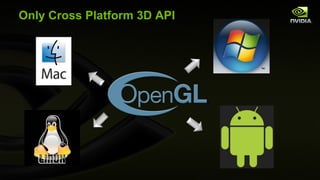
Only Cross Platform 3D API
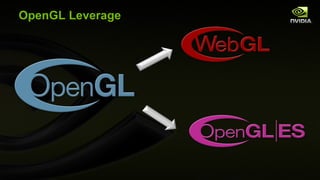
OpenGL Leverage
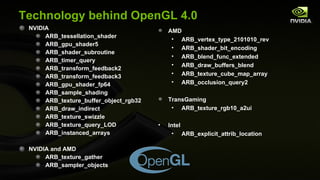
Technology behind OpenGL 4.0 NVIDIA ARB_tessellation_shader ARB_gpu_shader5 ARB_shader_subroutine ARB_timer_query ARB_transform_feedback2 ARB_transform_feedback3 ARB_gpu_shader_fp64 ARB_sample_shading ARB_texture_buffer_object_rgb32 ARB_draw_indirect ARB_texture_swizzle ARB_texture_query_LOD ARB_instanced_arrays NVIDIA and AMD ARB_texture_gather ARB_sampler_objects AMD ARB_vertex_type_2101010_rev ARB_shader_bit_encoding ARB_blend_func_extended ARB_draw_buffers_blend ARB_texture_cube_map_array ARB_occlusion_query2 TransGaming ARB_texture_rgb10_a2ui Intel ARB_explicit_attrib_location
Accelerating OpenGL Innovation OpenGL increased pace of innovation Six new spec versions in two years Actual implementations following specifications closely OpenGL 4 is a superset of DX 11 functionality While retaining backwards compatibility DirectX 10.1 2004 2006 2008 OpenGL 2.0 OpenGL 2.1 OpenGL 3.0 OpenGL 3.1 2009 DirectX 9.0c DirectX 10.0 DirectX 11 2005 2007 OpenGL 3.2 OpenGL 3.3 + OpenGL 4.0 2011 TODAY! OpenGL 4.1
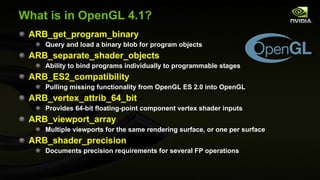
What is in OpenGL 4.1? ARB_get_program_binary Query and load a binary blob for program objects ARB_separate_shader_objects Ability to bind programs individually to programmable stages ARB_ES2_compatibility Pulling missing functionality from OpenGL ES 2.0 into OpenGL ARB_vertex_attrib_64_bit Provides 64-bit floating-point component vertex shader inputs ARB_viewport_array Multiple viewports for the same rendering surface, or one per surface ARB_shader_precision Documents precision requirements for several FP operations
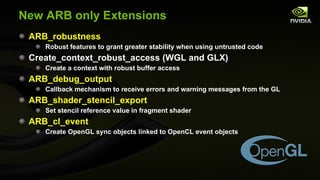
New ARB only Extensions ARB_robustness Robust features to grant greater stability when using untrusted code Create_context_robust_access (WGL and GLX) Create a context with robust buffer access ARB_debug_output Callback mechanism to receive errors and warning messages from the GL ARB_shader_stencil_export Set stencil reference value in fragment shader ARB_cl_event Create OpenGL sync objects linked to OpenCL event objects
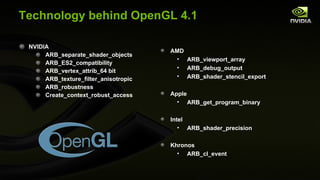
Technology behind OpenGL 4.1 NVIDIA ARB_separate_shader_objects ARB_ES2_compatibility ARB_vertex_attrib_64 bit ARB_texture_filter_anisotropic ARB_robustness Create_context_robust_access AMD ARB_viewport_array ARB_debug_output ARB_shader_stencil_export Apple ARB_get_program_binary Intel ARB_shader_precision Khronos ARB_cl_event
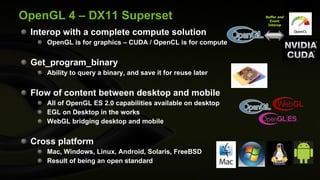
OpenGL 4 – DX11 Superset Interop with a complete compute solution  OpenGL is for graphics – CUDA / OpenCL is for compute Get_program_binary Ability to query a binary, and save it for reuse later Flow of content between desktop and mobile All of OpenGL ES 2.0 capabilities available on desktop EGL on Desktop in the works WebGL bridging desktop and mobile Cross platform Mac, Windows, Linux, Android, Solaris, FreeBSD Result of being an open standard Buffer  and Event Interop
Come to the OpenGL BOF – TODAY! Learn more about 5:15 pm - 7:15 pm  - Wilshire Grand – “Los Angeles” Room Win a brand new Quadro 5000 ! MSRP $2249 OpenGL 4.1
Where To Find Us Main Expo Area, Booth 717 and 725 July 28 th  Sponsored Sessions Twitter: nvidiadeveloper, Website:  http://developer.nvidia.com 0900-1000 Room 402B iray and Cloud Computing, Michael Kaplan 1015-1130 Room 402B OpenGL 4.0 for 2010,  Barthold Lichtenbelt and Mark Kilgard 1200-1300 Room 402B Parallel Nsight : GPU Computing and Graphics Development in Visual Studio, Jeff Kiel and Kumar Iyer 1315-1415 Room 402B Rapid GPU Ray Tracing Development with NVIDIA OptiX , Austin Robison 1430-1530 Room 402B Building Cutting-Edge Realtime 3D Applications , Holger Kunz and Phillip Miller 1545-1700 Room 402B APEX  : Creating scalable immersive game environments, Monier Maher and Aron Zoellner
Other NVIDIA Presentations Twitter: nvidiadeveloper, Website:  http://developer.nvidia.com Wed, 28 July 2-3:30 pm REYES using DirectX 11 Andrei Tatarinov, NVIDIA Corporation Thu, 29 July, 9 am-12:15 pm Advanced Techniques in Real-Time Hair Rendering and Simulation Cem Yuksel, Cyber Radiance LLC and Texas A&M Sarah Tariq, NVIDIA Corporation
GPU Technology Conference 2010 Monday, Sept. 20 — Thursday, Sept. 23, 2010 San Jose Convention Center, San Jose, California The most important event in  the GPU ecosystem http://www.nvidia.com/gtc

OpenGL 4 for 2010

  • 1.
    OpenGL 4 for2010 Mark Kilgard Barthold Lichtenbelt SIGGRAPH Sponsored Session July 28, 2010
  • 2.
    Also: Listen tothis Talk Online Listen to Barthold and Mark 57:16 minutes Use the link below FYI: This slides are corrected & extended http://nvidia.fullviewmedia.com/siggraph2010/02-dev-barthold-lichtenbelt-mark-kilgard.html
  • 3.
    Barthold Lichtenbelt Senior Manager of NVIDIA OpenGL core driver team Chair of Khronos OpenGL Working Group Co-author of Introduction to Volume Rendering
  • 4.
    Quadro 5000 Quadro4000 Quadro 6000 6 GB GDDR5 448 CUDA Cores ECC Stereo G-Sync Compatible HD SDI Compatible 2.5 GB GDDR5 352 CUDA Cores ECC Stereo G-Sync Compatible HD SDI Compatible 2 GB GDDR5 256 CUDA Cores Optional Stereo HD SDI Compatible QuadroPlex 7000 Two Quadro 6000 12 GB GDDR5 Total 896 Cores ECC Stereo Quad DVI-DL G-Sync Incl. DHIC Compatible: 1,792 Cores 24GB 8 DVI-DL
  • 5.
    Quadro 5000M: World’sFastest Mobile Workstation Available in Dell and HP 17” Mobile Workstations!
  • 6.
    Introducing NVIDIA 3DVision Pro For Professionals All of 3D Vision support, plus RF glasses, Bidirectional Query compass, accelerometer, battery Many RF channels – no collision Up to ~120 feet No line of sight needed to emitter NVAPI to control
  • 7.
    OpenGL Leverage ParallelNsight Cg SceniX CompleX OptiX
  • 8.
    Example of HybridRendering with OptiX OptiX (Ray tracing) OpenGL (Rasterization)
  • 9.
    OpenGL In EveryNVIDIA Business
  • 10.
    NVIDIA OpenGL InitiativesAPI improvements Direct State Access (DSA) Bindless Graphics Framebuffer Memory info Texture Barrier First class Direct3D-isms WebGL OpenGL ES Quadro Quadro SDI Capture Quadro SDI Output Quad Buffered Stereo Many more! Data interoperability and control DirectX interop CUDA interop OpenCL interop VDPAU interop Multi-GPU OpenGL interop GPU Affinity
  • 11.
    OpenGL on QuadroWorld class OpenGL 4 drivers 17 years of uninterrupted API compatibility Workstation application certifications Workstation application profiles Display list optimizations Fast antialiased lines GPU affinity Enhanced interop with CUDA and multi-GPU OpenGL Advanced multi-GPU rendering Overlays Genlock UBB for less framebuffer memory usage Cross-platform Windows XP, Vista, Win7, Linux, Mac, FreeBSD, Solaris SLI Mosaic Advanced multi-monitor support First class, in house, Linux support
  • 12.
  • 13.
    CUDA / OpenCLInterop example Application OpenGL driver CUDA driver Quadro or GeForce Display Tesla or GeForce Interop fast Interop are API extensions to OpenGL and CUDA Multi-card interop 2x faster on Quadro / Tesla. Transfer between cards, no host copy GeForce requires host copy
  • 14.
    Multi-GPU OpenGL InteropApplication OpenGL driver OpenGL driver Quadro Display Quadro Interop fast Interop using NV_copy_image Transfer between cards, no host copy Quadro only GPU affinity Off-screen buffer
  • 15.
    OpenGL and TeslaTesla for high performance Compute ECC, 10x double-precision, scalable Quadro for professional graphics and Compute Use interop to mix OpenGL and Compute Tesla M2050 / M2070
  • 16.
    OpenGL on TegraTegra ultra low power mobile web processor
  • 17.
    OpenGL on GeForceGames &quot;NVIDIA platforms continue to be the Gold Standard at Id Software for quality, performance, and support,&quot; John Carmack, id Software Technical Director Lifestyle Adobe CS5 Internet Accelerated browsing
  • 18.
  • 19.
    OpenGL 4 in2010 What’s new in the API? Mark J. Kilgard
  • 20.
    Mark J. KilgardPrincipal System Software Engineer OpenGL driver Cg (“C for graphics”) shading language OpenGL Utility Toolkit (GLUT) implementer Author of OpenGL for the X Window System Co-author of Cg Tutorial
  • 21.
    OpenGL Version ProgressionOpenGL 2.0 2.1 OpenGL 3.0 3.1 3.2 3.3 OpenGL 4.0 4.1 OpenGL 1.0 1.1 1.2.1 1.3 1.4 1.5 Silicon Graphics heritage DirectX 9 era GPUs DirectX 10 era GPUs DirectX 11 era GPUs (2008-2010) (1992-2003) (2004-2007) (2010-)
  • 22.
    What a yearfor OpenGL ! Two core updates in a single year! OpenGL 4.0 Released March 2010 OpenGL 4.1 Released July 2010 Cross-vendor supports for modern GPU features More functional than DirectX 11
  • 23.
    OpenGL 3.3 +4.0 Additions are Focus of This Talk Easy to get carried excited about new 4.1 goodies And miss out on OpenGL 4.0’s goodness Honestly, 4.0 is the bigger upgrade Still NVIDIA is providing OpenGL 4.1 now A few of the “big ticket” items in 4.0 Texture cube map arrays Double-precision values within shaders Programmable tessellation
  • 24.
    Classic OpenGL StateMachine From 1991-2007 * vertex & fragment processing became programmable [source: GL 1.0 specification]
  • 25.
    OpenGL 3.2 ConceptualData Flow (pre-2010) Vertex processing Pixel processing Texture mapping Geometric primitive assembly & processing Image primitive processing Transform feedback Pixel unpacking Pixel packing Vertex assembly pixels in framebuffer object textures texture buffer objects texture image specification image rectangles, bitmaps primitive topology, transformed vertex data vertex texture fetches pixel pack buffer objects pixel unpack buffer objects vertex buffer objects transform feedback buffer objects buffer data, unmap buffer geometry texture fetches primitive batch type, vertex indices, vertex attributes primitive batch type, vertex data fragment texture fetches pixel image or texture image specification map buffer, get buffer data transformed vertex attributes image and bitmap fragments point, line, and polygon fragments pixels to pack unpacked pixels pixels fragments filtered texels buffer data vertices Legend programmable operations fixed-function operations copy pixels, copy texture image Buffer store uniform/ parameters buffer objects Fragment processing stenciling, depth testing, blending, accumulation OpenGL 3.2 Raster operations Framebuffer Command parser
  • 26.
    Vertex processing Pixelprocessing Texture mapping Geometric primitive assembly & processing Image primitive processing Transform feedback Pixel unpacking Pixel packing Vertex assembly pixels in framebuffer object textures texture buffer objects texture image specification image rectangles, bitmaps primitive topology, transformed vertex data vertex texture fetches pixel pack buffer objects pixel unpack buffer objects vertex buffer objects transform feedback buffer objects buffer data, unmap buffer geometry texture fetches primitive batch type, vertex indices, vertex attributes primitive batch type, vertex data fragment texture fetches pixel image or texture image specification map buffer, get buffer data transformed vertex attributes image and bitmap fragments point, line, and polygon fragments pixels to pack unpacked pixels pixels fragments filtered texels buffer data vertices Legend programmable operations fixed-function operations copy pixels, copy texture image Buffer store Fragment processing stenciling, depth testing, blending, accumulation Control point processing Patch assembly & processing Patch tessellation generation Patch evaluation processing patch control points transformed control points transformed patch transformed patch, bivariate domain transformed patch tessellation texture fetches patch topology, evaluated patch vertex patch data OpenGL 4 Raster operations Framebuffer Command parser
  • 27.
    OpenGL 3.3 LaundryList (1) New GLSL functions ( floatBitsToInt , intBitsToFloat , etc.) to convert to and from floating-values to integer bit encodings New extended blend functions involving two output colors from the fragment shader (instead of one) New GL_SRC_COLOR 1 , etc. blend function modes Explicit mapping in your shader of GLSL vertex shader inputs to vertex attributes Example: layout(location = 3) in vec4 normal; Avoids otherwise needed calls to glBindAttribLocation in your applications Explicit mappings in your shader of GLSL fragment shader output colors to bound color buffers Example: layout(location=2) out vec4 color Avoids otherwise needed calls to glBindFragDataLocation in your applications
  • 28.
    OpenGL 3.3 LaundryList (2) Alternate occlusion query target ( GL_ANY_SAMPLES_PASSED ) returning a Boolean result instead of the samples passed Sampler objects to decouple sampler (i.e. glTexParameter state) from texture image state (i.e. glTexImage * state) Mimics Direct3D’s decoupling of sampler and texture image state Mostly useful to mimic Direct3D’s model of operation glBindSampler(GLuint uint,GLuint sampler) binds a named sampler object Zero for a sampler name means use the texture object’s sampler state
  • 29.
    OpenGL 3.3 LaundryList (3) New unsigned 10-10-10-2 integer internal texture format ( GL_RGB10_A2UI ) Like the fixed-point GL_RGB10_A2 format, but just with unsigned integer components The ability to swizzle the texture components returned by a texture fetch Mimics an ability of the PlayStation 3 architecture R G B A 1 0 X Y Z W texture fetch result delivered to shader fetched texture’s RGBA glTexParameteri(GL_TEXTURE_SWIZZLE_R, GL_BLUE) glTexParameteri(GL_TEXTURE_SWIZZLE_G, GL_BLUE) glTexParameteri(GL_TEXTURE_SWIZZLE_B, GL_ONE) glTexParameteri(GL_TEXTURE_SWIZZLE_A, GL_GREEN)
  • 30.
    OpenGL 3.3 LaundryList (4) Timer query objects Allows timing of OpenGL command sequences without timing the idle time Allows accurate instrumentation of GPU bottlenecks Instanced arrays Mimics the behavior of Direct3D’s geometry instancing OpenGL’s support for immediate mode and inexpensive primitive batches makes geometry instancing needless Primary use would be emulating Direct3D’s model New command glVertexAttribDivisor New 10-10-10-2 vertex array format types Signed and unsigned versions ( GL_INT_2_10_10_10_REV and GL_UNSIGNED_INT_2_10_10_10_REV ) Good for packed vertex normals
  • 31.
    OpenGL 3.3 Support& Older GPUs Pre-Fermi (DirectX 10 era) GPUs support OpenGL 3.3 Such pre-Fermi GPUs will never natively support OpenGL 4 (FYI: NVIDIA drivers do provide slooow emulation support for newer architectures; useful for experiments, but that’s about all) Only NVIDIA’s Fermi (and on) support OpenGL 4 However many ARB extensions introduced by OpenGL 4 are supported by older DirectX 10 (and sometimes 9) GPUs Examples: OpenGL 4.1’s ARB_viewport_array is exposed on DirectX 10 era NVIDIA GPUs NVIDIA’s policy is to expose as much of OpenGL functionality as a given GPU generation can possibly expose
  • 32.
    OpenGL 4.0 FeaturesCategories Texturing Framebuffer Transform feedback Programmability Indexing Numerics Subroutines Fragment processing Tessellation Fairly broad categories
  • 33.
    OpenGL 4.0 TexturingFeatures 3-component buffer texture formats RGB formats for floats ( GL_RGB32F ), signed ( GL_RGB32I ) & unsigned integers ( GL_RGB32UI ) GLSL functions ( textureLOD ) to return vector of automatic level-of-detail parameters GLSL function ( textureGather ) returns any single component of 2x2 footprint in RGBA vector Including depth comparisons Arbitrary varying offsets Independent offsets for each of 4 returned texels Cube map texture arrays ( GL_TEXTURE_CUBE_MAP_ARRAY ) Texture array where every 6 slices form a cube map
  • 34.
    Cube Map TextureArrays Extends 1D and 2D texture array concept to omni-directional cube map texture images accessed by 4D ( s , t , r , i ) coordinate set where ( s , t , r ) is an un-normalized direction vector And i is a texture array index “slice” Applications: Bidirectional Radiance Distribution Functions (BRDFs), spherical harmonics, time varying environment maps slice i = 0 slice i = 1 slice i = 2
  • 35.
    OpenGL 4.0 FramebufferFeatures Per-color buffer blending controls Each color buffer can specify its own Blend equation Separate blend functions for RGB and alpha New blend commands ( glBlendEquationi , glBlendFunci , etc.) take a buffer index parameter Better blending control for multiple render targets Per-sample shading Fragment shader executes per-sample, instead of per-pixel Easy API: glEnable(GL_SAMPLE_SHADING)
  • 36.
    OpenGL 4.0 TransformFeedback Features Transform feedback objects to encapsulated transform feedback related state ( glBindTransformFeedback , etc.) Allows the ability to pause ( glPasueTransformFeedback ) and resume ( glResumeTransformFeedback ) transform feedback operations Draw primitives captured by transform feedback ( glDrawTransformFeedback ) without having to explicitly query back the number of captured primitives Multiple separate vertex streams can be written during transform feedback New commands glDrawArraysInstanced and glDrawElementsInstancedBaseVertex can source their “draw arrays” and “draw elements” parameters from a GPU buffer object primitive processing rasterization pixel processing framebuffer transform feedback buffer data framebuffer buffer data
  • 37.
    OpenGL Shading LanguageUpdate OpenGL Shading Language (GLSL) version now synchronized with OpenGL version number So GLSL 4.00 corresponds to OpenGL 4.0 And GLSL 3.30 corresponds to OpenGL 3.3 Previously, confusingly, GLSL version number didn’t match OpenGL core version number Example: OpenGL 3.2 depended on GLSL 1.50 Remember to request the version of GLSL you require Example: #version 400 compatibility Best to always request compatibility or risk forced shader re-writes due to backward compatibility and deprecation issues
  • 38.
    OpenGL 4.0 ProgrammableFeatures: Indexing Indexing into arrays of samplers with varying indices So sampler2D sampler_array[3] allowed now But index must be uniform for all uses Similarly, now allows indexing into arrays of uniform blocks
  • 39.
    OpenGL 4.0 ProgrammableFeatures: Numeric Data Type Control Implicit signed and unsigned integer conversions “ precise ” type qualifier to avoid optimization-induced invariance Fused floating-point multiply-add (MAD) operation ( fma ) Splitting a floating-point value into significand and exponent ( frexp ) Constructing a floating-point value from a significand and exponent ( ldexp ) Integer bit-field manipulation ( bitfieldExtract , findLSB , etc.) Packing and unpacking small fixed-point values into larger scalar values ( packUnorm2x16 , unpackUnorm4x8 , etc.) NOTE: Recall 3.3 added raw cast of IEEE floating-point values to and from integers ( floatBitsToInt , intBitsToFloat , etc.)
  • 40.
    Double-precision data typesScalar double Vector dvec4 , etc Matrix dmat3 (3x3), dmat4x2 , etc. Doubles can reside in buffer objects Double-precision operations Multiply, add, multiply-add (MAD) Relational operators, including vector comparisons Absolute value Minimum, maximum, clamping, etc. Packing and unpacking No support for double-precision angle, trigonometric, or logarithmic functions OpenGL 4.0 Programmable Features: Double-Precision Numeric
  • 41.
    OpenGL 4.0 ProgrammableFeatures: Subroutines GLSL shaders support subroutine functions Typed subroutines variables can be bound to subroutine functions Allows for “indirect” subroutine calls Query glGetSubroutineIndex obtains index names for subroutine function names Command glUniformRountinesiv updates a program’s subroutine uniform variables with subroutine index names Use of subroutines can avoid/minimize shader recompilation costs by dynamically switching subroutines
  • 42.
    OpenGL 4.0 ProgrammableFeatures: Fragment Shaders Mask of covered samples ( gl_SampleMask[ ] ) of a fragment is read-able Fragment shader can “know” which samples within its pixel footprint are covered Fragment attribute interpolation control By offset relative to the pixel center ( interpolateAtOffset ) By a varying sample index ( interpolateAtSample ) Or at the centroid of the covered samples ( interpolateAtCentroid ) pixel center relative offset dx dy sample index 0 1 2 3 centroid centroid position of 3 covered samples pixel footprints interpolation modes
  • 43.
    OpenGL 4.0 ProgrammableFeatures: Tessellation Shaders Higher-level geometric primitives: Patches Quadrilateral patches Triangular patches Iso-line patches Two new shaders stages Existing vertex shader stage re-tasked to transform control points Tessellation control shader Executes a gang of cooperating threads per patch One thread per output control point Computes level-of-detail parameters, per-patch parameters, and/or performs patch basis change Hard-wired tessellation generator emits topology for the patch Tessellation evaluation shader Evaluates position of tessellated vertex within patch And performs conventional vertex processing (lighting, etc.)
  • 44.
    Programmable Tessellation DataFlow vertex shader clipping, setup, & rasterization fragment shader assembled primitive fragments index to vertex attribute puller indices primitive topology & in-band vertex attributes vertex attributes vertex shader geometry shader clipping, setup, & rasterization fragment shader OpenGL 4.0 adds tessellation shaders assembled primitive fragments index to vertex attribute puller indices primitive topology & in-band vertex attributes vertex attributes tessellation control (hull) shader tessellation evaluation (domain) shader tessellation generator level-of-detail parameters patch control points & parameters fine primitive topology (u, v) coordinates primitive stream control points control point (vertex) shader vertex attributes rectangular & triangluar patch OpenGL 3.2 programmable fixed-function Legend geometry shader primitive stream
  • 45.
    Tessellated Triangle andQuad Notice fractional tessellation scheme in wire-frame pattern
  • 46.
    Iso-line Tessellation Intendedfor hair, particular animation and combing Scientific visualization applications too
  • 47.
  • 48.
    Bezier Triangle ControlPoints b 300 b 210 b 120 b 030 b 021 b 012 b 003 b 102 b 201 b 111 P(u,v) = u 3 b 300 + 3 u 2 v b 210 + 3 uv 2 b 120 + v 3 b 030 + 3 u 2 w b 201 + 6 uvw b 111 + 3 v 2 w b 021 + 3 uw 2 b 102 + 3 uw 2 b 012 + w 3 b 003 where w=1-u-v
  • 49.
    “Precise” Evaluation Mathfor Bezier Triangle Example precise vec4 www = w*w*w * vec4 (b300,1), uuu = u*u*u * vec4 (b030,1), vvv = v*v*v * vec4 (b003,1), wwu3 = 3*w*w*u * vec4 (b210,1), wuu3 = 3*w*u*u * vec4 (b120,1), wwv3 = 3*w*w*v * vec4 (b201,1), uuv3 = 3*u*u*v * vec4 (b021,1), wvv3 = 3*w*v*v * vec4 (b102,1), uvv3 = 3*u*v*v * vec4 (b012,1), wuv6 = 6*w*u*v * vec4 (b111,1); precise vec4 wuE = wwu3 + wuu3, uvE = uvv3 + uuv3, wvE = wwv3 + wvv3, E = wuE + uvE + wvE; precise vec4 C = www + uuu + vvv; precise vec4 p = C + E; Notice evaluation needs homogenous coordinates, hence vec4(x,1)
  • 50.
  • 51.
  • 52.
    Surfaces are Determinedby Their Control Points Moving control points displaces the evaluated surfaces
  • 53.
  • 54.
  • 55.
    Photo of theLive Tessellation Demo given during the Talk
  • 56.
    Bi-cubic Patches Usedin Production Rendering Production renderers for film and video rely on surfaces
  • 57.
    Amplification of StandardTriangle Meshes Original faceted mesh Tessellation results in triangle amplification with curvature Results of Phong shading of curved
  • 58.
    Art Pipeline forTessellation … Generate LODs GPU Control Cage Smooth Surface Displaced Surface Polygon Mesh
  • 59.
  • 60.
  • 61.
    Displacement Mapping DisplacementMapping - Sample displacement value from a texture - Displace vertex along its normal Watertight Normals - cross product of a pair of tangent, bi-tangent vectors - discontinuities occur at shared corners and edges - define corner and edge ownership
  • 62.
    Tessellation Shader Example:Starting Simple Control point (vertex) shader transforms vertex positions to eye-space Simple 4x3 affine matrix transformation Tessellation control shader accepts a 3 control points Forms a standard triangle Passes each control point on to tessellation valuation Computes a level-of-detail scalar for each edge based on the scaled window-space length of each edge So the tessellation of the generated triangle patch adapts to the screen-space size of the triangle Tessellation evaluation shader runs at each tessellated vertex of triangle patch Gets 3 control points + (u,v,w) barycentric triangle weights Weights control points to make a new position Computes a surface normal The normal is constant for the entire triangle in this case, but generally the normal would vary Outputs barycentric weights as RGB color (to visualize)
  • 63.
    GLSL Control Point(Vertex) Shader #version 400 compatibility // Multiply XYZ vertex by 4x3 modelview matrix // (assumed non-projective) vec3 transform(precise vec3 v) { vec3 r; // Remember: GLSL is oddly column-major so [col][row] for ( int i=0; i<3; i++) { r[i] = v[0] * gl_ModelViewMatrix [0][i] + v[1] * gl_ModelViewMatrix [1][i] + v[2] * gl_ModelViewMatrix [2][i] + gl_ModelViewMatrix [3][i]; } return r; } uniform vec2 wh; // scaled width and height of screen out vec3 eye_space_pos; out vec2 scaled_window_space_pos; out vec3 eye_normal; void main( void ) { eye_space_pos = transform(gl_Vertex.xyz); vec4 ndc_pos = gl_ModelViewProjectionMatrix * vec4 ( gl_Vertex .xyz,1); scaled_window_space_pos = wh*(ndc_pos.xy / ndc_pos.w); // Pass along two sets of texture coordinates... gl_TexCoord [0] = gl_MultiTexCoord0 ; gl_TexCoord [1] = gl_MultiTexCoord1 ; mat3 nm = gl_NormalMatrix ; vec3 n = gl_Normal ; eye_normal = normalize (nm * n); }
  • 64.
    GLSL Tessellation Control Shader #version 400 compatibility layout (vertices=3) out; #define TID gl_InvocationID // thread ID out float sharable_len[]; in vec3 eye_space_pos[]; in vec2 scaled_window_space_pos[]; out vec3 eye_space_pos2[]; void main( void ) { sharable_len[TID] = distance (scaled_window_space_pos[TID], scaled_window_space_pos[(TID+1)%3]); barrier (); float len0 = sharable_len[0], len1 = sharable_len[1], len2 = sharable_len[2]; eye_space_pos2[TID] = eye_space_pos[TID]; // Limit level-of-detail output to thread zero. if (TID == 0) { // Outer LOD gl_TessLevelOuter [0] = len1; // V1-to-V2 edge gl_TessLevelOuter [1] = len2; // V2-to-V0 edge gl_TessLevelOuter [2] = len0; // V0-to-V1 edge // Inner LOD gl_TessLevelInner[0] = max (len0, max (len1, len2)); } }
  • 65.
    GLSL Tessellation Evaluation Shader #version 400 compatibility layout ( triangles ) in ; layout ( ccw ) in ; layout ( fractional_odd_spacing ) in ; in float sharable_len[]; in vec3 eye_space_pos2[]; vec3 lerp3( in vec3 attrs[3], vec3 uvw) { return attrs[0] * uvw[0] + attrs[1] * uvw[1] + attrs[2] * uvw[2]; } vec4 applyPerspective( mat4 affine_matrix, vec3 v) { vec4 r; r[0] = affine_matrix[0][0] * v[0]; r[1] = affine_matrix[1][1] * v[1]; r[2] = affine_matrix[2][2] * v[2] + affine_matrix[3][2]; r[3] = -v[2]; return r; } void main( void ) { vec3 barycentric_weights = gl_TessCoord ; vec3 v[3]; for ( int i = 0; i < 3; i++) { v[i] = eye_space_pos2[i]; } vec3 p = lerp3(v, barycentric_weights); gl_Position = applyPerspective( gl_ProjectionMatrix , p); vec3 dpdv = eye_space_pos2[1] - eye_space_pos2[0]; vec3 dpdw = eye_space_pos2[2] - eye_space_pos2[0]; vec3 normal = cross (dpdv, dpdw); // Visualize barycentric weights as color. vec4 color = vec4 (barycentric_weights, 1.0); gl_FrontColor = color; gl_TexCoord [0] = vec4 ( normalize (normal), length ( normalize (normal))); gl_TexCoord [1] = vec4 (p, 1); }
  • 66.
    Simple Example RenderedOriginal single triangle Adaptive tessellation automatically tessellates distant, small triangle less and close, large triangle more Visualization of barycentric weights used by tessellation evaluation shader
  • 67.
    More Complicated Example:Adaptive PN Triangles Idea: Send a triangle mesh with positions & normals Have the tessellation unit tessellated a curved triangle that matches the per-triangle positions & normals Nice because existing triangle meshes can get extra triangle detail Details Same control point (vertex) shader as before Tessellation control shader Input: 3 control points + normals Output: 10 control points for a Bezier triangle patch Output: 6 controls points for quadratic normal interpolation Output: adaptive level-of-detail (LOD) based on edge lengths in scaled window space Tessellation evaluation shader Does cubic interpolation of Bezier triangle to compute position Does quadratic interpolation to compute surface normal
  • 68.
    Adaptive PN TriangleTessellation Control Shader #version 400 compatibility layout ( vertices =3) out; // interior control points are per-patch #define TID gl_InvocationID // thread ID #define P eye_space_pos #define P2 eye_space_pos2 #define N eye_normal in vec3 eye_space_pos[]; in vec2 scaled_window_space_pos[]; in vec3 eye_normal[]; out vec3 eye_space_pos2[]; out vec3 eye_space_normal[]; out vec3 ccw_cp[]; out vec3 cw_cp[]; out vec3 mid_normal[]; patch out vec3 b111; void main(void) { // TIDp1 = counter-clockwise (plus 1) control point index from TID int TIDp1 = TID<2 ? TID+1 : 0; // Means TIDp1 = (TID+1)%3; // TIDm1 = clockwise (minus 1) control point index from TID int TIDm1 = TID>0 ? TID-1 : 2; // Means TIDp1 = (TID+2)%3; // Compute triangle LOD parameters. // Each of 3 threads computes each of 3 edge lengths . gl_TessLevelOuter [TID] = distance (scaled_window_space_pos[TIDm1], scaled_window_space_pos[TID]); barrier (); gl_TessLevelInner [0] = max ( gl_TessLevelOuter [0], max ( gl_TessLevelOuter [1], gl_TessLevelOuter [2])); // ccw_cp[TID] is the control point immediate counter-clockwise from P[TID] // cwc_cp[TID] is the control point immediate clockwise from P[TID] ccw_cp[TID] = (2*P[TID] + P[TIDp1] - dot (P[TIDp1]-P[TID],N[TID])*N[TID])/3.0; cw_cp[TID] = (2*P[TID] + P[TIDm1] - dot (P[TIDm1]-P[TID],N[TID])*N[TID])/3.0; P2[TID] = ccw_cp[TID] + cw_cp[TID]; vec3 E = (P2[0] + P2[1] + P2[2])/6.0, // (b210+b120+b021+b012+b102+b201)/6.0 V = (P[0] + P[1] + P[3])/3.0; b111 = E + (E-V)/2.0; P2[TID] = P[TID]; eye_space_normal[TID] = N[TID]; float v = 2* dot (P[TIDp1]-P[TID],N[TID]+N[TIDp1]) / dot (P[TIDp1]-P[TID],P[TIDp1]-P[TID]); vec3 h = N[TID] + N[TIDp1] - v*(P[TIDp1]-P[TID]); mid_normal[TID] = normalize (h); }
  • 69.
    #version 400 compatibilitylayout (triangles) in ; layout (ccw) in ; layout (fractional_even_spacing) in ; // Assumes matrix in gluPerspective form // Intended to be cheaper than full 4x4 transform // by projection matrix // Compiles to just 5 MAD ops precise vec4 applyPerspective( precise mat4 affine_matrix, precise vec4 v) { precise vec4 r; r[0] = affine_matrix[0][0] * v[0]; r[1] = affine_matrix[1][1] * v[1]; r[2] = affine_matrix[2][2] * v[2] + affine_matrix[3][2]*v[3]; r[3] = -v[2]; return r; } // 10 input control points for Bezier triangle position in precise vec3 eye_space_pos2[]; in precise vec3 ccw_cp[]; in precise vec3 cw_cp[]; patch in precise vec3 b111; // 6 input control points for quadratic normal interpolation in precise vec3 eye_space_normal[]; in vec3 mid_normal[]; Adaptive PN Triangle Tessellation Evaluation Shader (1 of 3)
  • 70.
    void main(void ) { // Evaluate position by weighting triangle vertex positions // with the generated vertex's barycentric weights. vec3 barycentric_weights = gl_TessCoord ; precise float u = barycentric_weights.x, v = barycentric_weights.y, w = barycentric_weights.z; // should be 1- u - v vec3 triangle_vertex[3]; for ( int i = 0; i < 3; i++) { triangle_vertex[i] = eye_space_pos2[i]; } // 10 position control points of a Bezier triangle precise vec3 b300 = eye_space_pos2[0], b030 = eye_space_pos2[1], b003 = eye_space_pos2[2], b210 = ccw_cp[0], b201 = cw_cp[0], b021 = ccw_cp[1], b120 = cw_cp[1], b102 = ccw_cp[2], b012 = cw_cp[2]; // Weight the position control points with a // (cubic) Bezier triangle basis precise vec4 www = w*w*w * vec4 (b300,1), uuu = u*u*u * vec4 (b030,1), vvv = v*v*v * vec4 (b003,1), wwu3 = 3*w*w*u * vec4 (b210,1), wuu3 = 3*w*u*u * vec4 (b120,1), wwv3 = 3*w*w*v * vec4 (b201,1), uuv3 = 3*u*u*v * vec4 (b021,1), wvv3 = 3*w*v*v * vec4 (b102,1), uvv3 = 3*u*v*v * vec4 (b012,1), wuv6 = 6*w*u*v * vec4 (b111,1), wuE = wwu3 + wuu3, uvE = uvv3 + uuv3, wvE = wwv3 + wvv3, E = wuE + uvE + wvE, C = www + uuu + vvv, p = C + E, clip_space_p = applyPerspective( gl_ProjectionMatrix , p); gl_Position = clip_space_p; Adaptive PN Triangle Tessellation Evaluation Shader (2 of 3)
  • 71.
    // Weight thenormal control points with a quadratic basis vec3 n200 = eye_space_normal[0], n020 = eye_space_normal[1], n002 = eye_space_normal[2], n110 = mid_normal[0], n011 = mid_normal[1], n101 = mid_normal[2], normal = n200*w*w + n020*u*u + n002*v*v + n110*w*u + n011*u*v + n101*w*v; // Visualize barycentric weights as color. vec4 color = vec4 (barycentric_weights, 1.0); gl_FrontColor = color; // Output the normalized surface normal gl_TexCoord [0] = vec4 (normalize(normal),1); // Output the (perspective-divided) eye-space view vector gl_TexCoord [1] = vec4 (p.xyz/p.w, 1); } Adaptive PN Triangle Tessellation Evaluation Shader (3 of 3)
  • 72.
    Adaptive PN TrianglesTessellation Rendered Visualization of barycentric weights used by tessellation evaluation shader Original monkey head faceted mesh Tessellated & Phong shaded Wire frame of adaptive tessellation
  • 73.
    Careful About Cracksat Patch Seams Patch seams need to be computed very carefully Otherwise you get cracks Animation makes cracks obvious! Be sure of the following Your LOD parameters at the seam of two patches are computed bit-for-bit identical The control points that influence the evaluation along a patch edge are bit-for-bit identical and use symmetric evaluation Influence means has “non-zero weight” A+B+C ≠ C+B+A in floating-point precise keyword can help this cracks
  • 74.
    NVIDIA’s Position onOpenGL Deprecation: Core vs. Compatibility Profiles OpenGL 3.1 introduced notion of “core” profile Idea was remove stuff from core to make OpenGL “good-er” Well-intentioned perhaps but… Throws API backward compatibility out the window Lots of useful functionality got removed that is in fast hardware Examples: Polygon mode, line width Lots of easy-to-use, effective API got labeled deprecated Immediate mode Display lists Best advice for real developers Simply use the “compatibility” profile Easiest course of action Requesting the core profile requires special context creation gymnastics Avoids the frustration of “they decided to remove what??” Allows you to use existing OpenGL libraries and code easily No, your program won’t go faster for using the “core” profile It may go slower because of extra “is this allowed to work?” checks
  • 75.
    Cg 3.0 Update(1) Cg 3.0 includes Shader Model 5.0 support New gp5vp , gp5gp , and gp5fp profiles correspond to Shader Model 5.0 vertex, geometry, and fragment profiles Compiles to assembly text for the NV_gpu_program5 assembly-level shading language Cg 3.0 also introduces programmable tessellation profiles gp5tcp = NV_gpu_program5 tessellation control program gp5tep = NV_gpu_program5 tessellation evaluation program Cg 3.0 also support DirectX 11 tessellation profiles So Cg provides one common language to target either OpenGL or Direct3D programmable tessellation
  • 76.
    Cg 3.0 Update(2) OpenGL Shading Language 4.10 profiles Compile Cg to assembly, GLSL, or HLSL Support for up to 32 texture units Previously 16 Unlike GLSL, CgFX provides a powerful effect system compatible with DirectX 9’s FX Download Cg 3.0 now from http://developer.nvidia.com/object/cg_download.html
  • 77.
    Cg Off-line CompilerCompiles GLSL to Assembly GLSL is “opaque” about the assembly generated Hard to know the quality of the code generated with the driver Cg Toolkit 3.0 is a useful development tool even for GLSL programmers Cg Toolkit’s cgc command-line compiler actually accepts both the Cg (cgc’s default) and GLSL (with –oglsl flag) languages Uses the same compiler technology used to compile GLSL within the driver Example command line for compiling earlier tessellation control and evaluation GLSL shaders cgc -profile gp5tcp -oglsl -po InputPatchSize=3 -po PATCH_3 filename.glsl (assumes 3 input control points and 3 outputs points) cgc -profile gp5tep -oglsl -po PATCH_3 filename.glsl (assumes 3 input control points)
  • 78.
    More NVIDIA OpenGLFeatures to Explore (1) Bindless Graphics NV_vertex_buffer_unified_memory (VBUM), NV_shader_buffer_load (SBL), and NV_shader_buffer_store (SBS) Supports mapping OpenGL buffer objects to GPU virtual address space Permits faster vertex array state changes by avoiding expensive glBindBuffer commands Direct State Access (DSA) Avoid error-prone OpenGL API’s reliance on “selectors” such as glMatrixMode and glActiveTexture Instead use new selector-free OpenGL commands Example: glMatrixMultfEXT and glTextureParameteriEXT Results in more read-able, less error-prone OpenGL code
  • 79.
    More NVIDIA OpenGLFeatures to Explore (2) Video Decode and Presentation API for Unix (VDPAU) interoperability Use NV_vdpau_interop extension to access VDPAU video and output surfaces for texturing and rendering Allows OpenGL to process and display contents of video streams decoded with VDPAU NV_gpu_program5 Assembly Extension Cg compile generates assembly for this extension (the gp5 * profiles) Allows you to off-line compile high-level shading languages to low-level assembly Better visibility into low-level execution environment and shading Instruction Set of Fermi
  • 80.
    More NVIDIA OpenGLFeatures to Explore (3) New low- and high-dynamic range Block Pixel Texture Compression (BPTC) formats ARB_texture_compression_bptc Bit-for-bit compatible with DirectX 10 block texture compression formats
  • 81.
  • 82.
    OpenGL the 3DGraphics API Barthold Lichtenbelt
  • 83.
  • 84.
  • 85.
    Technology behind OpenGL4.0 NVIDIA ARB_tessellation_shader ARB_gpu_shader5 ARB_shader_subroutine ARB_timer_query ARB_transform_feedback2 ARB_transform_feedback3 ARB_gpu_shader_fp64 ARB_sample_shading ARB_texture_buffer_object_rgb32 ARB_draw_indirect ARB_texture_swizzle ARB_texture_query_LOD ARB_instanced_arrays NVIDIA and AMD ARB_texture_gather ARB_sampler_objects AMD ARB_vertex_type_2101010_rev ARB_shader_bit_encoding ARB_blend_func_extended ARB_draw_buffers_blend ARB_texture_cube_map_array ARB_occlusion_query2 TransGaming ARB_texture_rgb10_a2ui Intel ARB_explicit_attrib_location
  • 86.
    Accelerating OpenGL InnovationOpenGL increased pace of innovation Six new spec versions in two years Actual implementations following specifications closely OpenGL 4 is a superset of DX 11 functionality While retaining backwards compatibility DirectX 10.1 2004 2006 2008 OpenGL 2.0 OpenGL 2.1 OpenGL 3.0 OpenGL 3.1 2009 DirectX 9.0c DirectX 10.0 DirectX 11 2005 2007 OpenGL 3.2 OpenGL 3.3 + OpenGL 4.0 2011 TODAY! OpenGL 4.1
  • 87.
    What is inOpenGL 4.1? ARB_get_program_binary Query and load a binary blob for program objects ARB_separate_shader_objects Ability to bind programs individually to programmable stages ARB_ES2_compatibility Pulling missing functionality from OpenGL ES 2.0 into OpenGL ARB_vertex_attrib_64_bit Provides 64-bit floating-point component vertex shader inputs ARB_viewport_array Multiple viewports for the same rendering surface, or one per surface ARB_shader_precision Documents precision requirements for several FP operations
  • 88.
    New ARB onlyExtensions ARB_robustness Robust features to grant greater stability when using untrusted code Create_context_robust_access (WGL and GLX) Create a context with robust buffer access ARB_debug_output Callback mechanism to receive errors and warning messages from the GL ARB_shader_stencil_export Set stencil reference value in fragment shader ARB_cl_event Create OpenGL sync objects linked to OpenCL event objects
  • 89.
    Technology behind OpenGL4.1 NVIDIA ARB_separate_shader_objects ARB_ES2_compatibility ARB_vertex_attrib_64 bit ARB_texture_filter_anisotropic ARB_robustness Create_context_robust_access AMD ARB_viewport_array ARB_debug_output ARB_shader_stencil_export Apple ARB_get_program_binary Intel ARB_shader_precision Khronos ARB_cl_event
  • 90.
    OpenGL 4 –DX11 Superset Interop with a complete compute solution OpenGL is for graphics – CUDA / OpenCL is for compute Get_program_binary Ability to query a binary, and save it for reuse later Flow of content between desktop and mobile All of OpenGL ES 2.0 capabilities available on desktop EGL on Desktop in the works WebGL bridging desktop and mobile Cross platform Mac, Windows, Linux, Android, Solaris, FreeBSD Result of being an open standard Buffer and Event Interop
  • 91.
    Come to theOpenGL BOF – TODAY! Learn more about 5:15 pm - 7:15 pm - Wilshire Grand – “Los Angeles” Room Win a brand new Quadro 5000 ! MSRP $2249 OpenGL 4.1
  • 92.
    Where To FindUs Main Expo Area, Booth 717 and 725 July 28 th Sponsored Sessions Twitter: nvidiadeveloper, Website: http://developer.nvidia.com 0900-1000 Room 402B iray and Cloud Computing, Michael Kaplan 1015-1130 Room 402B OpenGL 4.0 for 2010, Barthold Lichtenbelt and Mark Kilgard 1200-1300 Room 402B Parallel Nsight : GPU Computing and Graphics Development in Visual Studio, Jeff Kiel and Kumar Iyer 1315-1415 Room 402B Rapid GPU Ray Tracing Development with NVIDIA OptiX , Austin Robison 1430-1530 Room 402B Building Cutting-Edge Realtime 3D Applications , Holger Kunz and Phillip Miller 1545-1700 Room 402B APEX : Creating scalable immersive game environments, Monier Maher and Aron Zoellner
  • 93.
    Other NVIDIA PresentationsTwitter: nvidiadeveloper, Website: http://developer.nvidia.com Wed, 28 July 2-3:30 pm REYES using DirectX 11 Andrei Tatarinov, NVIDIA Corporation Thu, 29 July, 9 am-12:15 pm Advanced Techniques in Real-Time Hair Rendering and Simulation Cem Yuksel, Cyber Radiance LLC and Texas A&M Sarah Tariq, NVIDIA Corporation
  • 94.
    GPU Technology Conference2010 Monday, Sept. 20 — Thursday, Sept. 23, 2010 San Jose Convention Center, San Jose, California The most important event in the GPU ecosystem http://www.nvidia.com/gtc

Editor's Notes

  • #2 Introduce Mark and myself
  • #5 Before we delve into OpenGL, I wanted to make you aware of four new Quadro cards we announced yesterday, based on the Fermi architecture. Check them out in the NVIDIA booth, their performance is impressive! DHIC – Dual Host Interface Card
  • #6 We also announced the new Mobile Workstation solution, the 5000m. We are showing one in use in the “family room” in the “HP Innovation Zone” in our booth.
  • #7 Finally, Siggraph is where we introduce 3D Vision Pro as well. Again, come to the booth for more information. Now on to OpenGL!
  • #8 One way to view the OpenGL offerings from NVIDIA is as a tool to enable awesome visual applications to be developed through a comprehensive stack of software solutions. We offer: Cg: A shading language and effects system to develop rendering effects and techniques, and deploy them on various platforms and APIs, including OpenGL. Scenix: OpenGL based professional scene graph used in many markets today. Automotive styling, visualization, simulation, broadcast graphics, and more. Applications can quickly add features such as stereo, SDI, 30-bit color, scene distribution and interactive ray tracing Optix: Is an interactive ray-tracing engine built on top of CUDA and OpenGL. Hybrid rendering, mixing of traditional graphics rendering and ray tracing, are also enabled. OptiX integrates with SceniX. With Optix, you accelerate an existing renderer, or build a new one yourself. Complex: Maintains interactivity for large scenes as they exceed the limits of a single GPU, allowing massive data sets to be explored, using multiple GPUs in a system. The CompleX engine can be adopted by any product using OpenGL, and can be enabled immediately by an application using SceniX Parallel Nsight is an advanced debugger and analyzer fully integrated with Visual Studio. It enables you to better see what is going on with your OpenGL, CUDA, Direct3D, DirectCompute or OpenCL application.
  • #9 This is a close-up taken out of the Fermi Rocket Sled demo. This shows how hybrid rendering works. With traditional OpenGL rendering you generate your image, for example using SceniX, and then enhance it by using OptiX to add reflection and shadows. One of our experts on this, Tristan, is available if you have more questions on how you can do this in your application. Tristan, raise your hand please.
  • #10 OpenGL enables every NVIDIA business, and therefore is extremely important for us. Some of them might not be immediately obvious, I will show more detail in the upcoming slides why this is the case.
  • #11 Here I tried to list what recent initiatives we’ve introduced to enhance OpenGL usage, and enable you to build better, faster, more visually rich applications. First, NVIDIA continues to enhance the OpenGL API, and leverage that into OpenGL ES and WebGL. More on that later. Second, we recognize that there are different APIs, each with their own strengths to get a specific problem solved. Hence, we have and are actively working on ways for you to transfer data into and out of OpenGL into those other APIs. Third, with OpenGL we enable a long list of Quadro features, specifically aimed at the professional workstation market. The list is so long it doesn’t fit here. Hence [next slide]
  • #12 I continued the list here. I am not going to go through the list in detail. I do want to point out that through Quadro and OpenGL you get access to all these workstation features, a top notch stable OpenGL implementation, and awesome support from our support team. We continuously add new features, based on feedback from you, our developers and customers.
  • #13 OpenGL Interoperability means the ability to share data among different APIs. You can, for example, map a D3D surface as a texture or renderbuffer in OpenGL directly. Or map an OpenGL buffer object as a CUDA memory object. It is also possible to transfer data between two OpenGL contexts in a multi-GPU situation with maximum efficiency.
  • #14 Here is an example of interop with CUDA. The application makes OpenGL and CUDA calls. For example, process a video stream in CUDA, then transfer it over to OpenGL using interop for more processing and display. This works on a single card as well as multi-card systems. Performance between Quadro cards will be higher than between GeForce cards.
  • #15 This slide is almost the same as the previous one, except it shows interop between two OpenGL contexts, each talking to a separate graphics card. The application is using GPU affinity to direct rendering to a particular GPU. Again, you need interop to transfer the data from one card to the other. For example, to composite the final frame of a rendering split over many GPUs. Note that both GPU affinity and fast GL to GL interop with NV_copy_image are Quadro only solutions.
  • #16 Tesla is the brand for high performance computing. Tesla solutions scale from a single board solution to multi-rack mounted data centers. Because of its extreme efficiency in computing, some developers see 100x times speedup over a quad-core CPU, which enables all kinds of new applications. In scientific fields like chemistry, fluid dynamics, electromagnetics, medical imaging, weather prediction, but also in financial analysis and prediction. Obviously, with a Tesla board and a Quadro board together in a system, you can build awesome visual applications. You will need to use interop, as I just talked about, for this.
  • #17 Tegra is a system on a chip – a super low power complete visual computing processor. It is, or will be, deployed in many different mobile devices. OpenGL ES is a version of the OpenGL API for mobile platforms. You can think of OpenGL ES as offering that subset of OpenGL that is suitable for the capabilities of the mobile devices of today. Smart phones doesn’t need more introduction. For Cars, think of augmented driver reality, in dash navigation, a fully electronic instrument cluster like your speedometer, movie players for the kids in the back, but not for the driver, etc. Tablets are another big target market for Tegra. A handheld, lightweight computer that needs to run forever on a battery charge. Tegra is ideally suited for this application. And finally, Tegra is deployed in music players, like the Zune HD. Tegra offers a whole suite of APIs to make this all possible, including native support for OpenGL ES.
  • #18 We fully support OpenGL 4 and GLSL 4 on GeForce, including the Compatibility and Core profiles. Traditionally, supporting OpenGL based games has and is important, however we realize you can do much more with OpenGL than write an awesome game. So called lifestyle applications use OpenGL, like the Adobe Creative Suite, to accelerate image processing and video processing. With the upcoming release of WebGL you’ll see more and more 3D content delivered through your browser. All these kind of applications we care about, and support on GeForce.
  • #38 Next, OpenGL 4.0 introduces now programmability features But first a word about GLSL
  • #83 After Mark’s deep-dive, I’ll pull you back up into the higher level view of where OpenGL fits in as the 3D graphics API.
  • #84 OpenGL is the only Cross Platform 3D API. Every major Operating System provides a version or flavor of OpenGL. Windows, Mac OS, iOS, Linux and Android.
  • #85 OpenGL is a desktop API, as you’ve seen by now. OpenGL ES is the sister API for mobile and embedded devices. By keeping both APIs closely aligned, content can flow from there up into OpenGL enabled platforms and back down to OpenGL ES enabled platforms. WebGL was announced last year. It provides JavaScript bindings to OpenGL ES and provides plug-in less 3D graphics in a web browser. WebGL gives you access to the GPU in the system inside of a browser. Beta implementations of WebGL are already available from Mozilla, Google and Opera. For NVIDIA this means we will support and enhance OpenGL and WebGL on GeForce and OpenGL ES and WebGL on Tegra for the mobile market.
  • #86 Joke about quiz. This slide is a bit of an eye sore. Don’t worry if you can’t read it in the back. There will be a quiz later to make sure you caught all of it. Two points to make here – OpenGL is defined by the OpenGL ARB, the standards body responsible for moving OpenGL forward. OpenGL 4 is a collaborative effort among several companies, that also compete with each other in the market place. Without these companies working well together, there would not be an OpenGL 4. Second point I wanted to make, NVIDIA contributes the most technology. Not all of it, but most of it.
  • #87 As you might know, I also chair the OpenGL ARB Working group. On Monday, OpenGL 4.1 was announced by The OpenGL ARB and Khronos. In early 2008 the OpenGL ARB realized it had to change the way it is developing APIs. As a result, the ARB has become very schedule driven, and is enabling all those HW gates in those advanced GPUs we all love, at a very rapid rate, in an incremental fashion. This in turn enables you, application developers, to build the best applications out there. Here is a quick overview of what is in OpenGL 4.1.
  • #88 With Get program binary you can retrieve and set the binary for a program object. This enables an application to avoid the cost of compiling GLSL shaders over and over again. One usage model would be to compile shaders once after the application is installed, query the program binaries, and then store them away to be used on the next application invocation. Program binaries can also be created by offline compilers. Loading a binary can fail, for example when the HW has changed or a driver has been updated. Therefore it is advised that the GLSL source code is always available to re-compile in an event like this. OpenGL 4 has five programmable stages. Vertex, Tessellation Control, Tessellation Evaluation, Geometry and Fragment stages. Separate Shader Objects adopts a &amp;quot;mix-and-match&amp;quot; approach to specifying GLSL shaders independently for these different shader stages. Allowing the application to populate program objects with only the shader stages that best suit its needs. ES2 compatibility adds a few API commands that OpenGL ES 2.0 has, but OpenGL does not. Examples are ReleaseShaderCompiler, ShaderBinary, GetShaderPrecisionFormat and the float versions of DepthRange and ClearDepth. Plus the FIXED data type for vertex attributes . Vertex attrib 64 builds on the general 64 bit floating point support we added with OpenGL 4.0. This extension offers GLSL support and API support for providing 64 bit fp per component vertex data. ARB_viewport_array – This enables more efficient rendering if an application wants to render to several rectangles, by providing multiple viewports for the same rendering surface. The geometry shader selects which viewport to render into. ARB_shader_precision more precisely documents precision requirements for several floating point operations. It provides a minimum precision guarantee for algorithms that fall apart in low-precision cases. Note that all functionality is also available as ARB extensions, enabling OpenGL implementers to provide select pieces of functionality for older hardware, if so desired.
  • #89 Robustness addresses three areas. 1) Out of bounds vertex buffer accesses cannot result in termination of an application. This behavior can be turned on and off with a context creation flag. 2) Queries that return data to the application now have an explicit parameter indicating how many bytes can be returned. 3) Detection of a graphics hw reset, so that an application can then decide to re-build the objects for that context, or not. A query is provided to indicate if the current context or another context was responsible for the graphics hw reset. This is an “opt in” behavior, which you specify when creating a context Shader stencil export effectively lets the fragment shader write a value to the stencil buffer, with a GL_REPLACE stencil operation. Debug output provides a mechanism to provide much more information about what is going on in the GL. Messages are returned back to the application through a callback mechanism or a list of messages that you can query. Messages can be generated by the GL API, the GLSL shader compiler, the application, a third-party library, or a debugger. Message can be errors, a performance warning, undefined behavior, affects portability etc. The stream of messages can be controlled by filtering various message properties. CL_event offers a mechanism to more efficiently share buffers between OpenGL and OpenCL, without flushing the graphics pipeline . You can associate a OpenCL event with an OpenGL sync object and then use the existing OpenGL Sync object API to synchronize your OpenGL commands with OpenCL commands.
  • #90 I showed a similar slide for OpenGL 4.0 earlier in the talk. As you can see, OpenGL 4.1 is again a collaborative effort, with NVIDIA again contributing the most technology. In fact, we’ve done that for all of OpenGL 3 as well.
  • #92 Come to the OpenGL BOF – and learn more about OpenGL 4.1, GLSL 4.1, Viewperf 11, updates to the OpenGL Ecosystem, and an awesome gDEBugger demonstration. To entice you to come, there will be free beer and soda, as well as some awesome give away prices, including a Quadro 5000 as a giveaway, just announced yesterday!