Testing Docker
Images Security
Bsides Manchester,
August 2017
Jose Manuel
Ortega
Software Engineer &
Security Researcher
@jmortegac
jmortega.github.io
Agenda
● Introduction to docker security
● Security best practices
● Tools for auditing docker images
Docker
● “Docker containers wrap up a piece of
software in a complete filesystem that
contains everything it needs to run: code,
runtime, system tools, system libraries –
anything you can install on a server. This
guarantees that it will always run the same,
regardless of the environment it is running in.”
Docker Security
● Docker provides an additional layer of isolation, making
your infrastructure safer by default.
● Makes the application lifecycle fast and easier,reducing
risks in your applications
Docker Security
● Docker uses several mechanisms for security:
○ Linux kernel namespaces
○ Linux Control Groups (cgroups)
○ The Docker daemon
○ Linux capabilities (libcap)
○ Linux security mechanisms like AppArmor or
SELinux
Docker Security
● Namespaces:provides an isolated view of the
system where processes cannot see other
processes in other containers
● Each container also gets its own network stack.
● A container doesn’t get privileged access to the
sockets or interfaces of another container.
Docker Security
● Cgroups: kernel feature that limits and isolates the
resource usage(CPU,memory,network) of a collection of
processes.
● Linux Capabilities: divides the privileges of root into
distinct units and smaller groups of privileges.
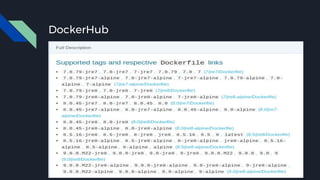
DockerHub
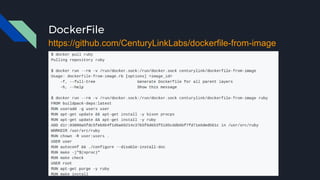
DockerFile
https://github.com/CenturyLinkLabs/dockerfile-from-image
Docker images
● Images are extracted in a chrooted sub process, being the
first-step in a wider effort toward privilege separation.
● From Docker 1.10, all images are stored and accessed by
the cryptographic checksums of their contents, limiting
the possibility of an attacker causing a collision with an
existing image Docker Content Trust.
Docker Content Trust
● Protects against untrusted images
● Can enable signing checks on every managed host
● Signature verification transparent to users
● Guarantee integrity of your images when pulled
● Provides trust from publisher to consumer
● export DOCKER_CONTENT_TRUST=1
● ~/.docker/trust/trusted-certificates/
Security Best Practices
DockerFile Security
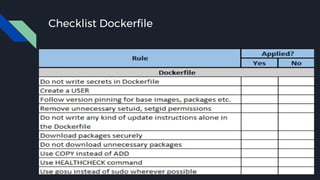
● Do not write secrets(users and passwords).
● Remove unnecessary setuid, setgid permissions
(Privilege escalation)
● Download packages securely using GPG and certificates
● Try to restrict an image or container to one service
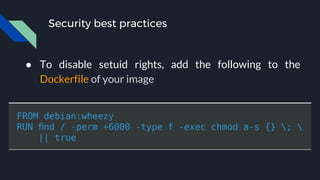
Security best practices
● To disable setuid rights, add the following to the
Dockerfile of your image
Security best practices
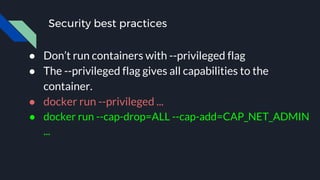
● Don’t run containers with --privileged flag
● The --privileged flag gives all capabilities to the
container.
● docker run --privileged ...
● docker run --cap-drop=ALL --cap-add=CAP_NET_ADMIN
...
Security best practices capabilities
● How do we add/remove capabilities?
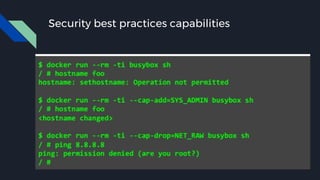
● Use cap-add and cap-drop with docker run/create
● Drop all capabilities which are not required
● docker run --cap-drop ALL --cap-add $CAP
Security best practices capabilities
● Manual management within the container:
docker run --cap-add ALL
● Restricted capabilities with root:
docker run --cap-drop ALL --cap-add $CAP
● No capabilities:
docker run --user
Security best practices capabilities
Security best practices
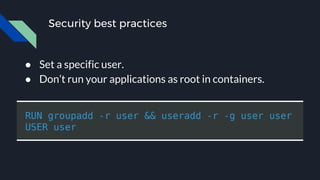
● Set a specific user.
● Don’t run your applications as root in containers.
Security best practices
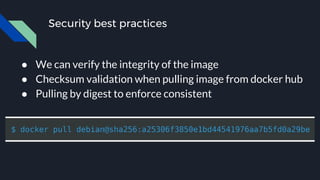
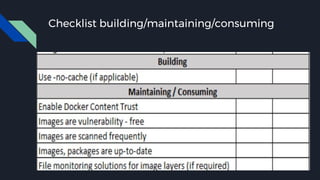
● We can verify the integrity of the image
● Checksum validation when pulling image from docker hub
● Pulling by digest to enforce consistent
Security best practices
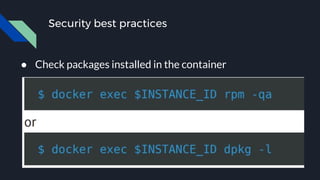
● Check packages installed in the container
Docker security is about
limiting and controlling the
attack surface on the kernel.
Docker least privileges
● Do not run processes in a container as root to avoid root
access from attackers.
● Enable User-namespace (disabled by default)
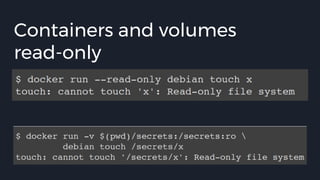
● Run filesystems as read-only so that attackers can not
overwrite data or save malicious scripts to the image.
● Cut down the kernel calls that a container can make to
reduce the potential attack surface.
● Limit the resources that a container can use (SELinux/AppArmor)
Containers and volumes
read-only
15
Checklist Dockerfile
Checklist building/maintaining/consuming
AUDITING
TOOLS
Docker images scanning
● You can scan your images for known vulnerabilities
● There are tools for that, like Docker Security Scanning,
Docker Bench Security and CoreOS Clair
● Find known vulnerable binaries
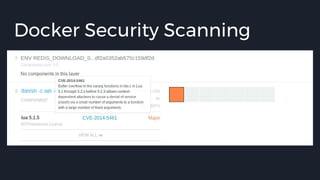
Docker Security Scanning
https://docs.docker.com/docker-cloud/builds/image-scan/
● Checks based on best practices for hosts and containers
● Find Common Vulnerabilities and Exposures (CVEs)
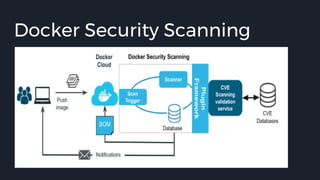
Docker Security Scanning
● Checks against CVE database for image layers
● Binary scanning of all components in the image
● Performs binary scan to pick up on statically linked binaries
● Analyses libraries statically compiled in the image
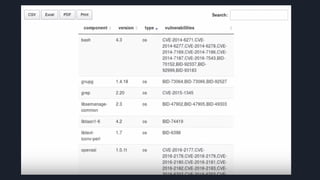
● Generates a reports that shows if there are CVE in the
libraries inside the image
Docker Security Scanning
15
25
Docker Security Scanning
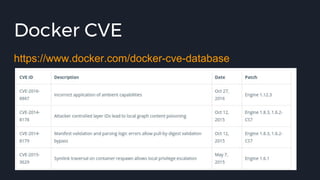
Docker CVE
https://www.docker.com/docker-cve-database
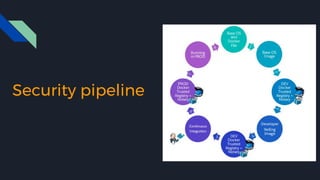
Security pipeline
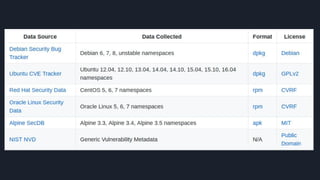
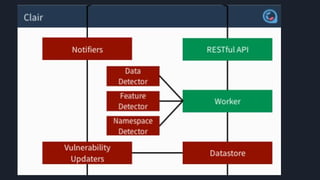
Clair (Container Vulnerability Analysis Service)
https://github.com/coreos/clair
Vulnerability Static Analysis for Containers
Clair Use cases
● You've found an image by searching the internet and want
to determine if it's safe enough for you to use in production.
● You're regularly deploying into a containerized production
environment and want operations to alert or block
deployments on insecure software.
Docker Bench Security
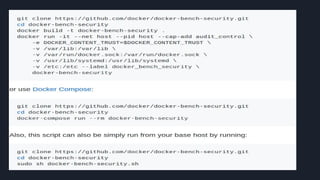
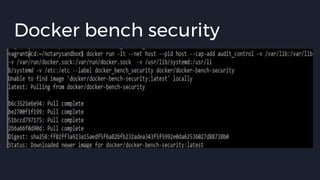
https://github.com/docker/docker-bench-security
Checks based on best practices for hosts and containers
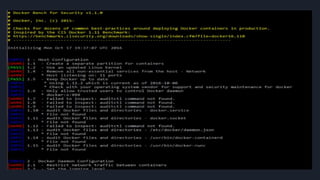
Docker bench security
● Open-source tool for running automated tests
● Inspired by the CIS Docker 1.11 benchmark
● Runs against containers currently running on same host
● Checks for AppArmor, read-only volumes, etc...
Docker bench security
● The host configuration
● The Docker daemon configuration
● The Docker daemon configuration files
● Container images and build files
● Container runtime
● Docker security operations
Docker bench security
● The Docker daemon configuration
● [WARN] 2.1- Restrict network traffic between containers
● [WARN] 4.1 - Create a user for the container
[WARN] * Running as root:
● [WARN] 5.4 - Restrict Linux Kernel Capabilities within containers
[WARN] * Capabilities added: CapAdd=[audit_control]
● [WARN] 5.13 - Mount container's root filesystem as readonly
[WARN] * Container running with root FS mounted R/W:
15
25 22
Docker Slim
https://github.com/docker-slim/docker-slim
Optimize and secure your Docker containers
Other tools
● OpenSCAP Container Compliance
● Lynis
● Twistlock
● Dockscan
● Aqua Security
● Dagda
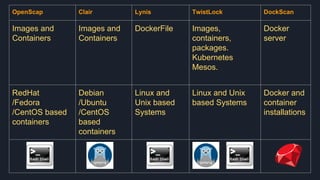
OpenScap Clair Lynis TwistLock DockScan
Images and
Containers
Images and
Containers
DockerFile Images,
containers,
packages.
Kubernetes
Mesos.
Docker
server
RedHat
/Fedora
/CentOS based
containers
Debian
/Ubuntu
/CentOS
based
containers
Linux and
Unix based
Systems
Linux and Unix
based Systems
Docker and
container
installations
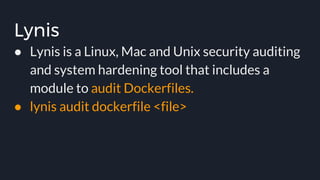
Lynis
● Lynis is a Linux, Mac and Unix security auditing
and system hardening tool that includes a
module to audit Dockerfiles.
● lynis audit dockerfile <file>
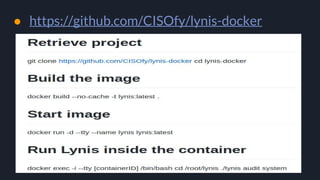
● https://github.com/CISOfy/lynis-docker
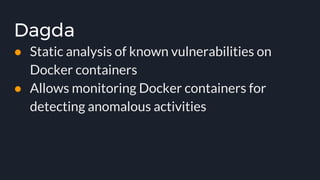
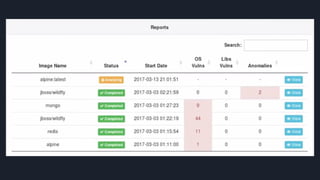
Dagda
● Static analysis of known vulnerabilities on
Docker containers
● Allows monitoring Docker containers for
detecting anomalous activities
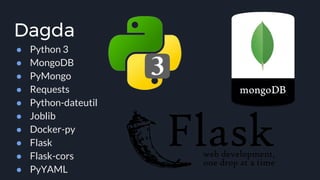
Dagda
● Python 3
● MongoDB
● PyMongo
● Requests
● Python-dateutil
● Joblib
● Docker-py
● Flask
● Flask-cors
● PyYAML
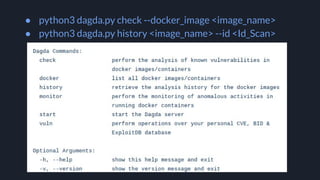
● python3 dagda.py check --docker_image <image_name>
● python3 dagda.py history <image_name> --id <Id_Scan>
Conclusions
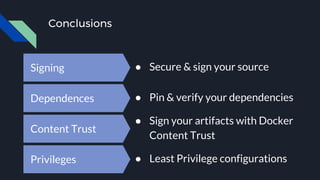
Signing ● Secure & sign your source
Dependences ● Pin & verify your dependencies
Content Trust
● Sign your artifacts with Docker
Content Trust
Privileges ● Least Privilege configurations
References
● https://docs.docker.com/engine/security
● http://www.oreilly.com/webops-perf/free/files/dock
er-security.pdf
● http://container-solutions.com/content/uploads/201
5/06/15.06.15_DockerCheatSheet_A2.pdf
● https://www.openshift.com/promotions/docker-sec
urity.html
References
● Docker Content Trust
● https://docs.docker.com/engine/security/trust/content_trust
● Docker Security Scanning
● https://docs.docker.com/docker-cloud/builds/image-scan
● https://blog.docker.com/2016/04/docker-security
● http://softwaretester.info/docker-audit/
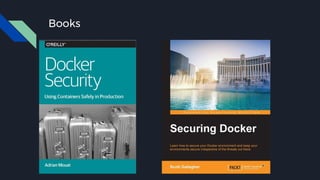
Books

Testing Docker Images Security

  • 1.
  • 2.
    Jose Manuel Ortega Software Engineer& Security Researcher @jmortegac jmortega.github.io
  • 3.
    Agenda ● Introduction todocker security ● Security best practices ● Tools for auditing docker images
  • 4.
    Docker ● “Docker containerswrap up a piece of software in a complete filesystem that contains everything it needs to run: code, runtime, system tools, system libraries – anything you can install on a server. This guarantees that it will always run the same, regardless of the environment it is running in.”
  • 5.
    Docker Security ● Dockerprovides an additional layer of isolation, making your infrastructure safer by default. ● Makes the application lifecycle fast and easier,reducing risks in your applications
  • 6.
    Docker Security ● Dockeruses several mechanisms for security: ○ Linux kernel namespaces ○ Linux Control Groups (cgroups) ○ The Docker daemon ○ Linux capabilities (libcap) ○ Linux security mechanisms like AppArmor or SELinux
  • 7.
    Docker Security ● Namespaces:providesan isolated view of the system where processes cannot see other processes in other containers ● Each container also gets its own network stack. ● A container doesn’t get privileged access to the sockets or interfaces of another container.
  • 8.
    Docker Security ● Cgroups:kernel feature that limits and isolates the resource usage(CPU,memory,network) of a collection of processes. ● Linux Capabilities: divides the privileges of root into distinct units and smaller groups of privileges.
  • 9.
  • 10.
  • 11.
    Docker images ● Imagesare extracted in a chrooted sub process, being the first-step in a wider effort toward privilege separation. ● From Docker 1.10, all images are stored and accessed by the cryptographic checksums of their contents, limiting the possibility of an attacker causing a collision with an existing image Docker Content Trust.
  • 12.
    Docker Content Trust ●Protects against untrusted images ● Can enable signing checks on every managed host ● Signature verification transparent to users ● Guarantee integrity of your images when pulled ● Provides trust from publisher to consumer ● export DOCKER_CONTENT_TRUST=1 ● ~/.docker/trust/trusted-certificates/
  • 13.
  • 14.
    DockerFile Security ● Donot write secrets(users and passwords). ● Remove unnecessary setuid, setgid permissions (Privilege escalation) ● Download packages securely using GPG and certificates ● Try to restrict an image or container to one service
  • 15.
    Security best practices ●To disable setuid rights, add the following to the Dockerfile of your image
  • 16.
    Security best practices ●Don’t run containers with --privileged flag ● The --privileged flag gives all capabilities to the container. ● docker run --privileged ... ● docker run --cap-drop=ALL --cap-add=CAP_NET_ADMIN ...
  • 17.
    Security best practicescapabilities ● How do we add/remove capabilities? ● Use cap-add and cap-drop with docker run/create ● Drop all capabilities which are not required ● docker run --cap-drop ALL --cap-add $CAP
  • 18.
    Security best practicescapabilities ● Manual management within the container: docker run --cap-add ALL ● Restricted capabilities with root: docker run --cap-drop ALL --cap-add $CAP ● No capabilities: docker run --user
  • 19.
  • 20.
    Security best practices ●Set a specific user. ● Don’t run your applications as root in containers.
  • 21.
    Security best practices ●We can verify the integrity of the image ● Checksum validation when pulling image from docker hub ● Pulling by digest to enforce consistent
  • 22.
    Security best practices ●Check packages installed in the container
  • 23.
    Docker security isabout limiting and controlling the attack surface on the kernel.
  • 24.
    Docker least privileges ●Do not run processes in a container as root to avoid root access from attackers. ● Enable User-namespace (disabled by default) ● Run filesystems as read-only so that attackers can not overwrite data or save malicious scripts to the image. ● Cut down the kernel calls that a container can make to reduce the potential attack surface. ● Limit the resources that a container can use (SELinux/AppArmor)
  • 25.
  • 26.
  • 27.
  • 28.
  • 29.
    Docker images scanning ●You can scan your images for known vulnerabilities ● There are tools for that, like Docker Security Scanning, Docker Bench Security and CoreOS Clair ● Find known vulnerable binaries
  • 30.
    Docker Security Scanning https://docs.docker.com/docker-cloud/builds/image-scan/ ●Checks based on best practices for hosts and containers ● Find Common Vulnerabilities and Exposures (CVEs)
  • 31.
    Docker Security Scanning ●Checks against CVE database for image layers ● Binary scanning of all components in the image ● Performs binary scan to pick up on statically linked binaries ● Analyses libraries statically compiled in the image ● Generates a reports that shows if there are CVE in the libraries inside the image
  • 32.
  • 33.
  • 34.
  • 35.
  • 36.
    Clair (Container VulnerabilityAnalysis Service) https://github.com/coreos/clair Vulnerability Static Analysis for Containers
  • 37.
    Clair Use cases ●You've found an image by searching the internet and want to determine if it's safe enough for you to use in production. ● You're regularly deploying into a containerized production environment and want operations to alert or block deployments on insecure software.
  • 40.
  • 41.
    Docker bench security ●Open-source tool for running automated tests ● Inspired by the CIS Docker 1.11 benchmark ● Runs against containers currently running on same host ● Checks for AppArmor, read-only volumes, etc...
  • 43.
  • 44.
    Docker bench security ●The host configuration ● The Docker daemon configuration ● The Docker daemon configuration files ● Container images and build files ● Container runtime ● Docker security operations
  • 45.
    Docker bench security ●The Docker daemon configuration ● [WARN] 2.1- Restrict network traffic between containers ● [WARN] 4.1 - Create a user for the container [WARN] * Running as root: ● [WARN] 5.4 - Restrict Linux Kernel Capabilities within containers [WARN] * Capabilities added: CapAdd=[audit_control] ● [WARN] 5.13 - Mount container's root filesystem as readonly [WARN] * Container running with root FS mounted R/W:
  • 46.
  • 47.
  • 48.
    Other tools ● OpenSCAPContainer Compliance ● Lynis ● Twistlock ● Dockscan ● Aqua Security ● Dagda
  • 49.
    OpenScap Clair LynisTwistLock DockScan Images and Containers Images and Containers DockerFile Images, containers, packages. Kubernetes Mesos. Docker server RedHat /Fedora /CentOS based containers Debian /Ubuntu /CentOS based containers Linux and Unix based Systems Linux and Unix based Systems Docker and container installations
  • 50.
    Lynis ● Lynis isa Linux, Mac and Unix security auditing and system hardening tool that includes a module to audit Dockerfiles. ● lynis audit dockerfile <file>
  • 51.
  • 52.
    Dagda ● Static analysisof known vulnerabilities on Docker containers ● Allows monitoring Docker containers for detecting anomalous activities
  • 53.
    Dagda ● Python 3 ●MongoDB ● PyMongo ● Requests ● Python-dateutil ● Joblib ● Docker-py ● Flask ● Flask-cors ● PyYAML
  • 54.
    ● python3 dagda.pycheck --docker_image <image_name> ● python3 dagda.py history <image_name> --id <Id_Scan>
  • 57.
    Conclusions Signing ● Secure& sign your source Dependences ● Pin & verify your dependencies Content Trust ● Sign your artifacts with Docker Content Trust Privileges ● Least Privilege configurations
  • 58.
    References ● https://docs.docker.com/engine/security ● http://www.oreilly.com/webops-perf/free/files/dock er-security.pdf ●http://container-solutions.com/content/uploads/201 5/06/15.06.15_DockerCheatSheet_A2.pdf ● https://www.openshift.com/promotions/docker-sec urity.html
  • 59.
    References ● Docker ContentTrust ● https://docs.docker.com/engine/security/trust/content_trust ● Docker Security Scanning ● https://docs.docker.com/docker-cloud/builds/image-scan ● https://blog.docker.com/2016/04/docker-security ● http://softwaretester.info/docker-audit/
  • 60.