Docker Fundamentals
Anshul Patel
Agenda
● What is OS Kernel?
● What is Virtual Machine(VM)?
● What is Docker?
● Docker Architecture
● Common Docker Operations
● What is Dockerfile
● Docker Advantages
What is OS
Kernel?
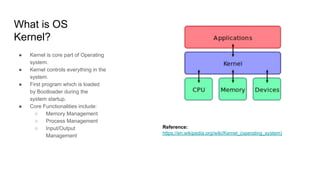
● Kernel is core part of Operating
system.
● Kernel controls everything in the
system.
● First program which is loaded
by Bootloader during the
system startup.
● Core Functionalities include:
○ Memory Management
○ Process Management
○ Input/Output
Management
Reference:
https://en.wikipedia.org/wiki/Kernel_(operating_system)
What is Virtual
Machine(VM)?
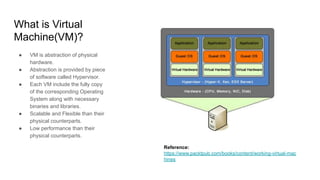
● VM is abstraction of physical
hardware.
● Abstraction is provided by piece
of software called Hypervisor.
● Each VM include the fully copy
of the corresponding Operating
System along with necessary
binaries and libraries.
● Scalable and Flexible than their
physical counterparts.
● Low performance than their
physical counterparts.
Reference:
https://www.packtpub.com/books/content/working-virtual-mac
hines
What is Docker?
● Docker is container technology.
● Containers are abstraction at
the app layer.
● Containers, packages code and
dependencies together.
● Different containers running on
the same machine, shares the
same OS kernel.
● Utilizes less system resources
compared to VM.
● Starts almost instantly.
Reference: https://www.docker.com/what-container
Docker Containers Virtual Machine
Docker
Architecture
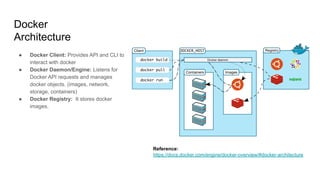
● Docker Client: Provides API and CLI to
interact with docker
● Docker Daemon/Engine: Listens for
Docker API requests and manages
docker objects. (images, network,
storage, containers)
● Docker Registry: It stores docker
images.
Reference:
https://docs.docker.com/engine/docker-overview/#docker-architecture
Docker
Architecture
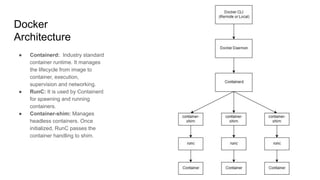
● Containerd: Industry standard
container runtime. It manages
the lifecycle from image to
container, execution,
supervision and networking.
● RunC: It is used by Containerd
for spawning and running
containers.
● Container-shim: Manages
headless containers. Once
initialized, RunC passes the
container handling to shim.
Docker Architecture – Underlying Technologies
● Kernel Namespaces: Docker uses it to provide process, network, filesystem,
etc isolation for each container.
● Kernel Control Groups: Docker uses it to enforce limit and constraints on
hardware resources. ( memory, cpu, i/o)
● Union Filesystem: Docker uses union filesystem for containers as it
lightweight and fast. (supports layering and CoW)
● Container Format: Docker combines namespaces, cgroups and UnionFS
into format called container format.
Docker Common CLI Operations
● Pulling and Listing Docker image
● Running and Listing Docker containers
● Stopping container and Removing Docker Container
● Mapping Host port with Docker container
● Mounting Host Directory/File on Docker container
● Checking Docker Container Logs
● Login into Docker Container
● Removing Docker Container Image
● Pushing to Docker Registry
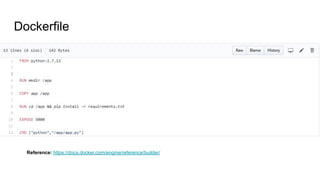
Dockerfile
Reference: https://docs.docker.com/engine/reference/builder/
Docker Advantages
● Lightweight, Open and Secure
● Portable and efficient in comparison to VM
● Accelerates Developer Onboarding
● Empower Developer Creativity
● Eliminates Environmental Inconsistencies
● Ability to scale quickly
● Reduces time to market

Docker Fundamentals

  • 1.
  • 2.
    Agenda ● What isOS Kernel? ● What is Virtual Machine(VM)? ● What is Docker? ● Docker Architecture ● Common Docker Operations ● What is Dockerfile ● Docker Advantages
  • 3.
    What is OS Kernel? ●Kernel is core part of Operating system. ● Kernel controls everything in the system. ● First program which is loaded by Bootloader during the system startup. ● Core Functionalities include: ○ Memory Management ○ Process Management ○ Input/Output Management Reference: https://en.wikipedia.org/wiki/Kernel_(operating_system)
  • 4.
    What is Virtual Machine(VM)? ●VM is abstraction of physical hardware. ● Abstraction is provided by piece of software called Hypervisor. ● Each VM include the fully copy of the corresponding Operating System along with necessary binaries and libraries. ● Scalable and Flexible than their physical counterparts. ● Low performance than their physical counterparts. Reference: https://www.packtpub.com/books/content/working-virtual-mac hines
  • 5.
    What is Docker? ●Docker is container technology. ● Containers are abstraction at the app layer. ● Containers, packages code and dependencies together. ● Different containers running on the same machine, shares the same OS kernel. ● Utilizes less system resources compared to VM. ● Starts almost instantly. Reference: https://www.docker.com/what-container Docker Containers Virtual Machine
  • 6.
    Docker Architecture ● Docker Client:Provides API and CLI to interact with docker ● Docker Daemon/Engine: Listens for Docker API requests and manages docker objects. (images, network, storage, containers) ● Docker Registry: It stores docker images. Reference: https://docs.docker.com/engine/docker-overview/#docker-architecture
  • 7.
    Docker Architecture ● Containerd: Industrystandard container runtime. It manages the lifecycle from image to container, execution, supervision and networking. ● RunC: It is used by Containerd for spawning and running containers. ● Container-shim: Manages headless containers. Once initialized, RunC passes the container handling to shim.
  • 8.
    Docker Architecture –Underlying Technologies ● Kernel Namespaces: Docker uses it to provide process, network, filesystem, etc isolation for each container. ● Kernel Control Groups: Docker uses it to enforce limit and constraints on hardware resources. ( memory, cpu, i/o) ● Union Filesystem: Docker uses union filesystem for containers as it lightweight and fast. (supports layering and CoW) ● Container Format: Docker combines namespaces, cgroups and UnionFS into format called container format.
  • 9.
    Docker Common CLIOperations ● Pulling and Listing Docker image ● Running and Listing Docker containers ● Stopping container and Removing Docker Container ● Mapping Host port with Docker container ● Mounting Host Directory/File on Docker container ● Checking Docker Container Logs ● Login into Docker Container ● Removing Docker Container Image ● Pushing to Docker Registry
  • 10.
  • 11.
    Docker Advantages ● Lightweight,Open and Secure ● Portable and efficient in comparison to VM ● Accelerates Developer Onboarding ● Empower Developer Creativity ● Eliminates Environmental Inconsistencies ● Ability to scale quickly ● Reduces time to market