Docker Security and Content Trust
Containers as a Service (CaaS)
Developers IT Operations
BUILD
Development Environments
SHIP
Secure Content & Collaboration
RUN
Deploy, Manage, Scale
Docker Platform
Docker delivers end-to-end integrated security
Developers IT Operations
BUILD
Development Environments
SHIP
Secure Content & Collaboration
RUN
Deploy, Manage, Scale
4
Secure Content
Content Trust and Project Nautilus
Secure Access
Authorization, Authentication, Access Control (AAA)
Secure Platform
Runtime containment and isolation
cGroups
Namespaces
User Namespaces
Linux Security Modules
Seccomp
Runtime Containment
• Kernel function Docker users to control resource access
• Helps to ensure appropriate multi-tenancy behavior
• Sets limits and constraints on hardware resources
– For example CPU or memory limits with --memory or --cpu
Containment: Control Groups
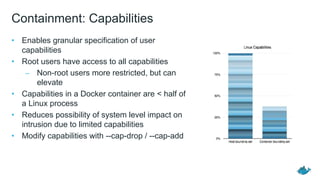
• Enables granular specification of user
capabilities
• Root users have access to all capabilities
– Non-root users more restricted, but can
elevate
• Capabilities in a Docker container are < half of
a Linux process
• Reduces possibility of system level impact on
intrusion due to limited capabilities
• Modify capabilities with --cap-drop / --cap-add
Containment: Capabilities
• Namespaces provide the isolated workspace for “the container”
• Containers are actually made up of several different namespaces that
manage different items, some examples:
– pid: process isolation
– net: network interfaces
– ipc: access to IPC resources
– mnt: mount-points
– uts: kernel and version identifiers
• By default containers run with full root privileges
• User Namespaces allow full-featured containers without root privilege
Containment: Namespaces
• Enhanced access controls
• Assign privileges for each container by
user group
• Separate container and Docker
daemon level privileges
• Containers no longer have root access
to host
Docker Host
Container 1 Container 2 Container 3
Containment: User Namespaces
• Granular policy control defining what
syscalls containers can make
• Increase security by reducing attack
surface of the Linux kernel
• Secure by default with “default
profile” applied to all containers
• Syscalls like acct, add_key, clone,
kexec_load, mount, reboot and
others are blocked by default profile
Docker Host
Container 1 Container 2 Container 3
Security: Seccomp Profiles
• Linux Security Modules (LSM) provides a general kernel framework to support
security modules
– In particular Mandatory Access Control (Mac) modules
• Popular modules include:
– AppArmor
– SELinux
– Smack
– TOMOYO
• By default Docker supports AppArmor (Ubuntu) and SELinux (Red Hat / Centos)
Containment: Linux Security Modules (LSM)
● Publisher digitally signs the Docker images before sending them to the cloud
● Any user can independently verify the digital signatures on the images
Content: Docker Content Trust
• YubiKey 4 hardware ensures
root key is never exposed
• Publisher’s root key can’t be
stolen AND Content Trust
protects content itself from
attacks
• Touch to sign ensures
human interaction
• Available in Docker
Experimental and Notary 0.1
Content: Integrated Hardware Signing
Content: Trust on Docker Hub
Docker Hub supports storage and distribution of images signed with Docker
Content Trust
• Docker hosts and manages the Notary server
• All 93 official repos signed by Docker Content Trust
• Opt in to Docker Content Trust on your commercially supported Docker
Engines
• Signed images can be pushed and pulled from Docker Hub repos
(signed status is not exposed in the UI at this time)
Use Case: Image Forgery
Use Case: Replay Attacks
Use Case: Compromised Keys
GA of Docker Security Scanning (formerly Project Nautilus) enabling
detailed image security profiles, continuous vulnerability monitoring and
notifications for integrated content security in the software supply chain
● Limited time free trial for Docker Cloud private repo customers
● Coming soon as an integrated feature in Docker Datacenter
● Expanding soon to all Docker Cloud repo users
Updated Docker Bench for checking host and daemon configs
● Implement recommendations from latest CIS Docker 1.11.0 Benchmark
Security Scanning
Deep visibility with binary level
scanning
• Detailed BOM of included components and
vulnerability profile
• Checks packages against CVE database AND
the code inside to protect against tampering
• Covers wide range of languages, binaries, OS
Proactive risk management
• Continuous monitoring of CVE/NVD
databases with notifications pointing to repos
and tags that contain new vulnerabilities
Sample Bill of
Materials (BOM)
Secure Content: Image Scanning
Docker enables least privilege microservices
Developers IT Operations
BUILD
Development Environments
SHIP
Secure Content & Collaboration
RUN
Deploy, Manage, Scale
Secure Content
Content Trust and Project Nautilus
Secure Access
Authorization, Authentication, Access Control (AAA)
Secure Platform
Runtime containment and isolation
CIS (Center of Internet Security) Docker Benchmark
• Prescriptive guidance on securing Docker environments
• Community collaboration: CIS, Docker, VMware, and others.
• Addresses Linux host configuration as well as Docker-specific configuration
• https://benchmarks.cisecurity.org/downloads/benchmarks/index.cfm
Docker Bench
• Automated tool to assess security compliance of your Docker configurations
• www.dockerbench.com
Best Practices and Tools
• Open source project on Github (github.com/docker/notary)
• Based on TUF (The Update Framework)
• Sign content with offline keys
• Trust thresholds (require K out of N keys) (Stealing a key reduces
signing requirements, but doesn't break the whole model)
• Guarantee freshness
• Distribute signed content on (potentially insecure) servers (leverage
existing (insecure) transport and mirrors)
• Basis for Docker Content Trust
Content Trust: Notary
Demo

Docker Security and Content Trust

  • 1.
    Docker Security andContent Trust
  • 2.
    Containers as aService (CaaS) Developers IT Operations BUILD Development Environments SHIP Secure Content & Collaboration RUN Deploy, Manage, Scale
  • 3.
  • 4.
    Docker delivers end-to-endintegrated security Developers IT Operations BUILD Development Environments SHIP Secure Content & Collaboration RUN Deploy, Manage, Scale 4 Secure Content Content Trust and Project Nautilus Secure Access Authorization, Authentication, Access Control (AAA) Secure Platform Runtime containment and isolation
  • 5.
    cGroups Namespaces User Namespaces Linux SecurityModules Seccomp Runtime Containment
  • 6.
    • Kernel functionDocker users to control resource access • Helps to ensure appropriate multi-tenancy behavior • Sets limits and constraints on hardware resources – For example CPU or memory limits with --memory or --cpu Containment: Control Groups
  • 7.
    • Enables granularspecification of user capabilities • Root users have access to all capabilities – Non-root users more restricted, but can elevate • Capabilities in a Docker container are < half of a Linux process • Reduces possibility of system level impact on intrusion due to limited capabilities • Modify capabilities with --cap-drop / --cap-add Containment: Capabilities
  • 8.
    • Namespaces providethe isolated workspace for “the container” • Containers are actually made up of several different namespaces that manage different items, some examples: – pid: process isolation – net: network interfaces – ipc: access to IPC resources – mnt: mount-points – uts: kernel and version identifiers • By default containers run with full root privileges • User Namespaces allow full-featured containers without root privilege Containment: Namespaces
  • 9.
    • Enhanced accesscontrols • Assign privileges for each container by user group • Separate container and Docker daemon level privileges • Containers no longer have root access to host Docker Host Container 1 Container 2 Container 3 Containment: User Namespaces
  • 10.
    • Granular policycontrol defining what syscalls containers can make • Increase security by reducing attack surface of the Linux kernel • Secure by default with “default profile” applied to all containers • Syscalls like acct, add_key, clone, kexec_load, mount, reboot and others are blocked by default profile Docker Host Container 1 Container 2 Container 3 Security: Seccomp Profiles
  • 11.
    • Linux SecurityModules (LSM) provides a general kernel framework to support security modules – In particular Mandatory Access Control (Mac) modules • Popular modules include: – AppArmor – SELinux – Smack – TOMOYO • By default Docker supports AppArmor (Ubuntu) and SELinux (Red Hat / Centos) Containment: Linux Security Modules (LSM)
  • 12.
    ● Publisher digitallysigns the Docker images before sending them to the cloud ● Any user can independently verify the digital signatures on the images Content: Docker Content Trust
  • 13.
    • YubiKey 4hardware ensures root key is never exposed • Publisher’s root key can’t be stolen AND Content Trust protects content itself from attacks • Touch to sign ensures human interaction • Available in Docker Experimental and Notary 0.1 Content: Integrated Hardware Signing
  • 14.
    Content: Trust onDocker Hub Docker Hub supports storage and distribution of images signed with Docker Content Trust • Docker hosts and manages the Notary server • All 93 official repos signed by Docker Content Trust • Opt in to Docker Content Trust on your commercially supported Docker Engines • Signed images can be pushed and pulled from Docker Hub repos (signed status is not exposed in the UI at this time)
  • 15.
  • 16.
  • 17.
  • 18.
    GA of DockerSecurity Scanning (formerly Project Nautilus) enabling detailed image security profiles, continuous vulnerability monitoring and notifications for integrated content security in the software supply chain ● Limited time free trial for Docker Cloud private repo customers ● Coming soon as an integrated feature in Docker Datacenter ● Expanding soon to all Docker Cloud repo users Updated Docker Bench for checking host and daemon configs ● Implement recommendations from latest CIS Docker 1.11.0 Benchmark Security Scanning
  • 19.
    Deep visibility withbinary level scanning • Detailed BOM of included components and vulnerability profile • Checks packages against CVE database AND the code inside to protect against tampering • Covers wide range of languages, binaries, OS Proactive risk management • Continuous monitoring of CVE/NVD databases with notifications pointing to repos and tags that contain new vulnerabilities Sample Bill of Materials (BOM) Secure Content: Image Scanning
  • 20.
    Docker enables leastprivilege microservices Developers IT Operations BUILD Development Environments SHIP Secure Content & Collaboration RUN Deploy, Manage, Scale Secure Content Content Trust and Project Nautilus Secure Access Authorization, Authentication, Access Control (AAA) Secure Platform Runtime containment and isolation
  • 21.
    CIS (Center ofInternet Security) Docker Benchmark • Prescriptive guidance on securing Docker environments • Community collaboration: CIS, Docker, VMware, and others. • Addresses Linux host configuration as well as Docker-specific configuration • https://benchmarks.cisecurity.org/downloads/benchmarks/index.cfm Docker Bench • Automated tool to assess security compliance of your Docker configurations • www.dockerbench.com Best Practices and Tools
  • 22.
    • Open sourceproject on Github (github.com/docker/notary) • Based on TUF (The Update Framework) • Sign content with offline keys • Trust thresholds (require K out of N keys) (Stealing a key reduces signing requirements, but doesn't break the whole model) • Guarantee freshness • Distribute signed content on (potentially insecure) servers (leverage existing (insecure) transport and mirrors) • Basis for Docker Content Trust Content Trust: Notary
  • 23.