Docker
https://training.docker.com/self-paced-training
What is docker?
• Docker is an open platform for developing, shipping, and running applications. Docker
is designed to deliver your applications faster. With Docker you can separate your
applications from your infrastructure and treat your infrastructure like a managed
application. Docker helps you ship code faster, test faster, deploy faster, and shorten
the cycle between writing code and running code.
• Docker allows you to package an application with all of its dependencies into
standardized unit for software development and deployment
• Docker containers wrap up a piece of software in a complete filesystem that contains
everything it needs to run: code, runtime, system tools, system libraries – anything you
can install on a server. This guarantees that it will always run the same, regardless of
the environment it is running in.
• Docker does this by combining kernel containerization features with workflows and
tooling that help you manage and deploy your applications.
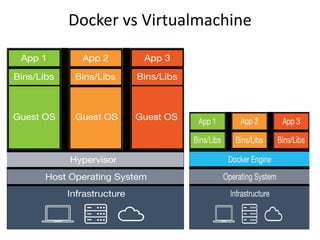
• At its core, Docker provides a way to run almost any application securely isolated in a
container. The isolation and security allow you to run many containers simultaneously
on your host. The lightweight nature of containers, which run without the extra load of
a hypervisor, means you can get more out of your hardware.
Docker components
• The Docker daemon
As shown in the diagram above, the Docker daemon runs on a host
machine. The user does not directly interact with the daemon, but
instead through the Docker client.
• The Docker client
The Docker client, in the form of the docker binary, is the primary user
interface to Docker. It accepts commands from the user and
communicates back and forth with a Docker daemon.
• Inside Docker
• To understand Docker’s internals, you need to know about three
components:
• Docker images.
• Docker registries.
• Docker containers.
Why docker
• Lightweight
Containers running on a single machine all share the same operating
system kernel so they start instantly and make more efficient use of
RAM. Images are constructed from layered filesystems so they can
share common files, making disk usage and image downloads much
more efficient
• Open
Docker containers are based on open standards allowing containers to
run on all major Linux distributions and Microsoft operating systems
with support for every infrastructure.
• Secure
Containers isolate applications from each other and the underlying
infrastructure while providing an added layer of protection for the
application. Also prevent potential side effect from third party
libraries.
Benefit of docker
• Productivity
– Deveopers focus on the building their apps
– System admin focus on deployment
• Application portability
– Build in one environment, ship to another without
worry of the dependency
• Scalability
– Easily spin up new containers if needed
– Run more apps on one host machine
Docker vs Virtualmachine
Docker workflow
• getting your applications (and supporting components) into Docker containers
• distributing and shipping those containers to your teams for further development
and testing
• deploying those applications to your production environment, whether it is in a
local data center or the Cloud.
• Docker is perfect for helping you with the development lifecycle. Docker allows
your developers to develop on local containers that contain your applications and
services. It can then integrate into a continuous integration and deployment
workflow.
• For example, your developers write code locally and share their development stack
via Docker with their colleagues. When they are ready, they push their code and
the stack they are developing onto a test environment and execute any required
tests. From the testing environment, you can then push the Docker images into
production and deploy your code.
Docker workflow
• What are the major Docker components?
• Docker has two major components:
• Docker: the open source containerization
platform.
• Docker Hub: our Software-as-a-Service
platform for sharing and managing Docker
containers.
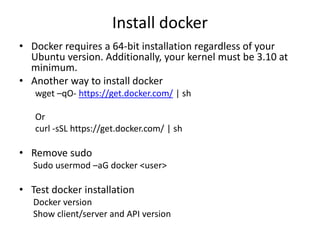
Install docker
• Docker requires a 64-bit installation regardless of your
Ubuntu version. Additionally, your kernel must be 3.10 at
minimum.
• Another way to install docker
wget –qO- https://get.docker.com/ | sh
Or
curl -sSL https://get.docker.com/ | sh
• Remove sudo
Sudo usermod –aG docker <user>
• Test docker installation
Docker version
Show client/server and API version
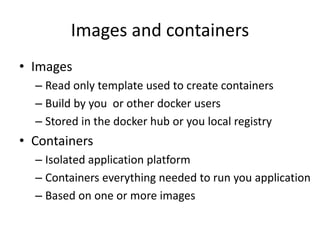
Images and containers
• Images
– Read only template used to create containers
– Build by you or other docker users
– Stored in the docker hub or you local registry
• Containers
– Isolated application platform
– Containers everything needed to run you application
– Based on one or more images
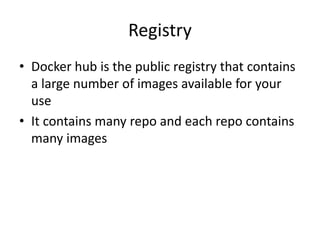
Registry
• Docker hub is the public registry that contains
a large number of images available for your
use
• It contains many repo and each repo contains
many images
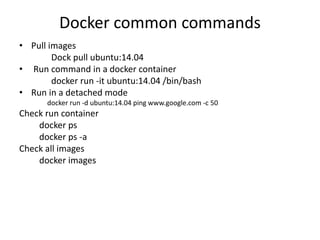
Docker common commands
• Pull images
Dock pull ubuntu:14.04
• Run command in a docker container
docker run -it ubuntu:14.04 /bin/bash
• Run in a detached mode
docker run -d ubuntu:14.04 ping www.google.com -c 50
Check run container
docker ps
docker ps -a
Check all images
docker images

Docker

  • 1.
  • 2.
    What is docker? •Docker is an open platform for developing, shipping, and running applications. Docker is designed to deliver your applications faster. With Docker you can separate your applications from your infrastructure and treat your infrastructure like a managed application. Docker helps you ship code faster, test faster, deploy faster, and shorten the cycle between writing code and running code. • Docker allows you to package an application with all of its dependencies into standardized unit for software development and deployment • Docker containers wrap up a piece of software in a complete filesystem that contains everything it needs to run: code, runtime, system tools, system libraries – anything you can install on a server. This guarantees that it will always run the same, regardless of the environment it is running in. • Docker does this by combining kernel containerization features with workflows and tooling that help you manage and deploy your applications. • At its core, Docker provides a way to run almost any application securely isolated in a container. The isolation and security allow you to run many containers simultaneously on your host. The lightweight nature of containers, which run without the extra load of a hypervisor, means you can get more out of your hardware.
  • 3.
    Docker components • TheDocker daemon As shown in the diagram above, the Docker daemon runs on a host machine. The user does not directly interact with the daemon, but instead through the Docker client. • The Docker client The Docker client, in the form of the docker binary, is the primary user interface to Docker. It accepts commands from the user and communicates back and forth with a Docker daemon. • Inside Docker • To understand Docker’s internals, you need to know about three components: • Docker images. • Docker registries. • Docker containers.
  • 4.
    Why docker • Lightweight Containersrunning on a single machine all share the same operating system kernel so they start instantly and make more efficient use of RAM. Images are constructed from layered filesystems so they can share common files, making disk usage and image downloads much more efficient • Open Docker containers are based on open standards allowing containers to run on all major Linux distributions and Microsoft operating systems with support for every infrastructure. • Secure Containers isolate applications from each other and the underlying infrastructure while providing an added layer of protection for the application. Also prevent potential side effect from third party libraries.
  • 5.
    Benefit of docker •Productivity – Deveopers focus on the building their apps – System admin focus on deployment • Application portability – Build in one environment, ship to another without worry of the dependency • Scalability – Easily spin up new containers if needed – Run more apps on one host machine
  • 6.
  • 7.
    Docker workflow • gettingyour applications (and supporting components) into Docker containers • distributing and shipping those containers to your teams for further development and testing • deploying those applications to your production environment, whether it is in a local data center or the Cloud. • Docker is perfect for helping you with the development lifecycle. Docker allows your developers to develop on local containers that contain your applications and services. It can then integrate into a continuous integration and deployment workflow. • For example, your developers write code locally and share their development stack via Docker with their colleagues. When they are ready, they push their code and the stack they are developing onto a test environment and execute any required tests. From the testing environment, you can then push the Docker images into production and deploy your code.
  • 8.
    Docker workflow • Whatare the major Docker components? • Docker has two major components: • Docker: the open source containerization platform. • Docker Hub: our Software-as-a-Service platform for sharing and managing Docker containers.
  • 9.
    Install docker • Dockerrequires a 64-bit installation regardless of your Ubuntu version. Additionally, your kernel must be 3.10 at minimum. • Another way to install docker wget –qO- https://get.docker.com/ | sh Or curl -sSL https://get.docker.com/ | sh • Remove sudo Sudo usermod –aG docker <user> • Test docker installation Docker version Show client/server and API version
  • 10.
    Images and containers •Images – Read only template used to create containers – Build by you or other docker users – Stored in the docker hub or you local registry • Containers – Isolated application platform – Containers everything needed to run you application – Based on one or more images
  • 11.
    Registry • Docker hubis the public registry that contains a large number of images available for your use • It contains many repo and each repo contains many images
  • 12.
    Docker common commands •Pull images Dock pull ubuntu:14.04 • Run command in a docker container docker run -it ubuntu:14.04 /bin/bash • Run in a detached mode docker run -d ubuntu:14.04 ping www.google.com -c 50 Check run container docker ps docker ps -a Check all images docker images