Sharing secret keys in Docker containers and K8s
José Manuel Ortega
Security researcher
Jose Manuel Ortega
Software engineer,
Freelance
1.Challenges of security and secret keys in containers
2.Best practices for saving and securing distribution of
secrets in Docker Containers
3.Managing secrets in Kubernetes using volumes and
sealed-secrets
4.Other tools for distributing secrets in containers
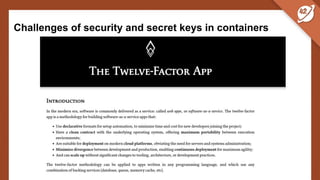
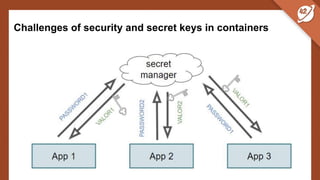
Challenges of security and secret keys in containers
● Secrets play a critical role in storing sensitive data separately from
application code. This includes data such as passwords,
hostnames, SSH keys, and more.
● Our application requires a database connection. To do this, it
needs a hostname, username, and password. Furthermore, there's
a different database server for development, testing, and
production.
● With secrets, each environment can provide its own database
information to the applications.
Challenges of security and secret keys in containers
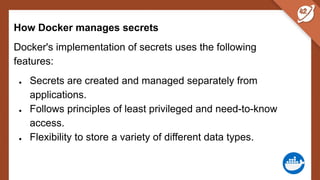
How Docker manages secrets
Docker's implementation of secrets uses the following
features:
● Secrets are created and managed separately from
applications.
● Follows principles of least privileged and need-to-know
access.
● Flexibility to store a variety of different data types.
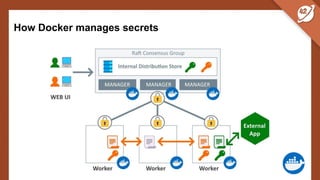
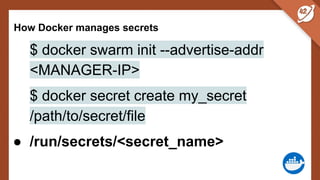
How Docker manages secrets
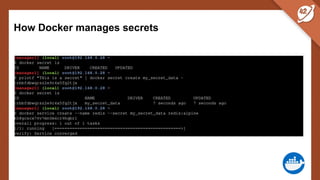
$ docker swarm init --advertise-addr
<MANAGER-IP>
$ docker secret create my_secret
/path/to/secret/file
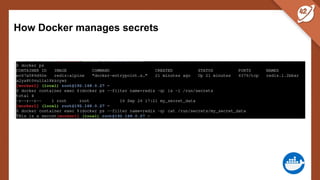
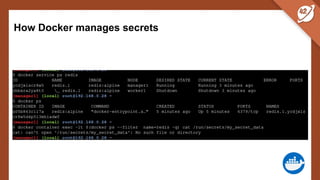
● /run/secrets/<secret_name>
How Docker manages secrets
Best practices for saving and securing distribution of
secrets in Docker Containers
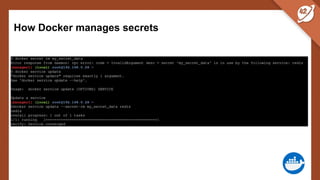
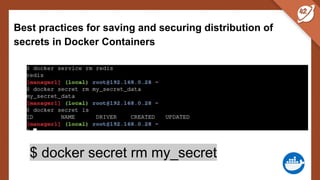
$ docker secret rm my_secret
Best practices for saving and securing distribution of
secrets in Docker Containers
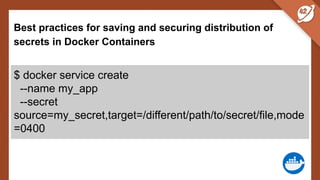
$ docker service create
--name my_app
--secret
source=my_secret,target=/different/path/to/secret/file,mode
=0400
Best practices for saving and securing distribution of
secrets in Docker Containers
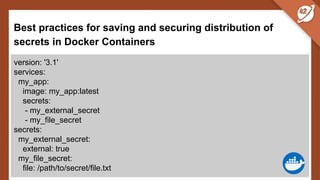
version: '3.1'
services:
my_app:
image: my_app:latest
secrets:
- my_external_secret
- my_file_secret
secrets:
my_external_secret:
external: true
my_file_secret:
file: /path/to/secret/file.txt
Best practices for saving and securing distribution of
secrets in Docker Containers
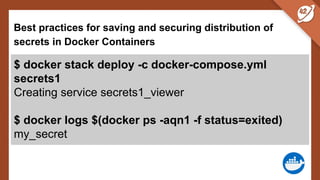
$ docker stack deploy -c docker-compose.yml
secrets1
Creating service secrets1_viewer
$ docker logs $(docker ps -aqn1 -f status=exited)
my_secret
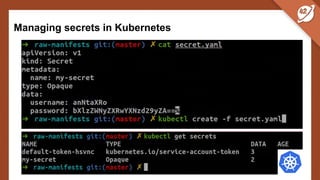
Managing secrets in Kubernetes
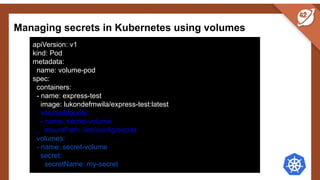
Managing secrets in Kubernetes using volumes
apiVersion: v1
kind: Pod
metadata:
name: volume-pod
spec:
containers:
- name: express-test
image: lukondefmwila/express-test:latest
volumeMounts:
- name: secret-volume
mountPath: /etc/config/secret
volumes:
- name: secret-volume
secret:
secretName: my-secret
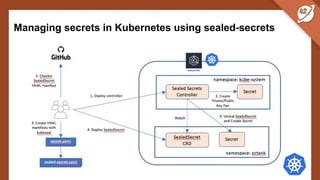
Managing secrets in Kubernetes using sealed-secrets
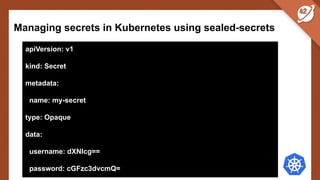
apiVersion: v1
kind: Secret
metadata:
name: my-secret
type: Opaque
data:
username: dXNlcg==
password: cGFzc3dvcmQ=
Managing secrets in Kubernetes using sealed-secrets
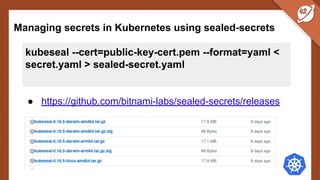
kubeseal --cert=public-key-cert.pem --format=yaml <
secret.yaml > sealed-secret.yaml
● https://github.com/bitnami-labs/sealed-secrets/releases
Managing secrets in Kubernetes using sealed-secrets
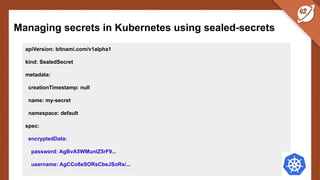
apiVersion: bitnami.com/v1alpha1
kind: SealedSecret
metadata:
creationTimestamp: null
name: my-secret
namespace: default
spec:
encryptedData:
password: AgBvA5WMunIZ5rF9...
username: AgCCo8eSORsCbeJSoRs/...
Managing secrets in Kubernetes using sealed-secrets
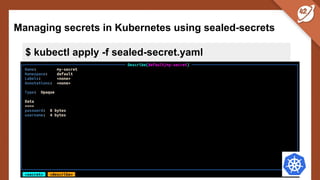
$ kubectl apply -f sealed-secret.yaml
Other tools for distributing secrets in containers
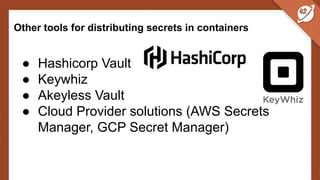
● Hashicorp Vault
● Keywhiz
● Akeyless Vault
● Cloud Provider solutions (AWS Secrets
Manager, GCP Secret Manager)
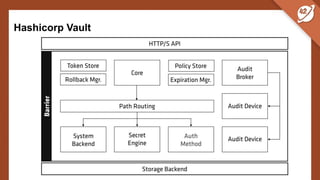
Hashicorp Vault
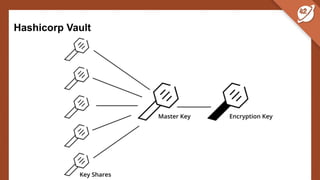
Hashicorp Vault
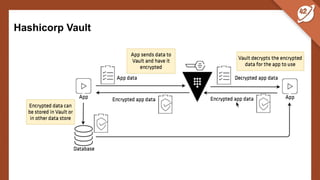
Hashicorp Vault
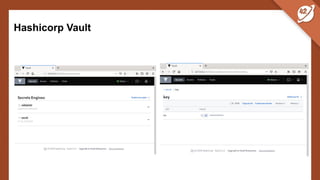
Hashicorp Vault
Hashicorp Vault
The key features of the Vault are:
● It encrypts and decrypts data without storing it.
● Vault can generate secrets on-demand for some
operations, such as AWS or SQL databases.
● Allows replication across multiple data centers.
● Vault has built-in protection for secret revocation.
● Serves as a secret repository with access control details.
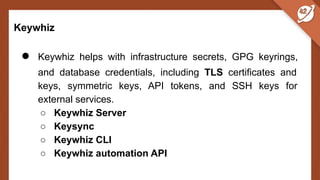
Keywhiz
● Keywhiz helps with infrastructure secrets, GPG keyrings,
and database credentials, including TLS certificates and
keys, symmetric keys, API tokens, and SSH keys for
external services.
○ Keywhiz Server
○ Keysync
○ Keywhiz CLI
○ Keywhiz automation API
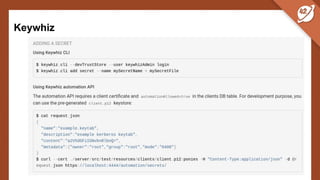
Keywhiz
Keywhiz
The key features of Keywhiz are:
● Helps with infrastructure secrets, GPG keyrings, and
database credentials, including TLS certificates and keys,
symmetric keys, API tokens, and SSH keys for external
services.
● Keywhiz Server provides JSON APIs for collecting and
managing secrets.
● It stores all secrets in memory only.
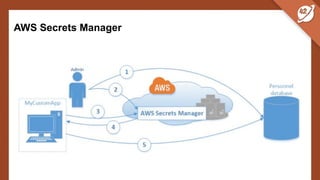
AWS Secrets Manager
AWS Secrets Manager
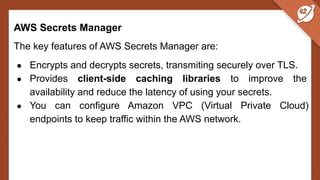
The key features of AWS Secrets Manager are:
● Encrypts and decrypts secrets, transmiting securely over TLS.
● Provides client-side caching libraries to improve the
availability and reduce the latency of using your secrets.
● You can configure Amazon VPC (Virtual Private Cloud)
endpoints to keep traffic within the AWS network.
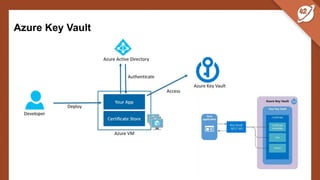
Azure Key Vault
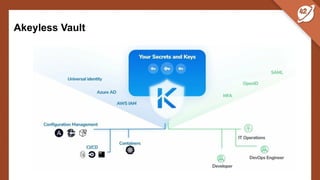
Akeyless Vault
Akeyless Vault
The platform supports two more pillars:
● Zero-Trust Application Access by providing unified
authentication and just-in-time access credentials, allowing
you to secure the perimeter of applications and infrastructure.
● Encryption as-a-Service, allows customers to protect
sensitive personal & business data by applying FIPS 140-2
certified app-level encryption.
Conclusions
● Secrets are an important tool for any container-based
architecture because they help us achieve the goal of
keeping code and configuration separate.
● Manage secrets in secure storage

Sharing secret keys in Docker containers and K8s

  • 1.
    Sharing secret keysin Docker containers and K8s José Manuel Ortega Security researcher
  • 2.
    Jose Manuel Ortega Softwareengineer, Freelance
  • 3.
    1.Challenges of securityand secret keys in containers 2.Best practices for saving and securing distribution of secrets in Docker Containers 3.Managing secrets in Kubernetes using volumes and sealed-secrets 4.Other tools for distributing secrets in containers
  • 4.
    Challenges of securityand secret keys in containers
  • 5.
    Challenges of securityand secret keys in containers ● Secrets play a critical role in storing sensitive data separately from application code. This includes data such as passwords, hostnames, SSH keys, and more. ● Our application requires a database connection. To do this, it needs a hostname, username, and password. Furthermore, there's a different database server for development, testing, and production. ● With secrets, each environment can provide its own database information to the applications.
  • 6.
    Challenges of securityand secret keys in containers
  • 7.
    How Docker managessecrets Docker's implementation of secrets uses the following features: ● Secrets are created and managed separately from applications. ● Follows principles of least privileged and need-to-know access. ● Flexibility to store a variety of different data types.
  • 8.
  • 9.
    How Docker managessecrets $ docker swarm init --advertise-addr <MANAGER-IP> $ docker secret create my_secret /path/to/secret/file ● /run/secrets/<secret_name>
  • 10.
  • 11.
  • 12.
  • 13.
  • 14.
    Best practices forsaving and securing distribution of secrets in Docker Containers $ docker secret rm my_secret
  • 15.
    Best practices forsaving and securing distribution of secrets in Docker Containers $ docker service create --name my_app --secret source=my_secret,target=/different/path/to/secret/file,mode =0400
  • 16.
    Best practices forsaving and securing distribution of secrets in Docker Containers version: '3.1' services: my_app: image: my_app:latest secrets: - my_external_secret - my_file_secret secrets: my_external_secret: external: true my_file_secret: file: /path/to/secret/file.txt
  • 17.
    Best practices forsaving and securing distribution of secrets in Docker Containers $ docker stack deploy -c docker-compose.yml secrets1 Creating service secrets1_viewer $ docker logs $(docker ps -aqn1 -f status=exited) my_secret
  • 18.
  • 19.
    Managing secrets inKubernetes using volumes apiVersion: v1 kind: Pod metadata: name: volume-pod spec: containers: - name: express-test image: lukondefmwila/express-test:latest volumeMounts: - name: secret-volume mountPath: /etc/config/secret volumes: - name: secret-volume secret: secretName: my-secret
  • 20.
    Managing secrets inKubernetes using sealed-secrets
  • 21.
    Managing secrets inKubernetes using sealed-secrets apiVersion: v1 kind: Secret metadata: name: my-secret type: Opaque data: username: dXNlcg== password: cGFzc3dvcmQ=
  • 22.
    Managing secrets inKubernetes using sealed-secrets kubeseal --cert=public-key-cert.pem --format=yaml < secret.yaml > sealed-secret.yaml ● https://github.com/bitnami-labs/sealed-secrets/releases
  • 23.
    Managing secrets inKubernetes using sealed-secrets apiVersion: bitnami.com/v1alpha1 kind: SealedSecret metadata: creationTimestamp: null name: my-secret namespace: default spec: encryptedData: password: AgBvA5WMunIZ5rF9... username: AgCCo8eSORsCbeJSoRs/...
  • 24.
    Managing secrets inKubernetes using sealed-secrets $ kubectl apply -f sealed-secret.yaml
  • 25.
    Other tools fordistributing secrets in containers ● Hashicorp Vault ● Keywhiz ● Akeyless Vault ● Cloud Provider solutions (AWS Secrets Manager, GCP Secret Manager)
  • 26.
  • 27.
  • 28.
  • 29.
  • 30.
    Hashicorp Vault The keyfeatures of the Vault are: ● It encrypts and decrypts data without storing it. ● Vault can generate secrets on-demand for some operations, such as AWS or SQL databases. ● Allows replication across multiple data centers. ● Vault has built-in protection for secret revocation. ● Serves as a secret repository with access control details.
  • 31.
    Keywhiz ● Keywhiz helpswith infrastructure secrets, GPG keyrings, and database credentials, including TLS certificates and keys, symmetric keys, API tokens, and SSH keys for external services. ○ Keywhiz Server ○ Keysync ○ Keywhiz CLI ○ Keywhiz automation API
  • 32.
  • 33.
    Keywhiz The key featuresof Keywhiz are: ● Helps with infrastructure secrets, GPG keyrings, and database credentials, including TLS certificates and keys, symmetric keys, API tokens, and SSH keys for external services. ● Keywhiz Server provides JSON APIs for collecting and managing secrets. ● It stores all secrets in memory only.
  • 34.
  • 35.
    AWS Secrets Manager Thekey features of AWS Secrets Manager are: ● Encrypts and decrypts secrets, transmiting securely over TLS. ● Provides client-side caching libraries to improve the availability and reduce the latency of using your secrets. ● You can configure Amazon VPC (Virtual Private Cloud) endpoints to keep traffic within the AWS network.
  • 36.
  • 37.
  • 38.
    Akeyless Vault The platformsupports two more pillars: ● Zero-Trust Application Access by providing unified authentication and just-in-time access credentials, allowing you to secure the perimeter of applications and infrastructure. ● Encryption as-a-Service, allows customers to protect sensitive personal & business data by applying FIPS 140-2 certified app-level encryption.
  • 39.
    Conclusions ● Secrets arean important tool for any container-based architecture because they help us achieve the goal of keeping code and configuration separate. ● Manage secrets in secure storage