Docker Primer and Tips
Building Blocks of Cloud Native Apps
GCP Los Angeles Meetup
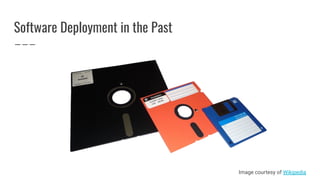
Software Deployment in the Past
Image courtesy of Wikipedia
Software Deployment is Hard
● Maintain code in different languages on different types of machines
● Deploy new version of the code
● Revert to the old version if something goes wrong
● Managing different configurations
● Hosting on different infrastructure (and Cloud providers)
But Tools are Better
And there are some great tools out there
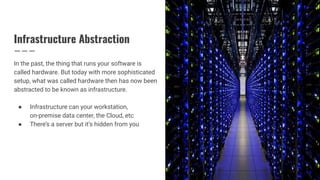
Infrastructure Abstraction
In the past, the thing that runs your software is
called hardware. But today with more sophisticated
setup, what was called hardware then has now been
abstracted to be known as infrastructure.
● Infrastructure can your workstation,
on-premise data center, the Cloud, etc
● There’s a server but it’s hidden from you
Host Architecture
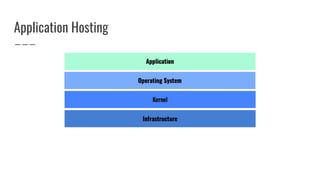
Running an application
Application Hosting
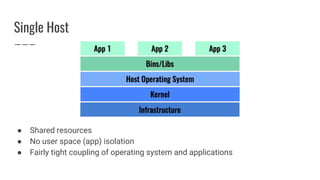
Single Host
● Shared resources
● No user space (app) isolation
● Fairly tight coupling of operating system and applications
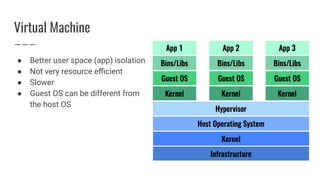
Virtual Machine
● Better user space (app) isolation
● Not very resource efficient
● Slower
● Guest OS can be different from
the host OS
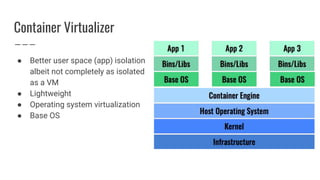
Container Virtualizer
● Better user space (app) isolation
albeit not completely as isolated
as a VM
● Lightweight
● Operating system virtualization
● Base OS
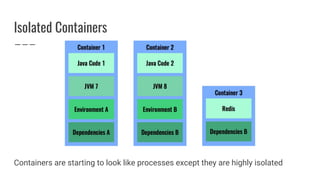
Isolated Containers
Containers are starting to look like processes except they are highly isolated
Docker Deep Dive
Closer Look at Docker
Container Technology
● Container existed for years
● Google has been using their own container for years
● In Open-source land, Linux has LXC and Libcontainer, BSD has Jails, Solaris
has Zones
● A good alternative to Docker is RKT
Then One Day...
Docker (the company)
figured a clever way to
package the tools for
using containers by
adding a rich toolset
around it.
What is Docker?
● Container = isolated (user space) sandbox
● Docker = A Container implementation
● Benefits
○ Lightweight
○ Faster to launch
○ Isolation
○ Easily define and set up the container via code
Docker Internals
● Docker runs on Linux x64 (only)
● Dependent on libcontainer, a Linux container platform
○ Container responsible for: filesystem, process, network
○ Layered filesystem
● Benefits
○ Versioning
○ Portability
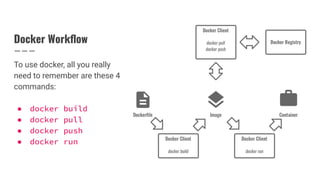
Docker Workflow
To use docker, all you really
need to remember are these 4
commands:
● docker build
● docker pull
● docker push
● docker run
Public and Private Docker Registries
● Registry = collection of repositories
● Private vs public registries
● When you push, you need write access. This means you need to run docker
login
● By default, docker push pushes a local image to the public repository
● Every GCP Project has a private Docker Registry, prefix your docker image
with gcr.io
● Configure your local docker client to push to the GCP Docker Registry
● See this article for more info
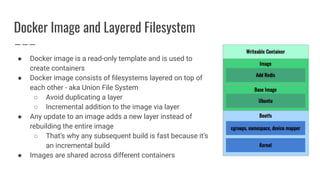
Docker Image and Layered Filesystem
● Docker image is a read-only template and is used to
create containers
● Docker image consists of filesystems layered on top of
each other - aka Union File System
○ Avoid duplicating a layer
○ Incremental addition to the image via layer
● Any update to an image adds a new layer instead of
rebuilding the entire image
○ That’s why any subsequent build is fast because it’s
an incremental build
● Images are shared across different containers
Layering Implications
● Understanding layering is critical especially if you want to be good at Docker
and deploy Docker images to production
● Each layer is based on a step in the Dockerfile
● Each layer builds on the previous layer, there’s a “pointer” to the previous layer
● It’s also based on the delta between the current and previous layer
● Everytime you change a layer, it has a cascading effect of changing every
subsequent layers - so install package before copying the source
● Image security - deleting a layer may not delete a file with sensitive data to
preceding layers. Type docker history to see what I mean
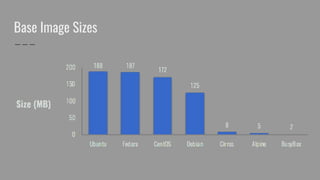
Base Image Sizes
Running Docker Container
Running Docker on a Mac
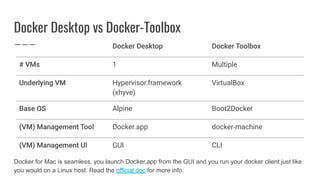
Docker Desktop vs Docker-Toolbox
1 Multiple
Hypervisor.framework
(xhyve)
VirtualBox
Alpine Boot2Docker
Docker.app docker-machine
GUI CLI
Docker for Mac is seamless, you launch Docker.app from the GUI and you run your docker client just like
you would on a Linux host. Read the official doc for more info.
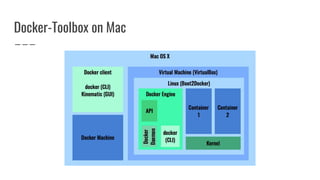
Docker-Toolbox on Mac
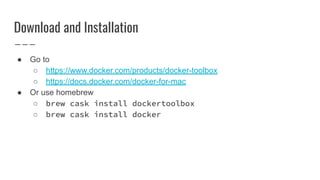
Download and Installation
● Go to
○ https://www.docker.com/products/docker-toolbox
○ https://docs.docker.com/docker-for-mac
● Or use homebrew
○ brew cask install dockertoolbox
○ brew cask install docker
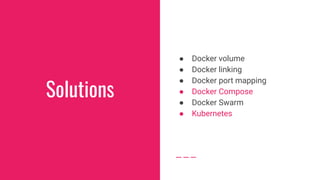
Solutions
● Docker volume
● Docker linking
● Docker port mapping
● Docker Compose
● Docker Swarm
● Kubernetes
Tips & Tricks
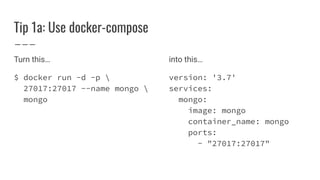
Tip 1a: Use docker-compose
Turn this…
$ docker run -d -p 
27017:27017 --name mongo 
mongo
into this…
version: '3.7'
services:
mongo:
image: mongo
container_name: mongo
ports:
- "27017:27017"
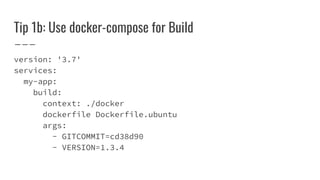
Tip 1b: Use docker-compose for Build
version: '3.7'
services:
my-app:
build:
context: ./docker
dockerfile Dockerfile.ubuntu
args:
- GITCOMMIT=cd38d90
- VERSION=1.3.4
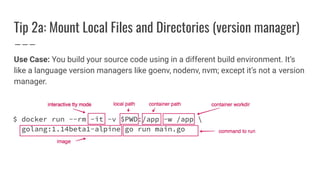
Tip 2a: Mount Local Files and Directories (version manager)
Use Case: You build your source code using in a different build environment. It’s
like a language version managers like goenv, nodenv, nvm; except it’s not a version
manager.
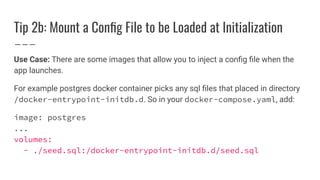
Tip 2b: Mount a Config File to be Loaded at Initialization
Use Case: There are some images that allow you to inject a config file when the
app launches.
For example postgres docker container picks any sql files that placed in directory
/docker-entrypoint-initdb.d. So in your docker-compose.yaml, add:
image: postgres
...
volumes:
- ./seed.sql:/docker-entrypoint-initdb.d/seed.sql
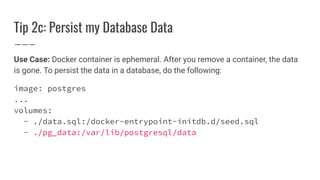
Tip 2c: Persist my Database Data
Use Case: Docker container is ephemeral. After you remove a container, the data
is gone. To persist the data in a database, do the following:
image: postgres
...
volumes:
- ./data.sql:/docker-entrypoint-initdb.d/seed.sql
- ./pg_data:/var/lib/postgresql/data
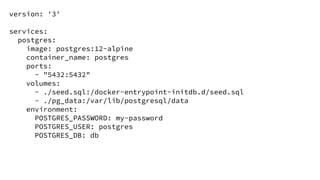
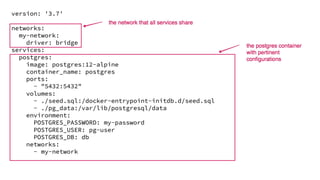
version: '3'
services:
postgres:
image: postgres:12-alpine
container_name: postgres
ports:
- "5432:5432"
volumes:
- ./seed.sql:/docker-entrypoint-initdb.d/seed.sql
- ./pg_data:/var/lib/postgresql/data
environment:
POSTGRES_PASSWORD: my-password
POSTGRES_USER: postgres
POSTGRES_DB: db
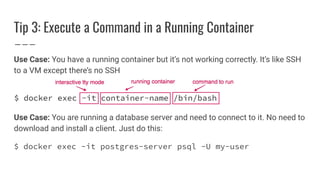
Tip 3: Execute a Command in a Running Container
Use Case: You have a running container but it’s not working correctly. It’s like SSH
to a VM except there’s no SSH
Use Case: You are running a database server and need to connect to it. No need to
download and install a client. Just do this:
$ docker exec -it postgres-server psql -U my-user
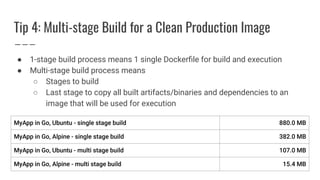
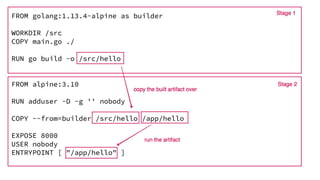
Tip 4: Multi-stage Build for a Clean Production Image
● 1-stage build process means 1 single Dockerfile for build and execution
● Multi-stage build process means
○ Stages to build
○ Last stage to copy all built artifacts/binaries and dependencies to an
image that will be used for execution
Tip 5: Useful Docker Commands for Housekeeping
$ docker ps -a # List all docker containers
$ # Remove all stopped containers
$ docker rm $(docker ps -q -f status=exited)
$ docker stats # Live stream of live container stats
$ docker image ls # List all local images
$ docker rmi [image_name] # Remove a specific image
$ docker image prune -a # Remove unused images
$ # Delete all stopped containers, dangling images, unused
networks, unused volumes, and build cache
$ docker system prune -a --volumes
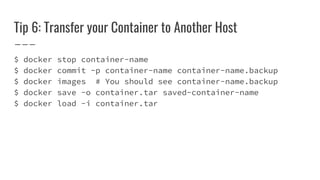
Tip 6: Transfer your Container to Another Host
$ docker stop container-name
$ docker commit -p container-name container-name.backup
$ docker images # You should see container-name.backup
$ docker save -o container.tar saved-container-name
$ docker load -i container.tar
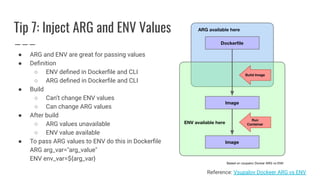
Tip 7: Inject ARG and ENV Values
● ARG and ENV are great for passing values
● Definition
○ ENV defined in Dockerfile and CLI
○ ARG defined in Dockerfile and CLI
● Build
○ Can’t change ENV values
○ Can change ARG values
● After build
○ ARG values unavailable
○ ENV value available
● To pass ARG values to ENV do this in Dockerfile
ARG arg_var="arg_value"
ENV env_var=${arg_var}
Reference: Vsupalov Dockeer ARG vs ENV
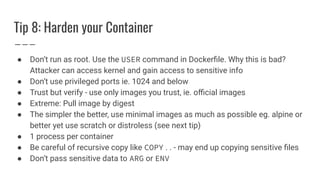
Tip 8: Harden your Container
● Don’t run as root. Use the USER command in Dockerfile. Why this is bad?
Attacker can access kernel and gain access to sensitive info
● Don’t use privileged ports ie. 1024 and below
● Trust but verify - use only images you trust, ie. official images
● Extreme: Pull image by digest
● The simpler the better, use minimal images as much as possible eg. alpine or
better yet use scratch or distroless (see next tip)
● 1 process per container
● Be careful of recursive copy like COPY . . - may end up copying sensitive files
● Don’t pass sensitive data to ARG or ENV
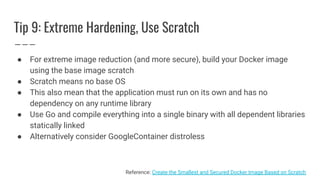
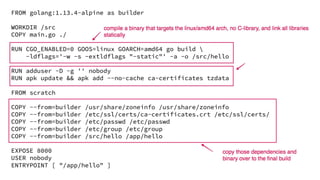
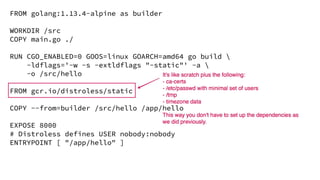
Tip 9: Extreme Hardening, Use Scratch
● For extreme image reduction (and more secure), build your Docker image
using the base image scratch
● Scratch means no base OS
● This also mean that the application must run on its own and has no
dependency on any runtime library
● Use Go and compile everything into a single binary with all dependent libraries
statically linked
● Alternatively consider GoogleContainer distroless
Reference: Create the Smallest and Secured Docker Image Based on Scratch
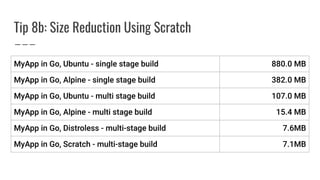
Tip 8b: Size Reduction Using Scratch
Multiple Containers
Running multiple containers
Use Case
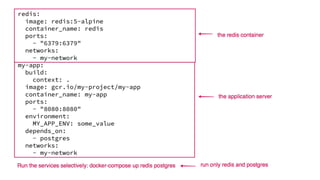
● Real world production applications are multi-tier...
● Web application
○ 1 Container running the API service written in Golang
● Datastores
○ 1 Container running Postgres as the core data store
○ 1 Container running Redis for cache and user sessions
● Need to orchestrate them, tell them how to communicate with each other
Before
● Local Setup
○ Download the postgres and redis - both server and client programs
○ Install them
○ Set them up - probably cut and paste instructions
● Remote Setup (dev environment)
○ Ask Ops to spin up an VM instance and set up the environment - you wait
○ Make sure no one else is using the environment
○ Ensure that the settings in the dev environment is the same as your local
environment
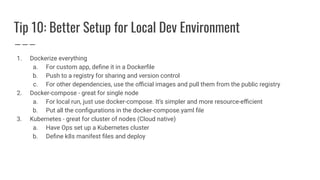
Tip 10: Better Setup for Local Dev Environment
1. Dockerize everything
a. For custom app, define it in a Dockerfile
b. Push to a registry for sharing and version control
c. For other dependencies, use the official images and pull them from the public registry
2. Docker-compose - great for single node
a. For local run, just use docker-compose. It’s simpler and more resource-efficient
b. Put all the configurations in the docker-compose.yaml file
3. Kubernetes - great for cluster of nodes (Cloud native)
a. Have Ops set up a Kubernetes cluster
b. Define k8s manifest files and deploy
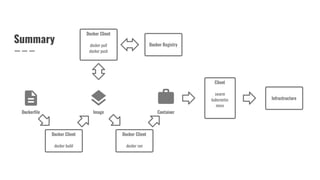
Summary
Docker primer and tips

Docker primer and tips

  • 1.
    Docker Primer andTips Building Blocks of Cloud Native Apps GCP Los Angeles Meetup
  • 2.
    Software Deployment inthe Past Image courtesy of Wikipedia
  • 3.
    Software Deployment isHard ● Maintain code in different languages on different types of machines ● Deploy new version of the code ● Revert to the old version if something goes wrong ● Managing different configurations ● Hosting on different infrastructure (and Cloud providers)
  • 4.
    But Tools areBetter And there are some great tools out there
  • 5.
    Infrastructure Abstraction In thepast, the thing that runs your software is called hardware. But today with more sophisticated setup, what was called hardware then has now been abstracted to be known as infrastructure. ● Infrastructure can your workstation, on-premise data center, the Cloud, etc ● There’s a server but it’s hidden from you
  • 6.
  • 7.
  • 8.
    Single Host ● Sharedresources ● No user space (app) isolation ● Fairly tight coupling of operating system and applications
  • 9.
    Virtual Machine ● Betteruser space (app) isolation ● Not very resource efficient ● Slower ● Guest OS can be different from the host OS
  • 10.
    Container Virtualizer ● Betteruser space (app) isolation albeit not completely as isolated as a VM ● Lightweight ● Operating system virtualization ● Base OS
  • 11.
    Isolated Containers Containers arestarting to look like processes except they are highly isolated
  • 12.
  • 13.
    Container Technology ● Containerexisted for years ● Google has been using their own container for years ● In Open-source land, Linux has LXC and Libcontainer, BSD has Jails, Solaris has Zones ● A good alternative to Docker is RKT
  • 14.
    Then One Day... Docker(the company) figured a clever way to package the tools for using containers by adding a rich toolset around it.
  • 15.
    What is Docker? ●Container = isolated (user space) sandbox ● Docker = A Container implementation ● Benefits ○ Lightweight ○ Faster to launch ○ Isolation ○ Easily define and set up the container via code
  • 16.
    Docker Internals ● Dockerruns on Linux x64 (only) ● Dependent on libcontainer, a Linux container platform ○ Container responsible for: filesystem, process, network ○ Layered filesystem ● Benefits ○ Versioning ○ Portability
  • 17.
    Docker Workflow To usedocker, all you really need to remember are these 4 commands: ● docker build ● docker pull ● docker push ● docker run
  • 18.
    Public and PrivateDocker Registries ● Registry = collection of repositories ● Private vs public registries ● When you push, you need write access. This means you need to run docker login ● By default, docker push pushes a local image to the public repository ● Every GCP Project has a private Docker Registry, prefix your docker image with gcr.io ● Configure your local docker client to push to the GCP Docker Registry ● See this article for more info
  • 19.
    Docker Image andLayered Filesystem ● Docker image is a read-only template and is used to create containers ● Docker image consists of filesystems layered on top of each other - aka Union File System ○ Avoid duplicating a layer ○ Incremental addition to the image via layer ● Any update to an image adds a new layer instead of rebuilding the entire image ○ That’s why any subsequent build is fast because it’s an incremental build ● Images are shared across different containers
  • 20.
    Layering Implications ● Understandinglayering is critical especially if you want to be good at Docker and deploy Docker images to production ● Each layer is based on a step in the Dockerfile ● Each layer builds on the previous layer, there’s a “pointer” to the previous layer ● It’s also based on the delta between the current and previous layer ● Everytime you change a layer, it has a cascading effect of changing every subsequent layers - so install package before copying the source ● Image security - deleting a layer may not delete a file with sensitive data to preceding layers. Type docker history to see what I mean
  • 21.
  • 22.
  • 23.
    Docker Desktop vsDocker-Toolbox 1 Multiple Hypervisor.framework (xhyve) VirtualBox Alpine Boot2Docker Docker.app docker-machine GUI CLI Docker for Mac is seamless, you launch Docker.app from the GUI and you run your docker client just like you would on a Linux host. Read the official doc for more info.
  • 24.
  • 25.
    Download and Installation ●Go to ○ https://www.docker.com/products/docker-toolbox ○ https://docs.docker.com/docker-for-mac ● Or use homebrew ○ brew cask install dockertoolbox ○ brew cask install docker
  • 26.
    Solutions ● Docker volume ●Docker linking ● Docker port mapping ● Docker Compose ● Docker Swarm ● Kubernetes
  • 27.
  • 28.
    Tip 1a: Usedocker-compose Turn this… $ docker run -d -p 27017:27017 --name mongo mongo into this… version: '3.7' services: mongo: image: mongo container_name: mongo ports: - "27017:27017"
  • 29.
    Tip 1b: Usedocker-compose for Build version: '3.7' services: my-app: build: context: ./docker dockerfile Dockerfile.ubuntu args: - GITCOMMIT=cd38d90 - VERSION=1.3.4
  • 30.
    Tip 2a: MountLocal Files and Directories (version manager) Use Case: You build your source code using in a different build environment. It’s like a language version managers like goenv, nodenv, nvm; except it’s not a version manager.
  • 31.
    Tip 2b: Mounta Config File to be Loaded at Initialization Use Case: There are some images that allow you to inject a config file when the app launches. For example postgres docker container picks any sql files that placed in directory /docker-entrypoint-initdb.d. So in your docker-compose.yaml, add: image: postgres ... volumes: - ./seed.sql:/docker-entrypoint-initdb.d/seed.sql
  • 32.
    Tip 2c: Persistmy Database Data Use Case: Docker container is ephemeral. After you remove a container, the data is gone. To persist the data in a database, do the following: image: postgres ... volumes: - ./data.sql:/docker-entrypoint-initdb.d/seed.sql - ./pg_data:/var/lib/postgresql/data
  • 33.
    version: '3' services: postgres: image: postgres:12-alpine container_name:postgres ports: - "5432:5432" volumes: - ./seed.sql:/docker-entrypoint-initdb.d/seed.sql - ./pg_data:/var/lib/postgresql/data environment: POSTGRES_PASSWORD: my-password POSTGRES_USER: postgres POSTGRES_DB: db
  • 34.
    Tip 3: Executea Command in a Running Container Use Case: You have a running container but it’s not working correctly. It’s like SSH to a VM except there’s no SSH Use Case: You are running a database server and need to connect to it. No need to download and install a client. Just do this: $ docker exec -it postgres-server psql -U my-user
  • 35.
    Tip 4: Multi-stageBuild for a Clean Production Image ● 1-stage build process means 1 single Dockerfile for build and execution ● Multi-stage build process means ○ Stages to build ○ Last stage to copy all built artifacts/binaries and dependencies to an image that will be used for execution
  • 37.
    Tip 5: UsefulDocker Commands for Housekeeping $ docker ps -a # List all docker containers $ # Remove all stopped containers $ docker rm $(docker ps -q -f status=exited) $ docker stats # Live stream of live container stats $ docker image ls # List all local images $ docker rmi [image_name] # Remove a specific image $ docker image prune -a # Remove unused images $ # Delete all stopped containers, dangling images, unused networks, unused volumes, and build cache $ docker system prune -a --volumes
  • 38.
    Tip 6: Transferyour Container to Another Host $ docker stop container-name $ docker commit -p container-name container-name.backup $ docker images # You should see container-name.backup $ docker save -o container.tar saved-container-name $ docker load -i container.tar
  • 39.
    Tip 7: InjectARG and ENV Values ● ARG and ENV are great for passing values ● Definition ○ ENV defined in Dockerfile and CLI ○ ARG defined in Dockerfile and CLI ● Build ○ Can’t change ENV values ○ Can change ARG values ● After build ○ ARG values unavailable ○ ENV value available ● To pass ARG values to ENV do this in Dockerfile ARG arg_var="arg_value" ENV env_var=${arg_var} Reference: Vsupalov Dockeer ARG vs ENV
  • 40.
    Tip 8: Hardenyour Container ● Don’t run as root. Use the USER command in Dockerfile. Why this is bad? Attacker can access kernel and gain access to sensitive info ● Don’t use privileged ports ie. 1024 and below ● Trust but verify - use only images you trust, ie. official images ● Extreme: Pull image by digest ● The simpler the better, use minimal images as much as possible eg. alpine or better yet use scratch or distroless (see next tip) ● 1 process per container ● Be careful of recursive copy like COPY . . - may end up copying sensitive files ● Don’t pass sensitive data to ARG or ENV
  • 41.
    Tip 9: ExtremeHardening, Use Scratch ● For extreme image reduction (and more secure), build your Docker image using the base image scratch ● Scratch means no base OS ● This also mean that the application must run on its own and has no dependency on any runtime library ● Use Go and compile everything into a single binary with all dependent libraries statically linked ● Alternatively consider GoogleContainer distroless Reference: Create the Smallest and Secured Docker Image Based on Scratch
  • 42.
    Tip 8b: SizeReduction Using Scratch
  • 45.
  • 46.
    Use Case ● Realworld production applications are multi-tier... ● Web application ○ 1 Container running the API service written in Golang ● Datastores ○ 1 Container running Postgres as the core data store ○ 1 Container running Redis for cache and user sessions ● Need to orchestrate them, tell them how to communicate with each other
  • 47.
    Before ● Local Setup ○Download the postgres and redis - both server and client programs ○ Install them ○ Set them up - probably cut and paste instructions ● Remote Setup (dev environment) ○ Ask Ops to spin up an VM instance and set up the environment - you wait ○ Make sure no one else is using the environment ○ Ensure that the settings in the dev environment is the same as your local environment
  • 48.
    Tip 10: BetterSetup for Local Dev Environment 1. Dockerize everything a. For custom app, define it in a Dockerfile b. Push to a registry for sharing and version control c. For other dependencies, use the official images and pull them from the public registry 2. Docker-compose - great for single node a. For local run, just use docker-compose. It’s simpler and more resource-efficient b. Put all the configurations in the docker-compose.yaml file 3. Kubernetes - great for cluster of nodes (Cloud native) a. Have Ops set up a Kubernetes cluster b. Define k8s manifest files and deploy
  • 51.