Implementing Observability
for Kubernetes
José Manuel Ortega(@jmortegac)
Agenda
● Introducing the concept of observability
● Implementing Kubernetes observability
● Observability stack in K8s
● Integrating Prometheus with
OpenTelemetry
Introducing the concept of observability
● Software architecture is more complex.
● Pillars of observability—logs, metrics,
and traces.
● Observability is now a top priority for
DevOps teams.
Introducing the concept of observability
● Monitoring
● Logging
● Tracing
Introducing the concept of observability
● time=”2019-12-23T01:27:38-04:00″
level=debug msg=”Application starting”
environment=dev
● http_requests_total=100
log metric
Introducing the concept of observability
Implementing Kubernetes observability
1. Node status. Current health status and availability of the
node.
2. Node resource usage metrics. Disk and memory
utilization, CPU and network bandwidth.
3. Implementation status. Current and desired state of the
deployments in the cluster.
4. Number of pods. Kubernetes internal components and
processes use this information to manage the workload and
schedule the pods.
Implementing Kubernetes observability
1. Kubernetes metrics. These metrics apply to the number
and types of resources within a pod. This metric includes
resource limit tracking to avoid running out of system
resources.
2. Container metrics. These metrics capture the utilization of
container-level resources, such as CPU, memory, and
network usage.
3. Application metrics. Such metrics include the number of
active or online users and response times.
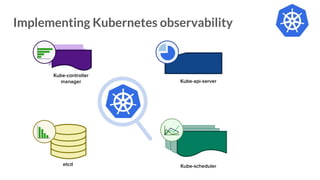
Implementing Kubernetes observability
Observability stack in K8s
● Kubewatch is an open-source Kubernetes monitoring
tool that sends notifications about changes in a
Kubernetes cluster to various communication channels,
such as Slack, Microsoft Teams, or email.
● It monitors Kubernetes resources, such as deployments,
services, and pods, and alerts users in real-time when
changes occur.
https://github.com/vmware-archive/kubewatch
Observability stack in K8s
https://github.com/salesforce/sloop
Observability stack in K8s
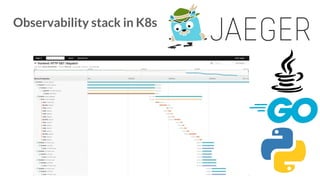
● Jaeger is an open-source distributed tracing system
● The tool is designed to monitor and troubleshoot
distributed microservices, mostly focusing on:
○ Distributed context propagation
○ Distributed transaction monitoring
○ Root cause analysis
○ Service dependency analysis
○ Performance/latency optimization
https://www.jaegertracing.io
Observability stack in K8s
https://www.jaegertracing.io/docs/1.46/operator
apiVersion: jaegertracing.io/v1
kind: Jaeger
metadata:
name: simplest
Observability stack in K8s
● Fluentd is an open-source data collector for
unified logging layers.
● It works with Kubernetes running as
DaemonSet. This combination ensures that all
nodes run one copy of a pod.
https://www.fluentd.org
Observability stack in K8s
apiVersion: extensions/v1beta1
kind: DaemonSet
metadata:
name: fluentd
namespace: kube-system
spec:
containers:
– name: fluentd
image:
quay.io/fluent/fluentd-kubernetes-daemonset
Observability stack in K8s
● Prometheus is a cloud native time series data
store with built-in rich query language for
metrics.
● Collecting data with Prometheus opens up many
possibilities for increasing the observability of
your infrastructure and the containers running in
Kubernetes cluster.
https://prometheus.io
Observability stack in K8s
● Multi-dimensional data model
● Prometheus query language(PromQL)
● Data collection
● Storage
● Visualization(Grafana)
https://prometheus.io
Observability stack in K8s
● Most of the metrics can be exported using node_exporter
https://github.com/prometheus/node_exporter and cAdvisor
https://github.com/google/cadvisor
○ Resource utilization saturation. The containers’ resource
consumption and allocation.
○ The number of failing pods and errors within a specific
namespace.
○ Kubernetes resource capacity. The total number of
nodes, CPU cores, and memory available.
Observability stack in K8s
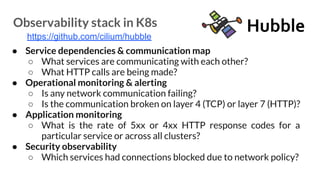
● Service dependencies & communication map
○ What services are communicating with each other?
○ What HTTP calls are being made?
● Operational monitoring & alerting
○ Is any network communication failing?
○ Is the communication broken on layer 4 (TCP) or layer 7 (HTTP)?
● Application monitoring
○ What is the rate of 5xx or 4xx HTTP response codes for a
particular service or across all clusters?
● Security observability
○ Which services had connections blocked due to network policy?
https://github.com/cilium/hubble
Observability stack in K8s
https://github.com/cilium/hubble
Observability stack in K8s
https://github.com/cilium/hubble
Service Dependency Graph
Observability stack in K8s
https://github.com/cilium/hubble
Networking Behavior
Observability stack in K8s
https://github.com/cilium/hubble
HTTP Request/Response Rate & Latency
Integrating Prometheus with OpenTelemetry
● Receivers: are the data sources of observability
information.
● Processors: they process the information received before it
is exported to the different backends.
● Exporters: they are in charge of exporting the information to
the different backends, such as Jaeger or Kafka
Integrating Prometheus with Open
https://github.com/open-telemetry/opentelemetry-collector
otel-collector:
image: otel/opentelemetry-collector:latest
command: [ "--config=/etc/otel-collector-config.yaml" ]
volumes:
- ./otel-collector-config.yaml:/etc/otel-collector-config.yaml:Z
ports:
- "13133:13133"
- "4317:4317"
- "4318:4318"
depends_on:
- jaeger
Integrating Prometheus with OpenTelemetry
otel-collector-config.yaml
processors:
batch:
extensions:
health_check:
service:
extensions: [health_check]
pipelines:
traces:
receivers: [otlp]
processors: [batch]
exporters: [jaeger]
receivers:
otlp:
protocols:
grpc:
endpoint: otel-collector:4317
exporters:
jaeger:
endpoint: jaeger:14250
tls:
insecure: true
Integrating Prometheus with OpenTelemetry
otel-collector-config.yaml
Integrating Prometheus with OpenTelemetry
https://github.com/open-telemetry/opentelemetry-collector/tree/main/processor
Integrating Prometheus with OpenTelemetry
receivers:
..
prometheus:
config:
scrape_configs:
- job_name: 'service-a'
scrape_interval: 2s
metrics_path: '/metrics/prometheus'
static_configs:
- targets: [ 'service-a:8080' ]
- job_name: 'service-b'
scrape_interval: 2s
metrics_path: '/actuator/prometheus'
static_configs:
- targets: [ 'service-b:8081' ]
- job_name: 'service-c'
scrape_interval: 2s
Integrating Prometheus with OpenTelemetry
exporters:
…
prometheusremotewrite:
endpoint: http://prometheus:9090/api/v1/write
tls:
insecure: true
● active in Prometheus “--web.enable-remote-write-receiver”
Integrating Prometheus with OpenTelemetry
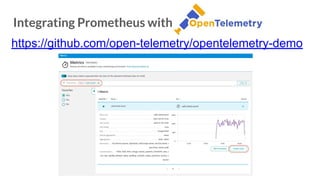
https://github.com/open-telemetry/opentelemetry-demo
Integrating Prometheus with OpenTelemetry
https://github.com/open-telemetry/opentelemetry-demo
Integrating Prometheus with OpenTelemetry
https://github.com/open-telemetry/opentelemetry-demo
Integrating Prometheus with OpenTelemetry
https://github.com/open-telemetry/opentelemetry-demo
Conclusions
● Lean on the native capabilities of Kubernetes for the
collection and exploitation of metrics in order to know
the state of health of your pods and, in general, of your
cluster.
● Use these metrics to be able to create alarms that
proactively notify us of errors or even allow us to
anticipate issues in our applications or infraestructure.
¡Thank you!
@jmortegac
https://www.linkedin.com
/in/jmortega1
https://jmortega.github.io

Implementing Observability for Kubernetes.pdf

  • 1.
  • 2.
    Agenda ● Introducing theconcept of observability ● Implementing Kubernetes observability ● Observability stack in K8s ● Integrating Prometheus with OpenTelemetry
  • 3.
    Introducing the conceptof observability ● Software architecture is more complex. ● Pillars of observability—logs, metrics, and traces. ● Observability is now a top priority for DevOps teams.
  • 4.
    Introducing the conceptof observability ● Monitoring ● Logging ● Tracing
  • 5.
    Introducing the conceptof observability ● time=”2019-12-23T01:27:38-04:00″ level=debug msg=”Application starting” environment=dev ● http_requests_total=100 log metric
  • 6.
    Introducing the conceptof observability
  • 7.
    Implementing Kubernetes observability 1.Node status. Current health status and availability of the node. 2. Node resource usage metrics. Disk and memory utilization, CPU and network bandwidth. 3. Implementation status. Current and desired state of the deployments in the cluster. 4. Number of pods. Kubernetes internal components and processes use this information to manage the workload and schedule the pods.
  • 8.
    Implementing Kubernetes observability 1.Kubernetes metrics. These metrics apply to the number and types of resources within a pod. This metric includes resource limit tracking to avoid running out of system resources. 2. Container metrics. These metrics capture the utilization of container-level resources, such as CPU, memory, and network usage. 3. Application metrics. Such metrics include the number of active or online users and response times.
  • 9.
  • 10.
  • 11.
  • 12.
    Observability stack inK8s ● Kubewatch is an open-source Kubernetes monitoring tool that sends notifications about changes in a Kubernetes cluster to various communication channels, such as Slack, Microsoft Teams, or email. ● It monitors Kubernetes resources, such as deployments, services, and pods, and alerts users in real-time when changes occur. https://github.com/vmware-archive/kubewatch
  • 13.
    Observability stack inK8s https://github.com/salesforce/sloop
  • 14.
    Observability stack inK8s ● Jaeger is an open-source distributed tracing system ● The tool is designed to monitor and troubleshoot distributed microservices, mostly focusing on: ○ Distributed context propagation ○ Distributed transaction monitoring ○ Root cause analysis ○ Service dependency analysis ○ Performance/latency optimization https://www.jaegertracing.io
  • 15.
  • 16.
  • 17.
    Observability stack inK8s https://www.jaegertracing.io/docs/1.46/operator apiVersion: jaegertracing.io/v1 kind: Jaeger metadata: name: simplest
  • 18.
    Observability stack inK8s ● Fluentd is an open-source data collector for unified logging layers. ● It works with Kubernetes running as DaemonSet. This combination ensures that all nodes run one copy of a pod. https://www.fluentd.org
  • 19.
    Observability stack inK8s apiVersion: extensions/v1beta1 kind: DaemonSet metadata: name: fluentd namespace: kube-system spec: containers: – name: fluentd image: quay.io/fluent/fluentd-kubernetes-daemonset
  • 20.
  • 21.
    Observability stack inK8s ● Prometheus is a cloud native time series data store with built-in rich query language for metrics. ● Collecting data with Prometheus opens up many possibilities for increasing the observability of your infrastructure and the containers running in Kubernetes cluster. https://prometheus.io
  • 22.
    Observability stack inK8s ● Multi-dimensional data model ● Prometheus query language(PromQL) ● Data collection ● Storage ● Visualization(Grafana) https://prometheus.io
  • 23.
  • 24.
    Observability stack inK8s ● Most of the metrics can be exported using node_exporter https://github.com/prometheus/node_exporter and cAdvisor https://github.com/google/cadvisor ○ Resource utilization saturation. The containers’ resource consumption and allocation. ○ The number of failing pods and errors within a specific namespace. ○ Kubernetes resource capacity. The total number of nodes, CPU cores, and memory available.
  • 25.
  • 26.
    Observability stack inK8s ● Service dependencies & communication map ○ What services are communicating with each other? ○ What HTTP calls are being made? ● Operational monitoring & alerting ○ Is any network communication failing? ○ Is the communication broken on layer 4 (TCP) or layer 7 (HTTP)? ● Application monitoring ○ What is the rate of 5xx or 4xx HTTP response codes for a particular service or across all clusters? ● Security observability ○ Which services had connections blocked due to network policy? https://github.com/cilium/hubble
  • 27.
    Observability stack inK8s https://github.com/cilium/hubble
  • 28.
    Observability stack inK8s https://github.com/cilium/hubble Service Dependency Graph
  • 29.
    Observability stack inK8s https://github.com/cilium/hubble Networking Behavior
  • 30.
    Observability stack inK8s https://github.com/cilium/hubble HTTP Request/Response Rate & Latency
  • 31.
  • 32.
  • 33.
    Integrating Prometheus withOpenTelemetry ● Receivers: are the data sources of observability information. ● Processors: they process the information received before it is exported to the different backends. ● Exporters: they are in charge of exporting the information to the different backends, such as Jaeger or Kafka
  • 34.
  • 35.
    https://github.com/open-telemetry/opentelemetry-collector otel-collector: image: otel/opentelemetry-collector:latest command: ["--config=/etc/otel-collector-config.yaml" ] volumes: - ./otel-collector-config.yaml:/etc/otel-collector-config.yaml:Z ports: - "13133:13133" - "4317:4317" - "4318:4318" depends_on: - jaeger Integrating Prometheus with OpenTelemetry otel-collector-config.yaml
  • 36.
    processors: batch: extensions: health_check: service: extensions: [health_check] pipelines: traces: receivers: [otlp] processors:[batch] exporters: [jaeger] receivers: otlp: protocols: grpc: endpoint: otel-collector:4317 exporters: jaeger: endpoint: jaeger:14250 tls: insecure: true Integrating Prometheus with OpenTelemetry otel-collector-config.yaml
  • 37.
    Integrating Prometheus withOpenTelemetry https://github.com/open-telemetry/opentelemetry-collector/tree/main/processor
  • 38.
  • 39.
    Integrating Prometheus withOpenTelemetry receivers: .. prometheus: config: scrape_configs: - job_name: 'service-a' scrape_interval: 2s metrics_path: '/metrics/prometheus' static_configs: - targets: [ 'service-a:8080' ] - job_name: 'service-b' scrape_interval: 2s metrics_path: '/actuator/prometheus' static_configs: - targets: [ 'service-b:8081' ] - job_name: 'service-c' scrape_interval: 2s
  • 40.
    Integrating Prometheus withOpenTelemetry exporters: … prometheusremotewrite: endpoint: http://prometheus:9090/api/v1/write tls: insecure: true ● active in Prometheus “--web.enable-remote-write-receiver”
  • 41.
    Integrating Prometheus withOpenTelemetry https://github.com/open-telemetry/opentelemetry-demo
  • 42.
    Integrating Prometheus withOpenTelemetry https://github.com/open-telemetry/opentelemetry-demo
  • 43.
    Integrating Prometheus withOpenTelemetry https://github.com/open-telemetry/opentelemetry-demo
  • 44.
    Integrating Prometheus withOpenTelemetry https://github.com/open-telemetry/opentelemetry-demo
  • 45.
    Conclusions ● Lean onthe native capabilities of Kubernetes for the collection and exploitation of metrics in order to know the state of health of your pods and, in general, of your cluster. ● Use these metrics to be able to create alarms that proactively notify us of errors or even allow us to anticipate issues in our applications or infraestructure.
  • 46.