Testing and Troubleshooting
         Networks
Network troubleshooting Tools
• The various tools available for checking the network are:
  – Software Tools
  – Hardware Tools
  – Touchy Tools
Loopback Test
• Signal is transmitted and it echos back
• Echo signal compared with original signal
• Tests the transmission path and tools used for
  transmission
• Traces a faulty node in network
• Requires a loopback plug


Chapter 4                                          3
Network Monitors

• Detect and display problems present in the network

• Provides data related to network traffic

• Analyze data traffic to determine various network
  problems that can occur
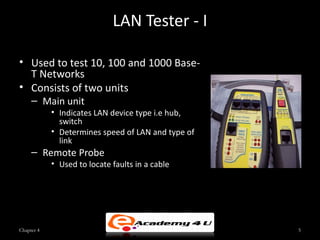
LAN Tester - I

• Used to test 10, 100 and 1000 Base-
  T Networks
• Consists of two units
     – Main unit
            • Indicates LAN device type i.e hub,
              switch
            • Determines speed of LAN and type of
              link
     – Remote Probe
            • Used to locate faults in a cable


Chapter 4                                           5
LAN Tester - II
• Functions of LAN tester
   – Verify PC to hub speed and data transmission
   – Check hub to hub data transmission
   – Determines any speed bottlenecks present on 10 and 100
     Base-T LANs
   – Continuously tracks LAN link
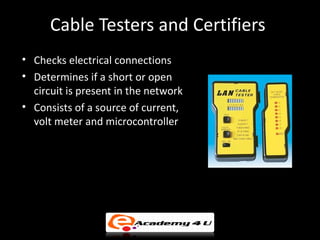
Cable Testers and Certifiers
• Checks electrical connections
• Determines if a short or open
  circuit is present in the network
• Consists of a source of current,
  volt meter and microcontroller
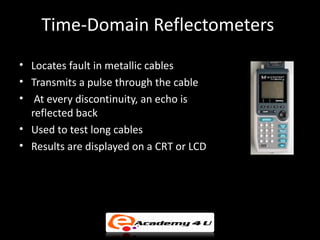
Time-Domain Reflectometers
• Locates fault in metallic cables
• Transmits a pulse through the cable
• At every discontinuity, an echo is
  reflected back
• Used to test long cables
• Results are displayed on a CRT or LCD
Protocol Analyzers - I
• It may be a software or hardware device
•   Captures packets from network
•    Analyzes captured packets
•   Analyzes the network traffic
•   Identifies bottlenecks in network
•   Operate on network layer
•   Identifies active systems on network
• Removes the faulty system from network
Protocol Analyzers - II
Types of protocol analyzers
  – Packet analyzer
      • Capture packets present on the wire and store them for
        analyzing later
      • Does a statistical analysis of the data captured but it is
        not its primary function
  – Statistical analyzers
      • Gather quantitative data to prepare a report on the
        different statistical trends
      • Does not store the packets for later analysis
Touchy Tools
• Used to identify network problems
• Problems are identified using asking various questions to
  user
• Analyzes current situation and compares it with set of
  baselines
• Adequate knowledge and experience is useful to
  determine problems
Backups
•   Used to preserves a copy of original files
•   Should be performed on regular basis
•   Useful when a data loss occurs
•   Restores system to previous state
Baselines
• Used to compare the system’s current performance with
  reference level set by the network administrator
• Determines possible network problems
• Performance monitor helps to set baselines
• Monitors both real time as well as historical data
• Baselines may change with time
Troubleshooting Model - I
• Steps of troubleshooting model
   – Establish the symptoms
   – Isolate the cause of the problem
   – Establish what has changed that might have caused the
     problem
   – Ask Isolating questions
Troubleshooting Model - II

–   Identify the most probable cause
–   Implement a solution
–   Test the solution
–   Recognize the potential effects of the solution
–   Document the solution
Four layer Model
• Four layers model
   – Hardware – Considers all the hardware related issues
    • Focuses on problems with network devices such as hubs,
       switches
   – Protocols – Deals with problems related to protocols
    • Checks the installation and configuration of protocols
   – Network – Considers the client and server concept
    • Determines which node will act as client and which will
       act as server
   – Shared Resources – Determines which resources are to be
     shared
Cable Testing and Certification - I
• Cable Distance
   – Measures the distance of a cable and helps to locate the
     point where a short or open is present
   – Speed of pulse depends on wires, type of insulation and
     external shielding
• Wire Map
   –                                  Used for twisted-pair
     installations
   – Detects split pairs
   – Detects crossed pair condition
Cable Testing and Certification - II
• Attenuation
   – Reduction in strength of signal
   – Cable Testers are used to measures loss of power
• Near-End Crosstalk
   – Transfer of electricity from one wire to another in the
     same cable
   – Causes
      • Untwisted patch cables
      • Crossed pairs
Cable Testing and Certification - III
• Network Monitoring and Protocol Decoding
   – Cable checkers monitor network traffic
      • Detects high or low level traffic
   – Locates loose cables
• Noise-Level Test
   – External signal that interfere with original signals
   – Measured in millivolts (mV)
• Testing Fiber
   – Fiber-optic cable testers use optical time-domain
     reflectometer which depend on the reflection of light
SNMP
•   Simple Network Management Protocol
•   Networking standard protocol
•   Used with TCP/IP networks
•   Monitors and manages the network
•   Helps to examine network performance
•   Detect network faults or inappropriate access
Potential Network connectivity
                  problem
• Causes of network connectivity problems
  –   Incorrect network adapters (NIC)
  –   Incorrect switch settings
  –   Faulty hardware
  –   Driver issues
  –   Upgradation of operating system
  –   Server relocation
  –   The network adapter is incompatible with the motherboard
Network Workstation Troubleshooting
                    Process
• Steps to troubleshoot network workstation
   –   Determine what stopped working
   –   Determine if failure is on a single user’s workstation
   –   Try to log onto the network
   –   Check the NIC’s link light
Netstat Command
•   Displays TCP/IP information
•   Determines which ports are active
•   Identifies ports that are vulnerable to attacks
•   Provides connection details
•   Provides data about TCP and UDP
Ipconfig Command
•   Displays all network settings
•   Identifies DHCP problems
•   Used with windows 2000 and later versions
•   Displays and resets DNS cache
•   Sets and displays DHCP class IDs for an adapter
Winipcfg Command
• Provides IP addressing details
• Used for windows 98 or earlier versions
• Provides details such as IP address, Subnet Mask, Default
  Gateway, DHCP Server, WINS Server, etc.
ARP Command
• Links IP address of a node with its hardware address
• Various ARP command options can be used to display or
  change the values in ARP table
Nbtstat Command
• Resolves NetBIOS name resolution problems
• Used when WINS server is not accessible
• displays protocol information and current TCP/IP
  connection using NetBIOS over TCP/IP (NBT)
Route Command
• Allows you to view and make changes in the IP routing
  table
• Used to differentiate between routes to hosts and routes
  to networks by reading the network address of the
  destination

Testing and troubleshooting networks

  • 1.
  • 2.
    Network troubleshooting Tools •The various tools available for checking the network are: – Software Tools – Hardware Tools – Touchy Tools
  • 3.
    Loopback Test • Signalis transmitted and it echos back • Echo signal compared with original signal • Tests the transmission path and tools used for transmission • Traces a faulty node in network • Requires a loopback plug Chapter 4 3
  • 4.
    Network Monitors • Detectand display problems present in the network • Provides data related to network traffic • Analyze data traffic to determine various network problems that can occur
  • 5.
    LAN Tester -I • Used to test 10, 100 and 1000 Base- T Networks • Consists of two units – Main unit • Indicates LAN device type i.e hub, switch • Determines speed of LAN and type of link – Remote Probe • Used to locate faults in a cable Chapter 4 5
  • 6.
    LAN Tester -II • Functions of LAN tester – Verify PC to hub speed and data transmission – Check hub to hub data transmission – Determines any speed bottlenecks present on 10 and 100 Base-T LANs – Continuously tracks LAN link
  • 7.
    Cable Testers andCertifiers • Checks electrical connections • Determines if a short or open circuit is present in the network • Consists of a source of current, volt meter and microcontroller
  • 8.
    Time-Domain Reflectometers • Locatesfault in metallic cables • Transmits a pulse through the cable • At every discontinuity, an echo is reflected back • Used to test long cables • Results are displayed on a CRT or LCD
  • 9.
    Protocol Analyzers -I • It may be a software or hardware device • Captures packets from network • Analyzes captured packets • Analyzes the network traffic • Identifies bottlenecks in network • Operate on network layer • Identifies active systems on network • Removes the faulty system from network
  • 10.
    Protocol Analyzers -II Types of protocol analyzers – Packet analyzer • Capture packets present on the wire and store them for analyzing later • Does a statistical analysis of the data captured but it is not its primary function – Statistical analyzers • Gather quantitative data to prepare a report on the different statistical trends • Does not store the packets for later analysis
  • 11.
    Touchy Tools • Usedto identify network problems • Problems are identified using asking various questions to user • Analyzes current situation and compares it with set of baselines • Adequate knowledge and experience is useful to determine problems
  • 12.
    Backups • Used to preserves a copy of original files • Should be performed on regular basis • Useful when a data loss occurs • Restores system to previous state
  • 13.
    Baselines • Used tocompare the system’s current performance with reference level set by the network administrator • Determines possible network problems • Performance monitor helps to set baselines • Monitors both real time as well as historical data • Baselines may change with time
  • 14.
    Troubleshooting Model -I • Steps of troubleshooting model – Establish the symptoms – Isolate the cause of the problem – Establish what has changed that might have caused the problem – Ask Isolating questions
  • 15.
    Troubleshooting Model -II – Identify the most probable cause – Implement a solution – Test the solution – Recognize the potential effects of the solution – Document the solution
  • 16.
    Four layer Model •Four layers model – Hardware – Considers all the hardware related issues • Focuses on problems with network devices such as hubs, switches – Protocols – Deals with problems related to protocols • Checks the installation and configuration of protocols – Network – Considers the client and server concept • Determines which node will act as client and which will act as server – Shared Resources – Determines which resources are to be shared
  • 17.
    Cable Testing andCertification - I • Cable Distance – Measures the distance of a cable and helps to locate the point where a short or open is present – Speed of pulse depends on wires, type of insulation and external shielding • Wire Map – Used for twisted-pair installations – Detects split pairs – Detects crossed pair condition
  • 18.
    Cable Testing andCertification - II • Attenuation – Reduction in strength of signal – Cable Testers are used to measures loss of power • Near-End Crosstalk – Transfer of electricity from one wire to another in the same cable – Causes • Untwisted patch cables • Crossed pairs
  • 19.
    Cable Testing andCertification - III • Network Monitoring and Protocol Decoding – Cable checkers monitor network traffic • Detects high or low level traffic – Locates loose cables • Noise-Level Test – External signal that interfere with original signals – Measured in millivolts (mV) • Testing Fiber – Fiber-optic cable testers use optical time-domain reflectometer which depend on the reflection of light
  • 20.
    SNMP • Simple Network Management Protocol • Networking standard protocol • Used with TCP/IP networks • Monitors and manages the network • Helps to examine network performance • Detect network faults or inappropriate access
  • 21.
    Potential Network connectivity problem • Causes of network connectivity problems – Incorrect network adapters (NIC) – Incorrect switch settings – Faulty hardware – Driver issues – Upgradation of operating system – Server relocation – The network adapter is incompatible with the motherboard
  • 22.
    Network Workstation Troubleshooting Process • Steps to troubleshoot network workstation – Determine what stopped working – Determine if failure is on a single user’s workstation – Try to log onto the network – Check the NIC’s link light
  • 23.
    Netstat Command • Displays TCP/IP information • Determines which ports are active • Identifies ports that are vulnerable to attacks • Provides connection details • Provides data about TCP and UDP
  • 24.
    Ipconfig Command • Displays all network settings • Identifies DHCP problems • Used with windows 2000 and later versions • Displays and resets DNS cache • Sets and displays DHCP class IDs for an adapter
  • 25.
    Winipcfg Command • ProvidesIP addressing details • Used for windows 98 or earlier versions • Provides details such as IP address, Subnet Mask, Default Gateway, DHCP Server, WINS Server, etc.
  • 26.
    ARP Command • LinksIP address of a node with its hardware address • Various ARP command options can be used to display or change the values in ARP table
  • 27.
    Nbtstat Command • ResolvesNetBIOS name resolution problems • Used when WINS server is not accessible • displays protocol information and current TCP/IP connection using NetBIOS over TCP/IP (NBT)
  • 28.
    Route Command • Allowsyou to view and make changes in the IP routing table • Used to differentiate between routes to hosts and routes to networks by reading the network address of the destination