Network Testing and
Debugging
TCP/IP CONCEPTS, WIRING, CONFIGURATING NETWORK, PROTOCOLS
S a d e e d A m e e n P O
s a d e e d a m e e n @ g m a i l . c o m
Testing and Debugging
 Testing activity is carried down to find the
defect in the network and its configurations.
 Identify and remove errors from computer
hardware or from network is termed as
debugging
09-03-2015sadeedameen@gmail.com
2
Possible points of failure
 The cable is plugged into the wrong network
 Host machine is plugged into the wrong network
 Host machine has a bad network card
 Machine is offline
 The web server may not be running
09-03-2015sadeedameen@gmail.com
3
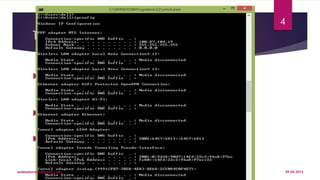
Testing the IP configuration
 Windows systems offer a command-line tool,
called ipconfig, that lets you find out your
computer's IP configuration
 The output of this command gives the IP
configuration for each interface
 a computer with two network cards and one
wireless adapter has 3 interfaces each with its
own configuration
09-03-2015sadeedameen@gmail.com
4
Testing the IP configuration cont
 The Ethernet interface connected to the local area network (network card) is not
active since the cable is disconnected, but the PPP adapter (MTS) is configured.
 Machines on a same network must use a same address range (with different
addresses) and a same subnet mask
 In the case of a local network, connecting machines that do not have routable
IP addresses, so-called private address ranges must be used
 The default gateway refers to, when applicable, the IP address of the machine
offering internet access. DNS servers
 The DNS servers must correspond to the organization's DNS servers; most of the
time these are the service provider's DNS servers
09-03-2015sadeedameen@gmail.com
5
Testing the connection
 To test the proper functioning of a network
 Ping utility is a highly practical utility provided as a standard feature
with most operating systems.
 Ping lets you send a data packet to a network computer and lets
you evaluate the response time
 ping -t 192.168.0.3 Ping the IP addresses of the network's computers
 ping -t Mickey Ping the computer names
 Ping –t www.google.com ping a domain name
09-03-2015sadeedameen@gmail.com
6
Testing the connection cont
09-03-2015sadeedameen@gmail.com
7
Network Testing
 Load Testing
 Stress Testing
 Negative Testing
 Inopportune Testing
 Conformance/Compliance Testing
 Line Speed Testing
 Performance Testing
 Robustness/Security Testing
 Interoperability Testing 09-03-2015sadeedameen@gmail.com
8
Load Testing
 Load testing is the process of putting demand on a system or device
and measuring its response. Load testing is performed to determine a
system's behavior under both normal and anticipated
peak loadconditions
 Where a system can support testing to actual volumes we have a
performance testing service to meet your requirements.
 Our network testing services provides comprehensive concurrent user
simulation of user and system traffic. This can be conducted while
concurrently generating threats and attacking traffic at high loads.
09-03-2015sadeedameen@gmail.com
9
Stress Testing
 Stress testing is a form of deliberately intense or thorough
testing used to determine the stability of a given nework.
 It involves testing beyond normal operational capacity,
often to a breaking point, in order to observe the results
 Stress testing is the process of determining the ability of a
network or device to maintain a certain level of
effectiveness under unfavorable conditions.
09-03-2015sadeedameen@gmail.com
10
Stress Testing
Actions involved may include:
 Running several resource-intensive applications in a single computer at
the same time
 Attempting to hack into a computer and use it as a zombie to
spreadspam
 Flooding a server with useless e-mail messages
 Making numerous, concurrent attempts to access a single Web site
 Attempting to infect a system with viruses, Trojans, spyware or
othermalware
09-03-2015sadeedameen@gmail.com
11
Negative Testing
 Process to verify that the device under test responds
correctly to error conditions or unacceptable input
conditions.
 Negative testing can be challenging because the
number of incorrect conditions is unlimited.
 Example of a negative test would be using a security
protocol for authentication with an incorrect parameter
09-03-2015sadeedameen@gmail.com
12
Inopportune Testing
 Process to verify that the device under test is able to
react properly when an unexpected event occurs
 The event is syntactically correct, but occurs when not
expected
 Inopportune testing is a specific instance of negative
protocol conformance testing.
09-03-2015sadeedameen@gmail.com
13
Conformance/Compliance Testing
 Testing both the capabilities and behavior of an implementation, and
checking what is observed against the conformance requirements in the
relevant International Standards.(ISO/IEC 9646-1:1994(E))
 testing to see if the device under test operates according to that
requirement
 This is done by creating a series of single function tests for each
requirement, resulting in thousands of tests
 An example of a conformance test is to check if the “ping” command
operates correctly.
09-03-2015sadeedameen@gmail.com
14
Line Speed Testing
 Process of verifying that a device can operate at its rated
line speed, when the bandwidth is 100% utilized or saturated.
 process of subjecting the device under test to out of
boundary conditions
 For example, if the device is rated as operating at 5 Giga
bytes per second, then the device should be able to handle
incoming traffic utilizing all the available bandwidth
09-03-2015sadeedameen@gmail.com
15
Performance Testing
 Process of verifying that the performance of the
device under test meets an acceptable level
 Performance testing is a superset of line speed
testing in which performance applies to many
aspects of a network device or application,
and not just line speed.
09-03-2015sadeedameen@gmail.com
16
Robustness/Security Testing
 Process of subjecting a device under test to particular input streams
 The input streams may be one of three types:
 Random input streams
 Valid input streams
 Invalid input streams
 Security testing is more broadly defined to include monitoring /
surveillance and the detection of specific exploits like IP spoofing or
phishing etc
09-03-2015sadeedameen@gmail.com
17
Interoperability Testing
 Process of testing devices from multiple manufacturers by interacting
in such a manner as to exercise the network protocol under test
 Interoperability testing is very useful in the early stages of a new
product
 As products mature, interoperability testing becomes less valuable as
it does not uncover enough new bugs to warrant the cost of setting
up, configuring and managing network equipment from various
manufacturers.
09-03-2015sadeedameen@gmail.com
18
Network Testing and Debugging
Penetration testing
09-03-2015sadeedameen@gmail.com
19
Penetration testing
 Evaluating the security of a network by hacking.
Basically, it is an analysis of system for any potential
vulnerabilities that may result from any of the following:
Poor or improper system configuration
Known and / or unknown hardware or software
flaws
Operational weaknesses in process
Technical countermeasures
09-03-2015sadeedameen@gmail.com
20
Penetration testing cont
Importance of PenetrationTesting:
 It prevents financial loss through from hackers or extortionists or
disgruntled employees
 It prevents financial loss through unreliable business systems and
processes
 From an operational perspective, penetration testing helps shape
information security strategy.
 It protects your brand by avoiding loss of consumer confidence
and business reputation.
09-03-2015sadeedameen@gmail.com
21
Basic Network Troubleshooting Tools
Ping
 The most commonly used network tool is the ping utility
 This utility is used to provide a basic connectivity test between the
requesting host and a destination host.
 This is done by using the Internet Control Message Protocol (ICMP)
which has the ability to send an echo packet to a destination host
and a mechanism to listen for a response from this host
09-03-2015sadeedameen@gmail.com
22
Tracert/traceroute
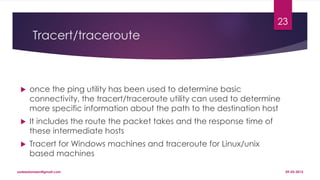
 once the ping utility has been used to determine basic
connectivity, the tracert/traceroute utility can used to determine
more specific information about the path to the destination host
 It includes the route the packet takes and the response time of
these intermediate hosts
 Tracert for Windows machines and traceroute for Linux/unix
based machines
09-03-2015sadeedameen@gmail.com
23
Tracert/traceroute cont
09-03-2015sadeedameen@gmail.com
24
Ipconfig/ifconfig
 The utilities that can be used to find out this IP configuration
information include the ipconfig utility on Windows machines and
the ifconfig utility on Linux/unix based machines.
 One of the most important things that must be completed when
troubleshooting a networking issue is to find out the specific IP
configuration of the variously affected hosts
09-03-2015sadeedameen@gmail.com
25
Ipconfig/ifconfig cont
09-03-2015sadeedameen@gmail.com
26
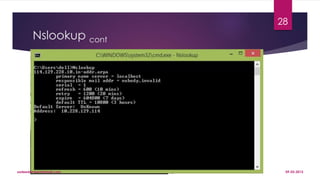
Nslookup
 Some of the most common networking issues revolve around issues with
Dynamic Name System (DNS) address resolution issues.
 The nslookup utility can be used to lookup the specific IP address(es)
associated with a domain name. If this utility is unable to resolve this
information, there is a DNS issue
 Along with simple lookup, the nslookup utility is able to query specific
DNS servers to determine an issue with the default DNS servers
configured on a host
09-03-2015sadeedameen@gmail.com
27
Nslookup cont
09-03-2015sadeedameen@gmail.com
28
Netstat
 the current state of the active network
connections on a host
 It is also possible to use the netstat utility to
determine which services on a host that is
associated with specific active ports
09-03-2015sadeedameen@gmail.com
29
09-03-2015sadeedameen@gmail.com
30
PuTTY/Tera Term
 When connecting to a variety of different types of
equipment, a telnet, SSH or serial client is required; when
this is required both the puTTY and Tera Term programs are
able to provide these functionalities.
 The selection of one over the other is strictly a personal
preference.
09-03-2015sadeedameen@gmail.com
31
PuTTY/Tera Term cont
09-03-2015sadeedameen@gmail.com
32
Subnet and IP Calculator
 These can be used to unsure a correct IP address selection and with
this a correct IP address configuration
 While this type of tool is used by senior level network engineers, much of
the information obtained from the tool becomes simpler to calculate
the longer and more experience you have in the field
 Two of the more commonly used free IP calculators include
Wildpackets (Bitcricket) Network Calculator and Solarwinds Advanced
Subnet Calculator
09-03-2015sadeedameen@gmail.com
33
Subnet and IP Calculator cont
09-03-2015sadeedameen@gmail.com
34
Speedtest.net/pingtest.net
 A very easy test that can be used to both determine the Internet bandwidth
available to a specific host and to determine the quality of an Internet
connection is the use of the tools available at the speedtest.net and
pingtest.net websites
 The speedtest.net site provides the ability to determine the amount of
bandwidth that is available to a specific host at a specific point in time
 This is a good tool to use when measuring how long it is going to take to
upload or download information from a local to remote host
 The pingtest.net website is used to determine the quality of the connection by
measuring the ping response times and jitter amounts over a short period of
time. 09-03-2015sadeedameen@gmail.com
35
Speedtest.net/pingtest.net cont
 This information can be used to determine a likelihood
of how well the measured connection will deal with
certain types of high demand traffic like Voice over IP
(VoIP) or gaming
09-03-2015sadeedameen@gmail.com
36
Speedtest.net/pingtest.net cont
09-03-2015sadeedameen@gmail.com
37
Speedtest.net/pingtest.net cont
09-03-2015sadeedameen@gmail.com
38
Pathping/mtr
 In an effort to take advantage of the benefits of both
the ping and tracert/traceroute commands, the
pathping and mtr utilities were developed
 Both of these tools take the functionality and
information that can be obtained from these types of
tools and provide a more detailed single picture of the
path characteristics from a specific host to a specific
destination
09-03-2015sadeedameen@gmail.com
39
Pathping/mtr->Pathping
09-03-2015sadeedameen@gmail.com
40
Pathping/mtr->mtr
09-03-2015sadeedameen@gmail.com
41
Route
This utility is used to display the current status of the routing table on a host
09-03-2015sadeedameen@gmail.com
42
09-03-2015sadeedameen@gmail.com
43

Network testing and debugging

  • 1.
    Network Testing and Debugging TCP/IPCONCEPTS, WIRING, CONFIGURATING NETWORK, PROTOCOLS S a d e e d A m e e n P O s a d e e d a m e e n @ g m a i l . c o m
  • 2.
    Testing and Debugging Testing activity is carried down to find the defect in the network and its configurations.  Identify and remove errors from computer hardware or from network is termed as debugging 09-03-2015sadeedameen@gmail.com 2
  • 3.
    Possible points offailure  The cable is plugged into the wrong network  Host machine is plugged into the wrong network  Host machine has a bad network card  Machine is offline  The web server may not be running 09-03-2015sadeedameen@gmail.com 3
  • 4.
    Testing the IPconfiguration  Windows systems offer a command-line tool, called ipconfig, that lets you find out your computer's IP configuration  The output of this command gives the IP configuration for each interface  a computer with two network cards and one wireless adapter has 3 interfaces each with its own configuration 09-03-2015sadeedameen@gmail.com 4
  • 5.
    Testing the IPconfiguration cont  The Ethernet interface connected to the local area network (network card) is not active since the cable is disconnected, but the PPP adapter (MTS) is configured.  Machines on a same network must use a same address range (with different addresses) and a same subnet mask  In the case of a local network, connecting machines that do not have routable IP addresses, so-called private address ranges must be used  The default gateway refers to, when applicable, the IP address of the machine offering internet access. DNS servers  The DNS servers must correspond to the organization's DNS servers; most of the time these are the service provider's DNS servers 09-03-2015sadeedameen@gmail.com 5
  • 6.
    Testing the connection To test the proper functioning of a network  Ping utility is a highly practical utility provided as a standard feature with most operating systems.  Ping lets you send a data packet to a network computer and lets you evaluate the response time  ping -t 192.168.0.3 Ping the IP addresses of the network's computers  ping -t Mickey Ping the computer names  Ping –t www.google.com ping a domain name 09-03-2015sadeedameen@gmail.com 6
  • 7.
    Testing the connectioncont 09-03-2015sadeedameen@gmail.com 7
  • 8.
    Network Testing  LoadTesting  Stress Testing  Negative Testing  Inopportune Testing  Conformance/Compliance Testing  Line Speed Testing  Performance Testing  Robustness/Security Testing  Interoperability Testing 09-03-2015sadeedameen@gmail.com 8
  • 9.
    Load Testing  Loadtesting is the process of putting demand on a system or device and measuring its response. Load testing is performed to determine a system's behavior under both normal and anticipated peak loadconditions  Where a system can support testing to actual volumes we have a performance testing service to meet your requirements.  Our network testing services provides comprehensive concurrent user simulation of user and system traffic. This can be conducted while concurrently generating threats and attacking traffic at high loads. 09-03-2015sadeedameen@gmail.com 9
  • 10.
    Stress Testing  Stresstesting is a form of deliberately intense or thorough testing used to determine the stability of a given nework.  It involves testing beyond normal operational capacity, often to a breaking point, in order to observe the results  Stress testing is the process of determining the ability of a network or device to maintain a certain level of effectiveness under unfavorable conditions. 09-03-2015sadeedameen@gmail.com 10
  • 11.
    Stress Testing Actions involvedmay include:  Running several resource-intensive applications in a single computer at the same time  Attempting to hack into a computer and use it as a zombie to spreadspam  Flooding a server with useless e-mail messages  Making numerous, concurrent attempts to access a single Web site  Attempting to infect a system with viruses, Trojans, spyware or othermalware 09-03-2015sadeedameen@gmail.com 11
  • 12.
    Negative Testing  Processto verify that the device under test responds correctly to error conditions or unacceptable input conditions.  Negative testing can be challenging because the number of incorrect conditions is unlimited.  Example of a negative test would be using a security protocol for authentication with an incorrect parameter 09-03-2015sadeedameen@gmail.com 12
  • 13.
    Inopportune Testing  Processto verify that the device under test is able to react properly when an unexpected event occurs  The event is syntactically correct, but occurs when not expected  Inopportune testing is a specific instance of negative protocol conformance testing. 09-03-2015sadeedameen@gmail.com 13
  • 14.
    Conformance/Compliance Testing  Testingboth the capabilities and behavior of an implementation, and checking what is observed against the conformance requirements in the relevant International Standards.(ISO/IEC 9646-1:1994(E))  testing to see if the device under test operates according to that requirement  This is done by creating a series of single function tests for each requirement, resulting in thousands of tests  An example of a conformance test is to check if the “ping” command operates correctly. 09-03-2015sadeedameen@gmail.com 14
  • 15.
    Line Speed Testing Process of verifying that a device can operate at its rated line speed, when the bandwidth is 100% utilized or saturated.  process of subjecting the device under test to out of boundary conditions  For example, if the device is rated as operating at 5 Giga bytes per second, then the device should be able to handle incoming traffic utilizing all the available bandwidth 09-03-2015sadeedameen@gmail.com 15
  • 16.
    Performance Testing  Processof verifying that the performance of the device under test meets an acceptable level  Performance testing is a superset of line speed testing in which performance applies to many aspects of a network device or application, and not just line speed. 09-03-2015sadeedameen@gmail.com 16
  • 17.
    Robustness/Security Testing  Processof subjecting a device under test to particular input streams  The input streams may be one of three types:  Random input streams  Valid input streams  Invalid input streams  Security testing is more broadly defined to include monitoring / surveillance and the detection of specific exploits like IP spoofing or phishing etc 09-03-2015sadeedameen@gmail.com 17
  • 18.
    Interoperability Testing  Processof testing devices from multiple manufacturers by interacting in such a manner as to exercise the network protocol under test  Interoperability testing is very useful in the early stages of a new product  As products mature, interoperability testing becomes less valuable as it does not uncover enough new bugs to warrant the cost of setting up, configuring and managing network equipment from various manufacturers. 09-03-2015sadeedameen@gmail.com 18
  • 19.
    Network Testing andDebugging Penetration testing 09-03-2015sadeedameen@gmail.com 19
  • 20.
    Penetration testing  Evaluatingthe security of a network by hacking. Basically, it is an analysis of system for any potential vulnerabilities that may result from any of the following: Poor or improper system configuration Known and / or unknown hardware or software flaws Operational weaknesses in process Technical countermeasures 09-03-2015sadeedameen@gmail.com 20
  • 21.
    Penetration testing cont Importanceof PenetrationTesting:  It prevents financial loss through from hackers or extortionists or disgruntled employees  It prevents financial loss through unreliable business systems and processes  From an operational perspective, penetration testing helps shape information security strategy.  It protects your brand by avoiding loss of consumer confidence and business reputation. 09-03-2015sadeedameen@gmail.com 21
  • 22.
    Basic Network TroubleshootingTools Ping  The most commonly used network tool is the ping utility  This utility is used to provide a basic connectivity test between the requesting host and a destination host.  This is done by using the Internet Control Message Protocol (ICMP) which has the ability to send an echo packet to a destination host and a mechanism to listen for a response from this host 09-03-2015sadeedameen@gmail.com 22
  • 23.
    Tracert/traceroute  once theping utility has been used to determine basic connectivity, the tracert/traceroute utility can used to determine more specific information about the path to the destination host  It includes the route the packet takes and the response time of these intermediate hosts  Tracert for Windows machines and traceroute for Linux/unix based machines 09-03-2015sadeedameen@gmail.com 23
  • 24.
  • 25.
    Ipconfig/ifconfig  The utilitiesthat can be used to find out this IP configuration information include the ipconfig utility on Windows machines and the ifconfig utility on Linux/unix based machines.  One of the most important things that must be completed when troubleshooting a networking issue is to find out the specific IP configuration of the variously affected hosts 09-03-2015sadeedameen@gmail.com 25
  • 26.
  • 27.
    Nslookup  Some ofthe most common networking issues revolve around issues with Dynamic Name System (DNS) address resolution issues.  The nslookup utility can be used to lookup the specific IP address(es) associated with a domain name. If this utility is unable to resolve this information, there is a DNS issue  Along with simple lookup, the nslookup utility is able to query specific DNS servers to determine an issue with the default DNS servers configured on a host 09-03-2015sadeedameen@gmail.com 27
  • 28.
  • 29.
    Netstat  the currentstate of the active network connections on a host  It is also possible to use the netstat utility to determine which services on a host that is associated with specific active ports 09-03-2015sadeedameen@gmail.com 29
  • 30.
  • 31.
    PuTTY/Tera Term  Whenconnecting to a variety of different types of equipment, a telnet, SSH or serial client is required; when this is required both the puTTY and Tera Term programs are able to provide these functionalities.  The selection of one over the other is strictly a personal preference. 09-03-2015sadeedameen@gmail.com 31
  • 32.
  • 33.
    Subnet and IPCalculator  These can be used to unsure a correct IP address selection and with this a correct IP address configuration  While this type of tool is used by senior level network engineers, much of the information obtained from the tool becomes simpler to calculate the longer and more experience you have in the field  Two of the more commonly used free IP calculators include Wildpackets (Bitcricket) Network Calculator and Solarwinds Advanced Subnet Calculator 09-03-2015sadeedameen@gmail.com 33
  • 34.
    Subnet and IPCalculator cont 09-03-2015sadeedameen@gmail.com 34
  • 35.
    Speedtest.net/pingtest.net  A veryeasy test that can be used to both determine the Internet bandwidth available to a specific host and to determine the quality of an Internet connection is the use of the tools available at the speedtest.net and pingtest.net websites  The speedtest.net site provides the ability to determine the amount of bandwidth that is available to a specific host at a specific point in time  This is a good tool to use when measuring how long it is going to take to upload or download information from a local to remote host  The pingtest.net website is used to determine the quality of the connection by measuring the ping response times and jitter amounts over a short period of time. 09-03-2015sadeedameen@gmail.com 35
  • 36.
    Speedtest.net/pingtest.net cont  Thisinformation can be used to determine a likelihood of how well the measured connection will deal with certain types of high demand traffic like Voice over IP (VoIP) or gaming 09-03-2015sadeedameen@gmail.com 36
  • 37.
  • 38.
  • 39.
    Pathping/mtr  In aneffort to take advantage of the benefits of both the ping and tracert/traceroute commands, the pathping and mtr utilities were developed  Both of these tools take the functionality and information that can be obtained from these types of tools and provide a more detailed single picture of the path characteristics from a specific host to a specific destination 09-03-2015sadeedameen@gmail.com 39
  • 40.
  • 41.
  • 42.
    Route This utility isused to display the current status of the routing table on a host 09-03-2015sadeedameen@gmail.com 42
  • 43.