SyAM Software 
Solutions Overview
About SyAM Software 
• SyAM Software is a developer of Management solutions that help 
Small, Medium, & Enterprises operate more efficiently through 
proactive systems management and saving money through 
intelligent, automated power management. 
• SyAM Software is a leading management technology enabler to 
global System Providers enabling them to compete against Dell, HP 
and IBM 
• A global company with reach into North America, South America, 
Europe, Asia, and emerging markets 
• A provider of certified management solutions with all Intel® based 
platforms 
2
Benefits – Simplifying your IT Infrastructure 
SyAM’s Management Software Suite centralizes and provides benefits to 8 
core IT Solutions, ranging from Asset Management to Software Deployment. 
• Guaranteed Energy Savings 
– With intelligent systems management from SyAM, you can see a ROI in just a 
few months. Easily set policies to control power consumption and save 
substantial amounts of money 
• 24/7 Monitoring and Alerting 
– Set up alerts to stay in control, and always be aware of all situations that could 
possibly slow down productivity 
• Maximize Efficiency 
– Without knowing how your systems have performed in the past, it is impossible 
to improve their performance in the future. By having reports available, IT 
managers can properly manager their entire IT infrastructure to ensure the 
proper policies are in place to expand the life expectancy of machines while also 
decreasing the cost of electricity. 
3
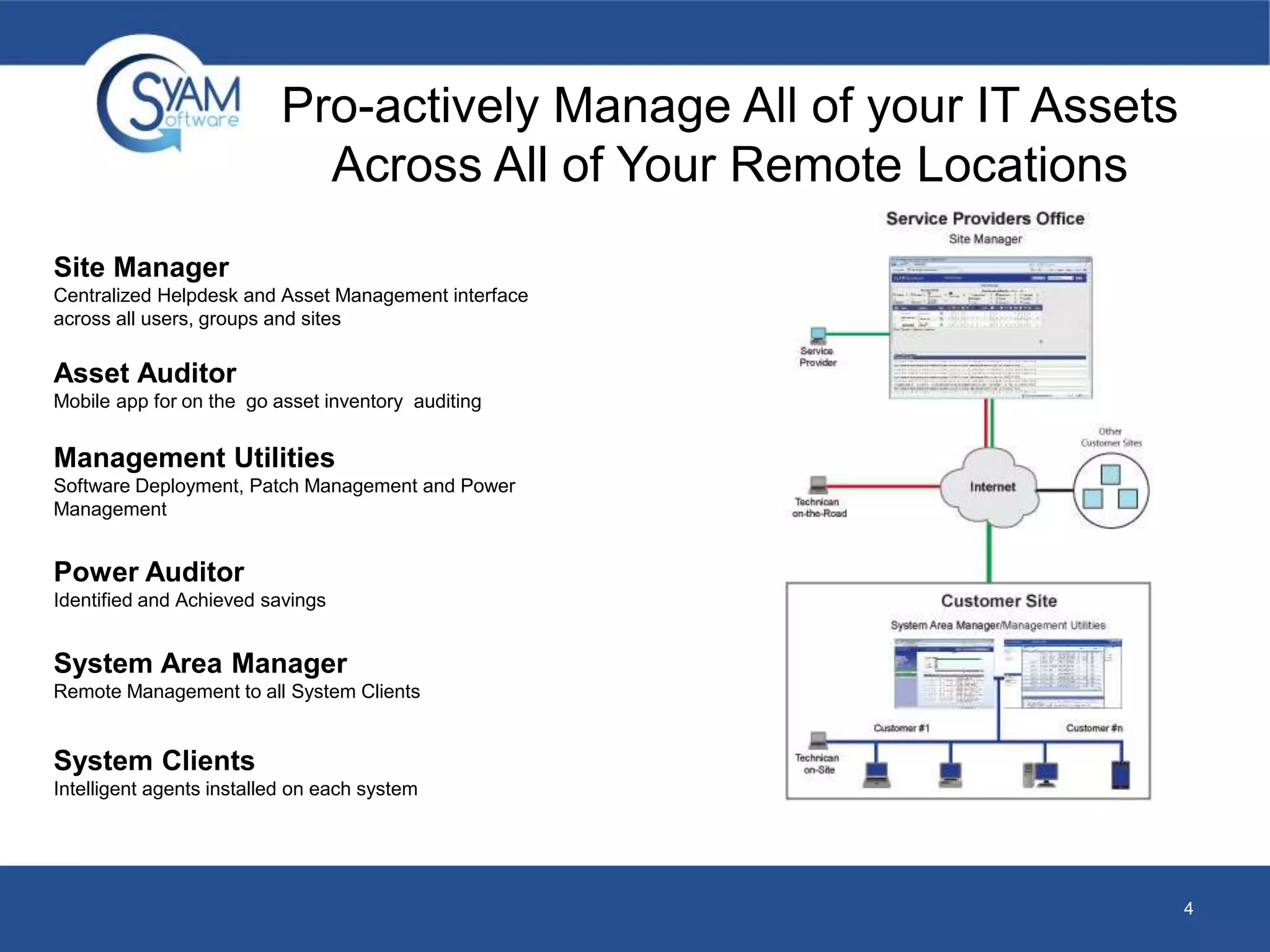
Pro-actively Manage All of your IT Assets 
Across All of Your Remote Locations 
Site Manager 
Centralized Helpdesk and Asset Management interface 
across all users, groups and sites 
System Area Manager 
Remote Management to all System Clients 
System Clients 
Intelligent agents installed on each system 
4 
Asset Auditor 
Mobile app for on the go asset inventory auditing 
Management Utilities 
Software Deployment, Patch Management and Power 
Management 
Power Auditor 
Identified and Achieved savings
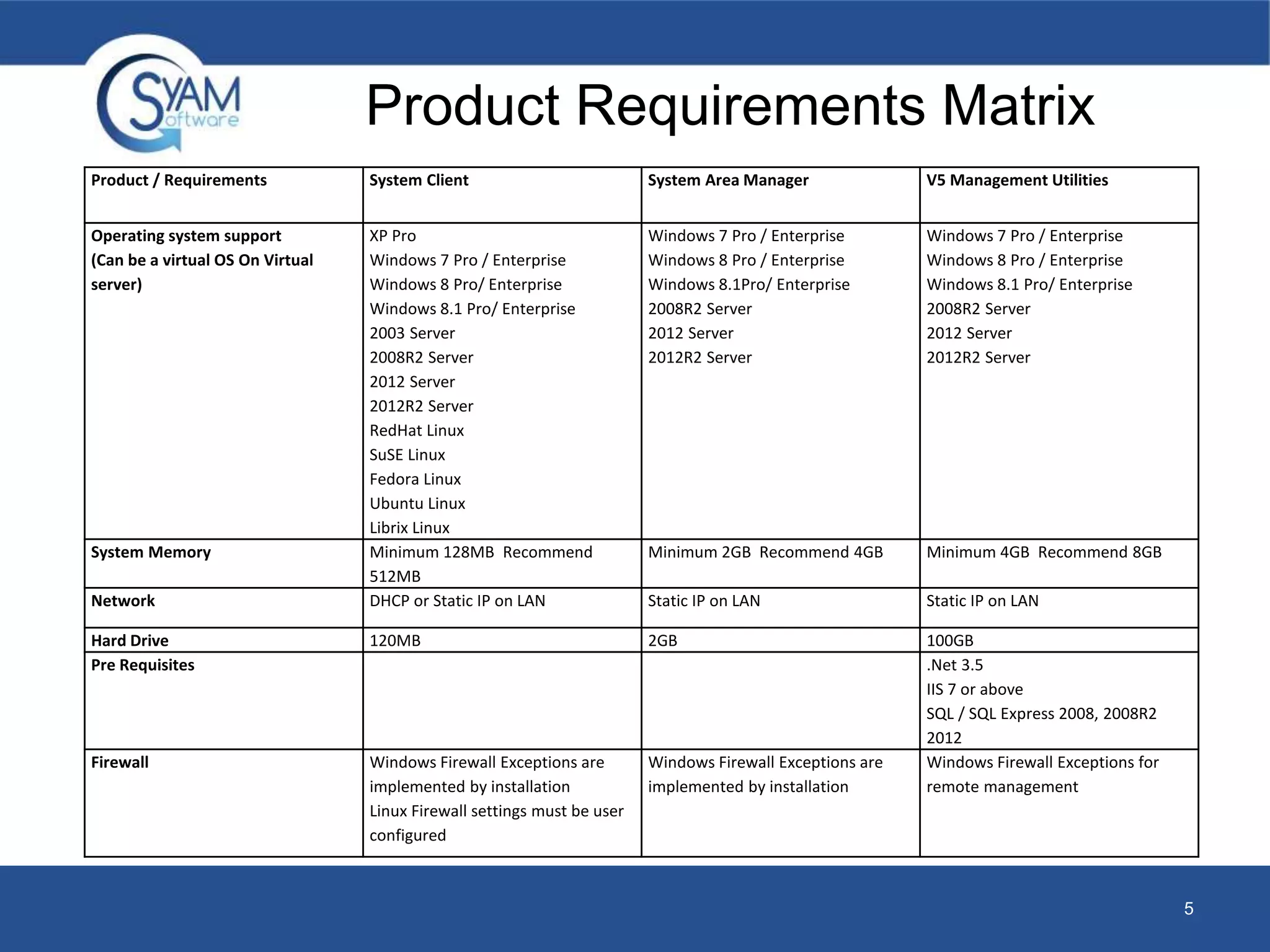
Product Requirements Matrix 
Product / Requirements System Client System Area Manager V5 Management Utilities 
Operating system support 
(Can be a virtual OS On Virtual 
server) 
XP Pro 
Windows 7 Pro / Enterprise 
Windows 8 Pro/ Enterprise 
Windows 8.1 Pro/ Enterprise 
2003 Server 
2008R2 Server 
2012 Server 
2012R2 Server 
RedHat Linux 
SuSE Linux 
Fedora Linux 
Ubuntu Linux 
Librix Linux 
Windows 7 Pro / Enterprise 
Windows 8 Pro / Enterprise 
Windows 8.1Pro/ Enterprise 
2008R2 Server 
2012 Server 
2012R2 Server 
Windows 7 Pro / Enterprise 
Windows 8 Pro / Enterprise 
Windows 8.1 Pro/ Enterprise 
2008R2 Server 
2012 Server 
2012R2 Server 
System Memory Minimum 128MB Recommend 
512MB 
Minimum 2GB Recommend 4GB Minimum 4GB Recommend 8GB 
Network DHCP or Static IP on LAN Static IP on LAN Static IP on LAN 
Hard Drive 120MB 2GB 100GB 
Pre Requisites .Net 3.5 
IIS 7 or above 
SQL / SQL Express 2008, 2008R2 
2012 
Firewall Windows Firewall Exceptions are 
implemented by installation 
Linux Firewall settings must be user 
configured 
Windows Firewall Exceptions are 
implemented by installation 
Windows Firewall Exceptions for 
remote management 
5
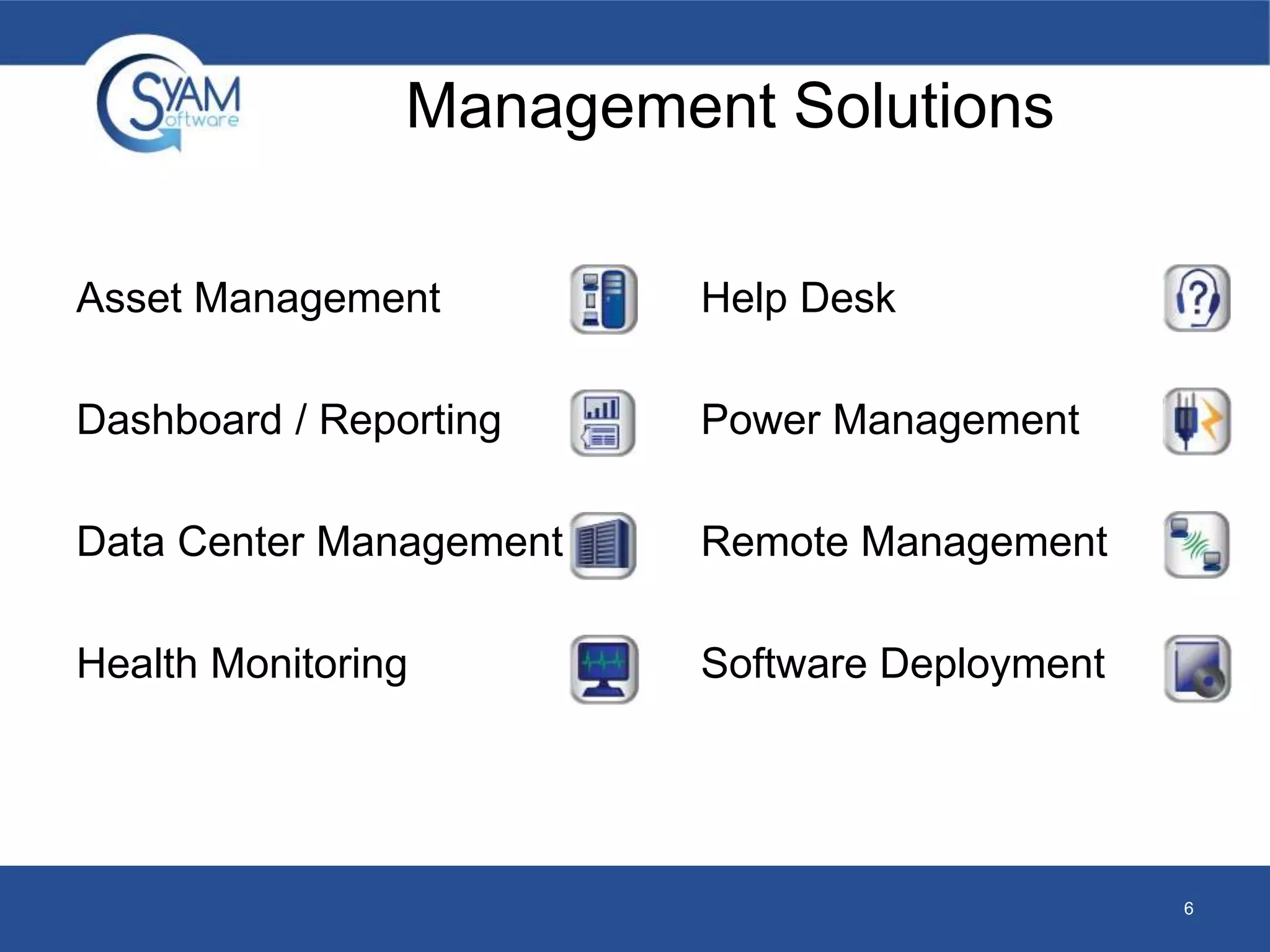
Management Solutions 
Asset Management 
Dashboard / Reporting 
Data Center Management 
Health Monitoring 
Help Desk 
Power Management 
Remote Management 
Software Deployment 
6
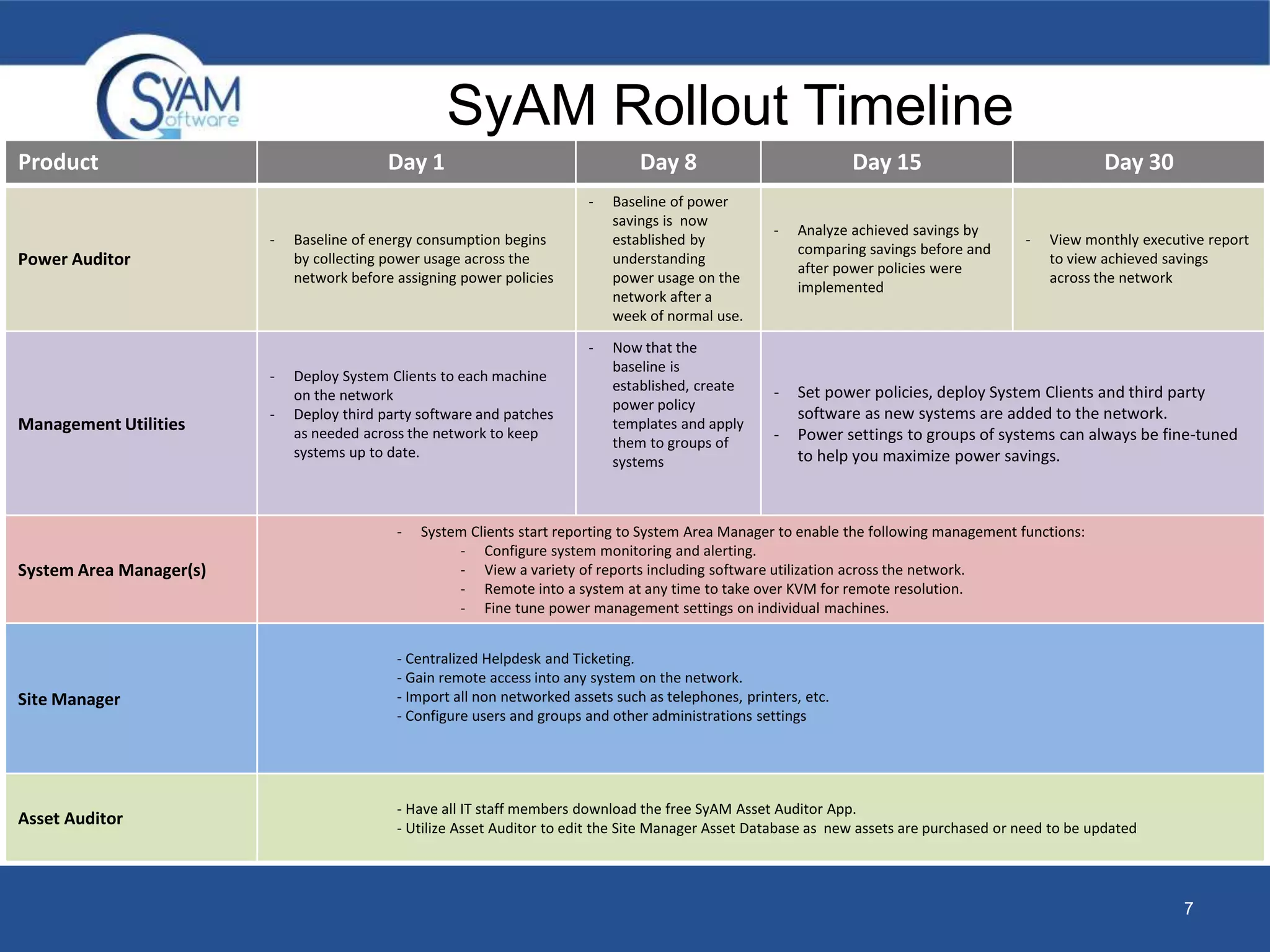
SyAM Rollout Timeline 
7 
Product Day 1 Day 8 Day 15 Day 30 
Power Auditor 
- Baseline of energy consumption begins 
by collecting power usage across the 
network before assigning power policies 
- Baseline of power 
savings is now 
established by 
understanding 
power usage on the 
network after a 
week of normal use. 
- Analyze achieved savings by 
comparing savings before and 
after power policies were 
implemented 
- View monthly executive report 
to view achieved savings 
across the network 
Management Utilities 
- Deploy System Clients to each machine 
on the network 
- Deploy third party software and patches 
as needed across the network to keep 
systems up to date. 
- Now that the 
baseline is 
established, create 
power policy 
templates and apply 
them to groups of 
systems 
- Set power policies, deploy System Clients and third party 
software as new systems are added to the network. 
- Power settings to groups of systems can always be fine-tuned 
to help you maximize power savings. 
System Area Manager(s) 
- System Clients start reporting to System Area Manager to enable the following management functions: 
- Configure system monitoring and alerting. 
- View a variety of reports including software utilization across the network. 
- Remote into a system at any time to take over KVM for remote resolution. 
- Fine tune power management settings on individual machines. 
Site Manager 
- Centralized Helpdesk and Ticketing. 
- Gain remote access into any system on the network. 
- Import all non networked assets such as telephones, printers, etc. 
- Configure users and groups and other administrations settings 
Asset Auditor 
- Have all IT staff members download the free SyAM Asset Auditor App. 
- Utilize Asset Auditor to edit the Site Manager Asset Database as new assets are purchased or need to be updated
ASSET MANAGEMENT 
MAKE MORE CALCULATED FINANCIAL DECISIONS 
8
Asset Management 
• By knowing what you have, where its located, how its configured, 
and utilized, you can make more calculated financial decisions 
about what will be needed in the upcoming system refresh cycle, 
including hardware upgrades, application license renewal, or 
maintenance contracts. 
• SyAM dynamically detects computer assets down to hardware serial 
numbers or application versions. SyAM also enables non computer 
assets to be fully managed within the same system, and reported 
upon centrally. 
9
Asset Management 
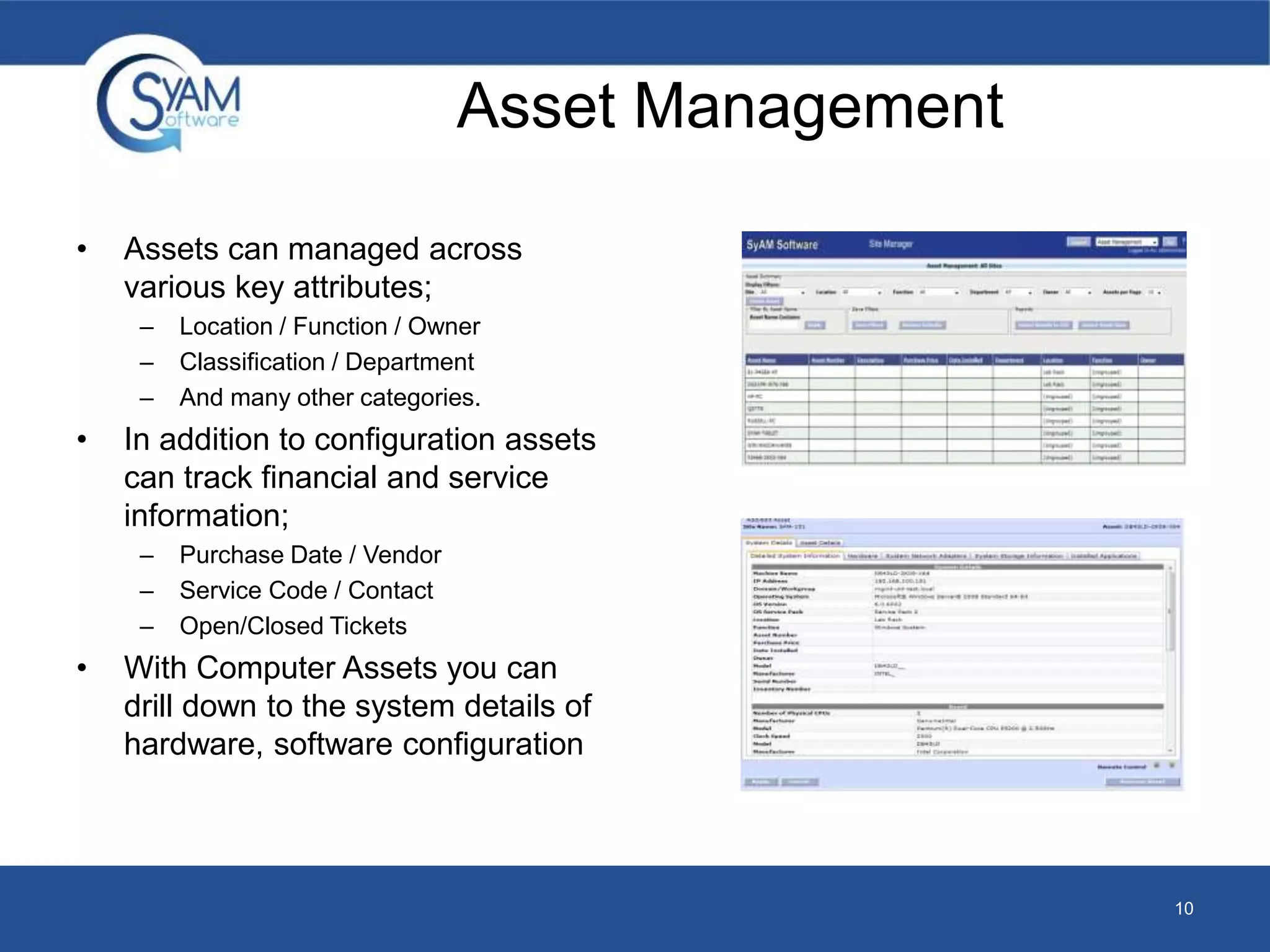
• Assets can managed across 
various key attributes; 
– Location / Function / Owner 
– Classification / Department 
– And many other categories. 
• In addition to configuration assets 
can track financial and service 
information; 
– Purchase Date / Vendor 
– Service Code / Contact 
– Open/Closed Tickets 
• With Computer Assets you can 
drill down to the system details of 
hardware, software configuration 
10
Asset Auditor Mobile App 
• Audit IT Asset Information on the Go 
– Add new assets and edit existing fields on the go. Verify assets are in the right location and 
being used by the right staff members 
• Utilize Barcodes and QR Codes 
– Pull up asset information by utilizing a Barcode or QR code (supports Code 128, ISBN and 
QR codes. This will save you time by eliminating the pain of manually entering long asset 
names or serial numbers. 
• Full Administrator Control 
– Anyone with access to the network can use Asset Auditor Have the peace of mind that all 
changes made must be approved by an administrator before the Site Manager Asset 
Management database is updated. 
• Log a Photo of the Asset 
– Use the camera on your mobile device to provide a picture of the asset to make it easier to 
identify in the future. 
• GPS Locations 
– When auditing assets you can record the GPS coordinates. From Site Manager, you can 
view the location in Google Maps. If the location of the asset ever changes you can always 
update it. 
• Available in the App Store and Google Play 
11
Asset Auditor Mobile App 
12 
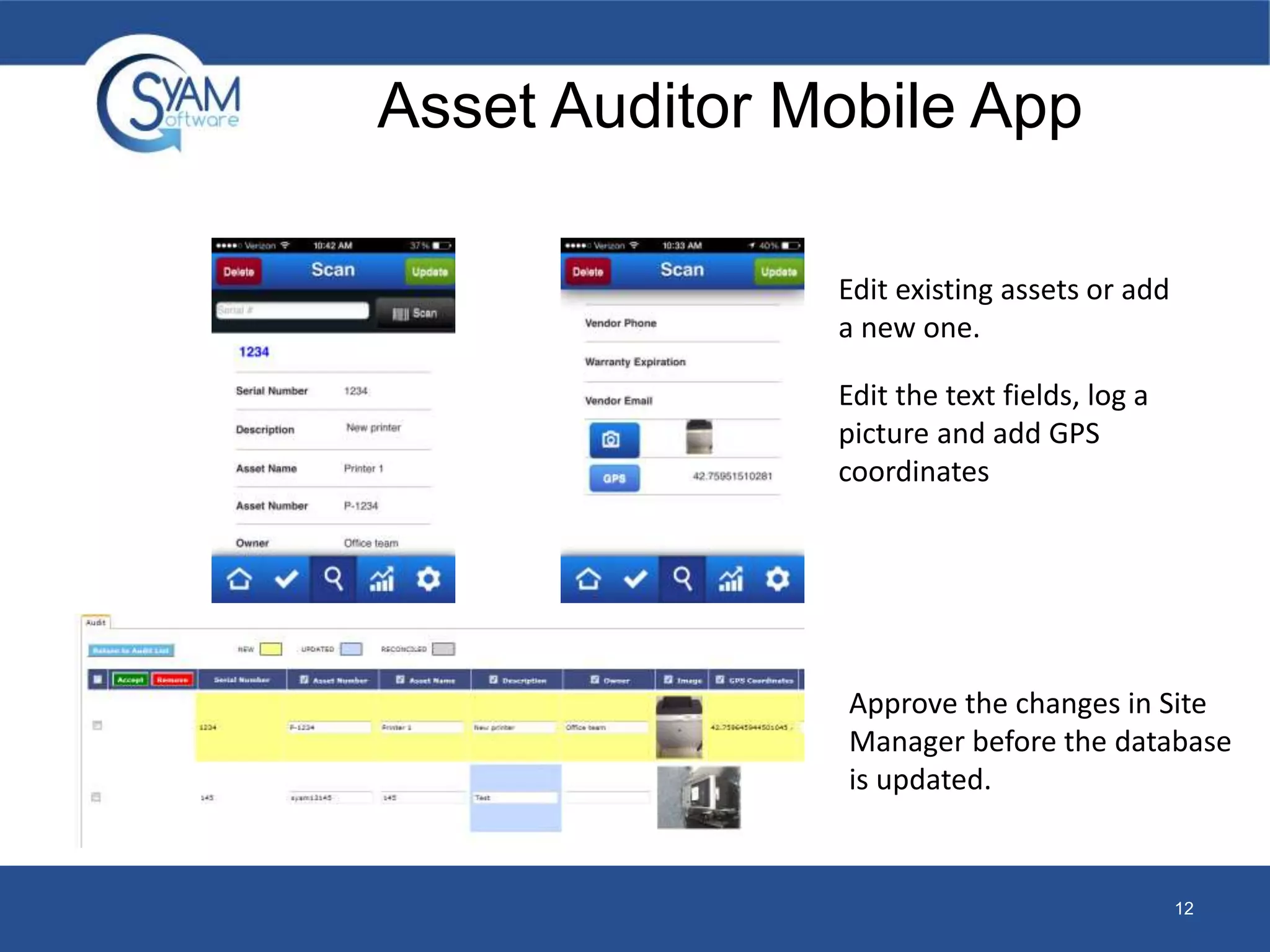
Edit existing assets or add 
a new one. 
Edit the text fields, log a 
picture and add GPS 
coordinates 
Approve the changes in Site 
Manager before the database 
is updated.
DASHBOARD/REPORTING 
EQUIPPING IT WITH THE INFORMATION THEY NEED 
13
Dashboard/Reporting 
• The Dashboards and reporting capabilities keep IT informed of all 
managed systems status, configuration, and provides simple visual 
indicators for problem systems to allow quick resolution. 
• Through integrated reporting at all levels you can fully understand 
what assets you have, their change history, and utilization levels 
enabling them to relocate where needed. The reporting is available 
at anytime from anywhere on the network providing reports on 
power savings, asset service history, application utilization and 
more. 
14
Dashboard/Reporting 
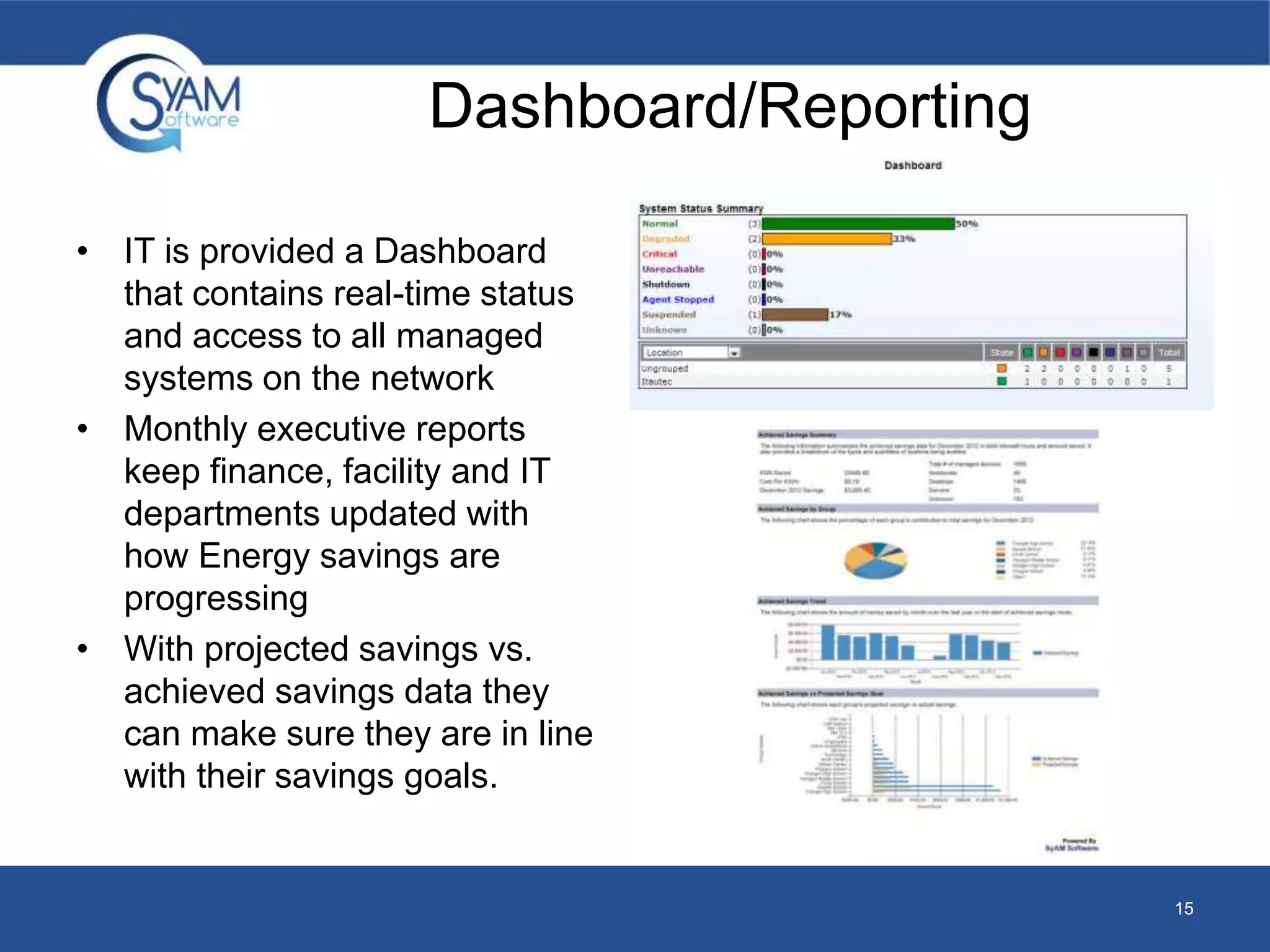
• IT is provided a Dashboard 
that contains real-time status 
and access to all managed 
systems on the network 
• Monthly executive reports 
keep finance, facility and IT 
departments updated with 
how Energy savings are 
progressing 
• With projected savings vs. 
achieved savings data they 
can make sure they are in line 
with their savings goals. 
15
DATA CENTER MANAGEMENT 
UNDERSTAND THE REAL TIME STATUS OF YOUR SERVER 
16
Data Center Management 
• With today’s powerful enterprise servers, data centers continue to 
heat up and require more power for the cooling of servers. SyAM 
gives you control through a single interface to fully understand the 
real-time status of the server room, from power consumption to 
temperatures, and utilization levels. This information makes it 
possible for you to make accurate decisions to truly improve server 
room efficiencies. 
• SyAM’s Data Center Management intelligent policies allow you to 
reduce server power consumption by reducing operating 
temperatures at non critical operational times. By controlling 
temperatures you not only reduce server energy costs, but also data 
center cooling systems that won’t need to be powered up as 
frequently. 
17
Data Center Management 
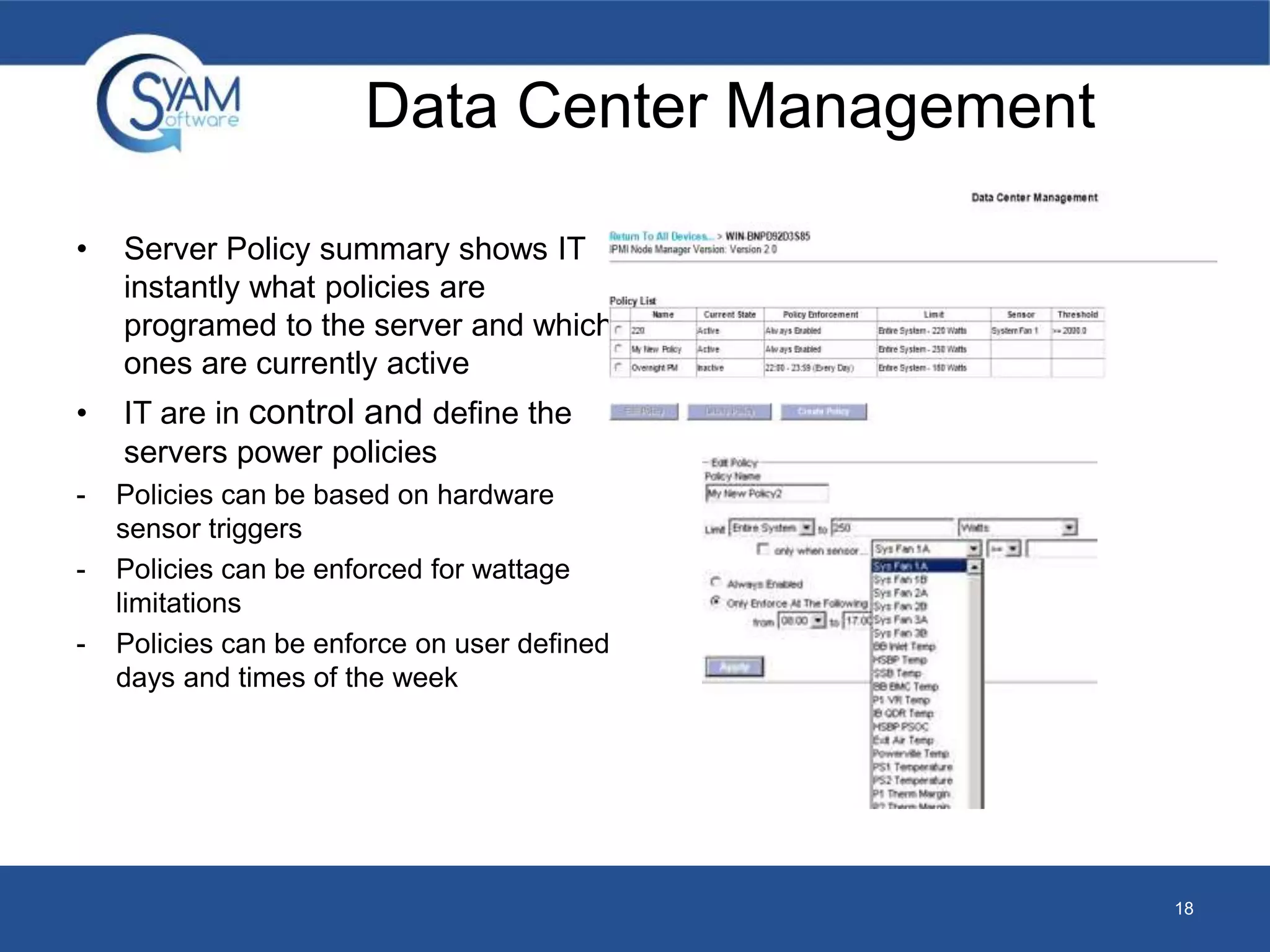
• Server Policy summary shows IT 
instantly what policies are 
programed to the server and which 
ones are currently active 
• IT are in control and define the 
servers power policies 
- Policies can be based on hardware 
sensor triggers 
- Policies can be enforced for wattage 
limitations 
- Policies can be enforce on user defined 
days and times of the week 
18
Microsoft System Center Operations 
Manager (SCOM) Management Pack 
• Diagram, State and Alert Views 
• System Monitoring – monitors hardware and logical sensors and 
displays a health state (Normal, Degraded, Critical) 
• System Alerts – Displays alerts for systems with health changes 
• Remote Desktop – Allows the user to launch a remote desktop from 
the SCOM client to the selected machine. 
• System Area Manager Console – Ability to launch the console for 
the System Area Manager that the System Client reports to 
• Dynamic Discovery – any system running a system client and is 
reporting to SCOM is automatically added into this management 
pack and is viewable in both the diagram view and state view. 
19
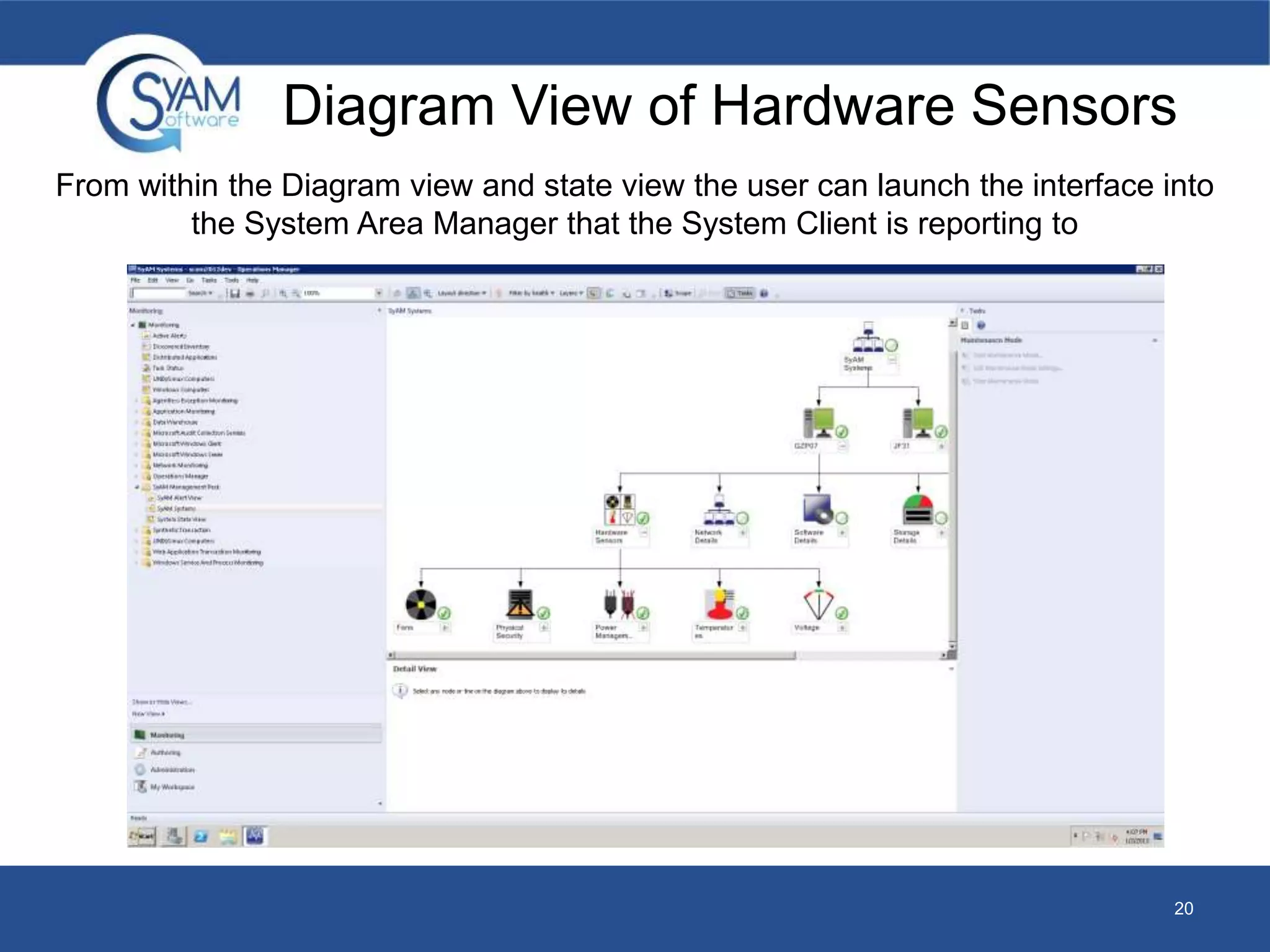
Diagram View of Hardware Sensors 
From within the Diagram view and state view the user can launch the interface into 
20 
the System Area Manager that the System Client is reporting to
HEALTH MONITORING 
24/7 ALERTING TO HELP YOU SOLVE ISSUES BEFORE THEY 
BECOME A PROBLEM 
21
Health Monitoring 
• Through its dynamic discovery of the system hardware and software 
environment, you are presented key sensor monitoring information 
without any user intervention. 
– The SyAM Software utilizes various standards to access hardware 
sensors such as IPMI 1.0, 1.5, 2.0, it also access sensors using 
proprietary Super IO device support 
– Hard Drive Sensors are directly accessed on the hard disk utilizing the 
SMART standard 
– CPU Core Temperatures are accessed diretcly from the CPU cores 
MSR’s 
– The wattage value is retrieved from Enterprise Servers with Node 
Manager support or from the intelligent agent within the SyAM Software 
that calculates based upon the systems configuraiton, utilization and 
running state 
• This real-time monitoring and Predictive Failure Alerting feature 
provides you the critical time to backup data and to schedule the 
necessary fixes without reducing user productivity or risking loss of 
data. 
22
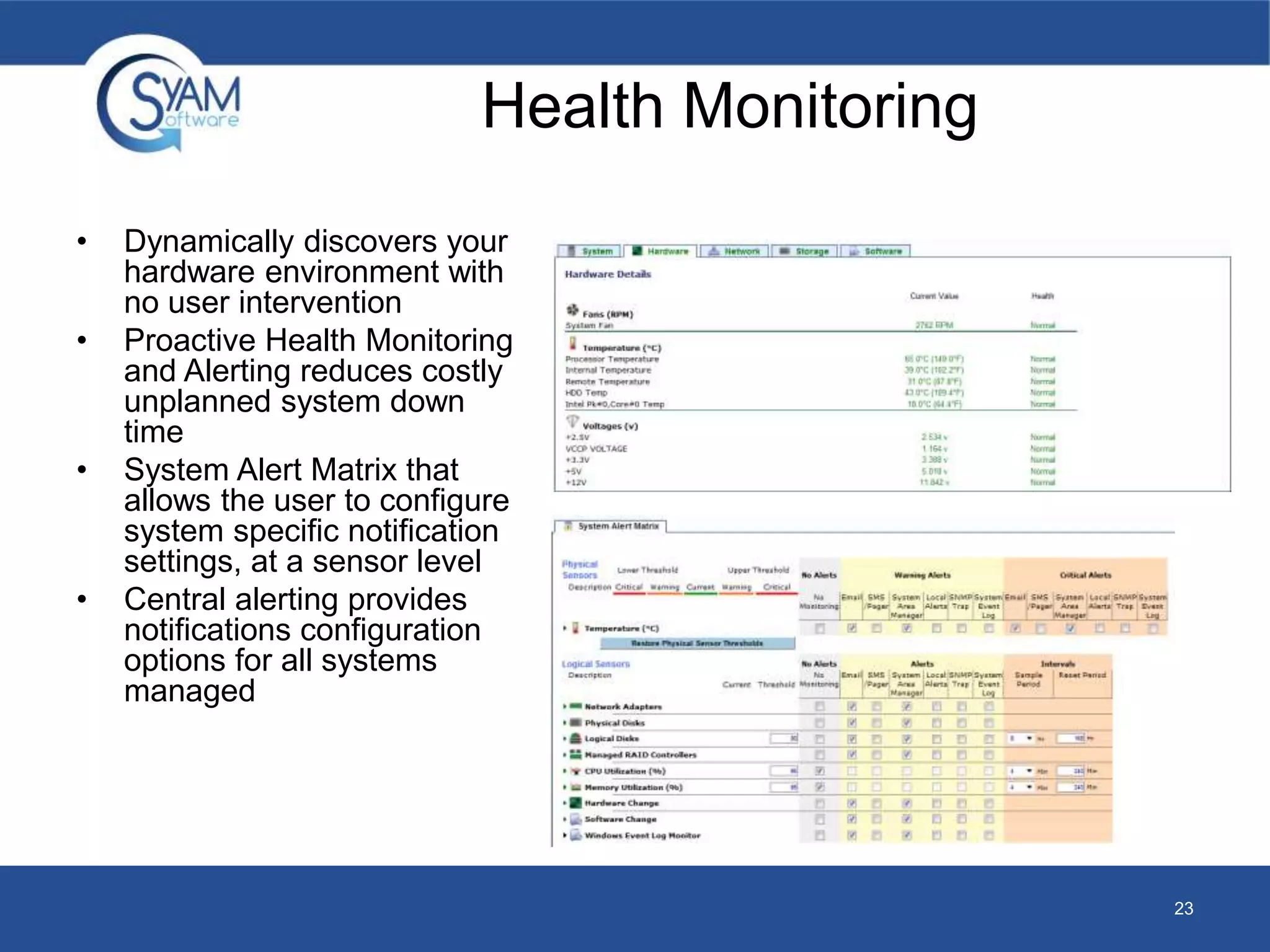
• Dynamically discovers your 
hardware environment with 
no user intervention 
• Proactive Health Monitoring 
and Alerting reduces costly 
unplanned system down 
time 
• System Alert Matrix that 
allows the user to configure 
system specific notification 
settings, at a sensor level 
• Central alerting provides 
notifications configuration 
options for all systems 
managed 
23 
Health Monitoring
HELP DESK 
CENTRALIZE YOUR IT INFRASTRUCTURE SUPPORT 
24
Help Desk 
• Whether you support multiple end users, or customers on your 
Network, the help desk capabilities integrated with SyAM’s Asset 
Management provide IT with a centralized system, to manage all IT 
help desk responsibilities. 
• The SyAM configurable self-service ticketing portal enables you to 
tailor service to the audience’s technical level, and terms; while 
streamlining the help desk support process with IT defined check 
lists based on user issues and ticketing rules, so the appropriate 
technician is assigned the necessary action. 
25
26 
• Provides IT with a single ticketing 
system for all managed assets 
(Computer and non Computer) 
• System Client issues can be 
Help Desk 
configured for real-time auto ticketing 
• IT can customize a self service 
ticketing portal making it user friendly 
based on the users they support 
• Users can review ticket status, and 
report new problems directly from their 
browser 
• Check lists can be created and 
presented to the user based upon the 
problem being reported to assist with 
self resolution
POWER MANAGEMENT 
ENERGY REDUCTION BY UP TO 40% 
27
Power Management 
• You are provided with a comprehensive set of tools to fully 
understand and take control of the power utilization across your 
network of systems, enabling you to pro-actively reduce energy 
costs by up to 40% with minimal resources. 
• With key energy savings data presented automatically through 
monthly executive level reporting, or through the Power Audit 
dashboard, you can be in control and have a full understanding of 
your power goals, while knowing your power policies are being 
executed intelligently and without affecting user productivity or 
powering down critical systems. 
28
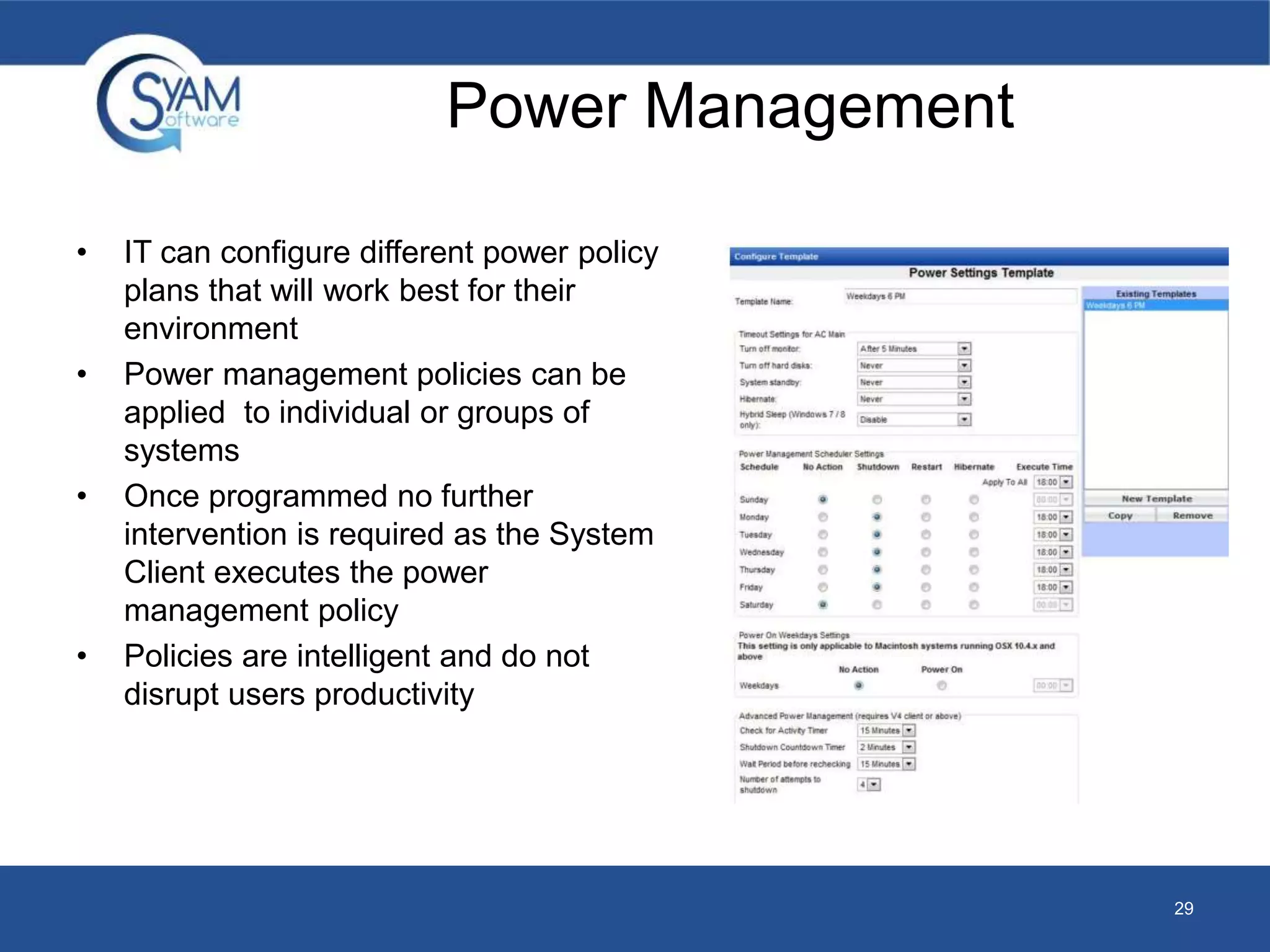
• IT can configure different power policy 
plans that will work best for their 
environment 
• Power management policies can be 
applied to individual or groups of 
systems 
• Once programmed no further 
intervention is required as the System 
Client executes the power 
management policy 
• Policies are intelligent and do not 
disrupt users productivity 
29 
Power Management
REMOTE MANAGEMENT 
CENTRALLY MANAGE ALL SYSTEMS 
30
Remote Management 
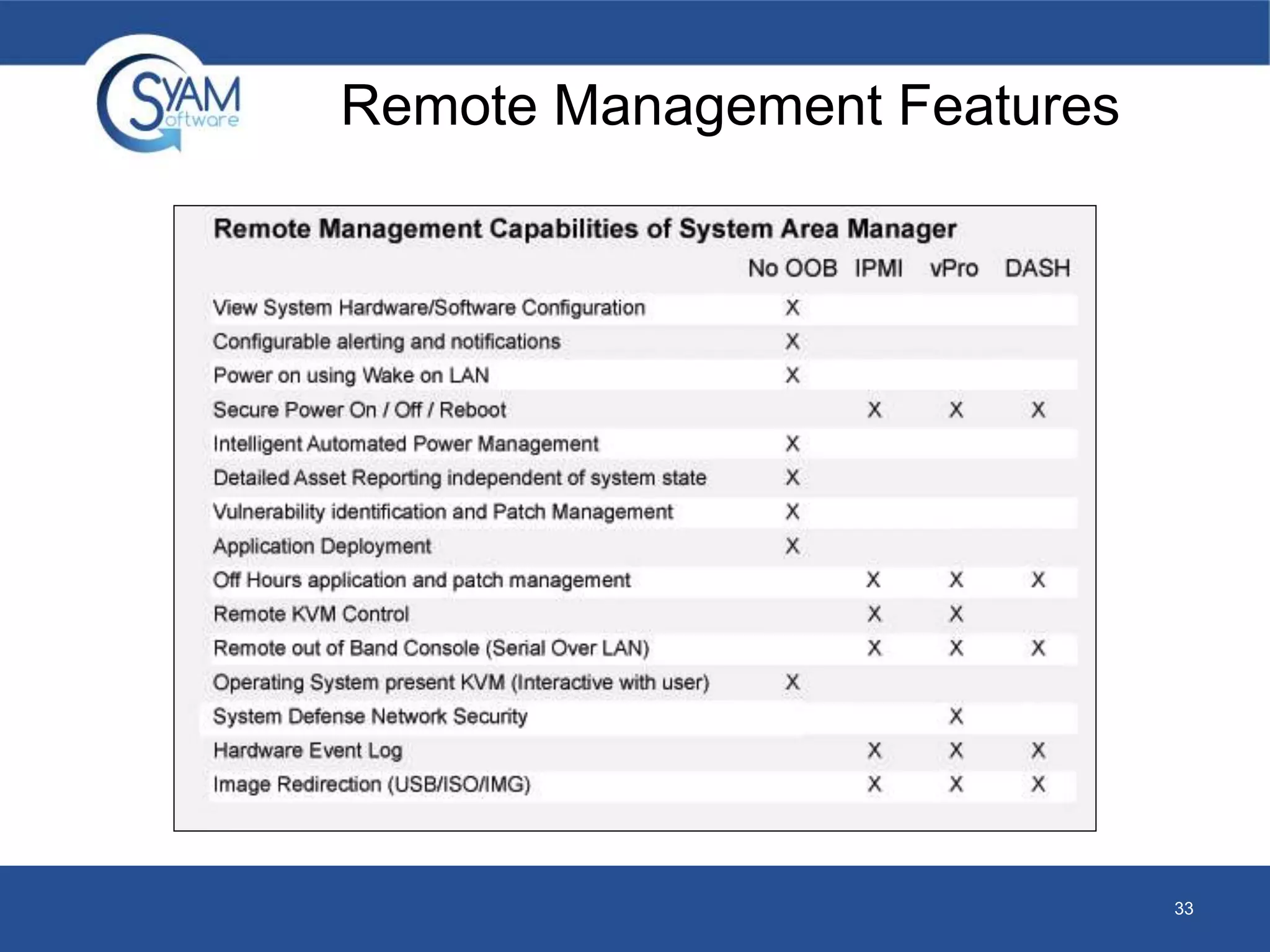
• You are provided with remote access from anywhere on the network 
to any system the Remote Management features range from helping 
an end user interactively, through remotely bringing back systems 
from a crash state at your end users remote location. 
• SyAM enables remote management capabilities to control all 
systems across your network. Even if your systems are no longer 
functioning, SyAM has the capabilities to bring those systems back 
to life through the latest out of band technologies, IPMI, vPro or 
Dash. 
31
Remote Management 
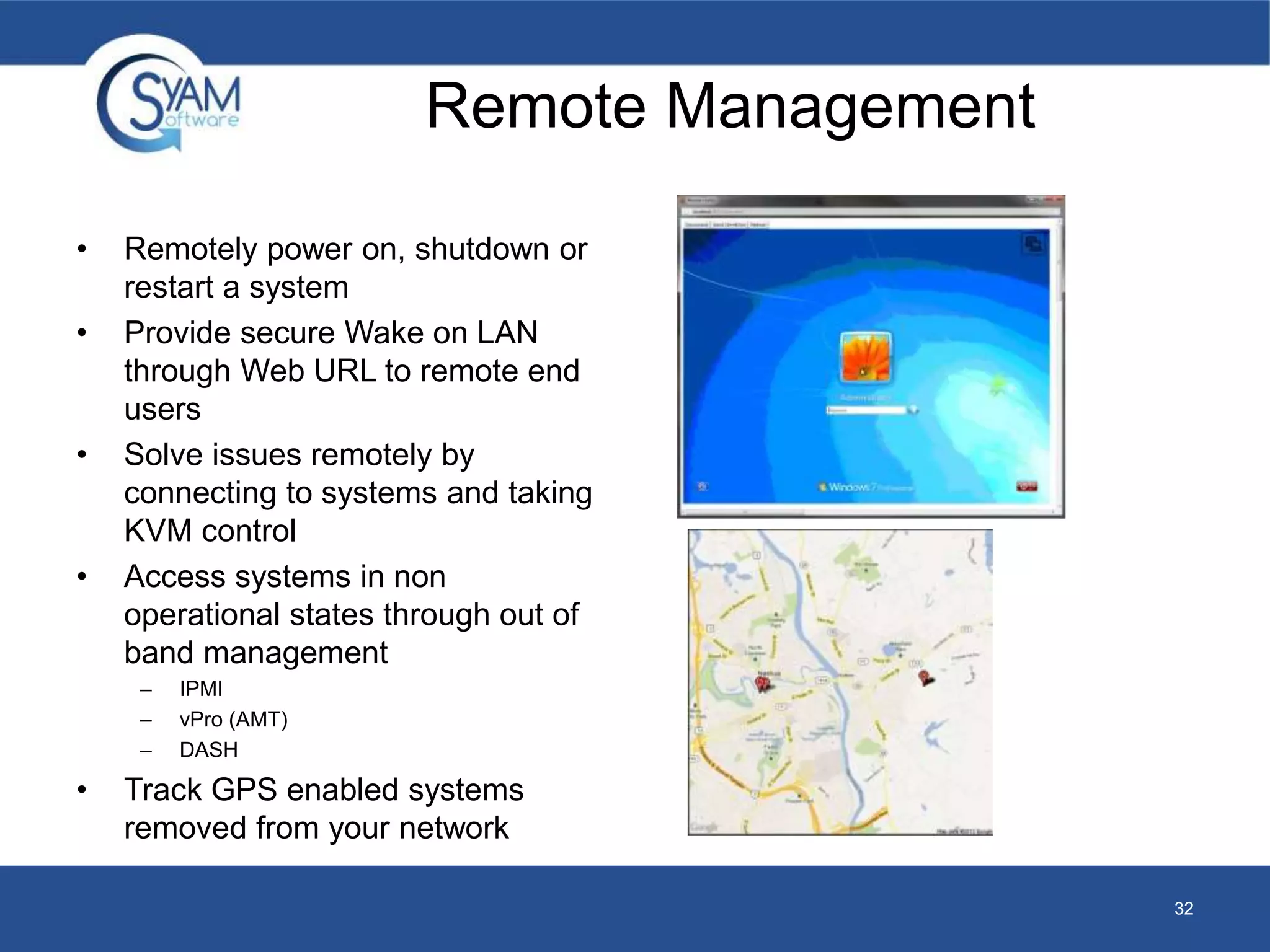
• Remotely power on, shutdown or 
restart a system 
• Provide secure Wake on LAN 
through Web URL to remote end 
users 
• Solve issues remotely by 
connecting to systems and taking 
KVM control 
• Access systems in non 
operational states through out of 
band management 
– IPMI 
– vPro (AMT) 
– DASH 
• Track GPS enabled systems 
removed from your network 
32
Remote Management Features 
33
SOFTWARE DEPLOYMENT 
AUTOMATE YOUR IT SYSTEMS FROM TOP TO BOTTOM 
34
Software Deployment 
• Managing applications, security patches, or scheduling virus scans 
can become an overwhelming task. SyAM helps simplify these tasks 
through its intelligent job-scheduling software deployment tool. 
• These jobs automate when systems get powered on, patched, 
scanned for viruses, or other key routines. Keep systems optimized 
without disrupting users productivity, while the job details help keep 
you informed of which systems have successfully been updated, 
and which remaining systems still need to be updated. 
35
Software Deployment 
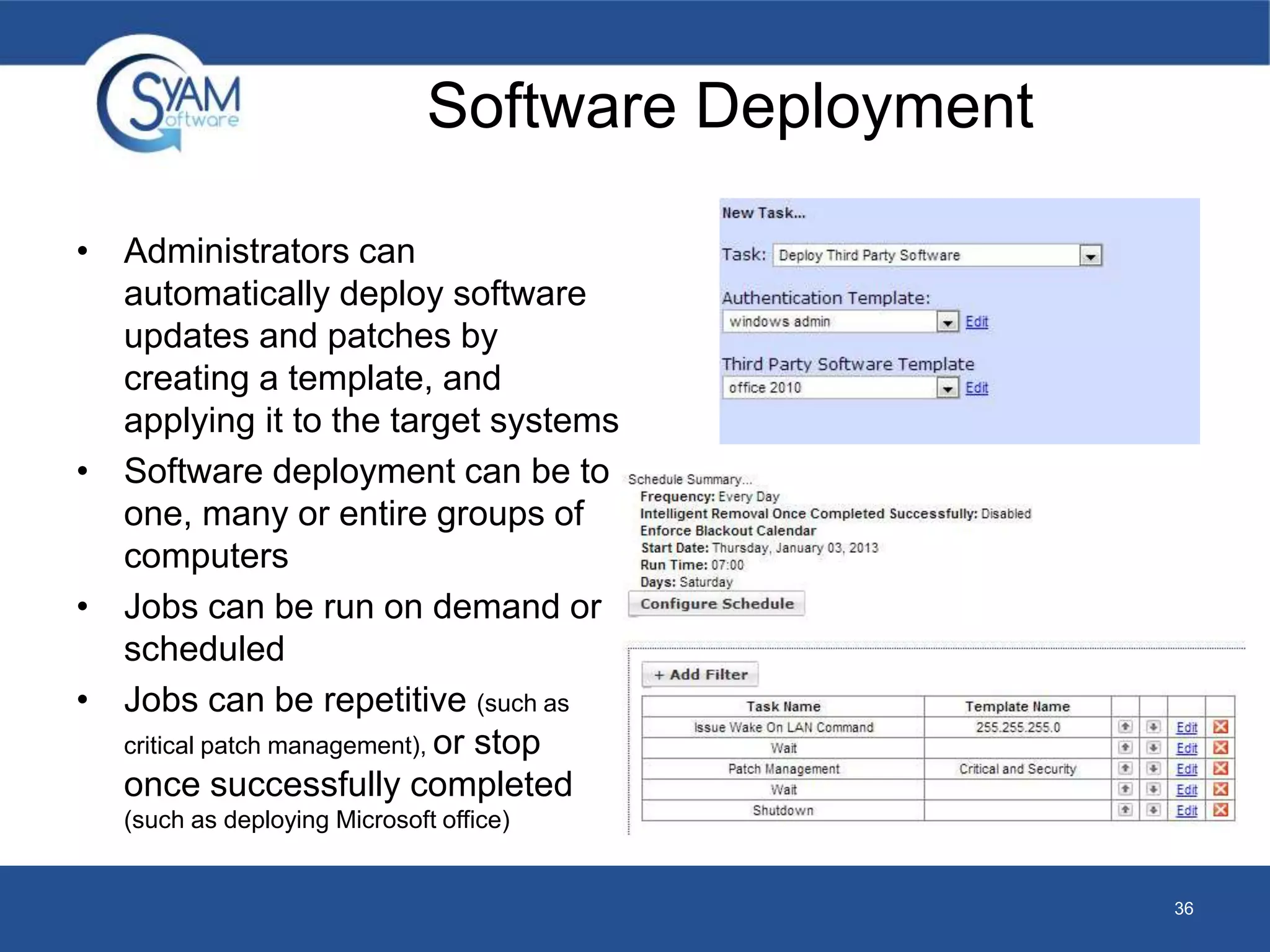
• Administrators can 
automatically deploy software 
updates and patches by 
creating a template, and 
applying it to the target systems 
• Software deployment can be to 
one, many or entire groups of 
computers 
• Jobs can be run on demand or 
scheduled 
• Jobs can be repetitive (such as 
critical patch management), or stop 
once successfully completed 
(such as deploying Microsoft office) 
36

SyAM Software Solutions Overview

  • 1.
  • 2.
    About SyAM Software • SyAM Software is a developer of Management solutions that help Small, Medium, & Enterprises operate more efficiently through proactive systems management and saving money through intelligent, automated power management. • SyAM Software is a leading management technology enabler to global System Providers enabling them to compete against Dell, HP and IBM • A global company with reach into North America, South America, Europe, Asia, and emerging markets • A provider of certified management solutions with all Intel® based platforms 2
  • 3.
    Benefits – Simplifyingyour IT Infrastructure SyAM’s Management Software Suite centralizes and provides benefits to 8 core IT Solutions, ranging from Asset Management to Software Deployment. • Guaranteed Energy Savings – With intelligent systems management from SyAM, you can see a ROI in just a few months. Easily set policies to control power consumption and save substantial amounts of money • 24/7 Monitoring and Alerting – Set up alerts to stay in control, and always be aware of all situations that could possibly slow down productivity • Maximize Efficiency – Without knowing how your systems have performed in the past, it is impossible to improve their performance in the future. By having reports available, IT managers can properly manager their entire IT infrastructure to ensure the proper policies are in place to expand the life expectancy of machines while also decreasing the cost of electricity. 3
  • 4.
    Pro-actively Manage Allof your IT Assets Across All of Your Remote Locations Site Manager Centralized Helpdesk and Asset Management interface across all users, groups and sites System Area Manager Remote Management to all System Clients System Clients Intelligent agents installed on each system 4 Asset Auditor Mobile app for on the go asset inventory auditing Management Utilities Software Deployment, Patch Management and Power Management Power Auditor Identified and Achieved savings
  • 5.
    Product Requirements Matrix Product / Requirements System Client System Area Manager V5 Management Utilities Operating system support (Can be a virtual OS On Virtual server) XP Pro Windows 7 Pro / Enterprise Windows 8 Pro/ Enterprise Windows 8.1 Pro/ Enterprise 2003 Server 2008R2 Server 2012 Server 2012R2 Server RedHat Linux SuSE Linux Fedora Linux Ubuntu Linux Librix Linux Windows 7 Pro / Enterprise Windows 8 Pro / Enterprise Windows 8.1Pro/ Enterprise 2008R2 Server 2012 Server 2012R2 Server Windows 7 Pro / Enterprise Windows 8 Pro / Enterprise Windows 8.1 Pro/ Enterprise 2008R2 Server 2012 Server 2012R2 Server System Memory Minimum 128MB Recommend 512MB Minimum 2GB Recommend 4GB Minimum 4GB Recommend 8GB Network DHCP or Static IP on LAN Static IP on LAN Static IP on LAN Hard Drive 120MB 2GB 100GB Pre Requisites .Net 3.5 IIS 7 or above SQL / SQL Express 2008, 2008R2 2012 Firewall Windows Firewall Exceptions are implemented by installation Linux Firewall settings must be user configured Windows Firewall Exceptions are implemented by installation Windows Firewall Exceptions for remote management 5
  • 6.
    Management Solutions AssetManagement Dashboard / Reporting Data Center Management Health Monitoring Help Desk Power Management Remote Management Software Deployment 6
  • 7.
    SyAM Rollout Timeline 7 Product Day 1 Day 8 Day 15 Day 30 Power Auditor - Baseline of energy consumption begins by collecting power usage across the network before assigning power policies - Baseline of power savings is now established by understanding power usage on the network after a week of normal use. - Analyze achieved savings by comparing savings before and after power policies were implemented - View monthly executive report to view achieved savings across the network Management Utilities - Deploy System Clients to each machine on the network - Deploy third party software and patches as needed across the network to keep systems up to date. - Now that the baseline is established, create power policy templates and apply them to groups of systems - Set power policies, deploy System Clients and third party software as new systems are added to the network. - Power settings to groups of systems can always be fine-tuned to help you maximize power savings. System Area Manager(s) - System Clients start reporting to System Area Manager to enable the following management functions: - Configure system monitoring and alerting. - View a variety of reports including software utilization across the network. - Remote into a system at any time to take over KVM for remote resolution. - Fine tune power management settings on individual machines. Site Manager - Centralized Helpdesk and Ticketing. - Gain remote access into any system on the network. - Import all non networked assets such as telephones, printers, etc. - Configure users and groups and other administrations settings Asset Auditor - Have all IT staff members download the free SyAM Asset Auditor App. - Utilize Asset Auditor to edit the Site Manager Asset Database as new assets are purchased or need to be updated
  • 8.
    ASSET MANAGEMENT MAKEMORE CALCULATED FINANCIAL DECISIONS 8
  • 9.
    Asset Management •By knowing what you have, where its located, how its configured, and utilized, you can make more calculated financial decisions about what will be needed in the upcoming system refresh cycle, including hardware upgrades, application license renewal, or maintenance contracts. • SyAM dynamically detects computer assets down to hardware serial numbers or application versions. SyAM also enables non computer assets to be fully managed within the same system, and reported upon centrally. 9
  • 10.
    Asset Management •Assets can managed across various key attributes; – Location / Function / Owner – Classification / Department – And many other categories. • In addition to configuration assets can track financial and service information; – Purchase Date / Vendor – Service Code / Contact – Open/Closed Tickets • With Computer Assets you can drill down to the system details of hardware, software configuration 10
  • 11.
    Asset Auditor MobileApp • Audit IT Asset Information on the Go – Add new assets and edit existing fields on the go. Verify assets are in the right location and being used by the right staff members • Utilize Barcodes and QR Codes – Pull up asset information by utilizing a Barcode or QR code (supports Code 128, ISBN and QR codes. This will save you time by eliminating the pain of manually entering long asset names or serial numbers. • Full Administrator Control – Anyone with access to the network can use Asset Auditor Have the peace of mind that all changes made must be approved by an administrator before the Site Manager Asset Management database is updated. • Log a Photo of the Asset – Use the camera on your mobile device to provide a picture of the asset to make it easier to identify in the future. • GPS Locations – When auditing assets you can record the GPS coordinates. From Site Manager, you can view the location in Google Maps. If the location of the asset ever changes you can always update it. • Available in the App Store and Google Play 11
  • 12.
    Asset Auditor MobileApp 12 Edit existing assets or add a new one. Edit the text fields, log a picture and add GPS coordinates Approve the changes in Site Manager before the database is updated.
  • 13.
    DASHBOARD/REPORTING EQUIPPING ITWITH THE INFORMATION THEY NEED 13
  • 14.
    Dashboard/Reporting • TheDashboards and reporting capabilities keep IT informed of all managed systems status, configuration, and provides simple visual indicators for problem systems to allow quick resolution. • Through integrated reporting at all levels you can fully understand what assets you have, their change history, and utilization levels enabling them to relocate where needed. The reporting is available at anytime from anywhere on the network providing reports on power savings, asset service history, application utilization and more. 14
  • 15.
    Dashboard/Reporting • ITis provided a Dashboard that contains real-time status and access to all managed systems on the network • Monthly executive reports keep finance, facility and IT departments updated with how Energy savings are progressing • With projected savings vs. achieved savings data they can make sure they are in line with their savings goals. 15
  • 16.
    DATA CENTER MANAGEMENT UNDERSTAND THE REAL TIME STATUS OF YOUR SERVER 16
  • 17.
    Data Center Management • With today’s powerful enterprise servers, data centers continue to heat up and require more power for the cooling of servers. SyAM gives you control through a single interface to fully understand the real-time status of the server room, from power consumption to temperatures, and utilization levels. This information makes it possible for you to make accurate decisions to truly improve server room efficiencies. • SyAM’s Data Center Management intelligent policies allow you to reduce server power consumption by reducing operating temperatures at non critical operational times. By controlling temperatures you not only reduce server energy costs, but also data center cooling systems that won’t need to be powered up as frequently. 17
  • 18.
    Data Center Management • Server Policy summary shows IT instantly what policies are programed to the server and which ones are currently active • IT are in control and define the servers power policies - Policies can be based on hardware sensor triggers - Policies can be enforced for wattage limitations - Policies can be enforce on user defined days and times of the week 18
  • 19.
    Microsoft System CenterOperations Manager (SCOM) Management Pack • Diagram, State and Alert Views • System Monitoring – monitors hardware and logical sensors and displays a health state (Normal, Degraded, Critical) • System Alerts – Displays alerts for systems with health changes • Remote Desktop – Allows the user to launch a remote desktop from the SCOM client to the selected machine. • System Area Manager Console – Ability to launch the console for the System Area Manager that the System Client reports to • Dynamic Discovery – any system running a system client and is reporting to SCOM is automatically added into this management pack and is viewable in both the diagram view and state view. 19
  • 20.
    Diagram View ofHardware Sensors From within the Diagram view and state view the user can launch the interface into 20 the System Area Manager that the System Client is reporting to
  • 21.
    HEALTH MONITORING 24/7ALERTING TO HELP YOU SOLVE ISSUES BEFORE THEY BECOME A PROBLEM 21
  • 22.
    Health Monitoring •Through its dynamic discovery of the system hardware and software environment, you are presented key sensor monitoring information without any user intervention. – The SyAM Software utilizes various standards to access hardware sensors such as IPMI 1.0, 1.5, 2.0, it also access sensors using proprietary Super IO device support – Hard Drive Sensors are directly accessed on the hard disk utilizing the SMART standard – CPU Core Temperatures are accessed diretcly from the CPU cores MSR’s – The wattage value is retrieved from Enterprise Servers with Node Manager support or from the intelligent agent within the SyAM Software that calculates based upon the systems configuraiton, utilization and running state • This real-time monitoring and Predictive Failure Alerting feature provides you the critical time to backup data and to schedule the necessary fixes without reducing user productivity or risking loss of data. 22
  • 23.
    • Dynamically discoversyour hardware environment with no user intervention • Proactive Health Monitoring and Alerting reduces costly unplanned system down time • System Alert Matrix that allows the user to configure system specific notification settings, at a sensor level • Central alerting provides notifications configuration options for all systems managed 23 Health Monitoring
  • 24.
    HELP DESK CENTRALIZEYOUR IT INFRASTRUCTURE SUPPORT 24
  • 25.
    Help Desk •Whether you support multiple end users, or customers on your Network, the help desk capabilities integrated with SyAM’s Asset Management provide IT with a centralized system, to manage all IT help desk responsibilities. • The SyAM configurable self-service ticketing portal enables you to tailor service to the audience’s technical level, and terms; while streamlining the help desk support process with IT defined check lists based on user issues and ticketing rules, so the appropriate technician is assigned the necessary action. 25
  • 26.
    26 • ProvidesIT with a single ticketing system for all managed assets (Computer and non Computer) • System Client issues can be Help Desk configured for real-time auto ticketing • IT can customize a self service ticketing portal making it user friendly based on the users they support • Users can review ticket status, and report new problems directly from their browser • Check lists can be created and presented to the user based upon the problem being reported to assist with self resolution
  • 27.
    POWER MANAGEMENT ENERGYREDUCTION BY UP TO 40% 27
  • 28.
    Power Management •You are provided with a comprehensive set of tools to fully understand and take control of the power utilization across your network of systems, enabling you to pro-actively reduce energy costs by up to 40% with minimal resources. • With key energy savings data presented automatically through monthly executive level reporting, or through the Power Audit dashboard, you can be in control and have a full understanding of your power goals, while knowing your power policies are being executed intelligently and without affecting user productivity or powering down critical systems. 28
  • 29.
    • IT canconfigure different power policy plans that will work best for their environment • Power management policies can be applied to individual or groups of systems • Once programmed no further intervention is required as the System Client executes the power management policy • Policies are intelligent and do not disrupt users productivity 29 Power Management
  • 30.
    REMOTE MANAGEMENT CENTRALLYMANAGE ALL SYSTEMS 30
  • 31.
    Remote Management •You are provided with remote access from anywhere on the network to any system the Remote Management features range from helping an end user interactively, through remotely bringing back systems from a crash state at your end users remote location. • SyAM enables remote management capabilities to control all systems across your network. Even if your systems are no longer functioning, SyAM has the capabilities to bring those systems back to life through the latest out of band technologies, IPMI, vPro or Dash. 31
  • 32.
    Remote Management •Remotely power on, shutdown or restart a system • Provide secure Wake on LAN through Web URL to remote end users • Solve issues remotely by connecting to systems and taking KVM control • Access systems in non operational states through out of band management – IPMI – vPro (AMT) – DASH • Track GPS enabled systems removed from your network 32
  • 33.
  • 34.
    SOFTWARE DEPLOYMENT AUTOMATEYOUR IT SYSTEMS FROM TOP TO BOTTOM 34
  • 35.
    Software Deployment •Managing applications, security patches, or scheduling virus scans can become an overwhelming task. SyAM helps simplify these tasks through its intelligent job-scheduling software deployment tool. • These jobs automate when systems get powered on, patched, scanned for viruses, or other key routines. Keep systems optimized without disrupting users productivity, while the job details help keep you informed of which systems have successfully been updated, and which remaining systems still need to be updated. 35
  • 36.
    Software Deployment •Administrators can automatically deploy software updates and patches by creating a template, and applying it to the target systems • Software deployment can be to one, many or entire groups of computers • Jobs can be run on demand or scheduled • Jobs can be repetitive (such as critical patch management), or stop once successfully completed (such as deploying Microsoft office) 36

Editor's Notes