OpStor
- A multi vendor storage resource management and
capacity forecasting software
AGENDA
• Understanding the user i.e, Storage Administrator, his duties
and the challenges he faces
• Introduction about OpStor
• Overview of OpStor
• Advantages of using OpStor
• Benefits of using OpStor
STORAGE ADMINISTRATORS - Duties
• Create LUNs
• Resolve storage shortages
• Maintain a proper backup schedule and perform backups
• System performance tuning
• Forecast Storage growth
• Monitor current storage environment
• Make hardware / configuration changes when adding new
servers
CHALLENGES FACED BY STORAGE ADMINISTRATORS
• Prevent system panic
• Isolating the problem
• Responsiveness
• Forecasting future storage demands
• Operate with products from different OEM
• Security of the data (availability and retention)
OPSTOR
• OpStor from Manage Engine is a multi vendor SRM (Storage Resource
Management) solution
• It monitors Storage Area Network (SAN) and Network Attached Storage
(NAS) devices such as storage arrays, fabric switches, tape libraries, host
servers and host bus adapter cards
• It performs auto-discovery to deliver asset, capacity, performance, and
configuration information on storage devices and their components
• It generates reports, forecasts storage demand and also performs
escalations on alerts
5 EASY STEPS TO UNDERSTAND OPSTOR
• Home - Autodiscovers devices and shows recent alarm logs
• Alarms - Allows you to select device type and view their alarms
• Maps - Gives a pictorial representaion of the storage network
• Reports - Gives reports on performance, capacity, availability etc
• Admin - Helps in scheduling the reports and for custom setting
HOME - Autodiscovers devices and shows recent alarm logs
ALARMS - Allows you to select device type and view their alarms
MAPS - Gives a pictorial representation of the storage network
Bad / disrupted Connection
Good / Operational Connection
REPORTS - Gives reports on performance, capacity, availability etc
Summary Reports - gives the summary of activity for all the devices for the day
REPORTS
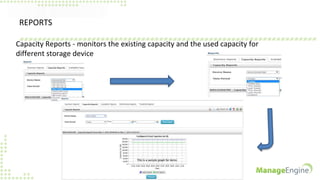
Capacity Reports - monitors the existing capacity and the used capacity for
different storage device
REPORTS
Forecasts - Helps you to understand the storage demand requirements for the
future
REPORTS
Availability - Show the Uptime, Downtime, MTTR and MTBF for different devices
that are connected to the network
REPORTS
Performance - Provides performance reports for all devices
REPORTS
Threshold - Shows the limits for raising alarms on each device as well as the rate of
data collection from each device (Polling Interval)
ADMIN
Discovery - Helps you to add devices manually using their IP addresses
ADMIN - Helps in scheduling the reports and for custom settings
Schedule Alarm
Actions - This helps
in sending alert mails
to the mentioned
email ids
ADMIN
Escalates Alarms which are not
attended to
Sends daily and weekly reports to prespecified email ids
ADMIN
Global Settings - Helps you to
manage accounts and mail
servers, change polling,
threshold rules etc
SUPPORT - for any queries or assistance
Forums - helps you to interact
within the Opstor community
about product upgrades and
queries
ADVANTAGES OF USING OPSTOR
• Supports devices from different vendors
• Auto discovers all the devices that are connected in the storage network
• Captures sensor faults such as power supply, temperature, fan and battery,
as well as status change notifications
• Has the map facility which provides the pictorial view of the storage network
• Administrators receive alarms through email or SMS messages based on pre-
set rules
• Can be integrated with different ME products. Customers need not use
different software for different applications
BENEFITS OF USING OPSTOR
• Increased visibility with unified view of your storage environment
• Reduced downtime with timely detection of problems
• Saves administrative time with effective reporting and escalations
• Lowers Total Cost of Ownership with NO extra software purchases
• Simplified management at an affordable price
Download OpStor now
http://www.manageengine.com/products/opstor/download.html
For more inputs
http://www.manageengine.com/products/opstor/help.html
For personalized support
Write to us: opstor-support@manageengine.com Call Toll free : +1-888-720-9500

OpStor - A multi vendor storage resource management and capacity forecasting software

  • 1.
    OpStor - A multivendor storage resource management and capacity forecasting software
  • 2.
    AGENDA • Understanding theuser i.e, Storage Administrator, his duties and the challenges he faces • Introduction about OpStor • Overview of OpStor • Advantages of using OpStor • Benefits of using OpStor
  • 3.
    STORAGE ADMINISTRATORS -Duties • Create LUNs • Resolve storage shortages • Maintain a proper backup schedule and perform backups • System performance tuning • Forecast Storage growth • Monitor current storage environment • Make hardware / configuration changes when adding new servers
  • 4.
    CHALLENGES FACED BYSTORAGE ADMINISTRATORS • Prevent system panic • Isolating the problem • Responsiveness • Forecasting future storage demands • Operate with products from different OEM • Security of the data (availability and retention)
  • 5.
    OPSTOR • OpStor fromManage Engine is a multi vendor SRM (Storage Resource Management) solution • It monitors Storage Area Network (SAN) and Network Attached Storage (NAS) devices such as storage arrays, fabric switches, tape libraries, host servers and host bus adapter cards • It performs auto-discovery to deliver asset, capacity, performance, and configuration information on storage devices and their components • It generates reports, forecasts storage demand and also performs escalations on alerts
  • 6.
    5 EASY STEPSTO UNDERSTAND OPSTOR • Home - Autodiscovers devices and shows recent alarm logs • Alarms - Allows you to select device type and view their alarms • Maps - Gives a pictorial representaion of the storage network • Reports - Gives reports on performance, capacity, availability etc • Admin - Helps in scheduling the reports and for custom setting
  • 7.
    HOME - Autodiscoversdevices and shows recent alarm logs
  • 8.
    ALARMS - Allowsyou to select device type and view their alarms
  • 9.
    MAPS - Givesa pictorial representation of the storage network Bad / disrupted Connection Good / Operational Connection
  • 10.
    REPORTS - Givesreports on performance, capacity, availability etc Summary Reports - gives the summary of activity for all the devices for the day
  • 11.
    REPORTS Capacity Reports -monitors the existing capacity and the used capacity for different storage device
  • 12.
    REPORTS Forecasts - Helpsyou to understand the storage demand requirements for the future
  • 13.
    REPORTS Availability - Showthe Uptime, Downtime, MTTR and MTBF for different devices that are connected to the network
  • 14.
    REPORTS Performance - Providesperformance reports for all devices
  • 15.
    REPORTS Threshold - Showsthe limits for raising alarms on each device as well as the rate of data collection from each device (Polling Interval)
  • 16.
    ADMIN Discovery - Helpsyou to add devices manually using their IP addresses
  • 17.
    ADMIN - Helpsin scheduling the reports and for custom settings Schedule Alarm Actions - This helps in sending alert mails to the mentioned email ids
  • 18.
    ADMIN Escalates Alarms whichare not attended to Sends daily and weekly reports to prespecified email ids
  • 19.
    ADMIN Global Settings -Helps you to manage accounts and mail servers, change polling, threshold rules etc
  • 20.
    SUPPORT - forany queries or assistance Forums - helps you to interact within the Opstor community about product upgrades and queries
  • 21.
    ADVANTAGES OF USINGOPSTOR • Supports devices from different vendors • Auto discovers all the devices that are connected in the storage network • Captures sensor faults such as power supply, temperature, fan and battery, as well as status change notifications • Has the map facility which provides the pictorial view of the storage network • Administrators receive alarms through email or SMS messages based on pre- set rules • Can be integrated with different ME products. Customers need not use different software for different applications
  • 22.
    BENEFITS OF USINGOPSTOR • Increased visibility with unified view of your storage environment • Reduced downtime with timely detection of problems • Saves administrative time with effective reporting and escalations • Lowers Total Cost of Ownership with NO extra software purchases • Simplified management at an affordable price
  • 23.
    Download OpStor now http://www.manageengine.com/products/opstor/download.html Formore inputs http://www.manageengine.com/products/opstor/help.html For personalized support Write to us: opstor-support@manageengine.com Call Toll free : +1-888-720-9500