Datasheet
IBM Software Group IBM Software Group
Migration Engine from
Butterfly Software
Key benefits:
•	 Consolidate	all	your	legacy	and	current	
data
•	 Clean	and	optimize	your	historic	data	files
•	 Fast	and	cost	effective	automated	
process
•	 Zero	risk	to	any	data
•	 Zero	impact	on	your	live	production	host	
environment
•	 Eliminate	legacy	infrastructure	
maintenance	costs
•	 Decommission	all	your	outdated	
infrastructure
•	 Fully	scalable	no	matter	how	many	
outdated	Backup	and	Recovery	
environments
The Migration Engine from Butterfly Software is an innovative, totally
automated application that enables companies to fully realize their data
backup and recovery cost, risk and energy reducing strategies by
facilitating completely flawless consolidation of all historic compliance
data from their legacy environments; quickly, safely, cost effectively and
without disruption.
The Migration Engine from Butterfly Software is an extremely
powerful software solution that has been specifically designed to tackle
the notorious cost and risk issues of moving historic backup data from
legacy environments by exploiting intelligently controlled automation
to safely consolidate all your data onto your strategic backup and
recovery solution.
Once the procedure has been completed all your data can now be
accessed from a single backup platform, improving your RTO and RPO
objectives and ensuring you are legally compliant as well as reducing
your overall carbon footprint.
The Butterfly migration follows a strictly defined process that ensures a
smooth transfer with complete risk mitigation, based on the metrics in
the Backup Analysis Engine Report (AER) from Butterfly Software. For
more information, see this latest White Paper featuring Butterfly.
Datasheet
IBM Software Group IBM Software Group
2
The Butterfly migration process
Set-up
Following the analysis stage a dedicated application server will
be configured on-site and linked to the customer’s monitoring
environment. The entire migration will be controlled from a
single point web interface.
Discovery
Building on the findings of the analysis, the Migration Engine
from Butterfly Software automatically gathers the information
it needs on the data to be migrated including number of
clients, data files and associated retention policies.
Scheduling
The customer can now define the parameters for the migra-
tion, such as timeframes, priority data, server access times and
so on, based on their operational guidelines. As a result, the
Migration Engine from Butterfly Software will then design
the most effective migration schedule. This process, which
would normally take weeks to define, literally takes a matter of
minutes and can be adjusted and reviewed with ease.
Configure the target environment
Once batching is complete, the Migration Engine from
Butterfly Software will recognize the new backup environ-
ment and automatically configure the solution for acceptance
of the historic data—and, in many environments, will actually
install and configure the software itself. Plus, the translation
and replication of any proprietary data configurations are
facilitated to best suit the new environment.
Furthermore, this resulting backup environment will back
itself up in the new target environment as a failsafe, before
giving the confirmation that it is now ready to perform the
migration.
Lock down and SecureFlow™ process
Once the migration process begins, the software copies the
first batch of data transactions and file attributes into a totally
secure mezzanine within the Migration Engine from Butterfly
Software. No data is removed from the source at any time.
This copied data information is then locked down inside the
system, untouchable by any operators and ensuring complete
data integrity between source and target points.
Post stage cleaning and optimizing
As part of this migration process, the customer can streamline
their historic data content for the new environment as the
batches are processed. Depending on the new environment
software, the files can be de-duped, encrypted, compressed or
excluded to maximize the capacity efficiency of the target
solution.
Total control during migration
This migration process also allows complete control during
the consolidation process. Daily reports, alerts and visual
displays keep you informed of progress until completion. The
throttle control allows the speed of migration to be slowed or
accelerated according to internal requirements.
The Migration Engine from Butterfly Software is able to log
and report any individual failures in or out of the mezzanine
in real time as the migration is at a transactional level.
The completion procedures
Once the migration of all legacy data is complete, it will
deliver a full exception report of any failed transactions which
need to be addressed, and validate the data in the new system.
All file and file system structure attributes are retained for
future reference.
Datasheet
IBM Software Group IBM Software Group
3
Once completely satisfied with the new environment and the
data credibility, the customer is free to entirely decommission
all old inefficient legacy environments and start realizing the
full potential of their strategic backup and recovery solution.
Complete scalability
The Migration Engine from Butterfly Software also provides
a batching capability which means the process is completely
scalable, running several batch migrations in parallel if the
source environments are particularly sizable and complex,
controlled from a single umbrella management interface.
Whatever your current legacy platform, you can be confident
that these intelligent automated processes, supported by the
Migration Engine from Butterfly Software, will safely
optimize and quickly transfer your historic information onto
your strategic solution with absolutely zero risk to your data.
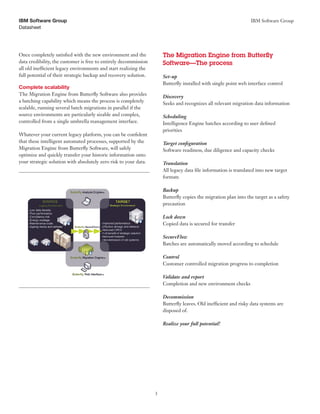
The Migration Engine from Butterfly
Software—The process
Set-up
Butterfly installed with single point web interface control
Discovery
Seeks and recognizes all relevant migration data information
Scheduling
Intelligence Engine batches according to user defined
priorities
Target configuration
Software readiness, due diligence and capacity checks
Translation
All legacy data file information is translated into new target
formats
Backup
Butterfly copies the migration plan into the target as a safety
precaution
Lock down
Copied data is secured for transfer
SecureFlow
Batches are automatically moved according to schedule
Control
Customer controlled migration progress to completion
Validate and report
Completion and new environment checks
Decommission
Butterfly leaves. Old inefficient and risky data systems are
disposed of.
Realize your full potential!
For more information
Please contact your IBM marketing representative or IBM
Business Partner, or visit the following website:
ibm.com/software/tivoli/solutions/recovery-management/
© Copyright IBM Corporation 2013
IBM Corporation
Software Group
Route 100
Somers, NY 10589
Produced in the United States of America
May 2013
IBM, the IBM logo and ibm.com are trademarks of International Business
Machines Corp., registered in many jurisdictions worldwide. Other
product and service names might be trademarks of IBM or other
companies. A current list of IBM trademarks is available on the web at
“Copyright and trademark information” at:
ibm.com/legal/copytrade.shtml
This document is current as of the initial date of publication and may be
changed by IBM at any time. Not all offerings are available in every
country in which IBM operates.
The performance data discussed herein is presented as derived under
specific operating conditions. Actual results may vary. THE
INFORMATION IN THIS DOCUMENT IS PROVIDED “AS IS”
WITHOUT ANY WARRANTY, EXPRESS OR IMPLIED,
INCLUDING WITHOUT ANY WARRANTIES OF
MERCHANTABILITY, FITNESS FOR A PARTICULAR PURPOSE
AND ANY WARRANTY OR CONDITION OF NON-
INFRINGEMENT. IBM products are warranted according to the terms
and conditions of the agreements under which they are provided.
Actual available storage capacity may be reported for both uncompressed
and compressed data and will vary and may be less than stated.
Please	Recycle
TID14099-USEN-01

Butterfly

  • 1.
    Datasheet IBM Software GroupIBM Software Group Migration Engine from Butterfly Software Key benefits: • Consolidate all your legacy and current data • Clean and optimize your historic data files • Fast and cost effective automated process • Zero risk to any data • Zero impact on your live production host environment • Eliminate legacy infrastructure maintenance costs • Decommission all your outdated infrastructure • Fully scalable no matter how many outdated Backup and Recovery environments The Migration Engine from Butterfly Software is an innovative, totally automated application that enables companies to fully realize their data backup and recovery cost, risk and energy reducing strategies by facilitating completely flawless consolidation of all historic compliance data from their legacy environments; quickly, safely, cost effectively and without disruption. The Migration Engine from Butterfly Software is an extremely powerful software solution that has been specifically designed to tackle the notorious cost and risk issues of moving historic backup data from legacy environments by exploiting intelligently controlled automation to safely consolidate all your data onto your strategic backup and recovery solution. Once the procedure has been completed all your data can now be accessed from a single backup platform, improving your RTO and RPO objectives and ensuring you are legally compliant as well as reducing your overall carbon footprint. The Butterfly migration follows a strictly defined process that ensures a smooth transfer with complete risk mitigation, based on the metrics in the Backup Analysis Engine Report (AER) from Butterfly Software. For more information, see this latest White Paper featuring Butterfly.
  • 2.
    Datasheet IBM Software GroupIBM Software Group 2 The Butterfly migration process Set-up Following the analysis stage a dedicated application server will be configured on-site and linked to the customer’s monitoring environment. The entire migration will be controlled from a single point web interface. Discovery Building on the findings of the analysis, the Migration Engine from Butterfly Software automatically gathers the information it needs on the data to be migrated including number of clients, data files and associated retention policies. Scheduling The customer can now define the parameters for the migra- tion, such as timeframes, priority data, server access times and so on, based on their operational guidelines. As a result, the Migration Engine from Butterfly Software will then design the most effective migration schedule. This process, which would normally take weeks to define, literally takes a matter of minutes and can be adjusted and reviewed with ease. Configure the target environment Once batching is complete, the Migration Engine from Butterfly Software will recognize the new backup environ- ment and automatically configure the solution for acceptance of the historic data—and, in many environments, will actually install and configure the software itself. Plus, the translation and replication of any proprietary data configurations are facilitated to best suit the new environment. Furthermore, this resulting backup environment will back itself up in the new target environment as a failsafe, before giving the confirmation that it is now ready to perform the migration. Lock down and SecureFlow™ process Once the migration process begins, the software copies the first batch of data transactions and file attributes into a totally secure mezzanine within the Migration Engine from Butterfly Software. No data is removed from the source at any time. This copied data information is then locked down inside the system, untouchable by any operators and ensuring complete data integrity between source and target points. Post stage cleaning and optimizing As part of this migration process, the customer can streamline their historic data content for the new environment as the batches are processed. Depending on the new environment software, the files can be de-duped, encrypted, compressed or excluded to maximize the capacity efficiency of the target solution. Total control during migration This migration process also allows complete control during the consolidation process. Daily reports, alerts and visual displays keep you informed of progress until completion. The throttle control allows the speed of migration to be slowed or accelerated according to internal requirements. The Migration Engine from Butterfly Software is able to log and report any individual failures in or out of the mezzanine in real time as the migration is at a transactional level. The completion procedures Once the migration of all legacy data is complete, it will deliver a full exception report of any failed transactions which need to be addressed, and validate the data in the new system. All file and file system structure attributes are retained for future reference.
  • 3.
    Datasheet IBM Software GroupIBM Software Group 3 Once completely satisfied with the new environment and the data credibility, the customer is free to entirely decommission all old inefficient legacy environments and start realizing the full potential of their strategic backup and recovery solution. Complete scalability The Migration Engine from Butterfly Software also provides a batching capability which means the process is completely scalable, running several batch migrations in parallel if the source environments are particularly sizable and complex, controlled from a single umbrella management interface. Whatever your current legacy platform, you can be confident that these intelligent automated processes, supported by the Migration Engine from Butterfly Software, will safely optimize and quickly transfer your historic information onto your strategic solution with absolutely zero risk to your data. The Migration Engine from Butterfly Software—The process Set-up Butterfly installed with single point web interface control Discovery Seeks and recognizes all relevant migration data information Scheduling Intelligence Engine batches according to user defined priorities Target configuration Software readiness, due diligence and capacity checks Translation All legacy data file information is translated into new target formats Backup Butterfly copies the migration plan into the target as a safety precaution Lock down Copied data is secured for transfer SecureFlow Batches are automatically moved according to schedule Control Customer controlled migration progress to completion Validate and report Completion and new environment checks Decommission Butterfly leaves. Old inefficient and risky data systems are disposed of. Realize your full potential!
  • 4.
    For more information Pleasecontact your IBM marketing representative or IBM Business Partner, or visit the following website: ibm.com/software/tivoli/solutions/recovery-management/ © Copyright IBM Corporation 2013 IBM Corporation Software Group Route 100 Somers, NY 10589 Produced in the United States of America May 2013 IBM, the IBM logo and ibm.com are trademarks of International Business Machines Corp., registered in many jurisdictions worldwide. Other product and service names might be trademarks of IBM or other companies. A current list of IBM trademarks is available on the web at “Copyright and trademark information” at: ibm.com/legal/copytrade.shtml This document is current as of the initial date of publication and may be changed by IBM at any time. Not all offerings are available in every country in which IBM operates. The performance data discussed herein is presented as derived under specific operating conditions. Actual results may vary. THE INFORMATION IN THIS DOCUMENT IS PROVIDED “AS IS” WITHOUT ANY WARRANTY, EXPRESS OR IMPLIED, INCLUDING WITHOUT ANY WARRANTIES OF MERCHANTABILITY, FITNESS FOR A PARTICULAR PURPOSE AND ANY WARRANTY OR CONDITION OF NON- INFRINGEMENT. IBM products are warranted according to the terms and conditions of the agreements under which they are provided. Actual available storage capacity may be reported for both uncompressed and compressed data and will vary and may be less than stated. Please Recycle TID14099-USEN-01