
::Contact us:: 61 555 555
43, Sarvodya Ind. Estate Mahakali Caves Road,
Andheri – East Mumbai - 400093
Visit Us : www.acmacomputers.com
Email Us : acma@acmacomputers.com
Proposal For
ACMA COMPUTERS
LTD.
“End to End IT Solutions and
Services , worldwide.”
Akruti Infrastructure Management Service
FMS /
Physical Support
FMS /
Physical Support
AMS /
IT Automation
AMS /
IT Automation
IMS /
IT Management
IMS /
IT Management
FMS / Physical SupportFMS / Physical Support
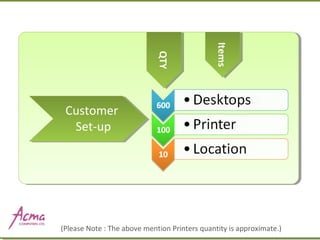
Customer
Set-up
(Please Note : The above mention Printers quantity is approximate.)
QTYQTY
ItemsItems
SERVICE LEVEL AGREEMENTSERVICE LEVEL AGREEMENT
Critical users 2 working hrs attend
& resolution
Normal users 4 hrs attend & call
resolution.
Escalated calls by 8 working hrs
In case of material requirement
then resolution by next day.
:: SCOPE OF SERVICE ::
Entire spectrum of our services will include.
For existing
setup –
i) Hardware support (For More
details click here).
For new setup - Pre & Post installation services (For
More details click here).
Management of mail services. (as per details
mentioned)
ii) Software support including virus
control (For More details click
here).
::Resident Engineer Services Navigator ::::Resident Engineer Services Navigator ::
List of Authorities:
customer name is to assign the details of the Authorities set for I.T. Activities.
Existing system & processes:
study of the existing process and the system will be made & the sheet will be if changes are required.
Supplier’s details:
to get details will be documented about suppliers.
Machine defect list:
before starting the operations a defect list of all its products will be made for future follow up.
Desktop details:
all the desktop under the scope of this contract will be listed for hardware details network sharing
information will be mentioned.
Networking details:
information will be available on the different users in network w.r.t the user rights shared printer, printer
server information will be listed.
User right form:
Users can be created or deleted or administered only if it is approved by the stated authorizes on User’s Right
Form.
Inventory:
Inventory of the components under the IT will be maintained in concise form with respect to the m/c nos.
Service Level Agreement:
The services level agreements will be clearly defined
The different process that are expected to be operated.
Details on the I.T. Infrastructure & People & Products at the site will be documented in a
structured form
Efficient, Trained Service Task Force
Daily call log Maintenance
Repeat call Management
Support for workstations
Senior level escalation handling.
Software Support Management
User Software Interfacing
Customer Software Installation
Operating System And Application
Upgrades
Licensing Verification (periodic)
Hardware Support
ServicesHardware Support
Services
Software support
service
Software support
service
Pre & Post
Installation
Mail System
Management
Installation Planning
Installation Coordination
Structured Cabling
User training
Inventory Library Updation
Contract Data Base Updation
Mail system Installation
Call Fixation
Mailbox Creation
Mail Traffic Management
Virus Control
Virus Control Virus check up at scheduled time
Regular Virus update using Virus
software
Help Desk
management
Help Desk
management
To register customer calls via email, direct user
ticket, & telephonic.
Co-ordinate with field team for call attend &
resolution.
Submit defined weekly reports.
PROFILE OF ENGINEER
1-2 years of networking
experience.
 
Experienced in handling the end
users for hardware & software
troubleshooting.
 
Good communication skill.
JOB TO BE CARRIED OUT BY RESIDENT
ENGINEER
PC Sever, peripherals &
software support
 
Timely escalation of the
situation to the Senior person
RESPONSIBILITIES
High uptime on desktop,
peripherals and servers
 
Faster response time
 
Handling report
periodically
 
Regular suggestion on
systems performance
suggestions if required
 
Escalation Generation
under non compliance’s
:: REQUIRMENTS FOR EFFICIENT SERVICING & MANAGEMENT ::
Availability of PC for maintaining the reports & other documents.
Storage to maintain spares.
Spares stock to be jointly planned.
Courier boys for spears delivery
Table space for the executive with telephone line.
Limited access to E - mail so that the reports can be sent on mail.
:: Information required from Customer ::
Critical User List
Organization user’s mailing list
Area office contact details
Vendor details specifying type of support, Service level agreement
& contact details.
Proof of purchase of m/c if MNC brand
Administrative controls details for Network & Server
administration
:: BENEFITS OF ACMA COMPUTERS RESIDENT ENGINEER SERVICES::
Total responsibility of entire activity
1. To give entire network high uptime and availability.
2. Periodic Virus control & preventive maintenance
3. Reliable operation & reduction on total cost of ownership.
4. Potential utilization of manpower.
5. Person independent system.
AMS /IT Automation
 An innovative way of delivering services, conceptualized by Acma
Computers India. Autopilot, further automates the automation and
takes IT Automation to the next level.
 A pre- automated solution that starts delivering results from the word
go.
 Industry standard configuration presets, so that all you need to do is
take-off
using Acma Computers and leave the rest to us.
 Extend the functionalities even further by customizing automation
routines
for your business
 AMS Autopilot control centre provides real time information with built
in
dashboards and Reports for every activity giving quick overviews as
What is AMS in Autopilot?
Asset Activity Status
Assets inventory management AMS inventory Score Card
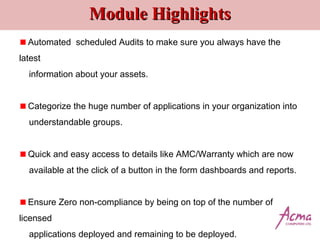
Module HighlightsModule Highlights
Automated scheduled Audits to make sure you always have the
latest
information about your assets.
Categorize the huge number of applications in your organization into
understandable groups.
Quick and easy access to details like AMC/Warranty which are now
available at the click of a button in the form dashboards and reports.
Ensure Zero non-compliance by being on top of the number of
licensed
applications deployed and remaining to be deployed.
Detailed FeaturesDetailed Features
 Machine Summary
 Machine Types
 Total Machine count and Group wise
count
 All with the option to just click on the graph
of your choice and get more detailed reports
Main Dashboard giving you
Executive Summary DashboardExecutive Summary Dashboard
Gives you an overview of the OS, Asset type, AMC/Warranty Report, System Age
report, Antivirus Summary, RAM Size and Hard disk utilization of one and multiple
organizations in a single pane of glass to take quick and informed decisions.
Executive Summary Dashboard Cont..Executive Summary Dashboard Cont..
Customized Machine SummaryCustomized Machine Summary
Customize what you want to see by selecting the columns, such as IP related,
AMC and Warranty related, Storage related and more and you can generate
reports that will display only those columns selected by you. Also export the
report in an Excel format and display it.
Asset Change HistoryAsset Change History
An overview of asset change history in the organization. By selecting the dates (from
and to) and the asset type you can generate reports to see and track any asset changes
that may have been made. You can drill down further to see on which machine the
changes have been made.
Asset Utilization
Select a period during which you want to calculate the asset utilization and
generate reports on the exact number of hours a machine has been in use. The
utilization is computed for a period by considering the working hours per day,
per week and holidays and generate a report to get the percentage of
utilization. Similarly also get reports for Asset Owner Change by date, asset
Installed Application
An overview of the applications installed in an organization (number of
machines with a particular application). On clicking on a particular product /
main group a dashboard with all sub - groups under a particular product will be
displayed. You can drill down and find out the exact machines on which a
LicenseLicense
A top view of the number of licenses by product/company name installed in an
organization, where you can drill down and see the sub groups of a product by
version and their numbers installed. You can further drill down to see the exact
machine on which the application is installed by machine name, user, etc. For
each product license you can set a ROL (re order level) and the current license
count and generate an alert if a particular threshold is breached for reorder. Or
alternately check and track the usage of a particular product license.
One click on the main dashboard and get drillOne click on the main dashboard and get drill
down detailsdown details
AMC/WarrantyAMC/Warranty
A top view of the number of machines under AMC/Warranty, nearing expiry and
expired, from which you can drill down and find out the exact machine that
comes under the above categories. The expiry date can be inputted manually
or imported from an excel sheet in the configuration page as a one- time effort.
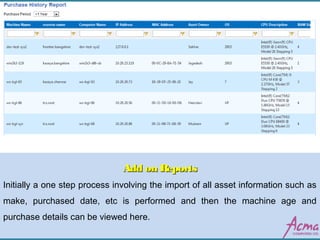
Add on ReportsAdd on Reports
Initially a one step process involving the import of all asset information such as
make, purchased date, etc is performed and then the machine age and
purchase details can be viewed here.
Configuration PageConfiguration Page
The main customization page where you can input the application company name,
product name, number of licenses available, warranty expiry and schedule automatic
reports to be generated with the actual data on all the above fields by machine or user.
You can also configure and create your own customized machine inventory summary
by selecting the fields you want to see or which you think are important for your
organization.
Server ManagementServer Management
Module HighlightsModule Highlights
Effectively manage IIS Server, SQL Server,
Citrix Server, Terminal Server, DHCP Server,
DNS and AD and more.
Monitor and manage all resource parameters
such as CPU, Memory and Disk.
Monitor all the critical and routine services on a
continuous basis and auto remediate or alert .
Monitor all configured ports and ensure their
maximum uptime.
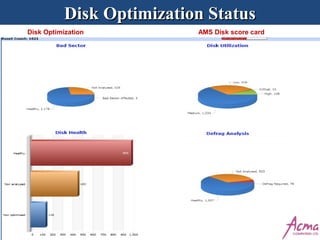
Disk Optimization StatusDisk Optimization Status
Disk Optimization AMS Disk score card
Module HighlightsModule Highlights
 Health report of your disk based on preset configurations,
classifying them into healthy/unhealthy machines.
 Periodic and Automatic disk cleanups, defragmentation, bad
sector analysis performed without any user intervention.
 Complete Drive wise analysis.
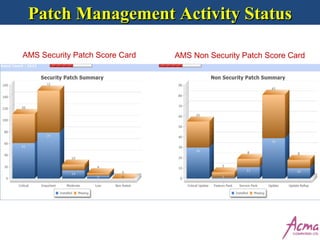
Patch Management Activity StatusPatch Management Activity Status
AMS Security Patch Score Card AMS Non Security Patch Score Card
Module HighlightsModule Highlights
 Get a Patch Score, for your organization based
on missing and installed patches.
 A unified dashboard to view all categories of
missing and installed patches .
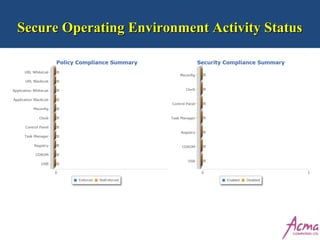
Secure Operating Environment Activity StatusSecure Operating Environment Activity Status
Module HighlightsModule Highlights
 Select and enforce security policies starting from USB access , Optical
drive
access to URL blacklisting depending on your requirements
 Dashboard gives you latest information of the status of the enforced
policies.
 Always stay on top with the visibility that will help ensure that all your
machines adhere to enforced policies
Software DeploymentSoftware Deployment
 Install and uninstall any software application remotely and silently across
locations.
Install software across multiple machines simultaneously without any user
intervention.
Dashboard and report gives you the status of the deployment such as
installed, already installed and failed by machine, user and IP address.
 Perform the tiresome and manually resource intensive task seamlessly and
with maximum accountability.
Anti Virus Management Activity StatusAnti Virus Management Activity Status
Module HighlightsModule Highlights
 Ensure your organization is protected against threats by having a clear
view of the protection status of your machines.
 Remotely and silently deploy Antivirus software on unprotected
machines.
 In case you have different AV products protecting your machines,
manage your licenses based on the instances of each and their installed
location.
Module HighlightsModule Highlights
 New Dashboards for tickets as well, to understand which are
the most frequent categories of tickets, how fast the tickets are
being resolved, and who is resolving most tickets. All this in
single pane of glass interface.
IMS /IT Management
“A Revolutionary way of converting Reactive way
of handling IT related errors to a Proactive and
Predictive Way”.
: : Which will ensure : :
Time
Savings
Manpower
Savings
Cost
Savings
Infrastructure Management Services
Monitoring
Proactive Alerts Maintenance
Security / Hardening
Asset Management
Ticketing
Reports
Multi-location Management
Monitoring (Servers , Desktops, Networks)
(Gives Single Dashboard Control of entire IT Assets)
Desktop And Server
Monitoring Sets :
Monitoring Sets Based
On ServerRoles:
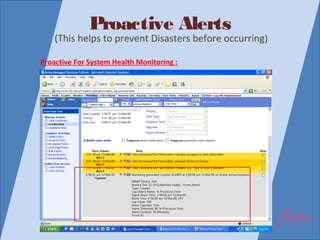
Proactive Alerts
(This helps to prevent Disasters before occurring)
Proactive For System Health Monitoring :
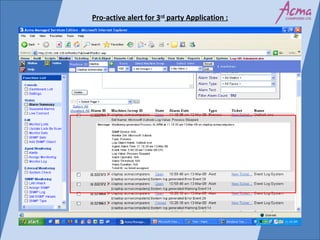
Pro-active alert for 3rd
party Application :
 Maintenance (Servers,
Desktops)
 Single Key Updates
(Ensure Automated & timely maintenance
which is manually not possible)
Maintenance – Defragmentation :
Single Click Update :
Maintenance – Patch Management :
Operating Systems With Computer Name :
Maintenance – Anti Virus:
Security
(This ensure through user Control)
• Block U S B Ports
• Block Network Settings
• Removes The Folder Options Menu
Item From The Tools
• Restrict Registry Editor
• Restrict RUN Start Menu & Many
More
I M S – Security
 Assets Management
 Asset History
 Filtering Option
(This also gives History of Assets)
Welcome Screen For Users :
Reports
Console for NOC Engineer :
Dashboard for NOC Engineer :
 Proactively
 Automatically
 Efficiently
 Keep your system healthy & updated
 Maximum Uptime
 And leads to lot of Direct & Indirect “COST
SAVINGS”.
IMS ensures all the steps are taken:
WE guarantee Cost Savings on yourIT
Infrastructure through ourSpecialized Services
such as:
 IMS
 AMC
 Antivirus
Acma Computers - Fms & Ims

Acma Computers - Fms & Ims

  • 1.
    ::Contact us:: 61555 555 43, Sarvodya Ind. Estate Mahakali Caves Road, Andheri – East Mumbai - 400093 Visit Us : www.acmacomputers.com Email Us : acma@acmacomputers.com Proposal For ACMA COMPUTERS LTD. “End to End IT Solutions and Services , worldwide.” Akruti Infrastructure Management Service FMS / Physical Support FMS / Physical Support AMS / IT Automation AMS / IT Automation IMS / IT Management IMS / IT Management
  • 2.
    FMS / PhysicalSupportFMS / Physical Support
  • 3.
    Customer Set-up (Please Note :The above mention Printers quantity is approximate.) QTYQTY ItemsItems
  • 4.
    SERVICE LEVEL AGREEMENTSERVICELEVEL AGREEMENT Critical users 2 working hrs attend & resolution Normal users 4 hrs attend & call resolution. Escalated calls by 8 working hrs In case of material requirement then resolution by next day.
  • 5.
    :: SCOPE OFSERVICE :: Entire spectrum of our services will include. For existing setup – i) Hardware support (For More details click here). For new setup - Pre & Post installation services (For More details click here). Management of mail services. (as per details mentioned) ii) Software support including virus control (For More details click here).
  • 6.
    ::Resident Engineer ServicesNavigator ::::Resident Engineer Services Navigator :: List of Authorities: customer name is to assign the details of the Authorities set for I.T. Activities. Existing system & processes: study of the existing process and the system will be made & the sheet will be if changes are required. Supplier’s details: to get details will be documented about suppliers. Machine defect list: before starting the operations a defect list of all its products will be made for future follow up. Desktop details: all the desktop under the scope of this contract will be listed for hardware details network sharing information will be mentioned. Networking details: information will be available on the different users in network w.r.t the user rights shared printer, printer server information will be listed. User right form: Users can be created or deleted or administered only if it is approved by the stated authorizes on User’s Right Form. Inventory: Inventory of the components under the IT will be maintained in concise form with respect to the m/c nos. Service Level Agreement: The services level agreements will be clearly defined The different process that are expected to be operated. Details on the I.T. Infrastructure & People & Products at the site will be documented in a structured form
  • 7.
    Efficient, Trained ServiceTask Force Daily call log Maintenance Repeat call Management Support for workstations Senior level escalation handling. Software Support Management User Software Interfacing Customer Software Installation Operating System And Application Upgrades Licensing Verification (periodic) Hardware Support ServicesHardware Support Services Software support service Software support service
  • 8.
    Pre & Post Installation MailSystem Management Installation Planning Installation Coordination Structured Cabling User training Inventory Library Updation Contract Data Base Updation Mail system Installation Call Fixation Mailbox Creation Mail Traffic Management
  • 9.
    Virus Control Virus ControlVirus check up at scheduled time Regular Virus update using Virus software Help Desk management Help Desk management To register customer calls via email, direct user ticket, & telephonic. Co-ordinate with field team for call attend & resolution. Submit defined weekly reports.
  • 10.
    PROFILE OF ENGINEER 1-2years of networking experience.   Experienced in handling the end users for hardware & software troubleshooting.   Good communication skill. JOB TO BE CARRIED OUT BY RESIDENT ENGINEER PC Sever, peripherals & software support   Timely escalation of the situation to the Senior person RESPONSIBILITIES High uptime on desktop, peripherals and servers   Faster response time   Handling report periodically   Regular suggestion on systems performance suggestions if required   Escalation Generation under non compliance’s
  • 11.
    :: REQUIRMENTS FOREFFICIENT SERVICING & MANAGEMENT :: Availability of PC for maintaining the reports & other documents. Storage to maintain spares. Spares stock to be jointly planned. Courier boys for spears delivery Table space for the executive with telephone line. Limited access to E - mail so that the reports can be sent on mail. :: Information required from Customer :: Critical User List Organization user’s mailing list Area office contact details Vendor details specifying type of support, Service level agreement & contact details. Proof of purchase of m/c if MNC brand Administrative controls details for Network & Server administration :: BENEFITS OF ACMA COMPUTERS RESIDENT ENGINEER SERVICES:: Total responsibility of entire activity 1. To give entire network high uptime and availability. 2. Periodic Virus control & preventive maintenance 3. Reliable operation & reduction on total cost of ownership. 4. Potential utilization of manpower. 5. Person independent system.
  • 12.
  • 13.
     An innovativeway of delivering services, conceptualized by Acma Computers India. Autopilot, further automates the automation and takes IT Automation to the next level.  A pre- automated solution that starts delivering results from the word go.  Industry standard configuration presets, so that all you need to do is take-off using Acma Computers and leave the rest to us.  Extend the functionalities even further by customizing automation routines for your business  AMS Autopilot control centre provides real time information with built in dashboards and Reports for every activity giving quick overviews as What is AMS in Autopilot?
  • 14.
    Asset Activity Status Assetsinventory management AMS inventory Score Card
  • 15.
    Module HighlightsModule Highlights Automatedscheduled Audits to make sure you always have the latest information about your assets. Categorize the huge number of applications in your organization into understandable groups. Quick and easy access to details like AMC/Warranty which are now available at the click of a button in the form dashboards and reports. Ensure Zero non-compliance by being on top of the number of licensed applications deployed and remaining to be deployed.
  • 16.
    Detailed FeaturesDetailed Features Machine Summary  Machine Types  Total Machine count and Group wise count  All with the option to just click on the graph of your choice and get more detailed reports Main Dashboard giving you
  • 17.
    Executive Summary DashboardExecutiveSummary Dashboard Gives you an overview of the OS, Asset type, AMC/Warranty Report, System Age report, Antivirus Summary, RAM Size and Hard disk utilization of one and multiple organizations in a single pane of glass to take quick and informed decisions.
  • 18.
    Executive Summary DashboardCont..Executive Summary Dashboard Cont..
  • 19.
    Customized Machine SummaryCustomizedMachine Summary Customize what you want to see by selecting the columns, such as IP related, AMC and Warranty related, Storage related and more and you can generate reports that will display only those columns selected by you. Also export the report in an Excel format and display it.
  • 20.
    Asset Change HistoryAssetChange History An overview of asset change history in the organization. By selecting the dates (from and to) and the asset type you can generate reports to see and track any asset changes that may have been made. You can drill down further to see on which machine the changes have been made.
  • 21.
    Asset Utilization Select aperiod during which you want to calculate the asset utilization and generate reports on the exact number of hours a machine has been in use. The utilization is computed for a period by considering the working hours per day, per week and holidays and generate a report to get the percentage of utilization. Similarly also get reports for Asset Owner Change by date, asset
  • 22.
    Installed Application An overviewof the applications installed in an organization (number of machines with a particular application). On clicking on a particular product / main group a dashboard with all sub - groups under a particular product will be displayed. You can drill down and find out the exact machines on which a
  • 24.
    LicenseLicense A top viewof the number of licenses by product/company name installed in an organization, where you can drill down and see the sub groups of a product by version and their numbers installed. You can further drill down to see the exact machine on which the application is installed by machine name, user, etc. For each product license you can set a ROL (re order level) and the current license count and generate an alert if a particular threshold is breached for reorder. Or alternately check and track the usage of a particular product license.
  • 25.
    One click onthe main dashboard and get drillOne click on the main dashboard and get drill down detailsdown details
  • 27.
    AMC/WarrantyAMC/Warranty A top viewof the number of machines under AMC/Warranty, nearing expiry and expired, from which you can drill down and find out the exact machine that comes under the above categories. The expiry date can be inputted manually or imported from an excel sheet in the configuration page as a one- time effort.
  • 28.
    Add on ReportsAddon Reports Initially a one step process involving the import of all asset information such as make, purchased date, etc is performed and then the machine age and purchase details can be viewed here.
  • 29.
    Configuration PageConfiguration Page Themain customization page where you can input the application company name, product name, number of licenses available, warranty expiry and schedule automatic reports to be generated with the actual data on all the above fields by machine or user. You can also configure and create your own customized machine inventory summary by selecting the fields you want to see or which you think are important for your organization.
  • 30.
  • 31.
    Module HighlightsModule Highlights Effectivelymanage IIS Server, SQL Server, Citrix Server, Terminal Server, DHCP Server, DNS and AD and more. Monitor and manage all resource parameters such as CPU, Memory and Disk. Monitor all the critical and routine services on a continuous basis and auto remediate or alert . Monitor all configured ports and ensure their maximum uptime.
  • 32.
    Disk Optimization StatusDiskOptimization Status Disk Optimization AMS Disk score card
  • 33.
    Module HighlightsModule Highlights Health report of your disk based on preset configurations, classifying them into healthy/unhealthy machines.  Periodic and Automatic disk cleanups, defragmentation, bad sector analysis performed without any user intervention.  Complete Drive wise analysis.
  • 34.
    Patch Management ActivityStatusPatch Management Activity Status AMS Security Patch Score Card AMS Non Security Patch Score Card
  • 35.
    Module HighlightsModule Highlights Get a Patch Score, for your organization based on missing and installed patches.  A unified dashboard to view all categories of missing and installed patches .
  • 36.
    Secure Operating EnvironmentActivity StatusSecure Operating Environment Activity Status
  • 37.
    Module HighlightsModule Highlights Select and enforce security policies starting from USB access , Optical drive access to URL blacklisting depending on your requirements  Dashboard gives you latest information of the status of the enforced policies.  Always stay on top with the visibility that will help ensure that all your machines adhere to enforced policies
  • 38.
  • 39.
    Software DeploymentSoftware Deployment Install and uninstall any software application remotely and silently across locations. Install software across multiple machines simultaneously without any user intervention. Dashboard and report gives you the status of the deployment such as installed, already installed and failed by machine, user and IP address.  Perform the tiresome and manually resource intensive task seamlessly and with maximum accountability.
  • 40.
    Anti Virus ManagementActivity StatusAnti Virus Management Activity Status
  • 41.
    Module HighlightsModule Highlights Ensure your organization is protected against threats by having a clear view of the protection status of your machines.  Remotely and silently deploy Antivirus software on unprotected machines.  In case you have different AV products protecting your machines, manage your licenses based on the instances of each and their installed location.
  • 42.
    Module HighlightsModule Highlights New Dashboards for tickets as well, to understand which are the most frequent categories of tickets, how fast the tickets are being resolved, and who is resolving most tickets. All this in single pane of glass interface.
  • 43.
  • 44.
    “A Revolutionary wayof converting Reactive way of handling IT related errors to a Proactive and Predictive Way”. : : Which will ensure : : Time Savings Manpower Savings Cost Savings
  • 45.
    Infrastructure Management Services Monitoring ProactiveAlerts Maintenance Security / Hardening Asset Management Ticketing Reports Multi-location Management Monitoring (Servers , Desktops, Networks) (Gives Single Dashboard Control of entire IT Assets)
  • 46.
    Desktop And Server MonitoringSets : Monitoring Sets Based On ServerRoles:
  • 47.
    Proactive Alerts (This helpsto prevent Disasters before occurring) Proactive For System Health Monitoring :
  • 48.
    Pro-active alert for3rd party Application :
  • 49.
     Maintenance (Servers, Desktops) Single Key Updates (Ensure Automated & timely maintenance which is manually not possible) Maintenance – Defragmentation :
  • 50.
  • 51.
  • 52.
    Operating Systems WithComputer Name :
  • 53.
  • 54.
    Security (This ensure throughuser Control) • Block U S B Ports • Block Network Settings • Removes The Folder Options Menu Item From The Tools • Restrict Registry Editor • Restrict RUN Start Menu & Many More I M S – Security
  • 55.
     Assets Management Asset History  Filtering Option (This also gives History of Assets)
  • 56.
  • 57.
  • 58.
  • 59.
     Proactively  Automatically Efficiently  Keep your system healthy & updated  Maximum Uptime  And leads to lot of Direct & Indirect “COST SAVINGS”. IMS ensures all the steps are taken:
  • 60.
    WE guarantee CostSavings on yourIT Infrastructure through ourSpecialized Services such as:  IMS  AMC  Antivirus