Site Manager
Asset Management
Agenda
•
•
•

Asset Summary
Filtering Assets
Settings
–

•
•

Adding Assets Manually
System Details
–

•
•
•
•
•

Customizing Columns

Editing an Existing Asset

Importing and Exporting Assets
Asset Reporting
Importing Assets
Exporting Assets
Asset Dashboard
–
–
–

Removing Widgets
Adding Widgets
Exporting Widgets to a PDF

Site Manager - Asset Management

2
Asset Summary
•

•

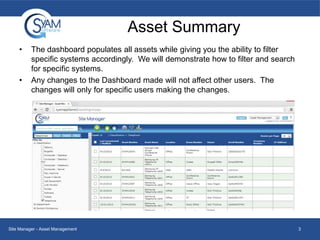
The dashboard populates all assets while giving you the ability to filter
specific systems accordingly. We will demonstrate how to filter and search
for specific systems.
Any changes to the Dashboard made will not affect other users. The
changes will only for specific users making the changes.

Site Manager - Asset Management

3
Filtering Assets
•

•
•

To narrow down to specific systems, expand the tree on the left. In this
example we expanded Department and chose to see which systems are
categorized in the Finance Department specifically
This is a quick and easy way to view assets with a variety of different filter
options.
You can check off as many boxes as you wish depending on how specific
you want to filter your systems.

Site Manager - Asset Management

4
Searching Assets
•
•
•
•
•
•

You can search for Assets using the serah window
You can search by
Serial Number
Asset Number
Asset Name
Description

Site Manager - Asset Management

5
Settings
•
•

By clicking the Settings icon at the top of the dashboard you will be brought
to the settings page.
Currently we have four columns; Asset Name, Location, Classification and
Manufacturer.

Site Manager - Asset Management

6
Customizing Columns
•
•

•

To add columns to the asset list, choose the category you wish to add and
click move right.
In this example we chose to add the Department column to view the
department that each asset belongs to. After clicking Move Right it will
populate under selected columns.
To remove a column, simply choose a selected column and click Move Left.

To close the settings page and return to the Asset
Summary page, click the red X at the top right.

Site Manager - Asset Management

7
Customizing Columns
•
•

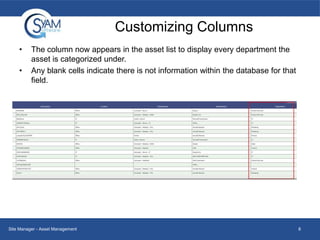
The column now appears in the asset list to display every department the
asset is categorized under.
Any blank cells indicate there is not information within the database for that
field.

Site Manager - Asset Management

8
Adding Assets Manually
•
•

To add an asset simply click the Add Asset icon
and the pop up window
show in the image below appears.
From here you can manually input asset information.

Site Manager - Asset Management

9
System Details
•

•

Clicking an asset in the asset list
causes a popup window to be
displayed. Asset information is
displayed and can be edited in the
pop up window.
The first tab, system details, displays
five categories of information:
–
–
–
–
–

Detailed System Information
Hardware
System Network Adapters
System Storage Information
Installed Applications

Site Manager - Asset Management

10
System Details
•

The details for a system include motherboard, display adapter, memory
slots and other valuable asset information

Site Manager - Asset Management

11
Hardware Details
•

Clicking the hardware tab under system details will populate the current
value of any sensors reported from the client. This varies depending upon
the system hardware.

Site Manager - Asset Management

12
System Network Adapters
•

This tab populates the network adapters configured in the system to include
adapter speed, IP address, and more.

Site Manager - Asset Management

13
System Storage Information
This tab will show logical and physical disk information

Site Manager - Asset Management

14
Installed Applications
•

Installed applications will display all applications for the system

Site Manager - Asset Management

15
Asset Details
•

The second tab, Asset Details,
provides three categories of
information:
– General Information
– Financial Information
– Service Information

•

The information displayed can
be entered manually or edited

Site Manager - Asset Management

16
Asset Details – General Information
•

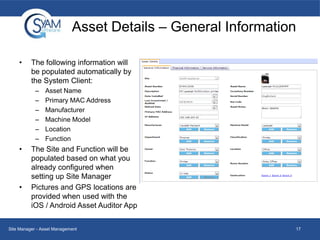
The following information will
be populated automatically by
the System Client:
–
–
–
–
–
–

•

•

Asset Name
Primary MAC Address
Manufacturer
Machine Model
Location
Function

The Site and Function will be
populated based on what you
already configured when
setting up Site Manager
Pictures and GPS locations are
provided when used with the
iOS / Android Asset Auditor App

Site Manager - Asset Management

17
Asset Details – General Information
•
•
•
•

•
•

•
•

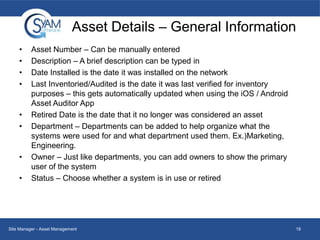
Asset Number – Can be manually entered
Description – A brief description can be typed in
Date Installed is the date it was installed on the network
Last Inventoried/Audited is the date it was last verified for inventory
purposes – this gets automatically updated when using the iOS / Android
Asset Auditor App
Retired Date is the date that it no longer was considered an asset
Department – Departments can be added to help organize what the
systems were used for and what department used them. Ex.)Marketing,
Engineering.
Owner – Just like departments, you can add owners to show the primary
user of the system
Status – Choose whether a system is in use or retired

Site Manager - Asset Management

18
Asset Details – Financial Information
•

Most sections allow you to manually input information.

Site Manager - Asset Management

19
Asset Details – Financial Information
•

Some sections require you to add
predefined information. In this
example we have to add a
Vendor/Supplier

•

After clicking Add a window pop up
displays where you can manually
enter the data point. In this
example we type in Dell.

•

Dell will now display in that drop
down menu for Vendor/Supplier for
every systems financial information

Site Manager - Asset Management

20
Service Information
•

On the Service Information tab you can record details of an asset’s service
contract, including start and ending dates and vendor contact information.
Site Manager service tickets related to the asset are automatically displayed
here.

Site Manager - Asset Management

21
Editing an Existing Asset
• To edit an existing asset, simply click anywhere
in the row of the desired asset you wish to
change.

Site Manager - Asset Management

22
Importing Assets
•

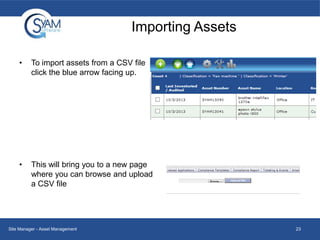
To import assets from a CSV file
click the blue arrow facing up.

•

This will bring you to a new page
where you can browse and upload
a CSV file

Site Manager - Asset Management

23
Exporting Assets
•
•
•

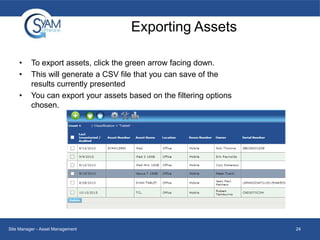
To export assets, click the green arrow facing down.
This will generate a CSV file that you can save of the
results currently presented
You can export your assets based on the filtering options
chosen.

Site Manager - Asset Management

24
Asset Dashboard
•
•
•

•

By clicking the bar chart icon at the top you will be brought to the analytics
dashboard where you are presented with a variety of different widgets.
The widgets give you many different statistics and charts of your IT assets.
By clicking on a widget it will be presented at the top of the dashboard.

To close the Asset Dashboard and return the summary page, click the
icon at the top right.

Site Manager - Asset Management

25
Removing a Widget
•

To remove a widget from the dashboard, mouse-over the desired widget
you wish to remove. A red X will appear in the top right corner of the widget.
Click that red X to remove the widget.

Site Manager - Asset Management

26
Adding a Widget
•

•
•
•
•

To add a widget click the icon at
the top of the dashboard
This will expand the page to
include a drop down menu.
Click the drop down and select a
widget.
Once you have chosen the desired
widget, click the icon to the right.
It will now appear in your analytics
dashboard

Site Manager - Asset Management

27
Exporting Widgets to PDF
•

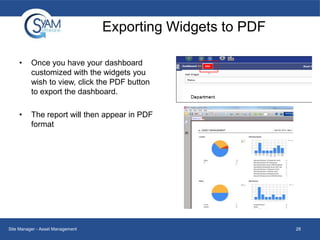
Once you have your dashboard
customized with the widgets you
wish to view, click the PDF button
to export the dashboard.

•

The report will then appear in PDF
format

Site Manager - Asset Management

28
Approving in Site Manager
• From the Drop Down Menu choose Asset Management.
• Press
to view a list of recent audits.
• Press reconcile on the Audit you completed.

29
Reconcile Page
•
•
•
•
•

On the Reconcile page you will see all assets that are new or edited during that audit.
Yellow indicates a new asset
Blue indicates that a change was made to a specific field(s)
Gray will show assets that were already reconciled and updated to the database.
You can choose to accept all changes made, or select all changes to certain assets
or fields by checking the appropriate checkboxes. For example, you can deselect the
description field if you do not wish to make any changes to any of the description
fields.

30

Asset management

  • 1.
  • 2.
    Agenda • • • Asset Summary Filtering Assets Settings – • • AddingAssets Manually System Details – • • • • • Customizing Columns Editing an Existing Asset Importing and Exporting Assets Asset Reporting Importing Assets Exporting Assets Asset Dashboard – – – Removing Widgets Adding Widgets Exporting Widgets to a PDF Site Manager - Asset Management 2
  • 3.
    Asset Summary • • The dashboardpopulates all assets while giving you the ability to filter specific systems accordingly. We will demonstrate how to filter and search for specific systems. Any changes to the Dashboard made will not affect other users. The changes will only for specific users making the changes. Site Manager - Asset Management 3
  • 4.
    Filtering Assets • • • To narrowdown to specific systems, expand the tree on the left. In this example we expanded Department and chose to see which systems are categorized in the Finance Department specifically This is a quick and easy way to view assets with a variety of different filter options. You can check off as many boxes as you wish depending on how specific you want to filter your systems. Site Manager - Asset Management 4
  • 5.
    Searching Assets • • • • • • You cansearch for Assets using the serah window You can search by Serial Number Asset Number Asset Name Description Site Manager - Asset Management 5
  • 6.
    Settings • • By clicking theSettings icon at the top of the dashboard you will be brought to the settings page. Currently we have four columns; Asset Name, Location, Classification and Manufacturer. Site Manager - Asset Management 6
  • 7.
    Customizing Columns • • • To addcolumns to the asset list, choose the category you wish to add and click move right. In this example we chose to add the Department column to view the department that each asset belongs to. After clicking Move Right it will populate under selected columns. To remove a column, simply choose a selected column and click Move Left. To close the settings page and return to the Asset Summary page, click the red X at the top right. Site Manager - Asset Management 7
  • 8.
    Customizing Columns • • The columnnow appears in the asset list to display every department the asset is categorized under. Any blank cells indicate there is not information within the database for that field. Site Manager - Asset Management 8
  • 9.
    Adding Assets Manually • • Toadd an asset simply click the Add Asset icon and the pop up window show in the image below appears. From here you can manually input asset information. Site Manager - Asset Management 9
  • 10.
    System Details • • Clicking anasset in the asset list causes a popup window to be displayed. Asset information is displayed and can be edited in the pop up window. The first tab, system details, displays five categories of information: – – – – – Detailed System Information Hardware System Network Adapters System Storage Information Installed Applications Site Manager - Asset Management 10
  • 11.
    System Details • The detailsfor a system include motherboard, display adapter, memory slots and other valuable asset information Site Manager - Asset Management 11
  • 12.
    Hardware Details • Clicking thehardware tab under system details will populate the current value of any sensors reported from the client. This varies depending upon the system hardware. Site Manager - Asset Management 12
  • 13.
    System Network Adapters • Thistab populates the network adapters configured in the system to include adapter speed, IP address, and more. Site Manager - Asset Management 13
  • 14.
    System Storage Information Thistab will show logical and physical disk information Site Manager - Asset Management 14
  • 15.
    Installed Applications • Installed applicationswill display all applications for the system Site Manager - Asset Management 15
  • 16.
    Asset Details • The secondtab, Asset Details, provides three categories of information: – General Information – Financial Information – Service Information • The information displayed can be entered manually or edited Site Manager - Asset Management 16
  • 17.
    Asset Details –General Information • The following information will be populated automatically by the System Client: – – – – – – • • Asset Name Primary MAC Address Manufacturer Machine Model Location Function The Site and Function will be populated based on what you already configured when setting up Site Manager Pictures and GPS locations are provided when used with the iOS / Android Asset Auditor App Site Manager - Asset Management 17
  • 18.
    Asset Details –General Information • • • • • • • • Asset Number – Can be manually entered Description – A brief description can be typed in Date Installed is the date it was installed on the network Last Inventoried/Audited is the date it was last verified for inventory purposes – this gets automatically updated when using the iOS / Android Asset Auditor App Retired Date is the date that it no longer was considered an asset Department – Departments can be added to help organize what the systems were used for and what department used them. Ex.)Marketing, Engineering. Owner – Just like departments, you can add owners to show the primary user of the system Status – Choose whether a system is in use or retired Site Manager - Asset Management 18
  • 19.
    Asset Details –Financial Information • Most sections allow you to manually input information. Site Manager - Asset Management 19
  • 20.
    Asset Details –Financial Information • Some sections require you to add predefined information. In this example we have to add a Vendor/Supplier • After clicking Add a window pop up displays where you can manually enter the data point. In this example we type in Dell. • Dell will now display in that drop down menu for Vendor/Supplier for every systems financial information Site Manager - Asset Management 20
  • 21.
    Service Information • On theService Information tab you can record details of an asset’s service contract, including start and ending dates and vendor contact information. Site Manager service tickets related to the asset are automatically displayed here. Site Manager - Asset Management 21
  • 22.
    Editing an ExistingAsset • To edit an existing asset, simply click anywhere in the row of the desired asset you wish to change. Site Manager - Asset Management 22
  • 23.
    Importing Assets • To importassets from a CSV file click the blue arrow facing up. • This will bring you to a new page where you can browse and upload a CSV file Site Manager - Asset Management 23
  • 24.
    Exporting Assets • • • To exportassets, click the green arrow facing down. This will generate a CSV file that you can save of the results currently presented You can export your assets based on the filtering options chosen. Site Manager - Asset Management 24
  • 25.
    Asset Dashboard • • • • By clickingthe bar chart icon at the top you will be brought to the analytics dashboard where you are presented with a variety of different widgets. The widgets give you many different statistics and charts of your IT assets. By clicking on a widget it will be presented at the top of the dashboard. To close the Asset Dashboard and return the summary page, click the icon at the top right. Site Manager - Asset Management 25
  • 26.
    Removing a Widget • Toremove a widget from the dashboard, mouse-over the desired widget you wish to remove. A red X will appear in the top right corner of the widget. Click that red X to remove the widget. Site Manager - Asset Management 26
  • 27.
    Adding a Widget • • • • • Toadd a widget click the icon at the top of the dashboard This will expand the page to include a drop down menu. Click the drop down and select a widget. Once you have chosen the desired widget, click the icon to the right. It will now appear in your analytics dashboard Site Manager - Asset Management 27
  • 28.
    Exporting Widgets toPDF • Once you have your dashboard customized with the widgets you wish to view, click the PDF button to export the dashboard. • The report will then appear in PDF format Site Manager - Asset Management 28
  • 29.
    Approving in SiteManager • From the Drop Down Menu choose Asset Management. • Press to view a list of recent audits. • Press reconcile on the Audit you completed. 29
  • 30.
    Reconcile Page • • • • • On theReconcile page you will see all assets that are new or edited during that audit. Yellow indicates a new asset Blue indicates that a change was made to a specific field(s) Gray will show assets that were already reconciled and updated to the database. You can choose to accept all changes made, or select all changes to certain assets or fields by checking the appropriate checkboxes. For example, you can deselect the description field if you do not wish to make any changes to any of the description fields. 30