Operating System Unit-I BCA Semester II
1
Notes by Dr. Chandrakantha T S, Vagdevi College of BCA, Melinakuruvalli, Thirthahalli-577 432
For more notes and resources, visit: https://sites.google.com/view/chandrakanthats/bca
UNIT-I: Introduction to Operating System
Introduction to Operating Systems (OS):
An Operating System (OS) is system software that acts as an interface between the user and
the computer hardware.
• It manages all hardware resources and ensures that applications run smoothly and
efficiently.
• Without an OS, a computer cannot function, as there would be no mechanism to control
hardware devices or execute programs.
The OS performs two main roles:
1. Resource Manager: It manages hardware resources such as the CPU, memory,
storage devices, and input/output devices.
2. User Interface Provider: It provides an easy way for users to interact with the
computer through commands, menus, or graphical elements.
Architecture of an Operating System
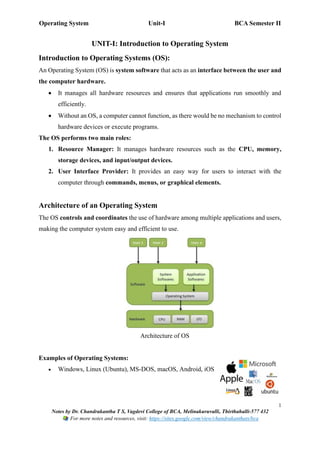
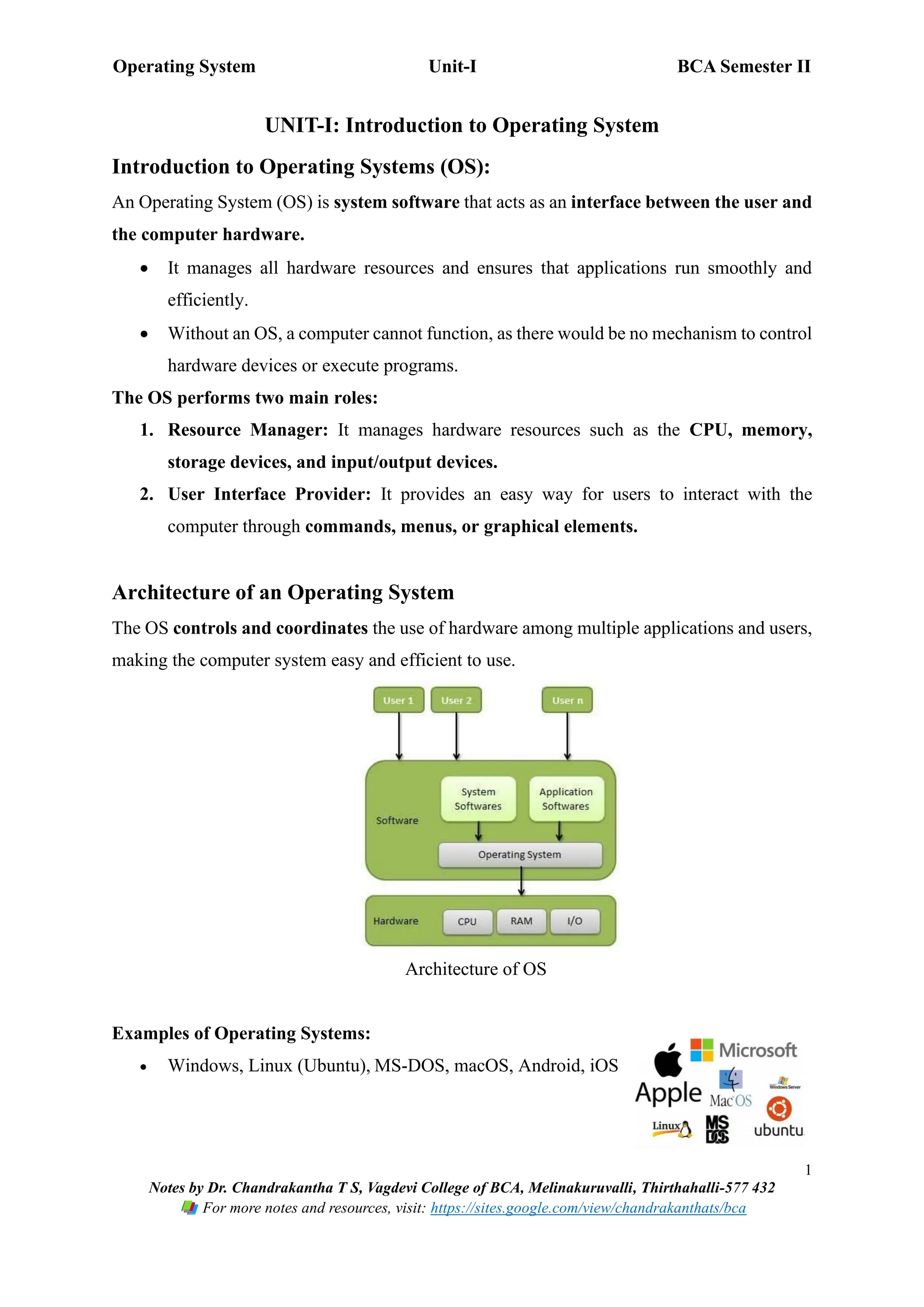
The OS controls and coordinates the use of hardware among multiple applications and users,
making the computer system easy and efficient to use.
Architecture of OS
Examples of Operating Systems:
• Windows, Linux (Ubuntu), MS-DOS, macOS, Android, iOS
Operating System Unit-I BCA Semester II
2
Notes by Dr. Chandrakantha T S, Vagdevi College of BCA, Melinakuruvalli, Thirthahalli-577 432
For more notes and resources, visit: https://sites.google.com/view/chandrakanthats/bca
Early Systems
• Early operating systems were developed in the 1950s and 1960s to manage large and
expensive computers used mainly for scientific and business applications.
• Their primary aim was to automate job execution and reduce manual intervention
in running programs.
• These systems focused on improving CPU utilisation and overall system efficiency
by handling multiple jobs effectively.
• Early system types include Batch Systems, Multiprogramming Systems, Time-
Sharing Systems, Real-Time Systems, Handheld Systems, and Distributed
Systems.
• These systems laid the foundation for modern operating system design and
influenced the development of advanced resource-management techniques.
Types of Operating Systems
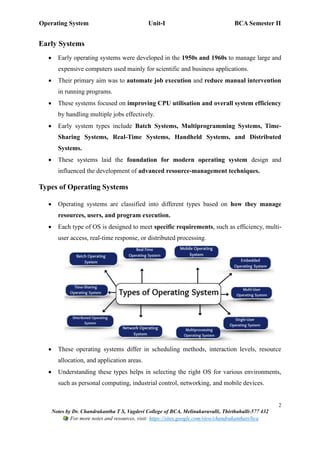
• Operating systems are classified into different types based on how they manage
resources, users, and program execution.
• Each type of OS is designed to meet specific requirements, such as efficiency, multi-
user access, real-time response, or distributed processing.
• These operating systems differ in scheduling methods, interaction levels, resource
allocation, and application areas.
• Understanding these types helps in selecting the right OS for various environments,
such as personal computing, industrial control, networking, and mobile devices.
Operating System Unit-I BCA Semester II
3
Notes by Dr. Chandrakantha T S, Vagdevi College of BCA, Melinakuruvalli, Thirthahalli-577 432
For more notes and resources, visit: https://sites.google.com/view/chandrakanthats/bca
1. Batch Operating System
Definition
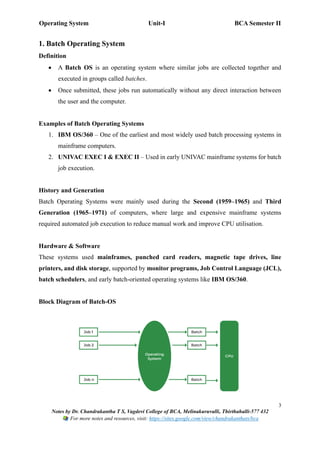
• A Batch OS is an operating system where similar jobs are collected together and
executed in groups called batches.
• Once submitted, these jobs run automatically without any direct interaction between
the user and the computer.
Examples of Batch Operating Systems
1. IBM OS/360 – One of the earliest and most widely used batch processing systems in
mainframe computers.
2. UNIVAC EXEC I & EXEC II – Used in early UNIVAC mainframe systems for batch
job execution.
History and Generation
Batch Operating Systems were mainly used during the Second (1959–1965) and Third
Generation (1965–1971) of computers, where large and expensive mainframe systems
required automated job execution to reduce manual work and improve CPU utilisation.
Hardware & Software
These systems used mainframes, punched card readers, magnetic tape drives, line
printers, and disk storage, supported by monitor programs, Job Control Language (JCL),
batch schedulers, and early batch-oriented operating systems like IBM OS/360.
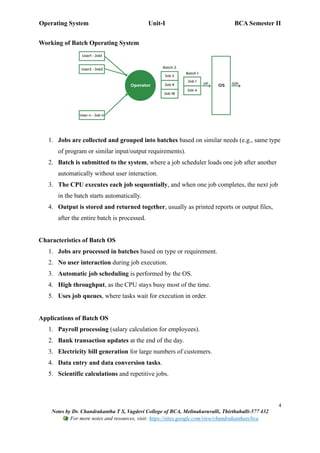
Block Diagram of Batch-OS
Operating System Unit-I BCA Semester II
4
Notes by Dr. Chandrakantha T S, Vagdevi College of BCA, Melinakuruvalli, Thirthahalli-577 432
For more notes and resources, visit: https://sites.google.com/view/chandrakanthats/bca
Working of Batch Operating System
1. Jobs are collected and grouped into batches based on similar needs (e.g., same type
of program or similar input/output requirements).
2. Batch is submitted to the system, where a job scheduler loads one job after another
automatically without user interaction.
3. The CPU executes each job sequentially, and when one job completes, the next job
in the batch starts automatically.
4. Output is stored and returned together, usually as printed reports or output files,
after the entire batch is processed.
Characteristics of Batch OS
1. Jobs are processed in batches based on type or requirement.
2. No user interaction during job execution.
3. Automatic job scheduling is performed by the OS.
4. High throughput, as the CPU stays busy most of the time.
5. Uses job queues, where tasks wait for execution in order.
Applications of Batch OS
1. Payroll processing (salary calculation for employees).
2. Bank transaction updates at the end of the day.
3. Electricity bill generation for large numbers of customers.
4. Data entry and data conversion tasks.
5. Scientific calculations and repetitive jobs.
Operating System Unit-I BCA Semester II
5
Notes by Dr. Chandrakantha T S, Vagdevi College of BCA, Melinakuruvalli, Thirthahalli-577 432
For more notes and resources, visit: https://sites.google.com/view/chandrakanthats/bca
Advantages of Batch OS
1. Efficient resource utilisation, as jobs are executed continuously.
2. Reduces manual intervention, saving time and effort.
3. Handles large, repetitive tasks effectively.
4. Higher throughput due to continuous job processing.
Disadvantages of Batch OS
1. Long waiting time, as jobs must wait in queues for their turn.
2. No interaction, so errors are detected only after execution.
3. Debugging is difficult, because user cannot observe the program while it is running.
4. Requires special scheduling, which increases complexity.
2. Multiprogramming Operating System
Definition
• A Multiprogramming OS allows multiple programs to reside in memory at the
same time, and the CPU switches between them to improve efficiency.
• When one job is waiting for input/output (I/O), the CPU executes another job, ensuring
maximum utilisation of CPU and system resources.
Examples of Multiprogramming OS
1. UNIX – One of the earliest systems to support multiprogramming for multi-user
environments.
2. IBM OS/390 – A mainframe operating system designed to run multiple jobs
simultaneously.
History and Generation
• Multiprogramming systems became popular during the Third Generation (1965–
1971) and Fourth Generation (1971–1980) of computers.
• They were introduced to overcome CPU idle time by allowing several jobs to stay in
memory and execute concurrently using scheduling algorithms.
Operating System Unit-I BCA Semester II
6
Notes by Dr. Chandrakantha T S, Vagdevi College of BCA, Melinakuruvalli, Thirthahalli-577 432
For more notes and resources, visit: https://sites.google.com/view/chandrakanthats/bca
Hardware & Software
• Hardware: Mainframes and minicomputers, magnetic disks, I/O devices, and multiple
memory partitions.
• Software: Memory management programs, CPU scheduling algorithms, interrupt
handling routines, and job control programs.
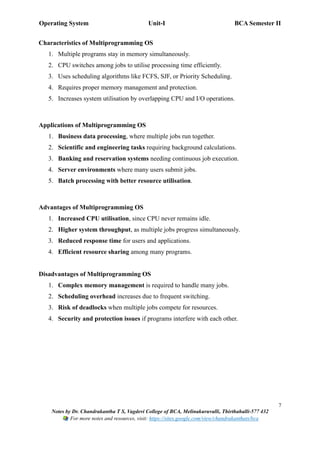
Block Diagram of Multiprogramming OS
Working of Multiprogramming OS
1. Multiple programs are loaded into memory simultaneously.
2. The OS uses scheduling algorithms to decide which job gets the CPU next.
3. When a job waits for I/O, the CPU is assigned to another job to prevent idle time.
4. This ensures continuous CPU usage, higher throughput, and better system efficiency.
Operating System Unit-I BCA Semester II
7
Notes by Dr. Chandrakantha T S, Vagdevi College of BCA, Melinakuruvalli, Thirthahalli-577 432
For more notes and resources, visit: https://sites.google.com/view/chandrakanthats/bca
Characteristics of Multiprogramming OS
1. Multiple programs stay in memory simultaneously.
2. CPU switches among jobs to utilise processing time efficiently.
3. Uses scheduling algorithms like FCFS, SJF, or Priority Scheduling.
4. Requires proper memory management and protection.
5. Increases system utilisation by overlapping CPU and I/O operations.
Applications of Multiprogramming OS
1. Business data processing, where multiple jobs run together.
2. Scientific and engineering tasks requiring background calculations.
3. Banking and reservation systems needing continuous job execution.
4. Server environments where many users submit jobs.
5. Batch processing with better resource utilisation.
Advantages of Multiprogramming OS
1. Increased CPU utilisation, since CPU never remains idle.
2. Higher system throughput, as multiple jobs progress simultaneously.
3. Reduced response time for users and applications.
4. Efficient resource sharing among many programs.
Disadvantages of Multiprogramming OS
1. Complex memory management is required to handle many jobs.
2. Scheduling overhead increases due to frequent switching.
3. Risk of deadlocks when multiple jobs compete for resources.
4. Security and protection issues if programs interfere with each other.
Operating System Unit-I BCA Semester II
8
Notes by Dr. Chandrakantha T S, Vagdevi College of BCA, Melinakuruvalli, Thirthahalli-577 432
For more notes and resources, visit: https://sites.google.com/view/chandrakanthats/bca
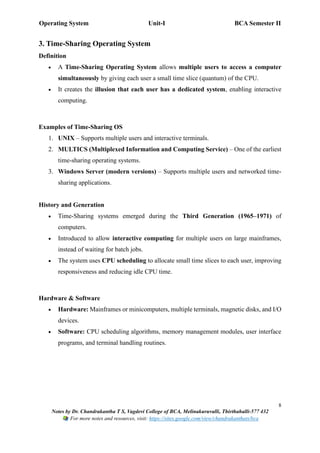
3. Time-Sharing Operating System
Definition
• A Time-Sharing Operating System allows multiple users to access a computer
simultaneously by giving each user a small time slice (quantum) of the CPU.
• It creates the illusion that each user has a dedicated system, enabling interactive
computing.
Examples of Time-Sharing OS
1. UNIX – Supports multiple users and interactive terminals.
2. MULTICS (Multiplexed Information and Computing Service) – One of the earliest
time-sharing operating systems.
3. Windows Server (modern versions) – Supports multiple users and networked time-
sharing applications.
History and Generation
• Time-Sharing systems emerged during the Third Generation (1965–1971) of
computers.
• Introduced to allow interactive computing for multiple users on large mainframes,
instead of waiting for batch jobs.
• The system uses CPU scheduling to allocate small time slices to each user, improving
responsiveness and reducing idle CPU time.
Hardware & Software
• Hardware: Mainframes or minicomputers, multiple terminals, magnetic disks, and I/O
devices.
• Software: CPU scheduling algorithms, memory management modules, user interface
programs, and terminal handling routines.
Operating System Unit-I BCA Semester II
9
Notes by Dr. Chandrakantha T S, Vagdevi College of BCA, Melinakuruvalli, Thirthahalli-577 432
For more notes and resources, visit: https://sites.google.com/view/chandrakanthats/bca
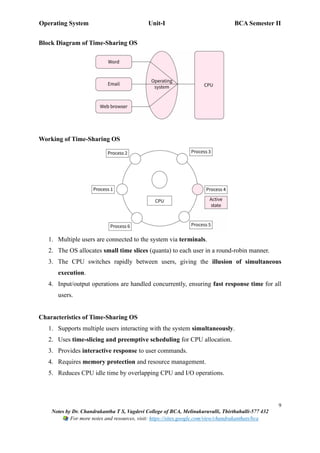
Block Diagram of Time-Sharing OS
Working of Time-Sharing OS
1. Multiple users are connected to the system via terminals.
2. The OS allocates small time slices (quanta) to each user in a round-robin manner.
3. The CPU switches rapidly between users, giving the illusion of simultaneous
execution.
4. Input/output operations are handled concurrently, ensuring fast response time for all
users.
Characteristics of Time-Sharing OS
1. Supports multiple users interacting with the system simultaneously.
2. Uses time-slicing and preemptive scheduling for CPU allocation.
3. Provides interactive response to user commands.
4. Requires memory protection and resource management.
5. Reduces CPU idle time by overlapping CPU and I/O operations.
Operating System Unit-I BCA Semester II
10
Notes by Dr. Chandrakantha T S, Vagdevi College of BCA, Melinakuruvalli, Thirthahalli-577 432
For more notes and resources, visit: https://sites.google.com/view/chandrakanthats/bca
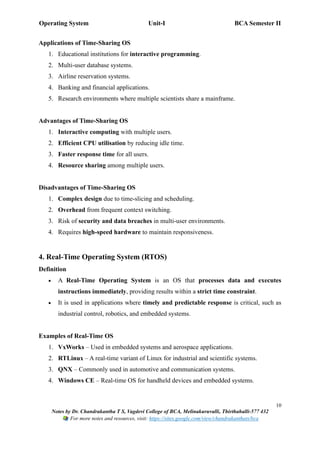
Applications of Time-Sharing OS
1. Educational institutions for interactive programming.
2. Multi-user database systems.
3. Airline reservation systems.
4. Banking and financial applications.
5. Research environments where multiple scientists share a mainframe.
Advantages of Time-Sharing OS
1. Interactive computing with multiple users.
2. Efficient CPU utilisation by reducing idle time.
3. Faster response time for all users.
4. Resource sharing among multiple users.
Disadvantages of Time-Sharing OS
1. Complex design due to time-slicing and scheduling.
2. Overhead from frequent context switching.
3. Risk of security and data breaches in multi-user environments.
4. Requires high-speed hardware to maintain responsiveness.
4. Real-Time Operating System (RTOS)
Definition
• A Real-Time Operating System is an OS that processes data and executes
instructions immediately, providing results within a strict time constraint.
• It is used in applications where timely and predictable response is critical, such as
industrial control, robotics, and embedded systems.
Examples of Real-Time OS
1. VxWorks – Used in embedded systems and aerospace applications.
2. RTLinux – A real-time variant of Linux for industrial and scientific systems.
3. QNX – Commonly used in automotive and communication systems.
4. Windows CE – Real-time OS for handheld devices and embedded systems.
Operating System Unit-I BCA Semester II
11
Notes by Dr. Chandrakantha T S, Vagdevi College of BCA, Melinakuruvalli, Thirthahalli-577 432
For more notes and resources, visit: https://sites.google.com/view/chandrakanthats/bca
History and Generation
• Real-Time Systems became significant during the Third Generation (1965–1971) and
Fourth Generation (1971–1980) of computers.
• Developed for mission-critical and time-sensitive applications where delayed
response could cause failure or danger.
• They ensure deterministic execution using special scheduling algorithms and
hardware support.
Hardware & Software
• Hardware: Embedded microcontrollers, industrial computers, sensors, actuators, and
I/O devices.
• Software: Real-time kernels, priority-based scheduling algorithms, interrupt handling
routines, and task management modules.
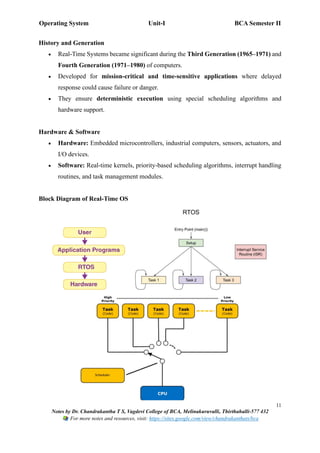
Block Diagram of Real-Time OS
Operating System Unit-I BCA Semester II
12
Notes by Dr. Chandrakantha T S, Vagdevi College of BCA, Melinakuruvalli, Thirthahalli-577 432
For more notes and resources, visit: https://sites.google.com/view/chandrakanthats/bca
Working of Real-Time OS
1. The system receives input from sensors or devices in real time.
2. The RTOS scheduler assigns priority to tasks and ensures critical tasks are executed
first.
3. CPU executes tasks within defined time constraints using preemptive or priority-
based scheduling.
4. Output is generated immediately to control actuators, display results, or trigger actions
in real time.
Characteristics of Real-Time OS
1. Provides deterministic response within strict deadlines.
2. Uses priority-based or preemptive scheduling.
3. Supports multitasking and interrupt handling efficiently.
4. Minimal latency and high reliability.
5. Often used in embedded systems and mission-critical applications.
Applications of Real-Time OS
1. Industrial automation and robotics.
2. Air traffic control systems.
3. Automobile systems like ABS (Anti-lock Braking System) and engine control units.
4. Medical equipment such as pacemakers and monitoring devices.
5. Military and defense applications like missile control and radar systems.
Operating System Unit-I BCA Semester II
13
Notes by Dr. Chandrakantha T S, Vagdevi College of BCA, Melinakuruvalli, Thirthahalli-577 432
For more notes and resources, visit: https://sites.google.com/view/chandrakanthats/bca
Advantages of Real-Time OS
1. Provides immediate and predictable response.
2. High reliability for mission-critical applications.
3. Efficient multitasking and priority management.
4. Reduces the risk of system failure in time-sensitive tasks.
Disadvantages of Real-Time OS
1. Complex and expensive to design and implement.
2. Requires specialized hardware for best performance.
3. Limited flexibility compared to general-purpose OS.
4. Debugging and testing are difficult due to time constraints.
5. Handheld / Mobile Operating System (Handheld OS)
Definition
• AHandheld or Mobile Operating System is an OS designed to run on small portable
devices such as smartphones, tablets, and PDAs.
• It manages limited resources like battery, memory, and processing power, while
providing a user-friendly interface for mobile applications.
Examples of Handheld / Mobile OS
1. Android – The most widely used mobile OS based on Linux.
2. iOS – Apple's mobile OS for iPhone and iPad.
3. Windows Mobile / Windows CE – Used in earlier smartphones and embedded
devices.
4. Symbian OS – Used in older mobile phones and embedded systems.
History and Generation
• Handheld OS became popular during the Fourth Generation (1971–1980) and Fifth
Generation (1980 onwards) of computers, when microprocessors and portable devices
were introduced.
• Developed to support mobile computing, touch interfaces, and wireless
communication.
Operating System Unit-I BCA Semester II
14
Notes by Dr. Chandrakantha T S, Vagdevi College of BCA, Melinakuruvalli, Thirthahalli-577 432
For more notes and resources, visit: https://sites.google.com/view/chandrakanthats/bca
• Designed to efficiently manage limited battery and hardware resources while
supporting multitasking and networking.
Hardware & Software
• Hardware: Smartphones, tablets, PDAs (Personal Digital Assistants),
microcontrollers, touchscreens, sensors, and wireless communication modules.
• Software: Mobile OS kernel, task scheduler, memory management, device drivers,
security modules, and application frameworks.
Block Diagram of Handheld OS
Working of Handheld OS
1. The OS manages user applications, hardware, and I/O devices on the handheld
device.
2. Multitasking allows multiple apps to run simultaneously (e.g., music player +
messaging).
3. Resource management optimises CPU, memory, and battery usage for smooth
operation.
4. Provides user interface, network connectivity, and security, ensuring a seamless
mobile experience.
Operating System Unit-I BCA Semester II
15
Notes by Dr. Chandrakantha T S, Vagdevi College of BCA, Melinakuruvalli, Thirthahalli-577 432
For more notes and resources, visit: https://sites.google.com/view/chandrakanthats/bca
Characteristics of Handheld OS
1. Supports multitasking with limited resources.
2. Optimises battery and memory usage.
3. Provides touchscreen and GUI interfaces for easy interaction.
4. Supports wireless communication like Wi-Fi, Bluetooth, and mobile data.
5. Lightweight, fast, and reliable for portable devices.
Applications of Handheld OS
1. Smartphones and tablets for personal and business use.
2. Portable gaming consoles and multimedia devices.
3. GPS navigation and mobile mapping devices.
4. Handheld medical devices and health monitors.
5. Mobile banking and payment applications.
Advantages of Handheld OS
1. Portable and convenient, allowing computing on the go.
2. Efficient resource management for battery, memory, and CPU.
3. Supports multitasking and interactive GUI applications.
4. Enables wireless communication and connectivity.
Disadvantages of Handheld OS
1. Limited processing power and memory compared to desktops.
2. Security vulnerabilities if not updated regularly.
3. Restricted multitasking due to hardware limitations.
4. Dependency on battery life for operation.
Operating System Unit-I BCA Semester II
16
Notes by Dr. Chandrakantha T S, Vagdevi College of BCA, Melinakuruvalli, Thirthahalli-577 432
For more notes and resources, visit: https://sites.google.com/view/chandrakanthats/bca
6. Distributed Operating System (Distributed OS)
Definition
• A Distributed Operating System is an OS that manages a group of independent
computers and makes them appear to the user as a single unified system.
• It allows sharing of resources, tasks, and data among multiple machines connected
via a network, improving performance and reliability.
Examples of Distributed OS
1. Amoeba – A research-oriented distributed OS for multiple processors.
2. Mach – Supports distributed computing with message passing.
3. Windows Server with clustering – Provides distributed resource management.
4. Unix / Linux clusters – Used in high-performance distributed systems.
History and Generation
• Distributed systems became prominent during the Fourth Generation (1971–1980)
and Fifth Generation (1980 onwards) of computers.
• They were developed to improve computing power and resource utilisation by
connecting multiple computers over a network.
• Introduced for applications requiring high availability, parallel processing, and
resource sharing.
Hardware & Software
• Hardware: Multiple interconnected computers, network devices, storage units, and I/O
devices.
• Software: Distributed OS kernel, network protocols, process schedulers, file and
resource managers, and security modules.
Operating System Unit-I BCA Semester II
17
Notes by Dr. Chandrakantha T S, Vagdevi College of BCA, Melinakuruvalli, Thirthahalli-577 432
For more notes and resources, visit: https://sites.google.com/view/chandrakanthats/bca
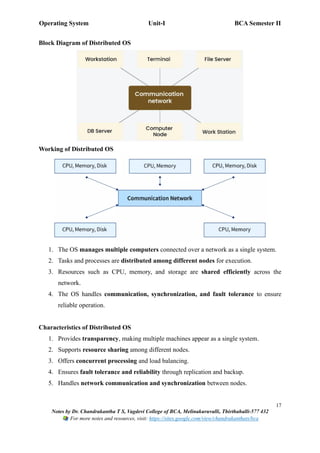
Block Diagram of Distributed OS
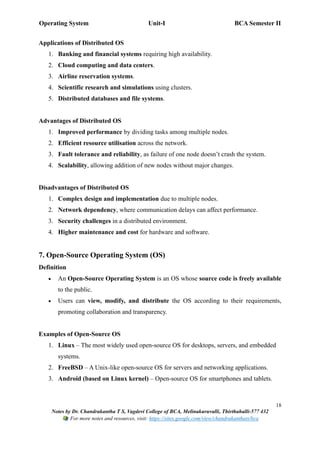
Working of Distributed OS
1. The OS manages multiple computers connected over a network as a single system.
2. Tasks and processes are distributed among different nodes for execution.
3. Resources such as CPU, memory, and storage are shared efficiently across the
network.
4. The OS handles communication, synchronization, and fault tolerance to ensure
reliable operation.
Characteristics of Distributed OS
1. Provides transparency, making multiple machines appear as a single system.
2. Supports resource sharing among different nodes.
3. Offers concurrent processing and load balancing.
4. Ensures fault tolerance and reliability through replication and backup.
5. Handles network communication and synchronization between nodes.
Operating System Unit-I BCA Semester II
18
Notes by Dr. Chandrakantha T S, Vagdevi College of BCA, Melinakuruvalli, Thirthahalli-577 432
For more notes and resources, visit: https://sites.google.com/view/chandrakanthats/bca
Applications of Distributed OS
1. Banking and financial systems requiring high availability.
2. Cloud computing and data centers.
3. Airline reservation systems.
4. Scientific research and simulations using clusters.
5. Distributed databases and file systems.
Advantages of Distributed OS
1. Improved performance by dividing tasks among multiple nodes.
2. Efficient resource utilisation across the network.
3. Fault tolerance and reliability, as failure of one node doesn’t crash the system.
4. Scalability, allowing addition of new nodes without major changes.
Disadvantages of Distributed OS
1. Complex design and implementation due to multiple nodes.
2. Network dependency, where communication delays can affect performance.
3. Security challenges in a distributed environment.
4. Higher maintenance and cost for hardware and software.
7. Open-Source Operating System (OS)
Definition
• An Open-Source Operating System is an OS whose source code is freely available
to the public.
• Users can view, modify, and distribute the OS according to their requirements,
promoting collaboration and transparency.
Examples of Open-Source OS
1. Linux – The most widely used open-source OS for desktops, servers, and embedded
systems.
2. FreeBSD – A Unix-like open-source OS for servers and networking applications.
3. Android (based on Linux kernel) – Open-source OS for smartphones and tablets.
Operating System Unit-I BCA Semester II
19
Notes by Dr. Chandrakantha T S, Vagdevi College of BCA, Melinakuruvalli, Thirthahalli-577 432
For more notes and resources, visit: https://sites.google.com/view/chandrakanthats/bca
4. Ubuntu, Fedora, Debian – Popular Linux distributions for personal and professional
use.
History and Generation
• Open-Source OS gained popularity during the Fifth Generation (1980 onwards) of
computers.
• The concept grew from the free software movement, where collaboration and
transparency were encouraged.
• Open-source OS provide low-cost alternatives to proprietary systems while allowing
customization and innovation.
Hardware & Software
• Hardware: Personal computers, servers, mobile devices, embedded systems, and cloud
infrastructure.
• Software: Kernel, device drivers, utilities, compilers, package managers, and
graphical/user interface components.
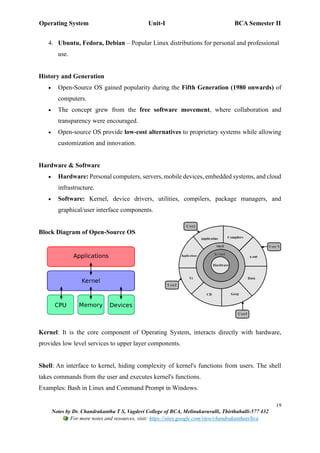
Block Diagram of Open-Source OS
Kernel: It is the core component of Operating System, interacts directly with hardware,
provides low level services to upper layer components.
Shell: An interface to kernel, hiding complexity of kernel's functions from users. The shell
takes commands from the user and executes kernel's functions.
Examples: Bash in Linux and Command Prompt in Windows.
Operating System Unit-I BCA Semester II
20
Notes by Dr. Chandrakantha T S, Vagdevi College of BCA, Melinakuruvalli, Thirthahalli-577 432
For more notes and resources, visit: https://sites.google.com/view/chandrakanthats/bca
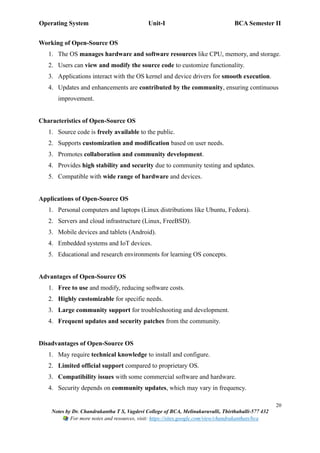
Working of Open-Source OS
1. The OS manages hardware and software resources like CPU, memory, and storage.
2. Users can view and modify the source code to customize functionality.
3. Applications interact with the OS kernel and device drivers for smooth execution.
4. Updates and enhancements are contributed by the community, ensuring continuous
improvement.
Characteristics of Open-Source OS
1. Source code is freely available to the public.
2. Supports customization and modification based on user needs.
3. Promotes collaboration and community development.
4. Provides high stability and security due to community testing and updates.
5. Compatible with wide range of hardware and devices.
Applications of Open-Source OS
1. Personal computers and laptops (Linux distributions like Ubuntu, Fedora).
2. Servers and cloud infrastructure (Linux, FreeBSD).
3. Mobile devices and tablets (Android).
4. Embedded systems and IoT devices.
5. Educational and research environments for learning OS concepts.
Advantages of Open-Source OS
1. Free to use and modify, reducing software costs.
2. Highly customizable for specific needs.
3. Large community support for troubleshooting and development.
4. Frequent updates and security patches from the community.
Disadvantages of Open-Source OS
1. May require technical knowledge to install and configure.
2. Limited official support compared to proprietary OS.
3. Compatibility issues with some commercial software and hardware.
4. Security depends on community updates, which may vary in frequency.
Operating System Unit-I BCA Semester II
21
Notes by Dr. Chandrakantha T S, Vagdevi College of BCA, Melinakuruvalli, Thirthahalli-577 432
For more notes and resources, visit: https://sites.google.com/view/chandrakanthats/bca
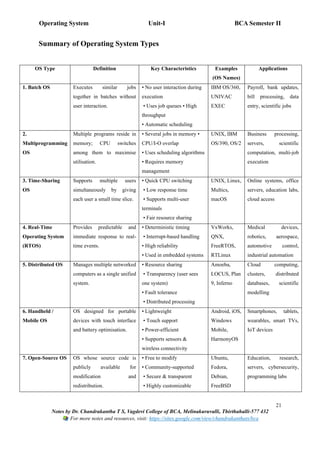
Summary of Operating System Types
OS Type Definition Key Characteristics Examples
(OS Names)
Applications
1. Batch OS Executes similar jobs
together in batches without
user interaction.
• No user interaction during
execution
• Uses job queues • High
throughput
• Automatic scheduling
IBM OS/360,
UNIVAC
EXEC
Payroll, bank updates,
bill processing, data
entry, scientific jobs
2.
Multiprogramming
OS
Multiple programs reside in
memory; CPU switches
among them to maximise
utilisation.
• Several jobs in memory •
CPU/I-O overlap
• Uses scheduling algorithms
• Requires memory
management
UNIX, IBM
OS/390, OS/2
Business processing,
servers, scientific
computation, multi-job
execution
3. Time-Sharing
OS
Supports multiple users
simultaneously by giving
each user a small time slice.
• Quick CPU switching
• Low response time
• Supports multi-user
terminals
• Fair resource sharing
UNIX, Linux,
Multics,
macOS
Online systems, office
servers, education labs,
cloud access
4. Real-Time
Operating System
(RTOS)
Provides predictable and
immediate response to real-
time events.
• Deterministic timing
• Interrupt-based handling
• High reliability
• Used in embedded systems
VxWorks,
QNX,
FreeRTOS,
RTLinux
Medical devices,
robotics, aerospace,
automotive control,
industrial automation
5. Distributed OS Manages multiple networked
computers as a single unified
system.
• Resource sharing
• Transparency (user sees
one system)
• Fault tolerance
• Distributed processing
Amoeba,
LOCUS, Plan
9, Inferno
Cloud computing,
clusters, distributed
databases, scientific
modelling
6. Handheld /
Mobile OS
OS designed for portable
devices with touch interface
and battery optimisation.
• Lightweight
• Touch support
• Power-efficient
• Supports sensors &
wireless connectivity
Android, iOS,
Windows
Mobile,
HarmonyOS
Smartphones, tablets,
wearables, smart TVs,
IoT devices
7. Open-Source OS OS whose source code is
publicly available for
modification and
redistribution.
• Free to modify
• Community-supported
• Secure & transparent
• Highly customizable
Ubuntu,
Fedora,
Debian,
FreeBSD
Education, research,
servers, cybersecurity,
programming labs
Operating System Unit-I BCA Semester II
22
Notes by Dr. Chandrakantha T S, Vagdevi College of BCA, Melinakuruvalli, Thirthahalli-577 432
For more notes and resources, visit: https://sites.google.com/view/chandrakanthats/bca
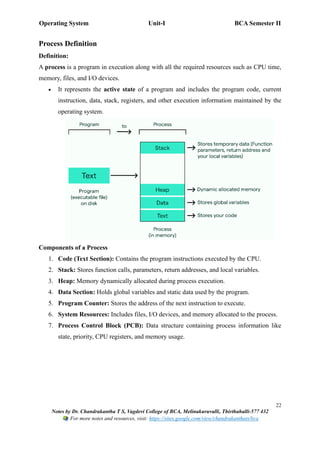
Process Definition
Definition:
A process is a program in execution along with all the required resources such as CPU time,
memory, files, and I/O devices.
• It represents the active state of a program and includes the program code, current
instruction, data, stack, registers, and other execution information maintained by the
operating system.
Components of a Process
1. Code (Text Section): Contains the program instructions executed by the CPU.
2. Stack: Stores function calls, parameters, return addresses, and local variables.
3. Heap: Memory dynamically allocated during process execution.
4. Data Section: Holds global variables and static data used by the program.
5. Program Counter: Stores the address of the next instruction to execute.
6. System Resources: Includes files, I/O devices, and memory allocated to the process.
7. Process Control Block (PCB): Data structure containing process information like
state, priority, CPU registers, and memory usage.
Operating System Unit-I BCA Semester II
23
Notes by Dr. Chandrakantha T S, Vagdevi College of BCA, Melinakuruvalli, Thirthahalli-577 432
For more notes and resources, visit: https://sites.google.com/view/chandrakanthats/bca
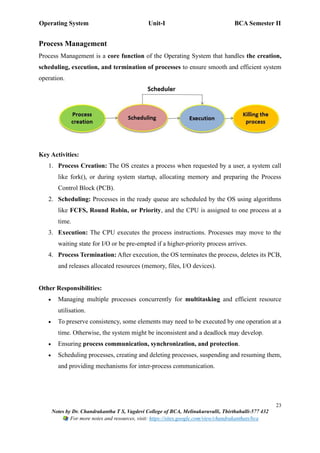
Process Management
Process Management is a core function of the Operating System that handles the creation,
scheduling, execution, and termination of processes to ensure smooth and efficient system
operation.
Key Activities:
1. Process Creation: The OS creates a process when requested by a user, a system call
like fork(), or during system startup, allocating memory and preparing the Process
Control Block (PCB).
2. Scheduling: Processes in the ready queue are scheduled by the OS using algorithms
like FCFS, Round Robin, or Priority, and the CPU is assigned to one process at a
time.
3. Execution: The CPU executes the process instructions. Processes may move to the
waiting state for I/O or be pre-empted if a higher-priority process arrives.
4. Process Termination: After execution, the OS terminates the process, deletes its PCB,
and releases allocated resources (memory, files, I/O devices).
Other Responsibilities:
• Managing multiple processes concurrently for multitasking and efficient resource
utilisation.
• To preserve consistency, some elements may need to be executed by one operation at a
time. Otherwise, the system might be inconsistent and a deadlock may develop.
• Ensuring process communication, synchronization, and protection.
• Scheduling processes, creating and deleting processes, suspending and resuming them,
and providing mechanisms for inter-process communication.
Operating System Unit-I BCA Semester II
24
Notes by Dr. Chandrakantha T S, Vagdevi College of BCA, Melinakuruvalli, Thirthahalli-577 432
For more notes and resources, visit: https://sites.google.com/view/chandrakanthats/bca
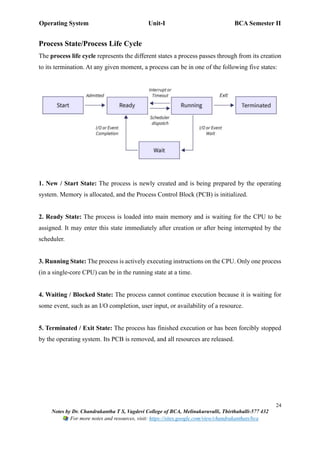
Process State/Process Life Cycle
The process life cycle represents the different states a process passes through from its creation
to its termination. At any given moment, a process can be in one of the following five states:
1. New / Start State: The process is newly created and is being prepared by the operating
system. Memory is allocated, and the Process Control Block (PCB) is initialized.
2. Ready State: The process is loaded into main memory and is waiting for the CPU to be
assigned. It may enter this state immediately after creation or after being interrupted by the
scheduler.
3. Running State: The process is actively executing instructions on the CPU. Only one process
(in a single-core CPU) can be in the running state at a time.
4. Waiting / Blocked State: The process cannot continue execution because it is waiting for
some event, such as an I/O completion, user input, or availability of a resource.
5. Terminated / Exit State: The process has finished execution or has been forcibly stopped
by the operating system. Its PCB is removed, and all resources are released.
Operating System Unit-I BCA Semester II
25
Notes by Dr. Chandrakantha T S, Vagdevi College of BCA, Melinakuruvalli, Thirthahalli-577 432
For more notes and resources, visit: https://sites.google.com/view/chandrakanthats/bca
Process Control Block (PCB)
• A Process Control Block (PCB) is a data structure used by the operating system to
store all the essential information about a process.
• It acts as a process descriptor, helping the OS manage and control processes
efficiently.
• Each process has its own PCB, identified by a unique Process ID (PID). The PCB helps
the OS track and manage the process throughout its life cycle.
• The PCB exists for the entire life of the process and is deleted once the process
terminates.
• It enables context switching, as the OS can save and restore process state efficiently.
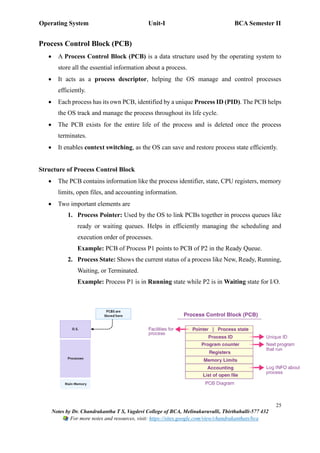
Structure of Process Control Block
• The PCB contains information like the process identifier, state, CPU registers, memory
limits, open files, and accounting information.
• Two important elements are
1. Process Pointer: Used by the OS to link PCBs together in process queues like
ready or waiting queues. Helps in efficiently managing the scheduling and
execution order of processes.
Example: PCB of Process P1 points to PCB of P2 in the Ready Queue.
2. Process State: Shows the current status of a process like New, Ready, Running,
Waiting, or Terminated.
Example: Process P1 is in Running state while P2 is in Waiting state for I/O.
Operating System Unit-I BCA Semester II
26
Notes by Dr. Chandrakantha T S, Vagdevi College of BCA, Melinakuruvalli, Thirthahalli-577 432
For more notes and resources, visit: https://sites.google.com/view/chandrakanthats/bca
Components of a PCB
1. Process ID (PID): A unique identifier assigned to each process to distinguish it from
others.
Example: PID = 101 identifies process P1 uniquely in the system.
2. Process State: Indicates the current status of the process, such as New, Ready, Running,
Waiting, or Terminated.
Example: P1 is in Running state while executing instructions.
3. Program Counter: Holds the address of the next instruction to be executed by the
CPU.
Example: Next instruction of P1 is at memory address 0x1050.
4. Registers: Stores the current values of CPU registers for the process during execution
or context switching.
Example: General-purpose registers R1=5, R2=10 for P1.
5. Memory Limits: Specifies the range of memory allocated to the process for code, data,
and stack.
Example: P1 has memory from 0x1000–0x1FFF.
6. Accounting Information: Keeps track of CPU time used, execution time, and other
resource usage.
Example: P1 has used 120 ms of CPU time so far.
7. List of Open Files: Contains all files currently opened by the process for input/output
operations.
Example: P1 has file1.txt and output.log open.
Process Scheduling
• Process scheduling is the OS activity that selects which process should run next on
the CPU.
• It improves CPU utilization, ensures fairness, and allows multitasking by switching
between processes efficiently.
Operating System Unit-I BCA Semester II
27
Notes by Dr. Chandrakantha T S, Vagdevi College of BCA, Melinakuruvalli, Thirthahalli-577 432
For more notes and resources, visit: https://sites.google.com/view/chandrakanthats/bca
Scheduling Queues
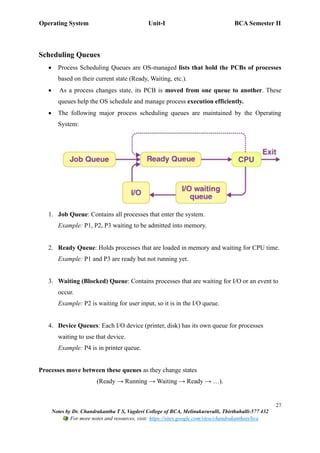
• Process Scheduling Queues are OS-managed lists that hold the PCBs of processes
based on their current state (Ready, Waiting, etc.).
• As a process changes state, its PCB is moved from one queue to another. These
queues help the OS schedule and manage process execution efficiently.
• The following major process scheduling queues are maintained by the Operating
System:
1. Job Queue: Contains all processes that enter the system.
Example: P1, P2, P3 waiting to be admitted into memory.
2. Ready Queue: Holds processes that are loaded in memory and waiting for CPU time.
Example: P1 and P3 are ready but not running yet.
3. Waiting (Blocked) Queue: Contains processes that are waiting for I/O or an event to
occur.
Example: P2 is waiting for user input, so it is in the I/O queue.
4. Device Queues: Each I/O device (printer, disk) has its own queue for processes
waiting to use that device.
Example: P4 is in printer queue.
Processes move between these queues as they change states
(Ready → Running → Waiting → Ready → …).
Operating System Unit-I BCA Semester II
28
Notes by Dr. Chandrakantha T S, Vagdevi College of BCA, Melinakuruvalli, Thirthahalli-577 432
For more notes and resources, visit: https://sites.google.com/view/chandrakanthats/bca
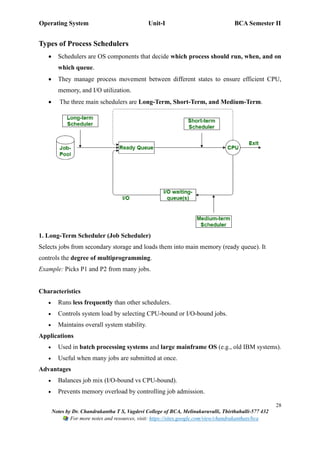
Types of Process Schedulers
• Schedulers are OS components that decide which process should run, when, and on
which queue.
• They manage process movement between different states to ensure efficient CPU,
memory, and I/O utilization.
• The three main schedulers are Long-Term, Short-Term, and Medium-Term.
1. Long-Term Scheduler (Job Scheduler)
Selects jobs from secondary storage and loads them into main memory (ready queue). It
controls the degree of multiprogramming.
Example: Picks P1 and P2 from many jobs.
Characteristics
• Runs less frequently than other schedulers.
• Controls system load by selecting CPU-bound or I/O-bound jobs.
• Maintains overall system stability.
Applications
• Used in batch processing systems and large mainframe OS (e.g., old IBM systems).
• Useful when many jobs are submitted at once.
Advantages
• Balances job mix (I/O-bound vs CPU-bound).
• Prevents memory overload by controlling job admission.
Operating System Unit-I BCA Semester II
29
Notes by Dr. Chandrakantha T S, Vagdevi College of BCA, Melinakuruvalli, Thirthahalli-577 432
For more notes and resources, visit: https://sites.google.com/view/chandrakanthats/bca
Disadvantages
• Not used in modern time-sharing OS.
• Poor decision may lead to under-utilization of resources.
2. Short-Term Scheduler (CPU Scheduler)
Selects a process from the ready queue and assigns the CPU to it. Runs very frequently.
Example: Chooses P1 to run next based on Round Robin or Priority.
Characteristics
• Makes quick decisions within milliseconds.
• Uses algorithms like FCFS, SJF, Round Robin, Priority.
• Directly affects CPU performance.
Applications
• Used in interactive, real-time, and multitasking operating systems (Windows,
Linux, macOS).
• Essential for time-sharing systems.
Advantages
• Ensures fast switching between processes.
• Improves responsiveness and CPU utilization.
Disadvantages
• High overhead due to frequent execution.
• Poor scheduling policy may increase waiting time.
3. Medium-Term Scheduler (Swapper)
Removes processes from memory (swapping out) and later brings them back (swapping in) to
control memory load.
Characteristics
• Works between long-term and short-term schedulers.
• Improves memory allocation and reduces congestion.
• Suspends and resumes processes based on memory availability.
Operating System Unit-I BCA Semester II
30
Notes by Dr. Chandrakantha T S, Vagdevi College of BCA, Melinakuruvalli, Thirthahalli-577 432
For more notes and resources, visit: https://sites.google.com/view/chandrakanthats/bca
Applications
• Used in multiprogramming and virtual memory systems.
• Helpful when memory is too small for all active processes.
Advantages
• Reduces memory pressure.
• Increases system throughput by managing suspended processes.
Disadvantages
• Swapping causes overhead and delay.
• Too much swapping leads to thrashing.
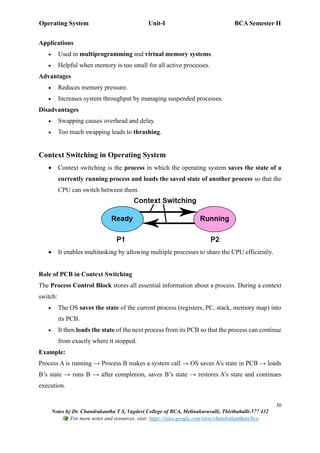
Context Switching in Operating System
• Context switching is the process in which the operating system saves the state of a
currently running process and loads the saved state of another process so that the
CPU can switch between them.
• It enables multitasking by allowing multiple processes to share the CPU efficiently.
Role of PCB in Context Switching
The Process Control Block stores all essential information about a process. During a context
switch:
• The OS saves the state of the current process (registers, PC, stack, memory map) into
its PCB.
• It then loads the state of the next process from its PCB so that the process can continue
from exactly where it stopped.
Example:
Process A is running → Process B makes a system call → OS saves A’s state in PCB → loads
B’s state → runs B → after completion, saves B’s state → restores A’s state and continues
execution.
Operating System Unit-I BCA Semester II
31
Notes by Dr. Chandrakantha T S, Vagdevi College of BCA, Melinakuruvalli, Thirthahalli-577 432
For more notes and resources, visit: https://sites.google.com/view/chandrakanthats/bca
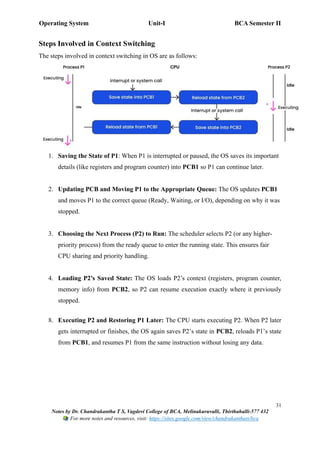
Steps Involved in Context Switching
The steps involved in context switching in OS are as follows:
1. Saving the State of P1: When P1 is interrupted or paused, the OS saves its important
details (like registers and program counter) into PCB1 so P1 can continue later.
2. Updating PCB and Moving P1 to the Appropriate Queue: The OS updates PCB1
and moves P1 to the correct queue (Ready, Waiting, or I/O), depending on why it was
stopped.
3. Choosing the Next Process (P2) to Run: The scheduler selects P2 (or any higher-
priority process) from the ready queue to enter the running state. This ensures fair
CPU sharing and priority handling.
4. Loading P2’s Saved State: The OS loads P2’s context (registers, program counter,
memory info) from PCB2, so P2 can resume execution exactly where it previously
stopped.
8. Executing P2 and Restoring P1 Later: The CPU starts executing P2. When P2 later
gets interrupted or finishes, the OS again saves P2’s state in PCB2, reloads P1’s state
from PCB1, and resumes P1 from the same instruction without losing any data.
Operating System Unit-I BCA Semester II
32
Notes by Dr. Chandrakantha T S, Vagdevi College of BCA, Melinakuruvalli, Thirthahalli-577 432
For more notes and resources, visit: https://sites.google.com/view/chandrakanthats/bca
Why Context Switching is Needed/ Applications of Context Switching
Context Switching is needed:
1. Multitasking: Allows multiple processes to run seemingly at the same time by
switching between them.
2. Efficient CPU Utilization: Keeps the CPU busy by giving another process the CPU
while one waits for I/O.
3. Handling Interrupts: Pauses the current process so the CPU can respond to urgent
events.
4. Process Prioritization: Lets high-priority or real-time processes run immediately when
needed.
5. Enabling Multithreading: Helps switch between multiple threads within the same
application.
Advantages of Context Switching
• Enables multitasking, allowing many processes to share a single CPU.
• Improves CPU utilisation, preventing idle time.
• Ensures fairness, as all processes get CPU time.
• Supports time-sharing and preemptive scheduling systems
Disadvantages of Context Switching
• It introduces overhead, because saving and loading states consumes time but does not
perform real work.
• Frequent context switches may reduce system performance.
• Managing multiple PCBs and memory maps increases system complexity.
Operating System Unit-I BCA Semester II
33
Notes by Dr. Chandrakantha T S, Vagdevi College of BCA, Melinakuruvalli, Thirthahalli-577 432
For more notes and resources, visit: https://sites.google.com/view/chandrakanthats/bca
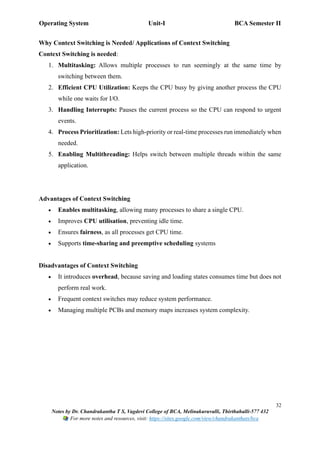
Inter Process Communication (IPC)
• Inter-Process Communication (IPC) is a mechanism provided by operating systems that
allows processes to exchange data, send signals, and coordinate actions.
• Since processes run independently and have separate memory spaces, IPC helps them
communicate and work together.
• This is a set of programming interfaces that allow a program to handle multiple user
requests at the same time. As every user request results in multiple processes running
in the OS, it is necessary for processes to communicate with each other.
• It plays a crucial role in multitasking systems where multiple processes must cooperate
to complete tasks efficiently.
Need for IPC
• Processes require IPC to share information (e.g., browser and its plugins).
• It helps in synchronizing activities between processes.
• Useful for resource sharing and avoiding conflicts (e.g., shared files or memory).
• Ensures efficient communication in client–server systems.
Methods of IPC
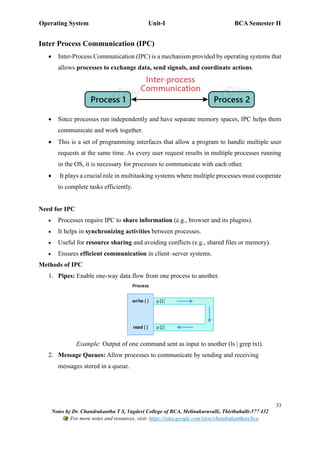
1. Pipes: Enable one-way data flow from one process to another.
Example: Output of one command sent as input to another (ls | grep txt).
2. Message Queues: Allow processes to communicate by sending and receiving
messages stored in a queue.
Operating System Unit-I BCA Semester II
34
Notes by Dr. Chandrakantha T S, Vagdevi College of BCA, Melinakuruvalli, Thirthahalli-577 432
For more notes and resources, visit: https://sites.google.com/view/chandrakanthats/bca
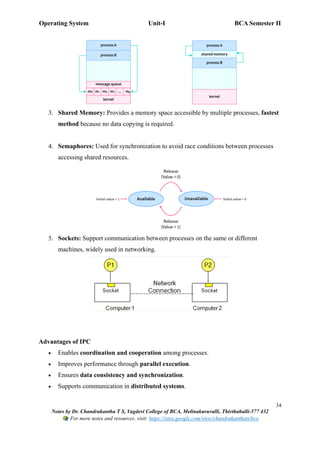
3. Shared Memory: Provides a memory space accessible by multiple processes, fastest
method because no data copying is required.
4. Semaphores: Used for synchronization to avoid race conditions between processes
accessing shared resources.
5. Sockets: Support communication between processes on the same or different
machines, widely used in networking.
Advantages of IPC
• Enables coordination and cooperation among processes.
• Improves performance through parallel execution.
• Ensures data consistency and synchronization.
• Supports communication in distributed systems.

Operating System (OS) :UNIT-I Introduction to Operating System BCA SEP SEM-II Operating System

  • 1.
    Operating System Unit-IBCA Semester II 1 Notes by Dr. Chandrakantha T S, Vagdevi College of BCA, Melinakuruvalli, Thirthahalli-577 432 For more notes and resources, visit: https://sites.google.com/view/chandrakanthats/bca UNIT-I: Introduction to Operating System Introduction to Operating Systems (OS): An Operating System (OS) is system software that acts as an interface between the user and the computer hardware. • It manages all hardware resources and ensures that applications run smoothly and efficiently. • Without an OS, a computer cannot function, as there would be no mechanism to control hardware devices or execute programs. The OS performs two main roles: 1. Resource Manager: It manages hardware resources such as the CPU, memory, storage devices, and input/output devices. 2. User Interface Provider: It provides an easy way for users to interact with the computer through commands, menus, or graphical elements. Architecture of an Operating System The OS controls and coordinates the use of hardware among multiple applications and users, making the computer system easy and efficient to use. Architecture of OS Examples of Operating Systems: • Windows, Linux (Ubuntu), MS-DOS, macOS, Android, iOS
  • 2.
    Operating System Unit-IBCA Semester II 2 Notes by Dr. Chandrakantha T S, Vagdevi College of BCA, Melinakuruvalli, Thirthahalli-577 432 For more notes and resources, visit: https://sites.google.com/view/chandrakanthats/bca Early Systems • Early operating systems were developed in the 1950s and 1960s to manage large and expensive computers used mainly for scientific and business applications. • Their primary aim was to automate job execution and reduce manual intervention in running programs. • These systems focused on improving CPU utilisation and overall system efficiency by handling multiple jobs effectively. • Early system types include Batch Systems, Multiprogramming Systems, Time- Sharing Systems, Real-Time Systems, Handheld Systems, and Distributed Systems. • These systems laid the foundation for modern operating system design and influenced the development of advanced resource-management techniques. Types of Operating Systems • Operating systems are classified into different types based on how they manage resources, users, and program execution. • Each type of OS is designed to meet specific requirements, such as efficiency, multi- user access, real-time response, or distributed processing. • These operating systems differ in scheduling methods, interaction levels, resource allocation, and application areas. • Understanding these types helps in selecting the right OS for various environments, such as personal computing, industrial control, networking, and mobile devices.
  • 3.
    Operating System Unit-IBCA Semester II 3 Notes by Dr. Chandrakantha T S, Vagdevi College of BCA, Melinakuruvalli, Thirthahalli-577 432 For more notes and resources, visit: https://sites.google.com/view/chandrakanthats/bca 1. Batch Operating System Definition • A Batch OS is an operating system where similar jobs are collected together and executed in groups called batches. • Once submitted, these jobs run automatically without any direct interaction between the user and the computer. Examples of Batch Operating Systems 1. IBM OS/360 – One of the earliest and most widely used batch processing systems in mainframe computers. 2. UNIVAC EXEC I & EXEC II – Used in early UNIVAC mainframe systems for batch job execution. History and Generation Batch Operating Systems were mainly used during the Second (1959–1965) and Third Generation (1965–1971) of computers, where large and expensive mainframe systems required automated job execution to reduce manual work and improve CPU utilisation. Hardware & Software These systems used mainframes, punched card readers, magnetic tape drives, line printers, and disk storage, supported by monitor programs, Job Control Language (JCL), batch schedulers, and early batch-oriented operating systems like IBM OS/360. Block Diagram of Batch-OS
  • 4.
    Operating System Unit-IBCA Semester II 4 Notes by Dr. Chandrakantha T S, Vagdevi College of BCA, Melinakuruvalli, Thirthahalli-577 432 For more notes and resources, visit: https://sites.google.com/view/chandrakanthats/bca Working of Batch Operating System 1. Jobs are collected and grouped into batches based on similar needs (e.g., same type of program or similar input/output requirements). 2. Batch is submitted to the system, where a job scheduler loads one job after another automatically without user interaction. 3. The CPU executes each job sequentially, and when one job completes, the next job in the batch starts automatically. 4. Output is stored and returned together, usually as printed reports or output files, after the entire batch is processed. Characteristics of Batch OS 1. Jobs are processed in batches based on type or requirement. 2. No user interaction during job execution. 3. Automatic job scheduling is performed by the OS. 4. High throughput, as the CPU stays busy most of the time. 5. Uses job queues, where tasks wait for execution in order. Applications of Batch OS 1. Payroll processing (salary calculation for employees). 2. Bank transaction updates at the end of the day. 3. Electricity bill generation for large numbers of customers. 4. Data entry and data conversion tasks. 5. Scientific calculations and repetitive jobs.
  • 5.
    Operating System Unit-IBCA Semester II 5 Notes by Dr. Chandrakantha T S, Vagdevi College of BCA, Melinakuruvalli, Thirthahalli-577 432 For more notes and resources, visit: https://sites.google.com/view/chandrakanthats/bca Advantages of Batch OS 1. Efficient resource utilisation, as jobs are executed continuously. 2. Reduces manual intervention, saving time and effort. 3. Handles large, repetitive tasks effectively. 4. Higher throughput due to continuous job processing. Disadvantages of Batch OS 1. Long waiting time, as jobs must wait in queues for their turn. 2. No interaction, so errors are detected only after execution. 3. Debugging is difficult, because user cannot observe the program while it is running. 4. Requires special scheduling, which increases complexity. 2. Multiprogramming Operating System Definition • A Multiprogramming OS allows multiple programs to reside in memory at the same time, and the CPU switches between them to improve efficiency. • When one job is waiting for input/output (I/O), the CPU executes another job, ensuring maximum utilisation of CPU and system resources. Examples of Multiprogramming OS 1. UNIX – One of the earliest systems to support multiprogramming for multi-user environments. 2. IBM OS/390 – A mainframe operating system designed to run multiple jobs simultaneously. History and Generation • Multiprogramming systems became popular during the Third Generation (1965– 1971) and Fourth Generation (1971–1980) of computers. • They were introduced to overcome CPU idle time by allowing several jobs to stay in memory and execute concurrently using scheduling algorithms.
  • 6.
    Operating System Unit-IBCA Semester II 6 Notes by Dr. Chandrakantha T S, Vagdevi College of BCA, Melinakuruvalli, Thirthahalli-577 432 For more notes and resources, visit: https://sites.google.com/view/chandrakanthats/bca Hardware & Software • Hardware: Mainframes and minicomputers, magnetic disks, I/O devices, and multiple memory partitions. • Software: Memory management programs, CPU scheduling algorithms, interrupt handling routines, and job control programs. Block Diagram of Multiprogramming OS Working of Multiprogramming OS 1. Multiple programs are loaded into memory simultaneously. 2. The OS uses scheduling algorithms to decide which job gets the CPU next. 3. When a job waits for I/O, the CPU is assigned to another job to prevent idle time. 4. This ensures continuous CPU usage, higher throughput, and better system efficiency.
  • 7.
    Operating System Unit-IBCA Semester II 7 Notes by Dr. Chandrakantha T S, Vagdevi College of BCA, Melinakuruvalli, Thirthahalli-577 432 For more notes and resources, visit: https://sites.google.com/view/chandrakanthats/bca Characteristics of Multiprogramming OS 1. Multiple programs stay in memory simultaneously. 2. CPU switches among jobs to utilise processing time efficiently. 3. Uses scheduling algorithms like FCFS, SJF, or Priority Scheduling. 4. Requires proper memory management and protection. 5. Increases system utilisation by overlapping CPU and I/O operations. Applications of Multiprogramming OS 1. Business data processing, where multiple jobs run together. 2. Scientific and engineering tasks requiring background calculations. 3. Banking and reservation systems needing continuous job execution. 4. Server environments where many users submit jobs. 5. Batch processing with better resource utilisation. Advantages of Multiprogramming OS 1. Increased CPU utilisation, since CPU never remains idle. 2. Higher system throughput, as multiple jobs progress simultaneously. 3. Reduced response time for users and applications. 4. Efficient resource sharing among many programs. Disadvantages of Multiprogramming OS 1. Complex memory management is required to handle many jobs. 2. Scheduling overhead increases due to frequent switching. 3. Risk of deadlocks when multiple jobs compete for resources. 4. Security and protection issues if programs interfere with each other.
  • 8.
    Operating System Unit-IBCA Semester II 8 Notes by Dr. Chandrakantha T S, Vagdevi College of BCA, Melinakuruvalli, Thirthahalli-577 432 For more notes and resources, visit: https://sites.google.com/view/chandrakanthats/bca 3. Time-Sharing Operating System Definition • A Time-Sharing Operating System allows multiple users to access a computer simultaneously by giving each user a small time slice (quantum) of the CPU. • It creates the illusion that each user has a dedicated system, enabling interactive computing. Examples of Time-Sharing OS 1. UNIX – Supports multiple users and interactive terminals. 2. MULTICS (Multiplexed Information and Computing Service) – One of the earliest time-sharing operating systems. 3. Windows Server (modern versions) – Supports multiple users and networked time- sharing applications. History and Generation • Time-Sharing systems emerged during the Third Generation (1965–1971) of computers. • Introduced to allow interactive computing for multiple users on large mainframes, instead of waiting for batch jobs. • The system uses CPU scheduling to allocate small time slices to each user, improving responsiveness and reducing idle CPU time. Hardware & Software • Hardware: Mainframes or minicomputers, multiple terminals, magnetic disks, and I/O devices. • Software: CPU scheduling algorithms, memory management modules, user interface programs, and terminal handling routines.
  • 9.
    Operating System Unit-IBCA Semester II 9 Notes by Dr. Chandrakantha T S, Vagdevi College of BCA, Melinakuruvalli, Thirthahalli-577 432 For more notes and resources, visit: https://sites.google.com/view/chandrakanthats/bca Block Diagram of Time-Sharing OS Working of Time-Sharing OS 1. Multiple users are connected to the system via terminals. 2. The OS allocates small time slices (quanta) to each user in a round-robin manner. 3. The CPU switches rapidly between users, giving the illusion of simultaneous execution. 4. Input/output operations are handled concurrently, ensuring fast response time for all users. Characteristics of Time-Sharing OS 1. Supports multiple users interacting with the system simultaneously. 2. Uses time-slicing and preemptive scheduling for CPU allocation. 3. Provides interactive response to user commands. 4. Requires memory protection and resource management. 5. Reduces CPU idle time by overlapping CPU and I/O operations.
  • 10.
    Operating System Unit-IBCA Semester II 10 Notes by Dr. Chandrakantha T S, Vagdevi College of BCA, Melinakuruvalli, Thirthahalli-577 432 For more notes and resources, visit: https://sites.google.com/view/chandrakanthats/bca Applications of Time-Sharing OS 1. Educational institutions for interactive programming. 2. Multi-user database systems. 3. Airline reservation systems. 4. Banking and financial applications. 5. Research environments where multiple scientists share a mainframe. Advantages of Time-Sharing OS 1. Interactive computing with multiple users. 2. Efficient CPU utilisation by reducing idle time. 3. Faster response time for all users. 4. Resource sharing among multiple users. Disadvantages of Time-Sharing OS 1. Complex design due to time-slicing and scheduling. 2. Overhead from frequent context switching. 3. Risk of security and data breaches in multi-user environments. 4. Requires high-speed hardware to maintain responsiveness. 4. Real-Time Operating System (RTOS) Definition • A Real-Time Operating System is an OS that processes data and executes instructions immediately, providing results within a strict time constraint. • It is used in applications where timely and predictable response is critical, such as industrial control, robotics, and embedded systems. Examples of Real-Time OS 1. VxWorks – Used in embedded systems and aerospace applications. 2. RTLinux – A real-time variant of Linux for industrial and scientific systems. 3. QNX – Commonly used in automotive and communication systems. 4. Windows CE – Real-time OS for handheld devices and embedded systems.
  • 11.
    Operating System Unit-IBCA Semester II 11 Notes by Dr. Chandrakantha T S, Vagdevi College of BCA, Melinakuruvalli, Thirthahalli-577 432 For more notes and resources, visit: https://sites.google.com/view/chandrakanthats/bca History and Generation • Real-Time Systems became significant during the Third Generation (1965–1971) and Fourth Generation (1971–1980) of computers. • Developed for mission-critical and time-sensitive applications where delayed response could cause failure or danger. • They ensure deterministic execution using special scheduling algorithms and hardware support. Hardware & Software • Hardware: Embedded microcontrollers, industrial computers, sensors, actuators, and I/O devices. • Software: Real-time kernels, priority-based scheduling algorithms, interrupt handling routines, and task management modules. Block Diagram of Real-Time OS
  • 12.
    Operating System Unit-IBCA Semester II 12 Notes by Dr. Chandrakantha T S, Vagdevi College of BCA, Melinakuruvalli, Thirthahalli-577 432 For more notes and resources, visit: https://sites.google.com/view/chandrakanthats/bca Working of Real-Time OS 1. The system receives input from sensors or devices in real time. 2. The RTOS scheduler assigns priority to tasks and ensures critical tasks are executed first. 3. CPU executes tasks within defined time constraints using preemptive or priority- based scheduling. 4. Output is generated immediately to control actuators, display results, or trigger actions in real time. Characteristics of Real-Time OS 1. Provides deterministic response within strict deadlines. 2. Uses priority-based or preemptive scheduling. 3. Supports multitasking and interrupt handling efficiently. 4. Minimal latency and high reliability. 5. Often used in embedded systems and mission-critical applications. Applications of Real-Time OS 1. Industrial automation and robotics. 2. Air traffic control systems. 3. Automobile systems like ABS (Anti-lock Braking System) and engine control units. 4. Medical equipment such as pacemakers and monitoring devices. 5. Military and defense applications like missile control and radar systems.
  • 13.
    Operating System Unit-IBCA Semester II 13 Notes by Dr. Chandrakantha T S, Vagdevi College of BCA, Melinakuruvalli, Thirthahalli-577 432 For more notes and resources, visit: https://sites.google.com/view/chandrakanthats/bca Advantages of Real-Time OS 1. Provides immediate and predictable response. 2. High reliability for mission-critical applications. 3. Efficient multitasking and priority management. 4. Reduces the risk of system failure in time-sensitive tasks. Disadvantages of Real-Time OS 1. Complex and expensive to design and implement. 2. Requires specialized hardware for best performance. 3. Limited flexibility compared to general-purpose OS. 4. Debugging and testing are difficult due to time constraints. 5. Handheld / Mobile Operating System (Handheld OS) Definition • AHandheld or Mobile Operating System is an OS designed to run on small portable devices such as smartphones, tablets, and PDAs. • It manages limited resources like battery, memory, and processing power, while providing a user-friendly interface for mobile applications. Examples of Handheld / Mobile OS 1. Android – The most widely used mobile OS based on Linux. 2. iOS – Apple's mobile OS for iPhone and iPad. 3. Windows Mobile / Windows CE – Used in earlier smartphones and embedded devices. 4. Symbian OS – Used in older mobile phones and embedded systems. History and Generation • Handheld OS became popular during the Fourth Generation (1971–1980) and Fifth Generation (1980 onwards) of computers, when microprocessors and portable devices were introduced. • Developed to support mobile computing, touch interfaces, and wireless communication.
  • 14.
    Operating System Unit-IBCA Semester II 14 Notes by Dr. Chandrakantha T S, Vagdevi College of BCA, Melinakuruvalli, Thirthahalli-577 432 For more notes and resources, visit: https://sites.google.com/view/chandrakanthats/bca • Designed to efficiently manage limited battery and hardware resources while supporting multitasking and networking. Hardware & Software • Hardware: Smartphones, tablets, PDAs (Personal Digital Assistants), microcontrollers, touchscreens, sensors, and wireless communication modules. • Software: Mobile OS kernel, task scheduler, memory management, device drivers, security modules, and application frameworks. Block Diagram of Handheld OS Working of Handheld OS 1. The OS manages user applications, hardware, and I/O devices on the handheld device. 2. Multitasking allows multiple apps to run simultaneously (e.g., music player + messaging). 3. Resource management optimises CPU, memory, and battery usage for smooth operation. 4. Provides user interface, network connectivity, and security, ensuring a seamless mobile experience.
  • 15.
    Operating System Unit-IBCA Semester II 15 Notes by Dr. Chandrakantha T S, Vagdevi College of BCA, Melinakuruvalli, Thirthahalli-577 432 For more notes and resources, visit: https://sites.google.com/view/chandrakanthats/bca Characteristics of Handheld OS 1. Supports multitasking with limited resources. 2. Optimises battery and memory usage. 3. Provides touchscreen and GUI interfaces for easy interaction. 4. Supports wireless communication like Wi-Fi, Bluetooth, and mobile data. 5. Lightweight, fast, and reliable for portable devices. Applications of Handheld OS 1. Smartphones and tablets for personal and business use. 2. Portable gaming consoles and multimedia devices. 3. GPS navigation and mobile mapping devices. 4. Handheld medical devices and health monitors. 5. Mobile banking and payment applications. Advantages of Handheld OS 1. Portable and convenient, allowing computing on the go. 2. Efficient resource management for battery, memory, and CPU. 3. Supports multitasking and interactive GUI applications. 4. Enables wireless communication and connectivity. Disadvantages of Handheld OS 1. Limited processing power and memory compared to desktops. 2. Security vulnerabilities if not updated regularly. 3. Restricted multitasking due to hardware limitations. 4. Dependency on battery life for operation.
  • 16.
    Operating System Unit-IBCA Semester II 16 Notes by Dr. Chandrakantha T S, Vagdevi College of BCA, Melinakuruvalli, Thirthahalli-577 432 For more notes and resources, visit: https://sites.google.com/view/chandrakanthats/bca 6. Distributed Operating System (Distributed OS) Definition • A Distributed Operating System is an OS that manages a group of independent computers and makes them appear to the user as a single unified system. • It allows sharing of resources, tasks, and data among multiple machines connected via a network, improving performance and reliability. Examples of Distributed OS 1. Amoeba – A research-oriented distributed OS for multiple processors. 2. Mach – Supports distributed computing with message passing. 3. Windows Server with clustering – Provides distributed resource management. 4. Unix / Linux clusters – Used in high-performance distributed systems. History and Generation • Distributed systems became prominent during the Fourth Generation (1971–1980) and Fifth Generation (1980 onwards) of computers. • They were developed to improve computing power and resource utilisation by connecting multiple computers over a network. • Introduced for applications requiring high availability, parallel processing, and resource sharing. Hardware & Software • Hardware: Multiple interconnected computers, network devices, storage units, and I/O devices. • Software: Distributed OS kernel, network protocols, process schedulers, file and resource managers, and security modules.
  • 17.
    Operating System Unit-IBCA Semester II 17 Notes by Dr. Chandrakantha T S, Vagdevi College of BCA, Melinakuruvalli, Thirthahalli-577 432 For more notes and resources, visit: https://sites.google.com/view/chandrakanthats/bca Block Diagram of Distributed OS Working of Distributed OS 1. The OS manages multiple computers connected over a network as a single system. 2. Tasks and processes are distributed among different nodes for execution. 3. Resources such as CPU, memory, and storage are shared efficiently across the network. 4. The OS handles communication, synchronization, and fault tolerance to ensure reliable operation. Characteristics of Distributed OS 1. Provides transparency, making multiple machines appear as a single system. 2. Supports resource sharing among different nodes. 3. Offers concurrent processing and load balancing. 4. Ensures fault tolerance and reliability through replication and backup. 5. Handles network communication and synchronization between nodes.
  • 18.
    Operating System Unit-IBCA Semester II 18 Notes by Dr. Chandrakantha T S, Vagdevi College of BCA, Melinakuruvalli, Thirthahalli-577 432 For more notes and resources, visit: https://sites.google.com/view/chandrakanthats/bca Applications of Distributed OS 1. Banking and financial systems requiring high availability. 2. Cloud computing and data centers. 3. Airline reservation systems. 4. Scientific research and simulations using clusters. 5. Distributed databases and file systems. Advantages of Distributed OS 1. Improved performance by dividing tasks among multiple nodes. 2. Efficient resource utilisation across the network. 3. Fault tolerance and reliability, as failure of one node doesn’t crash the system. 4. Scalability, allowing addition of new nodes without major changes. Disadvantages of Distributed OS 1. Complex design and implementation due to multiple nodes. 2. Network dependency, where communication delays can affect performance. 3. Security challenges in a distributed environment. 4. Higher maintenance and cost for hardware and software. 7. Open-Source Operating System (OS) Definition • An Open-Source Operating System is an OS whose source code is freely available to the public. • Users can view, modify, and distribute the OS according to their requirements, promoting collaboration and transparency. Examples of Open-Source OS 1. Linux – The most widely used open-source OS for desktops, servers, and embedded systems. 2. FreeBSD – A Unix-like open-source OS for servers and networking applications. 3. Android (based on Linux kernel) – Open-source OS for smartphones and tablets.
  • 19.
    Operating System Unit-IBCA Semester II 19 Notes by Dr. Chandrakantha T S, Vagdevi College of BCA, Melinakuruvalli, Thirthahalli-577 432 For more notes and resources, visit: https://sites.google.com/view/chandrakanthats/bca 4. Ubuntu, Fedora, Debian – Popular Linux distributions for personal and professional use. History and Generation • Open-Source OS gained popularity during the Fifth Generation (1980 onwards) of computers. • The concept grew from the free software movement, where collaboration and transparency were encouraged. • Open-source OS provide low-cost alternatives to proprietary systems while allowing customization and innovation. Hardware & Software • Hardware: Personal computers, servers, mobile devices, embedded systems, and cloud infrastructure. • Software: Kernel, device drivers, utilities, compilers, package managers, and graphical/user interface components. Block Diagram of Open-Source OS Kernel: It is the core component of Operating System, interacts directly with hardware, provides low level services to upper layer components. Shell: An interface to kernel, hiding complexity of kernel's functions from users. The shell takes commands from the user and executes kernel's functions. Examples: Bash in Linux and Command Prompt in Windows.
  • 20.
    Operating System Unit-IBCA Semester II 20 Notes by Dr. Chandrakantha T S, Vagdevi College of BCA, Melinakuruvalli, Thirthahalli-577 432 For more notes and resources, visit: https://sites.google.com/view/chandrakanthats/bca Working of Open-Source OS 1. The OS manages hardware and software resources like CPU, memory, and storage. 2. Users can view and modify the source code to customize functionality. 3. Applications interact with the OS kernel and device drivers for smooth execution. 4. Updates and enhancements are contributed by the community, ensuring continuous improvement. Characteristics of Open-Source OS 1. Source code is freely available to the public. 2. Supports customization and modification based on user needs. 3. Promotes collaboration and community development. 4. Provides high stability and security due to community testing and updates. 5. Compatible with wide range of hardware and devices. Applications of Open-Source OS 1. Personal computers and laptops (Linux distributions like Ubuntu, Fedora). 2. Servers and cloud infrastructure (Linux, FreeBSD). 3. Mobile devices and tablets (Android). 4. Embedded systems and IoT devices. 5. Educational and research environments for learning OS concepts. Advantages of Open-Source OS 1. Free to use and modify, reducing software costs. 2. Highly customizable for specific needs. 3. Large community support for troubleshooting and development. 4. Frequent updates and security patches from the community. Disadvantages of Open-Source OS 1. May require technical knowledge to install and configure. 2. Limited official support compared to proprietary OS. 3. Compatibility issues with some commercial software and hardware. 4. Security depends on community updates, which may vary in frequency.
  • 21.
    Operating System Unit-IBCA Semester II 21 Notes by Dr. Chandrakantha T S, Vagdevi College of BCA, Melinakuruvalli, Thirthahalli-577 432 For more notes and resources, visit: https://sites.google.com/view/chandrakanthats/bca Summary of Operating System Types OS Type Definition Key Characteristics Examples (OS Names) Applications 1. Batch OS Executes similar jobs together in batches without user interaction. • No user interaction during execution • Uses job queues • High throughput • Automatic scheduling IBM OS/360, UNIVAC EXEC Payroll, bank updates, bill processing, data entry, scientific jobs 2. Multiprogramming OS Multiple programs reside in memory; CPU switches among them to maximise utilisation. • Several jobs in memory • CPU/I-O overlap • Uses scheduling algorithms • Requires memory management UNIX, IBM OS/390, OS/2 Business processing, servers, scientific computation, multi-job execution 3. Time-Sharing OS Supports multiple users simultaneously by giving each user a small time slice. • Quick CPU switching • Low response time • Supports multi-user terminals • Fair resource sharing UNIX, Linux, Multics, macOS Online systems, office servers, education labs, cloud access 4. Real-Time Operating System (RTOS) Provides predictable and immediate response to real- time events. • Deterministic timing • Interrupt-based handling • High reliability • Used in embedded systems VxWorks, QNX, FreeRTOS, RTLinux Medical devices, robotics, aerospace, automotive control, industrial automation 5. Distributed OS Manages multiple networked computers as a single unified system. • Resource sharing • Transparency (user sees one system) • Fault tolerance • Distributed processing Amoeba, LOCUS, Plan 9, Inferno Cloud computing, clusters, distributed databases, scientific modelling 6. Handheld / Mobile OS OS designed for portable devices with touch interface and battery optimisation. • Lightweight • Touch support • Power-efficient • Supports sensors & wireless connectivity Android, iOS, Windows Mobile, HarmonyOS Smartphones, tablets, wearables, smart TVs, IoT devices 7. Open-Source OS OS whose source code is publicly available for modification and redistribution. • Free to modify • Community-supported • Secure & transparent • Highly customizable Ubuntu, Fedora, Debian, FreeBSD Education, research, servers, cybersecurity, programming labs
  • 22.
    Operating System Unit-IBCA Semester II 22 Notes by Dr. Chandrakantha T S, Vagdevi College of BCA, Melinakuruvalli, Thirthahalli-577 432 For more notes and resources, visit: https://sites.google.com/view/chandrakanthats/bca Process Definition Definition: A process is a program in execution along with all the required resources such as CPU time, memory, files, and I/O devices. • It represents the active state of a program and includes the program code, current instruction, data, stack, registers, and other execution information maintained by the operating system. Components of a Process 1. Code (Text Section): Contains the program instructions executed by the CPU. 2. Stack: Stores function calls, parameters, return addresses, and local variables. 3. Heap: Memory dynamically allocated during process execution. 4. Data Section: Holds global variables and static data used by the program. 5. Program Counter: Stores the address of the next instruction to execute. 6. System Resources: Includes files, I/O devices, and memory allocated to the process. 7. Process Control Block (PCB): Data structure containing process information like state, priority, CPU registers, and memory usage.
  • 23.
    Operating System Unit-IBCA Semester II 23 Notes by Dr. Chandrakantha T S, Vagdevi College of BCA, Melinakuruvalli, Thirthahalli-577 432 For more notes and resources, visit: https://sites.google.com/view/chandrakanthats/bca Process Management Process Management is a core function of the Operating System that handles the creation, scheduling, execution, and termination of processes to ensure smooth and efficient system operation. Key Activities: 1. Process Creation: The OS creates a process when requested by a user, a system call like fork(), or during system startup, allocating memory and preparing the Process Control Block (PCB). 2. Scheduling: Processes in the ready queue are scheduled by the OS using algorithms like FCFS, Round Robin, or Priority, and the CPU is assigned to one process at a time. 3. Execution: The CPU executes the process instructions. Processes may move to the waiting state for I/O or be pre-empted if a higher-priority process arrives. 4. Process Termination: After execution, the OS terminates the process, deletes its PCB, and releases allocated resources (memory, files, I/O devices). Other Responsibilities: • Managing multiple processes concurrently for multitasking and efficient resource utilisation. • To preserve consistency, some elements may need to be executed by one operation at a time. Otherwise, the system might be inconsistent and a deadlock may develop. • Ensuring process communication, synchronization, and protection. • Scheduling processes, creating and deleting processes, suspending and resuming them, and providing mechanisms for inter-process communication.
  • 24.
    Operating System Unit-IBCA Semester II 24 Notes by Dr. Chandrakantha T S, Vagdevi College of BCA, Melinakuruvalli, Thirthahalli-577 432 For more notes and resources, visit: https://sites.google.com/view/chandrakanthats/bca Process State/Process Life Cycle The process life cycle represents the different states a process passes through from its creation to its termination. At any given moment, a process can be in one of the following five states: 1. New / Start State: The process is newly created and is being prepared by the operating system. Memory is allocated, and the Process Control Block (PCB) is initialized. 2. Ready State: The process is loaded into main memory and is waiting for the CPU to be assigned. It may enter this state immediately after creation or after being interrupted by the scheduler. 3. Running State: The process is actively executing instructions on the CPU. Only one process (in a single-core CPU) can be in the running state at a time. 4. Waiting / Blocked State: The process cannot continue execution because it is waiting for some event, such as an I/O completion, user input, or availability of a resource. 5. Terminated / Exit State: The process has finished execution or has been forcibly stopped by the operating system. Its PCB is removed, and all resources are released.
  • 25.
    Operating System Unit-IBCA Semester II 25 Notes by Dr. Chandrakantha T S, Vagdevi College of BCA, Melinakuruvalli, Thirthahalli-577 432 For more notes and resources, visit: https://sites.google.com/view/chandrakanthats/bca Process Control Block (PCB) • A Process Control Block (PCB) is a data structure used by the operating system to store all the essential information about a process. • It acts as a process descriptor, helping the OS manage and control processes efficiently. • Each process has its own PCB, identified by a unique Process ID (PID). The PCB helps the OS track and manage the process throughout its life cycle. • The PCB exists for the entire life of the process and is deleted once the process terminates. • It enables context switching, as the OS can save and restore process state efficiently. Structure of Process Control Block • The PCB contains information like the process identifier, state, CPU registers, memory limits, open files, and accounting information. • Two important elements are 1. Process Pointer: Used by the OS to link PCBs together in process queues like ready or waiting queues. Helps in efficiently managing the scheduling and execution order of processes. Example: PCB of Process P1 points to PCB of P2 in the Ready Queue. 2. Process State: Shows the current status of a process like New, Ready, Running, Waiting, or Terminated. Example: Process P1 is in Running state while P2 is in Waiting state for I/O.
  • 26.
    Operating System Unit-IBCA Semester II 26 Notes by Dr. Chandrakantha T S, Vagdevi College of BCA, Melinakuruvalli, Thirthahalli-577 432 For more notes and resources, visit: https://sites.google.com/view/chandrakanthats/bca Components of a PCB 1. Process ID (PID): A unique identifier assigned to each process to distinguish it from others. Example: PID = 101 identifies process P1 uniquely in the system. 2. Process State: Indicates the current status of the process, such as New, Ready, Running, Waiting, or Terminated. Example: P1 is in Running state while executing instructions. 3. Program Counter: Holds the address of the next instruction to be executed by the CPU. Example: Next instruction of P1 is at memory address 0x1050. 4. Registers: Stores the current values of CPU registers for the process during execution or context switching. Example: General-purpose registers R1=5, R2=10 for P1. 5. Memory Limits: Specifies the range of memory allocated to the process for code, data, and stack. Example: P1 has memory from 0x1000–0x1FFF. 6. Accounting Information: Keeps track of CPU time used, execution time, and other resource usage. Example: P1 has used 120 ms of CPU time so far. 7. List of Open Files: Contains all files currently opened by the process for input/output operations. Example: P1 has file1.txt and output.log open. Process Scheduling • Process scheduling is the OS activity that selects which process should run next on the CPU. • It improves CPU utilization, ensures fairness, and allows multitasking by switching between processes efficiently.
  • 27.
    Operating System Unit-IBCA Semester II 27 Notes by Dr. Chandrakantha T S, Vagdevi College of BCA, Melinakuruvalli, Thirthahalli-577 432 For more notes and resources, visit: https://sites.google.com/view/chandrakanthats/bca Scheduling Queues • Process Scheduling Queues are OS-managed lists that hold the PCBs of processes based on their current state (Ready, Waiting, etc.). • As a process changes state, its PCB is moved from one queue to another. These queues help the OS schedule and manage process execution efficiently. • The following major process scheduling queues are maintained by the Operating System: 1. Job Queue: Contains all processes that enter the system. Example: P1, P2, P3 waiting to be admitted into memory. 2. Ready Queue: Holds processes that are loaded in memory and waiting for CPU time. Example: P1 and P3 are ready but not running yet. 3. Waiting (Blocked) Queue: Contains processes that are waiting for I/O or an event to occur. Example: P2 is waiting for user input, so it is in the I/O queue. 4. Device Queues: Each I/O device (printer, disk) has its own queue for processes waiting to use that device. Example: P4 is in printer queue. Processes move between these queues as they change states (Ready → Running → Waiting → Ready → …).
  • 28.
    Operating System Unit-IBCA Semester II 28 Notes by Dr. Chandrakantha T S, Vagdevi College of BCA, Melinakuruvalli, Thirthahalli-577 432 For more notes and resources, visit: https://sites.google.com/view/chandrakanthats/bca Types of Process Schedulers • Schedulers are OS components that decide which process should run, when, and on which queue. • They manage process movement between different states to ensure efficient CPU, memory, and I/O utilization. • The three main schedulers are Long-Term, Short-Term, and Medium-Term. 1. Long-Term Scheduler (Job Scheduler) Selects jobs from secondary storage and loads them into main memory (ready queue). It controls the degree of multiprogramming. Example: Picks P1 and P2 from many jobs. Characteristics • Runs less frequently than other schedulers. • Controls system load by selecting CPU-bound or I/O-bound jobs. • Maintains overall system stability. Applications • Used in batch processing systems and large mainframe OS (e.g., old IBM systems). • Useful when many jobs are submitted at once. Advantages • Balances job mix (I/O-bound vs CPU-bound). • Prevents memory overload by controlling job admission.
  • 29.
    Operating System Unit-IBCA Semester II 29 Notes by Dr. Chandrakantha T S, Vagdevi College of BCA, Melinakuruvalli, Thirthahalli-577 432 For more notes and resources, visit: https://sites.google.com/view/chandrakanthats/bca Disadvantages • Not used in modern time-sharing OS. • Poor decision may lead to under-utilization of resources. 2. Short-Term Scheduler (CPU Scheduler) Selects a process from the ready queue and assigns the CPU to it. Runs very frequently. Example: Chooses P1 to run next based on Round Robin or Priority. Characteristics • Makes quick decisions within milliseconds. • Uses algorithms like FCFS, SJF, Round Robin, Priority. • Directly affects CPU performance. Applications • Used in interactive, real-time, and multitasking operating systems (Windows, Linux, macOS). • Essential for time-sharing systems. Advantages • Ensures fast switching between processes. • Improves responsiveness and CPU utilization. Disadvantages • High overhead due to frequent execution. • Poor scheduling policy may increase waiting time. 3. Medium-Term Scheduler (Swapper) Removes processes from memory (swapping out) and later brings them back (swapping in) to control memory load. Characteristics • Works between long-term and short-term schedulers. • Improves memory allocation and reduces congestion. • Suspends and resumes processes based on memory availability.
  • 30.
    Operating System Unit-IBCA Semester II 30 Notes by Dr. Chandrakantha T S, Vagdevi College of BCA, Melinakuruvalli, Thirthahalli-577 432 For more notes and resources, visit: https://sites.google.com/view/chandrakanthats/bca Applications • Used in multiprogramming and virtual memory systems. • Helpful when memory is too small for all active processes. Advantages • Reduces memory pressure. • Increases system throughput by managing suspended processes. Disadvantages • Swapping causes overhead and delay. • Too much swapping leads to thrashing. Context Switching in Operating System • Context switching is the process in which the operating system saves the state of a currently running process and loads the saved state of another process so that the CPU can switch between them. • It enables multitasking by allowing multiple processes to share the CPU efficiently. Role of PCB in Context Switching The Process Control Block stores all essential information about a process. During a context switch: • The OS saves the state of the current process (registers, PC, stack, memory map) into its PCB. • It then loads the state of the next process from its PCB so that the process can continue from exactly where it stopped. Example: Process A is running → Process B makes a system call → OS saves A’s state in PCB → loads B’s state → runs B → after completion, saves B’s state → restores A’s state and continues execution.
  • 31.
    Operating System Unit-IBCA Semester II 31 Notes by Dr. Chandrakantha T S, Vagdevi College of BCA, Melinakuruvalli, Thirthahalli-577 432 For more notes and resources, visit: https://sites.google.com/view/chandrakanthats/bca Steps Involved in Context Switching The steps involved in context switching in OS are as follows: 1. Saving the State of P1: When P1 is interrupted or paused, the OS saves its important details (like registers and program counter) into PCB1 so P1 can continue later. 2. Updating PCB and Moving P1 to the Appropriate Queue: The OS updates PCB1 and moves P1 to the correct queue (Ready, Waiting, or I/O), depending on why it was stopped. 3. Choosing the Next Process (P2) to Run: The scheduler selects P2 (or any higher- priority process) from the ready queue to enter the running state. This ensures fair CPU sharing and priority handling. 4. Loading P2’s Saved State: The OS loads P2’s context (registers, program counter, memory info) from PCB2, so P2 can resume execution exactly where it previously stopped. 8. Executing P2 and Restoring P1 Later: The CPU starts executing P2. When P2 later gets interrupted or finishes, the OS again saves P2’s state in PCB2, reloads P1’s state from PCB1, and resumes P1 from the same instruction without losing any data.
  • 32.
    Operating System Unit-IBCA Semester II 32 Notes by Dr. Chandrakantha T S, Vagdevi College of BCA, Melinakuruvalli, Thirthahalli-577 432 For more notes and resources, visit: https://sites.google.com/view/chandrakanthats/bca Why Context Switching is Needed/ Applications of Context Switching Context Switching is needed: 1. Multitasking: Allows multiple processes to run seemingly at the same time by switching between them. 2. Efficient CPU Utilization: Keeps the CPU busy by giving another process the CPU while one waits for I/O. 3. Handling Interrupts: Pauses the current process so the CPU can respond to urgent events. 4. Process Prioritization: Lets high-priority or real-time processes run immediately when needed. 5. Enabling Multithreading: Helps switch between multiple threads within the same application. Advantages of Context Switching • Enables multitasking, allowing many processes to share a single CPU. • Improves CPU utilisation, preventing idle time. • Ensures fairness, as all processes get CPU time. • Supports time-sharing and preemptive scheduling systems Disadvantages of Context Switching • It introduces overhead, because saving and loading states consumes time but does not perform real work. • Frequent context switches may reduce system performance. • Managing multiple PCBs and memory maps increases system complexity.
  • 33.
    Operating System Unit-IBCA Semester II 33 Notes by Dr. Chandrakantha T S, Vagdevi College of BCA, Melinakuruvalli, Thirthahalli-577 432 For more notes and resources, visit: https://sites.google.com/view/chandrakanthats/bca Inter Process Communication (IPC) • Inter-Process Communication (IPC) is a mechanism provided by operating systems that allows processes to exchange data, send signals, and coordinate actions. • Since processes run independently and have separate memory spaces, IPC helps them communicate and work together. • This is a set of programming interfaces that allow a program to handle multiple user requests at the same time. As every user request results in multiple processes running in the OS, it is necessary for processes to communicate with each other. • It plays a crucial role in multitasking systems where multiple processes must cooperate to complete tasks efficiently. Need for IPC • Processes require IPC to share information (e.g., browser and its plugins). • It helps in synchronizing activities between processes. • Useful for resource sharing and avoiding conflicts (e.g., shared files or memory). • Ensures efficient communication in client–server systems. Methods of IPC 1. Pipes: Enable one-way data flow from one process to another. Example: Output of one command sent as input to another (ls | grep txt). 2. Message Queues: Allow processes to communicate by sending and receiving messages stored in a queue.
  • 34.
    Operating System Unit-IBCA Semester II 34 Notes by Dr. Chandrakantha T S, Vagdevi College of BCA, Melinakuruvalli, Thirthahalli-577 432 For more notes and resources, visit: https://sites.google.com/view/chandrakanthats/bca 3. Shared Memory: Provides a memory space accessible by multiple processes, fastest method because no data copying is required. 4. Semaphores: Used for synchronization to avoid race conditions between processes accessing shared resources. 5. Sockets: Support communication between processes on the same or different machines, widely used in networking. Advantages of IPC • Enables coordination and cooperation among processes. • Improves performance through parallel execution. • Ensures data consistency and synchronization. • Supports communication in distributed systems.