RICOH
Data Center
Services
1
Why Automated Managed Services
2
• Comprehensive and fully integrated IT Automation Framework .
• Easy to Deploy – install in hours, not days or weeks
• 100% Web Based –
– remotely accessible from anywhere anytime
– remotely manage endpoints located anywhere anytime
• No LAN/WAN or VPN restrictions
• Huge productivity improvement
• No infrastructure reconfiguration required
• Large user community sharing best practices and knowhow
• Technology leader; financially rock solid
Key Benefits
3
• Automate all key IT tasks in one central framework
• Manage each client's infrastructure, network components, servers, and
users' desktops - remotely, comprehensively and transparently
• Efficiently manage hundreds of systems through one interface, saving time,
hassle, money and resources
• Grow your business without adding resources
• Effectively demonstrate your value to customers
• Transition from a break-fix business model to proactive IT service delivery
• Deploy a solution that can scale as your business grows
• Get started immediately
Complete IT Service Delivery
4
IT Automation is a key factor in being able to deliver a proactive, results based IT
service model. Ricoh provides unparalleled automation of periodic IT tasks required to
manage and maintain systems and devices.
Through IT Automation, the Ricoh provides pro-active service delivery capabilities that
result in increased productivity, consistent service levels, increased utilization of staff,
expanded service capabilities, cost reduction and much more!
Routine IT Management Tasks
5
• Patch Management
• Anti - Virus Management
• Remote Control
• Security Event Management
• System Event Management
• Application Event Management
• Application Addition/Change
Management
• Third Party Application (API)
Support Coordination
• Desktop Policy Enforcement
• Asset Management
• Report Generation
• Endpoint Security
• User State Management
• Bandwidth Usage and Reporting
• Hardware Change Management
• End-User Remote Access
• Disk/Partition Management
• Backup and Disaster Recovery
• Application Deployment
• Desktop Policy Enforcement
• Performance Management
• Real Time Monitoring
• File Synchronization
• Service Desk
What Ricoh Framework Provides
6
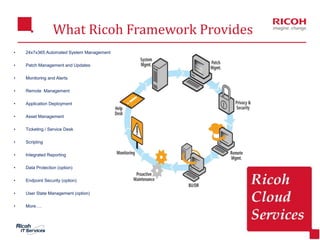
• 24x7x365 Automated System Management
• Patch Management and Updates
• Monitoring and Alerts
• Remote Management
• Application Deployment
• Asset Management
• Ticketing / Service Desk
• Scripting
• Integrated Reporting
• Data Protection (option)
• Endpoint Security (option)
• User State Management (option)
• More….
7
• Through Agent Procedures, provides pro-active service delivery
capabilities that result in increased productivity ,consistent service
levels, maximum utilization of staff, expanded service capabilities, cost
reduction and much more!
Agent Technology
• Discover, install, and audit new systems that enter the network
• Deploy system configuration templates and standards
• Log any hardware, software, or system changes
• Be alerted when changes are made to individual systems
• Report on current hardware and software statistics
Audit and Inventory
8
Monitoring
• User Defined Monitoring and Instant Alerts
• Monitor the Windows Event log
• Alert on hardware and software changes
• Alert on specific file changes and protection violations
• Know if disk space is running low on computers
• Monitor computer online/offline status
• Know when traveling users with notebooks connect
• Alert message and recipient configuration
• Automatically discover all devices on the network
• LAN Monitoring Alerts when new devices are detected and Easily view all
known and unknown devices
9
Remote Access
• Live Connect provides a robust and powerful single machine interface to
give you full control over your endpoints with minimal end user interruption
• Complete Agent Data including procedure history and Audit Information
• A robust drag and drop file manager for transferring files to and from the
agent also Remote Registry Editor like regedt32.exe
• Task Manager to see running processes and resource consumption
• Full Featured Event Viewer
• Chat for IM like conversations with the agent user
• Desktop Access for full interactive remote control of the agent
• Discovery is a tool to sweep the local network(s) of the agent and discover
all network nodes
• Video Chat allows for fully interactive face to face video chatting with the
agent user if their machine has a camera
10
• An ITIL-ready, automated and fully configurable service desk solution
• Track & Manage Incidents, Problems, Service
Requests, and Change Requests
• Automate Ticket Routing and Escalations
Based on SLA Goals
• Leverage Key Metrics for SLA Measurement
• Fine Grained Control of Service Desk Access
• Searchable Integrated Knowledge Base and Known Error database
• ITIL Made Easy – Best Practices Built-in
• Seamlessly Leverage Data
Service Desk
11
Info Center
• Detailed list, table and graphic style reports
• Complete and customizable reports
• Hardware and Software Inventory
• Complete Computer Changes
• Disk Utilization
• License Usage and Compliance
• Network Usage and Statistics
• Server and Workstation Uptime History
• Help Desk Trouble Tickets
• Computer Logs and Status
12
Patch Management
• Automatically keep computers up-to-date with the latest patches and
updates
• Schedule by time, computer, group or user defined collections of computers
• Simultaneously deploy all required patches across operating systems
• Support for Windows 2003, 2000, NT, XP, 98, 95, and Windows 7
• Single rollout strategy and policy enforcement
• Approve or deny selected patches
• Does not require multiple patch servers
• Monitors and maintains patch compliance for entire enterprise
13
Patch Management
• Deploy Help Desk capabilities in minutes
• Easy to use with no long training cycles
• Accessible from anywhere with no special servers or reconfiguration
• Quickly resolve issues and increase customer satisfaction
• Create tickets based on alarms
• Use email to update end users and receive feedback
• Assign priority
• Route tickets via escalation points
• Report on current ticket statistics
14
Ticketing
• Deploy Help Desk capabilities in minutes
• Easy to use with no long training cycles
• Accessible from anywhere with no special servers or reconfiguration
• Quickly resolve issues and increase customer satisfaction
• Create tickets based on alarms
• Use email to update end users and receive feedback
• Assign priority
• Route tickets via escalation points
• Report on current ticket statistics
15
Desktop Policy Management
• Works with all Windows environments
• Domains and active directory not required
• Policies can be applied to all, groups or specific computers
• One or multiple files
• Total file type restriction or by specific applications
• Permit or Deny application access to network
• User notification option
• Track network usage by computer and application
16
Desktop Migration
• Migrate single users or multiple users for one machine or many machines
on a scheduled basis
• Restore machine account information (including account creation) and user
settings from the backup
• Define which settings will be backed up and when this task will be
scheduled
• Agent based Desktop Migration allows for machines inside or outside of the
domain to be configured and managed with ease
• Desktop Migration allows adman's to schedule regular backups of settings
and to collectively migrate settings to groups of users without touching any
machines directly.
17
Backup
• Complete integrated solution that protects all Windows servers and
workstations in a distributed IT environment
• Intuitive management reduces administrator workload and backup costs
• Central Web-based administration of all features, including event
scheduling, remote backup status and reporting
• Remote backup administration and automation eliminates on-site visits
• Consolidated and easy-to-read alerts for failed cycles
• Universal restore for recoveries to dissimilar hardware or virtual machines
18
Security and Antivirus
• Discover new systems and automatically
• Install and configure Antivirus as new systems enter the network
• Deploy configuration templates and standards
• Log any changes
• Be alerted when security events occur
• Monitor definition update status
• protection components (mail, file, web, links)
• software options like tray icon behavior and target directory
• auto disable of Windows Defender
• pre/post install scripts
19
Traditional IT Management (1)
 Break/Fix
 Problems → tickets/complains → IT staff analyze and fix
the problems → tackle other problems
 Reactive – cannot foresee the next problem
 Too many problems, too little time
 Never enough staff
 Lose-lose relationship – irate users, unhappy IT staff
20
Traditional IT Management (2)
 Mainly Manual Process
 Lack of reliability – omissions, human errors, partial solutions, delays
 Lack of consistency – fluctuating service standards
 Boring & repetitive
 50-100 machines per engineer
 Poor Visibility
 What is happening, real time, at the endpoints?
 Hard to plan ahead
21
Traditional IT Management (3)
 Costly
 Lots of on-site service – travel time, expenses – city to city, country to
country, continent to continent
 Huge IT team, yet no time for more important/profitable projects
 User downtime and loss of productivity
 Loss of data and business opportunities
 Compliance – have to maintain and enforce corporate standards and policy
22
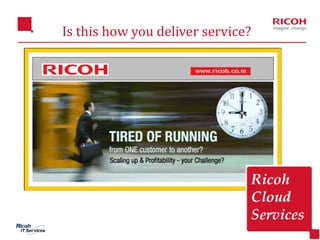
Is this how you deliver service?
23
RPASS Change It All..
24
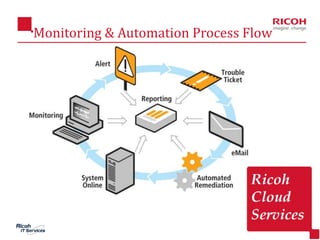
Monitoring & Automation Process Flow
25
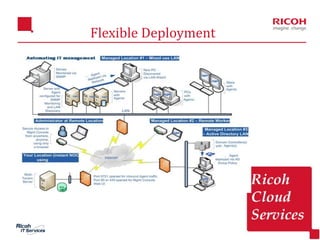
Flexible Deployment
26
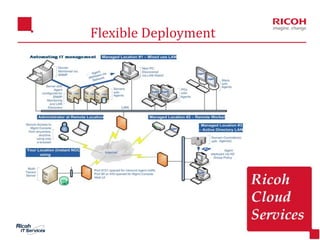
Flexible Deployment
Contact RICOH
 Toll Free No – 1800-3010-3363
 Sales Account Manager: Ankit Garg
 Phone Number: +91-9650256622
 Email ID: ankit.garg@ricoh.co.in
 Visit us at www.ricohidc.com
27
28
Thank you !!!

RPASS - Ricoh Proactive ServiceS for Remote Monitoring & Backup

  • 1.
  • 2.
    Why Automated ManagedServices 2 • Comprehensive and fully integrated IT Automation Framework . • Easy to Deploy – install in hours, not days or weeks • 100% Web Based – – remotely accessible from anywhere anytime – remotely manage endpoints located anywhere anytime • No LAN/WAN or VPN restrictions • Huge productivity improvement • No infrastructure reconfiguration required • Large user community sharing best practices and knowhow • Technology leader; financially rock solid
  • 3.
    Key Benefits 3 • Automateall key IT tasks in one central framework • Manage each client's infrastructure, network components, servers, and users' desktops - remotely, comprehensively and transparently • Efficiently manage hundreds of systems through one interface, saving time, hassle, money and resources • Grow your business without adding resources • Effectively demonstrate your value to customers • Transition from a break-fix business model to proactive IT service delivery • Deploy a solution that can scale as your business grows • Get started immediately
  • 4.
    Complete IT ServiceDelivery 4 IT Automation is a key factor in being able to deliver a proactive, results based IT service model. Ricoh provides unparalleled automation of periodic IT tasks required to manage and maintain systems and devices. Through IT Automation, the Ricoh provides pro-active service delivery capabilities that result in increased productivity, consistent service levels, increased utilization of staff, expanded service capabilities, cost reduction and much more!
  • 5.
    Routine IT ManagementTasks 5 • Patch Management • Anti - Virus Management • Remote Control • Security Event Management • System Event Management • Application Event Management • Application Addition/Change Management • Third Party Application (API) Support Coordination • Desktop Policy Enforcement • Asset Management • Report Generation • Endpoint Security • User State Management • Bandwidth Usage and Reporting • Hardware Change Management • End-User Remote Access • Disk/Partition Management • Backup and Disaster Recovery • Application Deployment • Desktop Policy Enforcement • Performance Management • Real Time Monitoring • File Synchronization • Service Desk
  • 6.
    What Ricoh FrameworkProvides 6 • 24x7x365 Automated System Management • Patch Management and Updates • Monitoring and Alerts • Remote Management • Application Deployment • Asset Management • Ticketing / Service Desk • Scripting • Integrated Reporting • Data Protection (option) • Endpoint Security (option) • User State Management (option) • More….
  • 7.
    7 • Through AgentProcedures, provides pro-active service delivery capabilities that result in increased productivity ,consistent service levels, maximum utilization of staff, expanded service capabilities, cost reduction and much more! Agent Technology • Discover, install, and audit new systems that enter the network • Deploy system configuration templates and standards • Log any hardware, software, or system changes • Be alerted when changes are made to individual systems • Report on current hardware and software statistics Audit and Inventory
  • 8.
    8 Monitoring • User DefinedMonitoring and Instant Alerts • Monitor the Windows Event log • Alert on hardware and software changes • Alert on specific file changes and protection violations • Know if disk space is running low on computers • Monitor computer online/offline status • Know when traveling users with notebooks connect • Alert message and recipient configuration • Automatically discover all devices on the network • LAN Monitoring Alerts when new devices are detected and Easily view all known and unknown devices
  • 9.
    9 Remote Access • LiveConnect provides a robust and powerful single machine interface to give you full control over your endpoints with minimal end user interruption • Complete Agent Data including procedure history and Audit Information • A robust drag and drop file manager for transferring files to and from the agent also Remote Registry Editor like regedt32.exe • Task Manager to see running processes and resource consumption • Full Featured Event Viewer • Chat for IM like conversations with the agent user • Desktop Access for full interactive remote control of the agent • Discovery is a tool to sweep the local network(s) of the agent and discover all network nodes • Video Chat allows for fully interactive face to face video chatting with the agent user if their machine has a camera
  • 10.
    10 • An ITIL-ready,automated and fully configurable service desk solution • Track & Manage Incidents, Problems, Service Requests, and Change Requests • Automate Ticket Routing and Escalations Based on SLA Goals • Leverage Key Metrics for SLA Measurement • Fine Grained Control of Service Desk Access • Searchable Integrated Knowledge Base and Known Error database • ITIL Made Easy – Best Practices Built-in • Seamlessly Leverage Data Service Desk
  • 11.
    11 Info Center • Detailedlist, table and graphic style reports • Complete and customizable reports • Hardware and Software Inventory • Complete Computer Changes • Disk Utilization • License Usage and Compliance • Network Usage and Statistics • Server and Workstation Uptime History • Help Desk Trouble Tickets • Computer Logs and Status
  • 12.
    12 Patch Management • Automaticallykeep computers up-to-date with the latest patches and updates • Schedule by time, computer, group or user defined collections of computers • Simultaneously deploy all required patches across operating systems • Support for Windows 2003, 2000, NT, XP, 98, 95, and Windows 7 • Single rollout strategy and policy enforcement • Approve or deny selected patches • Does not require multiple patch servers • Monitors and maintains patch compliance for entire enterprise
  • 13.
    13 Patch Management • DeployHelp Desk capabilities in minutes • Easy to use with no long training cycles • Accessible from anywhere with no special servers or reconfiguration • Quickly resolve issues and increase customer satisfaction • Create tickets based on alarms • Use email to update end users and receive feedback • Assign priority • Route tickets via escalation points • Report on current ticket statistics
  • 14.
    14 Ticketing • Deploy HelpDesk capabilities in minutes • Easy to use with no long training cycles • Accessible from anywhere with no special servers or reconfiguration • Quickly resolve issues and increase customer satisfaction • Create tickets based on alarms • Use email to update end users and receive feedback • Assign priority • Route tickets via escalation points • Report on current ticket statistics
  • 15.
    15 Desktop Policy Management •Works with all Windows environments • Domains and active directory not required • Policies can be applied to all, groups or specific computers • One or multiple files • Total file type restriction or by specific applications • Permit or Deny application access to network • User notification option • Track network usage by computer and application
  • 16.
    16 Desktop Migration • Migratesingle users or multiple users for one machine or many machines on a scheduled basis • Restore machine account information (including account creation) and user settings from the backup • Define which settings will be backed up and when this task will be scheduled • Agent based Desktop Migration allows for machines inside or outside of the domain to be configured and managed with ease • Desktop Migration allows adman's to schedule regular backups of settings and to collectively migrate settings to groups of users without touching any machines directly.
  • 17.
    17 Backup • Complete integratedsolution that protects all Windows servers and workstations in a distributed IT environment • Intuitive management reduces administrator workload and backup costs • Central Web-based administration of all features, including event scheduling, remote backup status and reporting • Remote backup administration and automation eliminates on-site visits • Consolidated and easy-to-read alerts for failed cycles • Universal restore for recoveries to dissimilar hardware or virtual machines
  • 18.
    18 Security and Antivirus •Discover new systems and automatically • Install and configure Antivirus as new systems enter the network • Deploy configuration templates and standards • Log any changes • Be alerted when security events occur • Monitor definition update status • protection components (mail, file, web, links) • software options like tray icon behavior and target directory • auto disable of Windows Defender • pre/post install scripts
  • 19.
    19 Traditional IT Management(1)  Break/Fix  Problems → tickets/complains → IT staff analyze and fix the problems → tackle other problems  Reactive – cannot foresee the next problem  Too many problems, too little time  Never enough staff  Lose-lose relationship – irate users, unhappy IT staff
  • 20.
    20 Traditional IT Management(2)  Mainly Manual Process  Lack of reliability – omissions, human errors, partial solutions, delays  Lack of consistency – fluctuating service standards  Boring & repetitive  50-100 machines per engineer  Poor Visibility  What is happening, real time, at the endpoints?  Hard to plan ahead
  • 21.
    21 Traditional IT Management(3)  Costly  Lots of on-site service – travel time, expenses – city to city, country to country, continent to continent  Huge IT team, yet no time for more important/profitable projects  User downtime and loss of productivity  Loss of data and business opportunities  Compliance – have to maintain and enforce corporate standards and policy
  • 22.
    22 Is this howyou deliver service?
  • 23.
  • 24.
  • 25.
  • 26.
  • 27.
    Contact RICOH  TollFree No – 1800-3010-3363  Sales Account Manager: Ankit Garg  Phone Number: +91-9650256622  Email ID: ankit.garg@ricoh.co.in  Visit us at www.ricohidc.com 27
  • 28.