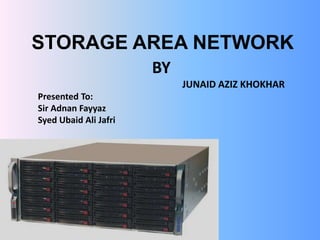
STORAGE AREA NETWORK
BY
JUNAID AZIZ KHOKHAR
Presented To:
Sir Adnan Fayyaz
Syed Ubaid Ali Jafri
TABLE OF CONTENTS
• INTRODUCTION
• WHY SAN?
• ADVANTAGES & DISADVANTAGES OF SAN
• SAN COMPONENTS
• RAID OVERVIEW
• DIAGRAMIC STRUCTURE
• HARDWARE & SOFTWARE REQUIREMENT FOR SAN
• ESXI SERVER INSTALLATION
• VSPHARE CLIENT INSTALLATION
• VIRTUALIZATION
INTRODUCTION
• The storage-area network (SAN) is a set of protocols
and technologies that permit storage devices to have
direct connections with servers over some distance.
In addition, a SAN permits the storage devices to be
shared among a number of servers based on select
criteria. Finally, using VSAN technologies (virtual
SAN), a group of discrete SANs can be connected
together using a "virtual" SAN fabric.
WHY SAN?
• The following are some of the business drivers for SAN
deployments:
• • Escalating storage requirements
• • Rising storage management costs
• • Business continuity
• • Requirement to share information
• • Increasing levels of underutilized disk storage resources resulting
in increased backup storage and backup handling costs
• One disadvantage to SANs is that there is limited vendor
interoperability.
ADVANTANGES AND DISADVANTAGES
Advantages Disadvantages
The SAN's performance is directly linked
to that of the type of network being used.
In the case of a fibre channel network, the
bandwidth is approximately 100
megabytes/second (1,000
megabits/second) and can be extended
by increasing the number of access
connections.
It is much more costly to acquire a SAN
than a NAS because it is a complete
architecture that uses technology that is
still very expensive
A SAN's capacity can be extended almost
limitlessly and can reach hundreds and
even thousands of terabytes
Using a Storage Area Network is that it
would be very difficult to keep up your
data if it breaks down.
it is possible to share data between
several network computers without
sacrificing performance because SAN
traffic is completely separate from user
traffic
with regards to stability, functionality and
speed, it's second to none.
SAN COMPONENTS
There are three main components to a SAN
• Host Bus Adapters (HBA)
• Data Storage Devices
• Storage Subsystems
HOST BUS ADAPTER
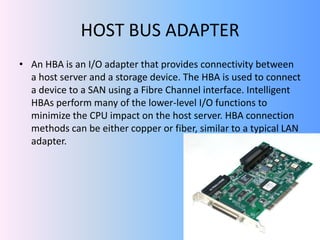
• An HBA is an I/O adapter that provides connectivity between
a host server and a storage device. The HBA is used to connect
a device to a SAN using a Fibre Channel interface. Intelligent
HBAs perform many of the lower-level I/O functions to
minimize the CPU impact on the host server. HBA connection
methods can be either copper or fiber, similar to a typical LAN
adapter.
DATA STORAGE DEVICES
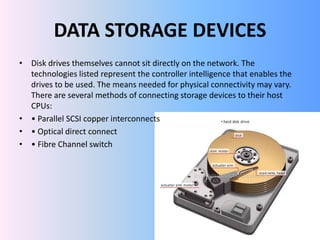
• Disk drives themselves cannot sit directly on the network. The
technologies listed represent the controller intelligence that enables the
drives to be used. The means needed for physical connectivity may vary.
There are several methods of connecting storage devices to their host
CPUs:
• • Parallel SCSI copper interconnects
• • Optical direct connect
• • Fibre Channel switch
STORAGE SUBSYSTEMS
• Storage Subsystems connect storage devices to the network. Storage
organization can be supported through various subsystems from simplistic
to complex with large volumes of storage and many services available.
Types of storage subsystems are:
➔Just a bunch of disks (JBOD)
➔Storage arrays
➔RAID
RAID OVERVIEW
• RAID is a method used to inexpensively put together a
set of physical hard drives into a logical array of storage
devices. RAID provides fault tolerance compared to
standalone disk drives. RAID does this by mirroring
data or implementing parity check operations. RAID
can be performed using hardware or host-based
software. Several types of RAID can be used, including
one or more of these:
• RAID 0 (striping)
• RAID 1 (mirroring)
• RAID 3 (error detection)
• RAID 5 (error correction)
DIAGRAMIC STRUCTURE
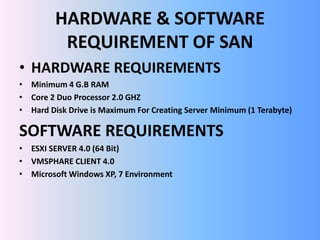
HARDWARE & SOFTWARE
REQUIREMENT OF SAN
• HARDWARE REQUIREMENTS
• Minimum 4 G.B RAM
• Core 2 Duo Processor 2.0 GHZ
• Hard Disk Drive is Maximum For Creating Server Minimum (1 Terabyte)
SOFTWARE REQUIREMENTS
• ESXI SERVER 4.0 (64 Bit)
• VMSPHARE CLIENT 4.0
• Microsoft Windows XP, 7 Environment
ESXI SERVER INSTALLATION
ESXI INSTALLATION STEP
ESXI INSTALLATION STEP 2
ESXI INSTALLATION STEP 3
ESXI LICENSE AGGREMENT
ESXI STORAGE
INSTALLATION
INSTALLATION COMPLETE
CUSTOMIZING MACHINE
CUSTOMIZING
CONFIGURING IP ADDRESS
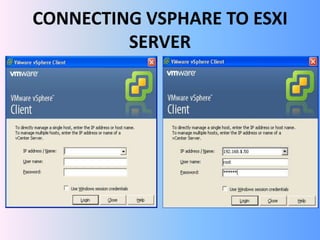
VSPHARE CLIENT INSTALLATION
CONNECTING VSPHARE TO ESXI
SERVER
MAIN WINDOW
VMWARE VIRTUALIZATION
CONCLUSION

Storage area network

  • 1.
    STORAGE AREA NETWORK BY JUNAIDAZIZ KHOKHAR Presented To: Sir Adnan Fayyaz Syed Ubaid Ali Jafri
  • 2.
    TABLE OF CONTENTS •INTRODUCTION • WHY SAN? • ADVANTAGES & DISADVANTAGES OF SAN • SAN COMPONENTS • RAID OVERVIEW • DIAGRAMIC STRUCTURE • HARDWARE & SOFTWARE REQUIREMENT FOR SAN • ESXI SERVER INSTALLATION • VSPHARE CLIENT INSTALLATION • VIRTUALIZATION
  • 3.
    INTRODUCTION • The storage-areanetwork (SAN) is a set of protocols and technologies that permit storage devices to have direct connections with servers over some distance. In addition, a SAN permits the storage devices to be shared among a number of servers based on select criteria. Finally, using VSAN technologies (virtual SAN), a group of discrete SANs can be connected together using a "virtual" SAN fabric.
  • 4.
    WHY SAN? • Thefollowing are some of the business drivers for SAN deployments: • • Escalating storage requirements • • Rising storage management costs • • Business continuity • • Requirement to share information • • Increasing levels of underutilized disk storage resources resulting in increased backup storage and backup handling costs • One disadvantage to SANs is that there is limited vendor interoperability.
  • 5.
    ADVANTANGES AND DISADVANTAGES AdvantagesDisadvantages The SAN's performance is directly linked to that of the type of network being used. In the case of a fibre channel network, the bandwidth is approximately 100 megabytes/second (1,000 megabits/second) and can be extended by increasing the number of access connections. It is much more costly to acquire a SAN than a NAS because it is a complete architecture that uses technology that is still very expensive A SAN's capacity can be extended almost limitlessly and can reach hundreds and even thousands of terabytes Using a Storage Area Network is that it would be very difficult to keep up your data if it breaks down. it is possible to share data between several network computers without sacrificing performance because SAN traffic is completely separate from user traffic with regards to stability, functionality and speed, it's second to none.
  • 6.
    SAN COMPONENTS There arethree main components to a SAN • Host Bus Adapters (HBA) • Data Storage Devices • Storage Subsystems
  • 7.
    HOST BUS ADAPTER •An HBA is an I/O adapter that provides connectivity between a host server and a storage device. The HBA is used to connect a device to a SAN using a Fibre Channel interface. Intelligent HBAs perform many of the lower-level I/O functions to minimize the CPU impact on the host server. HBA connection methods can be either copper or fiber, similar to a typical LAN adapter.
  • 8.
    DATA STORAGE DEVICES •Disk drives themselves cannot sit directly on the network. The technologies listed represent the controller intelligence that enables the drives to be used. The means needed for physical connectivity may vary. There are several methods of connecting storage devices to their host CPUs: • • Parallel SCSI copper interconnects • • Optical direct connect • • Fibre Channel switch
  • 9.
    STORAGE SUBSYSTEMS • StorageSubsystems connect storage devices to the network. Storage organization can be supported through various subsystems from simplistic to complex with large volumes of storage and many services available. Types of storage subsystems are: ➔Just a bunch of disks (JBOD) ➔Storage arrays ➔RAID
  • 10.
    RAID OVERVIEW • RAIDis a method used to inexpensively put together a set of physical hard drives into a logical array of storage devices. RAID provides fault tolerance compared to standalone disk drives. RAID does this by mirroring data or implementing parity check operations. RAID can be performed using hardware or host-based software. Several types of RAID can be used, including one or more of these: • RAID 0 (striping) • RAID 1 (mirroring) • RAID 3 (error detection) • RAID 5 (error correction)
  • 11.
  • 12.
    HARDWARE & SOFTWARE REQUIREMENTOF SAN • HARDWARE REQUIREMENTS • Minimum 4 G.B RAM • Core 2 Duo Processor 2.0 GHZ • Hard Disk Drive is Maximum For Creating Server Minimum (1 Terabyte) SOFTWARE REQUIREMENTS • ESXI SERVER 4.0 (64 Bit) • VMSPHARE CLIENT 4.0 • Microsoft Windows XP, 7 Environment
  • 13.
  • 14.
    ESXI INSTALLATION STEP ESXIINSTALLATION STEP 2
  • 15.
    ESXI INSTALLATION STEP3 ESXI LICENSE AGGREMENT
  • 16.
  • 17.
  • 18.
  • 19.
  • 20.
  • 21.
  • 22.
  • 23.
  • 24.
  • 25.