Storage Primer Sriram Ranganathachari
What is Storage ? Primary storage disk or RAM Secondary storage tape or Disk Storage can be  online, nearline  or  offline •  Online  – Random-access, low wait time – disk •  Nearline  – Random-access, some wait time – disk •  Offline  – Sequential-access, long wait time – tape Offline  and  nearline  storage •  File restore •  Image restore •  Data archiving
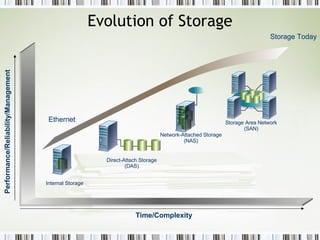
Evolution of Storage Performance/Reliability/Management Time/Complexity Storage Today Ethernet Internal Storage Direct-Attach Storage (DAS) Network-Attached Storage (NAS) Storage Area Network (SAN)
Need For the Invention of SAN Storage market Demand was growing and the traditional Server Attached Storage called DAS was not able to meet the High end Requirements . Rapid storage growth is causing new types of problems for data center managers Advantages of SAN  Staff and skill shortages Providing investment protection while at the same time storage prices drop Server, storage and data consolidations are often planned, or worse are in parallel Enterprise SAN and Storage Management is required Investment justification with limited fiscal resources
Disadvantages of SCSI Number of devices that can be attached on a Single bus is very limited  To reconfigure one device all the devices in  the string must be brought offline . Distance limitation due to cable length . Speed limitations  Sharing is possible by Multi-Drop Configuration BUT : All devices can not transfer data at the same time  Uses Arbitration During Arbitration – No Data Transfer
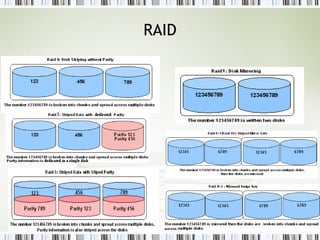
RAID
Advantages of SAN over SCSI Removes traditional Server-Storage connection  High Speed of Communication  Can connect Devices up to 10  Km Number of devices that can be connected is very high (16 million ) Improved backup and recovery LAN free and server free data movement Centralized management  Disk Storage can be expanded without disrupting the servers
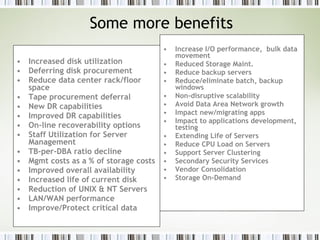
Some more benefits Increased disk utilization Deferring disk procurement Reduce data center rack/floor space Tape procurement deferral New DR capabilities Improved DR capabilities On-line recoverability options Staff Utilization for Server Management TB-per-DBA ratio decline Mgmt costs as a % of storage costs Improved overall availability Increased life of current disk Reduction of UNIX & NT Servers LAN/WAN performance Improve/Protect critical data Increase I/O performance,  bulk data movement Reduced Storage Maint. Reduce backup servers Reduce/eliminate batch, backup windows Non-disruptive scalability Avoid Data Area Network growth Impact new/migrating apps  Impact to applications development, testing Extending Life of Servers Reduce CPU Load on Servers Support Server Clustering Secondary Security Services Vendor Consolidation Storage On-Demand
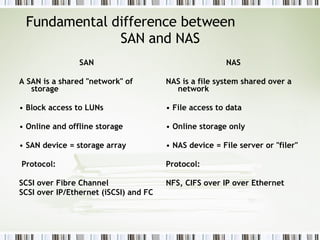
Fundamental difference between  SAN and NAS SAN A SAN is a shared "network" of storage •  Block access to LUNs •  Online and offline storage •  SAN device = storage array Protocol: SCSI over Fibre Channel SCSI over IP/Ethernet (iSCSI) and FC NAS NAS is a file system shared over a network •  File access to data •  Online storage only •  NAS device = File server or "filer" Protocol:  NFS, CIFS over IP over Ethernet
What is Fibre Channel ? Fibre Channel is serial interconnection technology that was developed to bring together elements from the channel and networking technology .   It Provides : Reliable High Speed Communication  Data transport over longer distances Low Overhead communication
What is SAN SAN is dedicated network behind the servers , based on Fibre Channel architecture .
How SAN works The data from a host server is converted into optical light pulses by a “host bus adapter” in the server, the pulses are transmitted over fiber-optic cables, through a switched network, to an intelligent storage array, which uses advanced raid protected disk drives to store the data safely.  The act of using a network to create a shared pool of storage devices is what makes a SAN different from the way data was normally stored on computers. The network is used to move data between various storage devices, allows for data sharing between different servers, and provides a fast medium for backing up and restoring data.  Devices in a SAN are usually bunched closely together in a single room, but the network allows the devices to be connected over long distances. The ability to spread everything out over long distances makes a SAN very useful to large companies with many offices.
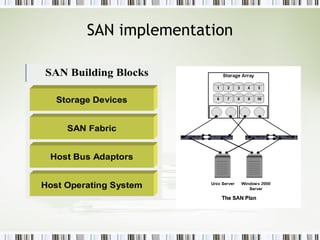
SAN implementation
Who should buy SAN Database servers:  Oracle, Sybase, SQL, DB2, Informix, and other database servers File servers:  Using SAN-based storage for file servers lets you expand file server resources quickly, makes them run better, and enables you to manage your file-based NAS storage through the SAN. Backup servers:  SAN-based backup is dramatically faster than LAN-based backup. Voice/video servers:  Voice and video servers tend to push large amounts of data very quickly. Mail servers:  Using SAN-based storage for mail servers enables quick restoration of data in case of corruption or viruses.  High-performance application servers:  Applications such as document management, customer relationship management, billing, data warehouses, and other high-performance and critical applications all benefit by what a SAN can provide.
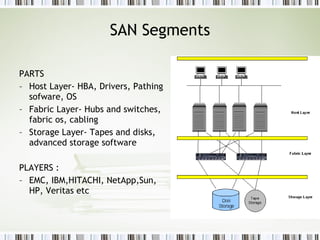
SAN Segments PARTS Host Layer- HBA, Drivers, Pathing sofware, OS Fabric Layer- Hubs and switches, fabric os, cabling Storage Layer- Tapes and disks, advanced storage software PLAYERS : EMC, IBM,HITACHI, NetApp,Sun, HP, Veritas etc
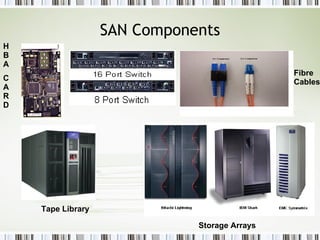
SAN Components HBA CARD Tape Library Fibre Cables Storage Arrays
Naming and Addressing Scheme  WWN : World Wide Name  A Unique 64 bit Address Assigned to the Node by manufacturer   WWPN : World Wide Port Name  A unique 64 Bit Address assigned to the N_Port
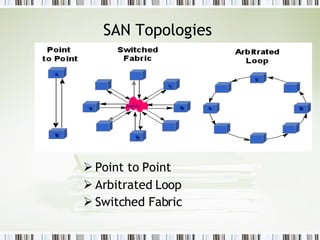
SAN Topologies  Point to Point Arbitrated Loop Switched Fabric
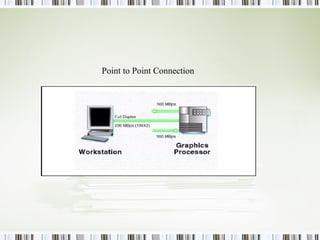
Point to Point Topology Direct Connection between two N_Ports No Sharing of Media  Allows Devices to use Full Bandwidth  Before the transmission two N_Ports perform a Login to assign the N_Port Address
Point to Point Connection
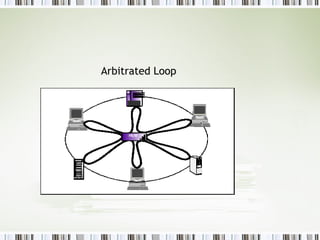
Arbitrated Loop Topology A loop of 127 Ports ( 126 NL_Port , 1FL_Port ) The Bandwidth is  shared by the Active Nodes  Media Access is gained through  an Arbitration Protocol Can Connect Ports up to a distance of 10 Km
Arbitrated Loop
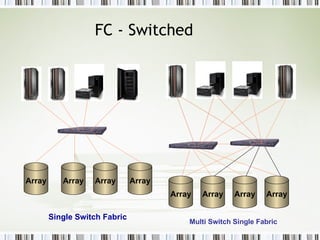
FC - Switched Multi Switch Single Fabric Single Switch Fabric Array Array Array Array Array Array Array Array
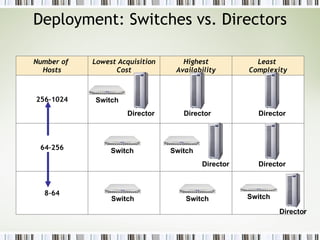
Deployment: Switches vs. Directors Director Director Director Director Director Director 8–64 64–256 256–1024 Least  Complexity Highest Availability Lowest Acquisition Cost Number of  Hosts Switch Switch Switch Switch Switch Switch
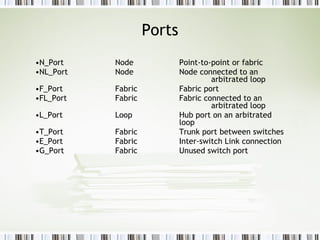
Ports N_Port Node Point-to-point or fabric NL_Port Node Node connected to an  arbitrated loop F_Port Fabric Fabric port FL_Port Fabric Fabric connected to an  arbitrated loop L_Port Loop Hub port on an arbitrated  loop T_Port Fabric Trunk port between switches E_Port Fabric Inter-switch Link connection G_Port Fabric Unused switch port
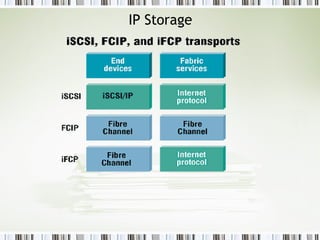
IP Storage
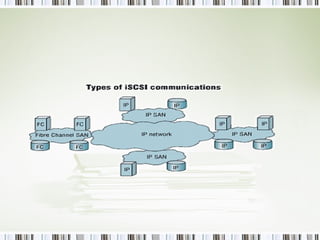
iSCSI Enables access of DAS over IP Infrastructure Optimal utilization of resource Virtualized Storage To enable FC based storage to be accessed through IP infrastructure Block level storage from SAN accessed through iSCSI IP Based Storage Protocol
 
 
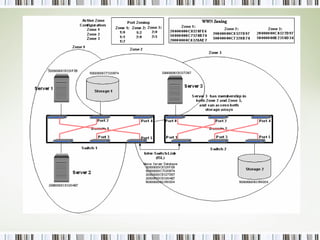
ZONING Definition :Zoning is a logical separation of traffic between host and resources  Advantages of Zoning · Data Integrity  · Security  · Shorter boot-up  Types of Zoning : Soft zoning or name server zoning : done using a name server databases in the SAN director. Zoning is via port numbers and WWN numbers.  Hard zoning : Uses a routing table in the director, which assigns devices to zones only by WWN. This is more limited since it doesn't take the port number into consideration, which makes it harder to shift devices between ports.
 
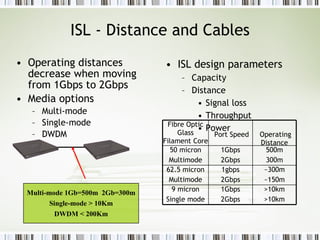
ISL - Distance and Cables Operating distances decrease when moving from 1Gbps to 2Gbps Media options Multi-mode Single-mode DWDM ISL design parameters Capacity Distance Signal loss Throughput Power Multi-mode 1Gb=500m  2Gb=300m Single-mode > 10Km DWDM < 200Km >10km >10km 1Gbps 2Gbps 9 micron Single mode ~300m ~150m 1gbps 2Gbps 62.5 micron Multimode 500m 300m 1Gbps 2Gbps 50 micron Multimode Operating Distance Port Speed Fibre Optic Glass Filament Core
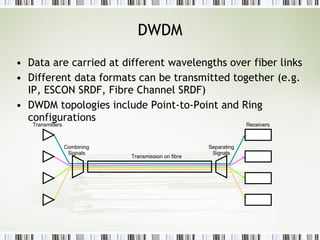
DWDM Data are carried at different wavelengths over fiber links Different data formats can be transmitted together (e.g. IP, ESCON SRDF, Fibre Channel SRDF) DWDM topologies include Point-to-Point and Ring configurations Transmission on fibre Combining Signals Separating Signals Transmitters Receivers
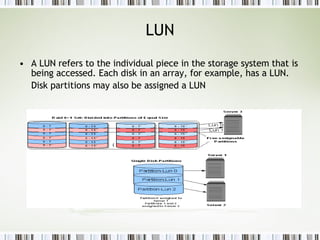
LUN A LUN refers to the individual piece in the storage system that is being accessed. Each disk in an array, for example, has a LUN. Disk partitions may also be assigned a LUN
Data Protection Backup Strategy Recovery Method ILM / HSM  DRP / BCP
Some terminologies Recovery Time Objective:  (RTO) The amount of time that it takes to get your systems back online.  Recovery Point Objective:  (RPO)This is the last consistent data transaction prior to the disaster. If you had a disaster, how much data would be lost? \ The Disaster Recovery plan (DR) focuses on  getting your business back up and running after a major outage The Business Continuance plan (BCP) focuses on keeping your business running DURING the disaster.
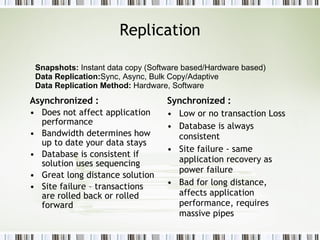
Replication Asynchronized : Does not affect application performance  Bandwidth determines how up to date your data stays Database is consistent if solution uses sequencing Great long distance solution Site failure – transactions are rolled back or rolled forward Synchronized : Low or no transaction Loss Database is always consistent Site failure - same application recovery as power failure Bad for long distance, affects application performance, requires massive pipes Snapshots:  Instant data copy (Software based/Hardware based) Data Replication: Sync, Async, Bulk Copy/Adaptive Data Replication Method:  Hardware, Software
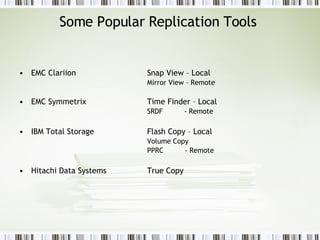
Some Popular Replication Tools  EMC Clariion Snap View – Local   Mirror View – Remote EMC Symmetrix  Time Finder – Local SRDF  - Remote IBM Total Storage  Flash Copy – Local Volume Copy  PPRC  - Remote Hitachi Data Systems  True Copy
SAN Security
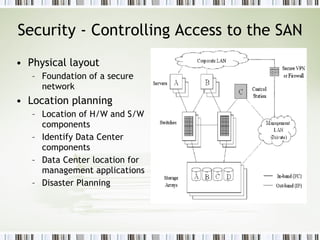
Security - Controlling Access to the SAN Physical layout Foundation of a secure network Location planning Location of H/W and S/W components Identify Data Center components Data Center location for management applications Disaster Planning
Fabric Security - Zoning Zone Controlled at the switch layer List of nodes that are made aware of each other A port or a node can be members of multiple zones Zone Set A collection of zones Also called zone config Single HBA Zoning A separate zone for each HBA Makes zone management easier when replacing HBAs Types of zones: Port Zoning (Hard Zoning) Port-to-Port traffic Ports can be  members of more than one zone Each HBA only “sees” the ports in the same zone If a cable is moved to a different port, zone has to be modified WWN based Zoning (Soft Zoning) Access is controlled using WWN WWNs defined as part of a zone “see” each other regardless of the switch port they are plugged into HBA replacement requires the zone to be modified Hybrid zones (Mixed Zoning) Contain ports and WWNs
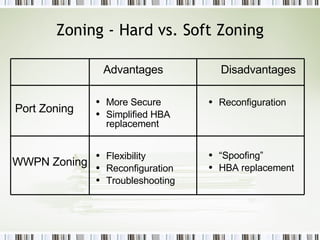
Zoning - Hard vs. Soft Zoning Flexibility Reconfiguration Troubleshooting Port Zoning WWPN Zoning More Secure Simplified HBA replacement   Reconfiguration “ Spoofing”  HBA replacement  Advantages Disadvantages
Fabric Security - Vendor Specific Access Control Most vendors have proprietary access control mechanisms These mechanisms are not governed by the Fibre Channel standard Examples of vendor features: McDATA Port Binding  SANtegrity Brocade Secure FabricOS
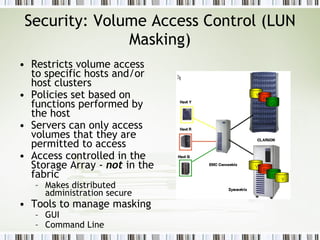
Security: Volume Access Control (LUN Masking) Restricts volume access to specific hosts and/or host clusters Policies set based on functions performed by the host Servers can only access volumes that they are permitted to access Access controlled in the Storage Array -  not  in the fabric Makes distributed administration secure  Tools to manage masking GUI Command Line
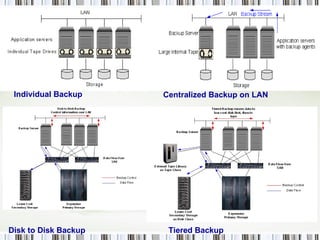
Backup Backup  is the process of saving your data so that it can be restored in case of problems such as system failure or data corruption.  Backup Window:  Time Backup Policy:  Full, Incremental, Differential  Backup Rotation:  Daily, Weekly, Monthly  Backup Method:  Network, SAN, Disk to tape, Disk to Disk,
Individual Backup Centralized Backup on LAN Disk to   Disk Backup Tiered Backup
Some Popular Backup Softwares Veritas Netbackup IBM Tivoli Storage EMC Legato Networker HP OmniBack Veritas BackupExec CA Brighstor Arcserve
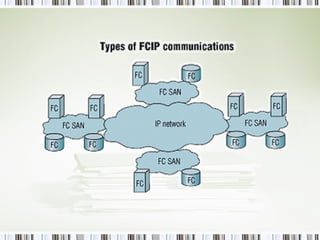
Common storage terms CIFS – Common Internet File System – A NAS protocol DAS – Direct-attached storage FCIP - SCSI over FC  tunneled  through IP HBA – Host bus adapter iFCP - SCSI over FC  translated  to IP iSCSI - SCSI over IP (often over Ethernet) JBOD – Just a bunch of disks LAN - Local area network LUN - Logical unit number – The basic unit of block storage MTBF - Mean time between failures MTTF - Mean time to failure NAS – Network attached storage NFS – Network File System – A NAS protocol RAID – Redundant array of independent disks SAN - Storage area network SCSI – Small Computer Systems Interface

Storage Primer

  • 1.
    Storage Primer SriramRanganathachari
  • 2.
    What is Storage? Primary storage disk or RAM Secondary storage tape or Disk Storage can be online, nearline or offline • Online – Random-access, low wait time – disk • Nearline – Random-access, some wait time – disk • Offline – Sequential-access, long wait time – tape Offline and nearline storage • File restore • Image restore • Data archiving
  • 3.
    Evolution of StoragePerformance/Reliability/Management Time/Complexity Storage Today Ethernet Internal Storage Direct-Attach Storage (DAS) Network-Attached Storage (NAS) Storage Area Network (SAN)
  • 4.
    Need For theInvention of SAN Storage market Demand was growing and the traditional Server Attached Storage called DAS was not able to meet the High end Requirements . Rapid storage growth is causing new types of problems for data center managers Advantages of SAN Staff and skill shortages Providing investment protection while at the same time storage prices drop Server, storage and data consolidations are often planned, or worse are in parallel Enterprise SAN and Storage Management is required Investment justification with limited fiscal resources
  • 5.
    Disadvantages of SCSINumber of devices that can be attached on a Single bus is very limited To reconfigure one device all the devices in the string must be brought offline . Distance limitation due to cable length . Speed limitations Sharing is possible by Multi-Drop Configuration BUT : All devices can not transfer data at the same time Uses Arbitration During Arbitration – No Data Transfer
  • 6.
  • 7.
    Advantages of SANover SCSI Removes traditional Server-Storage connection High Speed of Communication Can connect Devices up to 10 Km Number of devices that can be connected is very high (16 million ) Improved backup and recovery LAN free and server free data movement Centralized management Disk Storage can be expanded without disrupting the servers
  • 8.
    Some more benefitsIncreased disk utilization Deferring disk procurement Reduce data center rack/floor space Tape procurement deferral New DR capabilities Improved DR capabilities On-line recoverability options Staff Utilization for Server Management TB-per-DBA ratio decline Mgmt costs as a % of storage costs Improved overall availability Increased life of current disk Reduction of UNIX & NT Servers LAN/WAN performance Improve/Protect critical data Increase I/O performance, bulk data movement Reduced Storage Maint. Reduce backup servers Reduce/eliminate batch, backup windows Non-disruptive scalability Avoid Data Area Network growth Impact new/migrating apps Impact to applications development, testing Extending Life of Servers Reduce CPU Load on Servers Support Server Clustering Secondary Security Services Vendor Consolidation Storage On-Demand
  • 9.
    Fundamental difference between SAN and NAS SAN A SAN is a shared &quot;network&quot; of storage • Block access to LUNs • Online and offline storage • SAN device = storage array Protocol: SCSI over Fibre Channel SCSI over IP/Ethernet (iSCSI) and FC NAS NAS is a file system shared over a network • File access to data • Online storage only • NAS device = File server or &quot;filer&quot; Protocol: NFS, CIFS over IP over Ethernet
  • 10.
    What is FibreChannel ? Fibre Channel is serial interconnection technology that was developed to bring together elements from the channel and networking technology . It Provides : Reliable High Speed Communication Data transport over longer distances Low Overhead communication
  • 11.
    What is SANSAN is dedicated network behind the servers , based on Fibre Channel architecture .
  • 12.
    How SAN worksThe data from a host server is converted into optical light pulses by a “host bus adapter” in the server, the pulses are transmitted over fiber-optic cables, through a switched network, to an intelligent storage array, which uses advanced raid protected disk drives to store the data safely. The act of using a network to create a shared pool of storage devices is what makes a SAN different from the way data was normally stored on computers. The network is used to move data between various storage devices, allows for data sharing between different servers, and provides a fast medium for backing up and restoring data. Devices in a SAN are usually bunched closely together in a single room, but the network allows the devices to be connected over long distances. The ability to spread everything out over long distances makes a SAN very useful to large companies with many offices.
  • 13.
  • 14.
    Who should buySAN Database servers: Oracle, Sybase, SQL, DB2, Informix, and other database servers File servers: Using SAN-based storage for file servers lets you expand file server resources quickly, makes them run better, and enables you to manage your file-based NAS storage through the SAN. Backup servers: SAN-based backup is dramatically faster than LAN-based backup. Voice/video servers: Voice and video servers tend to push large amounts of data very quickly. Mail servers: Using SAN-based storage for mail servers enables quick restoration of data in case of corruption or viruses. High-performance application servers: Applications such as document management, customer relationship management, billing, data warehouses, and other high-performance and critical applications all benefit by what a SAN can provide.
  • 15.
    SAN Segments PARTSHost Layer- HBA, Drivers, Pathing sofware, OS Fabric Layer- Hubs and switches, fabric os, cabling Storage Layer- Tapes and disks, advanced storage software PLAYERS : EMC, IBM,HITACHI, NetApp,Sun, HP, Veritas etc
  • 16.
    SAN Components HBACARD Tape Library Fibre Cables Storage Arrays
  • 17.
    Naming and AddressingScheme WWN : World Wide Name A Unique 64 bit Address Assigned to the Node by manufacturer WWPN : World Wide Port Name A unique 64 Bit Address assigned to the N_Port
  • 18.
    SAN Topologies Point to Point Arbitrated Loop Switched Fabric
  • 19.
    Point to PointTopology Direct Connection between two N_Ports No Sharing of Media Allows Devices to use Full Bandwidth Before the transmission two N_Ports perform a Login to assign the N_Port Address
  • 20.
    Point to PointConnection
  • 21.
    Arbitrated Loop TopologyA loop of 127 Ports ( 126 NL_Port , 1FL_Port ) The Bandwidth is shared by the Active Nodes Media Access is gained through an Arbitration Protocol Can Connect Ports up to a distance of 10 Km
  • 22.
  • 23.
    FC - SwitchedMulti Switch Single Fabric Single Switch Fabric Array Array Array Array Array Array Array Array
  • 24.
    Deployment: Switches vs.Directors Director Director Director Director Director Director 8–64 64–256 256–1024 Least Complexity Highest Availability Lowest Acquisition Cost Number of Hosts Switch Switch Switch Switch Switch Switch
  • 25.
    Ports N_Port NodePoint-to-point or fabric NL_Port Node Node connected to an arbitrated loop F_Port Fabric Fabric port FL_Port Fabric Fabric connected to an arbitrated loop L_Port Loop Hub port on an arbitrated loop T_Port Fabric Trunk port between switches E_Port Fabric Inter-switch Link connection G_Port Fabric Unused switch port
  • 26.
  • 27.
    iSCSI Enables accessof DAS over IP Infrastructure Optimal utilization of resource Virtualized Storage To enable FC based storage to be accessed through IP infrastructure Block level storage from SAN accessed through iSCSI IP Based Storage Protocol
  • 28.
  • 29.
  • 30.
    ZONING Definition :Zoningis a logical separation of traffic between host and resources Advantages of Zoning · Data Integrity · Security · Shorter boot-up Types of Zoning : Soft zoning or name server zoning : done using a name server databases in the SAN director. Zoning is via port numbers and WWN numbers.  Hard zoning : Uses a routing table in the director, which assigns devices to zones only by WWN. This is more limited since it doesn't take the port number into consideration, which makes it harder to shift devices between ports.
  • 31.
  • 32.
    ISL - Distanceand Cables Operating distances decrease when moving from 1Gbps to 2Gbps Media options Multi-mode Single-mode DWDM ISL design parameters Capacity Distance Signal loss Throughput Power Multi-mode 1Gb=500m 2Gb=300m Single-mode > 10Km DWDM < 200Km >10km >10km 1Gbps 2Gbps 9 micron Single mode ~300m ~150m 1gbps 2Gbps 62.5 micron Multimode 500m 300m 1Gbps 2Gbps 50 micron Multimode Operating Distance Port Speed Fibre Optic Glass Filament Core
  • 33.
    DWDM Data arecarried at different wavelengths over fiber links Different data formats can be transmitted together (e.g. IP, ESCON SRDF, Fibre Channel SRDF) DWDM topologies include Point-to-Point and Ring configurations Transmission on fibre Combining Signals Separating Signals Transmitters Receivers
  • 34.
    LUN A LUNrefers to the individual piece in the storage system that is being accessed. Each disk in an array, for example, has a LUN. Disk partitions may also be assigned a LUN
  • 35.
    Data Protection BackupStrategy Recovery Method ILM / HSM DRP / BCP
  • 36.
    Some terminologies RecoveryTime Objective: (RTO) The amount of time that it takes to get your systems back online. Recovery Point Objective: (RPO)This is the last consistent data transaction prior to the disaster. If you had a disaster, how much data would be lost? \ The Disaster Recovery plan (DR) focuses on getting your business back up and running after a major outage The Business Continuance plan (BCP) focuses on keeping your business running DURING the disaster.
  • 37.
    Replication Asynchronized :Does not affect application performance Bandwidth determines how up to date your data stays Database is consistent if solution uses sequencing Great long distance solution Site failure – transactions are rolled back or rolled forward Synchronized : Low or no transaction Loss Database is always consistent Site failure - same application recovery as power failure Bad for long distance, affects application performance, requires massive pipes Snapshots: Instant data copy (Software based/Hardware based) Data Replication: Sync, Async, Bulk Copy/Adaptive Data Replication Method: Hardware, Software
  • 38.
    Some Popular ReplicationTools EMC Clariion Snap View – Local Mirror View – Remote EMC Symmetrix Time Finder – Local SRDF - Remote IBM Total Storage Flash Copy – Local Volume Copy PPRC - Remote Hitachi Data Systems True Copy
  • 39.
  • 40.
    Security - ControllingAccess to the SAN Physical layout Foundation of a secure network Location planning Location of H/W and S/W components Identify Data Center components Data Center location for management applications Disaster Planning
  • 41.
    Fabric Security -Zoning Zone Controlled at the switch layer List of nodes that are made aware of each other A port or a node can be members of multiple zones Zone Set A collection of zones Also called zone config Single HBA Zoning A separate zone for each HBA Makes zone management easier when replacing HBAs Types of zones: Port Zoning (Hard Zoning) Port-to-Port traffic Ports can be members of more than one zone Each HBA only “sees” the ports in the same zone If a cable is moved to a different port, zone has to be modified WWN based Zoning (Soft Zoning) Access is controlled using WWN WWNs defined as part of a zone “see” each other regardless of the switch port they are plugged into HBA replacement requires the zone to be modified Hybrid zones (Mixed Zoning) Contain ports and WWNs
  • 42.
    Zoning - Hardvs. Soft Zoning Flexibility Reconfiguration Troubleshooting Port Zoning WWPN Zoning More Secure Simplified HBA replacement Reconfiguration “ Spoofing” HBA replacement Advantages Disadvantages
  • 43.
    Fabric Security -Vendor Specific Access Control Most vendors have proprietary access control mechanisms These mechanisms are not governed by the Fibre Channel standard Examples of vendor features: McDATA Port Binding SANtegrity Brocade Secure FabricOS
  • 44.
    Security: Volume AccessControl (LUN Masking) Restricts volume access to specific hosts and/or host clusters Policies set based on functions performed by the host Servers can only access volumes that they are permitted to access Access controlled in the Storage Array - not in the fabric Makes distributed administration secure Tools to manage masking GUI Command Line
  • 45.
    Backup Backup is the process of saving your data so that it can be restored in case of problems such as system failure or data corruption. Backup Window: Time Backup Policy: Full, Incremental, Differential Backup Rotation: Daily, Weekly, Monthly Backup Method: Network, SAN, Disk to tape, Disk to Disk,
  • 46.
    Individual Backup CentralizedBackup on LAN Disk to Disk Backup Tiered Backup
  • 47.
    Some Popular BackupSoftwares Veritas Netbackup IBM Tivoli Storage EMC Legato Networker HP OmniBack Veritas BackupExec CA Brighstor Arcserve
  • 48.
    Common storage termsCIFS – Common Internet File System – A NAS protocol DAS – Direct-attached storage FCIP - SCSI over FC tunneled through IP HBA – Host bus adapter iFCP - SCSI over FC translated to IP iSCSI - SCSI over IP (often over Ethernet) JBOD – Just a bunch of disks LAN - Local area network LUN - Logical unit number – The basic unit of block storage MTBF - Mean time between failures MTTF - Mean time to failure NAS – Network attached storage NFS – Network File System – A NAS protocol RAID – Redundant array of independent disks SAN - Storage area network SCSI – Small Computer Systems Interface