Download to read offline

![Here
If we do a quick look in the source code of the original website it looks
string className = "font6";
string globalPattern;
globalPattern = String.Format("<span [^>]*class=("|')font6("|')>(.*?)</span>",className);
using "font6" as a span class. we can further enhance this code by calling Font7 which is the time class in the
source code.](https://image.slidesharecdn.com/datacallingfromwebtoc-150219001035-conversion-gate01/85/Data-calling-from-web-to-C-4-320.jpg)
![private void Form1_Load(object sender, EventArgs e)
{
webBrowser1.Navigate("http://www.worldtimeserver.com/current_time_in_PK.aspx");
}
private void button1_Click(object sender, EventArgs e)
{
WebClient web = new WebClient();
string url = string.Format("http://www.worldtimeserver.com/current_time_in_PK.aspx" );
string response = web.DownloadString(url);
string className = "font6";
string globalPattern;
globalPattern = String.Format("<span [^>]*class=("|')font6("|')>(.*?)</span>",className);
//<div[^>]*?class=(["'])[^>]*{0}[^>]*1[^>]*>(.*?)</div>", className);
Regex regx = new Regex(globalPattern, RegexOptions.Singleline | RegexOptions.Compiled |
RegexOptions.IgnoreCase);
Match match = regx.Match(response);
label1.Text = match.ToString();
string html = "<span class = 'font7'></span><span class="font7"></span>";
string newregex = "<span [^>]*class=("|')font7("|')>(.*?)</span>";
MatchCollection matches = new Regex(newregex, RegexOptions.Multiline |
RegexOptions.Compiled).Matches(html);
Match matcch = regx.Match(response);
string contents = matcch.Groups[3].Value;
label2.Text = contents;
}](https://image.slidesharecdn.com/datacallingfromwebtoc-150219001035-conversion-gate01/85/Data-calling-from-web-to-C-5-320.jpg)

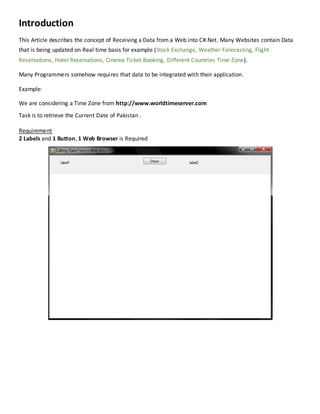
The document discusses how to retrieve real-time data from a web source into a C# application without using external services or libraries. It provides a specific example of obtaining the current date and time for Pakistan from the website worldtimeserver.com, detailing the code required to extract this information using a WebClient and regex. The article explains the setup of the application components including labels, buttons, and a web browser for displaying data.


