Introduction To Storage
Overview of the storage subsystem
Objectives for this Unit
 Understand Storage Basics
 Introduce Direct Attached Storage
 Differentiate between types of storage
 DAS
 NAS
 ISCSI
 SAN
 Introduce Network Attached Storage
 Introduce Fibre Channel SAN
A Few Storage Basics….
 Where will data finally end up?
 How will it get there?
 What will it pass through?
Direct Attached Storage
(Internal)
Computer System
CPU
Memory
Bus
I/O - RAID
Controller
Disk Drives
Direct Attached Storage
(Internal)
Computer System
CPU
Memory
Bus
I/O - RAID
Controller
Disk Drives
12345
Data
Direct Attached Storage
(Internal)
Computer System
CPU
Memory
Bus
I/O - RAID
Controller
Disk Drives
12345
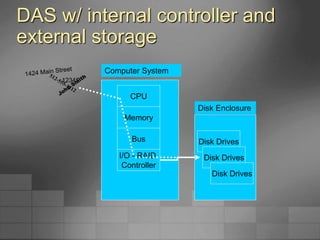
DAS w/ internal controller and
external storage
CPU
Memory
Bus
I/O - RAID
Controller
Computer System
Disk Drives
Disk Drives
Disk Drives
Disk Enclosure
12345
Comparing Internal and External
Storage
Internal Storage
Server
Storage
RAID controllers
and disk drives
are internal to the
server
SCSI, ATA, or
SATA protocol
between controller
and disks
SCSI Bus w/ external storage
Server
RAID Controller
Storage
RAID Controller
Disk Drives
RAID controller is
internal
SCSI or SATA
protocol between
controller and
disks
Disk drives are
external
Disk Drives
DAS w/ external controller and
external storage
Computer System
CPU
Memory
Bus
HBA
RAID
Controller
Storage System
Disk Drives
Disk Drives
Disk Drives
Disk Enclosure
12345
DAS over Fibre Channel
Server
HBA
Storage
Disk drives and
RAID controller
are external
Disk Drives
RAID Controller
HBA is internal
Fibre Channel
protocol
between HBAs
and external
RAID controller
External SAN Array
I/O Transfer
 RAID Controller
 Contains the “smarts”
 Determines how the data will be written (striping,
mirroring, RAID 10, RAID 5, etc.)
 Host Bus Adapter (HBA)
 Simply transfers the data to the RAID controller.
 Doesn’t do any RAID or striping calculations.
 “Dumb” for speed.
 Required for external storage.
Storage types
 Single Disk Drive
 JBOD
 Volume
 Storage Array
 SCSI device
 DAS
 NAS
 SAN
 iSCSI
NAS: What is it?
 Network Attached Storage
 Utilizes a TCP/IP network to “share” data
 Uses file sharing protocols like Unix NFS
and Windows CIFS
 Storage “Appliances” utilize a stripped-
down OS that optimizes file protocol
performance
Networked Attached Storage
NAS Server
Storage
Server has a
Network Interface
Card
No RAID
Controller or HBA
in the server
Public or Private Ethernet
network
RAID Controller
Disk Drives
All data converted
to file protocol for
transmission (may
slow down
database
transactions)
Server
NIC NIC
iSCSI: What is it?
 An alternate form of networked storage
 Like NAS, also utilizes a TCP/IP network
 Encapsulates native SCSI commands in TCP/IP
packets
 Supported in Windows 2003 Server and Linux
 TCP/IP Offload Engines (TOEs) on NICs speed
up packet encapsulation
iSCSI Storage
iSCSI Storage
Server has a
Network Interface
Card or iSCSI
HBA
iSCSI HBAs use
TCP/IP Offload
Engine (TOE)
Public or Private Ethernet
network
RAID Controller
Disk Drives
SCSI commands
are encapsulated
in TCP/IP packets
Server
NIC or iSCSI HBA NIC or iSCSI HBA
Fibre Channel: What is it?
 Fibre Channel is a network protocol
implemented specifically for dedicated
storage networks
 Fibre Channel utilizes specialized
 Switches
 Host Bus Adapters
 RAID controllers
 Cables
switch
Fibre Channel Components
RAID Controller RAID Controller
switch
 Servers
 Host Bus Adapters
 Cables
 Fiber optic or copper
 Fibre Channel Switches
 Two switches for redundancy
 Fibre Channel Storage Array
 Two RAID Controllers for
redundancy
 4–100+ disk drives per array
 A true storage network
 Multiple servers
 Multiple switches
 Multiple Storage Arrays
Server A
HBA
Server B
HBA
Server C
HBA
Disk Drives
FC Storage Array
HBA HBA HBA
SAN: What is it?
 Storage Area Network
 A network whose primary purpose is the transfer
of data between storage systems and computer
systems
 Fibre Channel is the primary technology utilized
for SANs
 Recently, SANs have been implemented with
dedicated iSCSI networks
Benefits of SAN/Consolidated
Storage
 Reduce cost of external storage
 Increase performance
 Centralized and improved tape backup
 LAN-less backup
 High-speed, no single-point-of-failure
clustering solutions
 Consolidation with > 70TB of storage
Fibre Channel Technology
 Provides concurrent communications between servers,
storage devices, and other peripherals
 A gigabit interconnect technology
 FC1: Over 1,000,000,000 bits per second
 FC2: Over 2,000,000,000 bits per second
 A highly reliable interconnect
 Up to 127 devices (SCSI: 15)
 Up to 10 km of cabling (3-15 ft. for SCSI)
 Physical interconnect can be copper or fiber optic
Fibre Channel – (continued)
 Hot-pluggable - Devices can be removed
or added at will with no ill effects to data
communications
 Provides a data link layer above the
physical interconnect, analogous to
Ethernet
 Sophisticated error detection at the frame
level
 Data is checked and resent if necessary
Fibre Channel – Frame
Dissection
 Up to 2048 byte
payload
 4 byte checksum
for each frame
Fibre Channel
 What’s with the funny name?
 Some background history required
 Originally developed to only support fiber optic
cabling
 When copper cabling support was added, ISO
decided not to rename the technology
 ISO changed to the French spelling to reduce
association with fiber optics only medium
Fibre Channel
 How does it work?
 Serial interface
 Data is transferred across a single piece of
medium at the fastest speed supported
 No complex signaling required
Fibre Channel Interface
Layers
Device Driver
SCSI Protocol
Fibre Channel
Fiber Optic or Copper Cabling
SCSI vs. Fibre Channel
Protocol
 SCSI
 SCSI protocol vs. SCSI device
 SCSI is an established, tried and true protocol
 Provides services analogous to TCP/IP
 Supported in every major OS on market
 Fibre Channel
 Fibre Channel runs on top of SCSI
 No re-inventing the wheel
 Immediate OS support
SCSI vs. FC Transmission
RAID Controller Disk Drive
Fibre Channel
SCSI
RAID Controller Disk Drive
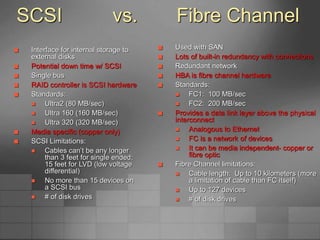
SCSI vs. Fibre Channel
 Interface for internal storage to
external disks
 Potential down time w/ SCSI
 Single bus
 RAID controller is SCSI hardware
 Standards:
 Ultra2 (80 MB/sec)
 Ultra 160 (160 MB/sec)
 Ultra 320 (320 MB/sec)
 Media specific (copper only)
 SCSI Limitations:
 Cables can’t be any longer
than 3 feet for single ended;
15 feet for LVD (low voltage
differential)
 No more than 15 devices on
a SCSI bus
 # of disk drives
 Used with SAN
 Lots of built-in redundancy with connections
 Redundant network
 HBA is fibre channel hardware
 Standards:
 FC1: 100 MB/sec
 FC2: 200 MB/sec
 Provides a data link layer above the physical
interconnect
 Analogous to Ethernet
 FC is a network of devices
 It can be media independent- copper or
fibre optic
 Fibre Channel limitations:
 Cable length: Up to 10 kilometers (more
a limitation of cable than FC itself)
 Up to 127 devices
 # of disk drives
Fibre Channel vs. iSCSI
 Fibre Channel
 The current market leader for shared storage technologies
 Provides the highest performance levels
 Designed for mission-critical applications
 Cost of components is relatively high, particularly per server
HBA costs
 Relatively difficult to implement and manage
 iSCSI
 Relatively new, but usage is increasing rapidly
 Performance can approach Fibre Channel speeds
 A better fit for databases than NAS
 A good fit for Small to Medium Size Businesses
 Relatively inexpensive, compared to Fibre Channel
 Relatively easy to implement and manage
Microsoft Simple SAN Initiative
 Make operating system aware of SAN and SAN
capabilities
 Shift integration burden from IT staff or services back
to VENDORS products:
 Microsoft
 Storage hardware and software
 Application developers
 Key storage technologies:
 Volume Shadow Copy Service (VSS)
 Virtual Disk Service (VDS)
 Microsoft Multipath Input/Output (MPIO)
 Microsoft iSCSI driver
 Software Initiator (client)
 Software Target (attached to disk subsystem)
Review
 What is the difference between a RAID
Controller and an HBA?
 How many protocols may be used for DAS?
 Name two types of storage that rely on ethernet
cables
 Name two benefits of SANs
 Describe the four interface layers of the Fibre
Channel protocol
 Describe a scenario where an iSCSI SAN may
be preferred over a Fibre Channel SAN
Summary
 How data is routed through a server to I/O
 Types of storage
 DAS
 NAS
 iSCSI
 SAN
 Benefits of SAN technology
 Storage consolidation
 Reduced costs
 Centralized, LAN-free backup and restore
 The Fibre Channel protocol
 How it works
 Fibre Channel protocol vs. SCSI protocol
 Comparing Fibre Channel SANs and iSCSI SANs
 Fibre Channel SANs offer mission-critical performance, with relatively high
costs and high complexity
 iSCSI SANs offer moderate to high performance at an attractive
price/performance ration and are relatively easy to administer

Introduction to Storage.ppt

  • 1.
    Introduction To Storage Overviewof the storage subsystem
  • 2.
    Objectives for thisUnit  Understand Storage Basics  Introduce Direct Attached Storage  Differentiate between types of storage  DAS  NAS  ISCSI  SAN  Introduce Network Attached Storage  Introduce Fibre Channel SAN
  • 3.
    A Few StorageBasics….  Where will data finally end up?  How will it get there?  What will it pass through?
  • 4.
    Direct Attached Storage (Internal) ComputerSystem CPU Memory Bus I/O - RAID Controller Disk Drives
  • 5.
    Direct Attached Storage (Internal) ComputerSystem CPU Memory Bus I/O - RAID Controller Disk Drives 12345 Data
  • 6.
    Direct Attached Storage (Internal) ComputerSystem CPU Memory Bus I/O - RAID Controller Disk Drives 12345
  • 7.
    DAS w/ internalcontroller and external storage CPU Memory Bus I/O - RAID Controller Computer System Disk Drives Disk Drives Disk Drives Disk Enclosure 12345
  • 8.
    Comparing Internal andExternal Storage Internal Storage Server Storage RAID controllers and disk drives are internal to the server SCSI, ATA, or SATA protocol between controller and disks SCSI Bus w/ external storage Server RAID Controller Storage RAID Controller Disk Drives RAID controller is internal SCSI or SATA protocol between controller and disks Disk drives are external Disk Drives
  • 9.
    DAS w/ externalcontroller and external storage Computer System CPU Memory Bus HBA RAID Controller Storage System Disk Drives Disk Drives Disk Drives Disk Enclosure 12345
  • 10.
    DAS over FibreChannel Server HBA Storage Disk drives and RAID controller are external Disk Drives RAID Controller HBA is internal Fibre Channel protocol between HBAs and external RAID controller External SAN Array
  • 11.
    I/O Transfer  RAIDController  Contains the “smarts”  Determines how the data will be written (striping, mirroring, RAID 10, RAID 5, etc.)  Host Bus Adapter (HBA)  Simply transfers the data to the RAID controller.  Doesn’t do any RAID or striping calculations.  “Dumb” for speed.  Required for external storage.
  • 12.
    Storage types  SingleDisk Drive  JBOD  Volume  Storage Array  SCSI device  DAS  NAS  SAN  iSCSI
  • 13.
    NAS: What isit?  Network Attached Storage  Utilizes a TCP/IP network to “share” data  Uses file sharing protocols like Unix NFS and Windows CIFS  Storage “Appliances” utilize a stripped- down OS that optimizes file protocol performance
  • 14.
    Networked Attached Storage NASServer Storage Server has a Network Interface Card No RAID Controller or HBA in the server Public or Private Ethernet network RAID Controller Disk Drives All data converted to file protocol for transmission (may slow down database transactions) Server NIC NIC
  • 15.
    iSCSI: What isit?  An alternate form of networked storage  Like NAS, also utilizes a TCP/IP network  Encapsulates native SCSI commands in TCP/IP packets  Supported in Windows 2003 Server and Linux  TCP/IP Offload Engines (TOEs) on NICs speed up packet encapsulation
  • 16.
    iSCSI Storage iSCSI Storage Serverhas a Network Interface Card or iSCSI HBA iSCSI HBAs use TCP/IP Offload Engine (TOE) Public or Private Ethernet network RAID Controller Disk Drives SCSI commands are encapsulated in TCP/IP packets Server NIC or iSCSI HBA NIC or iSCSI HBA
  • 17.
    Fibre Channel: Whatis it?  Fibre Channel is a network protocol implemented specifically for dedicated storage networks  Fibre Channel utilizes specialized  Switches  Host Bus Adapters  RAID controllers  Cables
  • 18.
    switch Fibre Channel Components RAIDController RAID Controller switch  Servers  Host Bus Adapters  Cables  Fiber optic or copper  Fibre Channel Switches  Two switches for redundancy  Fibre Channel Storage Array  Two RAID Controllers for redundancy  4–100+ disk drives per array  A true storage network  Multiple servers  Multiple switches  Multiple Storage Arrays Server A HBA Server B HBA Server C HBA Disk Drives FC Storage Array HBA HBA HBA
  • 19.
    SAN: What isit?  Storage Area Network  A network whose primary purpose is the transfer of data between storage systems and computer systems  Fibre Channel is the primary technology utilized for SANs  Recently, SANs have been implemented with dedicated iSCSI networks
  • 20.
    Benefits of SAN/Consolidated Storage Reduce cost of external storage  Increase performance  Centralized and improved tape backup  LAN-less backup  High-speed, no single-point-of-failure clustering solutions  Consolidation with > 70TB of storage
  • 21.
    Fibre Channel Technology Provides concurrent communications between servers, storage devices, and other peripherals  A gigabit interconnect technology  FC1: Over 1,000,000,000 bits per second  FC2: Over 2,000,000,000 bits per second  A highly reliable interconnect  Up to 127 devices (SCSI: 15)  Up to 10 km of cabling (3-15 ft. for SCSI)  Physical interconnect can be copper or fiber optic
  • 22.
    Fibre Channel –(continued)  Hot-pluggable - Devices can be removed or added at will with no ill effects to data communications  Provides a data link layer above the physical interconnect, analogous to Ethernet  Sophisticated error detection at the frame level  Data is checked and resent if necessary
  • 23.
    Fibre Channel –Frame Dissection  Up to 2048 byte payload  4 byte checksum for each frame
  • 24.
    Fibre Channel  What’swith the funny name?  Some background history required  Originally developed to only support fiber optic cabling  When copper cabling support was added, ISO decided not to rename the technology  ISO changed to the French spelling to reduce association with fiber optics only medium
  • 25.
    Fibre Channel  Howdoes it work?  Serial interface  Data is transferred across a single piece of medium at the fastest speed supported  No complex signaling required
  • 26.
    Fibre Channel Interface Layers DeviceDriver SCSI Protocol Fibre Channel Fiber Optic or Copper Cabling
  • 27.
    SCSI vs. FibreChannel Protocol  SCSI  SCSI protocol vs. SCSI device  SCSI is an established, tried and true protocol  Provides services analogous to TCP/IP  Supported in every major OS on market  Fibre Channel  Fibre Channel runs on top of SCSI  No re-inventing the wheel  Immediate OS support
  • 28.
    SCSI vs. FCTransmission RAID Controller Disk Drive Fibre Channel SCSI RAID Controller Disk Drive
  • 29.
    SCSI vs. FibreChannel  Interface for internal storage to external disks  Potential down time w/ SCSI  Single bus  RAID controller is SCSI hardware  Standards:  Ultra2 (80 MB/sec)  Ultra 160 (160 MB/sec)  Ultra 320 (320 MB/sec)  Media specific (copper only)  SCSI Limitations:  Cables can’t be any longer than 3 feet for single ended; 15 feet for LVD (low voltage differential)  No more than 15 devices on a SCSI bus  # of disk drives  Used with SAN  Lots of built-in redundancy with connections  Redundant network  HBA is fibre channel hardware  Standards:  FC1: 100 MB/sec  FC2: 200 MB/sec  Provides a data link layer above the physical interconnect  Analogous to Ethernet  FC is a network of devices  It can be media independent- copper or fibre optic  Fibre Channel limitations:  Cable length: Up to 10 kilometers (more a limitation of cable than FC itself)  Up to 127 devices  # of disk drives
  • 30.
    Fibre Channel vs.iSCSI  Fibre Channel  The current market leader for shared storage technologies  Provides the highest performance levels  Designed for mission-critical applications  Cost of components is relatively high, particularly per server HBA costs  Relatively difficult to implement and manage  iSCSI  Relatively new, but usage is increasing rapidly  Performance can approach Fibre Channel speeds  A better fit for databases than NAS  A good fit for Small to Medium Size Businesses  Relatively inexpensive, compared to Fibre Channel  Relatively easy to implement and manage
  • 31.
    Microsoft Simple SANInitiative  Make operating system aware of SAN and SAN capabilities  Shift integration burden from IT staff or services back to VENDORS products:  Microsoft  Storage hardware and software  Application developers  Key storage technologies:  Volume Shadow Copy Service (VSS)  Virtual Disk Service (VDS)  Microsoft Multipath Input/Output (MPIO)  Microsoft iSCSI driver  Software Initiator (client)  Software Target (attached to disk subsystem)
  • 32.
    Review  What isthe difference between a RAID Controller and an HBA?  How many protocols may be used for DAS?  Name two types of storage that rely on ethernet cables  Name two benefits of SANs  Describe the four interface layers of the Fibre Channel protocol  Describe a scenario where an iSCSI SAN may be preferred over a Fibre Channel SAN
  • 33.
    Summary  How datais routed through a server to I/O  Types of storage  DAS  NAS  iSCSI  SAN  Benefits of SAN technology  Storage consolidation  Reduced costs  Centralized, LAN-free backup and restore  The Fibre Channel protocol  How it works  Fibre Channel protocol vs. SCSI protocol  Comparing Fibre Channel SANs and iSCSI SANs  Fibre Channel SANs offer mission-critical performance, with relatively high costs and high complexity  iSCSI SANs offer moderate to high performance at an attractive price/performance ration and are relatively easy to administer