VMware SolutionsTechnical PerspectiveAley El-Dean AdhamSW Infrastructure Consultant aley.adham@qinnova.com
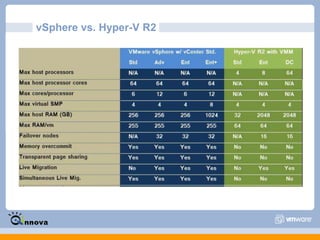
AgendaWhat is Virtualization ?What is Hypervisor layer?VMware Products LineESXi and ESXWhat is vSphere?VMware vCenterVirtual Desktop Infrastructure (VDI)vSphere vs. Hyper-V
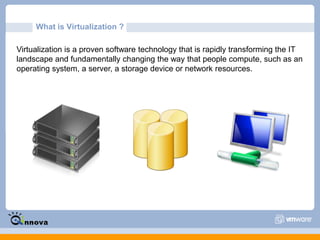
What is Virtualization ?Virtualization is a proven software technology that is rapidly transforming the IT landscape and fundamentally changing the way that people compute, such as an operating system, a server, a storage device or network resources.
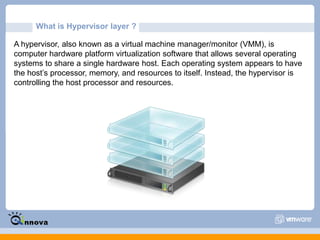
What is Hypervisor layer ?A hypervisor, also known as a virtual machine manager/monitor (VMM), is computer hardware platform virtualization software that allows several operating systems to share a single hardware host. Each operating system appears to have the host’s processor, memory, and resources to itself. Instead, the hypervisor is controlling the host processor and resources.
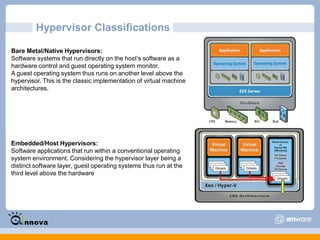
Hypervisor ClassificationsBare Metal/Native Hypervisors:Software systems that run directly on the host’s software as a hardware control and guest operating system monitor. A guest operating system thus runs on another level above the hypervisor. This is the classic implementation of virtual machine architectures.Embedded/Host Hypervisors:Software applications that run within a conventional operating system environment. Considering the hypervisor layer being a distinct software layer, guest operating systems thus run at the third level above the hardware
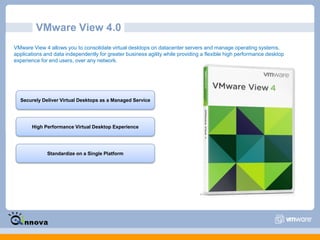
VMware Products Line Datacenter Platform Group:VMware ESXi - ESXi is essentially vSphere without the extra stuff, just a hypervisor. In addition, it lacks the service console that is included with ESX, which means that you must rely on remote management tools to adequately manage/monitor ESXi servers.VMware vSphere -This is what was the full VMware ESX Server, evolved into what VMware now calls a "Cloud OS".  The idea is that you can use this platform to virtualize your entire datacenter, then move that datacenter around for the sake of redundancy, availability, or computing power.Desktop Products Group:VMware View - VMware's flagship VDI product (formerly called VMware VDM - Virtual Desktop Manager) that comes in two editions, Premier and Enterprise.
VMware ThinApp - ThinApp is VMware's implementation of Application Virtualization, which allows basic desktops to be provisioned with the appropriate applications after they boot, rather than built into the image.
VMware ACE - ACE provides a method of securing an endpoint by delivering a virtual machine "packages" to the end user.
VMware Workstation - is a Type-2 hypervisor made to run on workstation versions of Windows and Linux. While more of a lab and niche solution
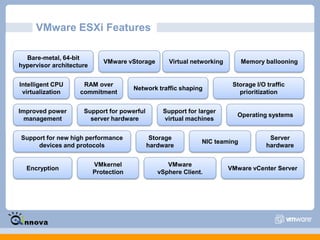
VMware Player - This is a simplified version of VMware Workstation.VMware ESXi Features Bare-metal, 64-bit hypervisor architectureVMware vStorageVirtual networkingMemory ballooningIntelligent CPU virtualizationRAM over commitmentNetwork traffic shapingStorage I/O traffic prioritizationOperating systemsSupport for larger virtual machinesSupport for powerful server hardwareImproved power managementSupport for new high performance devices and protocolsStorage hardwareServer hardwareNIC teamingVMware vSphere Client.EncryptionVMware vCenter ServerVMkernel Protection
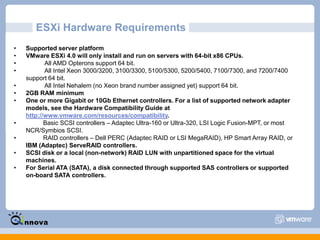
ESXi Hardware RequirementsSupported server platform
VMware ESXi 4.0 will only install and run on servers with 64-bit x86 CPUs.
           All AMD Opterons support 64 bit.
           All Intel Xeon 3000/3200, 3100/3300, 5100/5300, 5200/5400, 7100/7300, and 7200/7400 support 64 bit.
           All Intel Nehalem (no Xeon brand number assigned yet) support 64 bit.
2GB RAM minimum
One or more Gigabit or 10Gb Ethernet controllers. For a list of supported network adapter models, see the Hardware Compatibility Guide at http://www.vmware.com/resources/compatibility.
          Basic SCSI controllers – Adaptec Ultra-160 or Ultra-320, LSI Logic Fusion-MPT, or most NCR/Symbios SCSI.
          RAID controllers – Dell PERC (Adaptec RAID or LSI MegaRAID), HP Smart Array RAID, or IBM (Adaptec) ServeRAID controllers.
SCSI disk or a local (non-network) RAID LUN with unpartitioned space for the virtual machines.
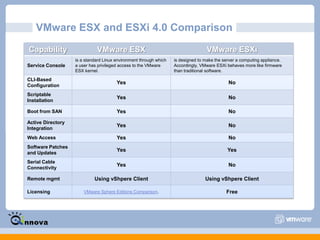
For Serial ATA (SATA), a disk connected through supported SAS controllers or supported on-board SATA controllers.VMware ESX and ESXi 4.0 Comparison
VMware ESXi Live Demo
VMware vSphere Features VMware vSphere comprises a number of components that transform industry standard hardware into a shared, main-frame like resilient environment with built in service level controls for all applications. The components of VMware vSphere are classified into:Infrastructure servicesfor example {ESX - ESXi}These are components that comprehensively virtualize server, storage and network resources, aggregate them and allocate them precisely on demand to applications based on business priority.Application servicesfor example {Vmotion - vStorage - HA - Data Recavery}These are components that provide built in service level controls to all applications running on the Cloud OS platform, regardless of application type or operating system.VMware vCenter Serverprovides a central point of control for virtualization management, essential for administering infrastructure and application services.
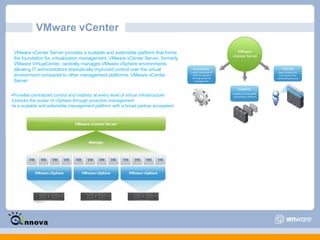
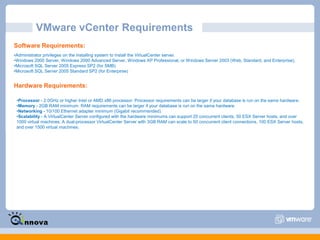
VMware vCenter VMware vCenter Server provides a scalable and extensible platform that forms the foundation for virtualization management. VMware vCenter Server, formerly VMware VirtualCenter, centrally manages VMware vSphere environments allowing IT administrators dramatically improved control over the virtual environment compared to other management platforms. VMware vCenter Server:Provides centralized control and visibility at every level of virtual infrastructure
Unlocks the power of vSphere through proactive management
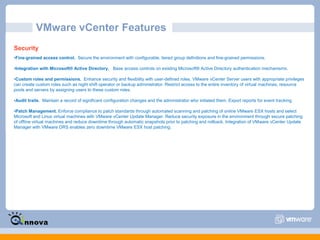
Is a scalable and extensible management platform with a broad partner ecosystemVMware vCenter Features Centralized Control and Deep Visibility into Virtual InfrastructureAn improved user interface allows for easier navigation. Access different parts of the vSphere Client from a vCenter Home Page featuring a new dashboard and navigation bar.
Inventory search puts the entire vCenter inventory including virtual machines, hosts, datastores, and networks at your fingertips from anywhere within vCenter
New hardware monitoring enable alarms when hardware failures of key components such as fans, system board and power supply occur, providing an integrated view of physical and virtual server health.

VMware vSphere technical presentation

  • 1.
    VMware SolutionsTechnical PerspectiveAleyEl-Dean AdhamSW Infrastructure Consultant aley.adham@qinnova.com
  • 2.
    AgendaWhat is Virtualization?What is Hypervisor layer?VMware Products LineESXi and ESXWhat is vSphere?VMware vCenterVirtual Desktop Infrastructure (VDI)vSphere vs. Hyper-V
  • 3.
    What is Virtualization?Virtualization is a proven software technology that is rapidly transforming the IT landscape and fundamentally changing the way that people compute, such as an operating system, a server, a storage device or network resources.
  • 4.
    What is Hypervisorlayer ?A hypervisor, also known as a virtual machine manager/monitor (VMM), is computer hardware platform virtualization software that allows several operating systems to share a single hardware host. Each operating system appears to have the host’s processor, memory, and resources to itself. Instead, the hypervisor is controlling the host processor and resources.
  • 5.
    Hypervisor ClassificationsBare Metal/NativeHypervisors:Software systems that run directly on the host’s software as a hardware control and guest operating system monitor. A guest operating system thus runs on another level above the hypervisor. This is the classic implementation of virtual machine architectures.Embedded/Host Hypervisors:Software applications that run within a conventional operating system environment. Considering the hypervisor layer being a distinct software layer, guest operating systems thus run at the third level above the hardware
  • 6.
    VMware Products LineDatacenter Platform Group:VMware ESXi - ESXi is essentially vSphere without the extra stuff, just a hypervisor. In addition, it lacks the service console that is included with ESX, which means that you must rely on remote management tools to adequately manage/monitor ESXi servers.VMware vSphere -This is what was the full VMware ESX Server, evolved into what VMware now calls a "Cloud OS". The idea is that you can use this platform to virtualize your entire datacenter, then move that datacenter around for the sake of redundancy, availability, or computing power.Desktop Products Group:VMware View - VMware's flagship VDI product (formerly called VMware VDM - Virtual Desktop Manager) that comes in two editions, Premier and Enterprise.
  • 7.
    VMware ThinApp -ThinApp is VMware's implementation of Application Virtualization, which allows basic desktops to be provisioned with the appropriate applications after they boot, rather than built into the image.
  • 8.
    VMware ACE -ACE provides a method of securing an endpoint by delivering a virtual machine "packages" to the end user.
  • 9.
    VMware Workstation -is a Type-2 hypervisor made to run on workstation versions of Windows and Linux. While more of a lab and niche solution
  • 10.
    VMware Player -This is a simplified version of VMware Workstation.VMware ESXi Features Bare-metal, 64-bit hypervisor architectureVMware vStorageVirtual networkingMemory ballooningIntelligent CPU virtualizationRAM over commitmentNetwork traffic shapingStorage I/O traffic prioritizationOperating systemsSupport for larger virtual machinesSupport for powerful server hardwareImproved power managementSupport for new high performance devices and protocolsStorage hardwareServer hardwareNIC teamingVMware vSphere Client.EncryptionVMware vCenter ServerVMkernel Protection
  • 11.
  • 12.
    VMware ESXi 4.0will only install and run on servers with 64-bit x86 CPUs.
  • 13.
    All AMD Opterons support 64 bit.
  • 14.
    All Intel Xeon 3000/3200, 3100/3300, 5100/5300, 5200/5400, 7100/7300, and 7200/7400 support 64 bit.
  • 15.
    All Intel Nehalem (no Xeon brand number assigned yet) support 64 bit.
  • 16.
  • 17.
    One or moreGigabit or 10Gb Ethernet controllers. For a list of supported network adapter models, see the Hardware Compatibility Guide at http://www.vmware.com/resources/compatibility.
  • 18.
    Basic SCSI controllers – Adaptec Ultra-160 or Ultra-320, LSI Logic Fusion-MPT, or most NCR/Symbios SCSI.
  • 19.
    RAID controllers – Dell PERC (Adaptec RAID or LSI MegaRAID), HP Smart Array RAID, or IBM (Adaptec) ServeRAID controllers.
  • 20.
    SCSI disk ora local (non-network) RAID LUN with unpartitioned space for the virtual machines.
  • 21.
    For Serial ATA(SATA), a disk connected through supported SAS controllers or supported on-board SATA controllers.VMware ESX and ESXi 4.0 Comparison
  • 22.
  • 23.
    VMware vSphere FeaturesVMware vSphere comprises a number of components that transform industry standard hardware into a shared, main-frame like resilient environment with built in service level controls for all applications. The components of VMware vSphere are classified into:Infrastructure servicesfor example {ESX - ESXi}These are components that comprehensively virtualize server, storage and network resources, aggregate them and allocate them precisely on demand to applications based on business priority.Application servicesfor example {Vmotion - vStorage - HA - Data Recavery}These are components that provide built in service level controls to all applications running on the Cloud OS platform, regardless of application type or operating system.VMware vCenter Serverprovides a central point of control for virtualization management, essential for administering infrastructure and application services.
  • 24.
    VMware vCenter VMwarevCenter Server provides a scalable and extensible platform that forms the foundation for virtualization management. VMware vCenter Server, formerly VMware VirtualCenter, centrally manages VMware vSphere environments allowing IT administrators dramatically improved control over the virtual environment compared to other management platforms. VMware vCenter Server:Provides centralized control and visibility at every level of virtual infrastructure
  • 25.
    Unlocks the powerof vSphere through proactive management
  • 26.
    Is a scalableand extensible management platform with a broad partner ecosystemVMware vCenter Features Centralized Control and Deep Visibility into Virtual InfrastructureAn improved user interface allows for easier navigation. Access different parts of the vSphere Client from a vCenter Home Page featuring a new dashboard and navigation bar.
  • 27.
    Inventory search putsthe entire vCenter inventory including virtual machines, hosts, datastores, and networks at your fingertips from anywhere within vCenter
  • 28.
    New hardware monitoringenable alarms when hardware failures of key components such as fans, system board and power supply occur, providing an integrated view of physical and virtual server health.