© 2014 VMware Inc. All rights reserved. 
Software-Defined Storage with VMware Virtual SAN 5.5 
Mike Armstrong 
Senior Site Reliability Engineer 
OneCloud 
VMware 
July, 2014
Agenda 
2 
•Introduction to VSAN 
•VSAN Architecture 
•Configuring VSAN –Demo (Off-Line Demo) 
•Additional Resources 
•Q & A 
•What’s in your vSphere environment?
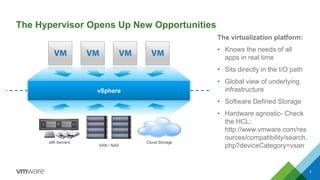
The Hypervisor Opens Up New Opportunities 
3 
SAN / NAS 
x86 Servers 
Cloud Storage 
vSphere 
The virtualization platform: 
•Knows the needs of all apps in real time 
•Sits directly in the I/O path 
•Global view of underlying infrastructure 
•Software Defined Storage 
•Hardware agnostic-Check the HCL: http://www.vmware.com/resources/compatibility/search. php?deviceCategory=vsan
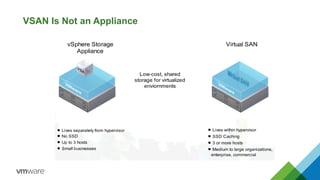
VSAN Is Not an Appliance
VSAN Architecture 
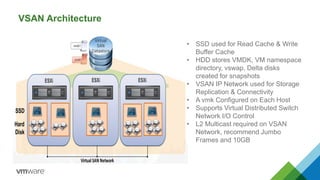
•SSD used for Read Cache & Write Buffer Cache 
•HDD stores VMDK, VM namespace directory, vswap, Delta disks created for snapshots 
•VSAN IP Network used for Storage Replication & Connectivity 
•A vmkConfigured on Each Host 
•Supports Virtual Distributed Switch Network I/O Control 
•L2 Multicast required on VSAN Network, recommend Jumbo Frames and 10GB
VSAN Architecture Contd. 
8 
•Full integration with HA, DRS, Horizon View (including Linked Clones), and SRM 
•Storage Policies assigned at the VM (Storage Policy Based Management) 
•vCenterand ESXihosts running 5.5 U1 
•Managed with vSphereWeb Client 
•Minimum of 3 hosts with minimum 1 SSD and 1 HDD 
•If more than 3 hosts are in the cluster then not all hosts need to contribute storage 
•Maximum of 32 hosts per cluster, 32,00 VM’s, 5 disk groups per host, each disk group has maximum of 7 HDD and 1 SSD 
•Object-based storage with VMFS-L file system 
•Single VSAN datastoreper cluster and thin-provisioning is enforced by default 
•Does Not Support Storage I/O Control, DatastoreClusters 
•VSAN Uses Includes: Management Cluster, DMZ, Remote Office, VDI, DR, Tier 2/3, Test & Dev
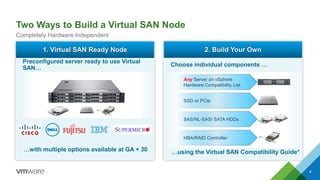
Two Ways to Build a Virtual SAN Node 
9 
Completely Hardware Independent1. Virtual SAN Ready Node 
…with multiple options available at GA + 30 
Preconfigured server ready to use Virtual SAN… 2. Build Your Own 
…using the Virtual SAN Compatibility Guide* 
Choose individual components … 
SSDor PCIe 
SAS/NL-SAS/ SATA HDDs 
Any Server on vSphere Hardware Compatibility List 
HBA/RAID Controller
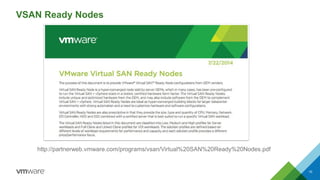
VSAN Ready Nodes 10 
http://partnerweb.vmware.com/programs/vsan/Virtual%20SAN%20Ready%20Nodes.pdf
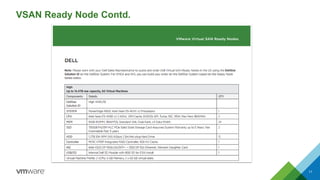
VSAN Ready Node Contd. 
11
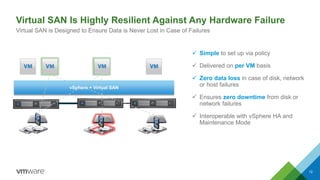
vSphere + Virtual SAN 
12 
Simpleto set up via policy 
Delivered on per VMbasis 
Zero data loss in case of disk, network or host failures 
Ensureszero downtimefrom disk or networkfailures 
Interoperable with vSphere HA and Maintenance Mode 
Virtual SAN Is Highly Resilient Against Any Hardware Failure 
Virtual SAN is Designed to Ensure Data is Never Lost in Case of Failures
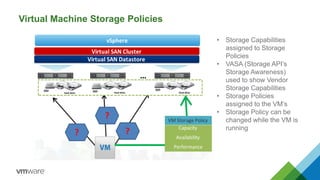
Virtual Machine Storage Policies 
•Storage Capabilities assigned to Storage Policies 
•VASA (Storage API’s Storage Awareness) used to show Vendor Storage Capabilities 
•Storage Policies assigned to the VM’s 
•Storage Policy can be changed while the VM is running
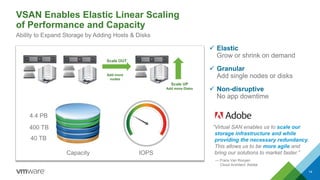
Scale UP 
Add more Disks 
IOPS 
Capacity 
40 TB 
400 TB 
4.4 PB 
Scale OUT 
Add more nodes 
ElasticGrow or shrink on demand 
GranularAdd single nodes or disks 
Non-disruptive No app downtime 
VSAN Enables Elastic Linear Scalingof Performance and Capacity 
Ability to Expand Storage by Adding Hosts & Disks 
“Virtual SAN enables us to scale our storage infrastructure and while providing the necessary redundancy. This allows us to be more agile and bring our solutions to market faster.” 
—FransVan Rooyen 
Cloud Architect, Adobe 
14
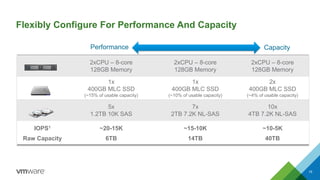
Flexibly Configure For Performance And Capacity 
15 
Performance 
2xCPU–8-core 
128GB Memory 
2xCPU–8-core 
128GB Memory 
2xCPU–8-core 
128GB Memory 
1x 
400GB MLC SSD 
(~15%of usable capacity) 
1x 
400GB MLC SSD 
(~10%of usable capacity) 
2x 
400GBMLC SSD 
(~4% of usable capacity) 
5x 
1.2TB 10K SAS 
7x 
2TB 7.2K NL-SAS 
10x 
4TB 7.2K NL-SAS 
IOPS1 
Raw Capacity 
~20-15K 
6TB 
~15-10K 
14TB 
~10-5K 
40TB 
Capacity
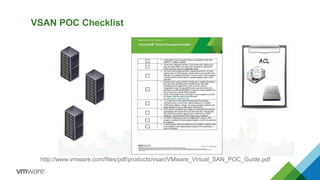
VSAN POC Checklist 
http://www.vmware.com/files/pdf/products/vsan/VMware_Virtual_SAN_POC_Guide.pdf
Additional Resources 
17 
Product Pagehttp://www.vmware.com/products/virtual-san/ 
VSAN Community 
https://communities.vmware.com/community/vmtn/vsan 
VMwareCompatibility Guidehttp://www.vmware.com/resources/compatibility/search.php?deviceCategory=vsan 
Hands-On-Lab 
http://vmware.com/go/vsanlab 
Virtual SAN 60-day Free Evaluationhttp://www.vmware.com/go/try-vsan-en 
Cormac Hogan 
http://cormachogan.com/vsan
Questions?

VMware Virtual SAN Presentation

  • 1.
    © 2014 VMwareInc. All rights reserved. Software-Defined Storage with VMware Virtual SAN 5.5 Mike Armstrong Senior Site Reliability Engineer OneCloud VMware July, 2014
  • 2.
    Agenda 2 •Introductionto VSAN •VSAN Architecture •Configuring VSAN –Demo (Off-Line Demo) •Additional Resources •Q & A •What’s in your vSphere environment?
  • 3.
    The Hypervisor OpensUp New Opportunities 3 SAN / NAS x86 Servers Cloud Storage vSphere The virtualization platform: •Knows the needs of all apps in real time •Sits directly in the I/O path •Global view of underlying infrastructure •Software Defined Storage •Hardware agnostic-Check the HCL: http://www.vmware.com/resources/compatibility/search. php?deviceCategory=vsan
  • 4.
    VSAN Is Notan Appliance
  • 5.
    VSAN Architecture •SSDused for Read Cache & Write Buffer Cache •HDD stores VMDK, VM namespace directory, vswap, Delta disks created for snapshots •VSAN IP Network used for Storage Replication & Connectivity •A vmkConfigured on Each Host •Supports Virtual Distributed Switch Network I/O Control •L2 Multicast required on VSAN Network, recommend Jumbo Frames and 10GB
  • 6.
    VSAN Architecture Contd. 8 •Full integration with HA, DRS, Horizon View (including Linked Clones), and SRM •Storage Policies assigned at the VM (Storage Policy Based Management) •vCenterand ESXihosts running 5.5 U1 •Managed with vSphereWeb Client •Minimum of 3 hosts with minimum 1 SSD and 1 HDD •If more than 3 hosts are in the cluster then not all hosts need to contribute storage •Maximum of 32 hosts per cluster, 32,00 VM’s, 5 disk groups per host, each disk group has maximum of 7 HDD and 1 SSD •Object-based storage with VMFS-L file system •Single VSAN datastoreper cluster and thin-provisioning is enforced by default •Does Not Support Storage I/O Control, DatastoreClusters •VSAN Uses Includes: Management Cluster, DMZ, Remote Office, VDI, DR, Tier 2/3, Test & Dev
  • 7.
    Two Ways toBuild a Virtual SAN Node 9 Completely Hardware Independent1. Virtual SAN Ready Node …with multiple options available at GA + 30 Preconfigured server ready to use Virtual SAN… 2. Build Your Own …using the Virtual SAN Compatibility Guide* Choose individual components … SSDor PCIe SAS/NL-SAS/ SATA HDDs Any Server on vSphere Hardware Compatibility List HBA/RAID Controller
  • 8.
    VSAN Ready Nodes10 http://partnerweb.vmware.com/programs/vsan/Virtual%20SAN%20Ready%20Nodes.pdf
  • 9.
    VSAN Ready NodeContd. 11
  • 10.
    vSphere + VirtualSAN 12 Simpleto set up via policy Delivered on per VMbasis Zero data loss in case of disk, network or host failures Ensureszero downtimefrom disk or networkfailures Interoperable with vSphere HA and Maintenance Mode Virtual SAN Is Highly Resilient Against Any Hardware Failure Virtual SAN is Designed to Ensure Data is Never Lost in Case of Failures
  • 11.
    Virtual Machine StoragePolicies •Storage Capabilities assigned to Storage Policies •VASA (Storage API’s Storage Awareness) used to show Vendor Storage Capabilities •Storage Policies assigned to the VM’s •Storage Policy can be changed while the VM is running
  • 12.
    Scale UP Addmore Disks IOPS Capacity 40 TB 400 TB 4.4 PB Scale OUT Add more nodes ElasticGrow or shrink on demand GranularAdd single nodes or disks Non-disruptive No app downtime VSAN Enables Elastic Linear Scalingof Performance and Capacity Ability to Expand Storage by Adding Hosts & Disks “Virtual SAN enables us to scale our storage infrastructure and while providing the necessary redundancy. This allows us to be more agile and bring our solutions to market faster.” —FransVan Rooyen Cloud Architect, Adobe 14
  • 13.
    Flexibly Configure ForPerformance And Capacity 15 Performance 2xCPU–8-core 128GB Memory 2xCPU–8-core 128GB Memory 2xCPU–8-core 128GB Memory 1x 400GB MLC SSD (~15%of usable capacity) 1x 400GB MLC SSD (~10%of usable capacity) 2x 400GBMLC SSD (~4% of usable capacity) 5x 1.2TB 10K SAS 7x 2TB 7.2K NL-SAS 10x 4TB 7.2K NL-SAS IOPS1 Raw Capacity ~20-15K 6TB ~15-10K 14TB ~10-5K 40TB Capacity
  • 14.
    VSAN POC Checklist http://www.vmware.com/files/pdf/products/vsan/VMware_Virtual_SAN_POC_Guide.pdf
  • 15.
    Additional Resources 17 Product Pagehttp://www.vmware.com/products/virtual-san/ VSAN Community https://communities.vmware.com/community/vmtn/vsan VMwareCompatibility Guidehttp://www.vmware.com/resources/compatibility/search.php?deviceCategory=vsan Hands-On-Lab http://vmware.com/go/vsanlab Virtual SAN 60-day Free Evaluationhttp://www.vmware.com/go/try-vsan-en Cormac Hogan http://cormachogan.com/vsan
  • 16.