1
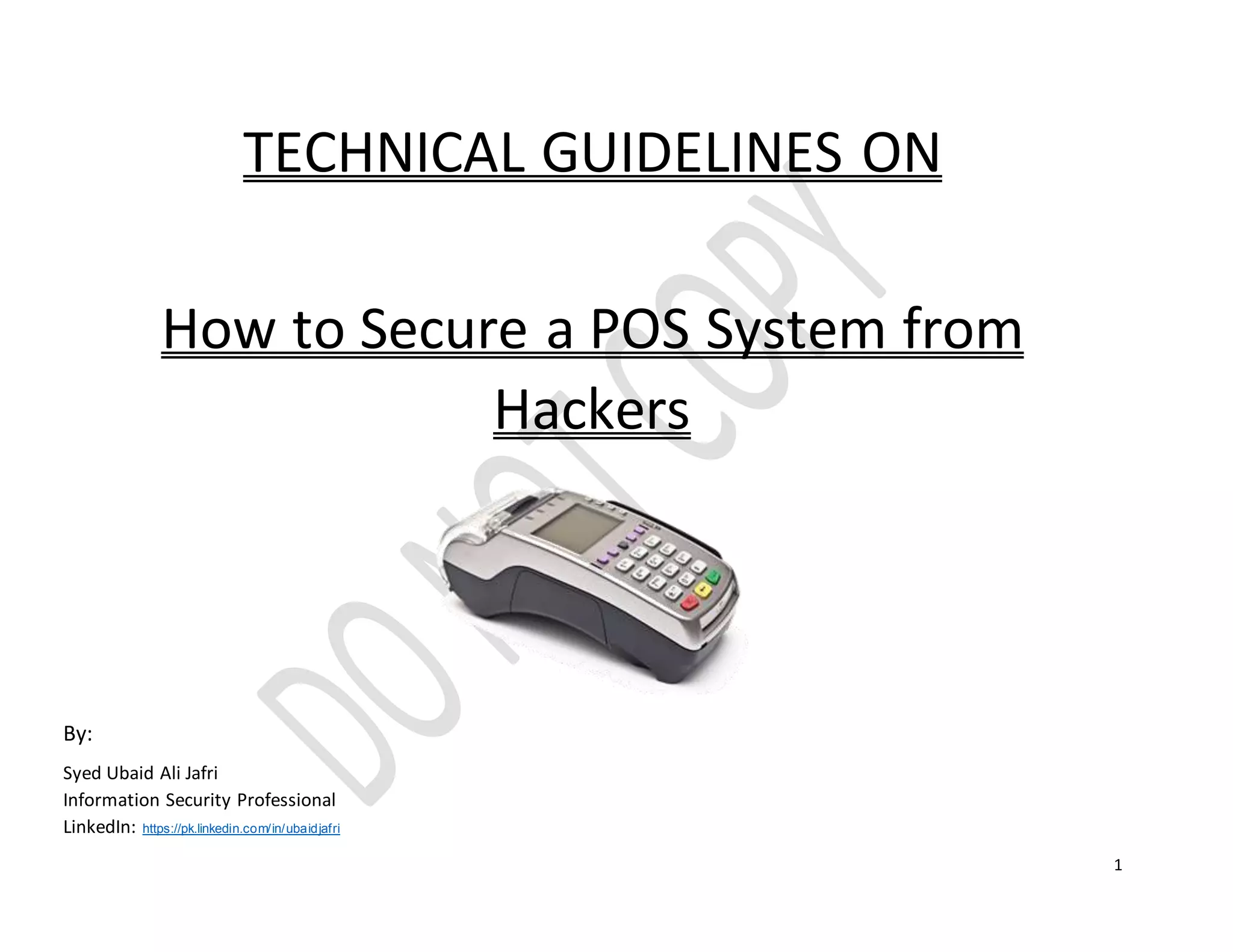
TECHNICAL GUIDELINES ON
How to Secure a POS System from
Hackers
By:
Syed Ubaid Ali Jafri
Information Security Professional
LinkedIn: https://pk.linkedin.com/in/ubaidjafri
2
Contents
Background..............................................................................................................................................................................................................3
Objective..................................................................................................................................................................................................................3
Testing Type .............................................................................................................................................................................................................3
TOP 15 Controls Checklist..........................................................................................................................................................................................4
POS Checklist............................................................................................................................................................................................................7
References................................................................................................................................................................................................................8
3
Background
The payment terminals we are talking about are tamper proof. They usually have Ethernet connectivity, and a serial line. The interface open to normal user is the card
slot and PIN pad, and in some occasions contactless reader. The actual configuration does vary between models and vendors, but the basic idea is that the terminal
initiates all the connections and doesn't listen to anything incoming.
Objective
Our objective for publishing this document is to ensure technically that the initial security up to a level where POS should be secure from basic attacks.
Testing Type
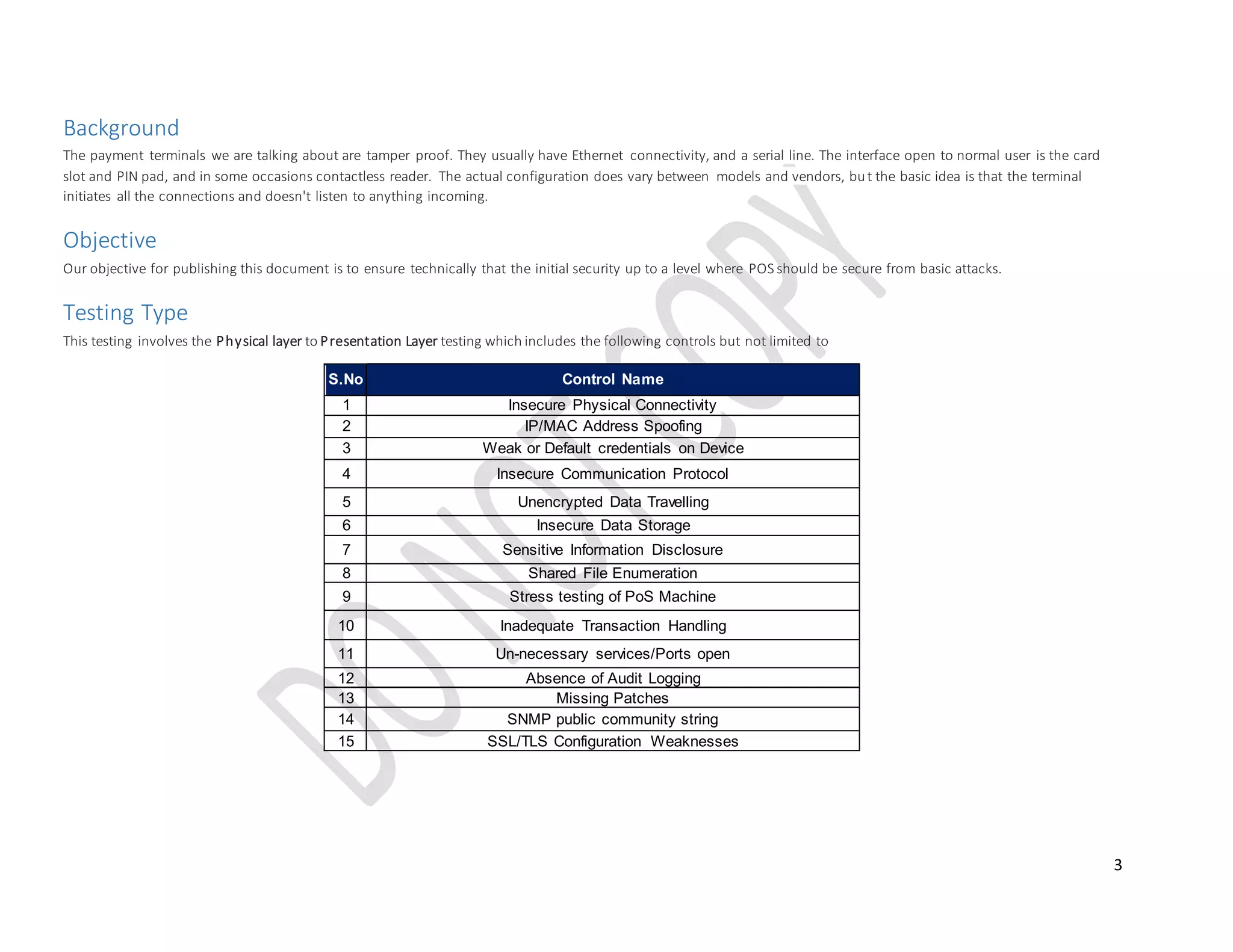
This testing involves the Physical layer to Presentation Layer testing which includes the following controls but not limited to
S.No Control Name
1 Insecure Physical Connectivity
2 IP/MAC Address Spoofing
3 Weak or Default credentials on Device
4 Insecure Communication Protocol
5 Unencrypted Data Travelling
6 Insecure Data Storage
7 Sensitive Information Disclosure
8 Shared File Enumeration
9 Stress testing of PoS Machine
10 Inadequate Transaction Handling
11 Un-necessary services/Ports open
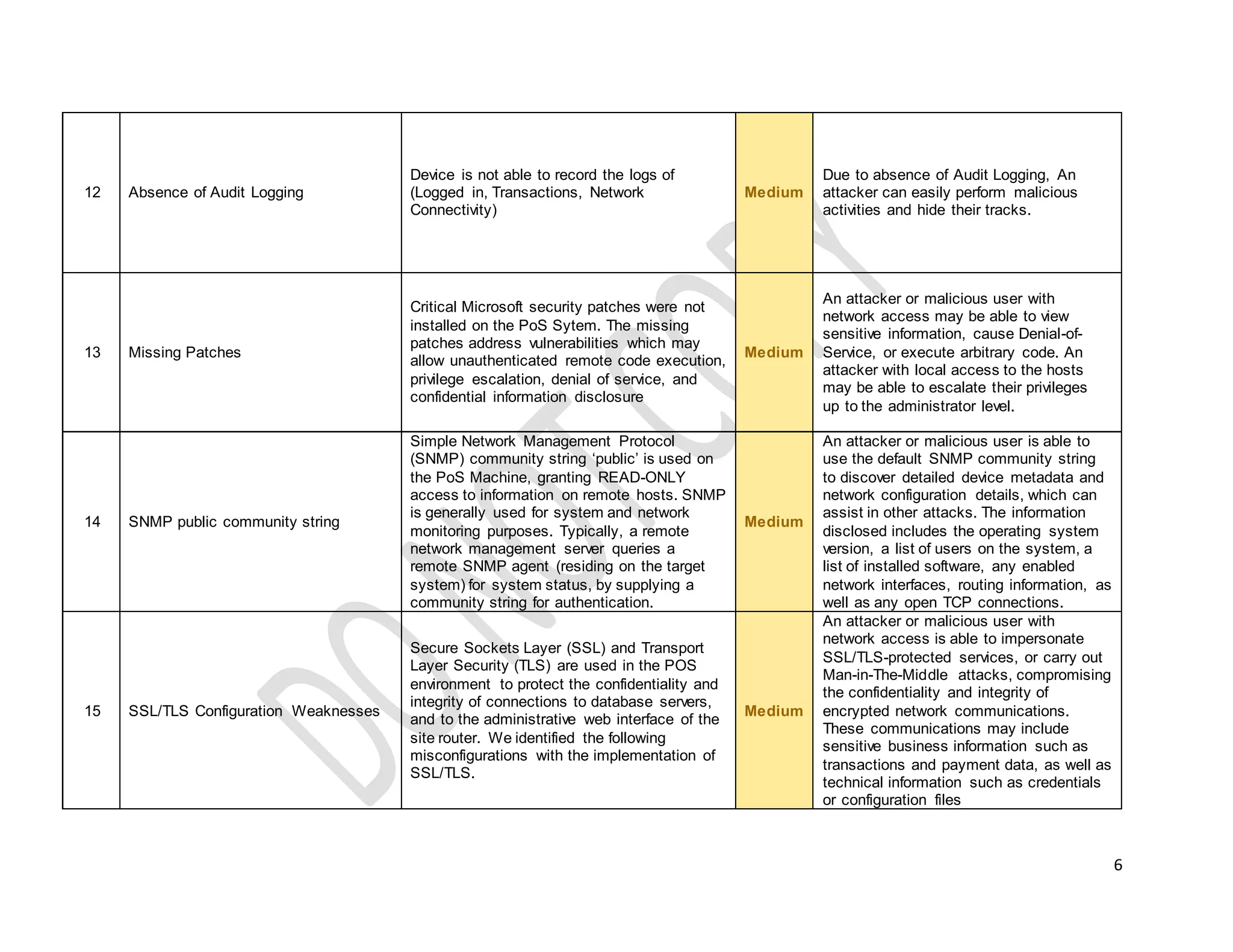
12 Absence of Audit Logging
13 Missing Patches
14 SNMP public community string
15 SSL/TLS Configuration Weaknesses
4
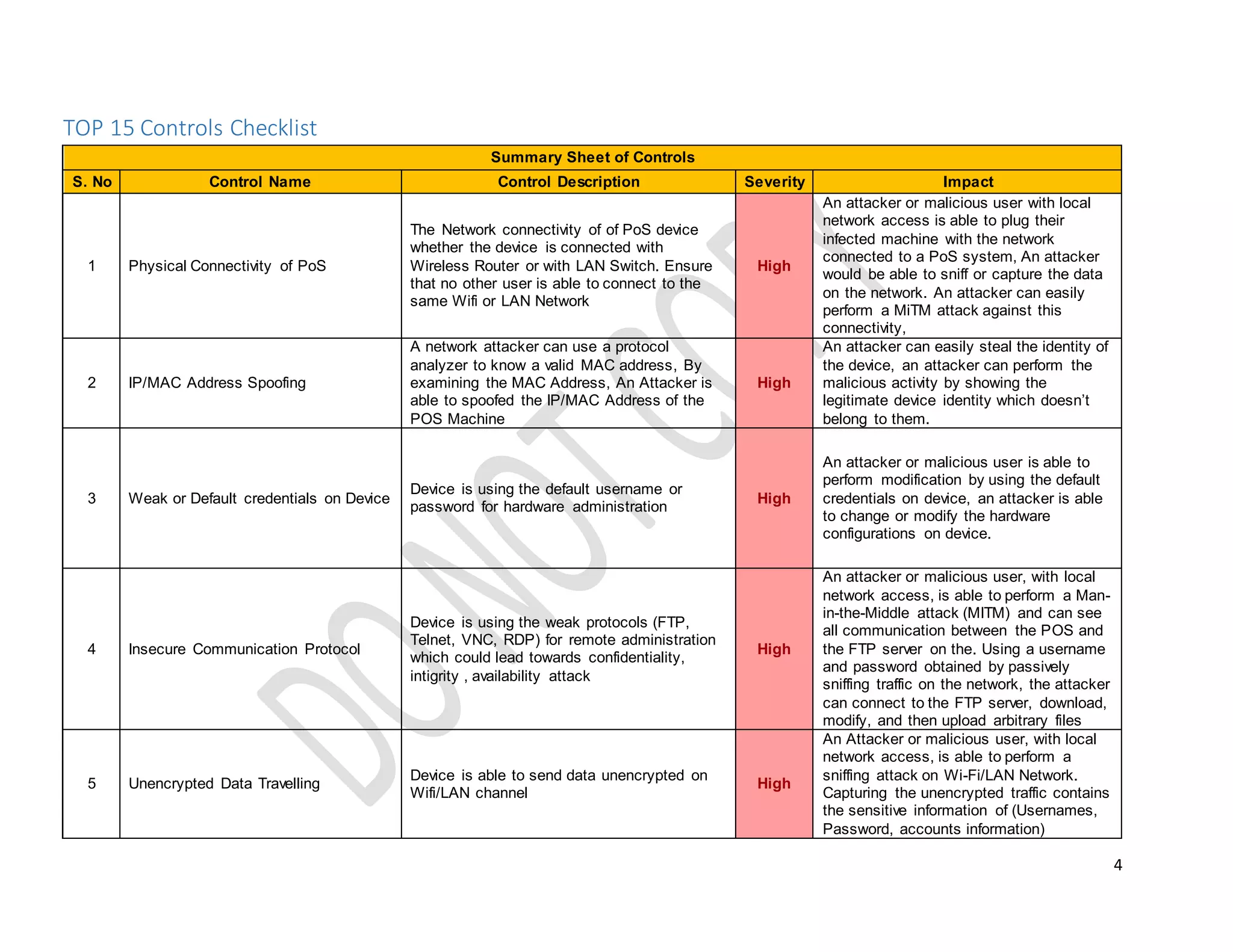
TOP 15 Controls Checklist
Summary Sheet of Controls
S. No Control Name Control Description Severity Impact
1 Physical Connectivity of PoS
The Network connectivity of of PoS device
whether the device is connected with
Wireless Router or with LAN Switch. Ensure
that no other user is able to connect to the
same Wifi or LAN Network
High
An attacker or malicious user with local
network access is able to plug their
infected machine with the network
connected to a PoS system, An attacker
would be able to sniff or capture the data
on the network. An attacker can easily
perform a MiTM attack against this
connectivity,
2 IP/MAC Address Spoofing
A network attacker can use a protocol
analyzer to know a valid MAC address, By
examining the MAC Address, An Attacker is
able to spoofed the IP/MAC Address of the
POS Machine
High
An attacker can easily steal the identity of
the device, an attacker can perform the
malicious activity by showing the
legitimate device identity which doesn’t
belong to them.
3 Weak or Default credentials on Device
Device is using the default username or
password for hardware administration
High
An attacker or malicious user is able to
perform modification by using the default
credentials on device, an attacker is able
to change or modify the hardware
configurations on device.
4 Insecure Communication Protocol
Device is using the weak protocols (FTP,
Telnet, VNC, RDP) for remote administration
which could lead towards confidentiality,
intigrity , availability attack
High
An attacker or malicious user, with local
network access, is able to perform a Man-
in-the-Middle attack (MITM) and can see
all communication between the POS and
the FTP server on the. Using a username
and password obtained by passively
sniffing traffic on the network, the attacker
can connect to the FTP server, download,
modify, and then upload arbitrary files
5 Unencrypted Data Travelling
Device is able to send data unencrypted on
Wifi/LAN channel
High
An Attacker or malicious user, with local
network access, is able to perform a
sniffing attack on Wi-Fi/LAN Network.
Capturing the unencrypted traffic contains
the sensitive information of (Usernames,
Password, accounts information)
5
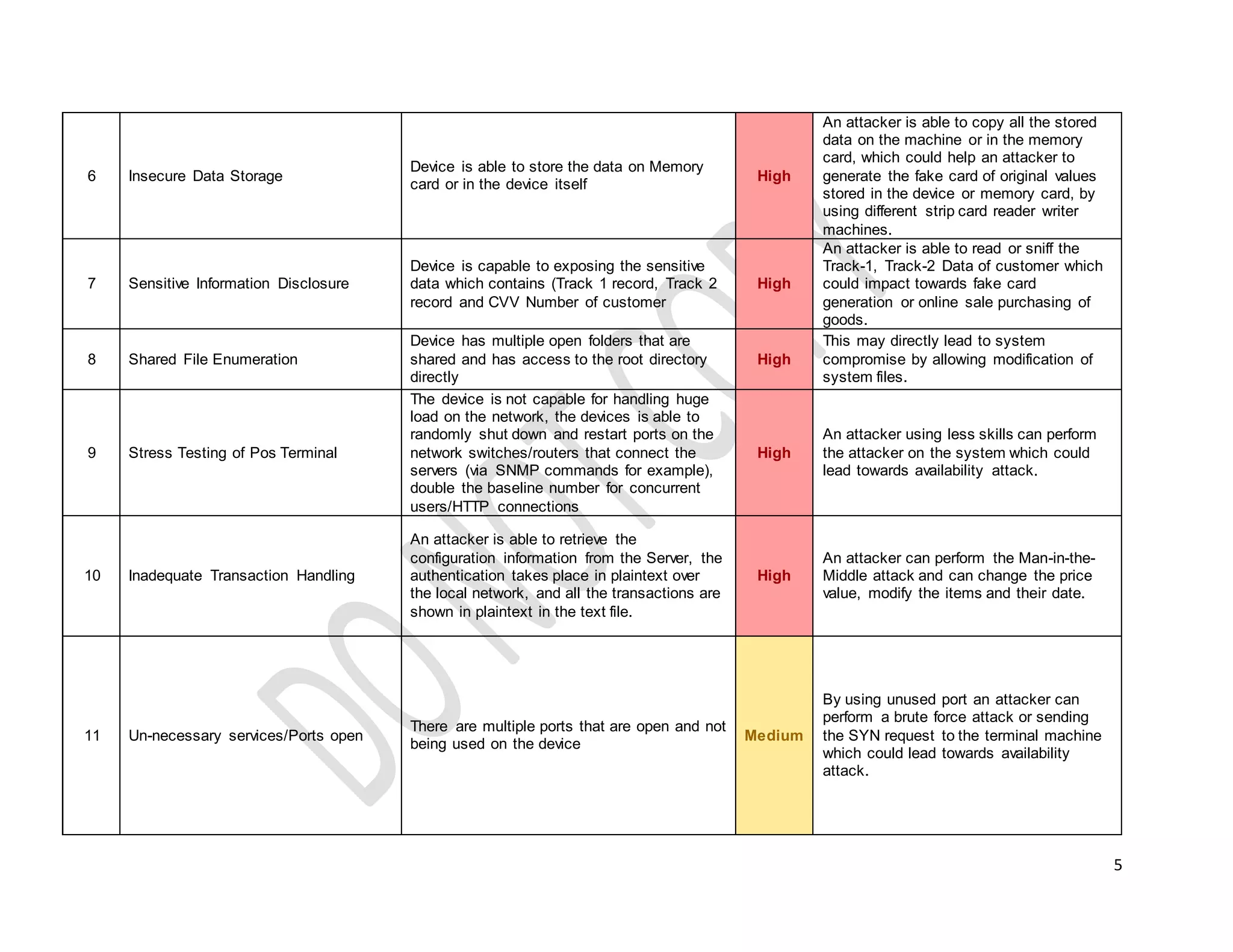
6 Insecure Data Storage
Device is able to store the data on Memory
card or in the device itself
High
An attacker is able to copy all the stored
data on the machine or in the memory
card, which could help an attacker to
generate the fake card of original values
stored in the device or memory card, by
using different strip card reader writer
machines.
7 Sensitive Information Disclosure
Device is capable to exposing the sensitive
data which contains (Track 1 record, Track 2
record and CVV Number of customer
High
An attacker is able to read or sniff the
Track-1, Track-2 Data of customer which
could impact towards fake card
generation or online sale purchasing of
goods.
8 Shared File Enumeration
Device has multiple open folders that are
shared and has access to the root directory
directly
High
This may directly lead to system
compromise by allowing modification of
system files.
9 Stress Testing of Pos Terminal
The device is not capable for handling huge
load on the network, the devices is able to
randomly shut down and restart ports on the
network switches/routers that connect the
servers (via SNMP commands for example),
double the baseline number for concurrent
users/HTTP connections
High
An attacker using less skills can perform
the attacker on the system which could
lead towards availability attack.
10 Inadequate Transaction Handling
An attacker is able to retrieve the
configuration information from the Server, the
authentication takes place in plaintext over
the local network, and all the transactions are
shown in plaintext in the text file.
High
An attacker can perform the Man-in-the-
Middle attack and can change the price
value, modify the items and their date.
11 Un-necessary services/Ports open
There are multiple ports that are open and not
being used on the device
Medium
By using unused port an attacker can
perform a brute force attack or sending
the SYN request to the terminal machine
which could lead towards availability
attack.
6
12 Absence of Audit Logging
Device is not able to record the logs of
(Logged in, Transactions, Network
Connectivity)
Medium
Due to absence of Audit Logging, An
attacker can easily perform malicious
activities and hide their tracks.
13 Missing Patches
Critical Microsoft security patches were not
installed on the PoS Sytem. The missing
patches address vulnerabilities which may
allow unauthenticated remote code execution,
privilege escalation, denial of service, and
confidential information disclosure
Medium
An attacker or malicious user with
network access may be able to view
sensitive information, cause Denial-of-
Service, or execute arbitrary code. An
attacker with local access to the hosts
may be able to escalate their privileges
up to the administrator level.
14 SNMP public community string
Simple Network Management Protocol
(SNMP) community string ‘public’ is used on
the PoS Machine, granting READ-ONLY
access to information on remote hosts. SNMP
is generally used for system and network
monitoring purposes. Typically, a remote
network management server queries a
remote SNMP agent (residing on the target
system) for system status, by supplying a
community string for authentication.
Medium
An attacker or malicious user is able to
use the default SNMP community string
to discover detailed device metadata and
network configuration details, which can
assist in other attacks. The information
disclosed includes the operating system
version, a list of users on the system, a
list of installed software, any enabled
network interfaces, routing information, as
well as any open TCP connections.
15 SSL/TLS Configuration Weaknesses
Secure Sockets Layer (SSL) and Transport
Layer Security (TLS) are used in the POS
environment to protect the confidentiality and
integrity of connections to database servers,
and to the administrative web interface of the
site router. We identified the following
misconfigurations with the implementation of
SSL/TLS.
Medium
An attacker or malicious user with
network access is able to impersonate
SSL/TLS-protected services, or carry out
Man-in-The-Middle attacks, compromising
the confidentiality and integrity of
encrypted network communications.
These communications may include
sensitive business information such as
transactions and payment data, as well as
technical information such as credentials
or configuration files
7
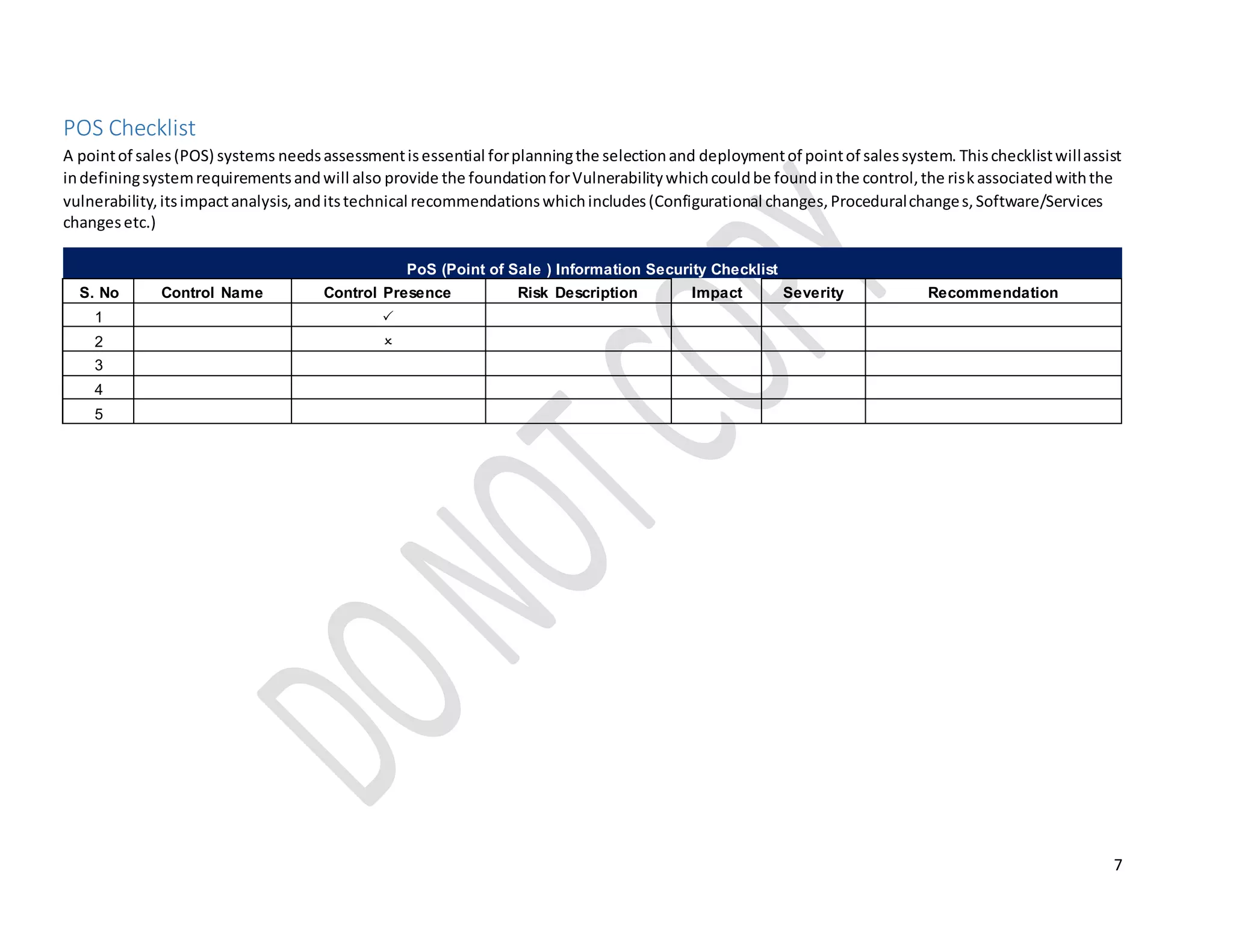
POS Checklist
A pointof sales(POS) systems needsassessmentisessential forplanningthe selectionand deploymentof pointof salessystem. Thischecklistwillassist
indefiningsystemrequirementsandwill also provide the foundationforVulnerabilitywhichcouldbe foundinthe control,the riskassociatedwiththe
vulnerability,itsimpactanalysis,anditstechnical recommendationswhichincludes(Configurational changes,Proceduralchanges,Software/Services
changesetc.)
PoS (Point of Sale ) Information Security Checklist
S. No Control Name Control Presence Risk Description Impact Severity Recommendation
1 
2 
3 
4
5 
8
References
1 http://www.internetsociety.org/doc/addressing-challenge-ip-spoofing
2 http://www.guru99.com/testing-for-retail-pos-point-of-sale-system.html
3 https://community.hpe.com/t5/Security-Research/Hacking-POS-Terminal-for-Fun-and-Non-profit/ba-p/6540620#.WEfkGNV97IU
4 http://www.pcworld.com/article/259882/vulnerabilities_in_payment_terminals_demonstrated_at_black_hat.html
5 https://pen-testing.sans.org/blog/2014/06/12/pen-testing-payment-terminals-a-step-by-step-how-to-guide
6 http://www.slideshare.net/evilhackerz/penetration-testing-guidancemarch2015

Securing PoS Terminal - A Technical Guideline on Securing PoS System From Hackers

  • 1.
    1 TECHNICAL GUIDELINES ON Howto Secure a POS System from Hackers By: Syed Ubaid Ali Jafri Information Security Professional LinkedIn: https://pk.linkedin.com/in/ubaidjafri
  • 2.
    2 Contents Background..............................................................................................................................................................................................................3 Objective..................................................................................................................................................................................................................3 Testing Type .............................................................................................................................................................................................................3 TOP15 Controls Checklist..........................................................................................................................................................................................4 POS Checklist............................................................................................................................................................................................................7 References................................................................................................................................................................................................................8
  • 3.
    3 Background The payment terminalswe are talking about are tamper proof. They usually have Ethernet connectivity, and a serial line. The interface open to normal user is the card slot and PIN pad, and in some occasions contactless reader. The actual configuration does vary between models and vendors, but the basic idea is that the terminal initiates all the connections and doesn't listen to anything incoming. Objective Our objective for publishing this document is to ensure technically that the initial security up to a level where POS should be secure from basic attacks. Testing Type This testing involves the Physical layer to Presentation Layer testing which includes the following controls but not limited to S.No Control Name 1 Insecure Physical Connectivity 2 IP/MAC Address Spoofing 3 Weak or Default credentials on Device 4 Insecure Communication Protocol 5 Unencrypted Data Travelling 6 Insecure Data Storage 7 Sensitive Information Disclosure 8 Shared File Enumeration 9 Stress testing of PoS Machine 10 Inadequate Transaction Handling 11 Un-necessary services/Ports open 12 Absence of Audit Logging 13 Missing Patches 14 SNMP public community string 15 SSL/TLS Configuration Weaknesses
  • 4.
    4 TOP 15 ControlsChecklist Summary Sheet of Controls S. No Control Name Control Description Severity Impact 1 Physical Connectivity of PoS The Network connectivity of of PoS device whether the device is connected with Wireless Router or with LAN Switch. Ensure that no other user is able to connect to the same Wifi or LAN Network High An attacker or malicious user with local network access is able to plug their infected machine with the network connected to a PoS system, An attacker would be able to sniff or capture the data on the network. An attacker can easily perform a MiTM attack against this connectivity, 2 IP/MAC Address Spoofing A network attacker can use a protocol analyzer to know a valid MAC address, By examining the MAC Address, An Attacker is able to spoofed the IP/MAC Address of the POS Machine High An attacker can easily steal the identity of the device, an attacker can perform the malicious activity by showing the legitimate device identity which doesn’t belong to them. 3 Weak or Default credentials on Device Device is using the default username or password for hardware administration High An attacker or malicious user is able to perform modification by using the default credentials on device, an attacker is able to change or modify the hardware configurations on device. 4 Insecure Communication Protocol Device is using the weak protocols (FTP, Telnet, VNC, RDP) for remote administration which could lead towards confidentiality, intigrity , availability attack High An attacker or malicious user, with local network access, is able to perform a Man- in-the-Middle attack (MITM) and can see all communication between the POS and the FTP server on the. Using a username and password obtained by passively sniffing traffic on the network, the attacker can connect to the FTP server, download, modify, and then upload arbitrary files 5 Unencrypted Data Travelling Device is able to send data unencrypted on Wifi/LAN channel High An Attacker or malicious user, with local network access, is able to perform a sniffing attack on Wi-Fi/LAN Network. Capturing the unencrypted traffic contains the sensitive information of (Usernames, Password, accounts information)
  • 5.
    5 6 Insecure DataStorage Device is able to store the data on Memory card or in the device itself High An attacker is able to copy all the stored data on the machine or in the memory card, which could help an attacker to generate the fake card of original values stored in the device or memory card, by using different strip card reader writer machines. 7 Sensitive Information Disclosure Device is capable to exposing the sensitive data which contains (Track 1 record, Track 2 record and CVV Number of customer High An attacker is able to read or sniff the Track-1, Track-2 Data of customer which could impact towards fake card generation or online sale purchasing of goods. 8 Shared File Enumeration Device has multiple open folders that are shared and has access to the root directory directly High This may directly lead to system compromise by allowing modification of system files. 9 Stress Testing of Pos Terminal The device is not capable for handling huge load on the network, the devices is able to randomly shut down and restart ports on the network switches/routers that connect the servers (via SNMP commands for example), double the baseline number for concurrent users/HTTP connections High An attacker using less skills can perform the attacker on the system which could lead towards availability attack. 10 Inadequate Transaction Handling An attacker is able to retrieve the configuration information from the Server, the authentication takes place in plaintext over the local network, and all the transactions are shown in plaintext in the text file. High An attacker can perform the Man-in-the- Middle attack and can change the price value, modify the items and their date. 11 Un-necessary services/Ports open There are multiple ports that are open and not being used on the device Medium By using unused port an attacker can perform a brute force attack or sending the SYN request to the terminal machine which could lead towards availability attack.
  • 6.
    6 12 Absence ofAudit Logging Device is not able to record the logs of (Logged in, Transactions, Network Connectivity) Medium Due to absence of Audit Logging, An attacker can easily perform malicious activities and hide their tracks. 13 Missing Patches Critical Microsoft security patches were not installed on the PoS Sytem. The missing patches address vulnerabilities which may allow unauthenticated remote code execution, privilege escalation, denial of service, and confidential information disclosure Medium An attacker or malicious user with network access may be able to view sensitive information, cause Denial-of- Service, or execute arbitrary code. An attacker with local access to the hosts may be able to escalate their privileges up to the administrator level. 14 SNMP public community string Simple Network Management Protocol (SNMP) community string ‘public’ is used on the PoS Machine, granting READ-ONLY access to information on remote hosts. SNMP is generally used for system and network monitoring purposes. Typically, a remote network management server queries a remote SNMP agent (residing on the target system) for system status, by supplying a community string for authentication. Medium An attacker or malicious user is able to use the default SNMP community string to discover detailed device metadata and network configuration details, which can assist in other attacks. The information disclosed includes the operating system version, a list of users on the system, a list of installed software, any enabled network interfaces, routing information, as well as any open TCP connections. 15 SSL/TLS Configuration Weaknesses Secure Sockets Layer (SSL) and Transport Layer Security (TLS) are used in the POS environment to protect the confidentiality and integrity of connections to database servers, and to the administrative web interface of the site router. We identified the following misconfigurations with the implementation of SSL/TLS. Medium An attacker or malicious user with network access is able to impersonate SSL/TLS-protected services, or carry out Man-in-The-Middle attacks, compromising the confidentiality and integrity of encrypted network communications. These communications may include sensitive business information such as transactions and payment data, as well as technical information such as credentials or configuration files
  • 7.
    7 POS Checklist A pointofsales(POS) systems needsassessmentisessential forplanningthe selectionand deploymentof pointof salessystem. Thischecklistwillassist indefiningsystemrequirementsandwill also provide the foundationforVulnerabilitywhichcouldbe foundinthe control,the riskassociatedwiththe vulnerability,itsimpactanalysis,anditstechnical recommendationswhichincludes(Configurational changes,Proceduralchanges,Software/Services changesetc.) PoS (Point of Sale ) Information Security Checklist S. No Control Name Control Presence Risk Description Impact Severity Recommendation 1  2  3  4 5 
  • 8.
    8 References 1 http://www.internetsociety.org/doc/addressing-challenge-ip-spoofing 2 http://www.guru99.com/testing-for-retail-pos-point-of-sale-system.html 3https://community.hpe.com/t5/Security-Research/Hacking-POS-Terminal-for-Fun-and-Non-profit/ba-p/6540620#.WEfkGNV97IU 4 http://www.pcworld.com/article/259882/vulnerabilities_in_payment_terminals_demonstrated_at_black_hat.html 5 https://pen-testing.sans.org/blog/2014/06/12/pen-testing-payment-terminals-a-step-by-step-how-to-guide 6 http://www.slideshare.net/evilhackerz/penetration-testing-guidancemarch2015