NetApp and the storage industry

Shashidhar HB
3
Google, Twitter, Facebook
are one of the biggest
companies in the world just
because of
DATA!!
4
is the best
search engine in the
world!
Because it stores and indexes the
entire WEB like no other
5
Facebook has over a billion users
today!

6
As a saying goes..
“You can have data without
information, but you cannot have
information without data”
8
You get the point.. right?

9
With more data, comes the
challenge of storing data
in a reliable way

10
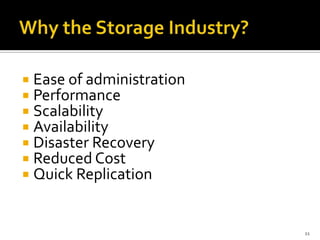
 Ease of administration
 Performance
 Scalability
 Availability
 Disaster Recovery
 Reduced Cost
 Quick Replication

11
Your computer!

Host layer
(Servers)

Fabric layer
(Switch/ Hub(s))

Disk
storage

Tape
storage

Storage layer
(Filers/ Disk Racks)
12
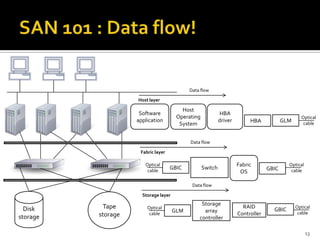
Data flow
Host layer

Host
Operating
System

Software
application

HBA
driver

GLM

HBAA

Optical
cable

Data flow
Fabric layer
Optical
cable

GBIC

Switch

Fabric
OS

GBIC

Optical
cable

Data flow
Storage layer

Disk
storage

Tape
storage

Optical
cable

GLM

Storage
array
controller

RAID
Controller

GBIC

Optical
cable

13
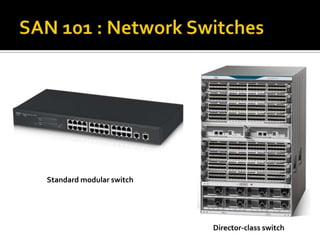
Standard modular switch

Director-class switch
Let me take you to a tour of
GOOGLE and FACEBOOK
Data Centers

23
Host layer of SAN is made up of server
and its components like
•
•
•
•

Host bus adapter (HBA)
Host bus adapter drivers
Gigabit Interface Converter (GBIC)
Cables
24
Fabric layer is the actual, tangible
network part of the SAN. Which moves data
around from a source to a destination.
•
•
•
•
•
•

SAN Hubs
SAN Switches
Data routers
Protocol bridges
Gateway devices
Cables
25
Storage layer consists of all the disk and
tape arrays that stores your data

26
27
Lets see what makes

stand out!!

28
NetApp believes in one tool for
many jobs
Data ONTAP®

29


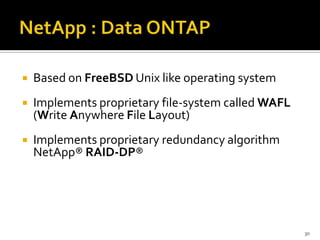
Based on FreeBSD Unix like operating system



Implements proprietary file-system called WAFL
(Write Anywhere File Layout)



Implements proprietary redundancy algorithm
NetApp® RAID-DP®

30


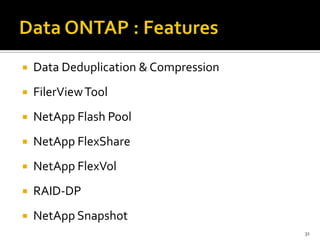
Data Deduplication & Compression



FilerView Tool



NetApp Flash Pool



NetApp FlexShare



NetApp FlexVol



RAID-DP



NetApp Snapshot
31


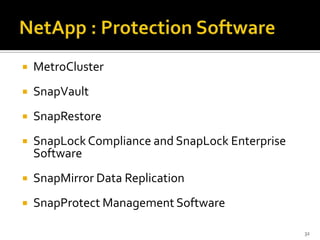
MetroCluster



SnapVault



SnapRestore



SnapLock Compliance and SnapLock Enterprise
Software



SnapMirror Data Replication



SnapProtect Management Software
32
Let’s have a look at how each of
these protection software work!

33


It is implemented similar to log-structured file
system



Snapshots is one of the most salient feature of
WAFL. It is a read only copy of the file system. This
gives raise to a host of software products from
NetApp



Supports Unix like file & directory layout for NFS
users and Microsoft file & directory layout of CIFS
users i.e. Windows and Unix users can use the
same networked volumes
34


Is a suite of web-based applications hosted on the
NetApp support site which helps you Analyse,
Model and Optimize your storage



NetApp AutoSupport has to be enabled by the
customer/vendor to leverage all the tools in
NetApp My AutoSupport



My AutoSupport proactively identifies storage
infrastructure issues through a continuous healthcheck feature and automatically provide a stepby-step plan to avoid disruptions
35
Let us see how My AutoSupport
helps NetApp customers

36


Storage Efficiency Profiling



Configuration summary and comparison



Proactive Health Check



Performance Trending



Event Alert History



Transition Advisor
37
38
39
40
41
42
Q&A

43
That’s all folks.. Thank YOU! 

44

NetApp & Storage fundamentals

  • 1.
    NetApp and thestorage industry Shashidhar HB 3
  • 2.
    Google, Twitter, Facebook areone of the biggest companies in the world just because of DATA!! 4
  • 3.
    is the best searchengine in the world! Because it stores and indexes the entire WEB like no other 5
  • 4.
    Facebook has overa billion users today! 6
  • 5.
    As a sayinggoes.. “You can have data without information, but you cannot have information without data” 8
  • 6.
    You get thepoint.. right? 9
  • 7.
    With more data,comes the challenge of storing data in a reliable way 10
  • 8.
     Ease ofadministration  Performance  Scalability  Availability  Disaster Recovery  Reduced Cost  Quick Replication 11
  • 9.
    Your computer! Host layer (Servers) Fabriclayer (Switch/ Hub(s)) Disk storage Tape storage Storage layer (Filers/ Disk Racks) 12
  • 10.
    Data flow Host layer Host Operating System Software application HBA driver GLM HBAA Optical cable Dataflow Fabric layer Optical cable GBIC Switch Fabric OS GBIC Optical cable Data flow Storage layer Disk storage Tape storage Optical cable GLM Storage array controller RAID Controller GBIC Optical cable 13
  • 14.
  • 20.
    Let me takeyou to a tour of GOOGLE and FACEBOOK Data Centers 23
  • 21.
    Host layer ofSAN is made up of server and its components like • • • • Host bus adapter (HBA) Host bus adapter drivers Gigabit Interface Converter (GBIC) Cables 24
  • 22.
    Fabric layer isthe actual, tangible network part of the SAN. Which moves data around from a source to a destination. • • • • • • SAN Hubs SAN Switches Data routers Protocol bridges Gateway devices Cables 25
  • 23.
    Storage layer consistsof all the disk and tape arrays that stores your data 26
  • 24.
  • 25.
    Lets see whatmakes stand out!! 28
  • 26.
    NetApp believes inone tool for many jobs Data ONTAP® 29
  • 27.
     Based on FreeBSDUnix like operating system  Implements proprietary file-system called WAFL (Write Anywhere File Layout)  Implements proprietary redundancy algorithm NetApp® RAID-DP® 30
  • 28.
     Data Deduplication &Compression  FilerView Tool  NetApp Flash Pool  NetApp FlexShare  NetApp FlexVol  RAID-DP  NetApp Snapshot 31
  • 29.
     MetroCluster  SnapVault  SnapRestore  SnapLock Compliance andSnapLock Enterprise Software  SnapMirror Data Replication  SnapProtect Management Software 32
  • 30.
    Let’s have alook at how each of these protection software work! 33
  • 31.
     It is implementedsimilar to log-structured file system  Snapshots is one of the most salient feature of WAFL. It is a read only copy of the file system. This gives raise to a host of software products from NetApp  Supports Unix like file & directory layout for NFS users and Microsoft file & directory layout of CIFS users i.e. Windows and Unix users can use the same networked volumes 34
  • 32.
     Is a suiteof web-based applications hosted on the NetApp support site which helps you Analyse, Model and Optimize your storage  NetApp AutoSupport has to be enabled by the customer/vendor to leverage all the tools in NetApp My AutoSupport  My AutoSupport proactively identifies storage infrastructure issues through a continuous healthcheck feature and automatically provide a stepby-step plan to avoid disruptions 35
  • 33.
    Let us seehow My AutoSupport helps NetApp customers 36
  • 34.
     Storage Efficiency Profiling  Configurationsummary and comparison  Proactive Health Check  Performance Trending  Event Alert History  Transition Advisor 37
  • 35.
  • 36.
  • 37.
  • 38.
  • 39.
  • 40.
  • 41.
    That’s all folks..Thank YOU!  44

Editor's Notes

  • #5 How google search work?http://www.google.co.in/intl/en/insidesearch/howsearchworks/thestory/
  • #6 How google search work?http://www.google.co.in/intl/en/insidesearch/howsearchworks/thestory/
  • #7 Avg. user on Facebook stores about https://newsroom.fb.com/Key-Factshttp://visual.ly/facebook-1-billion-users-bubbles-englishhttps://www.facebook.com/datahttp://en.wikipedia.org/wiki/Facebook_statisticshttp://gigaom.com/2012/08/22/facebook-is-collecting-your-data-500-terabytes-a-day/facebook data storage per user#What all you can do with facebook datahttp://www.socialbakers.com/facebook-statistics/indiahttp://zaidrasid.com/facebook/facebook-data.html
  • #9 “More data beats better algorithms” = Who said this?? Some guy in FB said this..http://allthingsd.com/20120907/more-data-beats-better-algorithms-or-does-it/
  • #10 http://allthingsd.com/20120907/more-data-beats-better-algorithms-or-does-it/I do not have to say no more….
  • #11 #Difference between EMC & NetApphttps://communities.netapp.com/community/netapp-blogs/netapp-360/blog/2012/10/24/the-five-differences-between-netapp-and-emc
  • #12 TODO: Think of more points for this slide #Difference between EMC & NetApphttps://communities.netapp.com/community/netapp-blogs/netapp-360/blog/2012/10/24/the-five-differences-between-netapp-and-emc
  • #13 Storage for dummies http://en.wikipedia.org/wiki/Storage_area_network
  • #14 HBA – Host Bus AdapterGLM – Gigabit Link ModuleGBIC – Gigabit Interface ConvertersStorage for dummies http://en.wikipedia.org/wiki/Storage_area_network
  • #15 HBA – Host Bus AdapterAre intelligent devices used to connect the servers to the fabric layer. The HBA fits into a slot inside your server and, through the use of software drivers, allows the server’s OS to communicate with the external storage arrays in the SAN BIOS (Basic Input Output System) in the HBA is what makes HBA intelligent. HBA uses the intelligence to move the digital data to the gigabit link module. New features can be added just by updating the BIOS firmware
  • #16 GLM – Gigabit Link ModuleGBIC – Gigabit Interface Converters GLM converts the data from digital ones and zeros into a serialized bit stream to be transmitted over the optical cable as pulses of light GBIC houses the lasers, it convers the bits to light pluses to be transmitted over the optical fiber. It is formally known as transceiver, it can be a transmitter and a receiver. In older HBAs, the transmission device was called GLM(Gigabit Link Module), which was a replaceable module in the HBA that was expensive to manufacture. These days, most HBAs use a GBIC that is either removable or soldered directly to the card.
  • #17 Notes about optical cables
  • #18 Network Switches Notes about switches
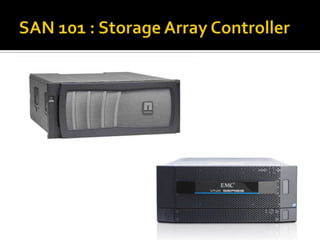
  • #19 Storage Array Controller Notes about SAC
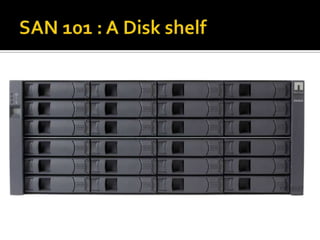
  • #20 Disk Shelf
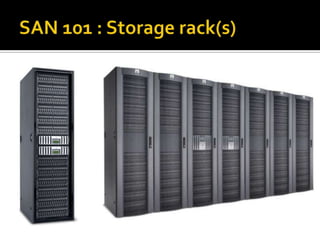
  • #21 Storage racks
  • #22 Data centre
  • #24 Play the datacenter video
  • #25 http://en.wikipedia.org/wiki/Storage_area_network
  • #26 http://en.wikipedia.org/wiki/Storage_area_network
  • #27 http://en.wikipedia.org/wiki/Storage_area_network
  • #28 TODO: Think of more points for this slide #Difference between EMC & NetApphttps://communities.netapp.com/community/netapp-blogs/netapp-360/blog/2012/10/24/the-five-differences-between-netapp-and-emc
  • #29 http://en.wikipedia.org/wiki/NetApp#Difference between EMC & NetApphttps://communities.netapp.com/community/netapp-blogs/netapp-360/blog/2012/10/24/the-five-differences-between-netapp-and-emc
  • #30 http://en.wikipedia.org/wiki/NetApp#Difference between EMC & NetApphttps://communities.netapp.com/community/netapp-blogs/netapp-360/blog/2012/10/24/the-five-differences-between-netapp-and-emc
  • #31 #WAFLhttp://en.wikipedia.org/wiki/Write_Anywhere_File_Layout#RAID & RAID-DPhttps://en.wikipedia.org/wiki/RAIDhttp://www.netapp.com/in/products/platform-os/raid-dp.aspx
  • #32 Videos to be played at each point#WAFLhttp://en.wikipedia.org/wiki/Write_Anywhere_File_Layout#RAID & RAID-DPhttps://en.wikipedia.org/wiki/RAIDhttp://www.netapp.com/in/products/platform-os/raid-dp.aspx#Featureshttp://www.netapp.com/in/products/platform-os/dedupe.aspxhttp://www.netapp.com/in/products/platform-os/filerview.aspxhttp://www.netapp.com/in/products/platform-os/flashpool.aspxhttp://www.netapp.com/in/products/platform-os/flexshare.aspxhttp://www.netapp.com/in/products/platform-os/raid-dp.aspxhttp://www.netapp.com/in/products/platform-os/snapshot.aspx
  • #33 Videos to be played at each point#WAFLhttp://en.wikipedia.org/wiki/Write_Anywhere_File_Layout#RAID & RAID-DPhttps://en.wikipedia.org/wiki/RAIDhttp://www.netapp.com/in/products/platform-os/raid-dp.aspx#Protection softwarehttp://www.netapp.com/in/products/protection-software/metrocluster.aspxhttp://www.netapp.com/in/products/protection-software/snapvault.aspxhttp://www.netapp.com/in/products/protection-software/snaprestore.aspxhttp://www.netapp.com/in/products/protection-software/snaplock.aspxhttp://www.netapp.com/in/products/protection-software/snapmirror.aspxhttp://www.netapp.com/in/products/protection-software/snapprotect.aspx
  • #34 Play the video
  • #35 #WAFLhttp://en.wikipedia.org/wiki/Write_Anywhere_File_Layout#RAID & RAID-DPhttps://en.wikipedia.org/wiki/RAIDhttp://www.netapp.com/in/products/platform-os/raid-dp.aspx#BLOCK & FILE STORAGEhttp://www.techrepublic.com/blog/the-enterprise-cloud/block-level-storage-vs-file-level-storage-a-comparison/
  • #36 #WAFLhttp://en.wikipedia.org/wiki/Write_Anywhere_File_Layout#RAID & RAID-DPhttps://en.wikipedia.org/wiki/RAIDhttp://www.netapp.com/in/products/platform-os/raid-dp.aspx#BLOCK & FILE STORAGEhttp://www.techrepublic.com/blog/the-enterprise-cloud/block-level-storage-vs-file-level-storage-a-comparison/
  • #37 Play the video
  • #38 #WAFLhttp://en.wikipedia.org/wiki/Write_Anywhere_File_Layout#RAID & RAID-DPhttps://en.wikipedia.org/wiki/RAIDhttp://www.netapp.com/in/products/platform-os/raid-dp.aspx#BLOCK & FILE STORAGEhttp://www.techrepublic.com/blog/the-enterprise-cloud/block-level-storage-vs-file-level-storage-a-comparison/
  • #43 TODO: system id and other details should be masked