STORAGE
VIRTUALIZATION ON
SERVER
STORAGE AREA NETWORKMehul Jariwala
Overview
 What is Storage
 What is Virtualization
 Why Virtualization
 Types of Virtualization.
 Server Virtualization.
 Storage Virtualization On Server.
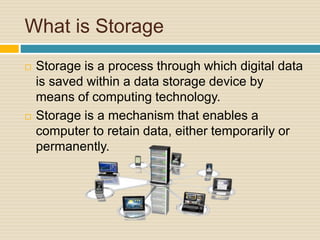
What is Storage
 Storage is a process through which digital data
is saved within a data storage device by
means of computing technology.
 Storage is a mechanism that enables a
computer to retain data, either temporarily or
permanently.
Workflow of Storage
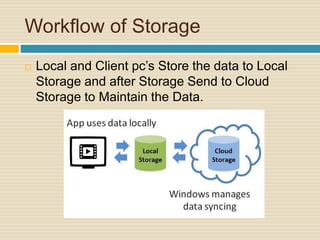
 Local and Client pc’s Store the data to Local
Storage and after Storage Send to Cloud
Storage to Maintain the Data.
What is Virtualization
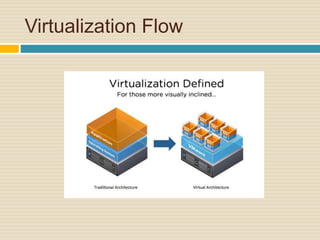
 Virtualization refers to the creation of a virtual
resource such as a server, desktop, operating
system, file, storage or network.
 The main goal of virtualization is to manage
workloads by radically transforming traditional
computing to make it more scalable.
Virtualization Flow
Why Virtualization
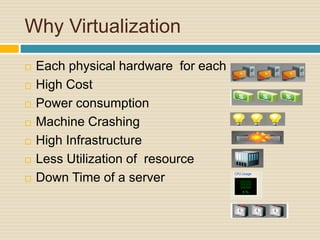
 Each physical hardware for each server.
 High Cost
 Power consumption
 Machine Crashing
 High Infrastructure
 Less Utilization of resource
 Down Time of a server
Types of Virtualization
1.Server Virtualization
The server administrator uses a software
application to divide one physical server
into multiple isolated virtual environments.
2. Desktop Virtualization
The major advantages of desktop
virtualization is that users are able to access
all their personal files and applications from
any location and on any PC
Types of Virtualization
3. Application Virtualization
This is a process where applications get
virtualized and are delivered from a server
to the end user’s device, such as laptops,
smartphones, and tablets.
4. Network Virtualization
Network virtualization is a method that
combines all physical networking
equipment into a single resource.
Types of Virtualization
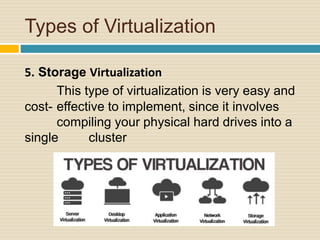
5. Storage Virtualization
This type of virtualization is very easy and
cost- effective to implement, since it involves
compiling your physical hard drives into a
single cluster
Server Virtualization
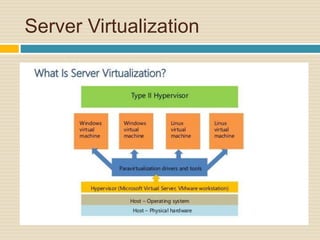
 Server virtualization is the partitioning of a
physical server into several virtual servers. It is
used to maximize the server resources.
 The server virtualization technology is mainly
used in web servers.
Server Virtualization
 Server virtualization is used:
 1. to make more efficient use of server
resources,
 2. to improve the server availability,
 3. to help in disaster recovery,
 4. development and testing, and
 5. to centralize the server administration.
Server Virtualization
Storage Virtualization On
Server
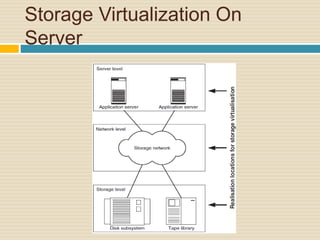
 The representative of virtualisation in the
server is the combination of file system and
volume manager.
 A volume manager undertakes the separation
of the storage into logical view and physical
implementation by encapsulating the physical
hard disk into logical disk groups and logical
volumes.
Storage Virtualization On
Server
 Some volume managers additionally have
further storage functions such as RAID,
snapshots or dynamic reconfiguration options.
 Which permit the addition and removal or
storage during operation.
Storage Virtualization On
Server
Storage Virtualization On
Server
 Benefits:
 Tried and tested virtualisation techniques are
generally used.
 The virtualisation functions can integrate
multiple storage systems.
 The approach remains cost effective.
Storage Virtualization On
Server
 Disadvantages: :
 The administration of the storage virtualisation
must take place on every single server.
 To achieve this, the appropriate software must be
installed and maintained upon the computers.
 The storage virtualisation software running on the
server can cost system resources and thus have a
negative impact upon the server performance
Reference
 https://computer.howstuffworks.com/server-
virtualization1.htm
 http://www.ques10.com/p/2607/explain-snia-
storage-virtualization-taxonomy-with-/
 http://www.srmuniv.ac.in/sites/default/files/files/
Chapter%2010.pdf
 https://www.javatpoint.com/server-
virtualization
 http://whatis.techtarget.com/definition/server
Thanks You.

Storage Virtualization

  • 1.
  • 2.
    Overview  What isStorage  What is Virtualization  Why Virtualization  Types of Virtualization.  Server Virtualization.  Storage Virtualization On Server.
  • 3.
    What is Storage Storage is a process through which digital data is saved within a data storage device by means of computing technology.  Storage is a mechanism that enables a computer to retain data, either temporarily or permanently.
  • 4.
    Workflow of Storage Local and Client pc’s Store the data to Local Storage and after Storage Send to Cloud Storage to Maintain the Data.
  • 5.
    What is Virtualization Virtualization refers to the creation of a virtual resource such as a server, desktop, operating system, file, storage or network.  The main goal of virtualization is to manage workloads by radically transforming traditional computing to make it more scalable.
  • 6.
  • 7.
    Why Virtualization  Eachphysical hardware for each server.  High Cost  Power consumption  Machine Crashing  High Infrastructure  Less Utilization of resource  Down Time of a server
  • 8.
    Types of Virtualization 1.ServerVirtualization The server administrator uses a software application to divide one physical server into multiple isolated virtual environments. 2. Desktop Virtualization The major advantages of desktop virtualization is that users are able to access all their personal files and applications from any location and on any PC
  • 9.
    Types of Virtualization 3.Application Virtualization This is a process where applications get virtualized and are delivered from a server to the end user’s device, such as laptops, smartphones, and tablets. 4. Network Virtualization Network virtualization is a method that combines all physical networking equipment into a single resource.
  • 10.
    Types of Virtualization 5.Storage Virtualization This type of virtualization is very easy and cost- effective to implement, since it involves compiling your physical hard drives into a single cluster
  • 11.
    Server Virtualization  Servervirtualization is the partitioning of a physical server into several virtual servers. It is used to maximize the server resources.  The server virtualization technology is mainly used in web servers.
  • 12.
    Server Virtualization  Servervirtualization is used:  1. to make more efficient use of server resources,  2. to improve the server availability,  3. to help in disaster recovery,  4. development and testing, and  5. to centralize the server administration.
  • 13.
  • 14.
    Storage Virtualization On Server The representative of virtualisation in the server is the combination of file system and volume manager.  A volume manager undertakes the separation of the storage into logical view and physical implementation by encapsulating the physical hard disk into logical disk groups and logical volumes.
  • 15.
    Storage Virtualization On Server Some volume managers additionally have further storage functions such as RAID, snapshots or dynamic reconfiguration options.  Which permit the addition and removal or storage during operation.
  • 16.
  • 17.
    Storage Virtualization On Server Benefits:  Tried and tested virtualisation techniques are generally used.  The virtualisation functions can integrate multiple storage systems.  The approach remains cost effective.
  • 18.
    Storage Virtualization On Server Disadvantages: :  The administration of the storage virtualisation must take place on every single server.  To achieve this, the appropriate software must be installed and maintained upon the computers.  The storage virtualisation software running on the server can cost system resources and thus have a negative impact upon the server performance
  • 19.
    Reference  https://computer.howstuffworks.com/server- virtualization1.htm  http://www.ques10.com/p/2607/explain-snia- storage-virtualization-taxonomy-with-/ http://www.srmuniv.ac.in/sites/default/files/files/ Chapter%2010.pdf  https://www.javatpoint.com/server- virtualization  http://whatis.techtarget.com/definition/server
  • 20.

Editor's Notes

  • #3 Beginning course details and/or books/materials needed for a class/project.
  • #4 A schedule design for optional periods of time/objectives.
  • #5 A schedule design for optional periods of time/objectives.
  • #6 Objectives for instruction and expected results and/or skills developed from learning.
  • #7 Objectives for instruction and expected results and/or skills developed from learning.
  • #8 A schedule design for optional periods of time/objectives.
  • #9 Relative vocabulary list.
  • #10 Relative vocabulary list.
  • #11 Relative vocabulary list.
  • #12 Relative vocabulary list.
  • #13 Relative vocabulary list.
  • #14 Relative vocabulary list.
  • #15 Relative vocabulary list.
  • #16 Relative vocabulary list.
  • #17 Relative vocabulary list.
  • #18 Relative vocabulary list.
  • #19 Relative vocabulary list.
  • #20 Relative vocabulary list.
  • #21 Relative vocabulary list.