Spreadsheet Fundamentals Module 6 Lesson 1
What is a spreadsheet? A program that allows you to use rows and columns of data to manage, predict, and present information. Spreadsheets in  Baseball Spreadsheets in  Economics Spreadsheets in  Finance Spreadsheets in  Nutrition Click on  BLUE  hyperlinks to view examples.  Websites will open in a new window.  Be sure to come back when you are done.
Who uses spreadsheets? Schools Grades, Payroll, Class Size, Budgets Sports Teams Individual and Team Statistics, Budgets Businesses Payroll, Investments, Inventory, Sales, Delivery Families Checkbook, Expenses, Investments, Income Tax Government Taxes, Census, Loans, Investments, Budgets Click on  BLUE  hyperlinks to view examples.  Websites will open in a new window.  Be sure to come back when you are done.
What can a spreadsheet do? Answer What is? Questions students’ current grade (school) individual athlete statistics (sports) transportation schedules (business) current $ available for spending (personal) census results (government)
What can a spreadsheet do? Answer What if? Questions student population increases (school) win/loss record changes (sports) product sales decrease (business) hourly wage rate changes (personal) population increases (government)
Why use a spreadsheet? Fast—spreadsheets are created to automatically calculate Accurate—the spreadsheet does the math for you Click the button for a brief video.  A new website will open, be sure to return to this presentation.
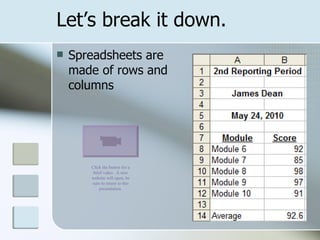
Let’s break it down. Spreadsheets are made of rows and columns Click the button for a brief video.  A new website will open, be sure to return to this presentation.
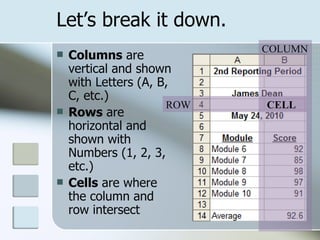
Let’s break it down. Columns  are vertical and shown with Letters (A, B, C, etc.) Rows  are horizontal and shown with Numbers (1, 2, 3, etc.) Cells  are where the column and row intersect ROW COLUMN CELL
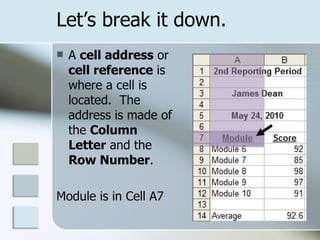
Let’s break it down. A  cell address  or  cell reference  is where a cell is located.  The address is made of the  Column Letter  and the  Row Number . Module is in Cell A7
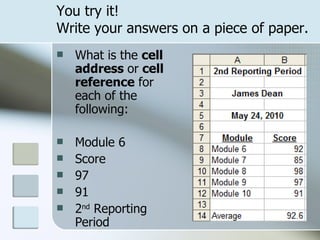
You try it!  Write your answers on a piece of paper. What is the  cell address  or  cell reference  for each of the following: Module 6 Score 97 91 2 nd  Reporting Period
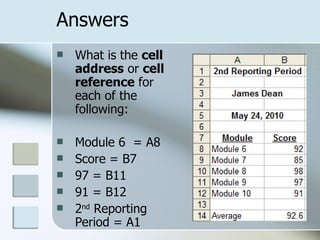
Answers  What is the  cell address  or  cell reference  for each of the following: Module 6  = A8 Score = B7 97 = B11 91 = B12 2 nd  Reporting Period = A1
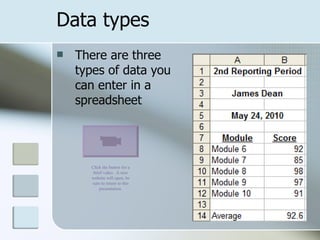
Data types There are three types of data you can enter in a spreadsheet Click the button for a brief video.  A new website will open, be sure to return to this presentation.
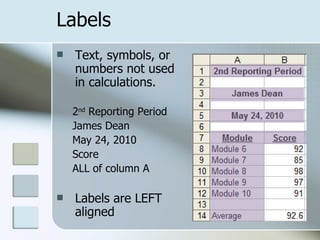
Labels Text, symbols, or numbers not used in calculations. 2 nd  Reporting Period James Dean May 24, 2010 Score ALL of column A Labels are LEFT aligned
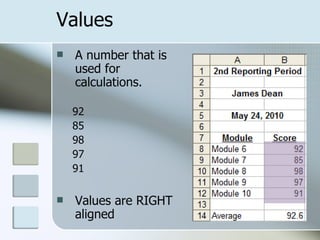
Values A number that is used for calculations. 92 85 98 97 91 Values are RIGHT  aligned
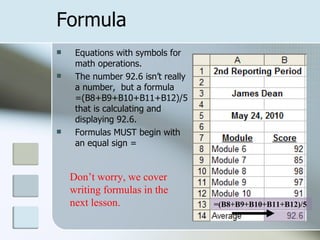
Formula Equations with symbols for math operations.  The number 92.6 isn’t really a number,  but a formula =(B8+B9+B10+B11+B12)/5 that is calculating and displaying 92.6. Formulas MUST begin with an equal sign = =(B8+B9+B10+B11+B12)/5 Don’t worry, we cover writing formulas in the next lesson.
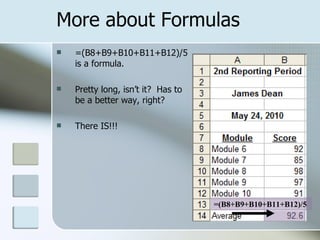
More about Formulas =(B8+B9+B10+B11+B12)/5 is a formula.  Pretty long, isn’t it?  Has to be a better way, right?  There IS!!! =(B8+B9+B10+B11+B12)/5
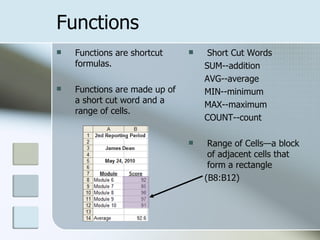
Functions Functions are shortcut formulas. Functions are made up of a short cut word and a range of cells. Short Cut Words SUM--addition AVG--average MIN--minimum MAX--maximum COUNT--count Range of Cells—a block of adjacent cells that form a rectangle (B8:B12)
Can you tell the difference? Label, Value, Formula or Function? Sally Mae =B4*D7 Total of expenses $23.00 Sum of the range B4 thru E4 6859 East Hill Street 34% 910.555.1212
Answers Label, Value, Formula or Function? Sally Mae-- Label  (text)  =B4*D7-- Formula  (equal sign and operators) Total of expenses-- Formula  or  Function  (calculation) $23.00-- Value  (dollars are most often values, but could be the result of a function or formula)
Answers Label, Value, Formula or Function? Sum of the range B4 thru E4-- Function  (use of shortcut word and a range) 6859 East Hill Street-- Label  (address) 34%-- Value  (percents will most often be used in a calculations) 910.555.1212-- Label  (phone number, would not be used in a calculation
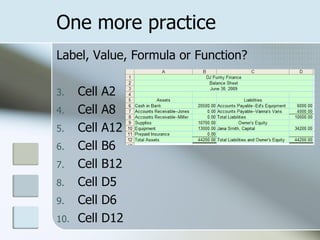
Label, Value, Formula or Function? Cell A2 Cell A8 Cell A12 Cell B6 Cell B12 Cell D5 Cell D6 Cell D12 One more practice
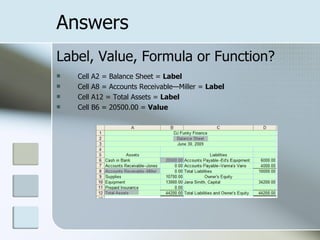
Label, Value, Formula or Function? Cell A2 = Balance Sheet =  Label Cell A8 = Accounts Receivable—Miller =  Label Cell A12 = Total Assets =  Label Cell B6 = 20500.00 =  Value Answers
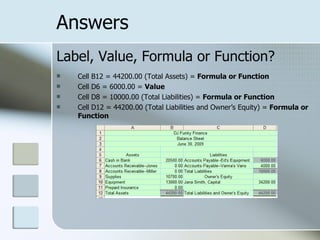
Label, Value, Formula or Function? Cell B12 = 44200.00 (Total Assets) =  Formula or Function Cell D6 = 6000.00 =  Value Cell D8 = 10000.00 (Total Liabilities) =  Formula or Function Cell D12 = 44200.00 (Total Liabilities and Owner’s Equity) =  Formula or Function Answers
Got it? Here is a short review. Click the button for a brief video.  A new website will open, be sure to return to this presentation.
 

Spreadsheet fundamentals

  • 1.
  • 2.
    What is aspreadsheet? A program that allows you to use rows and columns of data to manage, predict, and present information. Spreadsheets in Baseball Spreadsheets in Economics Spreadsheets in Finance Spreadsheets in Nutrition Click on BLUE hyperlinks to view examples. Websites will open in a new window. Be sure to come back when you are done.
  • 3.
    Who uses spreadsheets?Schools Grades, Payroll, Class Size, Budgets Sports Teams Individual and Team Statistics, Budgets Businesses Payroll, Investments, Inventory, Sales, Delivery Families Checkbook, Expenses, Investments, Income Tax Government Taxes, Census, Loans, Investments, Budgets Click on BLUE hyperlinks to view examples. Websites will open in a new window. Be sure to come back when you are done.
  • 4.
    What can aspreadsheet do? Answer What is? Questions students’ current grade (school) individual athlete statistics (sports) transportation schedules (business) current $ available for spending (personal) census results (government)
  • 5.
    What can aspreadsheet do? Answer What if? Questions student population increases (school) win/loss record changes (sports) product sales decrease (business) hourly wage rate changes (personal) population increases (government)
  • 6.
    Why use aspreadsheet? Fast—spreadsheets are created to automatically calculate Accurate—the spreadsheet does the math for you Click the button for a brief video. A new website will open, be sure to return to this presentation.
  • 7.
    Let’s break itdown. Spreadsheets are made of rows and columns Click the button for a brief video. A new website will open, be sure to return to this presentation.
  • 8.
    Let’s break itdown. Columns are vertical and shown with Letters (A, B, C, etc.) Rows are horizontal and shown with Numbers (1, 2, 3, etc.) Cells are where the column and row intersect ROW COLUMN CELL
  • 9.
    Let’s break itdown. A cell address or cell reference is where a cell is located. The address is made of the Column Letter and the Row Number . Module is in Cell A7
  • 10.
    You try it! Write your answers on a piece of paper. What is the cell address or cell reference for each of the following: Module 6 Score 97 91 2 nd Reporting Period
  • 11.
    Answers Whatis the cell address or cell reference for each of the following: Module 6 = A8 Score = B7 97 = B11 91 = B12 2 nd Reporting Period = A1
  • 12.
    Data types Thereare three types of data you can enter in a spreadsheet Click the button for a brief video. A new website will open, be sure to return to this presentation.
  • 13.
    Labels Text, symbols,or numbers not used in calculations. 2 nd Reporting Period James Dean May 24, 2010 Score ALL of column A Labels are LEFT aligned
  • 14.
    Values A numberthat is used for calculations. 92 85 98 97 91 Values are RIGHT aligned
  • 15.
    Formula Equations withsymbols for math operations. The number 92.6 isn’t really a number, but a formula =(B8+B9+B10+B11+B12)/5 that is calculating and displaying 92.6. Formulas MUST begin with an equal sign = =(B8+B9+B10+B11+B12)/5 Don’t worry, we cover writing formulas in the next lesson.
  • 16.
    More about Formulas=(B8+B9+B10+B11+B12)/5 is a formula. Pretty long, isn’t it? Has to be a better way, right? There IS!!! =(B8+B9+B10+B11+B12)/5
  • 17.
    Functions Functions areshortcut formulas. Functions are made up of a short cut word and a range of cells. Short Cut Words SUM--addition AVG--average MIN--minimum MAX--maximum COUNT--count Range of Cells—a block of adjacent cells that form a rectangle (B8:B12)
  • 18.
    Can you tellthe difference? Label, Value, Formula or Function? Sally Mae =B4*D7 Total of expenses $23.00 Sum of the range B4 thru E4 6859 East Hill Street 34% 910.555.1212
  • 19.
    Answers Label, Value,Formula or Function? Sally Mae-- Label (text) =B4*D7-- Formula (equal sign and operators) Total of expenses-- Formula or Function (calculation) $23.00-- Value (dollars are most often values, but could be the result of a function or formula)
  • 20.
    Answers Label, Value,Formula or Function? Sum of the range B4 thru E4-- Function (use of shortcut word and a range) 6859 East Hill Street-- Label (address) 34%-- Value (percents will most often be used in a calculations) 910.555.1212-- Label (phone number, would not be used in a calculation
  • 21.
    Label, Value, Formulaor Function? Cell A2 Cell A8 Cell A12 Cell B6 Cell B12 Cell D5 Cell D6 Cell D12 One more practice
  • 22.
    Label, Value, Formulaor Function? Cell A2 = Balance Sheet = Label Cell A8 = Accounts Receivable—Miller = Label Cell A12 = Total Assets = Label Cell B6 = 20500.00 = Value Answers
  • 23.
    Label, Value, Formulaor Function? Cell B12 = 44200.00 (Total Assets) = Formula or Function Cell D6 = 6000.00 = Value Cell D8 = 10000.00 (Total Liabilities) = Formula or Function Cell D12 = 44200.00 (Total Liabilities and Owner’s Equity) = Formula or Function Answers
  • 24.
    Got it? Hereis a short review. Click the button for a brief video. A new website will open, be sure to return to this presentation.
  • 25.