Presented by
 M. Pirthee
 R. Poorun
   Understanding Software
       Software
       Application Software
   Application Software
       Types and Category
   Examples of application Software
   Summary
   References
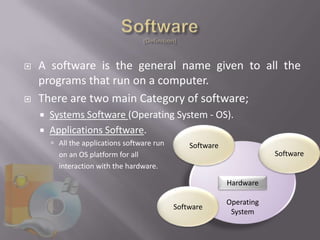
   A software is the general name given to all the
    programs that run on a computer.
   There are two main Category of software;
       Systems Software (Operating System - OS).
       Applications Software.
         All the applications software run       Software
          on an OS platform for all                                      Software
          interaction with the hardware.

                                                             Hardware

                                                             Operating
                                              Software
                                                              System
   Also known as an Application
   It is designed to help users with singular or multiple
    specific tasks.
       Examples:
         Office documentation processing software
         Web Brower
         Media Player
           Note – for different OS there are different application packages
   An OS is a platform/program mounted on a
    computer that helps;
     Executing commands more efficiently,
     Allowing memory allocation,
     Hardware management,
     Devices synchronization,
     Acts as an intermediary between inputs, processing and
      output
         Examples of OS: Windows OS, Mac OS and Linux
   An application software is an add-on to the
    OS, consisting of special instructions to solve a task.
         Example the calculator which has special functions
   Applications software comes in 3 main categories:
       Tailor-made Software
       General Purpose Software
       Application Packages/ Suite
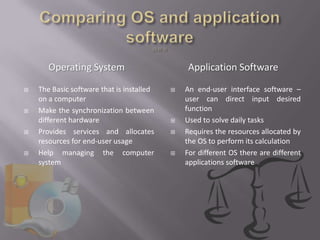
Operating System                         Application Software
   The Basic software that is installed      An end-user interface software –
    on a computer                              user can direct input desired
   Make the synchronization between           function
    different hardware                        Used to solve daily tasks
   Provides services and allocates           Requires the resources allocated by
    resources for end-user usage               the OS to perform its calculation
   Help managing the computer                For different OS there are different
    system                                     applications software
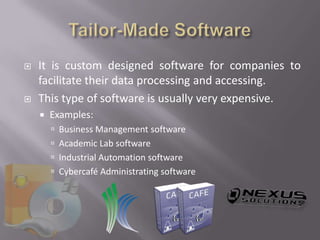
   It is custom designed software for companies to
    facilitate their data processing and accessing.
   This type of software is usually very expensive.
       Examples:
         Business Management software
         Academic Lab software
         Industrial Automation software
         Cybercafé Administrating software
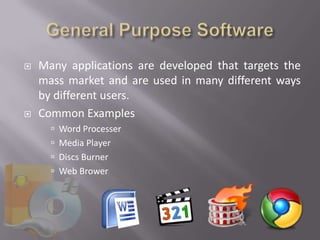
   Many applications are developed that targets the
    mass market and are used in many different ways
    by different users.
   Common Examples
       Word Processer
       Media Player
       Discs Burner
       Web Brower
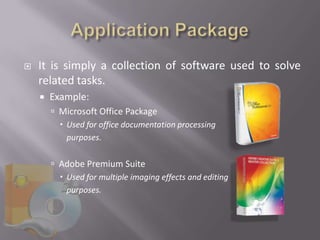
   It is simply a collection of software used to solve
    related tasks.
       Example:
         Microsoft Office Package
           Used for office documentation processing
            purposes.

         Adobe Premium Suite
           Used for multiple imaging effects and editing
            purposes.
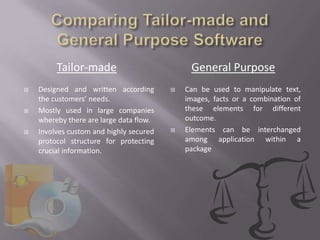
Tailor-made                          General Purpose
   Designed and written according          Can be used to manipulate text,
    the customers’ needs.                    images, facts or a combination of
   Mostly used in large companies           these elements for different
    whereby there are large data flow.       outcome.
   Involves custom and highly secured      Elements can be interchanged
    protocol structure for protecting        among application within a
    crucial information.                     package


    
    
    
    
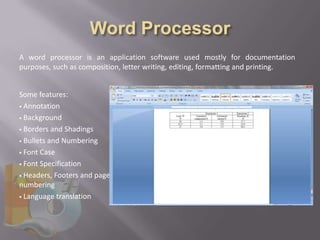
A word processor is an application software used mostly for documentation
purposes, such as composition, letter writing, editing, formatting and printing.


Some features:
 Annotation

 Background

 Borders and Shadings

 Bullets and Numbering

 Font Case

 Font Specification

 Headers, Footers and page
numbering
 Language translation
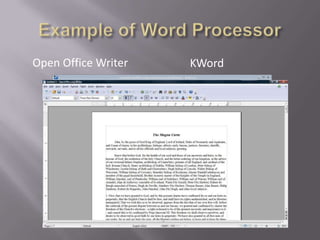
Open Office Writer   KWord
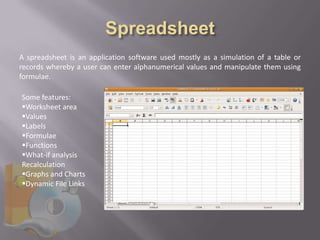
A spreadsheet is an application software used mostly as a simulation of a table or
records whereby a user can enter alphanumerical values and manipulate them using
formulae.

Some features:
Worksheet area
Values
Labels
Formulae
Functions
What-if analysis
Recalculation
Graphs and Charts
Dynamic File Links
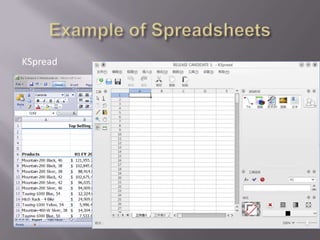
KSpread   Microsoft Excel
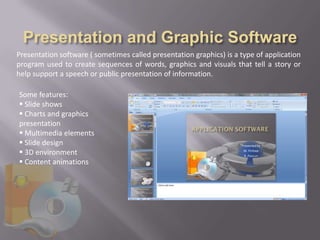
Presentation software ( sometimes called presentation graphics) is a type of application
program used to create sequences of words, graphics and visuals that tell a story or
help support a speech or public presentation of information.

Some features:
 Slide shows
 Charts and graphics
presentation
 Multimedia elements
 Slide design
 3D environment
 Content animations
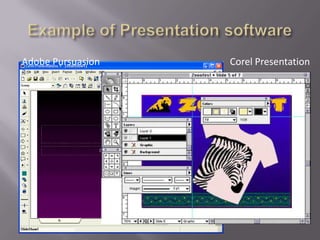
Adobe Pursuasion   Corel Presentation
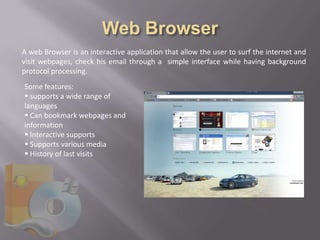
A web Browser is an interactive application that allow the user to surf the internet and
visit webpages, check his email through a simple interface while having background
protocol processing.
Some features:
 supports a wide range of
languages
 Can bookmark webpages and
information
 Interactive supports
 Supports various media
 History of last visits
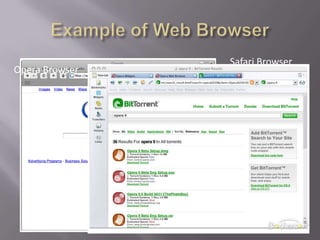
Safari Browser
Opera Browser
   There are two types of software
       System Software
       Application Software
   Application software depends on services and
    resources provided by system software
   For different OS there are different applications
    running
   Applications come in two category
         Tailor Made/ Custom designed
         General Purpose
   Some examples of applications
     Word processor
     Spreadsheets
     Web browser
     Presentation software
   Books
       Intro to Information Technology (CSE 1010e UoM)
         Chapter 7
       Information Systems For You, S. Doyle, 2001
         Chapter 5

   Web Pages
       The importance of computer software
           http://www.thetechfaq.com/2009/04/24/the-importance-of-computer-software-and-what-it-is/

       Application Software, classification
           http://en.wikipedia.org/wiki/Application_software

       Google image search engine

Application Software

  • 1.
    Presented by M.Pirthee R. Poorun
  • 2.
    Understanding Software  Software  Application Software  Application Software  Types and Category  Examples of application Software  Summary  References
  • 4.
    A software is the general name given to all the programs that run on a computer.  There are two main Category of software;  Systems Software (Operating System - OS).  Applications Software.  All the applications software run Software on an OS platform for all Software interaction with the hardware. Hardware Operating Software System
  • 5.
    Also known as an Application  It is designed to help users with singular or multiple specific tasks.  Examples:  Office documentation processing software  Web Brower  Media Player  Note – for different OS there are different application packages
  • 6.
    An OS is a platform/program mounted on a computer that helps;  Executing commands more efficiently,  Allowing memory allocation,  Hardware management,  Devices synchronization,  Acts as an intermediary between inputs, processing and output  Examples of OS: Windows OS, Mac OS and Linux
  • 7.
    An application software is an add-on to the OS, consisting of special instructions to solve a task.  Example the calculator which has special functions  Applications software comes in 3 main categories:  Tailor-made Software  General Purpose Software  Application Packages/ Suite
  • 8.
    Operating System Application Software  The Basic software that is installed  An end-user interface software – on a computer user can direct input desired  Make the synchronization between function different hardware  Used to solve daily tasks  Provides services and allocates  Requires the resources allocated by resources for end-user usage the OS to perform its calculation  Help managing the computer  For different OS there are different system applications software
  • 10.
    It is custom designed software for companies to facilitate their data processing and accessing.  This type of software is usually very expensive.  Examples:  Business Management software  Academic Lab software  Industrial Automation software  Cybercafé Administrating software
  • 11.
    Many applications are developed that targets the mass market and are used in many different ways by different users.  Common Examples  Word Processer  Media Player  Discs Burner  Web Brower
  • 12.
    It is simply a collection of software used to solve related tasks.  Example:  Microsoft Office Package  Used for office documentation processing purposes.  Adobe Premium Suite  Used for multiple imaging effects and editing purposes.
  • 13.
    Tailor-made General Purpose  Designed and written according  Can be used to manipulate text, the customers’ needs. images, facts or a combination of  Mostly used in large companies these elements for different whereby there are large data flow. outcome.  Involves custom and highly secured  Elements can be interchanged protocol structure for protecting among application within a crucial information. package
  • 14.
       
  • 15.
    A word processoris an application software used mostly for documentation purposes, such as composition, letter writing, editing, formatting and printing. Some features:  Annotation  Background  Borders and Shadings  Bullets and Numbering  Font Case  Font Specification  Headers, Footers and page numbering  Language translation
  • 16.
  • 17.
    A spreadsheet isan application software used mostly as a simulation of a table or records whereby a user can enter alphanumerical values and manipulate them using formulae. Some features: Worksheet area Values Labels Formulae Functions What-if analysis Recalculation Graphs and Charts Dynamic File Links
  • 18.
    KSpread Microsoft Excel
  • 19.
    Presentation software (sometimes called presentation graphics) is a type of application program used to create sequences of words, graphics and visuals that tell a story or help support a speech or public presentation of information. Some features:  Slide shows  Charts and graphics presentation  Multimedia elements  Slide design  3D environment  Content animations
  • 20.
    Adobe Pursuasion Corel Presentation
  • 21.
    A web Browseris an interactive application that allow the user to surf the internet and visit webpages, check his email through a simple interface while having background protocol processing. Some features:  supports a wide range of languages  Can bookmark webpages and information  Interactive supports  Supports various media  History of last visits
  • 22.
  • 23.
    There are two types of software  System Software  Application Software  Application software depends on services and resources provided by system software  For different OS there are different applications running
  • 24.
    Applications come in two category  Tailor Made/ Custom designed  General Purpose  Some examples of applications  Word processor  Spreadsheets  Web browser  Presentation software
  • 25.
    Books  Intro to Information Technology (CSE 1010e UoM)  Chapter 7  Information Systems For You, S. Doyle, 2001  Chapter 5  Web Pages  The importance of computer software  http://www.thetechfaq.com/2009/04/24/the-importance-of-computer-software-and-what-it-is/  Application Software, classification  http://en.wikipedia.org/wiki/Application_software  Google image search engine

Editor's Notes

  • #3 Summarizes the content of the whole presentation
  • #5 Definition of a software is the general name given to all programs (instruction to a pc) that are executableThere are two category of software System software Application softwareNote that all applications software depend on the operating system/firmware to function or communicate with the hardwarei.e. without the os the application software would not be able to compute correctly in its environment (the types of resources/hardware available)
  • #6 Application software, also known as applications, is a program used to perform a specific task by a user on his computer, Common examples; typing a letter in word/text/word pad, balancing the records of an account in excel, surfing the web using a web browser, view his pictures and videos in media player On different os we have different application performing the same task, that is on windows we would be using media player to play video and music, whereas on macos we would have quicktime player.
  • #7 An os may be considered as the least intelligence that a computer might have to compute between devices and hardware.For exampleManaging and addressing the RAM and storage devices Controlling the precedence of execution of commandsSynchronizing between different devices which allows a smooth data flowsome common examples are the windows os, macos and linux – they are different from each other, providing different type of services to the user and different interface as well.
  • #8 An application is just an add-on software to an os which consists of special commands, instructions and functions that are executed to help and ease a user solving a task. It is mainly designed for end-user.A simple example is the calculator which allows the user to perform algebraic operations only and not for viewing photos. There are 3 main categories of application software, namely the – application package, tailor made software and the general purpose software
  • #9 Here is a quick list of the main points that can help differentiating between an OS and an application software
  • #11 Tailor-made software, or custom-made software, are specifically designed software for companies and organizations performing functions and commands that differs from existing packages. These software do not generally target the mass market and are very expensive.Some common examples of these are; Business management software – designed by a specific companies to manage, record, administrate and supervise all the data processing and accessingAcademic lab software – used mostly in with lab equipments calculating and evaluating purpose during experimentationsIndustrial automation software – programmed for controlling of automatic machining Cybercafé administrating software – developed to facilitate the management of clients’ accounts and computers of the building Icons:Kitware – lab software for encompassing thousands of algorithms which transform data into interactive 3D environmentsInternet café platform – platform for flexible management of café Nexus solutions – a organization providing custom designed business software to large companies
  • #12 The general purpose software are the mostly used one on the large market, mainly used for entertainment purposes. All software that are not classified as tailor-made are known as general purpose software, if they come in a collection then they are called a packageSome common examples: -Word processor – used to issue different text documentsmedia player codecs – used to play different movie types, in video editing, encordingnero disc burner – used to copy discs, create slideshows, video compilation, dvd markerGoogle Chrome – used to browse the net, viewing pages, integrated plug-in to play online, check mail (into chrome itself)
  • #13 Application package is simply a collection of software to resolve related problems and tasks for the user.For example, The famous Microsoft office package – that helps its users performing and simplifying office documentations procedures, such as ms word for letter typing and editing, ms visio implementing graph, flowcharts and diagram representations, ms access for keeping records in databases and ms math as an aiding software to solve math problems and for representation of complex equations, all these different applications can be further merged into a single document since these applications can work in synchronization. Another example, the adobe creative premium suite – consisting of a collection of software that helps editing photos, imaging and documents in different ways, such are photoshop for photography editing, illustrator for artistic drawing realisation, acrobat for publishing and printing of rich text documents and flash builder for making compact animation files, games or even presentation.