INTRODUCTION TO SOFT SKILLS


          Prof(Dr) .K. P. Mohandas
         Dean (Electrical Sciences)
               Professor EEE
 M E S College of Engineering, Kuttippuram


                                             1
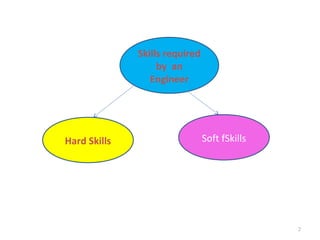
Skills required
                   by an
                 Engineer


Hard Skills                     Soft fSkills


                                               2
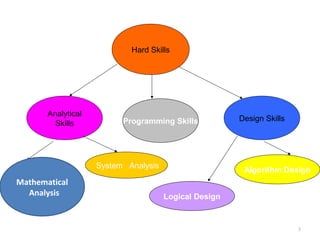
Hard Skills


       Analytical
                          Programming Skills           Design Skills
         Skills


                    System Analysis
                                                        Algorithm Design
Mathematical
  Analysis                            Logical Design


                                                                       3
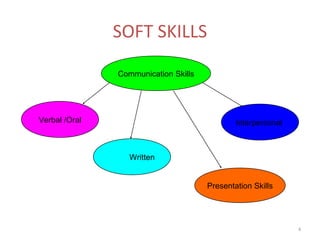
SOFT SKILLS

               Communication Skills


Verbal /Oral                                  Interpersonal


                  Written


                                      Presentation Skills


                                                              4
SOFT SKILL CATEGORIES
• Corporate Skills

• Employability skills

• Life Skills


                                 5
Corporate skills:

These are required at executive levels

Awareness of these helps in
      helping your organization and
      assist your bosses.


                                         6
Corporate Skills
•   Political sensitivity
•   Business and commercial awareness
•   Strategic awareness
•   Understanding funding sources and schemes
•   Information Management
•   Organization and Control
•   Team building
•   Communication and persuasion
•   Networking and public relations
•   Leading change


                                                7
Employability Skills
• Essential for those who seek employment
• To be mastered by every one who seeks
  employment
• These can be mastered only by constant
  practice and effort
• Mastering every new skill leads to another


                                               8
Employability skills
•   Leadership qualities
•   Cooperation with others
•   Planning and organizing
•   Making decisions
•   Communication skills
•       Verbal skills
•       Writing skills
•       Presentation skills

                                     9
Life Skills
 Related to
        head,
        heart,
        hands and
        health,
These are highly personal and
Are also called behavioural skills


                                     10
Head related
Keeping records,
Making use of resources,
Planning and organizing,
Goal setting,
Service learning,
Problem solving,
Learning to learn


                           11
Heart Related Skills
    Related to people and caring,
    How do we relate to people, relate people
    by accepting differences,
Conflict resolutions,
Social skills,
Cooperation and
Communication and caring through nurturing relations,
Sharing,
Empathy and concern for others


                                                        12
Hands related

Community service,
Volunteering,
Leadership,
Responsible citizenship,
Contribution to group


                            13
Health related

Healthy life styles,
stress management,
disease prevention and
personal safety for better living :
 self esteem,
self responsibility,
character,
managing emotions and self discipline
  share well, care well, and fare well

                                         14
THINGS TO DO DAILY
• Greet your family members everyday
• Greet your peers, subordinates and colleagues when you
  enter the office
• Greet your friends on the way, don’t ignore them
• Continuously reciprocate to breed communication
• Say ‘thanks’ when you get some help even if is trivial, make it
  a habit even to subordinates
• Be a proactive listener – don’t simply ‘pretend’ to hear
• While talking to others your voice should be audible, clear
  and soothing, never be aggressive or shout
• Dress well to suit the profession and occasion
• Avoid political comments at work place
• Do not talk ill of others
• Respect others, if you expect to be respected by others
                                                                    15
DEVELOPING LANGUAGE SKILLS
What is to be done to
           MASTER A LANGUAGE
• READ
         As much as possible
WRITE
         In your own language
• SPEAK
         Even if you make mistakes initially
 HEAR      carefully how others speak


                                               17
READ - HOW
Not just for time pass,
          But to understand,
Learn new words,
          Use them when you get a chance,
Summarize and
          Make notes for later use
Reading an English newspaper everyday a
habit, preferably Hindu or Times of India
                                            18
SPEAK
• Try speaking the language
         you want to be proficient in,
• Even if you make mistakes initially,
• Be willing to correct it when some one points
  out it to you
• Be ever willing to learn


                                                  19
WRITE
• Short and simple sentences,
• Style makes a man or woman.
• Use apt language for
        Personal or Official write ups
  Try your skill in translation from one language
  to another


                                                    20
Writing, the major tool for
            communication
• writing has two major roles:
   it clarifies –
        for both writer and reader
   it conveys
         information
Remember the following
ethig follow this simple procedure:
1.Establish the AIM
2.Consider the READER
3.Devise the STRUCTURE
4.DRAFT the text
5.EDIT and REVISE
A document tells somebody
             something
Three major considerations:
• What they already know affects what you can
  leave out.
• What they need to know determines what
  you include.
• What they want to know suggests the order
  and emphasis of your writing.
Structure
•   a development of the idea
•   an explanation or analogy
•   an illustration
•   support with evidence
•   contextual links to reinforce the structure
Draft, Revise and Edit

•   Style
•   The Beginning
•   Punctuation
•   Spelling
•   Simple Errors -proof reading
•   Sentence Length
•   Word Length
•   Jargon

                                    25
HEAR GOOD ENGLISH
•   On Radio
•   On Television
•   BBC News , English channels like NDTV etc
•   National Geographic
•   Discovery channel
•   History Channel
•   Good English Movies on HBO,

                                                26
PRESENTATION SKILLS


                      27
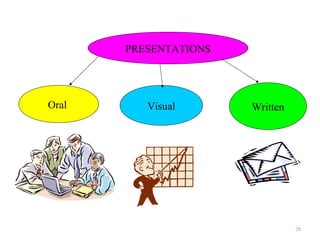
PRESENTATIONS


Oral      Visual       Written


                                 28
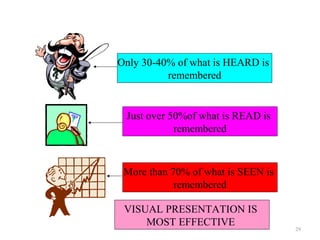
Only 30-40% of what is HEARD is
          remembered


 Just over 50%of what is READ is
            remembered


 More than 70% of what is SEEN is
            remembered

 VISUAL PRESENTATION IS
     MOST EFFECTIVE
                                    29
REMEMBER
• Tell me I will forget
• Show me I will remember
• Involve me, I will learn

• This applies to teaching and even for
  presentations


                                          30
Why Presentations
• Presentations and reports are ways of
  communicating ideas and information to a
  group
• Presentation carries the speakers personality
  better and
• Allows immediate interaction between the
  audience and speaker (presenter)


                                                  31
A good presentation has
• Content : contains information that can be
  absorbed by the audience in one sitting
• Structure: It has a logical beginning, middle and
  end. Should be sequenced such that the audience
  can understand
• Packaging: It must be well prepared. A report can
  be read later, but the audience haring a
  presentation is at the mercy of the presenter.
• Human element: a god presentation will be
  remembered because a person is attached to it

                                                      32
Check Availability of equipment
• Only Over head projectors(OHP) : prepare
  transparencies on OHP films using OHP pens
• LCD Projectors and PC/Laptop available.
  Use Power point slides
  Save paper or slide films
  Give handouts 6 slides per page,if necessary


                                                 33
How Many slides?
• Difficult to say, as many as required
• But one slide on the average 2 minutes to 2.5
  minutes.
• Figures and charts can take less time


                                              34
Slides when manually made
• Use big enough letters
• Use colour pens with deep colours
• Never use photocopies of printed pages as slides
  directly
• Never overcrowd the slides with too much of
  material – not more 7-8 lines per slide
• Use minimum number of equations – give qualitative
  interpretations
• Never give complete derivations


                                                   35
DO THESE
•   Write neatly and legibly
•   Use big enough letters
•   Use dark colours not light
•   Use a pointer to indicate
•   Never read directly from the slides
•   Number the films in the sequence order
•   Do not be totally be dependent on the slides
•   Use presentation software like Power point
    wherever possible


                                                   36
VOICE
• Four main items that define the voice quality
• Volume: How loud ? Enough to be heard by all
  members in the audience
• Tone : A voice that carries fear can frighten the
  audience and one that carries laughter can get the
  audience into smile
• Pitch : How high or low a note is
• Pace: How long a sound lasts


                                                       37
How to improve your voice?
• Listen to it! Practice listening to your
  voice while at home, driving, walking,
  working to see if you are using it the way
  you want to
• To really listen to your voice, cup your
  right hand around your right ear and
  gently pull the ear forward. Next, cup your
  left hand around your mouth and direct
  the sound straight into your ear.
• Now practice moderating your voice.

                                            38
Body Language
• The posture and your movements can greatly
  help in your presentation
• Displaying good posture tells your
  audience that you know what you
  are doing and you care deeply about
  it.
• Also, a good posture helps you to
  speak more clearly and effective.

                                               39
Throughout your display
o Eye contact:Speakers who make eye
  contact open the flow of communication
  and convey interest, concern, warmth,
  and credibility.
o Facial Expressions: Smiling is a powerful
  cue that transmits happiness, friendliness,
  warmth, and liking favorably. The listeners
  will be more comfortable around you and
  will want to listen to you more.


                                            40
Body Language – continued
o Gestures: If you fail to gesture
  while speaking, you may be
  perceived as boring and stiff.
• Posture and body orientation: You
  communicate numerous messages by the way
  you talk and move. Standing erect and leaning
  forward communicates that you are
  approachable, receptive, and friendly.
  Speaking with your back turned or looking at
  the floor or ceiling should be avoided as it
  communicates disinterest


                                             41
Body Language (continued)
   Proximity: Cultural norms dictate a comfortable
  distance for interaction with others. Increasing
  the proximity enables you to make better eye
  contact and increases the opportunities for others
  to speak.
• Voice. One of the major criticisms of speakers is
  that they speak in a monotone voice. Listeners
  perceive this type of speaker as boring and dull.
  People report that they learn less and lose
  interest more quickly when listening to those who
  have not learned to modulate their voices.


                                                  42
Active Listening
  Listening can be one of our most powerful tools, Be

                      sure to use it
o Spend more time listening than talking (but of course, as a
  presenter, you will be doing most of the talking).
o Do not finish the sentence of others.
o Do not answer questions with questions.
o Aware of biases. We all have them. We need to control
  them.
o Never daydream or become preoccupied with their own
  thoughts when others talk.
o Let the other speaker talk. Do not dominate the
  conversation.
• Plan responses after others have finished speaking...NOT
  while they are speaking. Their full concentration is on what
  others are saying, not on what they are going to respond
  with.

                                                            43
GETTING FEED BACK
1.   Evaluative: Makes a judgment about the worth,
     goodness, or appropriateness of the other
     person's statement.
2.   Interpretive: Paraphrasing - attempt to explain
     what the other persons statement mean.
3.   Supportive: Attempt to assist or bolster the
     other communicator
4.   Probing: Attempt to gain additional information,
     continue the discussion, or clarify a point.
5.   Understanding: Attempt to discover completely
     what the other communicator means by her
     statements.


                                                        44
Feedback (continued)
o Provide feedback but do not interrupt
  incessantly.
o Analyze by looking at all the relevant
  factors and asking open-ended questions.
  Walk    the   person   through   analysis
  (summarize).
o Keep the conversation on what the
  speaker says...NOT on what interest them.


                                          45
Are you nervous?
• Tension can be reduced by performing
  some relaxation exercises.
o Before the presentation: Lie on the floor. Your back should be flat
  on the floor. Pull your feet towards you so that your knees are up
  in the air. Relax. Close your eyes. Fell your back spreading out
  and supporting your weight. Feel your neck lengthening. Work
  your way through your body, relaxing one section at a time - your
  toes, feet, legs, torso, etc. When finished, stand up slowly and try
  to maintain the relaxed feeling in a standing position.
o clockwise, and then counter-clockwise.


                                                                    46
Technique to reduce tension -
• If you cannot lie down: Stand with you feet about
  6 inches apart, arms hanging by your sides, and
  fingers unclenched. Gently shake each part of
  your body, starting with your hands, then arms,
  shoulders, torso, and legs. Concentrate on
  shaking out the tension. Then slowly rotate your
  shoulders forwards and the backwards. Move on
  to your head. Rotate it slowly


                                                  47
Are you nervous?
o Mental Visualization: Before the presentation,
  visualize the room, audience, and you giving the
  presentation. Mentally go over what you are
  going to do from the moment you start to the
  end of the presentation.
o During the presentation: Take a moment to
  yourself by getting a drink of water, take a deep
  breath, concentrate on relaxing the most tense
  part of your body, and then return to the
  presentation saying to your self, "I can do it!"


                                                  48
At least pretend not to be nervous
o You do NOT need to get rid of anxiety and
  tension! Channel the energy into concentration
  and expressiveness.
o Know that anxiety and tension is not as
  noticeable to the audience as it is to you.
o Know that even the best presenters make
  mistakes. The key is to continue on after the
  mistake. If you pick up and continue, so will the
  audience. Winners continue! Losers stop!


                                                  49
Questions
•   Keep cool if a questioner disagrees with you. You are
    a professional! No matter how hard you try, not
    everyone in the world will agree with you!
•   Although some people get a perverse pleasure from putting
    others on the spot, and some try to look good in front of
    the boss, most people ask questions from a genuine
    interest. Questions do not mean you did not explain the
    topic good enough, but that their interest is deeper than
    the average audience.


•   .

                                                           50
Questions – troubles??
•   Always allow time at the end of the presentation for
    questions. After inviting questions, do not rush ahead if no
    one asks a question. Pause for about 6 seconds to allow the
    audience to gather their thoughts. When a question is
    asked, repeat the question to ensure that everyone heard it
    (and that you heard it correctly). When answering, direct
    your remarks to the entire audience. That way, you keep
    everyone focused, not just the questioner. To reinforce
    your presentation, try to relate the question back to the
    main points.


                                                              51
Listen carefully to Questions
• Make sure you listen to the question being asked.
  If you do not understand it, ask them to clarify.
  Pause to think about the question as the answer
  you give may be correct, but ignore the main
  issue. If you do not know the answer, be honest,
  do not waffle. Tell them you will get back to
  them...and make sure you do!
• Answers that last 10 to 40 seconds work best. If
  they are too short, they seem abrupt; while
  longer answers appear too elaborate. Also, be
  sure to keep on track. Do not let off-the-wall
  questions sidetrack you into areas that are not
  relevant to the presentation.
                                                  52
REMEMBER
•   SOFT SKILLS
•   LANGUAGE SKILLS &
•   PRESENTATION SKILLS
•          CAN BE ACQUIRED AND MASTERED
•          ONLY BY CNSTANT PRACTICE
•   SO
•   PRACTICE !!! PRACTICE !!! PRACTICE !!!

                                             53
Thank you
You can contact me by email at :

kpmdas@ieee.org
                                   54

Softskills

  • 1.
    INTRODUCTION TO SOFTSKILLS Prof(Dr) .K. P. Mohandas Dean (Electrical Sciences) Professor EEE M E S College of Engineering, Kuttippuram 1
  • 2.
    Skills required by an Engineer Hard Skills Soft fSkills 2
  • 3.
    Hard Skills Analytical Programming Skills Design Skills Skills System Analysis Algorithm Design Mathematical Analysis Logical Design 3
  • 4.
    SOFT SKILLS Communication Skills Verbal /Oral Interpersonal Written Presentation Skills 4
  • 5.
    SOFT SKILL CATEGORIES •Corporate Skills • Employability skills • Life Skills 5
  • 6.
    Corporate skills: These arerequired at executive levels Awareness of these helps in helping your organization and assist your bosses. 6
  • 7.
    Corporate Skills • Political sensitivity • Business and commercial awareness • Strategic awareness • Understanding funding sources and schemes • Information Management • Organization and Control • Team building • Communication and persuasion • Networking and public relations • Leading change 7
  • 8.
    Employability Skills • Essentialfor those who seek employment • To be mastered by every one who seeks employment • These can be mastered only by constant practice and effort • Mastering every new skill leads to another 8
  • 9.
    Employability skills • Leadership qualities • Cooperation with others • Planning and organizing • Making decisions • Communication skills • Verbal skills • Writing skills • Presentation skills 9
  • 10.
    Life Skills Relatedto head, heart, hands and health, These are highly personal and Are also called behavioural skills 10
  • 11.
    Head related Keeping records, Makinguse of resources, Planning and organizing, Goal setting, Service learning, Problem solving, Learning to learn 11
  • 12.
    Heart Related Skills Related to people and caring, How do we relate to people, relate people by accepting differences, Conflict resolutions, Social skills, Cooperation and Communication and caring through nurturing relations, Sharing, Empathy and concern for others 12
  • 13.
  • 14.
    Health related Healthy lifestyles, stress management, disease prevention and personal safety for better living : self esteem, self responsibility, character, managing emotions and self discipline share well, care well, and fare well 14
  • 15.
    THINGS TO DODAILY • Greet your family members everyday • Greet your peers, subordinates and colleagues when you enter the office • Greet your friends on the way, don’t ignore them • Continuously reciprocate to breed communication • Say ‘thanks’ when you get some help even if is trivial, make it a habit even to subordinates • Be a proactive listener – don’t simply ‘pretend’ to hear • While talking to others your voice should be audible, clear and soothing, never be aggressive or shout • Dress well to suit the profession and occasion • Avoid political comments at work place • Do not talk ill of others • Respect others, if you expect to be respected by others 15
  • 16.
  • 17.
    What is tobe done to MASTER A LANGUAGE • READ As much as possible WRITE In your own language • SPEAK Even if you make mistakes initially HEAR carefully how others speak 17
  • 18.
    READ - HOW Notjust for time pass, But to understand, Learn new words, Use them when you get a chance, Summarize and Make notes for later use Reading an English newspaper everyday a habit, preferably Hindu or Times of India 18
  • 19.
    SPEAK • Try speakingthe language you want to be proficient in, • Even if you make mistakes initially, • Be willing to correct it when some one points out it to you • Be ever willing to learn 19
  • 20.
    WRITE • Short andsimple sentences, • Style makes a man or woman. • Use apt language for Personal or Official write ups Try your skill in translation from one language to another 20
  • 21.
    Writing, the majortool for communication • writing has two major roles: it clarifies – for both writer and reader it conveys information
  • 22.
    Remember the following ethigfollow this simple procedure: 1.Establish the AIM 2.Consider the READER 3.Devise the STRUCTURE 4.DRAFT the text 5.EDIT and REVISE
  • 23.
    A document tellssomebody something Three major considerations: • What they already know affects what you can leave out. • What they need to know determines what you include. • What they want to know suggests the order and emphasis of your writing.
  • 24.
    Structure • a development of the idea • an explanation or analogy • an illustration • support with evidence • contextual links to reinforce the structure
  • 25.
    Draft, Revise andEdit • Style • The Beginning • Punctuation • Spelling • Simple Errors -proof reading • Sentence Length • Word Length • Jargon 25
  • 26.
    HEAR GOOD ENGLISH • On Radio • On Television • BBC News , English channels like NDTV etc • National Geographic • Discovery channel • History Channel • Good English Movies on HBO, 26
  • 27.
  • 28.
    PRESENTATIONS Oral Visual Written 28
  • 29.
    Only 30-40% ofwhat is HEARD is remembered Just over 50%of what is READ is remembered More than 70% of what is SEEN is remembered VISUAL PRESENTATION IS MOST EFFECTIVE 29
  • 30.
    REMEMBER • Tell meI will forget • Show me I will remember • Involve me, I will learn • This applies to teaching and even for presentations 30
  • 31.
    Why Presentations • Presentationsand reports are ways of communicating ideas and information to a group • Presentation carries the speakers personality better and • Allows immediate interaction between the audience and speaker (presenter) 31
  • 32.
    A good presentationhas • Content : contains information that can be absorbed by the audience in one sitting • Structure: It has a logical beginning, middle and end. Should be sequenced such that the audience can understand • Packaging: It must be well prepared. A report can be read later, but the audience haring a presentation is at the mercy of the presenter. • Human element: a god presentation will be remembered because a person is attached to it 32
  • 33.
    Check Availability ofequipment • Only Over head projectors(OHP) : prepare transparencies on OHP films using OHP pens • LCD Projectors and PC/Laptop available. Use Power point slides Save paper or slide films Give handouts 6 slides per page,if necessary 33
  • 34.
    How Many slides? •Difficult to say, as many as required • But one slide on the average 2 minutes to 2.5 minutes. • Figures and charts can take less time 34
  • 35.
    Slides when manuallymade • Use big enough letters • Use colour pens with deep colours • Never use photocopies of printed pages as slides directly • Never overcrowd the slides with too much of material – not more 7-8 lines per slide • Use minimum number of equations – give qualitative interpretations • Never give complete derivations 35
  • 36.
    DO THESE • Write neatly and legibly • Use big enough letters • Use dark colours not light • Use a pointer to indicate • Never read directly from the slides • Number the films in the sequence order • Do not be totally be dependent on the slides • Use presentation software like Power point wherever possible 36
  • 37.
    VOICE • Four mainitems that define the voice quality • Volume: How loud ? Enough to be heard by all members in the audience • Tone : A voice that carries fear can frighten the audience and one that carries laughter can get the audience into smile • Pitch : How high or low a note is • Pace: How long a sound lasts 37
  • 38.
    How to improveyour voice? • Listen to it! Practice listening to your voice while at home, driving, walking, working to see if you are using it the way you want to • To really listen to your voice, cup your right hand around your right ear and gently pull the ear forward. Next, cup your left hand around your mouth and direct the sound straight into your ear. • Now practice moderating your voice. 38
  • 39.
    Body Language • Theposture and your movements can greatly help in your presentation • Displaying good posture tells your audience that you know what you are doing and you care deeply about it. • Also, a good posture helps you to speak more clearly and effective. 39
  • 40.
    Throughout your display oEye contact:Speakers who make eye contact open the flow of communication and convey interest, concern, warmth, and credibility. o Facial Expressions: Smiling is a powerful cue that transmits happiness, friendliness, warmth, and liking favorably. The listeners will be more comfortable around you and will want to listen to you more. 40
  • 41.
    Body Language –continued o Gestures: If you fail to gesture while speaking, you may be perceived as boring and stiff. • Posture and body orientation: You communicate numerous messages by the way you talk and move. Standing erect and leaning forward communicates that you are approachable, receptive, and friendly. Speaking with your back turned or looking at the floor or ceiling should be avoided as it communicates disinterest 41
  • 42.
    Body Language (continued) Proximity: Cultural norms dictate a comfortable distance for interaction with others. Increasing the proximity enables you to make better eye contact and increases the opportunities for others to speak. • Voice. One of the major criticisms of speakers is that they speak in a monotone voice. Listeners perceive this type of speaker as boring and dull. People report that they learn less and lose interest more quickly when listening to those who have not learned to modulate their voices. 42
  • 43.
    Active Listening Listening can be one of our most powerful tools, Be sure to use it o Spend more time listening than talking (but of course, as a presenter, you will be doing most of the talking). o Do not finish the sentence of others. o Do not answer questions with questions. o Aware of biases. We all have them. We need to control them. o Never daydream or become preoccupied with their own thoughts when others talk. o Let the other speaker talk. Do not dominate the conversation. • Plan responses after others have finished speaking...NOT while they are speaking. Their full concentration is on what others are saying, not on what they are going to respond with. 43
  • 44.
    GETTING FEED BACK 1. Evaluative: Makes a judgment about the worth, goodness, or appropriateness of the other person's statement. 2. Interpretive: Paraphrasing - attempt to explain what the other persons statement mean. 3. Supportive: Attempt to assist or bolster the other communicator 4. Probing: Attempt to gain additional information, continue the discussion, or clarify a point. 5. Understanding: Attempt to discover completely what the other communicator means by her statements. 44
  • 45.
    Feedback (continued) o Providefeedback but do not interrupt incessantly. o Analyze by looking at all the relevant factors and asking open-ended questions. Walk the person through analysis (summarize). o Keep the conversation on what the speaker says...NOT on what interest them. 45
  • 46.
    Are you nervous? •Tension can be reduced by performing some relaxation exercises. o Before the presentation: Lie on the floor. Your back should be flat on the floor. Pull your feet towards you so that your knees are up in the air. Relax. Close your eyes. Fell your back spreading out and supporting your weight. Feel your neck lengthening. Work your way through your body, relaxing one section at a time - your toes, feet, legs, torso, etc. When finished, stand up slowly and try to maintain the relaxed feeling in a standing position. o clockwise, and then counter-clockwise. 46
  • 47.
    Technique to reducetension - • If you cannot lie down: Stand with you feet about 6 inches apart, arms hanging by your sides, and fingers unclenched. Gently shake each part of your body, starting with your hands, then arms, shoulders, torso, and legs. Concentrate on shaking out the tension. Then slowly rotate your shoulders forwards and the backwards. Move on to your head. Rotate it slowly 47
  • 48.
    Are you nervous? oMental Visualization: Before the presentation, visualize the room, audience, and you giving the presentation. Mentally go over what you are going to do from the moment you start to the end of the presentation. o During the presentation: Take a moment to yourself by getting a drink of water, take a deep breath, concentrate on relaxing the most tense part of your body, and then return to the presentation saying to your self, "I can do it!" 48
  • 49.
    At least pretendnot to be nervous o You do NOT need to get rid of anxiety and tension! Channel the energy into concentration and expressiveness. o Know that anxiety and tension is not as noticeable to the audience as it is to you. o Know that even the best presenters make mistakes. The key is to continue on after the mistake. If you pick up and continue, so will the audience. Winners continue! Losers stop! 49
  • 50.
    Questions • Keep cool if a questioner disagrees with you. You are a professional! No matter how hard you try, not everyone in the world will agree with you! • Although some people get a perverse pleasure from putting others on the spot, and some try to look good in front of the boss, most people ask questions from a genuine interest. Questions do not mean you did not explain the topic good enough, but that their interest is deeper than the average audience. • . 50
  • 51.
    Questions – troubles?? • Always allow time at the end of the presentation for questions. After inviting questions, do not rush ahead if no one asks a question. Pause for about 6 seconds to allow the audience to gather their thoughts. When a question is asked, repeat the question to ensure that everyone heard it (and that you heard it correctly). When answering, direct your remarks to the entire audience. That way, you keep everyone focused, not just the questioner. To reinforce your presentation, try to relate the question back to the main points. 51
  • 52.
    Listen carefully toQuestions • Make sure you listen to the question being asked. If you do not understand it, ask them to clarify. Pause to think about the question as the answer you give may be correct, but ignore the main issue. If you do not know the answer, be honest, do not waffle. Tell them you will get back to them...and make sure you do! • Answers that last 10 to 40 seconds work best. If they are too short, they seem abrupt; while longer answers appear too elaborate. Also, be sure to keep on track. Do not let off-the-wall questions sidetrack you into areas that are not relevant to the presentation. 52
  • 53.
    REMEMBER • SOFT SKILLS • LANGUAGE SKILLS & • PRESENTATION SKILLS • CAN BE ACQUIRED AND MASTERED • ONLY BY CNSTANT PRACTICE • SO • PRACTICE !!! PRACTICE !!! PRACTICE !!! 53
  • 54.
    Thank you You cancontact me by email at : kpmdas@ieee.org 54