Long Business Systems, Inc. (LBSi)

LBSI is a technology services firm that understands technology is a tool
that enables you to grow profitably, outpace the competition and provide
                   better service to your customers.


             Cleveland – Columbus – Cincinnati - Pittsburgh
LBSi Whistle Stop Tour

Topic: Dunning Process
Presented by: Vicki Smith

Dunning Process helps you monitor customer payments, track payment
  history and contact customers with overdue balances.


Main Objectives:
  Get paid – increase cash in bank
  Retain customer
  Reduce risk of incurring bad debt


  Decreasing your A/R days by 10 days will increase your cash flow by
  33% of one month’s average revenue
Before we get into the Dunning Process…
Avoid the Dunning Process by getting paid on time.


How is this done?


1.   Perform an Order Review when the customer order is received.
2.   Generate an Order Acknowledgment to your customer.
3.   Generate a Packing Slip or Delivery Notice at shipment.
4.   Make sure that your company has a consistent billing process.
Order Review Process

This is your chance to get it right from the start.


   The order review process ensures that your Sales Order, Packing Slip
   and AR Invoice match the customer’s purchase order.


   These items should match:
    1. Customer’s PO#
          Activate an alert in your system to identify “orders without customer PO#”
    2. Bill-to address
    3. Items ordered, quantity, and price
    4. Payment Terms
    5. Look at the details
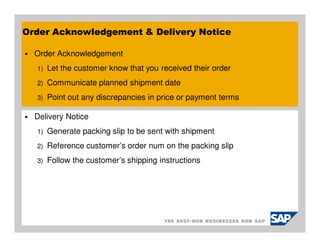
Order Acknowledgement & Delivery Notice

  Order Acknowledgement
  1)   Let the customer know that you received their order
  2)   Communicate planned shipment date
  3)   Point out any discrepancies in price or payment terms

  Delivery Notice
  1)   Generate packing slip to be sent with shipment
  2)   Reference customer’s order num on the packing slip
  3)   Follow the customer’s shipping instructions
AR Invoice Process

     Institute a consistent billing process to be used for all customers.
     Companies that invoice in an efficient manner have better cash flow


Some simple steps for an efficient process:
1.   Generate AR invoices as soon as possible after shipment
2.   Make sure invoices are clear and concise
        They should match your customer's PO after the review process

3.   Make sure the Due Date of the invoice is prominently displayed
4.   Make sure that your Remittance address in on the invoice
5.   Follow the customers invoice instructions
6.   Follow-up on large invoices to make the customer has received
        A simple customer service phone call can be effective
        Use an Activity to remind of the follow-up
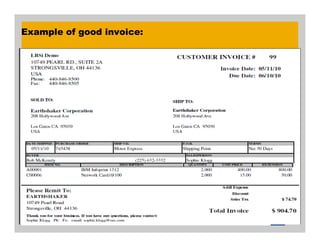
Example of good invoice:
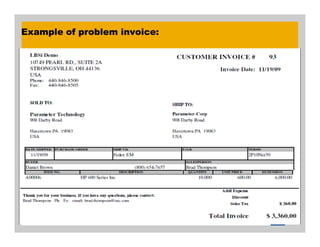
Example of problem invoice:
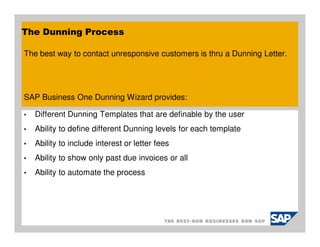
The Dunning Process

The best way to contact unresponsive customers is thru a Dunning Letter.


SAP Business One Dunning Wizard provides:

•   Different Dunning Templates that are definable by the user
•   Ability to define different Dunning levels for each template
•   Ability to include interest or letter fees
•   Ability to show only past due invoices or all
•   Ability to automate the process
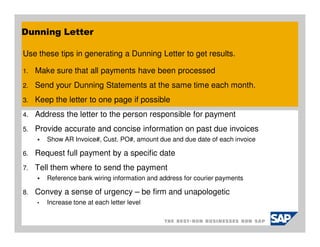
Dunning Letter

Use these tips in generating a Dunning Letter to get results.

1.   Make sure that all payments have been processed
2.   Send your Dunning Statements at the same time each month.
3.   Keep the letter to one page if possible
4.   Address the letter to the person responsible for payment
5.   Provide accurate and concise information on past due invoices
         Show AR Invoice#, Cust. PO#, amount due and due date of each invoice

6.   Request full payment by a specific date
7.   Tell them where to send the payment
         Reference bank wiring information and address for courier payments

8.   Convey a sense of urgency – be firm and unapologetic
     •   Increase tone at each letter level
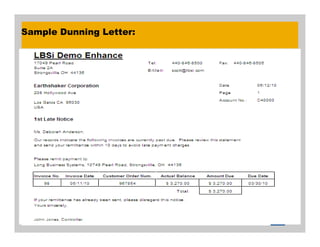
Sample Dunning Letter:
Dunning Letter – Progression

Progress your Dunning Letters at each level
1)   Start with a general reminder of past due invoices
2)   Tell the customer how many times you have contacted them
3)   State that current and future orders could be put on hold
4)   State that their amount could be turned over to a Collection Agency
5)   State that legal action could be taken
Example:
We have sent you three previous notices in an attempt to settle your past due
   balance. This is our final attempt to settle this amount before taking legal action.
Payment for all outstanding invoices and late fees is due within 10 days of this
   notice.
If payment is not received within the terms outlined, we will have no choice but to
     seek legal action.
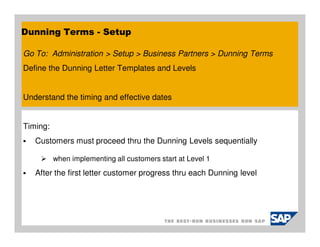
Dunning Terms - Setup

Go To: Administration > Setup > Business Partners > Dunning Terms
Define the Dunning Letter Templates and Levels


Understand the timing and effective dates


Timing:
   Customers must proceed thru the Dunning Levels sequentially

          when implementing all customers start at Level 1
   After the first letter customer progress thru each Dunning level
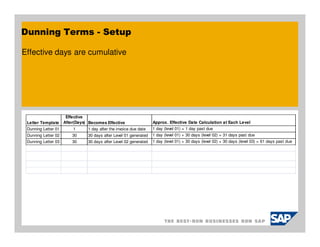
Dunning Terms - Setup

Effective days are cumulative


                      Effective
 Letter Template     After(Days) Becomes Effective                 Approx. Effective Date Calculation at Each Level
 Dunning Letter 01       1      1 day after the invoice due date   1 day (level 01) = 1 day past due
 Dunning Letter 02       30     30 days after Level 01 generated   1 day (level 01) + 30 days (level 02) = 31 days past due
 Dunning Letter 03       30     30 days after Level 02 generated   1 day (level 01) + 30 days (level 02) + 30 days (level 03) = 61 days past due
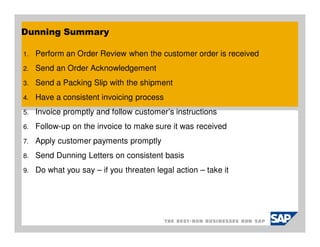
Dunning Summary

1.   Perform an Order Review when the customer order is received
2.   Send an Order Acknowledgement
3.   Send a Packing Slip with the shipment
4.   Have a consistent invoicing process
5.   Invoice promptly and follow customer’s instructions
6.   Follow-up on the invoice to make sure it was received
7.   Apply customer payments promptly
8.   Send Dunning Letters on consistent basis
9.   Do what you say – if you threaten legal action – take it
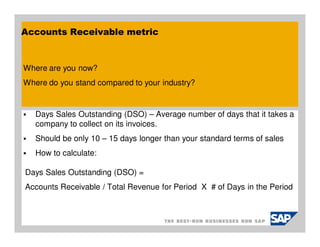
Accounts Receivable metric


Where are you now?
Where do you stand compared to your industry?


   Days Sales Outstanding (DSO) – Average number of days that it takes a
   company to collect on its invoices.
   Should be only 10 – 15 days longer than your standard terms of sales
   How to calculate:

Days Sales Outstanding (DSO) =
Accounts Receivable / Total Revenue for Period X # of Days in the Period
Summary

Thank you for taking time to participate in the SAP Business One User
  Group meeting.
Please take a few minutes to give us feedback of the meeting and any
   suggestions for going forward.


We are always looking for new clients to work with. And we'd like to find
  more like you - companies that are engaged, smart, and focused on their
  future.
Can you help us out?
Tour Wrap Up

Questions & Answers


Schedule for next Stops:
Aug 24th - Key Performance Indicators – KPI & 8.8 Cockpit
Sep 14th - Budgets
Oct 12th - SAP 8.8 cool features
Long Business Systems, Inc. (LBSi)
Cleveland – Columbus – Cincinnati – Pittsburgh


Questions:

Vicki Smith
Senior Consultant
Email: vicki@lbsi.com
Phone: 440-846-8500 Ext. 22
www.lbsi.com
Long Business Systems, Inc. (LBSi)
Cleveland – Columbus – Cincinnati – Pittsburgh


Questions:

Vicki Smith
Senior Consultant
Email: vicki@lbsi.com
Phone: 440-846-8500 Ext. 22
www.lbsi.com

Sap business one_dunning_process

  • 1.
    Long Business Systems,Inc. (LBSi) LBSI is a technology services firm that understands technology is a tool that enables you to grow profitably, outpace the competition and provide better service to your customers. Cleveland – Columbus – Cincinnati - Pittsburgh
  • 2.
    LBSi Whistle StopTour Topic: Dunning Process Presented by: Vicki Smith Dunning Process helps you monitor customer payments, track payment history and contact customers with overdue balances. Main Objectives: Get paid – increase cash in bank Retain customer Reduce risk of incurring bad debt Decreasing your A/R days by 10 days will increase your cash flow by 33% of one month’s average revenue
  • 3.
    Before we getinto the Dunning Process… Avoid the Dunning Process by getting paid on time. How is this done? 1. Perform an Order Review when the customer order is received. 2. Generate an Order Acknowledgment to your customer. 3. Generate a Packing Slip or Delivery Notice at shipment. 4. Make sure that your company has a consistent billing process.
  • 4.
    Order Review Process Thisis your chance to get it right from the start. The order review process ensures that your Sales Order, Packing Slip and AR Invoice match the customer’s purchase order. These items should match: 1. Customer’s PO# Activate an alert in your system to identify “orders without customer PO#” 2. Bill-to address 3. Items ordered, quantity, and price 4. Payment Terms 5. Look at the details
  • 5.
    Order Acknowledgement &Delivery Notice Order Acknowledgement 1) Let the customer know that you received their order 2) Communicate planned shipment date 3) Point out any discrepancies in price or payment terms Delivery Notice 1) Generate packing slip to be sent with shipment 2) Reference customer’s order num on the packing slip 3) Follow the customer’s shipping instructions
  • 6.
    AR Invoice Process Institute a consistent billing process to be used for all customers. Companies that invoice in an efficient manner have better cash flow Some simple steps for an efficient process: 1. Generate AR invoices as soon as possible after shipment 2. Make sure invoices are clear and concise They should match your customer's PO after the review process 3. Make sure the Due Date of the invoice is prominently displayed 4. Make sure that your Remittance address in on the invoice 5. Follow the customers invoice instructions 6. Follow-up on large invoices to make the customer has received A simple customer service phone call can be effective Use an Activity to remind of the follow-up
  • 7.
  • 8.
  • 9.
    The Dunning Process Thebest way to contact unresponsive customers is thru a Dunning Letter. SAP Business One Dunning Wizard provides: • Different Dunning Templates that are definable by the user • Ability to define different Dunning levels for each template • Ability to include interest or letter fees • Ability to show only past due invoices or all • Ability to automate the process
  • 10.
    Dunning Letter Use thesetips in generating a Dunning Letter to get results. 1. Make sure that all payments have been processed 2. Send your Dunning Statements at the same time each month. 3. Keep the letter to one page if possible 4. Address the letter to the person responsible for payment 5. Provide accurate and concise information on past due invoices Show AR Invoice#, Cust. PO#, amount due and due date of each invoice 6. Request full payment by a specific date 7. Tell them where to send the payment Reference bank wiring information and address for courier payments 8. Convey a sense of urgency – be firm and unapologetic • Increase tone at each letter level
  • 11.
  • 12.
    Dunning Letter –Progression Progress your Dunning Letters at each level 1) Start with a general reminder of past due invoices 2) Tell the customer how many times you have contacted them 3) State that current and future orders could be put on hold 4) State that their amount could be turned over to a Collection Agency 5) State that legal action could be taken Example: We have sent you three previous notices in an attempt to settle your past due balance. This is our final attempt to settle this amount before taking legal action. Payment for all outstanding invoices and late fees is due within 10 days of this notice. If payment is not received within the terms outlined, we will have no choice but to seek legal action.
  • 13.
    Dunning Terms -Setup Go To: Administration > Setup > Business Partners > Dunning Terms Define the Dunning Letter Templates and Levels Understand the timing and effective dates Timing: Customers must proceed thru the Dunning Levels sequentially when implementing all customers start at Level 1 After the first letter customer progress thru each Dunning level
  • 14.
    Dunning Terms -Setup Effective days are cumulative Effective Letter Template After(Days) Becomes Effective Approx. Effective Date Calculation at Each Level Dunning Letter 01 1 1 day after the invoice due date 1 day (level 01) = 1 day past due Dunning Letter 02 30 30 days after Level 01 generated 1 day (level 01) + 30 days (level 02) = 31 days past due Dunning Letter 03 30 30 days after Level 02 generated 1 day (level 01) + 30 days (level 02) + 30 days (level 03) = 61 days past due
  • 15.
    Dunning Summary 1. Perform an Order Review when the customer order is received 2. Send an Order Acknowledgement 3. Send a Packing Slip with the shipment 4. Have a consistent invoicing process 5. Invoice promptly and follow customer’s instructions 6. Follow-up on the invoice to make sure it was received 7. Apply customer payments promptly 8. Send Dunning Letters on consistent basis 9. Do what you say – if you threaten legal action – take it
  • 16.
    Accounts Receivable metric Whereare you now? Where do you stand compared to your industry? Days Sales Outstanding (DSO) – Average number of days that it takes a company to collect on its invoices. Should be only 10 – 15 days longer than your standard terms of sales How to calculate: Days Sales Outstanding (DSO) = Accounts Receivable / Total Revenue for Period X # of Days in the Period
  • 17.
    Summary Thank you fortaking time to participate in the SAP Business One User Group meeting. Please take a few minutes to give us feedback of the meeting and any suggestions for going forward. We are always looking for new clients to work with. And we'd like to find more like you - companies that are engaged, smart, and focused on their future. Can you help us out?
  • 18.
    Tour Wrap Up Questions& Answers Schedule for next Stops: Aug 24th - Key Performance Indicators – KPI & 8.8 Cockpit Sep 14th - Budgets Oct 12th - SAP 8.8 cool features
  • 19.
    Long Business Systems,Inc. (LBSi) Cleveland – Columbus – Cincinnati – Pittsburgh Questions: Vicki Smith Senior Consultant Email: vicki@lbsi.com Phone: 440-846-8500 Ext. 22 www.lbsi.com
  • 20.
    Long Business Systems,Inc. (LBSi) Cleveland – Columbus – Cincinnati – Pittsburgh Questions: Vicki Smith Senior Consultant Email: vicki@lbsi.com Phone: 440-846-8500 Ext. 22 www.lbsi.com