ALTUS ALLIANCE 2016
Best Practices:
Introducing
Electronic Funds
Transfer (EFT) to Your
Organization
Your Presenters
Glen Watson CPA, CA, CMA
• ERP Solution Architect
• Joined Altus 2005
• gwatson@altusdynamics.com
Kinley Graham CPA, CMA
• Application Consultant
• Joined Altus 2016
• kgraham@altusdynamics.com
Objectives
• Gain a deeper understanding of the pros and cons of EFT
• Learn how to use the EFT functionality to improve efficiency and
control
• Provide some tips and tricks to Payment Journals in general
• Discuss ideas for rolling out EFT
Agenda
• Pros and Cons
• Setup Requirements
• Payment Journal Options
• Previous Enhancements (in NAV 2013)
• Validations (Altus Product 7-02, Sep 2013)
• Approvals (Altus Product 7-03, Feb 2014)
• Email Improvements (Altus Product 7-04, Jul 2014)
• Rolling out EFT
• Tip: Pre-Authorized Payments (PAP) as Invoices
Pros and Cons
Pros
• Greater control/confidence
• Fraud prevention
• No printing and mailing costs
• Paperless
• Bank Reconciliation is easier
• Consistent setup for Payroll
Others?
Cons
• Initial administration
(gathering bank data)
• Transaction cost (dependent
on bank service)
• Cash balance reduced
immediately
Setup Requirements
• Bank Account Setup
• Vendor Bank Accounts
• Email Setup
• Purchases & Payables Setup
• Payroll Bank Accounts (linked to Vendor)
Setup Requirements
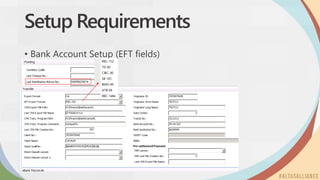
• Bank Account Setup (EFT fields)
Setup Requirements
• Vendor Bank Accounts
Setup Requirements
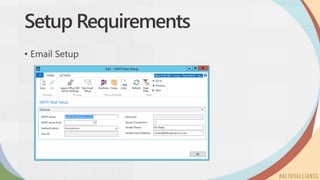
• Email Setup
Setup Requirements
• Purchases & Payables Setup
Setup Requirements
• Payroll Bank Accounts – maintained on Employee Pay Distribution
• Note: When this information is updated in HR it will also be updated in
the Vendor card (not vice versa)
Payment Journal Options
• Batches
• Purpose
• Numbering (Document No.)
• Suggest Vendor Payments
• Payment Method Code
• Other fields
• EFT Tips
Payment Journal Options
• Batches
• Options on how to setup by user
• Options on why to setup by bank account (and EFT separately)
• How to setup document numbers with No. Series
Payment Journal Options
Suggest Vendor Payments:
• Last Payment Date
• Summarize per Vendor
• Posting Date
• Use Due Date (Cheques)
• Starting Document No.
• Use No. Series on Batch
• New Doc. No. per Line
• Bal. Account Type / No.
• Bank Payment Type
• Payment Method Code
• Posted Invoice vs Vendor
Payment Journal Options
EFT Tips :
• Last Payment date and Posting should not be too far off
• Make separate batches for EFT and bank cheque by bank –
currency of bank
• Common questions:
• Missing Credit Memos – no Pymt Method Code, or ‘Min. Chk Value’ flag
• Removing applied entries – if ‘Summarize per Vendor’
• Edit Vendor Ledger Entry – ‘On Hold’; change due date/Pymt Meth Code
• Miscellaneous Vendors – can’t be used for EFT
Previous Enhancements (NAV 2013)
• Validations (Altus Product 7-02, Sep 2013)
• Only becomes ‘Exported’ once all records pass validations
• Checks banking information and remittance email exists on Vendor
• Warning (on Posting) if Remittances not Sent
• Approvals (defined in User Setup) (Altus Product 7-03, Feb 2014)
• Defined in Journal Templates (Payment, General, Recurring, and Deposit)
• Data saves to General Journal entry table 17 (view / report)
• Email Improvements (Altus Product 7-04, Jul 2014)
• Remittance Sent field updated for each document
• New EFT Email Sent Log (available from Vendor Card)
• Edits in Payment Journal (Email, Remittance Sent status)
Rolling Out EFT
• Confirm bank service
• Complete NAV setup (in Test first)
• Start with a sample of Vendors (few employees, select Vendors)
• Send letters to Vendors requesting EFT setup data
• By Groups e.g. Employees versus regular Trade
• Address benefits for the Vendor, and any confidentiality concerns etc
• Update ‘New Employee / Vendor’ forms to include EFT setup data
• Over time begin to ‘require it’ (employees), or make ‘the rule’
Tip: Pre-Authorized Payments
• PAP are automatically deducted from your account
• Rather than just debiting expense and crediting bank, you can
easily track through an AP Vendor
• The Vendor Invoice has a Payment Method Code with a balancing account
• Entries recorded on posting of Invoice: Dr Expense, Cr A/P; Dr A/P, Cr Bank
Questions & Answers
ALTUS ALLIANCE 2016
Altus Ideas
Thenewwayforyoutosubmitfeature
requeststous.
ALTUS ALLIANCE 2016
Altus Advocates
Membershiphasitrewards.
Enrolltoday.
ALTUS ALLIANCE 2016
Submit your
evaluations to win!
Thanks for coming!
@altusdynamics
altusdynamics.com
linkedin.com/company/altus-dynamics

Altus Alliance 2016 - Introducing EFT

  • 1.
    ALTUS ALLIANCE 2016 BestPractices: Introducing Electronic Funds Transfer (EFT) to Your Organization
  • 2.
    Your Presenters Glen WatsonCPA, CA, CMA • ERP Solution Architect • Joined Altus 2005 • gwatson@altusdynamics.com Kinley Graham CPA, CMA • Application Consultant • Joined Altus 2016 • kgraham@altusdynamics.com
  • 3.
    Objectives • Gain adeeper understanding of the pros and cons of EFT • Learn how to use the EFT functionality to improve efficiency and control • Provide some tips and tricks to Payment Journals in general • Discuss ideas for rolling out EFT
  • 4.
    Agenda • Pros andCons • Setup Requirements • Payment Journal Options • Previous Enhancements (in NAV 2013) • Validations (Altus Product 7-02, Sep 2013) • Approvals (Altus Product 7-03, Feb 2014) • Email Improvements (Altus Product 7-04, Jul 2014) • Rolling out EFT • Tip: Pre-Authorized Payments (PAP) as Invoices
  • 5.
    Pros and Cons Pros •Greater control/confidence • Fraud prevention • No printing and mailing costs • Paperless • Bank Reconciliation is easier • Consistent setup for Payroll Others? Cons • Initial administration (gathering bank data) • Transaction cost (dependent on bank service) • Cash balance reduced immediately
  • 6.
    Setup Requirements • BankAccount Setup • Vendor Bank Accounts • Email Setup • Purchases & Payables Setup • Payroll Bank Accounts (linked to Vendor)
  • 7.
    Setup Requirements • BankAccount Setup (EFT fields)
  • 8.
  • 9.
  • 10.
  • 11.
    Setup Requirements • PayrollBank Accounts – maintained on Employee Pay Distribution • Note: When this information is updated in HR it will also be updated in the Vendor card (not vice versa)
  • 12.
    Payment Journal Options •Batches • Purpose • Numbering (Document No.) • Suggest Vendor Payments • Payment Method Code • Other fields • EFT Tips
  • 13.
    Payment Journal Options •Batches • Options on how to setup by user • Options on why to setup by bank account (and EFT separately) • How to setup document numbers with No. Series
  • 14.
    Payment Journal Options SuggestVendor Payments: • Last Payment Date • Summarize per Vendor • Posting Date • Use Due Date (Cheques) • Starting Document No. • Use No. Series on Batch • New Doc. No. per Line • Bal. Account Type / No. • Bank Payment Type • Payment Method Code • Posted Invoice vs Vendor
  • 15.
    Payment Journal Options EFTTips : • Last Payment date and Posting should not be too far off • Make separate batches for EFT and bank cheque by bank – currency of bank • Common questions: • Missing Credit Memos – no Pymt Method Code, or ‘Min. Chk Value’ flag • Removing applied entries – if ‘Summarize per Vendor’ • Edit Vendor Ledger Entry – ‘On Hold’; change due date/Pymt Meth Code • Miscellaneous Vendors – can’t be used for EFT
  • 16.
    Previous Enhancements (NAV2013) • Validations (Altus Product 7-02, Sep 2013) • Only becomes ‘Exported’ once all records pass validations • Checks banking information and remittance email exists on Vendor • Warning (on Posting) if Remittances not Sent • Approvals (defined in User Setup) (Altus Product 7-03, Feb 2014) • Defined in Journal Templates (Payment, General, Recurring, and Deposit) • Data saves to General Journal entry table 17 (view / report) • Email Improvements (Altus Product 7-04, Jul 2014) • Remittance Sent field updated for each document • New EFT Email Sent Log (available from Vendor Card) • Edits in Payment Journal (Email, Remittance Sent status)
  • 17.
    Rolling Out EFT •Confirm bank service • Complete NAV setup (in Test first) • Start with a sample of Vendors (few employees, select Vendors) • Send letters to Vendors requesting EFT setup data • By Groups e.g. Employees versus regular Trade • Address benefits for the Vendor, and any confidentiality concerns etc • Update ‘New Employee / Vendor’ forms to include EFT setup data • Over time begin to ‘require it’ (employees), or make ‘the rule’
  • 18.
    Tip: Pre-Authorized Payments •PAP are automatically deducted from your account • Rather than just debiting expense and crediting bank, you can easily track through an AP Vendor • The Vendor Invoice has a Payment Method Code with a balancing account • Entries recorded on posting of Invoice: Dr Expense, Cr A/P; Dr A/P, Cr Bank
  • 19.
  • 20.
    ALTUS ALLIANCE 2016 AltusIdeas Thenewwayforyoutosubmitfeature requeststous.
  • 21.
    ALTUS ALLIANCE 2016 AltusAdvocates Membershiphasitrewards. Enrolltoday.
  • 22.
    ALTUS ALLIANCE 2016 Submityour evaluations to win!
  • 23.

Editor's Notes

  • #12 There is additional setup in HR setup for Employee Types. There is a setting on Employee Types for ‘Create Employee Vendor’ which is to automatically create a Vendor Card when the employee is hired.