Long Business Systems, Inc. (LBSi)

          Management Software Solutions

         We help businesses manage for success
       Cleveland – Columbus – Cincinnati - Pittsburgh
Inventory Management
  Presented by: Vicki Smith

  A general overview of the Inventory Master Data screens, Inventory
  Transactions and Reports


Agenda:
  General System Settings for Inventory
  Inventory Valuation Methods
  Cycle counts
  Physical Inventory
  Inventory Reports
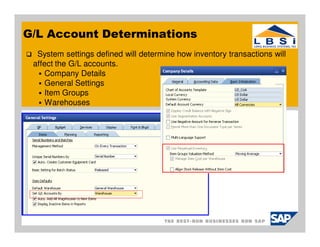
G/L Account Determinations
  System settings defined will determine how inventory transactions will
 affect the G/L accounts.
     Company Details
     General Settings
     Item Groups
     Warehouses
Inventory Valuation Methods
Three (3) valuation methods for calculating inventory value:
   Moving Average – Calculates the average cost for the item in each sales,
   purchasing, inventory, and production transaction
   Standard – Calculates the inventory value by a fixed price which is used
   for all transactions
   FIFO – Calculates the inventory value by First in – First Out method.
     Goods purchased first (or produced) are sold first
     Each inventory receipt transaction creates a stack of quantities linked to costs.
     Each inventory release transactions uses the quantities and costs from the top stack first

  Note: You can do the following:
     Manage all 3 methods in the same company
     Select a specific valuation method for each item
Preparation for Inventory/Cycle Counts
Make sure the warehouse is clean and organized!!!
  All inventory is in its designated stock location
  All shipments are processed
  All PO Goods Receipts are processed
  All production orders are transacted to date
  All RMA items are separated from the regular inventory into a
  designated HOLD area.
  Make all necessary inventory adjustments to production orders or
  inventory.
  Run the Inventory Valuation Simulation Report
  Stop all inventory transactions
  Perform copy of live database to demo prior to starting count
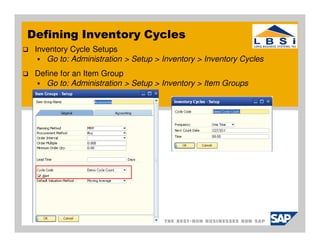
Defining Inventory Cycles
 Inventory Cycle Setups
    Go to: Administration > Setup > Inventory > Inventory Cycles
 Define for an Item Group
    Go to: Administration > Setup > Inventory > Item Groups
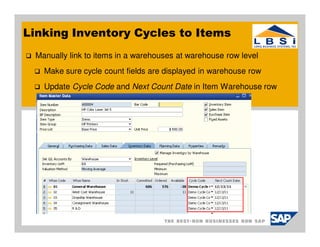
Linking Inventory Cycles to Items
 Manually link to items in a warehouses at warehouse row level
   Make sure cycle count fields are displayed in warehouse row
   Update Cycle Code and Next Count Date in Item Warehouse row
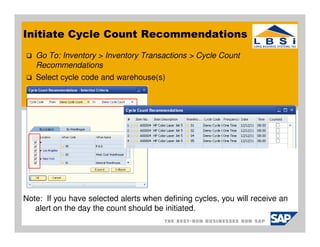
Initiate Cycle Count Recommendations
   Go To: Inventory > Inventory Transactions > Cycle Count
   Recommendations
   Select cycle code and warehouse(s)


Note: If you have selected alerts when defining cycles, you will receive an
   alert on the day the count should be initiated.
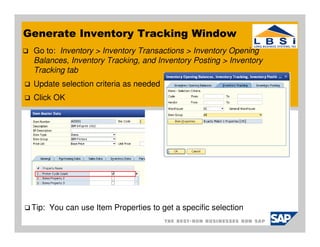
Generate Inventory Tracking Window
 Go to: Inventory > Inventory Transactions > Inventory Opening
 Balances, Inventory Tracking, and Inventory Posting > Inventory
 Tracking tab
 Update selection criteria as needed
 Click OK


 Tip: You can use Item Properties to get a specific selection
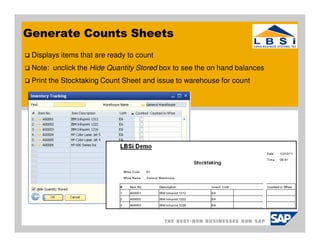
Generate Counts Sheets
 Displays items that are ready to count
 Note: unclick the Hide Quantity Stored box to see the on hand balances
 Print the Stocktaking Count Sheet and issue to warehouse for count
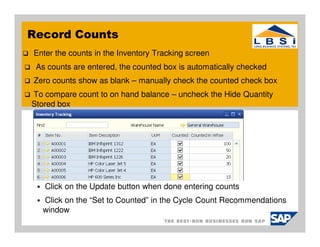
Record Counts
Enter the counts in the Inventory Tracking screen
 As counts are entered, the counted box is automatically checked
Zero counts show as blank – manually check the counted check box
To compare count to on hand balance – uncheck the Hide Quantity
Stored box


   Click on the Update button when done entering counts
  Click on the “Set to Counted” in the Cycle Count Recommendations
  window
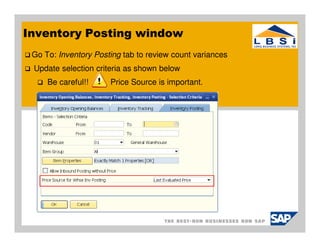
Inventory Posting window
 Go To: Inventory Posting tab to review count variances
 Update selection criteria as shown below
     Be careful!!     Price Source is important.
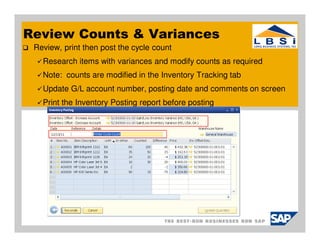
Review Counts & Variances
 Review, print then post the cycle count
   Research items with variances and modify counts as required
   Note: counts are modified in the Inventory Tracking tab
   Update G/L account number, posting date and comments on screen
   Print the Inventory Posting report before posting
Inventory Reports
Various reports display cost, track, and reconcile inventory transactions.
   Inventory Audit report
        only report that reconciles to the Balance Sheet
   Last Prices Report
       shows price history for various system transactions
   Item List Report
        Overview of all items with price lists and quantity in stock
   Inventory Status report
        Overview of current stock including planned receipts and withdrawals. (Hot List).
   Inventory Posting List Report
        Details of all transaction postings in the system displayed by date and inventory
        balance at that date
   Inventory in Warehouse Report
        Shows current stock status, planned receipts and withdrawals, last receipt &
        issue date (slow movers)
Thank you for taking time to participate in the SAP
Business One User Group Meeting.

Please take a few minutes to respond to our survey
and provide us with feedback and suggestions going
forward.


  o   We are always looking for new clients to work with. And we would like
      to find more clients and partners like you – companies that are
      engaged, smart, and focused on their future.
  o   Can you help us out by referring LBSi to someone who could benefit
      from our services?
Next Meetings:


  o   Tuesday, Jan. 17, 2012
       o   1099 Reporting
  o   Tuesday, Feb. 14, 2012
       o TBA   – Give us your ideas
Long Business Systems, Inc. (LBSi)
                Cleveland – Columbus – Cincinnati – Pittsburgh


  Contact Information:
  Vicki Smith
  Senior Consultant
  email: vicki@lbsi.com
  Phone: 440-846-8500 ext 22
  www.lbsi.com

Sap business-one-inventory-management

  • 1.
    Long Business Systems,Inc. (LBSi) Management Software Solutions We help businesses manage for success Cleveland – Columbus – Cincinnati - Pittsburgh
  • 2.
    Inventory Management Presented by: Vicki Smith A general overview of the Inventory Master Data screens, Inventory Transactions and Reports Agenda: General System Settings for Inventory Inventory Valuation Methods Cycle counts Physical Inventory Inventory Reports
  • 3.
    G/L Account Determinations System settings defined will determine how inventory transactions will affect the G/L accounts. Company Details General Settings Item Groups Warehouses
  • 4.
    Inventory Valuation Methods Three(3) valuation methods for calculating inventory value: Moving Average – Calculates the average cost for the item in each sales, purchasing, inventory, and production transaction Standard – Calculates the inventory value by a fixed price which is used for all transactions FIFO – Calculates the inventory value by First in – First Out method. Goods purchased first (or produced) are sold first Each inventory receipt transaction creates a stack of quantities linked to costs. Each inventory release transactions uses the quantities and costs from the top stack first Note: You can do the following: Manage all 3 methods in the same company Select a specific valuation method for each item
  • 5.
    Preparation for Inventory/CycleCounts Make sure the warehouse is clean and organized!!! All inventory is in its designated stock location All shipments are processed All PO Goods Receipts are processed All production orders are transacted to date All RMA items are separated from the regular inventory into a designated HOLD area. Make all necessary inventory adjustments to production orders or inventory. Run the Inventory Valuation Simulation Report Stop all inventory transactions Perform copy of live database to demo prior to starting count
  • 6.
    Defining Inventory Cycles Inventory Cycle Setups Go to: Administration > Setup > Inventory > Inventory Cycles Define for an Item Group Go to: Administration > Setup > Inventory > Item Groups
  • 7.
    Linking Inventory Cyclesto Items Manually link to items in a warehouses at warehouse row level Make sure cycle count fields are displayed in warehouse row Update Cycle Code and Next Count Date in Item Warehouse row
  • 8.
    Initiate Cycle CountRecommendations Go To: Inventory > Inventory Transactions > Cycle Count Recommendations Select cycle code and warehouse(s) Note: If you have selected alerts when defining cycles, you will receive an alert on the day the count should be initiated.
  • 9.
    Generate Inventory TrackingWindow Go to: Inventory > Inventory Transactions > Inventory Opening Balances, Inventory Tracking, and Inventory Posting > Inventory Tracking tab Update selection criteria as needed Click OK Tip: You can use Item Properties to get a specific selection
  • 10.
    Generate Counts Sheets Displays items that are ready to count Note: unclick the Hide Quantity Stored box to see the on hand balances Print the Stocktaking Count Sheet and issue to warehouse for count
  • 11.
    Record Counts Enter thecounts in the Inventory Tracking screen As counts are entered, the counted box is automatically checked Zero counts show as blank – manually check the counted check box To compare count to on hand balance – uncheck the Hide Quantity Stored box Click on the Update button when done entering counts Click on the “Set to Counted” in the Cycle Count Recommendations window
  • 12.
    Inventory Posting window Go To: Inventory Posting tab to review count variances Update selection criteria as shown below Be careful!! Price Source is important.
  • 13.
    Review Counts &Variances Review, print then post the cycle count Research items with variances and modify counts as required Note: counts are modified in the Inventory Tracking tab Update G/L account number, posting date and comments on screen Print the Inventory Posting report before posting
  • 14.
    Inventory Reports Various reportsdisplay cost, track, and reconcile inventory transactions. Inventory Audit report only report that reconciles to the Balance Sheet Last Prices Report shows price history for various system transactions Item List Report Overview of all items with price lists and quantity in stock Inventory Status report Overview of current stock including planned receipts and withdrawals. (Hot List). Inventory Posting List Report Details of all transaction postings in the system displayed by date and inventory balance at that date Inventory in Warehouse Report Shows current stock status, planned receipts and withdrawals, last receipt & issue date (slow movers)
  • 15.
    Thank you fortaking time to participate in the SAP Business One User Group Meeting. Please take a few minutes to respond to our survey and provide us with feedback and suggestions going forward. o We are always looking for new clients to work with. And we would like to find more clients and partners like you – companies that are engaged, smart, and focused on their future. o Can you help us out by referring LBSi to someone who could benefit from our services?
  • 16.
    Next Meetings: o Tuesday, Jan. 17, 2012 o 1099 Reporting o Tuesday, Feb. 14, 2012 o TBA – Give us your ideas
  • 17.
    Long Business Systems,Inc. (LBSi) Cleveland – Columbus – Cincinnati – Pittsburgh Contact Information: Vicki Smith Senior Consultant email: vicki@lbsi.com Phone: 440-846-8500 ext 22 www.lbsi.com