Long Business Systems, Inc. (LBSi)

          Management Software Solutions

         We help businesses manage for success
       Cleveland – Columbus – Cincinnati - Pittsburgh
What’s new in 8.82?
In general release now……..


  SAP continues to add functionality to Business One product
  All under the annual support & maintenance fee
  Completed 2 months ahead of schedule
  Twice as many live customers than planned
  Five times more shipments than planned
Sales & Purchasing
 Credit Memos without Inventory Movement
   Create AR & AP Credit memos for items without affecting inventory
   Checkbox lets you decide whether to affect inventory

 Post Dunning Fees and Interest Automatically
   Supports complete Dunning process from end to end
   Automatically create service invoices for Dunning fees and interest

 Date Options for Closing Goods Receipt PO and Goods Returns
   Specify a date other then Current System Date or Original Document Date

 Use “Copy From” and “Copy To” to credit Reserve Invoices
   Create credit memos for AR Reserve Invoices for items delivered
   Create credit memos for AP Reserve Invoices for items returned
Sales & Purchasing
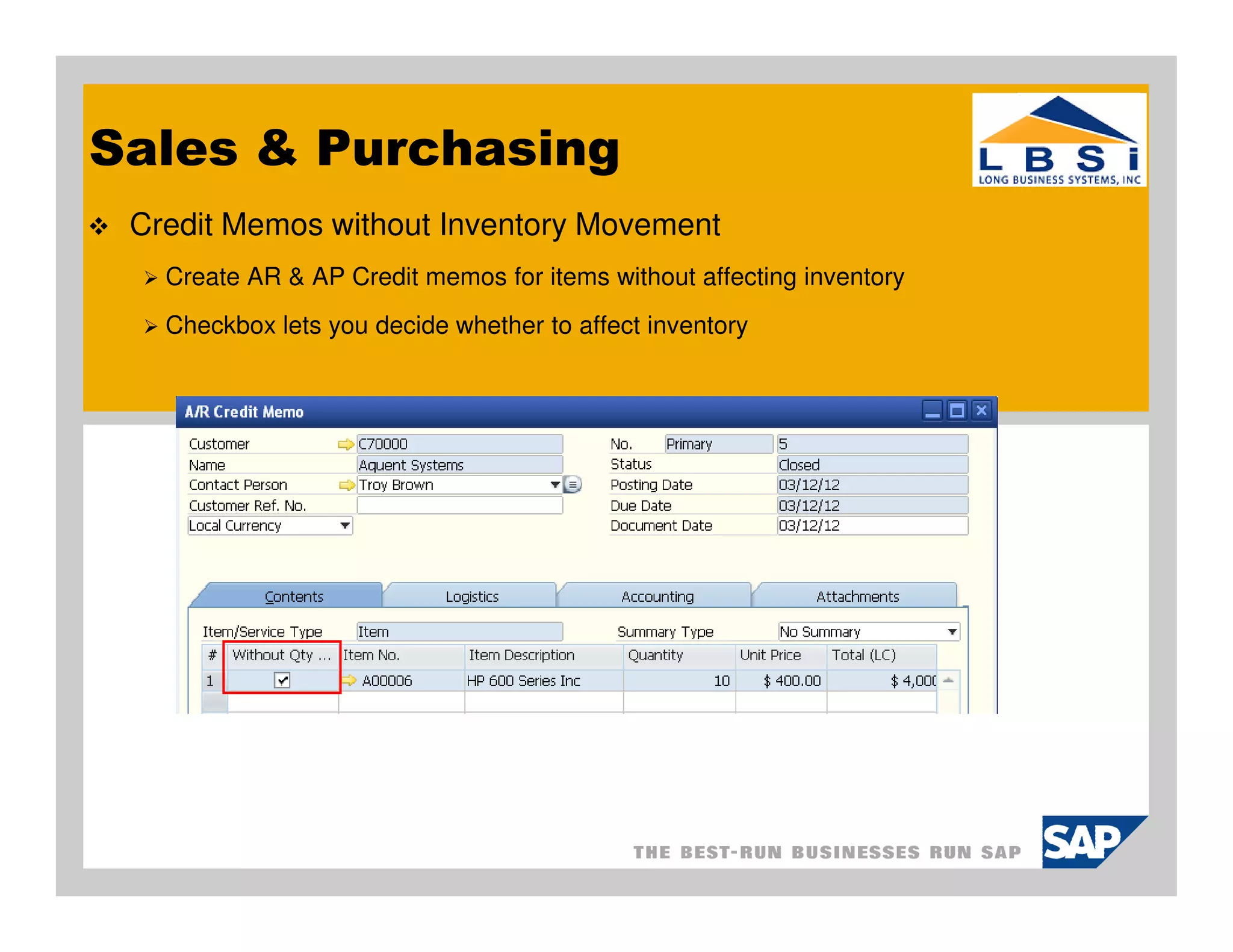
 Credit Memos without Inventory Movement
   Create AR & AP Credit memos for items without affecting inventory
   Checkbox lets you decide whether to affect inventory
Business Partners
 Blanket Agreements
   Create blanket agreements to show long term sales and purchasing agreements
   Link sales and purchasing documents to blanket agreements
   Consider blanket agreements in MRP runs and Cash Flow calculations

 Activity Enhancement
   Duplicate BP activity
   Define monthly and annual reoccurring activities on any day
   Assign activities to employees that are not users
   Drag and drop Outlook email to activity

 Display employee activities, absence and education on calendar
 Connection between employee master, users & sales employee/buyers
 Campaign Management
Business Partners
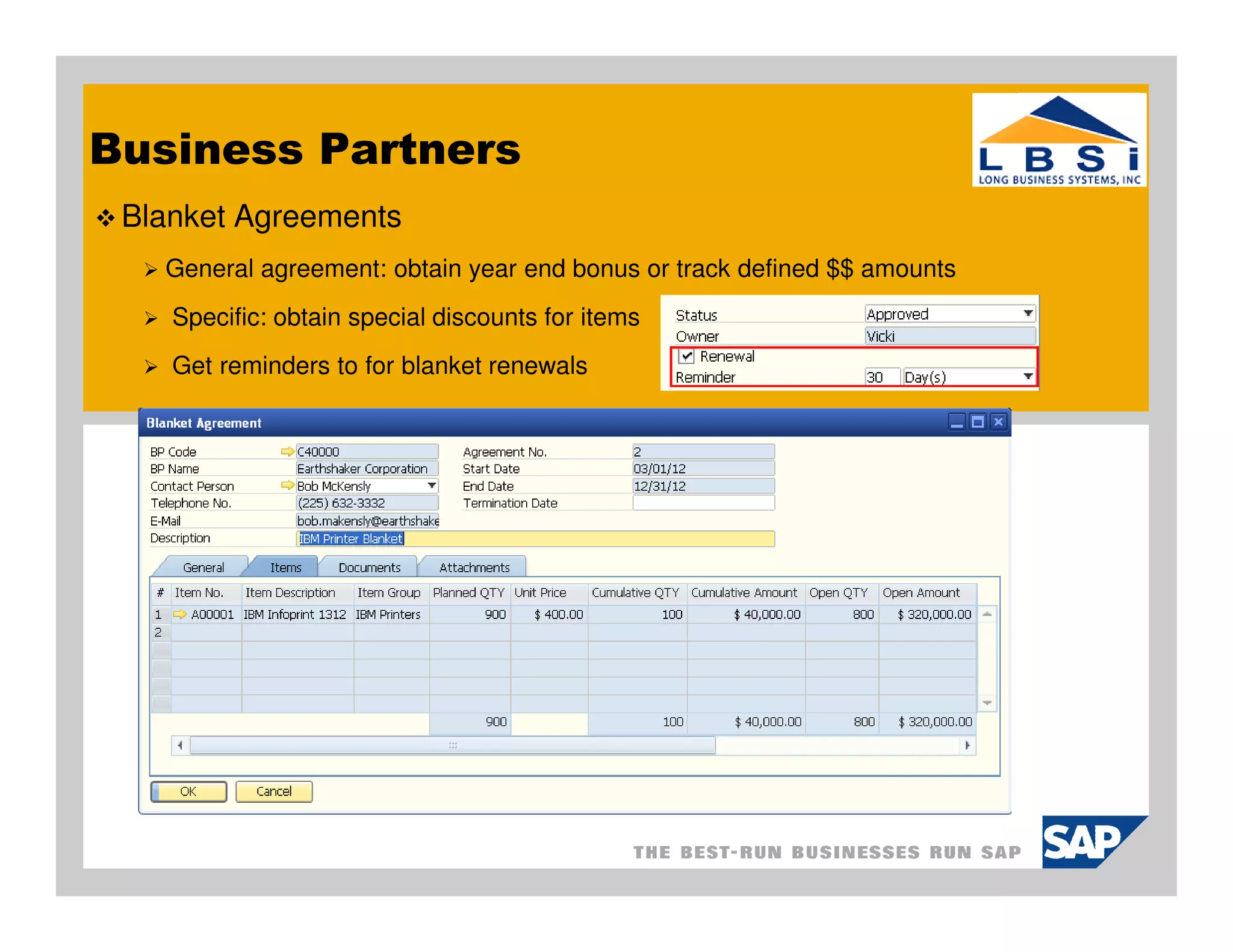
 Blanket Agreements
   General agreement: obtain year end bonus or track defined $$ amounts
    Specific: obtain special discounts for items
    Get reminders to for blanket renewals
Inventory
 Allocate batch or serial numbers to Sales Orders
   View status of the allocation
   Modify your selections – select and deselect
   Print Pick List with serial and batch details

 Pick and Pack Enhancements
   Allocate serial and batch numbers
   Create deliveries and AR Invoices
   Filter sales orders and user defined fields

 Inventory Transfer Request document
   Will be considered in MRP planning
Inventory
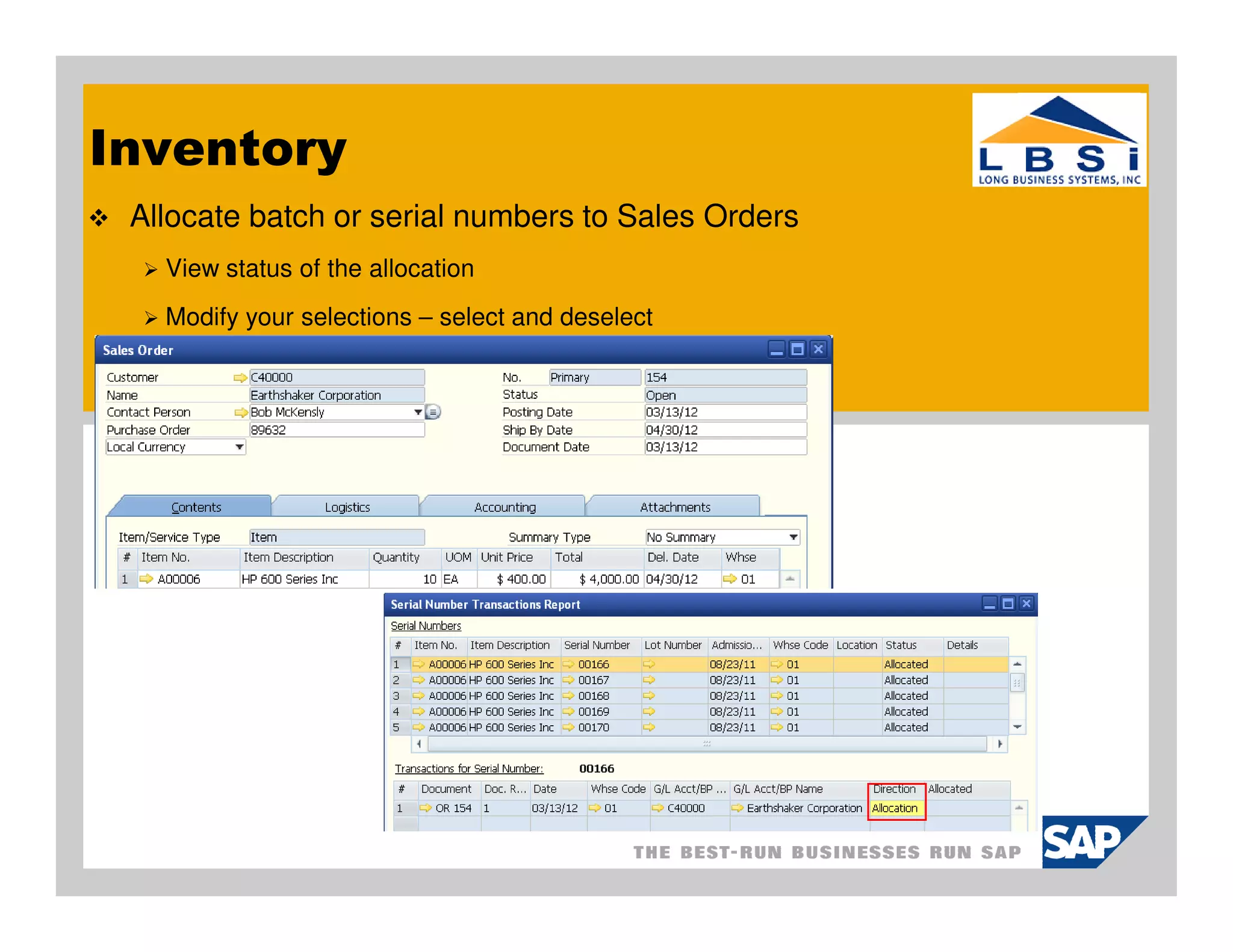
 Allocate batch or serial numbers to Sales Orders
   View status of the allocation
   Modify your selections – select and deselect
Inventory
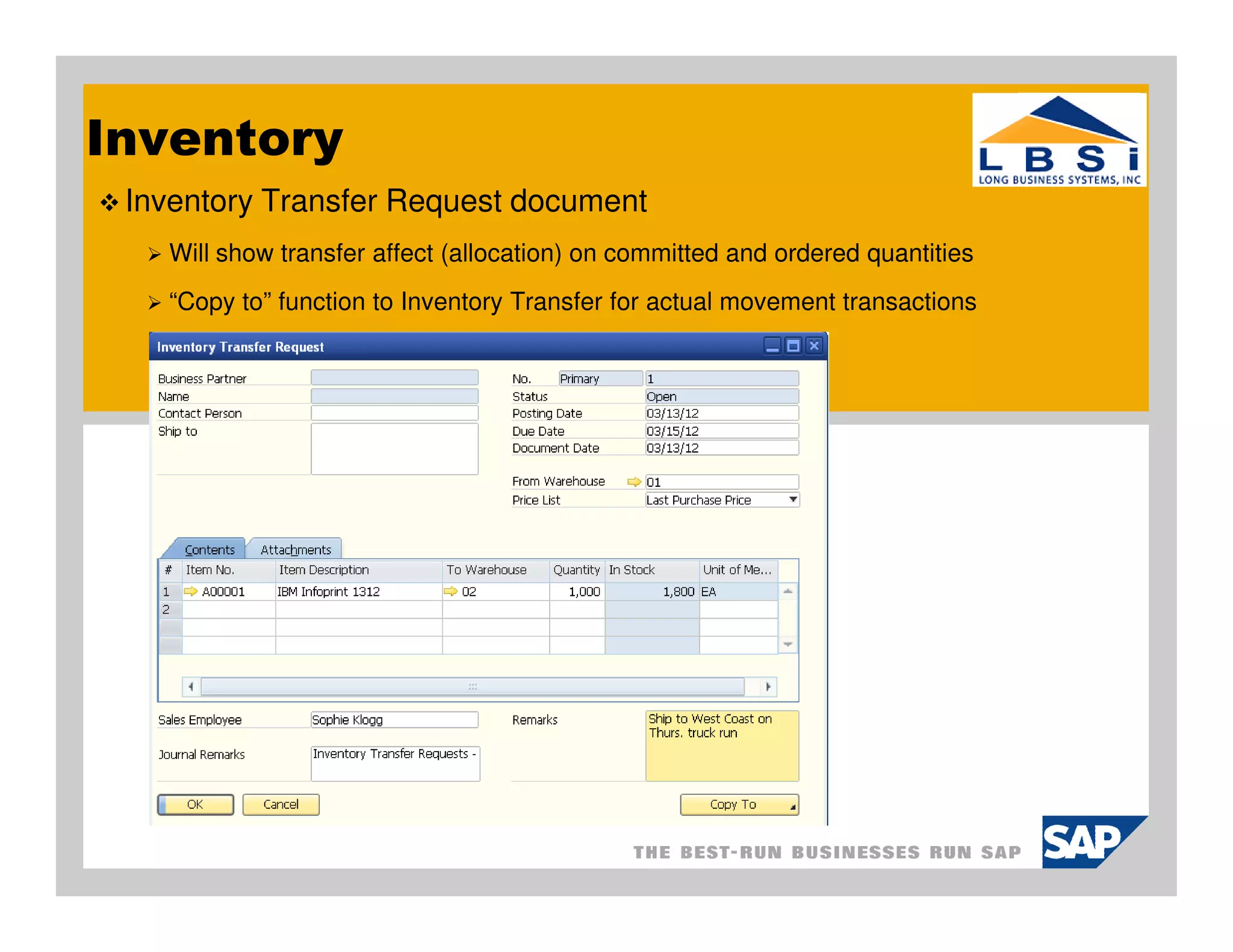
 Inventory Transfer Request document
   Will show transfer affect (allocation) on committed and ordered quantities
   “Copy to” function to Inventory Transfer for actual movement transactions
MRP
 Enhanced Forecast
   Enabled forecast generation based on sales history

   Scale up/down buttons to adjust forecasted quantities

 MRP Wizard
   More document sources: blanket agreements, recurring transactions, transfer requests

   Enhanced item and warehouse selection

Order Recommendation Report
   Right click menus for reports

   Purchase quotation selection
Financial / Banking
 Payment Wizard Enhancements
    Simpler and easier to use
    Sort and find transactions
    Simulate a payment summary before execution

 Automatic System Reconciliation of Interim Accounts
    Allocation account, Expense Clearing Account, Stock in Transit Account

 Automatic Import of Bank Statements
Cockpits
 Purchasing Cockpit
   Predefined cockpit to help you search and organize purchasing data

 Cash Flow Forecast Dashboard
   Forecast your company’s future cash flow position

 Purchase Orders Dashboard
    Monitor open purchase orders; search, filter, track past due


 Purchase Quotation Dashboard
   Monitor open purchase orders; search, filter, track how vendors have responded

 Dashboard Parameters
   Define and monitor parameters; single, quarterly, monthly, multiple
Other Enhancements
 Master Data Clean-up
    Easy way to remove clean-up master data no longer needed
    Provides log for batch removal and deactivation process

 Create Production Orders from Sales Orders
    Use Procurement Wizard to create Production Orders and reference to SO’s

 Use SAP search box without enabling Cockpits

 Schedule and view Service Calls
    New scheduling tab and option to display in calendar
    Display Service Calls in Activities Overview window
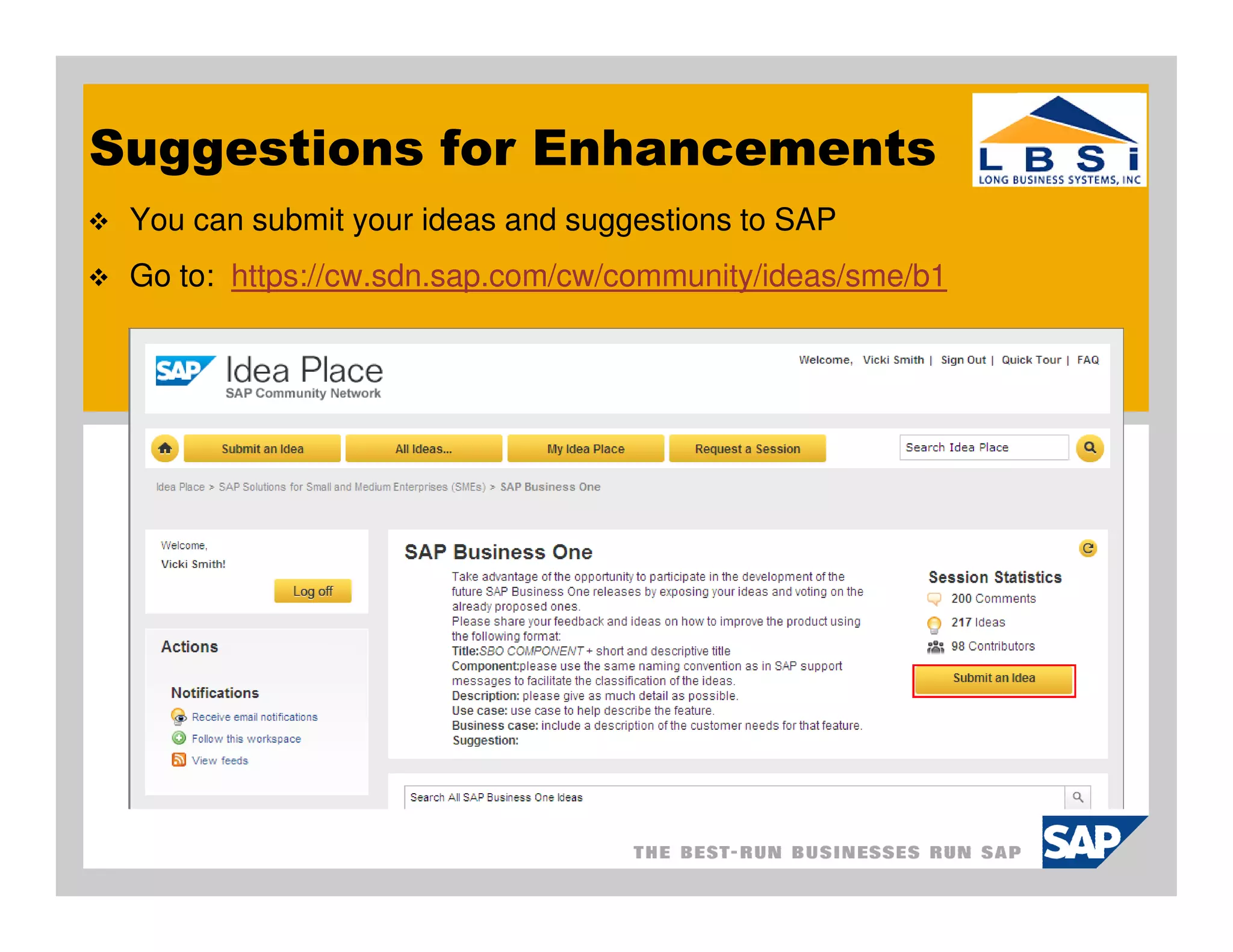
Suggestions for Enhancements
 You can submit your ideas and suggestions to SAP
 Go to: https://cw.sdn.sap.com/cw/community/ideas/sme/b1
Thank you for taking time to participate in the SAP
Business One User Group Meeting.

Please take a few minutes to respond to our survey
and provide us with feedback and suggestions going
forward.


  o   We are always looking for new clients to work with. And we would like
      to find more clients and partners like you – companies that are
      engaged, smart, and focused on their future.
  o   Can you help us out by referring LBSi to someone who could benefit
      from our services?
Next Meetings:


  o   Tuesday, Apr. 10, 2012
       o Price   Lists
  o   Tuesday, May 8, 2012
       o TBA   – Give us your ideas
Long Business Systems, Inc. (LBSi)
                Cleveland – Columbus – Cincinnati –Pittsburgh


  Contact Information:
  Vicki Smith
  Senior Consultant
  email: vicki@lbsi.com
  Phone: 440-846-8500 ext 22
  www.lbsi.com

Whats New in SAP Business One 8.82 March 2012

  • 1.
    Long Business Systems,Inc. (LBSi) Management Software Solutions We help businesses manage for success Cleveland – Columbus – Cincinnati - Pittsburgh
  • 2.
    What’s new in8.82? In general release now…….. SAP continues to add functionality to Business One product All under the annual support & maintenance fee Completed 2 months ahead of schedule Twice as many live customers than planned Five times more shipments than planned
  • 3.
    Sales & Purchasing Credit Memos without Inventory Movement Create AR & AP Credit memos for items without affecting inventory Checkbox lets you decide whether to affect inventory Post Dunning Fees and Interest Automatically Supports complete Dunning process from end to end Automatically create service invoices for Dunning fees and interest Date Options for Closing Goods Receipt PO and Goods Returns Specify a date other then Current System Date or Original Document Date Use “Copy From” and “Copy To” to credit Reserve Invoices Create credit memos for AR Reserve Invoices for items delivered Create credit memos for AP Reserve Invoices for items returned
  • 4.
    Sales & Purchasing Credit Memos without Inventory Movement Create AR & AP Credit memos for items without affecting inventory Checkbox lets you decide whether to affect inventory
  • 5.
    Business Partners BlanketAgreements Create blanket agreements to show long term sales and purchasing agreements Link sales and purchasing documents to blanket agreements Consider blanket agreements in MRP runs and Cash Flow calculations Activity Enhancement Duplicate BP activity Define monthly and annual reoccurring activities on any day Assign activities to employees that are not users Drag and drop Outlook email to activity Display employee activities, absence and education on calendar Connection between employee master, users & sales employee/buyers Campaign Management
  • 6.
    Business Partners BlanketAgreements General agreement: obtain year end bonus or track defined $$ amounts Specific: obtain special discounts for items Get reminders to for blanket renewals
  • 7.
    Inventory Allocate batchor serial numbers to Sales Orders View status of the allocation Modify your selections – select and deselect Print Pick List with serial and batch details Pick and Pack Enhancements Allocate serial and batch numbers Create deliveries and AR Invoices Filter sales orders and user defined fields Inventory Transfer Request document Will be considered in MRP planning
  • 8.
    Inventory Allocate batchor serial numbers to Sales Orders View status of the allocation Modify your selections – select and deselect
  • 9.
    Inventory Inventory TransferRequest document Will show transfer affect (allocation) on committed and ordered quantities “Copy to” function to Inventory Transfer for actual movement transactions
  • 10.
    MRP Enhanced Forecast Enabled forecast generation based on sales history Scale up/down buttons to adjust forecasted quantities MRP Wizard More document sources: blanket agreements, recurring transactions, transfer requests Enhanced item and warehouse selection Order Recommendation Report Right click menus for reports Purchase quotation selection
  • 11.
    Financial / Banking Payment Wizard Enhancements Simpler and easier to use Sort and find transactions Simulate a payment summary before execution Automatic System Reconciliation of Interim Accounts Allocation account, Expense Clearing Account, Stock in Transit Account Automatic Import of Bank Statements
  • 12.
    Cockpits Purchasing Cockpit Predefined cockpit to help you search and organize purchasing data Cash Flow Forecast Dashboard Forecast your company’s future cash flow position Purchase Orders Dashboard Monitor open purchase orders; search, filter, track past due Purchase Quotation Dashboard Monitor open purchase orders; search, filter, track how vendors have responded Dashboard Parameters Define and monitor parameters; single, quarterly, monthly, multiple
  • 13.
    Other Enhancements MasterData Clean-up Easy way to remove clean-up master data no longer needed Provides log for batch removal and deactivation process Create Production Orders from Sales Orders Use Procurement Wizard to create Production Orders and reference to SO’s Use SAP search box without enabling Cockpits Schedule and view Service Calls New scheduling tab and option to display in calendar Display Service Calls in Activities Overview window
  • 14.
    Suggestions for Enhancements You can submit your ideas and suggestions to SAP Go to: https://cw.sdn.sap.com/cw/community/ideas/sme/b1
  • 15.
    Thank you fortaking time to participate in the SAP Business One User Group Meeting. Please take a few minutes to respond to our survey and provide us with feedback and suggestions going forward. o We are always looking for new clients to work with. And we would like to find more clients and partners like you – companies that are engaged, smart, and focused on their future. o Can you help us out by referring LBSi to someone who could benefit from our services?
  • 16.
    Next Meetings: o Tuesday, Apr. 10, 2012 o Price Lists o Tuesday, May 8, 2012 o TBA – Give us your ideas
  • 17.
    Long Business Systems,Inc. (LBSi) Cleveland – Columbus – Cincinnati –Pittsburgh Contact Information: Vicki Smith Senior Consultant email: vicki@lbsi.com Phone: 440-846-8500 ext 22 www.lbsi.com