RAID LEVELS
UZAIR KHAN
MUHAMMAD SHAHAB
Contents:
 Introduction
 Abstract
 Major concepts
 Raid Levels
 Conclusion
 Reference
Introduction:
 RAID stands for Redundant Array of Independent Disks
or Redundant Array of Inexpensive Disks.
 RAID is an example of storage virtualization and was first
defined by David Patterson in 1987.
 RAID is a storage technology that combines multiple disk
drive components into a logical unit
Abstract:
 Storage scheme using multiple hard drives to share or
replicate data among the drives.
 It provide data integrity, fault-tolerance, throughput or
capacity compared to single drives.
 Instead of seeing several different hard drives, the OS sees
only one.
 Typically used on server computers, advanced personal
computers.
Major concepts that you should know!
 What is RAID?
 Why RAID?
 How does RAID work?
 Are there any alternatives to RAID?
What is RAID?
 Redundant Array of Inexpensive Disks.
Basic idea is to connect multiple disks together to provide
 Large storage capacity
 Faster access to reading data
 Redundant data
Why RAID?
 RAID system provides data redundancy, fault tolerance,
increased capacity and increased performance.
 RAID has for a long time been something that you only find
in large server systems, but lately cheaper RAID controller
card have made it possible to get a RAID system even for
small servers and home computers.
How does RAID works?
 Take some inexpensive disks and group them together, which
will make the system see them as one single disk.
 This is done by using a RAID controller card that handle all I/O
to the disks, and which knows where the stored data can be
found.
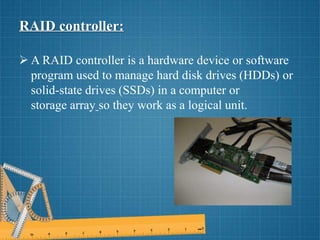
RAID controller:
 A RAID controller is a hardware device or software
program used to manage hard disk drives (HDDs) or
solid-state drives (SSDs) in a computer or
storage array so they work as a logical unit.
Are there any alternatives to RAID?
At the Berkeley University of California they perform
researches about alternative solutions.
 Such a solution is RADD, or Redundant Array of Distributed
Disks. RADD: can support redundant copies of data across a
computer network at the same space cost as RAID: do for
local data.
 Such copies increase availability in the presence of both
temporary and permanent failures (disasters) of single site
computer systems as well as disk failures.
RAID LEVELS:
 RAID 0 – striping
 RAID 1 – mirroring
 RAID 2 – redundancy through Hamming
 RAID 3 – bit interleaved Parity
 RAID 4 – block interleaved Parity
 RAID 5 – striping with parity
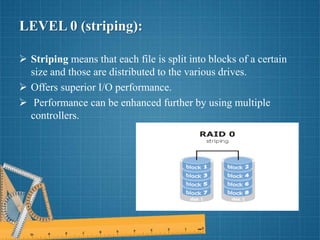
LEVEL 0 (striping):
 Striping means that each file is split into blocks of a certain
size and those are distributed to the various drives.
 Offers superior I/O performance.
 Performance can be enhanced further by using multiple
controllers.
Ideal use:
Photoshop image retouching station.
Advantages:
 Offers great performance.
 There is no overhead caused by parity controls.
 Easy to implement.
Disadvantages:
 Not fault-tolerant.
 It should not be used on mission-critical systems
LEVEL 1 (mirroring):
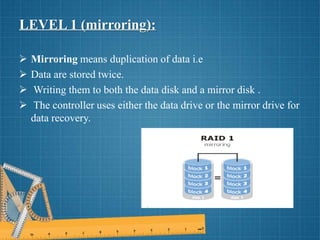
 Mirroring means duplication of data i.e
 Data are stored twice.
 Writing them to both the data disk and a mirror disk .
 The controller uses either the data drive or the mirror drive for
data recovery.
Ideal use:
Accounting systems.
Advantages:
Data do not have to be rebuild.
Disadvantages:
Storage capacity is only half of the total disk capacity .
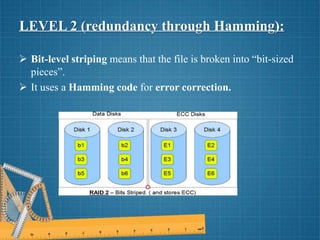
LEVEL 2 (redundancy through Hamming):
 Bit-level striping means that the file is broken into “bit-sized
pieces”.
 It uses a Hamming code for error correction.
Ideal use:
 No commercial use.
Advantages:
 Data transferred rate is very high.
 Single bit errors can be detected and corrected.
 Multiple bit errors can be detected.
Disadvantages:
 Multiple bits error cannot be corrected.
 Raid 3 gives better performance at lower price.
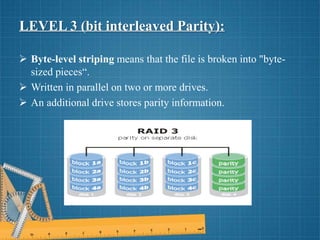
LEVEL 3 (bit interleaved Parity):
 Byte-level striping means that the file is broken into "byte-
sized pieces“.
 Written in parallel on two or more drives.
 An additional drive stores parity information.
Ideal use:
 Video streaming.
Advantages:
 It provides high throughput for large data transfers.
 Disk failures do not significantly slow down
throughput.
Disadvantages:
 Performance is slower for random, small I/O
operations.
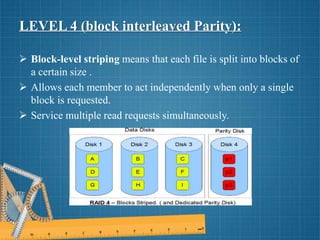
LEVEL 4 (block interleaved Parity):
 Block-level striping means that each file is split into blocks of
a certain size .
 Allows each member to act independently when only a single
block is requested.
 Service multiple read requests simultaneously.
Ideal use:
Enterprise level company to use it is Net App.
Advantages:
 Reading operations are very fast.
 Fault tolerance is very high.
Disadvantages:
 In degraded mode, its reading operation becomes slow.
 Writing operation on disks is extremely slow.
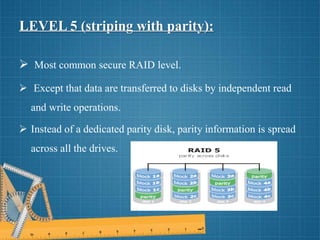
LEVEL 5 (striping with parity):
 Most common secure RAID level.
 Except that data are transferred to disks by independent read
and write operations.
 Instead of a dedicated parity disk, parity information is spread
across all the drives.
Ideal use:
 Application servers.
Advantages:
 Read data transactions are very fast while write data
are somewhat slow.
Disadvantages:
 Disk failures have an effect on throughput.
 This is complex technology.
Conclusion:
 Overall it provides systems with a variety of benefits
depending upon the version implemented.
 Most users will likely opt to use the RAID 0 for increased
performance without the loss of storage space.
 This is primarily because redundancy is not an issue for the
average user.
References:
 Jimmy Person (pt98jpr)
Gustav Everson (pt99gev)
Blekinge Institute of Technology, Sweden
 Garth Gibson, Randy H.Katz
David A. Paterson, Martin schulze
University of California
•
ANY QUERY ?
THANKS !

RAID LEVELS

  • 1.
  • 2.
    Contents:  Introduction  Abstract Major concepts  Raid Levels  Conclusion  Reference
  • 3.
    Introduction:  RAID standsfor Redundant Array of Independent Disks or Redundant Array of Inexpensive Disks.  RAID is an example of storage virtualization and was first defined by David Patterson in 1987.  RAID is a storage technology that combines multiple disk drive components into a logical unit
  • 4.
    Abstract:  Storage schemeusing multiple hard drives to share or replicate data among the drives.  It provide data integrity, fault-tolerance, throughput or capacity compared to single drives.  Instead of seeing several different hard drives, the OS sees only one.  Typically used on server computers, advanced personal computers.
  • 5.
    Major concepts thatyou should know!  What is RAID?  Why RAID?  How does RAID work?  Are there any alternatives to RAID?
  • 6.
    What is RAID? Redundant Array of Inexpensive Disks. Basic idea is to connect multiple disks together to provide  Large storage capacity  Faster access to reading data  Redundant data
  • 7.
    Why RAID?  RAIDsystem provides data redundancy, fault tolerance, increased capacity and increased performance.  RAID has for a long time been something that you only find in large server systems, but lately cheaper RAID controller card have made it possible to get a RAID system even for small servers and home computers.
  • 8.
    How does RAIDworks?  Take some inexpensive disks and group them together, which will make the system see them as one single disk.  This is done by using a RAID controller card that handle all I/O to the disks, and which knows where the stored data can be found.
  • 9.
    RAID controller:  ARAID controller is a hardware device or software program used to manage hard disk drives (HDDs) or solid-state drives (SSDs) in a computer or storage array so they work as a logical unit.
  • 10.
    Are there anyalternatives to RAID? At the Berkeley University of California they perform researches about alternative solutions.  Such a solution is RADD, or Redundant Array of Distributed Disks. RADD: can support redundant copies of data across a computer network at the same space cost as RAID: do for local data.  Such copies increase availability in the presence of both temporary and permanent failures (disasters) of single site computer systems as well as disk failures.
  • 11.
    RAID LEVELS:  RAID0 – striping  RAID 1 – mirroring  RAID 2 – redundancy through Hamming  RAID 3 – bit interleaved Parity  RAID 4 – block interleaved Parity  RAID 5 – striping with parity
  • 12.
    LEVEL 0 (striping): Striping means that each file is split into blocks of a certain size and those are distributed to the various drives.  Offers superior I/O performance.  Performance can be enhanced further by using multiple controllers.
  • 13.
    Ideal use: Photoshop imageretouching station. Advantages:  Offers great performance.  There is no overhead caused by parity controls.  Easy to implement. Disadvantages:  Not fault-tolerant.  It should not be used on mission-critical systems
  • 14.
    LEVEL 1 (mirroring): Mirroring means duplication of data i.e  Data are stored twice.  Writing them to both the data disk and a mirror disk .  The controller uses either the data drive or the mirror drive for data recovery.
  • 15.
    Ideal use: Accounting systems. Advantages: Datado not have to be rebuild. Disadvantages: Storage capacity is only half of the total disk capacity .
  • 16.
    LEVEL 2 (redundancythrough Hamming):  Bit-level striping means that the file is broken into “bit-sized pieces”.  It uses a Hamming code for error correction.
  • 17.
    Ideal use:  Nocommercial use. Advantages:  Data transferred rate is very high.  Single bit errors can be detected and corrected.  Multiple bit errors can be detected. Disadvantages:  Multiple bits error cannot be corrected.  Raid 3 gives better performance at lower price.
  • 18.
    LEVEL 3 (bitinterleaved Parity):  Byte-level striping means that the file is broken into "byte- sized pieces“.  Written in parallel on two or more drives.  An additional drive stores parity information.
  • 19.
    Ideal use:  Videostreaming. Advantages:  It provides high throughput for large data transfers.  Disk failures do not significantly slow down throughput. Disadvantages:  Performance is slower for random, small I/O operations.
  • 20.
    LEVEL 4 (blockinterleaved Parity):  Block-level striping means that each file is split into blocks of a certain size .  Allows each member to act independently when only a single block is requested.  Service multiple read requests simultaneously.
  • 21.
    Ideal use: Enterprise levelcompany to use it is Net App. Advantages:  Reading operations are very fast.  Fault tolerance is very high. Disadvantages:  In degraded mode, its reading operation becomes slow.  Writing operation on disks is extremely slow.
  • 22.
    LEVEL 5 (stripingwith parity):  Most common secure RAID level.  Except that data are transferred to disks by independent read and write operations.  Instead of a dedicated parity disk, parity information is spread across all the drives.
  • 23.
    Ideal use:  Applicationservers. Advantages:  Read data transactions are very fast while write data are somewhat slow. Disadvantages:  Disk failures have an effect on throughput.  This is complex technology.
  • 24.
    Conclusion:  Overall itprovides systems with a variety of benefits depending upon the version implemented.  Most users will likely opt to use the RAID 0 for increased performance without the loss of storage space.  This is primarily because redundancy is not an issue for the average user.
  • 25.
    References:  Jimmy Person(pt98jpr) Gustav Everson (pt99gev) Blekinge Institute of Technology, Sweden  Garth Gibson, Randy H.Katz David A. Paterson, Martin schulze University of California •
  • 26.
  • 27.